

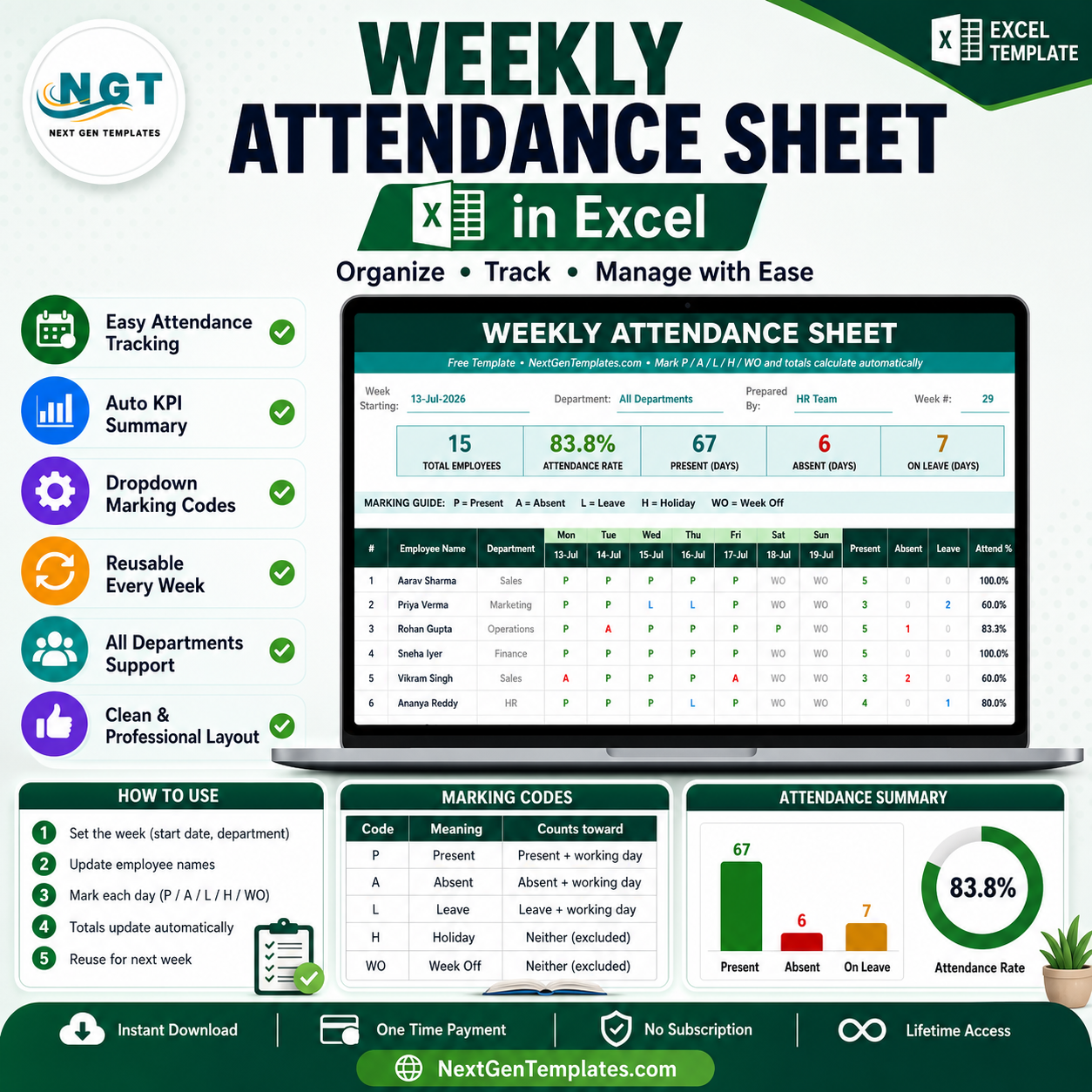


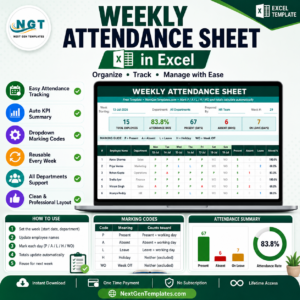
The Weekly Attendance Sheet in Excel tracks a full six-day week (Monday to Saturday) for up to 15 employees per sheet, with 5 live summary cards and 4 auto-calculating columns: Present, Absent, Leave, and Attendance %. Mark each day as P, A, L, H, or WO from a built-in dropdown and every total recalculates instantly. Setup takes under 5 minutes — replace the sample names and start marking.
🌍 Join 8,400+ teams in 40+ countries using NextGenTemplates to replace paid SaaS tools with one-time-purchase Excel, Google Sheets, and Power BI templates.
✅ Instant download · One-time payment · No subscription · No macros · Lifetime access
🔑 Key Features of the Weekly Attendance Sheet in Excel
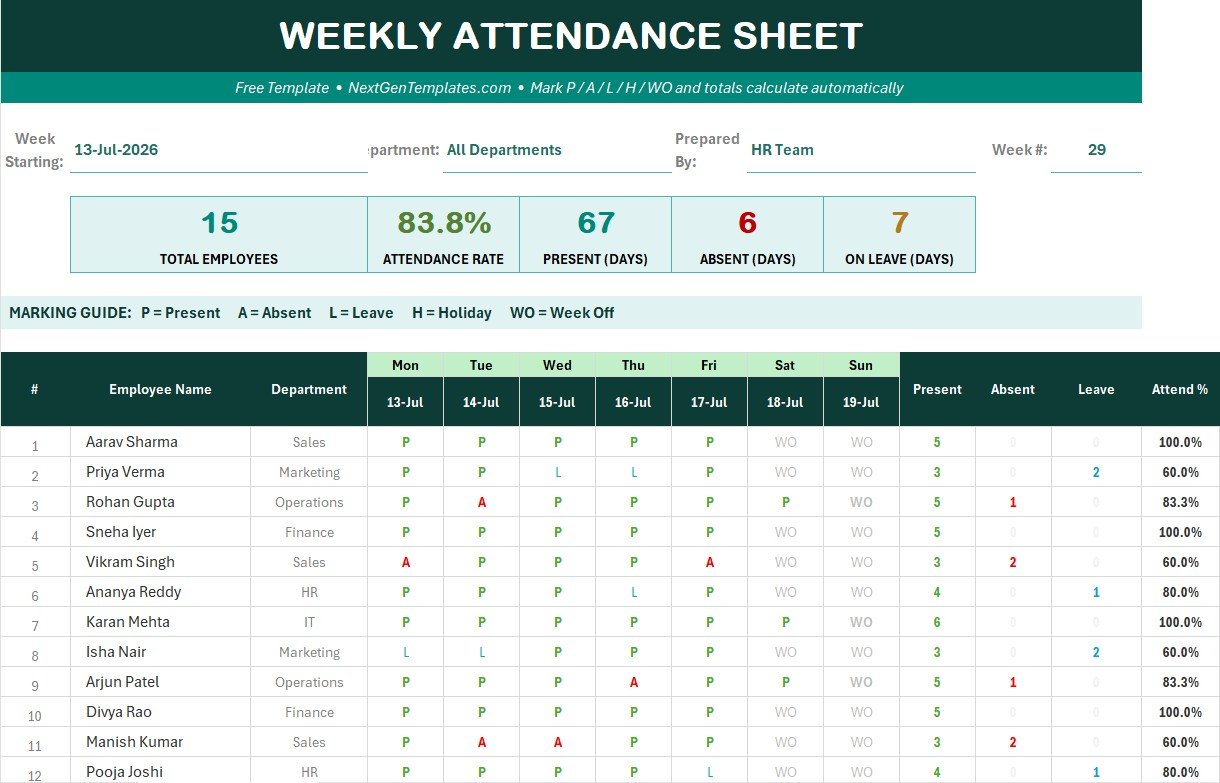
- Five live summary cards sit above the grid and recalculate on every edit: Total Employees, Attendance Rate %, Present days, Absent days, and On-Leave days for the whole team.
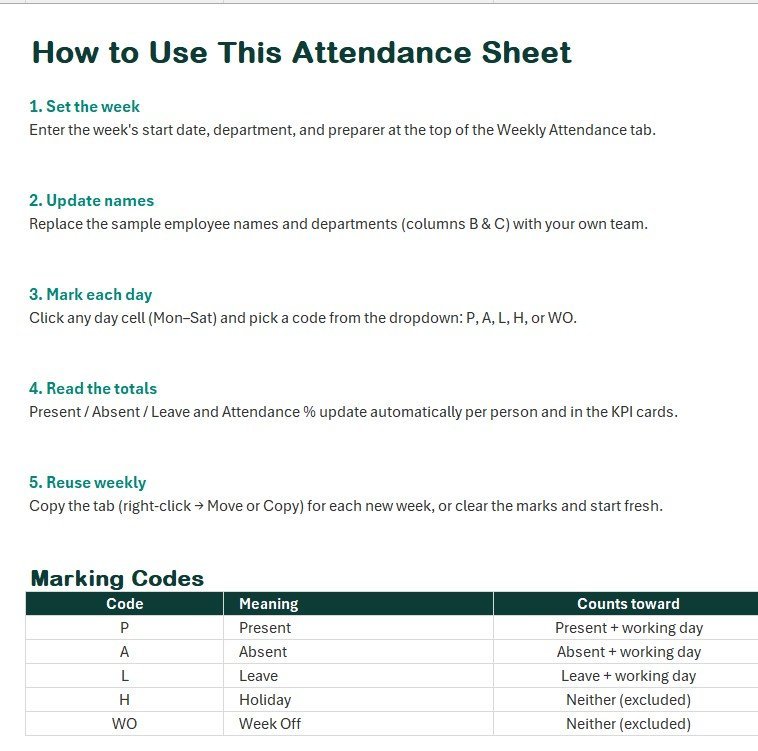
- Six-day marking grid (Mon–Sat) with a dropdown on every day cell restricted to five codes — P (Present), A (Absent), L (Leave), H (Holiday), and WO (Week Off) — so data stays clean.
- Four auto-calculating columns per employee use COUNTIF and IFERROR to return Present, Absent, Leave counts, and an Attendance % with no manual maths.
- Payroll-accurate percentage: Attendance % = Present ÷ (Present + Absent + Leave), so company holidays and week-offs are excluded from the rate automatically.
- Colour-coded marks — green Present, red Absent, amber Leave — let a manager read a whole week at a glance, plus a TOTAL row with per-day present counts.
- Instructions tab documents every code and formula, and a clean landscape layout (gridlines off) prints to a single page.
📦 What’s Inside the Weekly Attendance Sheet in Excel
Weekly Attendance Grid & Live Summary Cards
The main tab pairs the five KPI cards with the marking grid below. Enter your week-starting date, department, and preparer at the top, then mark each employee’s day. The cards show Total Employees, Attendance Rate %, and total Present, Absent, and On-Leave days for the team.
Automatic Totals & Attendance Rate
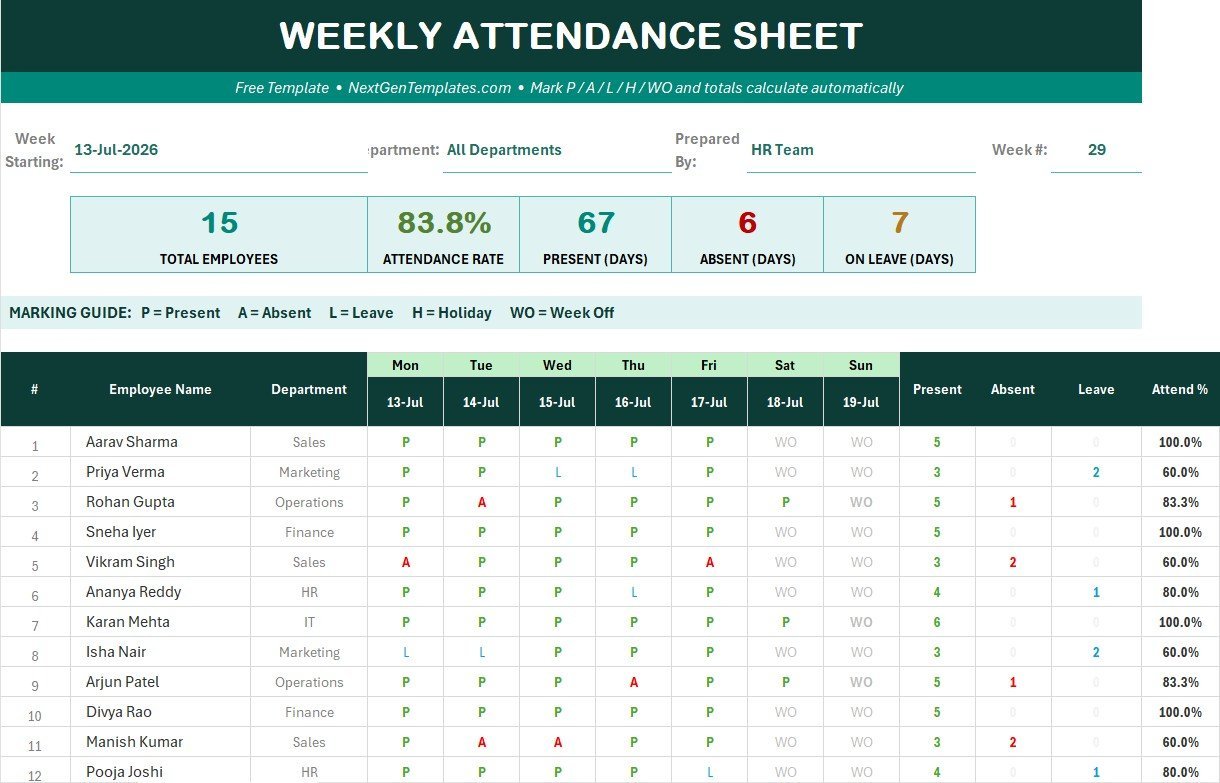
To the right of each employee row, the Present, Absent, Leave, and Attendance % columns fill in from the day marks. The TOTAL row sums present counts for each weekday and the whole team, and the header rate card reflects the group Attendance %.
📊 Weekly Attendance Sheet vs. Google Sheets vs. Paid HR SaaS — Where This Fits
| Feature | Weekly Attendance Sheet in Excel | Google Sheets equivalent | Paid HR SaaS (BambooHR / Deputy) |
|---|---|---|---|
| Cost | $5.99 one-time (free launch) | Low one-time | $4–$8 / user / month |
| Platform | Excel 2016–2021 & Microsoft 365, offline | Browser / cloud | Cloud only |
| Setup time | Under 5 minutes ✅ | Under 5 minutes | Hours to onboard |
| Auto attendance % | Yes, holidays excluded ✅ | Yes | Yes |
| Real-time team collaboration | Shared drive / turns | Yes ✅ | Yes |
| Mobile access | Excel mobile | Browser | Native apps |
| Customizable fields | Fully editable ✅ | Editable | Plan-limited |
| Year-1 cost at 5 users | $5.99 one-time ✅ | Low one-time | $240–$480 / year |
For small teams that want automatic weekly attendance without a per-user subscription, the Weekly Attendance Sheet in Excel sits in the sweet spot.
👥 Who This Template Is For — and Who It’s Not For
✅ This template is built for:
- Office admins, team leads, and HR executives tracking 5–15 people one week at a time.
- Shops, clinics, salons, tuition centres, and site supervisors who need a simple printable weekly register.
- Anyone who wants automatic Present/Absent/Leave counts without formulas or macros.
❌ This template is NOT for:
- Enterprises needing biometric integration, statutory filing, or SSO.
- Teams that must have many managers editing the same file simultaneously in real time — a cloud tool fits better.
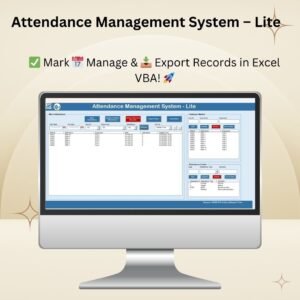
- Multi-month payroll runs — for that, step up to the Attendance Management System – Lite.
⚙️ How to Use the Weekly Attendance Sheet in Excel
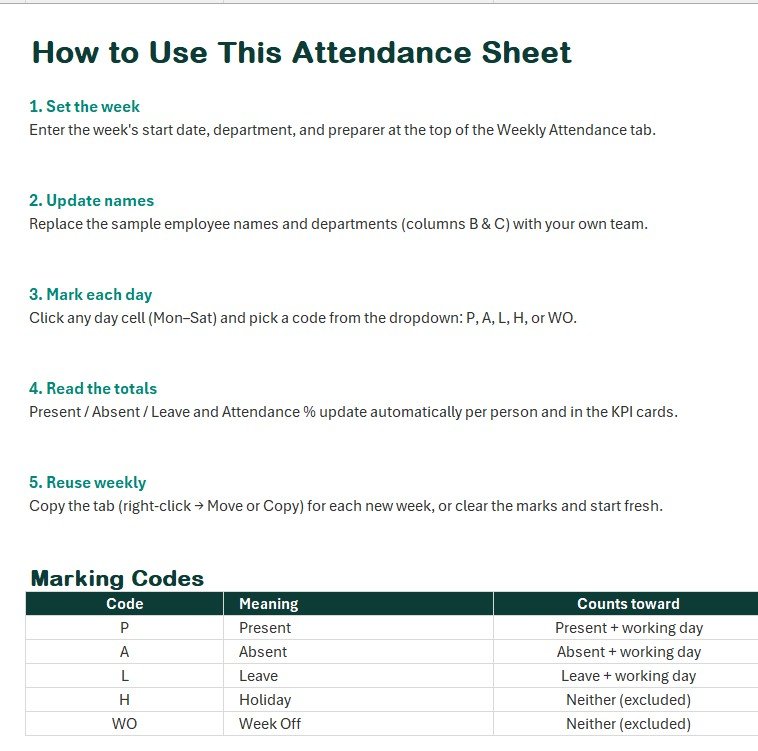
- Open the file in Microsoft Excel and set the week-starting date, department, and preparer at the top.
- Replace the sample employee names and departments with your own team.
- Click any day cell (Mon–Sat) and pick a code from the dropdown: P, A, L, H, or WO.
- Read the auto-filled Present, Absent, Leave, and Attendance % columns, plus the five summary cards.
- To reuse it, right-click the tab, choose Move or Copy, and tick Create a Copy for the next week.
💼 Real-World Use Cases
Neha manages a 12-person design studio. Every Monday she copies the tab, marks the week, and shares a one-page PDF attendance rate with the founders — no HR software needed.
Rakesh supervises a retail floor. He marks WO for rotating week-offs and L for approved leave, and the Attendance % ignores those days so his numbers match payroll.
A coaching centre admin tracks staff attendance weekly and keeps printed copies for records, using the colour-coded grid to spot repeat absences fast.
❓ Frequently Asked Questions
How does the Weekly Attendance Sheet calculate attendance percentage?
The Weekly Attendance Sheet in Excel divides Present days by the sum of Present, Absent, and Leave days, so holidays (H) and week-offs (WO) are excluded. The result updates automatically as you mark each day.
Does the Weekly Attendance Sheet use macros?
No. The Weekly Attendance Sheet in Excel is macro-free and runs on COUNTIF and IFERROR formulas, so it works in Excel 2016, 2019, 2021, and Microsoft 365 without enabling content.
How many employees can it track?
The sample grid holds 15 employees for one week. You can add more rows and extend the formulas, though for larger teams and monthly cycles the Attendance Management System – Lite is a better fit.
How does this compare to paid HR SaaS like BambooHR?
Paid HR platforms charge $4–$8 per user each month. The Weekly Attendance Sheet in Excel is a one-time purchase with no per-user fees, ideal for small teams that only need weekly attendance and a printable summary.
Can I print the weekly attendance sheet?
Yes. The Weekly Attendance Sheet in Excel is set to landscape with gridlines off and fits a single page, so you can print or export a clean PDF for records each week.
👤 About the Author
Built by PK — Microsoft Certified Professional with 15+ years of Excel, Google Sheets, and Power BI experience. Founder of NextGenTemplates, reaching 300K+ subscribers across YouTube channels (@PK-AnExcelExpert, @NextGenTemplates). Every template is hand-built and tested before release.
🔗 Explore Related Templates
- Attendance Management System – Lite — Excel VBA tracker with mark, update, delete, and export for up to 100 employees.
- Attendance and Overtime Dashboard in Excel — turn attendance data into a visual dashboard with overtime analytics.
- Monthly Attendance Sheet in Excel with Check Boxes — a free monthly companion.
- Also available as: Attendance Sheet in Google Sheets for cloud, real-time collaboration.
💎 Save 44% — get attendance, leave, payroll, and HR dashboards together in the HR & Workforce Analytics Bundle. Browse more HR & Payroll Templates or Excel Dashboard Templates.
📖 Click here to read the Detailed Blog Post
🎥 Visit our YouTube channel for step-by-step video tutorials
👉 YouTube.com/@PKAnExcelExpert
📅 Last updated: July 2026
Compatibility and Requirements
- Works in Microsoft Excel desktop (Excel 2016 or later, or Microsoft 365). It has no macros.
- Each day cell uses a drop-down list of five codes. Microsoft explains drop-down lists in Create a drop-down list.













Reviews
There are no reviews yet.