

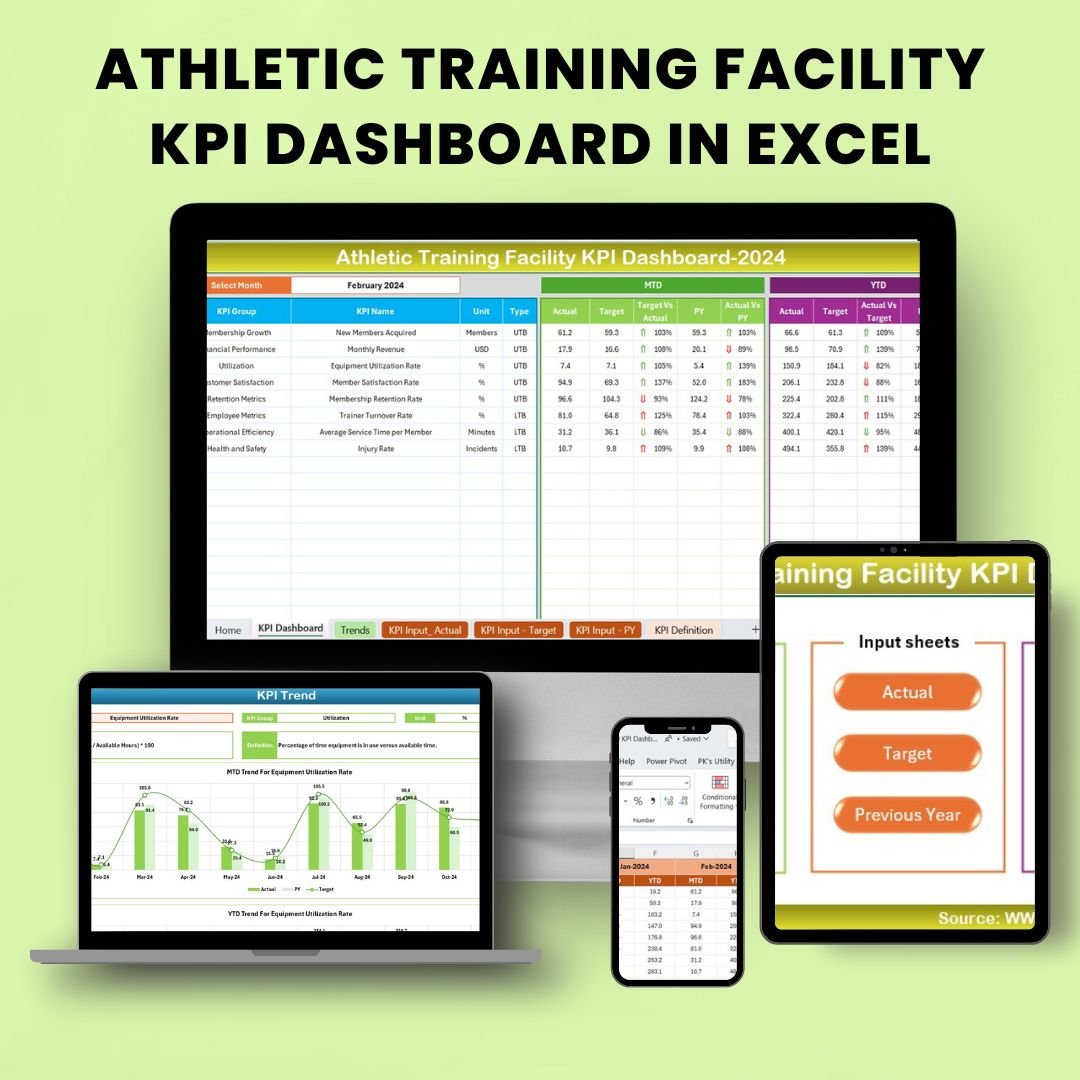



The Athletic Training Facility KPI Dashboard in Excel is an essential tool for sports organizations, athletic trainers, and fitness facilities. This Excel-based dashboard is designed to track and optimize key performance indicators (KPIs) related to athlete performance, facility usage, and overall operational efficiency. Whether you manage a gym, a sports clinic, or an athletic training center, this dashboard will provide you with valuable insights to improve training outcomes and optimize facility management.
By monitoring KPIs such as training hours, athlete progress, injury rates, and equipment usage, you can identify areas for improvement, make informed decisions, and ensure that your facility operates at peak efficiency. The intuitive and customizable layout allows you to tailor the dashboard to your specific needs, ensuring it provides the most relevant data for your facility.

Key Features of the Athletic Training Facility KPI Dashboard in Excel
📊 Comprehensive KPI Tracking
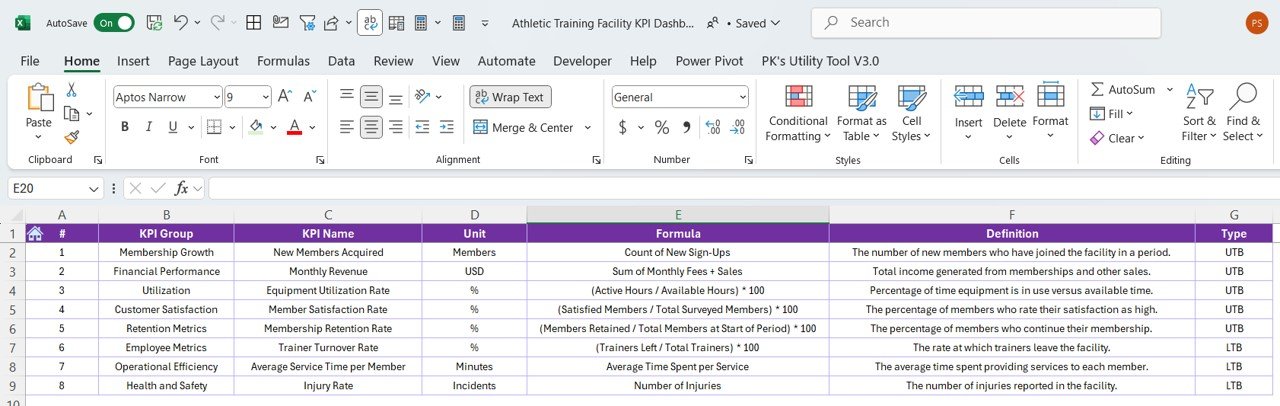
Track essential metrics such as training hours, athlete progress, injury rates, and equipment usage. Monitor the performance of both athletes and the facility to ensure optimal results.
🏋️♂️ Athlete Performance Tracking
Monitor individual and group athlete performance, including training frequency, progress over time, and specific skill improvements. This feature allows trainers to assess athlete development and tailor training plans.
⏱ Training Hours Monitoring
Track the total number of hours athletes spend in training sessions. This metric helps optimize training schedules and monitor athlete workload to avoid overtraining.
📉 Injury Rate & Recovery Tracking
Keep track of injury rates and monitor recovery progress. This helps ensure the health and safety of athletes while minimizing the risk of future injuries.
🛠 Facility Usage Monitoring
Track facility usage, including the number of sessions, types of training, and equipment usage. This allows you to maximize the utilization of your facility’s resources.
📅 Time-Based Performance Analysis
Monitor KPIs over different time periods, including daily, weekly, and monthly trends. This provides insights into performance progress, facility usage, and training effectiveness over time.
⚙️ Customizable & Scalable Dashboard
Customize the dashboard to fit the unique needs of your athletic training facility. Add or modify KPIs and metrics based on your facility’s specific focus and goals.
Why You’ll Love the Athletic Training Facility KPI Dashboard in Excel
✅ Track Athlete Progress & Performance
Monitor individual athlete performance and track improvements over time. Ensure athletes are on track to meet their fitness and training goals.
✅ Optimize Facility Operations
Track facility usage, equipment availability, and training schedules to optimize resource allocation and improve operational efficiency.
✅ Improve Injury Prevention & Recovery
Keep an eye on injury rates and recovery times to reduce the risk of future injuries and ensure that athletes are following appropriate recovery plans.
✅ Make Data-Driven Decisions
Leverage data from the dashboard to make informed decisions about athlete training, facility management, and resource allocation. Improve performance and reduce costs by making proactive adjustments.
✅ Scalable & Adaptable
The dashboard is fully customizable to meet the needs of any athletic facility, from small training centers to large gyms. It can scale as your facility grows, adapting to new performance metrics and additional services.
What’s Inside the Athletic Training Facility KPI Dashboard in Excel?
Comprehensive KPI Tracking: Monitor athlete performance, training hours, and injury rates.
Training Hours Monitoring: Track the total hours spent on training sessions.
Injury Rate & Recovery Tracking: Track and manage injuries and recovery times.
Facility Usage Monitoring: Monitor facility and equipment usage for optimized scheduling.
Time-Based Performance Analysis: Assess KPIs over various time periods to monitor trends.
Customizable Layout: Tailor the dashboard to suit the unique needs of your facility.
How to Use the Athletic Training Facility KPI Dashboard in Excel
1️⃣ Download the Template: Access the Athletic Training Facility KPI Dashboard in Excel instantly.
2️⃣ Enter Athlete Data: Input performance metrics such as training hours, injury reports, and recovery status.
3️⃣ Track Key Metrics: Monitor essential KPIs like athlete progress, injury rates, and facility usage.
4️⃣ Analyze Trends Over Time: Use the time-based analysis features to monitor long-term performance and identify areas for improvement.
5️⃣ Optimize Facility Operations: Use insights from the dashboard to optimize resource allocation and improve facility efficiency.
Who Can Benefit from the Athletic Training Facility KPI Dashboard in Excel?
🔹 Athletic Trainers & Coaches
🔹 Sports Organizations & Facilities
🔹 Gym Owners & Fitness Facility Managers
🔹 Physical Therapists & Rehab Centers
🔹 Sports Medicine Professionals
🔹 Performance Analysts & Trainers
🔹 Health & Wellness Professionals
Track, monitor, and improve the performance of athletes and the operational efficiency of your facility with the Athletic Training Facility KPI Dashboard in Excel. This easy-to-use and customizable tool helps ensure that your facility runs smoothly while optimizing athlete performance and safety.
Click here to read the Detailed blog post
Visit our YouTube channel to learn step-by-step video tutorials
Youtube.com/@PKAnExcelExpert
Compatibility and Requirements
- Works in Microsoft Excel desktop (Excel 2016 or later, or Microsoft 365).
- The KPIs are shown in interactive charts. Microsoft explains Excel charts in Create a chart from start to finish.
Frequently Asked Questions
What does the Athletic Training Facility KPI Dashboard track?
It tracks athlete performance, training hours, injury rates and recovery times, and facility and equipment usage.
How do I add my own data?
Enter performance metrics such as training hours, injury reports and recovery status. Then use the dashboard to monitor the KPIs.
Can I see trends over time?
Yes. Time-based analysis lets you compare KPIs over different periods to spot long-term trends.
Can I change the layout?
Yes. The layout is customizable to suit your facility.
Is there a Google Sheets or Power BI version?
Yes. The Athletic Training Facility KPI Dashboard in Google Sheets and the Athletic Training Facility KPI Dashboard in Power BI cover the same KPIs on those platforms.
Related Sports and Training Templates
- Athletic Training Facility KPI Dashboard in Google Sheets: the same dashboard in Google Sheets
- Athletic Training Facility KPI Dashboard in Power BI: the same KPIs in Power BI
- Sports KPI Dashboard in Excel: general sports KPIs
- Sports & Recreation KPI Dashboard in Excel: KPIs for sports and recreation
- KPI Dashboard Library (Excel): 15 Excel KPI dashboards in one download
Browse all Excel KPI dashboards or the Excel education templates.

























Reviews
There are no reviews yet.