
Managing smart city projects involves multiple contracts, vendors, project managers, and financial transactions. Governments and urban development agencies often struggle to track contract performance when data is scattered across spreadsheets and manual reports. As a result, monitoring project costs, revenues, vendor contributions, and profitability becomes extremely challenging.
The Smart Cities Contract Dashboard in Excel solves this problem by providing a centralized, interactive analytics solution for monitoring smart city project contracts. This ready-to-use Excel dashboard helps organizations track contract performance, financial outcomes, payment status, and operational efficiency from a single interface.
Instead of spending hours preparing manual reports, decision-makers can instantly analyze contract data through visual KPI cards, dynamic charts, and interactive slicers. With just a few clicks, users can filter information by project manager, vendor, region, or month to uncover meaningful insights.
Because the dashboard is built in Microsoft Excel, it offers flexibility, ease of use, and powerful analytical capabilities without requiring advanced software or technical skills. Simply update the data sheet and the dashboard automatically refreshes to reflect the latest contract performance.
Whether you are managing smart transportation systems, IoT infrastructure, waste management automation, or public safety technology projects, this dashboard provides the visibility required to monitor contracts effectively.
🚀 Key Feature of Smart Cities Contract Dashboard in Excel
This dashboard includes several powerful features designed to simplify contract monitoring and project analysis.
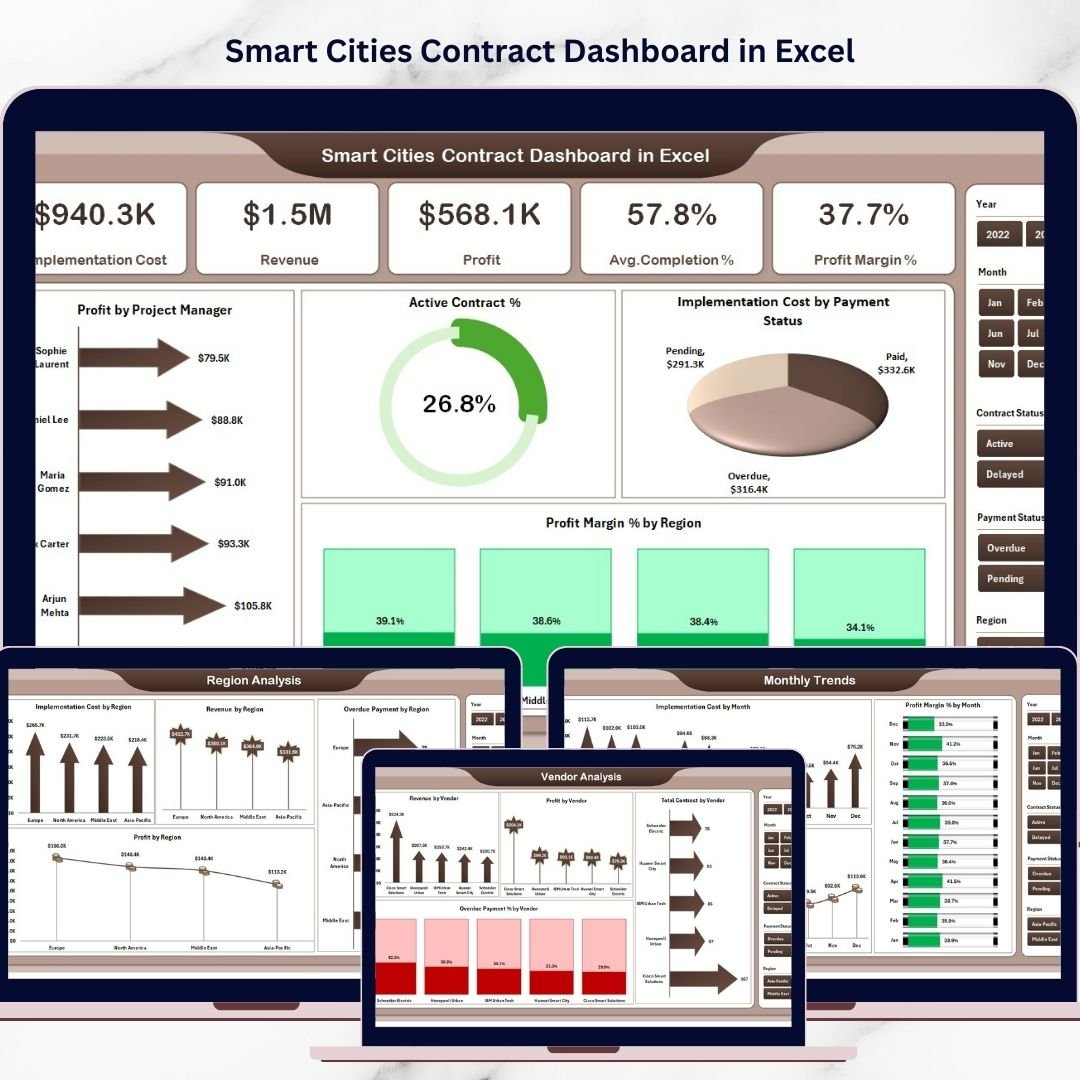
📊 Interactive KPI Cards – Instantly monitor key performance indicators such as implementation cost, revenue, profit, completion rate, and profit margin.
📈 Multi-Page Analytical Dashboard – The dashboard contains five analytical pages that provide insights from different perspectives.
🎯 Interactive Data Filters – Slicers allow users to filter data dynamically by project manager, region, vendor, and month.
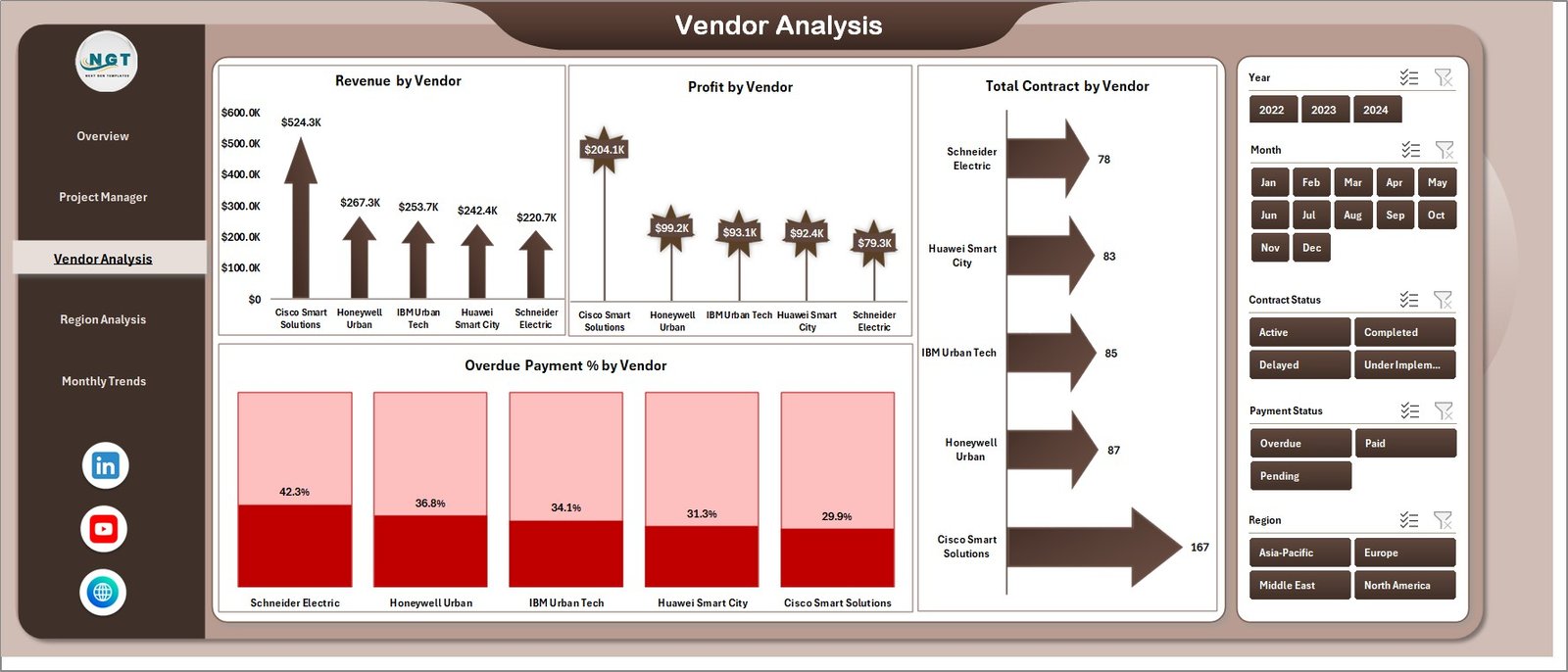
📉 Vendor Performance Monitoring – Track vendor revenue contribution, contract volume, profit generation, and overdue payment percentages.
🌍 Regional Project Analysis – Evaluate how smart city projects perform across different regions.
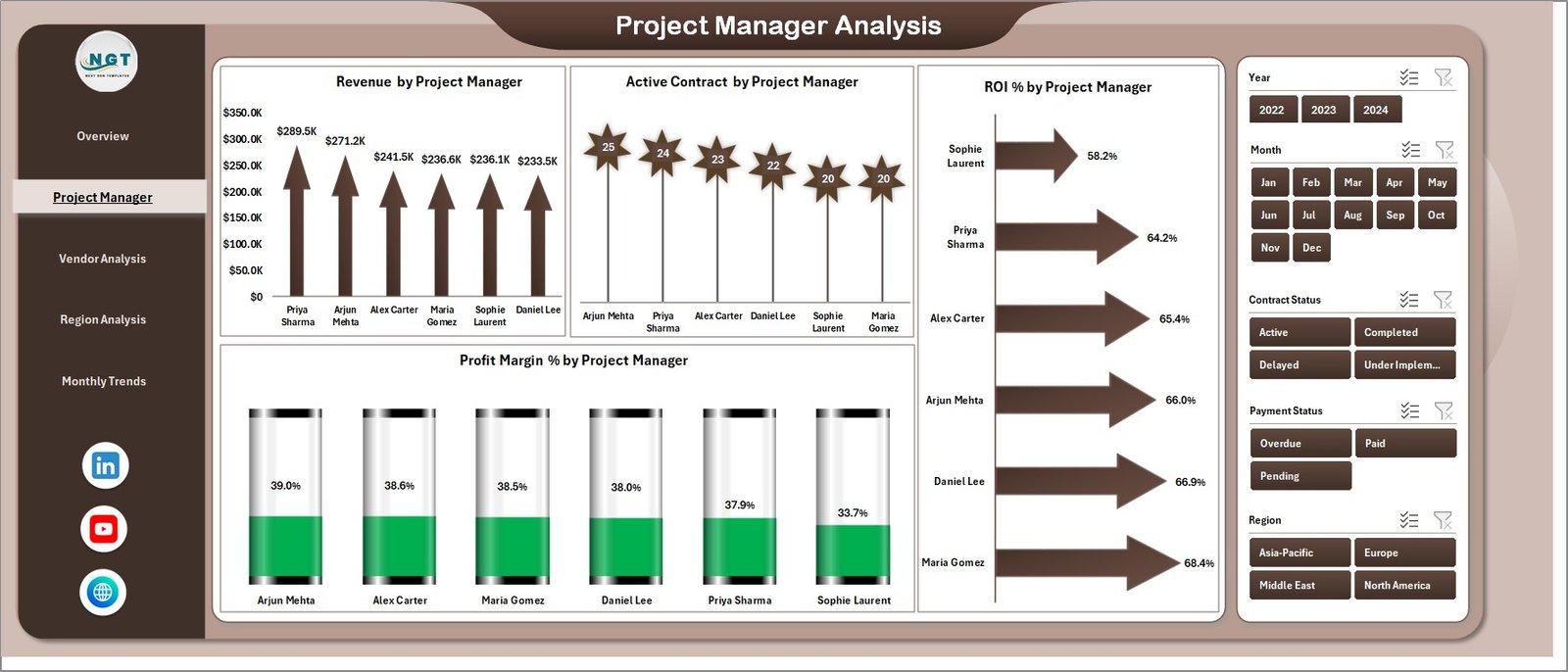
👨💼 Project Manager Performance Tracking – Identify top-performing project managers and analyze their ROI and contract outcomes.
📅 Monthly Financial Trend Analysis – Analyze revenue growth, implementation costs, and profit margins across months.
⚡ Automated Calculations – Built-in formulas automatically calculate profits, profit margins, and completion metrics.
📦 What’s Inside the Smart Cities Contract Dashboard in Excel
This ready-to-use Excel template includes multiple worksheets designed for complete contract monitoring.
📊 Overview Dashboard Page
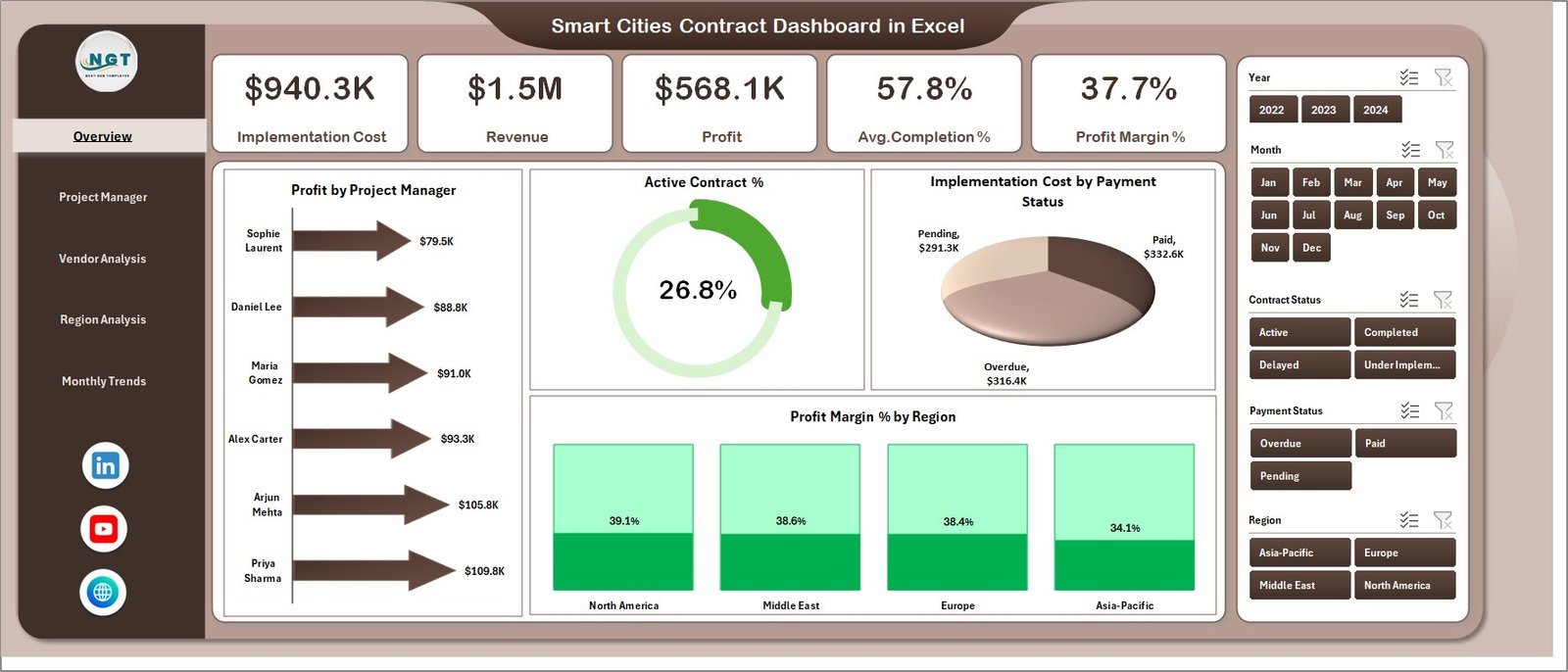
Provides a high-level summary of contract performance with KPI cards and charts including:
Profit by Project Manager
Active Contract Percentage
Implementation Cost by Payment Status
Profit Margin by Region
👨💼 Project Manager Analysis Page
Analyzes performance by project manager with metrics such as revenue generation, ROI, active contracts, and profitability.
🏢 Vendor Analysis Page
Evaluates vendor contributions and financial performance through charts including revenue by vendor, profit by vendor, contract count, and overdue payments.
🌍 Region Analysis Page
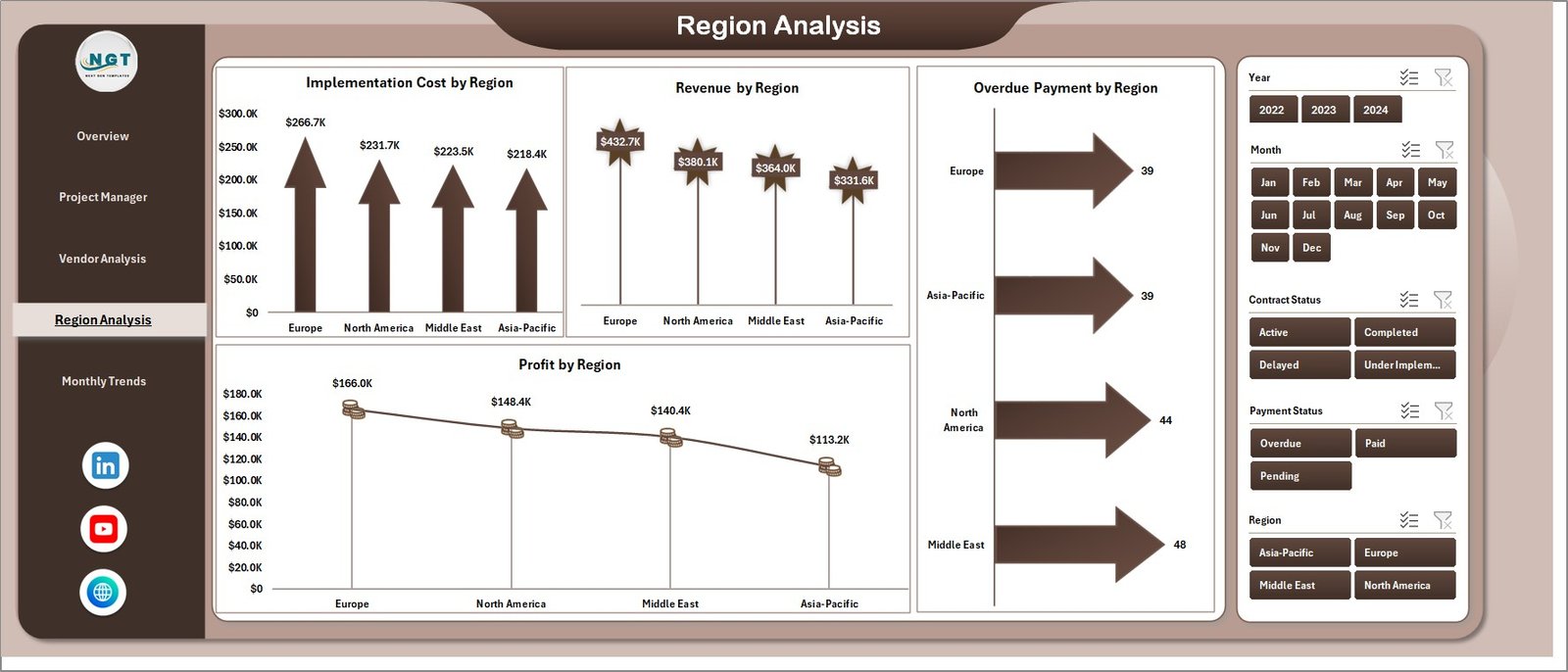
Provides insights into how projects perform across regions by analyzing implementation cost, revenue, overdue payments, and profit.
📅 Monthly Trends Page
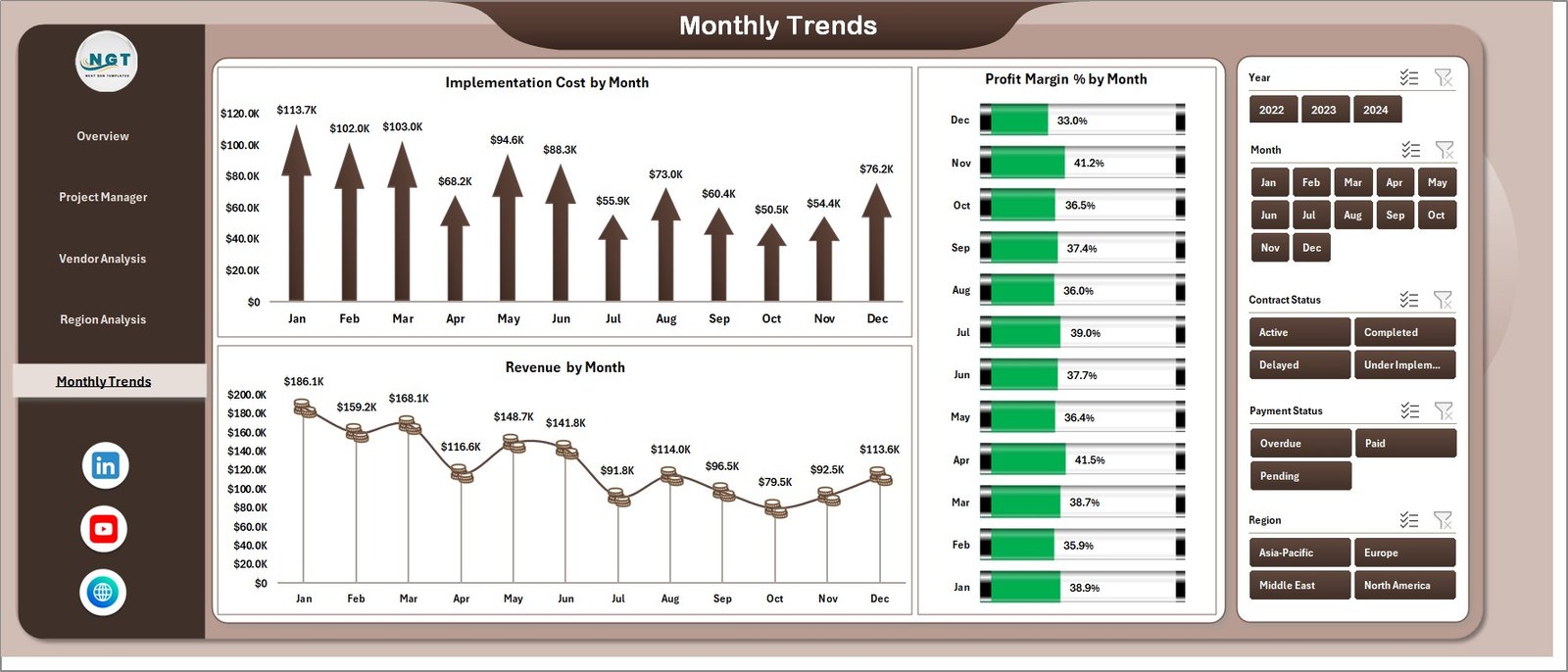
Tracks financial performance over time through charts showing implementation cost, revenue trends, and monthly profit margins.
📂 Data Sheet
Stores the raw contract data used to power the dashboard.
⚙️ Support Sheet
Contains helper formulas and calculations required for the dashboard to function smoothly.
🛠 How to Use the Smart Cities Contract Dashboard in Excel
Using this dashboard is extremely simple and requires no advanced Excel expertise.
1️⃣ Enter or update project contract data in the Data Sheet.
2️⃣ Ensure the fields such as project manager, vendor, region, revenue, and implementation cost are filled correctly.
3️⃣ The dashboard automatically updates all charts and KPI cards based on the entered data.
4️⃣ Use the interactive slicers to filter the dashboard by vendor, region, project manager, or month.
5️⃣ Analyze the charts and insights to monitor contract performance and make informed decisions.
This streamlined workflow eliminates manual reporting and significantly improves project monitoring efficiency.
👥 Who Can Benefit from This Smart Cities Contract Dashboard in Excel
This dashboard is designed for professionals responsible for managing smart city initiatives and contract performance.
🏛 Government Agencies – Monitor smart city project performance and financial outcomes.
🏗 Urban Development Authorities – Track implementation costs and regional project success.
📊 Project Managers – Evaluate project profitability and contract completion status.
🤝 Contract Management Teams – Monitor vendor performance and payment status.
🏢 Technology Vendors & Contractors – Analyze project contributions and financial results.
📈 Policy Makers & Decision Makers – Use data insights to improve strategic planning and resource allocation.
With centralized analytics and visual reporting, this dashboard empowers organizations to manage smart city contracts more efficiently.
### Click here to read the Detailed blog post
Visit our YouTube channel to learn step-by-step video tutorials
👉 https://youtube.com/@PKAnExcelExpert
Watch the step-by-step video tutorial:
Compatibility and Requirements
- Works in Microsoft Excel desktop (Excel 2016 or later, or Microsoft 365).
- The dashboard is filtered with slicers for project manager, vendor, region and month. Microsoft explains them in Use slicers to filter data.
Frequently Asked Questions
Which pages does the dashboard have?
Five analytical pages: Overview, Project Manager Analysis, Vendor Analysis, Region Analysis and Monthly Trends. The file also has a Data Sheet and a Support Sheet.
How do I update the dashboard with my own contracts?
Enter your contract data in the Data Sheet, including project manager, vendor, region, revenue and implementation cost. The charts and KPI cards update from that data.
Can I filter by vendor or region?
Yes. Slicers let you filter the dashboard by project manager, vendor, region or month.
What does the Vendor Analysis page show?
It shows revenue by vendor, profit by vendor, contract count and overdue payments.
Is there a Power BI version?
Yes. See the Smart Cities Contract Dashboard in Power BI.
Related Smart Cities Templates
- Smart Cities Contract Management Dashboard in Excel: another Excel view of contract data
- Smart Cities Contract KPI Dashboard in Excel: a KPI-focused contract view
- Smart Cities Contract Dashboard in Power BI: the Power BI edition
- Smart Cities Project Management Dashboard in Excel: tracks the projects behind the contracts
Browse all Excel dashboards.