



The Recruitment Agencies Dashboard in Excel is your all-in-one analytical toolkit to manage placements, clients, and profitability like a pro. Designed for staffing and recruitment professionals, this dashboard turns your everyday hiring data into visual insights that drive growth, transparency, and better decision-making.
Whether you handle a few clients or hundreds, this Excel-based solution helps you track key performance indicators (KPIs) such as Recruitment Cost vs Revenue, Profit Margin, Placement Ratio, and Client Satisfaction — all in one interactive, easy-to-use file. No coding. No extra software. Just smart analytics that work right inside Microsoft Excel.
✨ Key Features of the Recruitment Agencies Dashboard in Excel
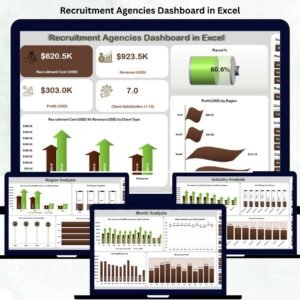
✅ 📊 Overview Page – Central Command Center

Get a 360-degree snapshot of your agency’s health.
Includes:
KPI Cards: Total Placements, Total Revenue, Profit Margin %, Client Satisfaction Score.
Charts:
Placed % – track successful hires vs total openings.
Recruitment Cost (USD) vs Revenue (USD) by Client Type.
Profit (USD) by Region.
🎯 Instantly see where your agency performs best and where margins can improve.
✅ 🏭 Industry Analysis Page – Know Your Most Profitable Sectors
Visualize which industries deliver the highest ROI.
Compare Cost vs Revenue by Industry.
Track Profit Margin %, Client Satisfaction (1–10), and Placed % by Industry.
💡 Focus your resources on the sectors that bring in maximum placements and profits.
✅ 🌍 Region Analysis Page – Identify High-Performing Areas
Analyze geographical trends with ease.
Cost vs Revenue by Region.
Profit Margin % by Region.
Client Satisfaction and Placement Rate by Region.
📈 Perfect for agencies operating in multiple locations or countries.
✅ 👤 Candidate Source Analysis Page – Evaluate Sourcing Channels
Measure how each sourcing platform performs — job portals, referrals, LinkedIn, or databases.
Compare Cost vs Revenue and Profit by Candidate Source.
Measure Satisfaction Scores by Source.
🚀 Discover which sourcing channels produce top candidates and highest ROI.
✅ 📅 Month Analysis Page – Trend Tracking Made Simple
Uncover performance trends over time.
Monthly Cost vs Revenue, Profit, and Placement %.
Satisfaction score trends by month.
📆 Plan budgets, set realistic goals, and identify seasonal hiring patterns.
📦 What’s Inside the Dashboard
📁 Five Analytical Pages: Overview | Industry | Region | Candidate Source | Month
📂 Data Sheet: A structured backend to store all recruitment details —
Client Name, Industry, Region, Candidate Source, Recruitment Cost, Revenue, Profit, Placement Status, Client Satisfaction (1–10), and Month/Year.
All pages refresh automatically when new data is added — thanks to Excel’s powerful pivot tables and slicers.
⚙️ How to Use the Dashboard
1️⃣ Input Data: Enter client, cost, and placement info into the Data Sheet.
2️⃣ Refresh Dashboard: Click “Refresh All” — all KPIs and charts update instantly.
3️⃣ Use Slicers: Filter by Client Type, Industry, Region, or Month.
4️⃣ Analyze Insights: Review profit, satisfaction, and placement trends.
5️⃣ Share Reports: Export visuals as PDFs or images for clients or management.
💡 No advanced Excel knowledge required — everything works automatically.
👥 Who Can Benefit from This Dashboard
🏢 Recruitment Agencies & Staffing Firms – Monitor cost efficiency and placement ratios.
👩💼 HR Consultants – Track multiple client accounts with accuracy.
💻 Talent Acquisition Managers – Evaluate hiring success across regions or industries.
📊 Business Owners – Gain a clear financial view of agency performance.
🧠 Analysts & Team Leads – Measure recruiter productivity and profitability.
This Excel template is ideal for small, medium, or enterprise-level recruitment businesses.
💡 Advantages of Using the Recruitment Agencies Dashboard
✅ Centralized recruitment data — manage clients, candidates, and costs in one file.
✅ Real-time analytics — pivot charts and slicers refresh instantly.
✅ Smarter decisions — pinpoint profitable industries, clients, and sources.
✅ Time savings — automated summaries eliminate manual reports.
✅ Improved transparency — share visual reports with clients and teams.
✅ Easy scalability — expand to new clients or recruiters effortlessly.
✅ Excel-based simplicity — no complex software or subscriptions needed.
🔗 Click here to read the Detailed Blog Post
🎥 Visit our YouTube channel to learn step-by-step video tutorials
Watch the step-by-step video tutorial:
Compatibility and Requirements
- Works in Microsoft Excel desktop (Excel 2016 or later, or Microsoft 365).
- The pages use pivot tables and slicers, and you refresh them with Refresh All after adding data. Microsoft explains slicers in Use slicers to filter data.
Frequently Asked Questions
Which pages does the dashboard include?
Five analytical pages: Overview, Industry, Region, Candidate Source and Month. A Data Sheet stores the recruitment records behind them.
What do I enter in the Data Sheet?
Client name, industry, region, candidate source, recruitment cost, revenue, profit, placement status, client satisfaction (1-10) and month/year.
How do I update the charts after adding new data?
Add your rows to the Data Sheet and click Refresh All. The KPI cards and charts update, and you can filter with the slicers by client type, industry, region or month.
Which KPIs does it track?
Total placements, total revenue, profit margin %, client satisfaction score, placed %, and recruitment cost versus revenue by client type, industry, region and candidate source.
Is there a Google Sheets or Power BI version?
Yes. See the Recruitment Agencies Dashboard in Google Sheets and the Recruitment Agencies Dashboard in Power BI.
Related Recruitment Templates
- Recruitment Agencies Dashboard in Google Sheets: the same dashboard for Google Sheets
- Recruitment Agencies Dashboard in Power BI: the Power BI edition
- Recruitment Agencies KPI Dashboard in Excel: a KPI-focused view for agencies
- Recruitment and Hiring Dashboard in Excel: for tracking in-house hiring
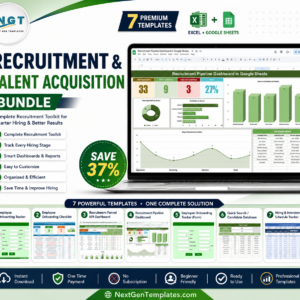
- Recruitment & Talent Acquisition Bundle: 7 Excel and Google Sheets templates in one download
Browse all Excel dashboards and HR and Payroll templates.




























Reviews
There are no reviews yet.