

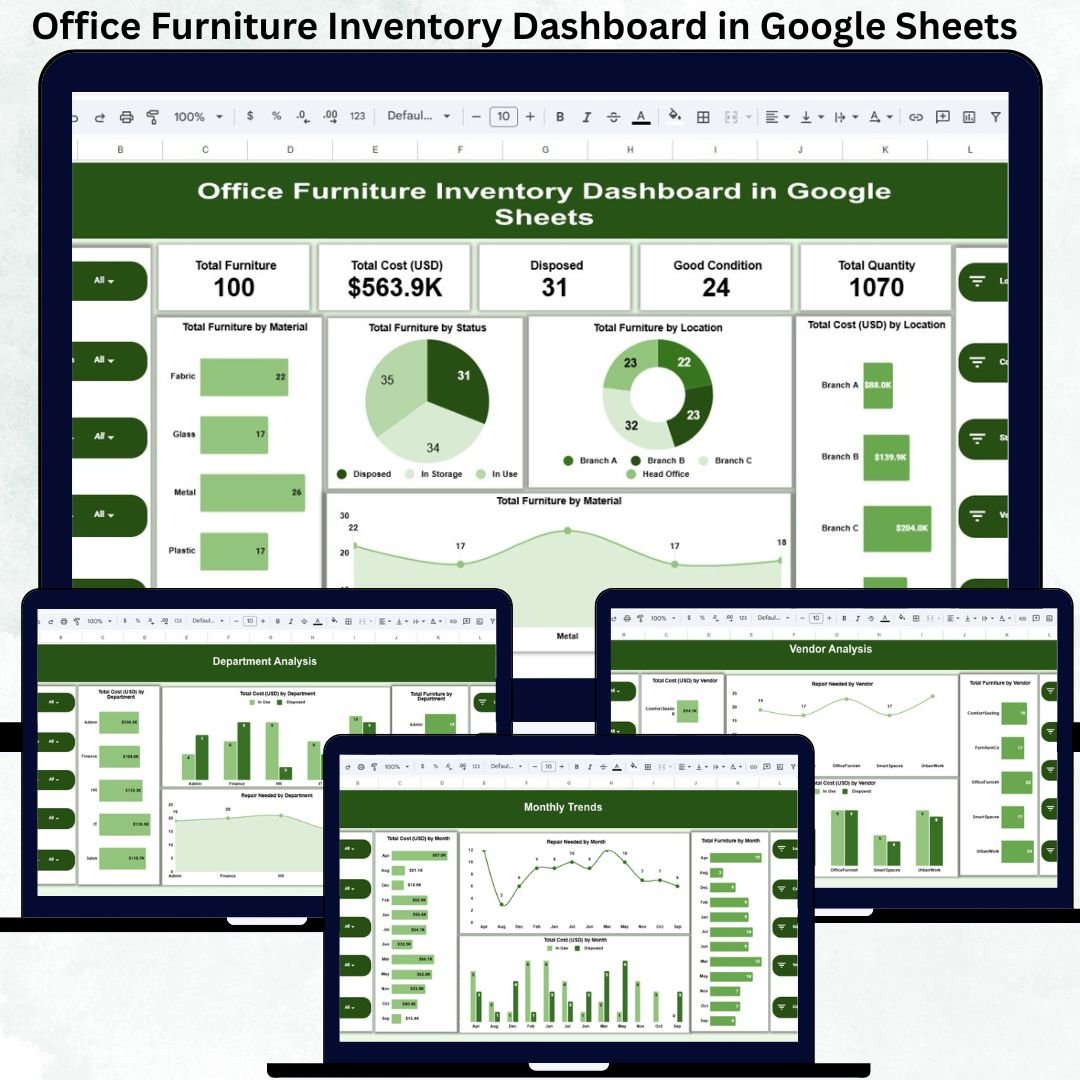

Managing office furniture becomes increasingly complex as organizations expand across departments, floors, and locations. Chairs, desks, cabinets, workstations, and meeting tables are purchased frequently, moved often, repaired occasionally, and disposed of over time. When this information is scattered across spreadsheets or registers, businesses lose visibility, overspend unnecessarily, and struggle with maintenance planning. The Office Furniture Inventory Dashboard in Google Sheets solves these challenges with a centralized, visual, and ready-to-use inventory management solution.
This dashboard brings all furniture-related data into one structured system. It allows facility managers, admin teams, procurement teams, and finance departments to track furniture quantity, condition, cost, vendor details, department allocation, and monthly trends—all from a single Google Sheets file. Because the dashboard updates automatically and works in the cloud, teams always work with accurate, real-time information.
✨ Key Features of the Office Furniture Inventory Dashboard in Google Sheets
📊 Centralized Furniture Inventory Overview
The dashboard consolidates all furniture data into one place, eliminating duplicate records and manual reconciliation.
💰 Cost & Asset Visibility
Track total furniture cost, department-wise spending, vendor-wise investment, and location-wise allocation instantly.
🛠 Condition & Repair Monitoring
Identify furniture in good condition, items requiring repair, and disposed assets to plan maintenance proactively.
📈 Trend Analysis for Better Planning
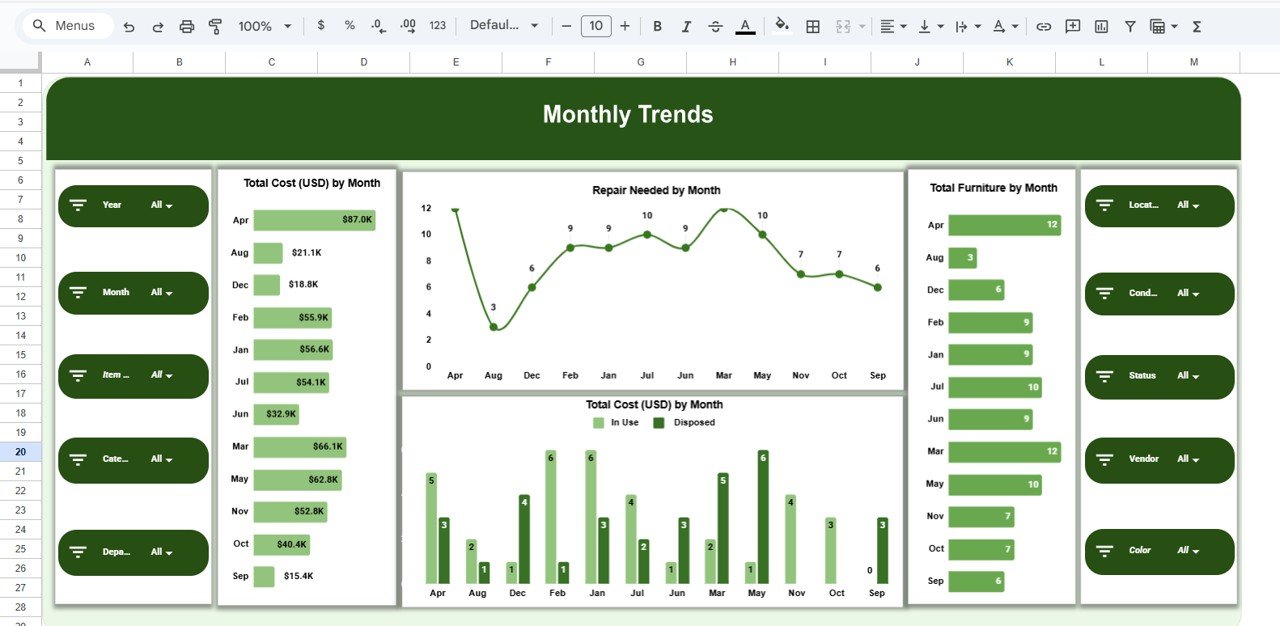
Monthly trend charts highlight new purchases, repair frequency, and spending patterns over time.
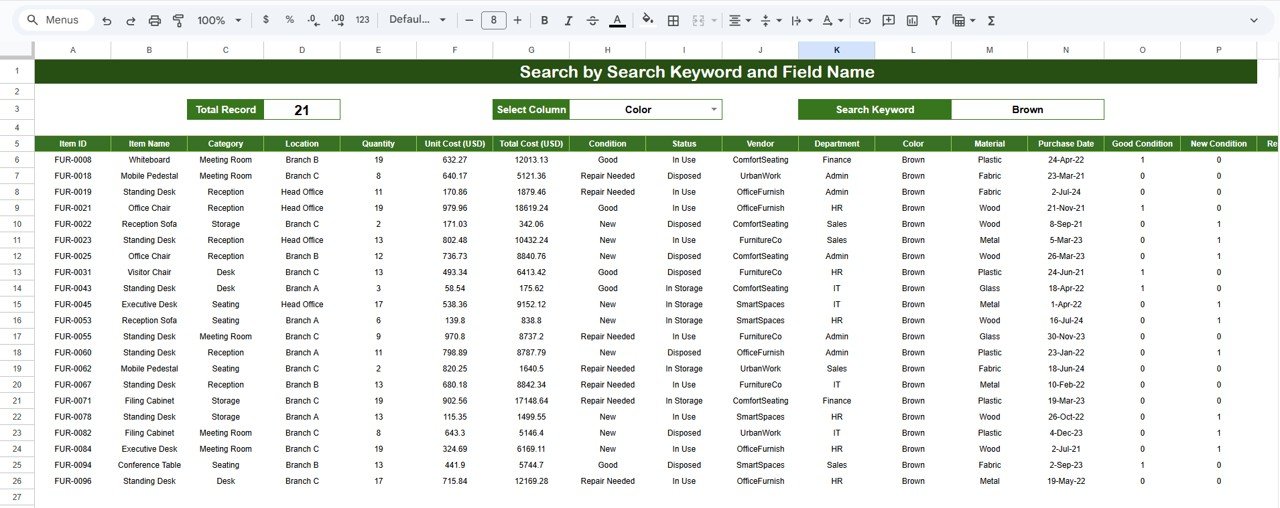
🔍 Smart Search Panel
Find any furniture item instantly using keyword-based search and field selection.
🤝 Real-Time Collaboration
Multiple users can update and review data simultaneously using Google Sheets.
📦 What’s Inside the Office Furniture Inventory Dashboard
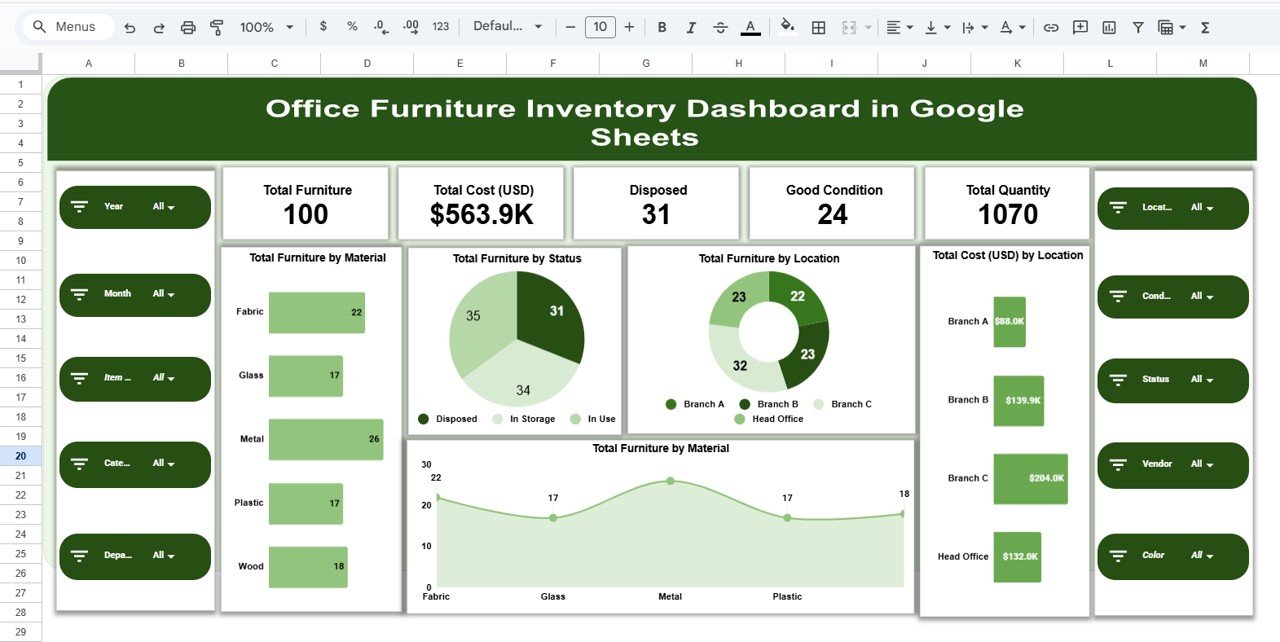
🖥 Overview Sheet – Instant Inventory Health Check
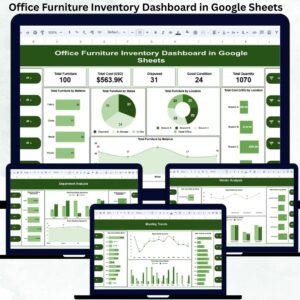
This sheet provides a high-level snapshot of your furniture inventory using KPI cards and charts.
KPI Cards Display:
Total Furniture
Total Cost (USD)
Total Quantity
Good Condition Items
Disposed Items
Overview Charts Include:
Total Furniture by Material
Total Furniture by Status
Total Furniture by Location
Total Cost (USD) by Location
These visuals help management assess inventory health in seconds.
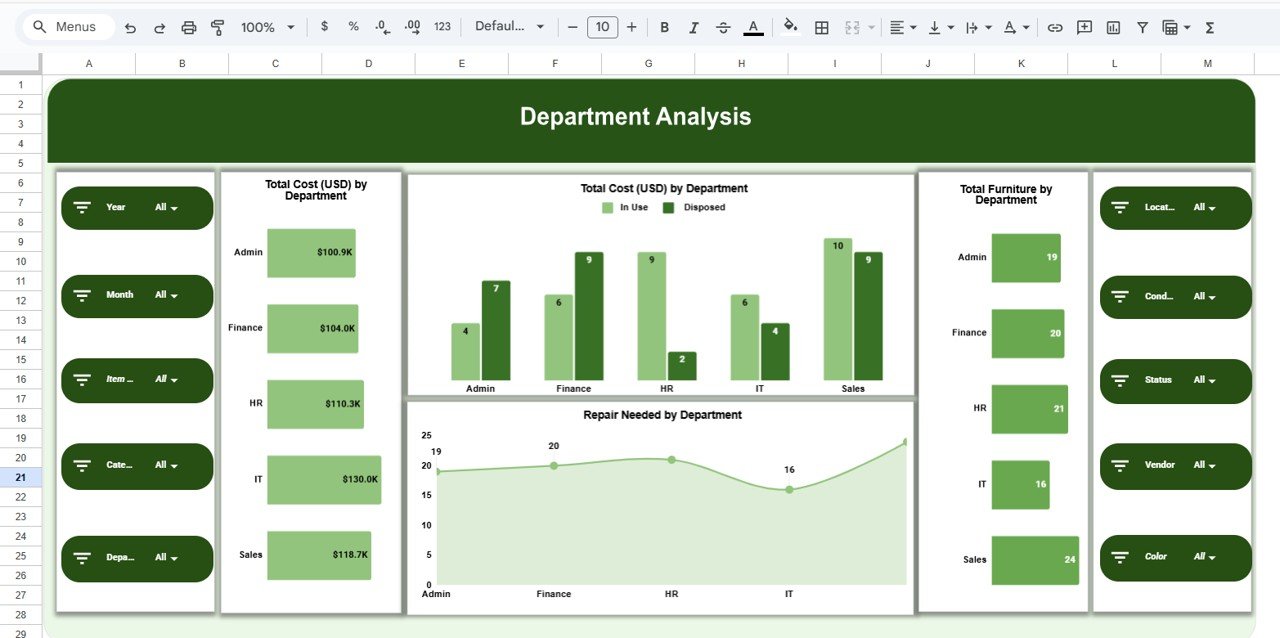
🏢 Department Analysis – Usage & Cost Breakdown
This section shows how furniture is distributed and maintained across departments.
Key Charts:
Total Furniture by Department
Total Cost (USD) by Department
Repair Needed by Department
This analysis helps identify departments with higher usage, frequent repairs, or excessive costs—supporting smarter budgeting decisions.
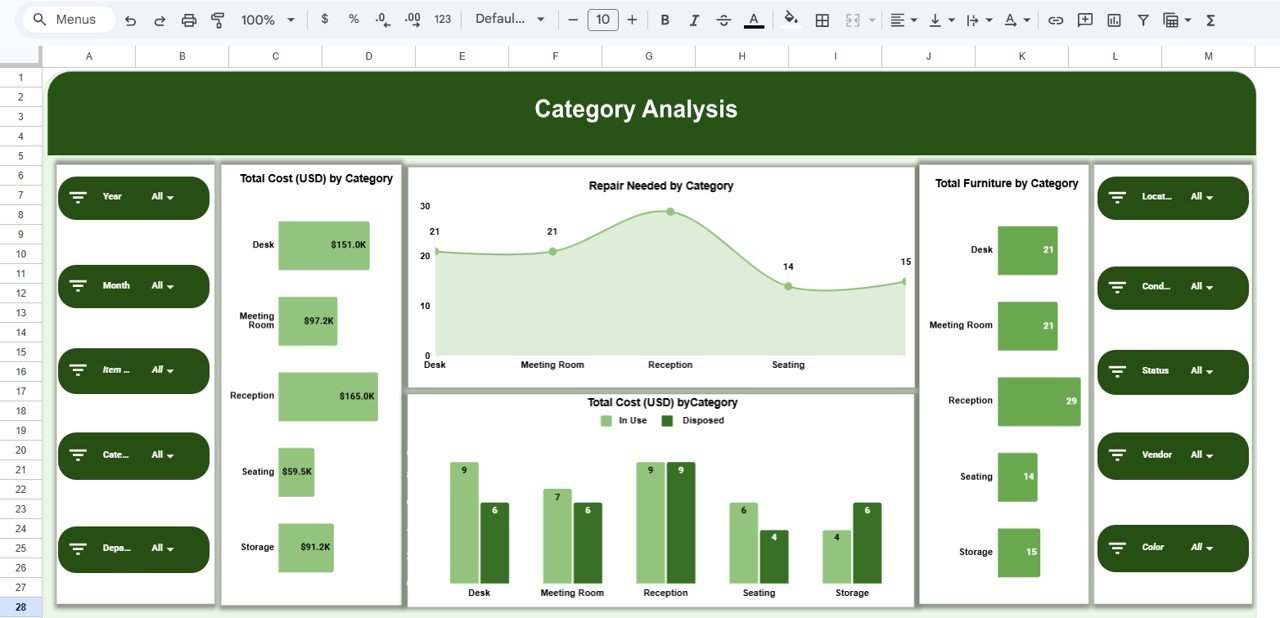
🪑 Category Analysis – Furniture Type Insights
Furniture categories such as chairs, desks, cabinets, tables, and workstations are analyzed here.
Category Charts:
Total Furniture by Category
Total Cost (USD) by Category
Repair Needed by Category
These insights help standardize purchases, reduce maintenance costs, and improve asset planning.
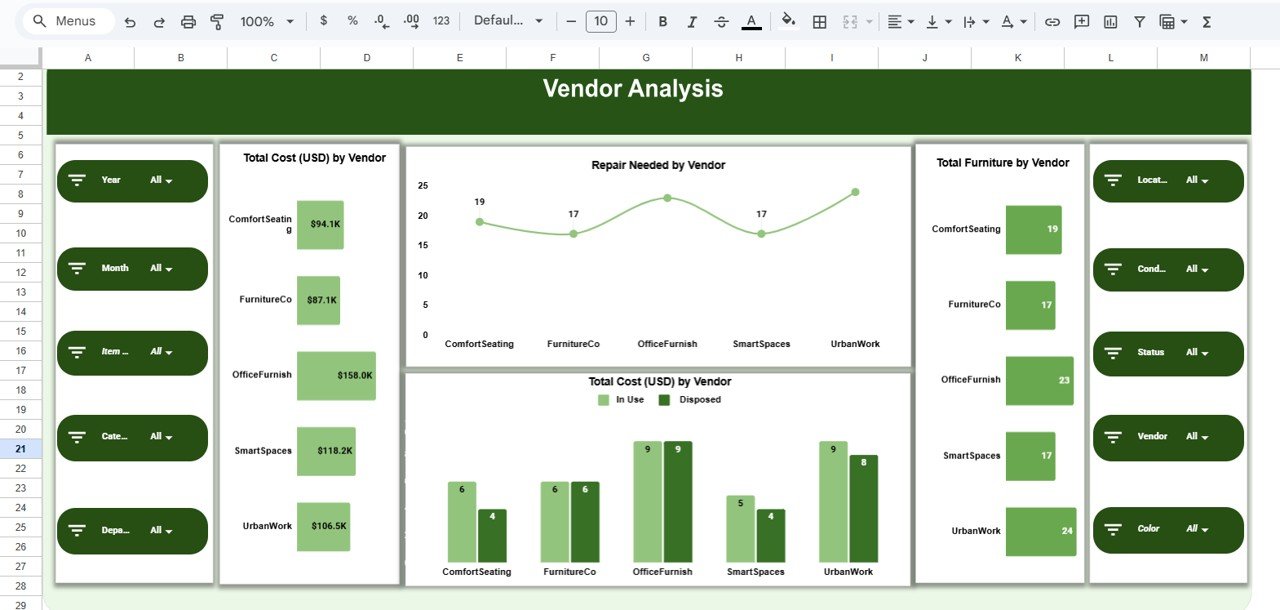
🏭 Vendor Analysis – Supplier Performance Tracking
This section evaluates furniture suppliers based on cost, quantity, and quality.
Vendor Charts Include:
Total Furniture by Vendor
Total Cost (USD) by Vendor
Repair Needed by Vendor
It helps procurement teams identify reliable vendors and negotiate better contracts.
📅 Monthly Trends – Track Changes Over Time
Monitor inventory movement and maintenance patterns with month-wise visuals.
Trend Charts:
Total Furniture by Month
Total Cost (USD) by Month
Repair Needed by Month
These trends support forecasting, budgeting, and procurement planning.
🔍 Search Functionality – Find Anything in Seconds
The dashboard includes a powerful Search Panel where users can search by:
Department
Location
Vendor
Category
Condition
Status
This feature saves time during audits, inspections, and management reviews.
🛠 How to Use the Office Furniture Inventory Dashboard
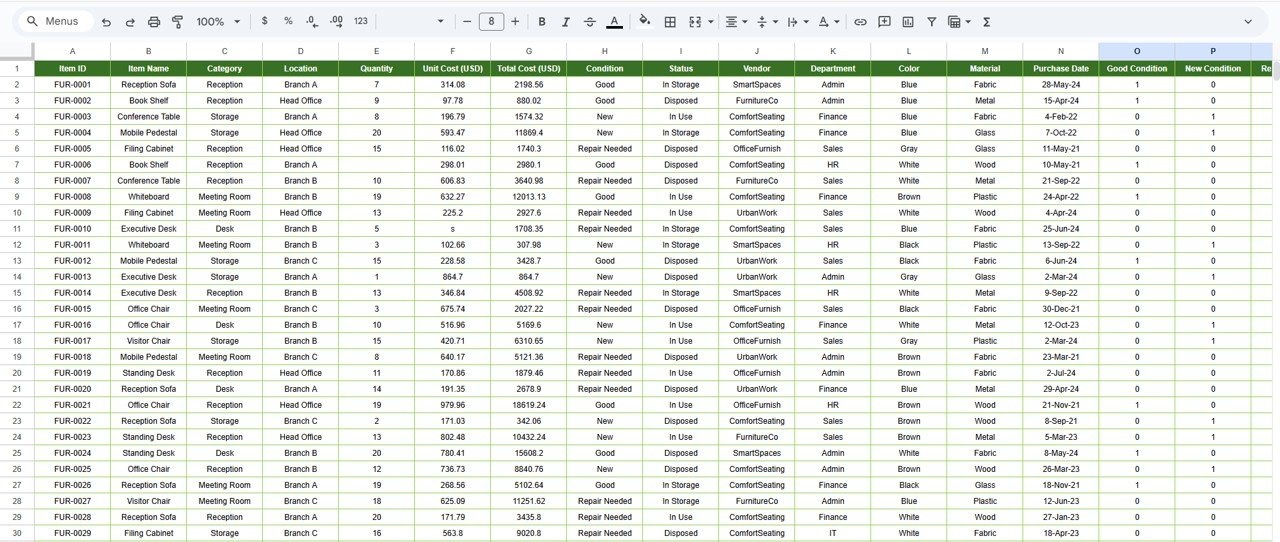
1️⃣ Enter all furniture details in the Data Sheet
2️⃣ Update condition and repair status regularly
3️⃣ Review department and vendor charts monthly
4️⃣ Use search for audits and quick checks
5️⃣ Restrict editing access to maintain data integrity
🎯 Who Can Benefit from This Dashboard
🏢 Facility & Admin Teams
📦 Procurement Departments
💼 Finance & Asset Management Teams
🧩 Operations & Compliance Teams
🚀 Growing Organizations with Multiple Offices
### Click here to read the Detailed blog post
Watch the step-by-step video tutorial:
Visit our YouTube channel to learn step-by-step video tutorials — Youtube.com/@NeotechNavigators
Compatibility and Requirements
- Works in Google Sheets. You need a free Google account and a web browser.
- Google explains how to read and build the charts used in this dashboard in Add and edit a chart or graph.
Frequently Asked Questions
What does the dashboard show on the Overview sheet?
The Overview sheet has KPI cards for Total Furniture, Total Cost (USD), Total Quantity, Good Condition Items and Disposed Items. It also has charts for furniture by material, status and location, and cost by location.
Where do I enter my furniture data?
Enter every item on the Data Sheet. Update the condition and repair status there, and the charts follow.
Can I see which departments need the most repairs?
Yes. The Department Analysis section has a Repair Needed by Department chart. It also shows total furniture and total cost by department.
Can I compare furniture suppliers?
Yes. The Vendor Analysis section shows total furniture, total cost and repairs needed by vendor.
How do I find a single furniture item?
Use the Search Panel. You can search by department, location, vendor, category, condition or status.
Is there an Excel or Power BI version?
Yes. See the Office Furniture Inventory Dashboard in Excel and the Office Furniture Inventory Dashboard in Power BI.
Related Inventory and Office Templates
- Office Furniture Inventory Dashboard in Excel: the same dashboard for Excel
- Office Furniture Inventory Dashboard in Power BI: the Power BI edition
- Office Infrastructure and Furniture Dashboard in Google Sheets: another furniture view in Google Sheets
- Office Supply Inventory Update Tracker in Google Sheets: track office supplies as well as furniture
- Inventory Management Dashboard in Google Sheets: a general stock dashboard
Browse all Google Sheets dashboards or Google Sheets inventory templates.































Reviews
There are no reviews yet.