
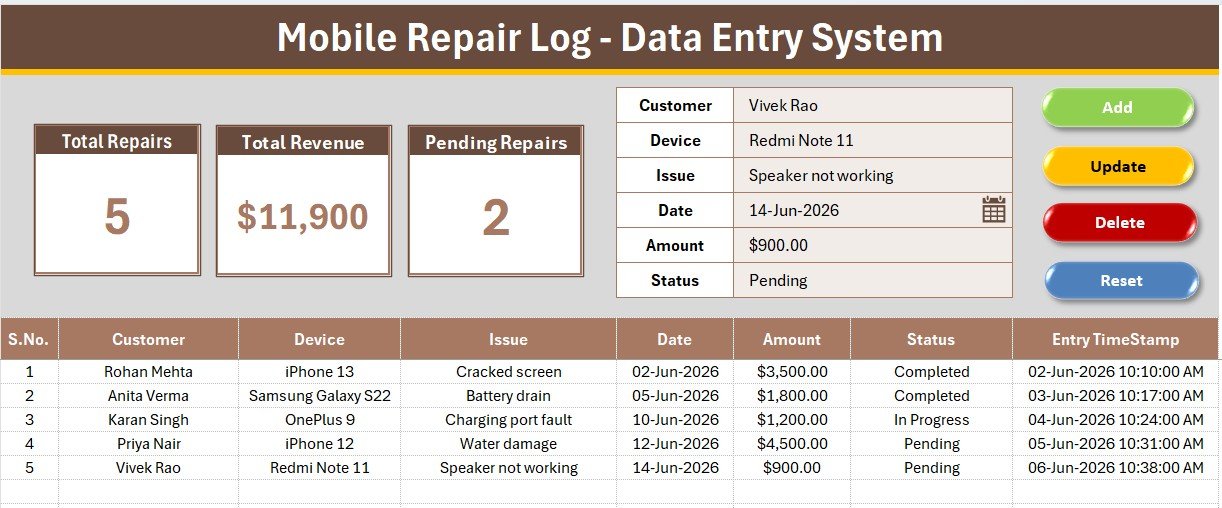
Mobile Repair Log Data Entry System in Excel tracks 6 fields per repair job — Customer, Device, Issue, Date, Amount, and Status — across 3 live KPI cards and a searchable records table. Setup takes under 5 minutes: import one VBA module and start logging repairs.
🌍 Join 8,400+ teams in 40+ countries using NextGenTemplates to replace paid SaaS tools with one-time-purchase Excel, Google Sheets, Power BI, and HTML templates.
✅ Instant download · One-time payment · No subscription · No per-user fees · Lifetime access
🔑 Key Features of the Mobile Repair Log Data Entry System
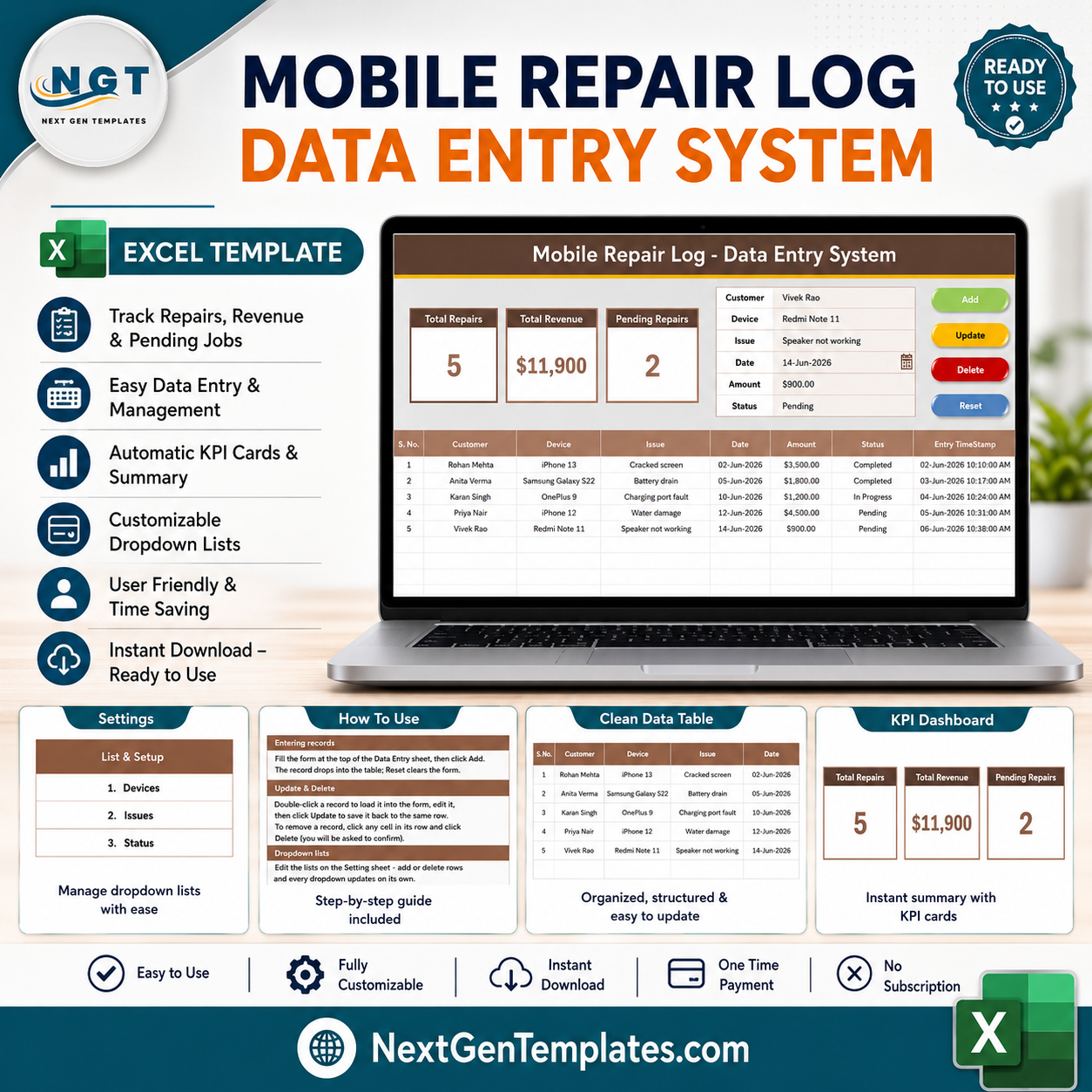
The Mobile Repair Log tracks every phone and device repair from intake to payment. It logs 6 fields — Customer, Device, Issue, Date, Amount, and Status — with the Status field wired to a dropdown (Pending, In Progress, Completed, Cancelled) so your shop floor stays consistent.
Three KPI cards sit on the dashboard: Total Repairs (a live COUNTA), Total Revenue (a live SUM of Amount), and Pending Repairs (a live COUNTIF on Status). All three recalculate instantly as records are added, updated, or deleted.
Four flat-color buttons — Add (green), Delete (red), Update (gold), Reset (dark blue) — run dedicated VBA macros, so front-desk staff never touch a formula. Each row also gets an auto S.No and an Entry Timestamp for audit purposes.
📦 What’s Inside the Mobile Repair Log Data Entry System in Excel
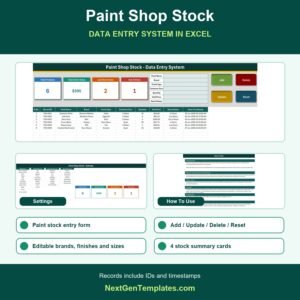
The main sheet holds the entry form at the top — bold labels with light-tinted input lines — the 3 KPI cards, the 4 action buttons, and the records table below starting at row 15. The dark heading bar and gold divider line keep the layout on-brand and easy to scan.
Setting Sheet
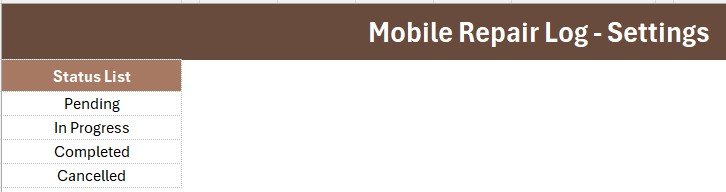
The Status dropdown list lives here as a named range, along with a duplicated set of the 3 KPI cards so you can Copy → Paste Special → Linked Picture them into a summary report or slide deck without touching the live dashboard.
Instructions Sheet
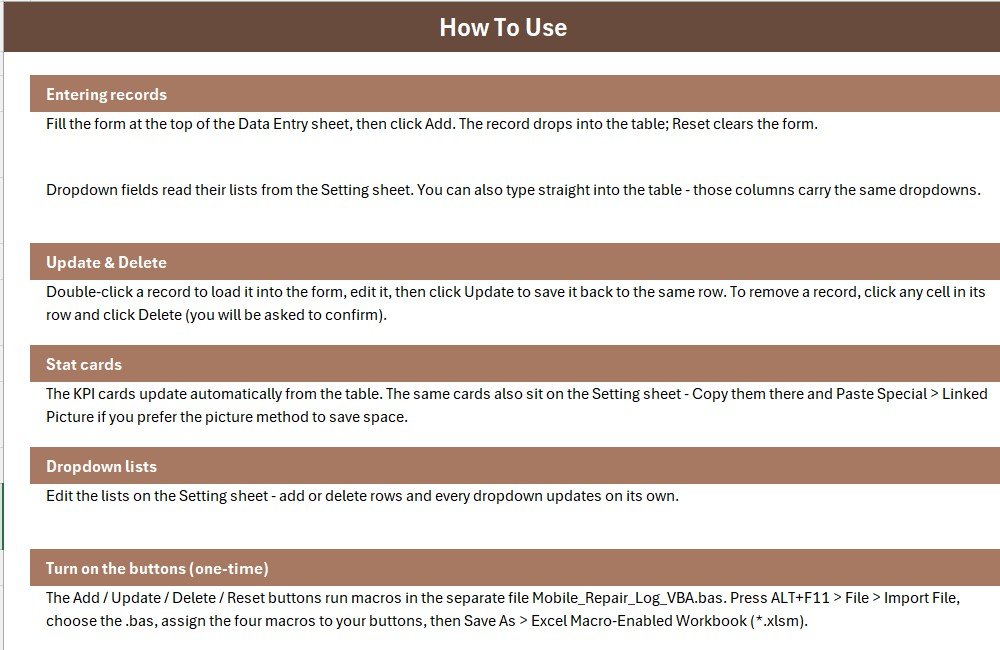
Step-by-step setup — importing the VBA module, drawing the four buttons, and assigning the macros — so you’re logging repairs within minutes of opening the file.
📊 Mobile Repair Log Data Entry System in Excel vs. Google Sheets equivalent vs. Paid CRM/SaaS — Where This Fits
| Feature | Mobile Repair Log (Excel) | Google Sheets equivalent | RepairShopr / RepairDesk |
|---|---|---|---|
| Cost | $5.99 one-time | $0-9 one-time | $60-150 / month |
| Platform | Excel desktop/mobile | Browser-based | Web + mobile app |
| Setup time | Under 5 minutes | Under 5 minutes | 1-3 hours onboarding |
| Real-time team collaboration | ❌ (single file) | ✅ | ✅ |
| Mobile access | ✅ Excel mobile app | ✅ | ✅ |
| Customizable fields | ✅ Fully editable | ✅ | ❌ Locked schema |
| Share with link | ❌ (email/OneDrive) | ✅ | ✅ |
| Year-1 cost at 5 users | $5.99 total | $0-9 total | $3,600-9,000 |
| Offline access | ✅ Native | ❌ Needs sync | ❌ Needs internet |
For a single-location repair shop that wants clean job tracking without paying $60+/month for repair-shop CRM software, the Mobile Repair Log Data Entry System sits in the sweet spot.
👥 Who This Template Is For — and Who It’s Not For
✅ This template is built for:
- Independent phone and gadget repair shops logging 5-50 jobs a week
- Solo technicians who need a customer + device + cost record without a monthly SaaS bill
- Small repair chains (2-3 locations) that consolidate logs manually at month-end
❌ This template is NOT for:
- Multi-location chains needing real-time shared access across staff at the same moment
- Shops that need SMS/email customer notifications built in
⚙️ How to Use the Mobile Repair Log Data Entry System
- Open the workbook and press ALT+F11 to open the VBA editor.
- File → Import File → select the included .bas module.
- Draw four Form-Control buttons over the colored Add/Delete/Update/Reset cells.
- Assign Add_Record, Delete_Record, Update_Record, and Reset_Form to the matching buttons.
- Save As → Excel Macro-Enabled Workbook (.xlsm) and start logging repairs.
💼 Real-World Use Cases
Arjun runs a one-man phone repair counter inside a mall kiosk. He logs every screen and battery job on the Mobile Repair Log between customers, and the Pending Repairs KPI tells him at a glance how many devices are still waiting for parts.
Meera manages a 3-technician repair shop. She uses the Status dropdown to move jobs from Pending to In Progress to Completed, and pulls the Total Revenue card into her weekly owner report — without paying for RepairDesk’s multi-user plan.
❓ Frequently Asked Questions
What fields does the Mobile Repair Log Data Entry System track?
The Mobile Repair Log Data Entry System tracks Customer, Device, Issue, Date, Amount, and Status for every repair job. Status is a dropdown (Pending, In Progress, Completed, Cancelled) so entries stay consistent.
How does this compare to RepairShopr or RepairDesk?
The Mobile Repair Log Data Entry System costs $5.99 one-time versus $60-150/month for repair-shop CRM software. It trades real-time multi-user sync for a fully customizable, offline-capable Excel file.
How long does setup take?
Under 5 minutes — import the VBA module, add four buttons, save as .xlsm, and the Mobile Repair Log Data Entry System is ready to use.
Do I need to know VBA to use this?
No. The VBA is pre-written; you only import the module and assign four macros to buttons using Excel’s built-in Form Controls.
Can I add more fields to the entry form?
Yes. The Mobile Repair Log Data Entry System is a standard Excel file, so you can insert columns and extend the form and records table to fit your shop’s workflow.
Does the KPI card update automatically?
Yes. Total Repairs, Total Revenue, and Pending Repairs are live formulas that recalculate the moment a record is added, updated, or deleted.
👤 About the Author
Built by PK — Microsoft Certified Professional with 15+ years of Excel, Google Sheets, and Power BI experience. Founder of NextGenTemplates, reaching 300K+ subscribers across YouTube channels (@PK-AnExcelExpert, @NextGenTemplates, @NeoTechNavigators). Every template is hand-built and tested before release.
🔗 Explore Related Templates
- Watch Repair Data Entry System in Excel: a data entry system for watch repair jobs.
- Appliance Service Data Entry System in Excel: log appliance service calls.
- Service Center and Repair Shop Management System Web App: a browser-based system for repair shops.
- Computer Repair Shop Management System Web App: for computer repair counters.
- VBA Management Systems Mega Pack: 5 Excel VBA management systems.
Browse all Excel VBA tools.
📖 Click here to read the Detailed Blog Post
🎥 Visit our YouTube channel for step-by-step video tutorials
👉 YouTube.com/@NextGenTemplates
📅 Last updated: July 2026
Watch the step-by-step video tutorial:
Compatibility and Requirements
- Needs Microsoft Excel desktop on Windows with macros enabled. The Add, Update, Delete and Reset buttons run VBA macros, and the file is saved as a macro-enabled workbook (.xlsm).
- The buttons do not work in Excel for the web, Google Sheets or mobile apps. Microsoft explains how to enable or disable macros in Microsoft 365 files.