



In today’s fast-paced marketing world, managing multiple campaigns across channels can be overwhelming. Without a structured system, important submissions can slip through the cracks, leading to missed deadlines, miscommunication, or wasted budgets. That’s where the Marketing Campaign Submission Tracker in Google Sheets comes in—a ready-to-use, collaborative, and powerful tool designed to simplify campaign tracking, streamline workflows, and maximize marketing efficiency.Marketing Campaign Submission Tracker in Google Sheets
This tracker is not just a spreadsheet; it’s a complete solution for marketing teams who want a central hub for campaign management. From recording submission details to monitoring approval status, it ensures every campaign is tracked, analyzed, and optimized in real time.Marketing Campaign Submission Tracker in Google Sheets

✨ Key Features of the Marketing Campaign Submission Tracker
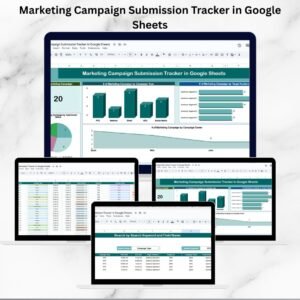
Interactive Dashboard View – Visualize campaign performance instantly through cards and charts.
Real-Time Collaboration – Google Sheets allows multiple team members to update the tracker simultaneously.
Search & Filter Functionality – Quickly find campaigns by type, audience, owner, or submission status.
Centralized Database – All campaign details (budget, dates, owners, status) stored in one place.
Automated Charts – Gain quick insights into campaign type, target audience, and approval status.
Status Tracking – Monitor whether campaigns are submitted, approved, or rejected.
Customizable Setup – Easily add new campaign types, audience segments, or metrics.
Error-Free Input – Structured columns minimize mistakes and ensure reliable reporting.
📂 What’s Inside the Marketing Campaign Submission Tracker
This tracker is designed with three intuitive worksheets, each serving a unique purpose:
Tracker Sheet Tab
Displays campaign insights via cards and charts.
Cards show # of Campaigns Tracked.
Charts visualize campaigns by type, audience, owner, and status.
Search Sheet Tab
A powerful search tool to filter campaigns.
Search by campaign name, type, or status.
View total record count instantly.
Data Sheet Tab
The backbone of the tracker.
Includes fields for ID, Campaign Name, Type, Dates, Audience, Budget, Owner, Status, Remarks.
Updates in this sheet auto-refresh the Tracker and Search sheets.
🛠️ How to Use the Marketing Campaign Submission Tracker
Start with the Data Sheet – Enter details of every marketing campaign.
Use the Tracker Sheet – Monitor real-time visual reports on campaigns by status, audience, and owner.
Search Sheet – Quickly find campaigns by entering keywords (e.g., “Email Campaign” or “Rejected”).
Collaborate in Real-Time – Share the sheet with your team so everyone stays updated.
Review Monthly – At the end of each month, review campaigns to evaluate trends and performance.
👥 Who Can Benefit from This Tracker
Marketing Teams – Stay on top of campaign submissions across all channels.
Agencies – Track multiple client campaigns in one organized sheet.
Freelancers – Manage campaign submissions for different clients with ease.
Marketing Managers – Gain real-time visibility into campaign workload and outcomes.
Startups & SMEs – A cost-effective tool to manage campaigns without expensive software.
Large Enterprises – Use it as a structured campaign log for collaboration across teams.
✅ Advantages of Using the Tracker
Centralizes all campaign data in one place
Saves time with quick search and automated updates
Improves collaboration across marketing teams
Enhances accountability by tracking ownership and status
Supports smarter marketing strategies with visual insights
🔑 Best Practices
Update campaign data as soon as submissions are made
Use consistent naming for campaigns and audiences
Monitor status breakdowns (approved, submitted, rejected) weekly
Review trends monthly to identify high-impact campaigns
Encourage team members to update their campaigns regularly
📖 Click here to read the detailed blog post
Watch the step-by-step video Demo:
📺 Visit our YouTube channel to learn step-by-step video tutorials
Compatibility and Requirements
- Works in Google Sheets. You need a free Google account and a web browser.
- Several people can open the same sheet and update it at once. Google explains charts in Add and edit a chart.
Frequently Asked Questions
Which sheets are included?
Three sheets: Tracker, Search and Data.
Where do I enter campaign details?
On the Data sheet. It has fields for ID, Campaign Name, Type, Dates, Audience, Budget, Owner, Status and Remarks. The Tracker and Search sheets update from it.
Can I find a campaign quickly?
Yes. The Search sheet filters campaigns by name, type or status and shows the total record count.
What does the Tracker sheet show?
A card with the number of campaigns tracked, plus charts of campaigns by type, audience, owner and status.
Is there an Excel version?
Yes. See the Marketing Campaign Submission Tracker in Excel.
Related Marketing Templates
- Marketing Campaign Submission Tracker in Excel: the same tracker for Excel
- Marketing Campaign Calendar in Google Sheets: plan campaign dates on a calendar
- Digital Marketing Campaign Dashboard in Google Sheets: a dashboard view of campaign results
- Marketing Dashboard in Google Sheets: an overview of marketing metrics
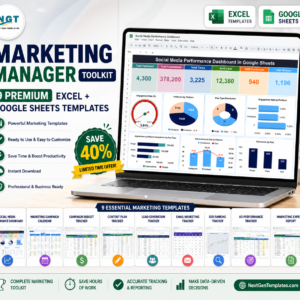
- Marketing Manager Toolkit: 9 marketing templates in one download
Browse all Google Sheets trackers.






Reviews
There are no reviews yet.