



Managing IT support tickets using emails, scattered Excel sheets, or manual logs often leads to delays, lost requests, and poor visibility. To solve this problem, we have developed the IT Helpdesk Ticket Management System V1.0, a professional, Excel VBA–based helpdesk solution that helps you manage tickets efficiently from a single, secure Excel file.
This is a ready-to-use digital product, specially designed for organizations that want a simple, cost-effective, and offline IT ticket management system without installing complex software or databases.
🔐 Secure Login System (Admin & User)
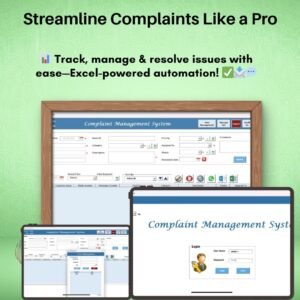
The system starts with a Login Form that ensures controlled and secure access.
Default Login Credentials
Admin Role
Username: Admin1
Password: abcd
User Role
Username: User1
Password: abcd
After successful login, users are redirected to the Main Dashboard, where all ticket operations are managed.
🖥️ Main Form – Central Ticket Management Dashboard

The Main Form acts as the heart of the system and allows complete control over ticket data.
📋 Ticket List Box
Displays all relevant ticket records in a structured list
Easy selection and navigation of tickets
🔍 Advanced Filters
Filter tickets by date range
Filter by selected columns for faster analysis
🔃 Sort Options
Quickly sort ticket data based on required criteria
🎛️ Control Buttons (One-Click Actions)
The dashboard includes powerful control buttons for daily operations:
➕ Add New Record – Create a new IT support ticket instantly
✏️ Update Existing Record – Modify ticket details by selecting or double-clicking a record
🗑️ Delete Record – Remove unwanted or incorrect tickets
🕒 Show Record History – Track full modification history for audit and transparency
📤 Export to Excel – Export filtered ticket data to a new Excel file
📝 Ticket Master Form
The Ticket Master Form opens when adding or updating records.
It provides a clean data-entry interface to:
Add new tickets
Update existing ticket details
Save records directly into the system database (Excel sheets)
📂 Left-Side Navigation Menu (Complete System Control)
The left navigation panel provides quick access to system modules:
🏢 Firm Information
Update company or firm details easily
👥 User Management
Add, update, delete users
Reset passwords
Change user credentials securely
📋 Manage List
Maintain dropdown master lists
Add or delete list values dynamically
🧑💼 Agent Master
Manage support agents and assignments
📊 Reports
Generate date-wise ticket reports
Export reports directly to Excel format
🔐 User Access Control (Admin Only)
Define role-based permissions
Control which features Users can access
🚪 Logout
Saves all data securely
Closes forms and the Excel file safely
📧 Email Us
Displays support email for help or customization requests
🌐 Visit Our Website
Redirects to our website to explore more tools and templates
✅ Key Advantages
✔️ No external database required
✔️ Fully offline Excel-based solution
✔️ Role-based access control
✔️ Easy ticket tracking & reporting
✔️ One-time purchase – no recurring cost
✔️ Ideal for small & medium IT teams
⚠️ System Compatibility (Important)
Please review compatibility before purchasing:
✅ Windows 10 and above
✅ Microsoft Excel 2010 or later (Desktop version only)
❌ Not supported on Mobile or Tablet devices
❌ Not compatible with Mac OS
❌ Does NOT work on Excel Online / Office 365 Web
🎯 Who Should Use This Tool?
IT Helpdesk Teams
Internal IT Support Departments
Small & Medium Businesses
Service Providers
System Administrators
Organizations needing a simple IT ticket tracker
📦 Product Type
Digital Download
Excel file with VBA (Macros Enabled)
💡 If you are looking for a simple, powerful, and cost-effective IT Helpdesk Ticket Management System, this Excel VBA tool is the perfect solution for you. Download once and start managing tickets professionally today!
### 🔗 Click here to read the Detailed blog post
📺 Visit our YouTube channel to learn step-by-step video tutorials
👉 Youtube.com/@PKAnExcelExpert
Watch the step-by-step video tutorial:
Frequently Asked Questions
Do I need to enable macros?
Yes. The file is an Excel workbook with VBA, so macros must be enabled. Microsoft explains how in Enable or disable macros in Microsoft 365 files.
What can I do from the Main Form?
You can add, update and delete tickets, view the record history of a ticket and export filtered tickets to a new Excel file. The list box can be filtered by date range or column and sorted.
Can I control what each user can do?
Yes. The Admin can add, update and delete users, reset passwords and set role-based permissions in User Access Control.
Can I manage support agents?
Yes. The Agent Master module holds your support agents and their assignments.
Can I get ticket reports?
Yes. The Reports module creates date-wise ticket reports and exports them to Excel.
Related IT Support Templates
- IT Helpdesk Ticket Tracker in Google Sheets: a simpler ticket tracker for Google Sheets
- IT Support Ticket Dashboard in Excel: charts for ticket volumes and resolution
- Office IT Helpdesk Dashboard in Excel: a helpdesk dashboard for office IT
- IT Helpdesk KPI Dashboard in Excel: tracks helpdesk KPIs against targets
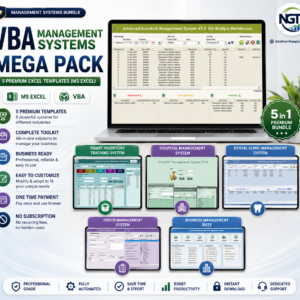
- VBA Management Systems Mega Pack: 5 Excel VBA management systems in one bundle
Browse all VBA tools or the Excel IT templates.







Reviews
There are no reviews yet.