



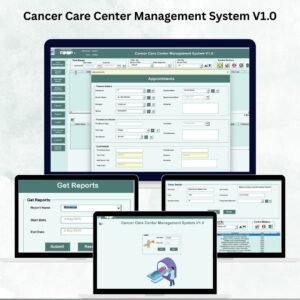
Managing a cancer care center is a complex task that requires precision, efficiency, and seamless coordination across patients, staff, treatments, and finances. The Cancer Care Center Management System V1.0 is a ready-to-use Excel and VBA-based solution designed to simplify these operations in one powerful tool.
This system eliminates the need for multiple spreadsheets or manual record-keeping by providing an integrated platform where you can manage patient records, track appointments, monitor expenses, assign doctors, and generate detailed reports. With user-friendly forms, secure access controls, and automated processes, this tool ensures accuracy, saves time, and enhances patient care.

🔑 Key Features of Cancer Care Center Management System V1.0
🔐 Login Form
Secure access with User ID & Password (Default: Admin1 / abcd).
Simple login process with the option to press Enter or use the login button.
📋 Main Form – Central Hub
Interactive list box to view all records.
Filter and sort records by date or column.
Main action buttons: Add, Update, Delete, Export, and View History.
Export data directly to Excel for reporting or backup.
📅 Appointments Form
Add, edit, and cancel patient appointments.
Simplify scheduling for doctors and patients.
👩⚕️ Patients Master Form
Store complete patient details and treatment history.
Maintain accurate and up-to-date records.
🧪 Test Type Master Form
Manage and categorize different cancer-related tests.
Ensure treatments/tests are mapped accurately.
👨⚕️ Doctor Master Form
Maintain doctor details including specialty, schedule, and assigned patients.
💰 Expenses Form
Track operational and treatment-related expenses.
Support cost management and financial control.
📊 Advanced Functionalities
User Management – Add/update users, reset passwords, and control access.
Manage Lists – Customize treatments, departments, and test lists.
Log Form History – Track every modification for full accountability.
Access Control – Restrict sensitive data by roles.
Reports – Generate patient, financial, and operational reports (exportable).
Email Integration – Send reports or notifications directly via email.
Logout Button – Securely exit after use.
📦 What’s Inside the System
✅ Fully Automated Excel & VBA Tool
✅ Patient Records & Appointment Tracking
✅ Doctor & Treatment Management
✅ Expense Tracking & Financial Reporting
✅ Secure Multi-User Login & Role-Based Access
✅ Log History for Transparency
✅ Customizable Data Lists (tests, treatments, departments)
✅ Report Exporting & Email Integration
Everything is designed to provide a streamlined workflow for cancer care centers.
👥 Who Can Benefit from This System?
🏥 Cancer Care Center Administrators – Manage operations from one platform.
👨⚕️ Doctors & Specialists – Access accurate patient data and schedules.
👩⚕️ Nurses & Medical Staff – Simplify treatment tracking and appointments.
💰 Finance Teams – Track expenses and manage budgets.
📊 Management & Decision Makers – Use reports for strategic insights.
This system is ideal for small, medium, and large cancer care centers looking for affordable yet professional management software.
📋 Best Practices
🔄 Update patient, appointment, and treatment data regularly.
🔎 Use filters & sorting to find records faster.
💾 Backup data by exporting regularly.
👩💼 Assign user roles carefully to maintain confidentiality.
📊 Review logs and generate reports periodically for performance analysis.
✅ Advantages of Cancer Care Center Management System
Centralized Management – Patients, doctors, expenses, and reports in one system.
Improved Efficiency – Automation reduces manual work and errors.
Data Security – Access control protects sensitive medical information.
Better Patient Care – Fast, accurate access to treatment and history.
Financial Control – Keep track of costs and budgets.
Customizable Reports – Generate data-driven insights instantly.
🔗 Click here to read the Detailed blog post
Watch the step-by-step video Demo:
🔗 Visit our YouTube channel to learn step-by-step video tutorials
Compatibility and Requirements
- Needs Microsoft Excel desktop on Windows with macros enabled.
- The login form and the data entry forms run on VBA, so the file does not work in Excel for the web, Google Sheets or mobile apps.
- Microsoft’s guide Enable or disable macros in Microsoft 365 files shows how to turn macros on.
Frequently Asked Questions
Which forms are included?
A login form, the Main Form, plus Appointments, Patients Master, Test Type Master, Doctor Master and Expenses forms.
Can different staff have different access?
Yes. User Management lets you add users, reset passwords and restrict sensitive data by role.
Can I see who changed a record?
Yes. The Log Form History keeps a record of every change.
Can I export or email reports?
Yes. Patient, financial and operational reports can be exported to Excel, and reports or notifications can be sent by email from the system.
Related Healthcare Templates
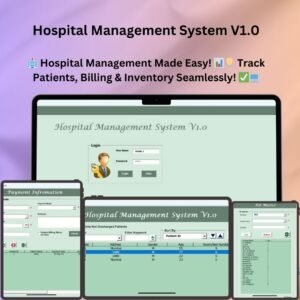
- Hospital Management System V1.0: a hospital management system in Excel
- Dental Clinic Management System V1.0: a dental clinic management system in Excel
- Oncology Services KPI Dashboard in Excel: track oncology services KPIs in Excel
- Oncology Services Dashboard in Power BI: an oncology services dashboard in Power BI
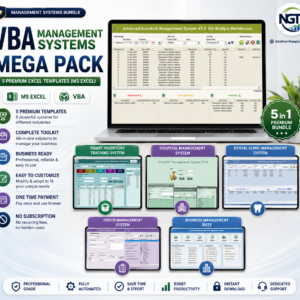
- Healthcare & Hospital Management Bundle: healthcare templates in one bundle
Browse all Excel VBA tools or the template bundles.





Reviews
There are no reviews yet.