



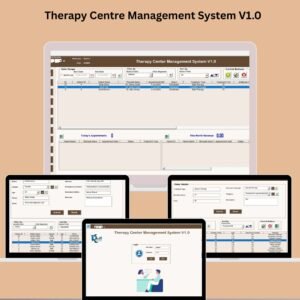
Managing a therapy center requires juggling appointments, patient data, therapist schedules, expenses, and more. If you’re tired of using scattered tools and manual tracking, the Therapy Centre Management System V1.0 is here to streamline your clinic’s entire workflow in one secure and efficient Excel + VBA-based tool.
This powerful yet easy-to-use system is built specifically for therapy clinics and centers that want to simplify administration, reduce errors, and improve productivity. Whether you run a small clinic or a growing multi-therapist center, this system gives you total control of your operations.
✨ Key Features of Therapy Centre Management System V1.0

🔐 Secure Login Form: Protect sensitive data with user ID and password access.
📋 Main Dashboard Hub: Navigate through patient records, appointments, expenses, and more.
🧾 Add, Update, Delete Records: Manage clinic data with ease and flexibility.
📤 Export to Excel: Share or back up your data anytime with a single click.
🗓️ Appointment Scheduler: Never miss a session again with an organized calendar.
🧑⚕️ Patient Master Record: Track treatment history and personal details in one place.
💼 Therapist Master: Manage therapist info, schedules, specialties, and performance.
💳 Expense Tracker: Monitor clinic spending and categorize expenses for clarity.
📈 User-Friendly Filters and Sorts: Quickly access the exact record you need.
👥 User Management: Define roles and control access levels for your team.
📦 What’s Inside the Therapy Centre Management System?
This all-in-one Excel tool includes:
Login Form: Secure entry point with default credentials (Admin1 / abcd).
Main Form Interface: Intuitive dashboard with quick-action buttons.
Appointments Form: Create, view, and manage therapy session schedules.
Patients Master Form: Central repository for patient information and history.
Treatment Master Form: Store and manage available therapy types.
Therapist Master Form: Keep therapist profiles organized and accessible.
Expense Management: Track and analyze clinic expenditures.
User Access Settings: Customize permissions based on staff roles.
Export Options: Back up any data for external use or reporting.
🛠️ How to Use the Therapy Centre Management System
Login with your user credentials (default: Admin1 / abcd).
Use the Main Form to navigate between appointments, patients, and other modules.
Add or update records directly from the dashboard using the control buttons.
Use filters and sort options to search and organize your data quickly.
Export data to Excel for backups or reporting.
Manage user roles and restrict access to sensitive areas as needed.
No technical expertise required — this tool is designed for simplicity and productivity!
👩⚕️ Who Can Benefit from This Tool?
🎯 Therapy Clinic Owners – Organize your clinic’s operations efficiently.
🎯 Clinic Managers & Admins – Track appointments, expenses, and records from one dashboard.
🎯 Therapists – View schedules, update treatment logs, and access patient info securely.
🎯 Health Professionals – Simplify multi-patient and multi-therapist coordination.
🎯 New Clinics – Start your clinic with a professional, ready-to-use management system.
📘 Click here to read the Detailed blog post
📺 Visit our YouTube channel to learn step-by-step video tutorials
👉 Youtube.com/@PKAnExcelExpert
Watch the step-by-step video tutorial:
Compatibility and Requirements
- This file uses VBA macros. Use Microsoft Excel desktop on Windows with macros enabled.
- Excel for the web, Google Sheets and the Excel mobile apps are not supported.
- Microsoft explains how to turn macros on in Enable or disable macros in Microsoft 365 files.
Frequently Asked Questions
How do I log in the first time?
Use the default user ID and password listed above, then set up your own users and access levels in User Access Settings.
Which modules are included?
Appointments, Patients Master, Treatment Master, Therapist Master, Expense Management and User Access Settings, all reached from the Main Form.
Can I back up my data?
Yes. The export option copies records to a separate Excel file for backups or reporting.
Can I limit what staff can see?
Yes. User management lets you define roles and control access levels for each team member.
Can I find records quickly?
Yes. Filters and sort options help you find a patient, appointment or expense in a few clicks.
Related Clinic Management Templates
- Physiotherapy Clinic Management System V1.0 in Excel VBA: built for physiotherapy clinics
- Multispecialty Clinic Management System V1.0 in Excel: for clinics with several specialties
- Dental Clinic Management System V1.0: the same approach for dental practices
- Physiotherapy & Rehabilitation KPI Dashboard in Excel: report on clinic KPIs
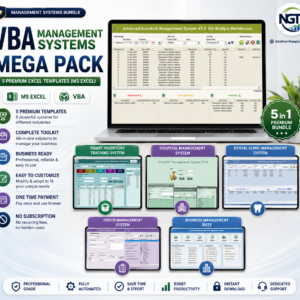
- VBA Management Systems Mega Pack: 5 Excel VBA systems in one bundle
Browse all Excel VBA tools or the Health and Safety templates.















Reviews
There are no reviews yet.