

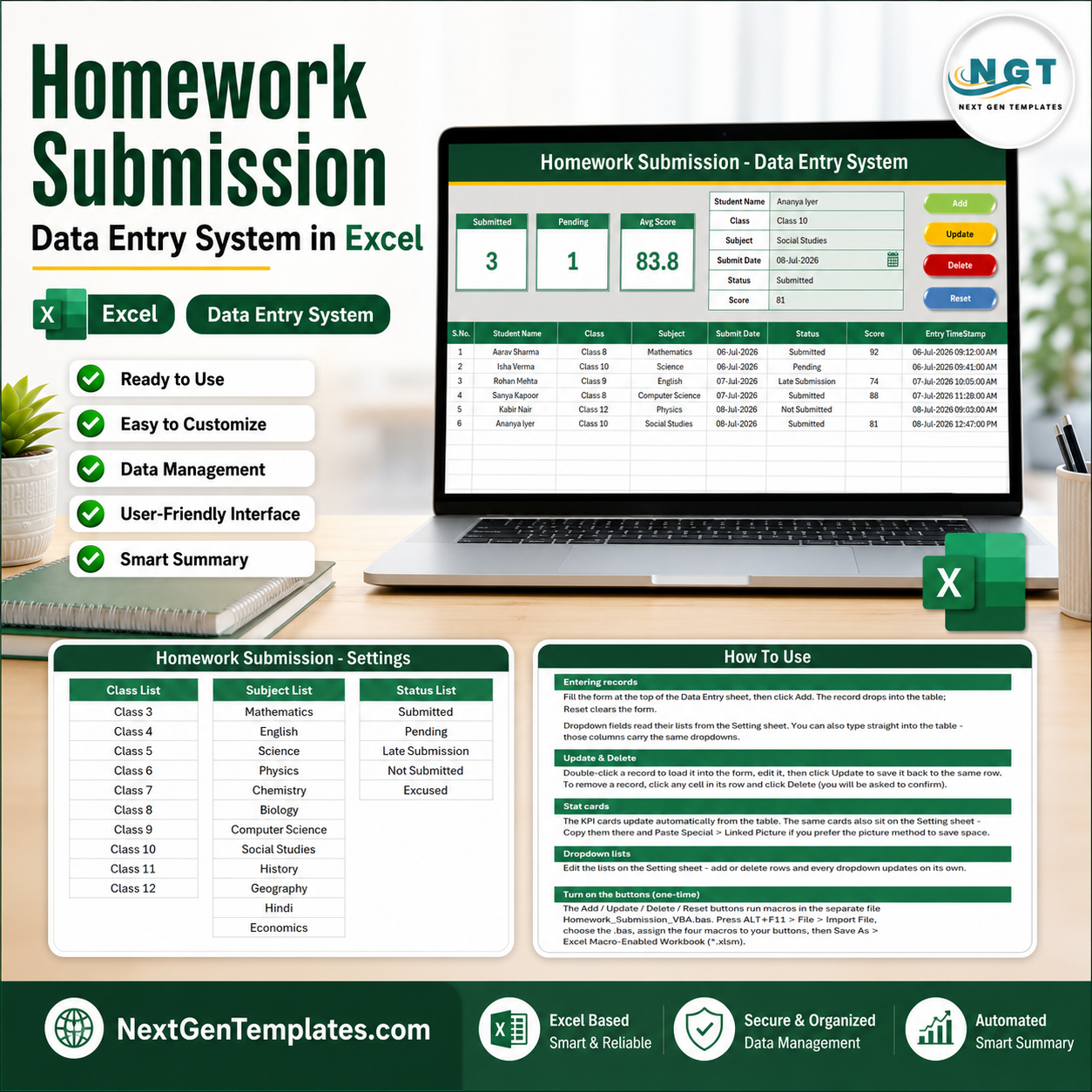

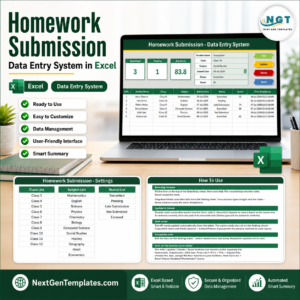
The Homework Submission Data Entry System in Excel records every assignment through a 7-field form — Student Name, Class & Section, Subject, Assignment Title, Due Date, Submission Date and Status — and refreshes 3 live KPI cards the moment you click Add. Setup takes under 10 minutes: paste your class and subject lists into the Setting sheet and every dropdown is ready to use.
🌍 Join 10,000+ customers in 180+ countries using NextGenTemplates to replace paid SaaS tools with one-time-purchase Excel, Google Sheets, Power BI, and HTML templates.
✅ Instant download · One-time payment · No subscription · No per-user fees · Lifetime access
🔑 Key Features of the Homework Submission Data Entry System in Excel
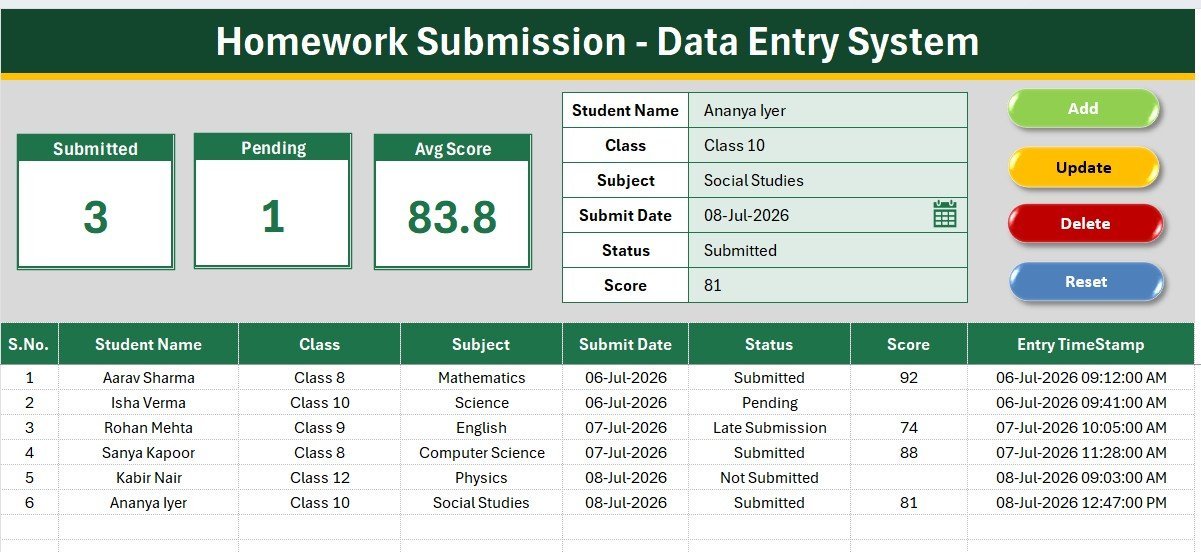
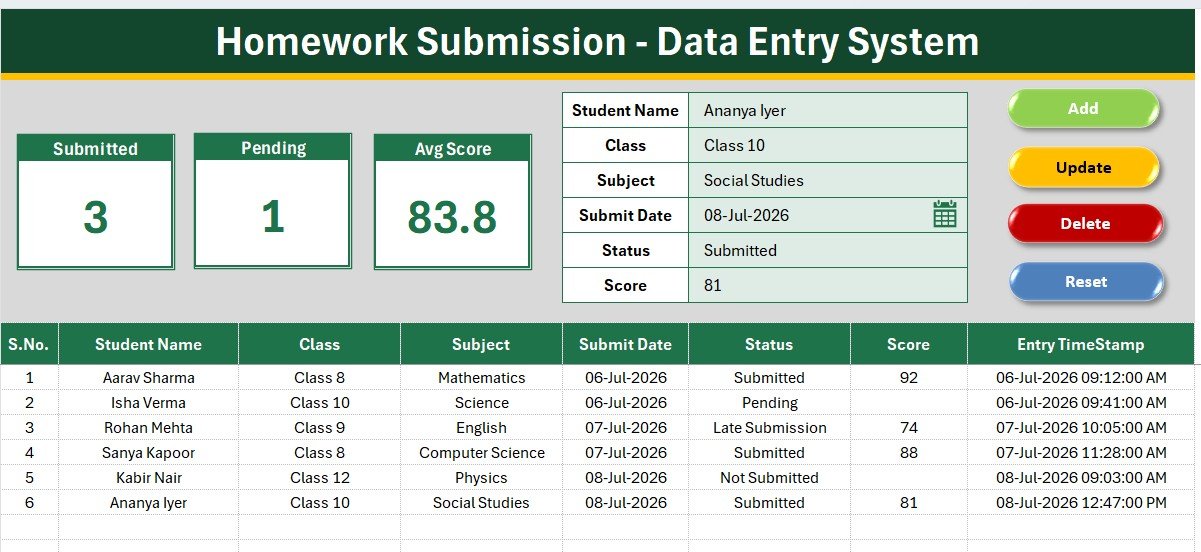
📝 One-screen entry form. The form sits directly above the records table, so a teacher logging 40 submissions never scrolls or switches sheets. Type the student name, pick the class, subject and status from dropdowns, enter the due and submission dates, then click Add.
🖱️ Four VBA buttons — Add, Update, Delete, Reset. Add writes a new row, Update edits the selected record in place, Delete removes it after a confirmation prompt, and Reset clears the form for the next entry. No manual copy-paste and no accidental overwrites.
📊 Three live KPI cards. Total Assignments Logged, Submitted On Time and Pending Submissions sit at the top of the Data Entry sheet and recalculate with every record, so a class teacher can read the pending count before the bell rings.
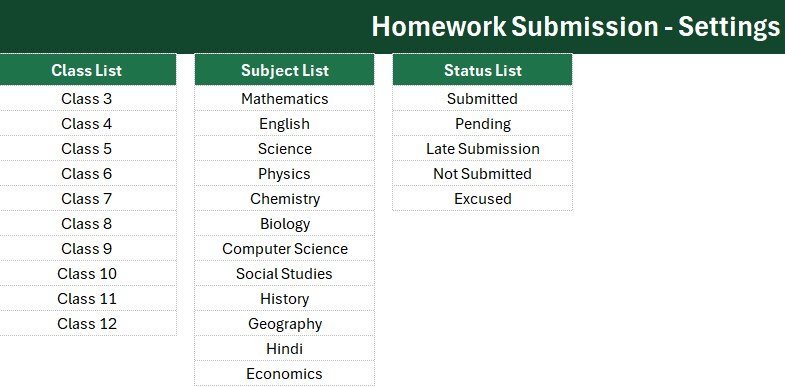
🔽 Dropdown lists driven by the Setting sheet. Class & Section, Subject and Status pull from named ranges, so Maths and Math never end up as two different subjects in your term report.
🔢 Automatic serial number and entry timestamp. Every row receives an auto S.No and an Entry TimeStamp value, giving you a defensible record of exactly when each submission was logged.
🎨 Clean, print-ready layout. Aptos Narrow throughout, a dark heading bar on every sheet, a gold divider line and a gray dashboard panel — it reads like a finished school system rather than a spreadsheet experiment.
📦 What’s Inside the Homework Submission Data Entry System in Excel
Sheet 1: Data Entry
The working screen. KPI stat cards sit in the gray panel at the top, the seven-field form sits beneath them alongside the four coloured action buttons, and the records table begins at row 15 with S.No, all seven fields and the Entry TimeStamp column.
Sheet 2: Setting
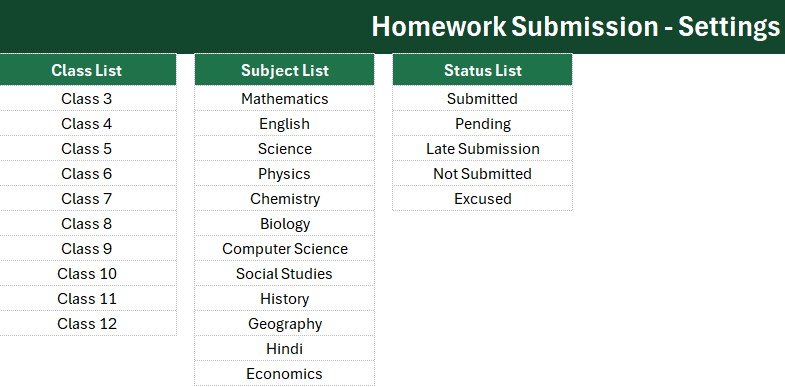
Holds the source lists behind every dropdown — classes and sections, subject names and submission statuses — plus a duplicate set of KPI stat cards you can copy into a report as a Linked Picture. Edit a list here and the form picks it up immediately.
Sheet 3: Instructions
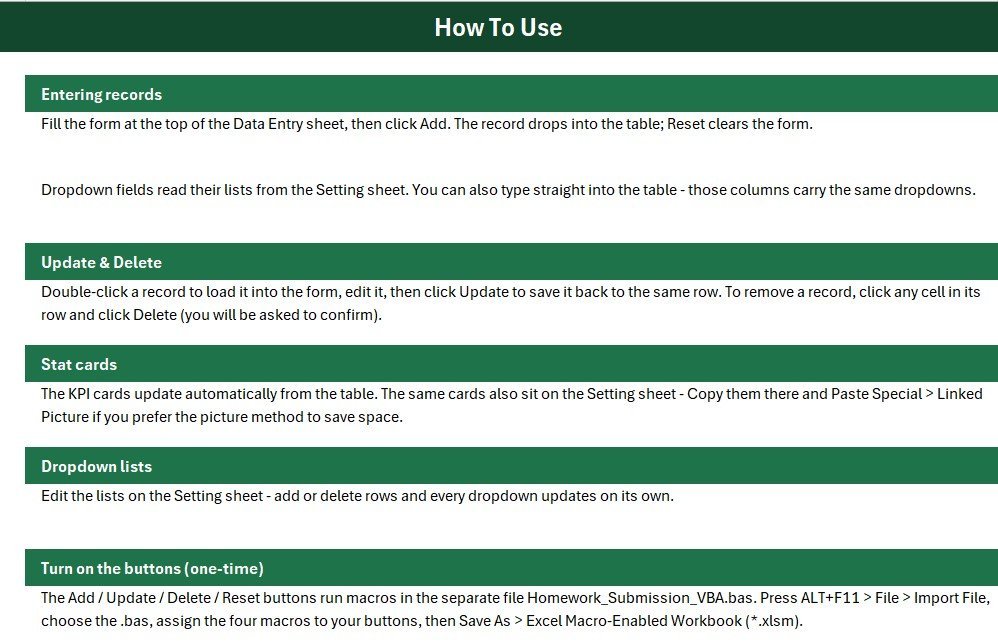
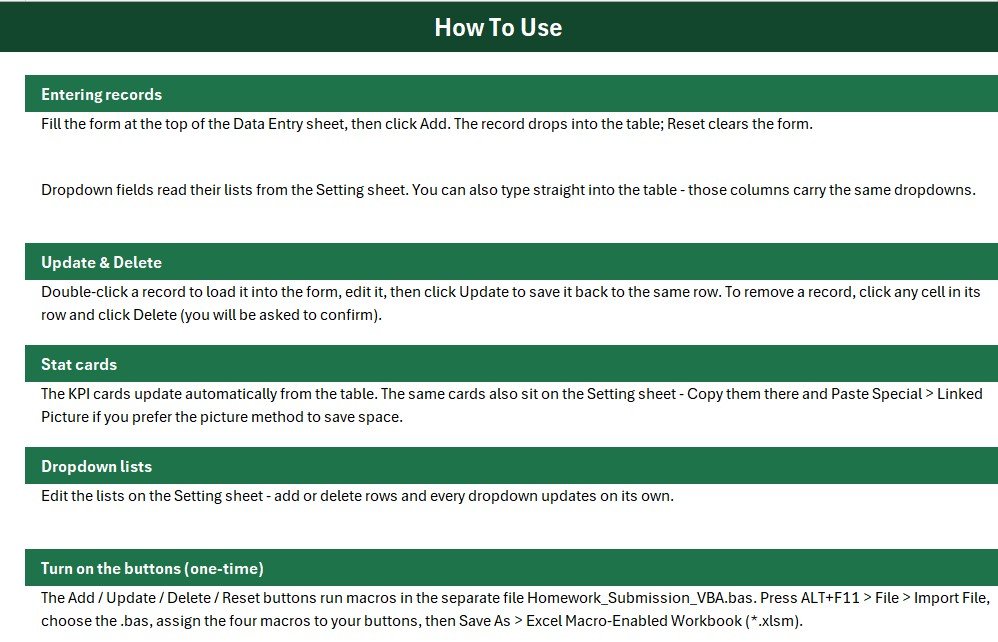
A short setup guide covering how to enable macros, how to assign the four macros to the button shapes, and how to add your own classes and subjects. Written for teachers, not developers.
📁 A Get More Templates sheet is included as well, and the VBA code ships as a separate .bas module so you can import it and save the workbook as .xlsm in one step. Browse more Education Templates or the wider MS Excel Templates collection.
📊 Homework Submission Data Entry System in Excel vs. Google Sheets vs. Paid LMS — Where This Fits
| Feature | Homework Submission Data Entry System (Excel) | Google Sheets homework tracker | Paid LMS (Canvas / Teachmint) |
|---|---|---|---|
| Cost | $5.99 one-time ✅ | Free, but build it yourself | $4–15 per teacher / month |
| Platform | Microsoft Excel 2013 or later | Browser only | Browser + vendor app |
| Setup time | Under 10 minutes ✅ | 2–4 hours to build formulas | Days, plus school IT approval |
| Works offline | Yes — fully offline ✅ | No | No |
| Add / Update / Delete buttons | Built-in VBA macros ✅ | Manual row editing | Yes |
| Real-time team collaboration | Via OneDrive co-authoring | Yes ✅ | Yes ✅ |
| Student data stays on your device | Yes ✅ | Stored in Google cloud | Stored on vendor servers |
| Customisable fields | Rename or add any field ✅ | Yes | Limited to vendor schema |
| Year-1 cost for 5 teachers | $5.99 total ✅ | $0 + your build time | $240–900 |
For teachers who want a dependable submission log without asking the school to fund an LMS licence, the Homework Submission Data Entry System in Excel sits in the sweet spot.
👥 Who This Template Is For — and Who It’s Not For
✅ This template is built for:
- Class teachers and subject teachers tracking daily or weekly homework for 20–200 students
- Home tutors and coaching-centre owners who need a submission record per batch
- School coordinators compiling term-end submission compliance reports
- Homeschooling parents logging assignments across several subjects
❌ This template is NOT for:
- Schools that need students to upload files — this logs submissions, it does not collect them
- Institutions requiring parent-facing logins, SSO or automated notification emails
- Teams with no access to desktop Excel, since the macros need the Windows or Mac desktop app
- Anyone who needs several teachers editing the same file simultaneously all day
⚙️ How to Use the Homework Submission Data Entry System in Excel
- Unzip the download and open the workbook in Microsoft Excel on desktop.
- Import the included .bas module through the VBA editor, then save the file as .xlsm.
- Enable macros when Excel prompts you — the four buttons will not run without them.
- Open the Setting sheet and replace the sample classes, subjects and statuses with your own.
- Return to Data Entry, fill the form and click Add. The record lands in the table with an S.No and timestamp.
- Select any row, edit the form and click Update to correct it, or Delete to remove it.
- Read the three KPI cards at any point for total, on-time and pending submission counts.
💼 Real-World Use Cases
Meera teaches Class 7 Science at a 600-student CBSE school. She logs each lab-report submission as it arrives, filters the records table by Pending, and prints the shortlist for her Friday parent-communication slot — replacing the paper register she used to lose every term.
Daniel runs a small maths coaching centre with four batches. He uses Class & Section as the batch name, and the Submitted On Time card gives him a single number to quote to parents at monthly review meetings, without paying a per-student platform fee.
Priya coordinates the middle school at an IB campus. At term end she merges each teacher’s copy into one workbook, sorts by Status, and produces a submission-compliance summary for the academic head in about fifteen minutes.
❓ Frequently Asked Questions
What does the Homework Submission Data Entry System in Excel track?
The Homework Submission Data Entry System in Excel tracks seven fields per record: Student Name, Class & Section, Subject, Assignment Title, Due Date, Submission Date and Status, plus an automatic serial number and entry timestamp on every row.
How long does setup take?
Under ten minutes. Import the .bas module, save as .xlsm, enable macros, then replace the sample class and subject lists on the Setting sheet. The Homework Submission Data Entry System in Excel is ready to log records straight after that.
Do I need to know VBA to use it?
No. The macros behind Add, Update, Delete and Reset are already written and documented on the Instructions sheet. You only assign each macro to its button once, which the guide walks through step by step.
How does this compare with a paid LMS like Canvas or Teachmint?
An LMS collects files and manages courses at $4–15 per teacher each month. The Homework Submission Data Entry System in Excel costs $5.99 once, works offline, and keeps student data on your own device — it logs and reports submissions rather than hosting them.
Can I add more subjects or change the status list?
Yes. Every dropdown reads from a named range on the Setting sheet, so adding a subject or a new status such as Resubmitted takes one row. The form picks up the change immediately with no formula edits.
Will it work on Excel for Mac or Excel Online?
The Homework Submission Data Entry System in Excel runs on desktop Excel 2013 and later on Windows, and on Excel for Mac with macros enabled. Excel Online cannot run VBA, so the buttons will not work in the browser.
👤 About the Author
Built by PK — Microsoft Certified Professional with 15+ years of Excel, Google Sheets, and Power BI experience. Founder of NextGenTemplates, reaching 300K+ subscribers across YouTube channels (@PK-AnExcelExpert, @NextGenTemplates, @NeoTechNavigators). Every template is hand-built and tested before release.
🔗 Explore Related Templates
- Exam Marks Entry Data Entry System in Excel — the natural companion: log the marks once the homework is in.
- Online Class Tracker Data Entry System in Excel — record classes taught, hours and student attendance.
- Library Book Issue Data Entry System in Excel — same form-and-KPI layout for issuing and returning books.
- Online Certification Providers Dashboard in Excel — step up to a full multi-page education dashboard.
📖 Click here to read the Detailed Blog Post
🎥 Visit our YouTube channel for step-by-step video tutorials
👉 YouTube.com/@NextGenTemplates
📅 Last updated: July 2026
Watch the demo video:
Compatibility and Requirements
- Runs in Microsoft Excel desktop on Windows, with macros enabled. The Add, Update, Delete and Reset buttons are VBA macros, so they do not run in Excel for the web, Google Sheets or mobile apps. Microsoft explains how to turn macros on in Enable or disable macros in Microsoft 365 files.
- Import the included .bas module and save the workbook as .xlsm before you use the buttons.
More Questions About This Template
Is there a Google Sheets version?
There is a Homework Checklist in Google Sheets for teachers who work in a browser. It is a checklist and does not include the VBA form or buttons.
Is there a simpler Excel option without macros?
The Homework Checklist in Excel is a checklist version for teachers who do not want to enable macros.
Related Education Templates
- Homework Checklist in Excel: a lighter way to tick off homework by student
- Homework Checklist in Google Sheets: the same idea in Google Sheets
- Exam Marks Entry Data Entry System in Excel: log marks once homework is in
- Online Class Tracker Data Entry System in Excel: record classes taught
- Education & School Management Bundle: 8 education templates in one download
Browse all Excel VBA tools.





























Reviews
There are no reviews yet.