



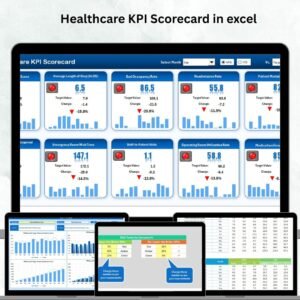
Managing healthcare performance is not just about reports—it’s about making smarter decisions that improve patient care, reduce costs, and optimize resources. That’s where our Healthcare KPI Scorecard in Excel comes in. This ready-to-use template is designed to help hospitals, clinics, and healthcare teams monitor essential KPIs with ease, all in one structured dashboard.
With the flexibility of Excel, you don’t need expensive software or complex BI tools. Instead, you get an intuitive, customizable, and powerful tool that allows you to track, analyze, and report clinical, financial, and operational KPIs in real time. Whether you’re an administrator, a clinic manager, or part of the analytics team, this scorecard ensures you always have the right insights at your fingertips.
✨ Key Features of the Healthcare KPI Scorecard in Excel
✅ Comprehensive Dashboard View – Track MTD (Month-to-Date), YTD (Year-to-Date), and PY (Previous Year) comparisons in one place.
✅ Interactive Dropdowns – Select months or KPIs easily without manually adjusting reports.
✅ Actual vs Target Comparison – See where your healthcare KPIs stand against set benchmarks.
✅ Color-Coded Visuals – Use conditional formatting and indicators for instant performance insights.
✅ KPI Definitions Built-In – Eliminate confusion with a dedicated KPI Definition sheet.
✅ Trend Analysis – Visualize performance patterns over time with charts and slicers.
✅ Data Integration – Simple input sheet for easy updates and smooth integration with visuals.
✅ Scalable & Flexible – Add, modify, or customize KPIs as per your organizational needs.
📂 What’s Inside the Healthcare KPI Scorecard
This template comes with four professionally designed worksheet tabs:

Scorecard Sheet 🗂️ – The main interface where you analyze MTD and YTD KPI performance with dropdowns and conditional visuals.
KPI Trend Sheet 📊 – Select any KPI and view its group, type, formula, and trend chart across time.
Input Data Sheet ✍️ – Record actuals, targets, and previous year data to keep your dashboard up to date.
KPI Definition Sheet 📖 – A built-in glossary of KPIs that ensures consistency and clarity for all users.
🛠️ How to Use the Healthcare KPI Scorecard
Using this Excel tool is simple and intuitive:
Enter Your Data into the Input Data Sheet (actuals, targets, PY).
Review Definitions in the KPI Definition Sheet to avoid misinterpretation.
Analyze Performance on the Scorecard Sheet for instant MTD & YTD insights.
Track Trends in the KPI Trend Sheet to identify patterns and gaps.
Update Regularly to ensure accurate and actionable reporting.
Within minutes, you’ll have a clear overview of how your healthcare organization is performing across key areas like patient satisfaction, financial sustainability, and operational efficiency.
👥 Who Can Benefit from This Scorecard?
This product is perfect for:
🏥 Hospital Administrators – Get a high-level overview of performance to support strategic decisions.
💉 Clinic Managers – Monitor daily operations and improve resource allocation.
📊 Healthcare Analytics Teams – Use built-in visuals and KPI definitions to deliver insights quickly.
👨⚕️ Medical Staff & Department Heads – Track operational KPIs such as bed occupancy, staffing ratios, and wait times.
💼 Financial Officers – Monitor revenue, margins, and cost efficiencies for better budgeting.
🏢 Small Clinics & Healthcare Startups – Scale the template to fit your needs without investing in expensive BI tools.
📌 Click here to read the Detailed Blog Post
📺 Visit our YouTube channel to learn step-by-step video tutorials
Watch the step-by-step video tutorial:
Compatibility and Requirements
- Works in Microsoft Excel desktop (Excel 2016 or later, or Microsoft 365).
- Month and KPI selection use drop-down lists. Microsoft’s guide to creating a drop-down list explains how these lists work.
Frequently Asked Questions
Which sheets are in the Healthcare KPI Scorecard?
Four: the Scorecard sheet, the KPI Trend sheet, the Input Data sheet and the KPI Definition sheet.
What do MTD, YTD and PY mean in the scorecard?
MTD is month to date, YTD is year to date and PY is the previous year. The Scorecard sheet compares actual against target for MTD and YTD and shows the previous year figure next to them.
Where do I enter my numbers?
On the Input Data sheet. Record actuals, targets and previous year data there, and the Scorecard and KPI Trend sheets update from it.
Can I add my own healthcare KPIs?
Yes. You can add, change or remove KPIs to fit your hospital or clinic. Describe each one on the KPI Definition sheet so everyone reads it the same way.
How do I see the trend for one KPI?
Open the KPI Trend sheet and select the KPI. It shows the KPI group, type and formula with a trend chart over time.
Related Healthcare Templates
- Healthcare KPI Dashboard In Excel: the same KPIs as a dashboard
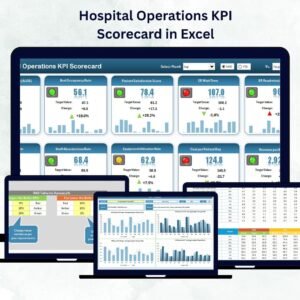
- Hospital Operations KPI Scorecard in Excel: a scorecard for hospital operations
- Healthcare KPI Dashboard in Google Sheets: a browser-based version
- Healthcare KPI Dashboard in Power BI: for teams that report in Power BI
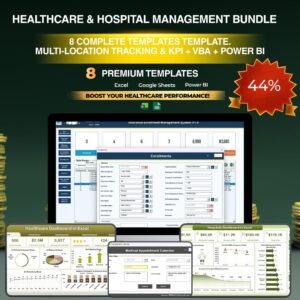
- Healthcare & Hospital Management Bundle: 8 healthcare templates in one pack
Browse all Health and Safety templates or the Excel KPI dashboard templates.



Reviews
There are no reviews yet.