



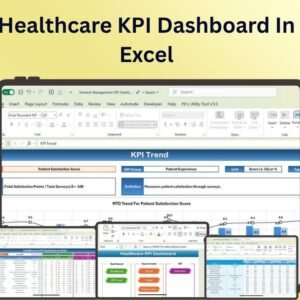
The Healthcare KPI Dashboard in Excel is a comprehensive tool designed specifically for healthcare professionals, administrators, and managers to monitor key performance indicators (KPIs) in a healthcare setting. This customizable Excel-based dashboard provides a clear and dynamic view of essential healthcare metrics such as patient satisfaction, staff performance, patient outcomes, financial health, and more.
This dashboard is built to help healthcare organizations stay on top of key metrics that directly impact patient care and operational efficiency. With real-time data updates and intuitive visualizations, the Healthcare KPI Dashboard allows healthcare teams to track performance, identify trends, and make informed decisions to enhance service delivery, optimize resources, and improve patient care. Whether you are managing a hospital, clinic, or outpatient facility, this tool helps you maintain the highest standards of care and operational excellence.

Key Features of the Healthcare KPI Dashboard in Excel:
📊 Comprehensive Healthcare KPIs
Track a wide range of healthcare KPIs, including patient satisfaction, patient outcomes, staff productivity, financial metrics, and more.
🩺 Patient and Staff Performance Monitoring
Monitor key performance indicators related to patient care and staff performance, ensuring that patient satisfaction and outcomes are optimized.
📅 Real-Time Data Updates
Automatically update your dashboard as new data is entered, providing you with real-time insights into your healthcare operations and patient care performance.
💡 Visual Insights and Reporting
Easily visualize data with charts, graphs, and progress indicators, making it easier to identify trends, areas of improvement, and key insights.
🛠️ Customizable Design
Tailor the dashboard to fit the unique needs of your healthcare facility by adjusting KPIs, metrics, and visualizations based on your organizational goals.
Why You’ll Love the Healthcare KPI Dashboard in Excel:
✅ Comprehensive Monitoring – Keep track of multiple KPIs in one place, including patient outcomes, financial health, staff efficiency, and patient satisfaction. ✅ Real-Time Performance Insights – Stay on top of your healthcare facility’s performance with up-to-date data and actionable insights. ✅ Customizable to Your Needs – Adjust the dashboard to monitor the specific metrics that matter most to your healthcare organization. ✅ Clear Visual Representation – Visualize key data points using dynamic charts and graphs to easily communicate performance to stakeholders. ✅ User-Friendly Interface – Designed with ease of use in mind, making it simple to input data and track performance without advanced Excel knowledge.
What’s Inside the Healthcare KPI Dashboard in Excel:
- Healthcare KPIs – Track critical healthcare KPIs such as patient satisfaction, wait times, staff performance, patient outcomes, and financial metrics.
- Real-Time Data Updates – The dashboard automatically updates as you input new data, providing you with accurate, real-time insights.
- Customizable Layout – Modify the layout and KPIs to suit your healthcare organization’s needs and goals.
- Charts and Visual Indicators – Use pie charts, bar graphs, and line charts to visually represent key metrics and track progress.
- Performance Monitoring – Track individual and team performance, monitor operational efficiency, and ensure optimal patient care delivery.
How to Use the Healthcare KPI Dashboard in Excel:
1️⃣ Download the Template – Access the Excel dashboard instantly after purchase. 2️⃣ Input Your Healthcare Data – Enter data related to patient care, staff performance, financials, and more. 3️⃣ Customize the Dashboard – Adjust the dashboard to reflect your healthcare organization’s unique goals and priorities. 4️⃣ Monitor Performance – Use the dashboard to monitor the healthcare facility’s performance, track progress, and identify areas of improvement. 5️⃣ Make Informed Decisions – Use the insights to make data-driven decisions that enhance patient care, optimize resources, and improve overall healthcare outcomes.
Who Can Benefit from the Healthcare KPI Dashboard in Excel:
- Healthcare Administrators
- Hospital Managers
- Medical Professionals
- Financial Managers in Healthcare
- Patient Care Coordinators
- Healthcare Analysts
- Anyone involved in managing or overseeing healthcare services and operations
The Healthcare KPI Dashboard in Excel is the ideal tool for healthcare organizations looking to optimize their operations, improve patient care, and make data-driven decisions. With its real-time updates, customizable design, and easy-to-read visuals, this tool empowers healthcare professionals to monitor and improve key aspects of healthcare delivery and business performance.
Click here to read the Detailed blog post
https://www.pk-anexcelexpert.com/healthcare-kpi-dashboard-in-excel/
Visit our YouTube channel to learn step-by-step video tutorials
Compatibility and Requirements
- Works in Microsoft Excel desktop (Excel 2016 or later, or Microsoft 365).
- Microsoft’s guide Create a chart from start to finish explains the Excel feature this file is built on.
Frequently Asked Questions
Which healthcare KPIs can I track?
Patient satisfaction, wait times, patient outcomes, staff performance and productivity, and financial metrics.
Does the dashboard update when I add data?
Yes. The charts and indicators update as you enter new data.
What charts does it use?
Pie charts, bar graphs, line charts and progress indicators show the key metrics and trends.
Can I adjust it for a clinic or outpatient facility?
Yes. You can change the layout, KPIs and visuals to match the goals of your hospital, clinic or outpatient facility.
Related Healthcare Templates
- Healthcare Dashboard in Excel: a multi-page healthcare dashboard in Excel
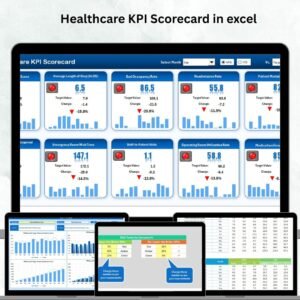
- Healthcare KPI Scorecard in excel: a scorecard view of healthcare KPIs
- Healthcare KPI Dashboard in Google Sheets: the same KPI dashboard in Google Sheets
- Healthcare KPI Dashboard in Power BI: the same KPI dashboard in Power BI
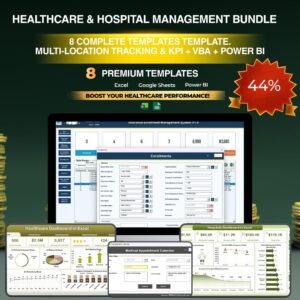
- Healthcare & Hospital Management Bundle: healthcare templates in one bundle
Browse all Excel KPI dashboards or the Health and Safety templates.









Reviews
There are no reviews yet.