


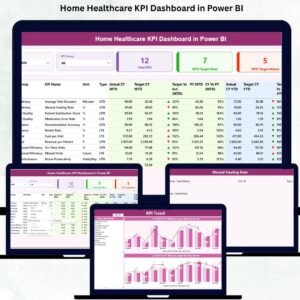
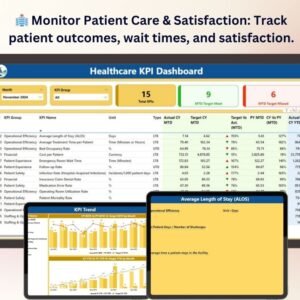
The Healthcare KPI Dashboard in Power BI is a powerful and interactive tool designed for healthcare providers, administrators, and managers to track and analyze key performance indicators (KPIs) that drive the success of healthcare operations. This Power BI-based dashboard allows you to monitor a wide range of performance metrics related to patient care, operational efficiency, financial performance, and staff productivity, providing valuable insights to enhance decision-making and improve the quality of care delivered.
Whether you’re managing a hospital, clinic, or any healthcare facility, the Healthcare KPI Dashboard in Power BI offers real-time data tracking and in-depth analytics to help you optimize healthcare delivery, manage costs, and ensure high standards of patient care. By utilizing this dashboard, you can ensure your healthcare organization operates efficiently, meets regulatory standards, and improves patient outcomes.
Key Features of the Healthcare KPI Dashboard in Power BI
🏥 Track Patient Care & Satisfaction
Monitor patient satisfaction levels, patient wait times, treatment outcomes, and readmission rates. Evaluate the quality of care provided and ensure that patients receive timely and effective treatment.
⚡ Operational Efficiency Metrics
Track key operational metrics such as bed occupancy, emergency room wait times, staff-to-patient ratios, and patient flow efficiency. Identify bottlenecks and inefficiencies to optimize healthcare delivery and improve patient outcomes.
💰 Financial Performance & Cost Management
Monitor financial KPIs like revenue, expenses, profit margins, and cost per patient. Track your facility’s financial health, identify cost-saving opportunities, and make informed decisions to improve profitability while maintaining quality care.
📊 Staff Productivity & Performance
Track staff productivity, employee satisfaction, and workforce utilization. Monitor shift coverage, workload distribution, and employee performance to ensure efficient use of resources and effective service delivery.
🖥️ Interactive & Real-Time Insights
The Power BI dashboard provides real-time updates and dynamic visualizations on all KPIs. Customize the dashboard with filters, slicers, and detailed reports to drill down into the data and get actionable insights.
Why You’ll Love the Healthcare KPI Dashboard in Power BI

✅ Monitor Patient Care & Satisfaction
Keep track of patient outcomes, satisfaction, and wait times to improve care delivery and ensure a positive patient experience.
✅ Optimize Operational Efficiency
Track key operational metrics to identify inefficiencies, optimize resource allocation, and improve patient flow, reducing wait times and improving overall service delivery.
✅ Improve Financial Performance
Monitor financial health by tracking key revenue and expense KPIs. Use the insights to identify cost-saving opportunities and improve profitability without compromising patient care.
✅ Enhance Staff Productivity
Ensure optimal use of healthcare staff by tracking productivity, satisfaction, and performance. Maintain proper staffing levels and optimize workforce utilization for better service delivery.
✅ Make Data-Driven Decisions
Utilize real-time data from the dashboard to make informed decisions about patient care, resource allocation, cost management, and operational improvements.
What’s Inside the Healthcare KPI Dashboard Template?
- Patient Care & Satisfaction Tracking: Monitor patient outcomes, satisfaction levels, and readmission rates.
- Operational Efficiency Metrics: Track bed occupancy, emergency room wait times, and staff-to-patient ratios.
- Financial Performance Tracking: Monitor revenue, expenses, profit margins, and cost per patient.
- Staff Productivity & Utilization: Track staff performance, satisfaction, and workload distribution.
- Real-Time Data Insights: Access live updates on key healthcare KPIs to optimize decision-making.
- Customizable KPIs: Adjust the dashboard to track the KPIs that are most important to your healthcare facility.
How to Use the Healthcare KPI Dashboard in Power BI
1️⃣ Download the Template: Get instant access to your Healthcare KPI Dashboard in Power BI.
2️⃣ Input Your Data: Enter patient care, operational, financial, and staff performance data into the dashboard.
3️⃣ Track & Monitor KPIs: Use the dashboard to track patient satisfaction, financial performance, and operational efficiency in real-time.
4️⃣ Analyze & Optimize: Use the insights from the dashboard to optimize healthcare delivery, reduce costs, and improve patient care.
Who Can Benefit from the Healthcare KPI Dashboard in Power BI?
🔹 Healthcare Providers & Administrators
🔹 Hospital & Clinic Managers
🔹 Financial Managers in Healthcare
🔹 Patient Care Coordinators
🔹 Human Resource & Staffing Managers
🔹 Anyone Involved in Improving Healthcare Operations & Outcomes
Enhance your healthcare operations with the Healthcare KPI Dashboard in Power BI. Track patient care, optimize efficiency, manage costs, and improve staff productivity to provide high-quality care and boost overall performance.
Click here to read the Detailed blog post
Visit our YouTube channel to learn step-by-step video tutorials
Youtube.com/@PKAnExcelExpert
Compatibility and Requirements
- Opens in Power BI Desktop, which is free to download from Microsoft.
- Filters and slicers let you drill into the KPIs.
- Need the software? Microsoft explains how in Get Power BI Desktop.
Frequently Asked Questions
Which KPIs does the Healthcare KPI Dashboard track?
Patient satisfaction, wait times, treatment outcomes and readmission rates, bed occupancy, staff-to-patient ratios, revenue, expenses, profit margins, cost per patient and staff productivity.
Can I filter the dashboard?
Yes. Filters and slicers let you drill down into the data.
What data do I need to enter?
Patient care, operational, financial and staff performance data.
Is there an Excel or Google Sheets version?
Yes. See the Excel edition and the Google Sheets edition.
Related Healthcare Templates
- Healthcare KPI Dashboard in Excel: the same KPIs in Excel
- Healthcare KPI Dashboard in Google Sheets: the same KPIs online
- Healthcare Dashboard in Power BI: a patient and revenue dashboard
- Healthcare KPI Scorecard in Excel: a scorecard view of healthcare KPIs
- Healthcare & Hospital Management Bundle: 8 healthcare templates in one download
Browse all Power BI KPI dashboards or the Power BI dashboards.


Reviews
There are no reviews yet.