


The Disaster Relief Dashboard in Power BI reports on 500 sample relief responses across 5 interactive pages, 25 KPI cards and 218 report visuals, driven by a 19-field dataset covering 6 disaster types, 5 regions, 6 relief camps and 5 partner agencies. Setup takes under 10 minutes: open the .pbix, point Power Query at your own workbook, and press Refresh.
🌍 Join 8,400+ teams in 40+ countries using NextGenTemplates to replace paid SaaS tools with one-time-purchase Excel, Google Sheets, Power BI, and HTML templates.
✅ Instant download · One-time payment · No subscription · No per-user fees · Lifetime access
📌 Please read this first. This is an analytical Power BI report built over a sample dataset. It is not an emergency response system, not a beneficiary registry, and not a substitute for any official relief coordination platform. It reads a spreadsheet of already-recorded response records and summarises them. It does not dispatch, alert, allocate, or coordinate anything, and it holds no personal data — the shipped sample carries no names, contact details, household identifiers or case notes of any kind.
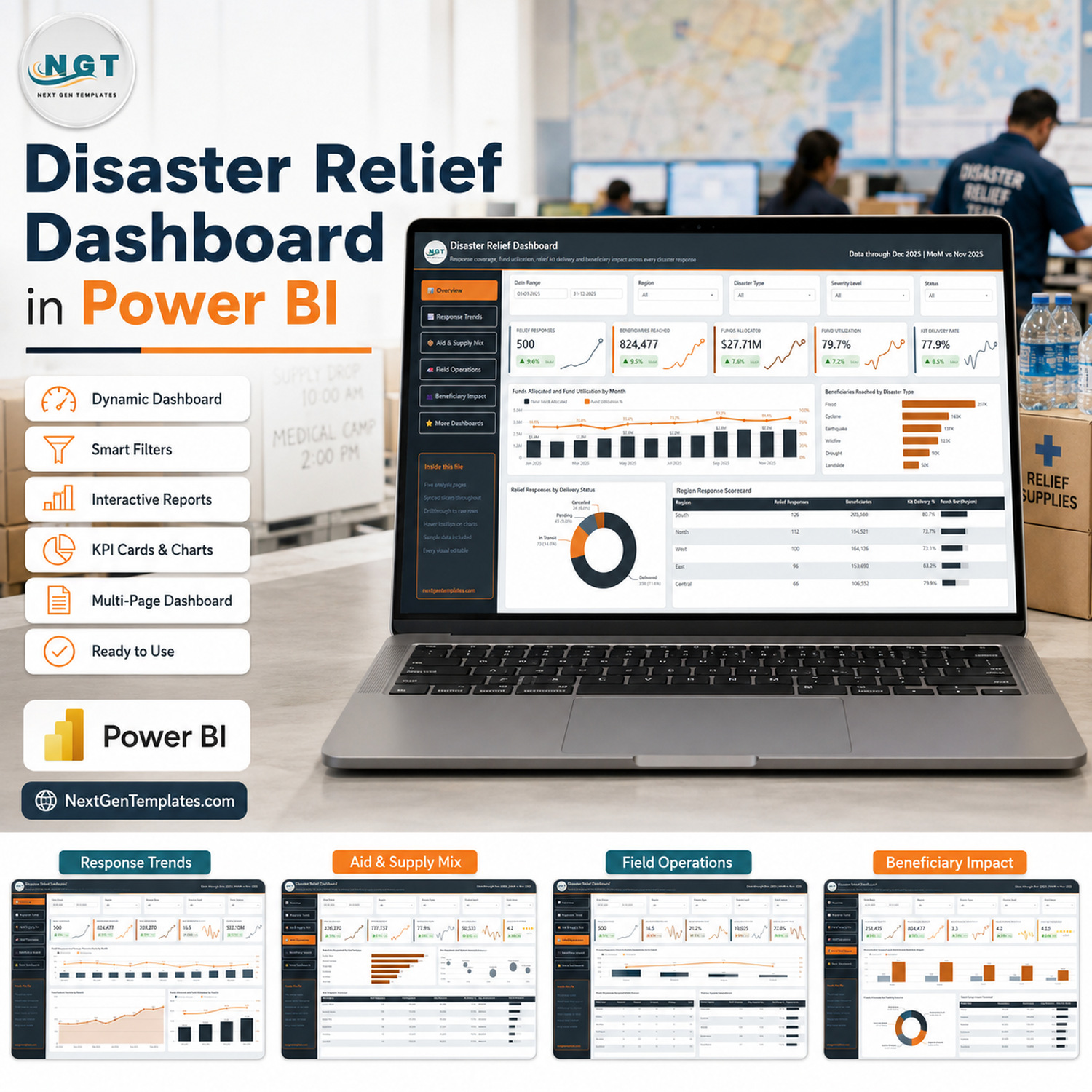
🔑 Key Features of the Disaster Relief Dashboard in Power BI
- 🔹 Five analysis pages, one sidebar — Overview, Response Trends, Aid & Supply Mix, Field Operations and Beneficiary Impact. The sidebar buttons are page navigation, so the whole report is one click deep from anywhere.
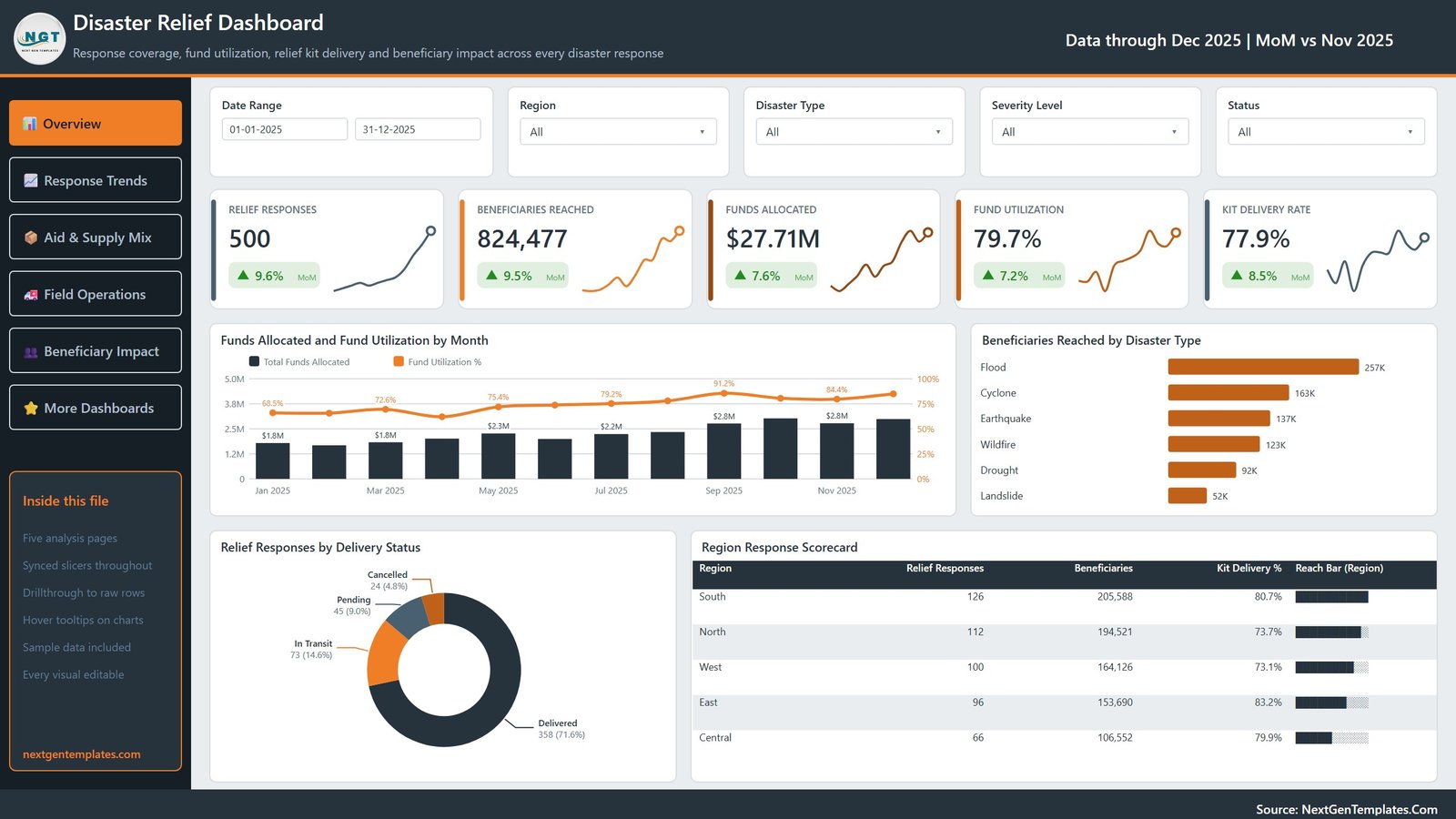
- 🔹 25 KPI cards with month-on-month deltas — every card carries a sparkline and a green or red MoM arrow. The Overview reports 500 relief responses, 824,477 beneficiaries reached, $27.71M funds allocated, 79.7% fund utilization and a 77.9% kit delivery rate.
- 🔹 Five synced slicers on every page — a Date Range pair plus Region, Disaster Type and Severity Level carry across all five pages, and each page adds one slicer of its own: Status, Funding Source, Aid Category, Relief Camp and Partner Agency.
- 🔹 A working drillthrough page — a hidden Details page is wired as a real Power BI drillthrough target on eight fields (Disaster Type, Region, Relief Camp, Partner Agency, Aid Category, Severity Level, Funding Source and Status), so right-clicking any chart element opens the underlying rows filtered to it.
- 🔹 Two report-page tooltips — Trend Detail and Metric Detail are built as tooltip pages, so hovering a chart shows a small formatted panel instead of a raw value list.
- 🔹 34 named DAX measures wired into the visuals — Relief Responses, Beneficiaries, Kits Dispatched, Kits Delivered, Kit Delivery %, Fund Utilization %, Avg. Response Hrs, Cost Per Beneficiary, Reach Per Household and the card variants that carry the MoM comparison.
- 🔹 500 sample records, 19 fields — one row per relief response, dated across the whole of 2025, with allocated and utilized funds, kits dispatched and delivered, households targeted, response hours, volunteers deployed and a satisfaction score.
- 🔹 Every visual is editable — nothing is a picture and nothing is locked. Rename a measure, change a colour, swap a chart type, add your own page.
- 🔹 A user manual PDF ships inside the ZIP alongside the .pbix and the sample Data.xlsx.
📦 What’s Inside the Disaster Relief Dashboard in Power BI
Page 1: Overview
The landing page. KPI cards report Relief Responses, Beneficiaries Reached, Funds Allocated, Fund Utilization and Kit Delivery Rate, each with a month-on-month change. Charts are Funds Allocated and Fund Utilization by Month, Beneficiaries Reached by Disaster Type, Relief Responses by Delivery Status and a Region Response Scorecard table. Slicers: Date Range, Region, Disaster Type, Severity Level and Status.
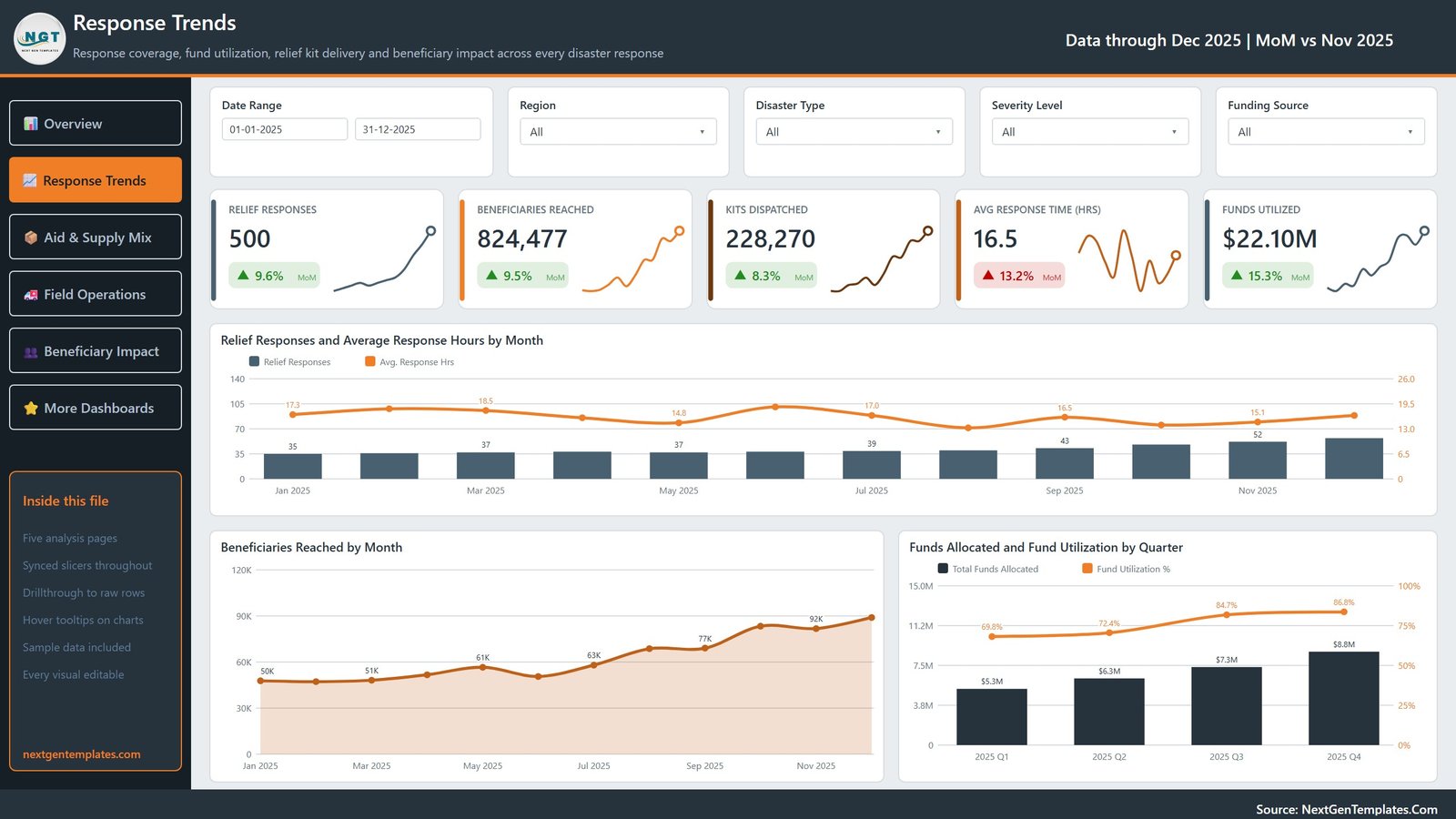
Page 2: Response Trends
The time view. KPI cards report Relief Responses, Beneficiaries Reached, Kits Dispatched, Avg Response Time (Hrs) and Funds Utilized. Charts are Relief Responses and Average Response Hours by Month, Beneficiaries Reached by Month and Funds Allocated and Fund Utilization by Quarter. The page swaps in a Funding Source slicer.
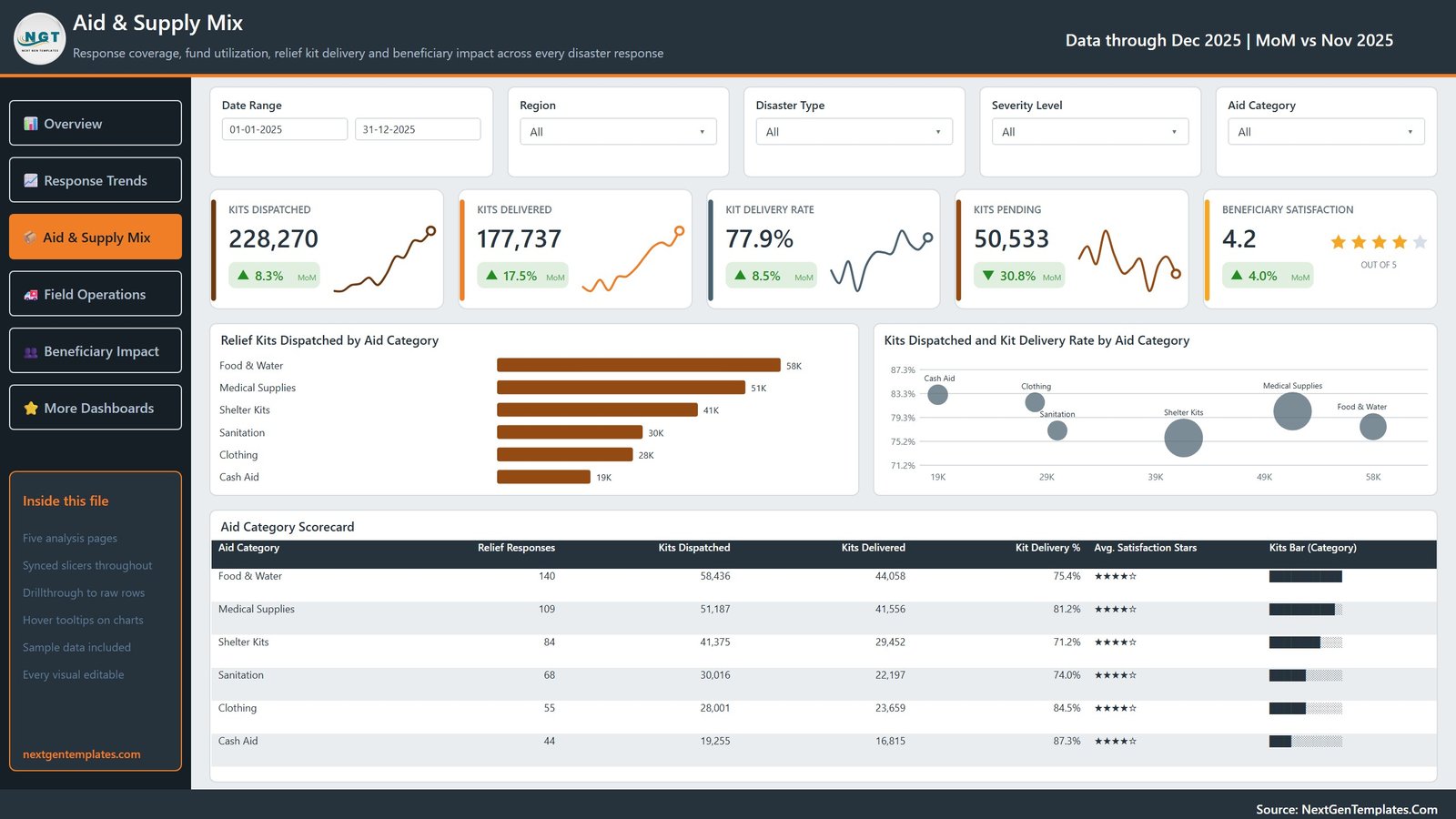
Page 3: Aid & Supply Mix
Where the kits go. KPI cards report Kits Dispatched, Kits Delivered, Kit Delivery Rate, Kits Pending and Beneficiary Satisfaction as a 4.2 out of 5 star rating. Charts are Relief Kits Dispatched by Aid Category, Kits Dispatched and Kit Delivery Rate by Aid Category, and an Aid Category Scorecard table across the six categories from Food & Water down to Cash Aid.
Page 4: Field Operations
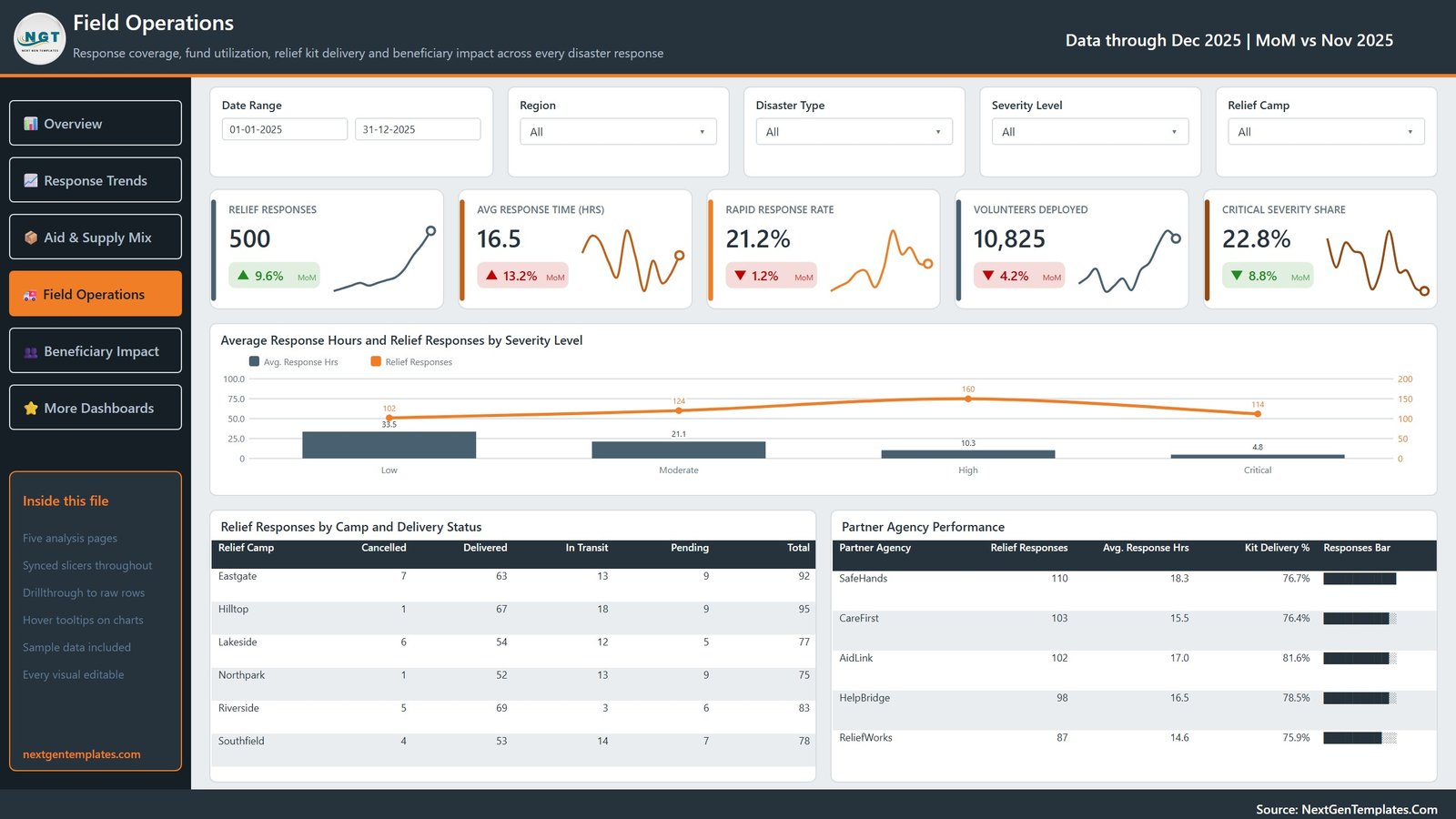
The delivery view. KPI cards report Relief Responses, Avg Response Time (Hrs), Rapid Response Rate, Volunteers Deployed and Critical Severity Share. Charts are Average Response Hours and Relief Responses by Severity Level, a Relief Responses by Camp and Delivery Status matrix across the six camps, and a Partner Agency Performance table for the five agencies.
Page 5: Beneficiary Impact
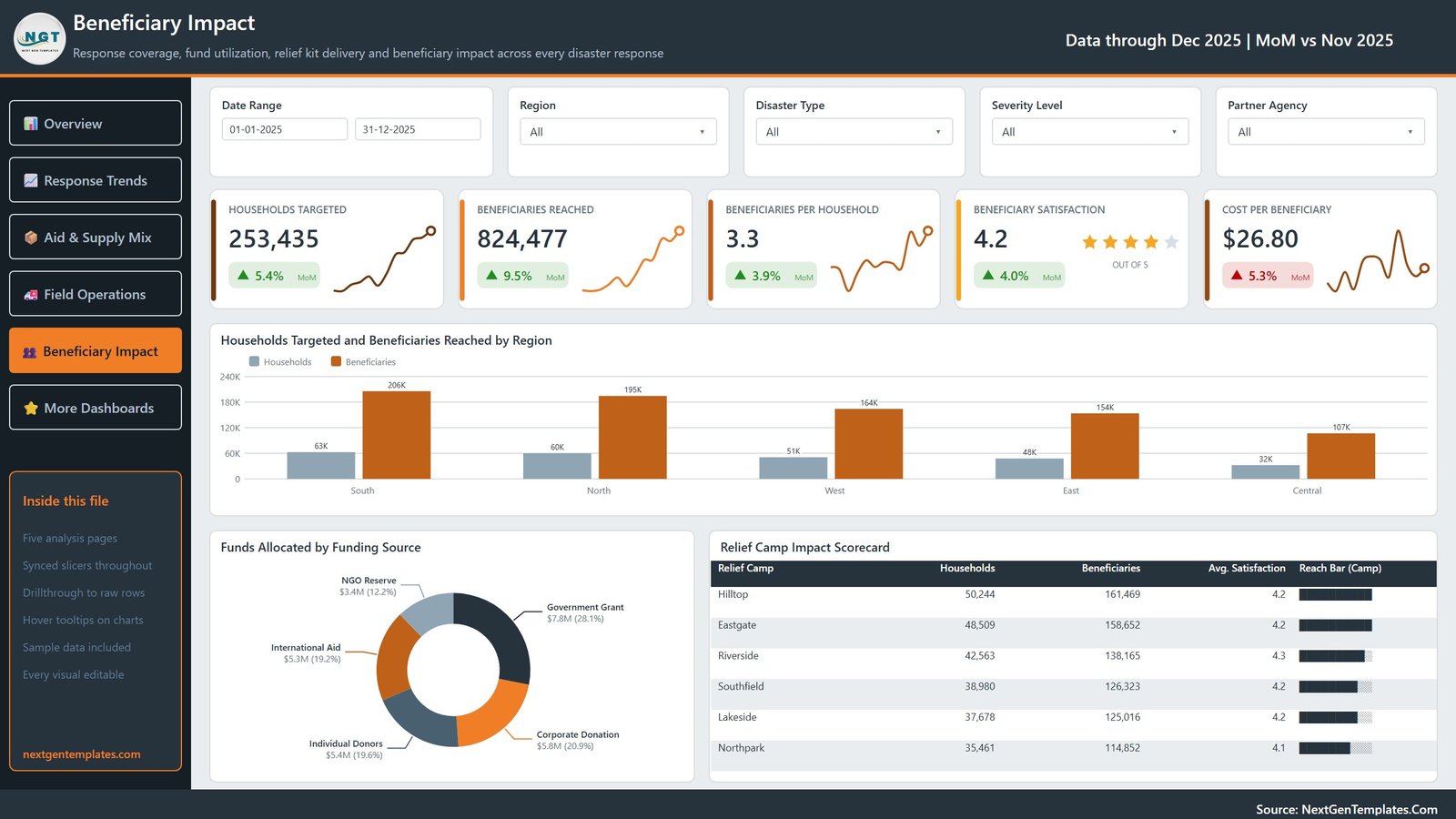
The reach and cost view. KPI cards report Households Targeted, Beneficiaries Reached, Beneficiaries per Household, Beneficiary Satisfaction and Cost per Beneficiary. Charts are Households Targeted and Beneficiaries Reached by Region, Funds Allocated by Funding Source across the five sources, and a Relief Camp Impact Scorecard table.
📊 Disaster Relief Dashboard in Power BI vs. Tableau / Qlik vs. Paid Relief-Analytics SaaS — Where This Fits
| Feature | Disaster Relief Dashboard in Power BI | Tableau / Qlik build | Paid relief-analytics SaaS |
|---|---|---|---|
| Cost | $17.99 one-time | $75 / user / month (Tableau Creator) | $300-2,000 / month per organisation |
| Platform | Power BI Desktop (free) ✅ | Paid desktop licence required | Vendor-hosted, browser only |
| Setup time | Under 10 minutes ✅ | Days to weeks to build from scratch | Weeks of onboarding and data mapping |
| Report ships pre-built | Yes — 5 pages, 25 KPI cards ✅ | No, blank canvas | Fixed vendor templates only |
| Editable visuals and measures | Every visual and all 34 measures ✅ | Yes | Rarely — vendor controls the schema |
| Drillthrough to raw rows | Built in, on 8 fields ✅ | Build it yourself | Sometimes, often gated by tier |
| Data stays on your machine | Yes, offline .pbix ✅ | Yes | No — uploaded to the vendor |
| Year-1 cost at 5 users | $17.99 total ✅ | $4,500 | $3,600-24,000 |
| Real-time field data capture | No — reports an existing dataset | No | Yes ✅ |
For teams that want a finished relief-operations report they can open, rebrand and refresh today without a licence negotiation, the Disaster Relief Dashboard in Power BI sits in the sweet spot.
👥 Who This Template Is For — and Who It’s Not For
✅ This template is built for:
- Programme and M&E officers at NGOs and charities who already keep a response log in Excel and need a monthly report from it
- Relief logistics and supply coordinators tracking kits dispatched against kits delivered by camp, category and agency
- Finance and grants staff reporting fund allocation and utilization to donors by funding source, region and quarter
- Power BI learners who want a realistic 19-field model with working drillthrough and tooltip pages to pull apart
❌ This template is NOT for:
- Live emergency dispatch or incident command — this is a reporting layer, not an operational response system
- Beneficiary case management or registry work — there is no person-level record here, by design, and you should not add one to a file you share
- Teams needing hosted multi-user editing with row-level security out of the box — that requires a Power BI Pro workspace you configure yourself
- Anyone needing certified compliance reporting against a specific donor or cluster standard without adapting the measures first
⚙️ How to Use This Power BI Report
- Unzip the download. You get the .pbix report, the sample Data.xlsx and a user manual PDF.
- Open the .pbix in Power BI Desktop, free from Microsoft. The report opens fully populated with the sample data.
- Click through the five sidebar pages to see which KPI cards, charts and slicers sit on each one before changing anything.
- Replace the sample rows in Data.xlsx with your own response log, keeping the 19 column headers exactly as they are.
- In Power BI, open Transform data, point the source at your own file path, close and apply, then press Refresh. Every page updates.
- Right-click any bar, slice or table row and choose Drillthrough to open the Details page filtered to that selection.
- Rebrand it: change the title, swap the logo and recolour the theme, then publish to your workspace or export to PDF.
💼 Real-World Use Cases
Priya coordinates programmes for a regional relief NGO. Her field teams already file a response record per deployment. She drops that export into the Data.xlsx, refreshes, and takes the Beneficiary Impact page straight into her monthly board meeting — households targeted, beneficiaries reached and cost per beneficiary by region, without rebuilding a deck.
Marcus runs supply logistics for a five-camp operation. He lives on the Aid & Supply Mix page, where kits dispatched against kits delivered exposes exactly which aid categories are leaking. When Shelter Kits shows the lowest delivery rate, he drills through to the underlying rows to see which camps and agencies account for it.
Dana handles donor reporting at a foundation. She filters the Overview by Funding Source and takes the Funds Allocated and Fund Utilization by Month chart into her grant acquittals, so each donor sees what their own money did rather than a blended organisation-wide figure.
❓ Frequently Asked Questions
What does the Disaster Relief Dashboard in Power BI actually measure?
It measures response coverage, fund allocation and utilization, relief kit dispatch and delivery, response time, volunteer deployment and beneficiary reach. It reports 34 named DAX measures across 5 pages and 25 KPI cards, all recalculated from whatever data you load.
Is this an emergency response or coordination system?
No. The Disaster Relief Dashboard in Power BI is an analytical report over a spreadsheet of already-recorded responses. It does not dispatch teams, raise alerts, allocate resources or coordinate agencies, and it is not a replacement for any official relief coordination platform your organisation uses.
Does the sample data contain any beneficiary personal information?
No. The shipped Data.xlsx holds 500 rows and 19 columns of operational fields only — response ID, date, disaster type, region, camp, agency, aid category, severity, funding source, status and numeric totals. There is no name, contact detail, household identifier, address or case note anywhere in it.
How long does setup take?
Under 10 minutes. Unzip, open the .pbix in Power BI Desktop, paste your own rows into the 19-column layout, repoint the Power Query source at your file and press Refresh. The report recalculates every card, chart and table automatically.
How does this compare to a paid relief-analytics platform?
A hosted platform gives you live field data capture and vendor support for $300-2,000 a month. This template gives you the reporting layer for $17.99 once, running offline on free Power BI Desktop, with every measure and visual editable. It reports data you already have rather than collecting it.
Can I change the KPIs, charts and branding?
Yes. Nothing in this report is locked or an image. All 34 DAX measures, every chart, the colour theme, the sidebar and the page names are editable, and you can add your own pages and measures on top of the existing model.
Do I need a Power BI subscription?
No. The report opens and refreshes in Power BI Desktop, which Microsoft provides free. A Power BI Pro or Premium licence is only needed if you want to publish the report to the Power BI Service and share it with colleagues there.
👤 About the Author
Built by PK — Microsoft Certified Professional with 15+ years of Excel, Google Sheets, and Power BI experience. Founder of NextGenTemplates, reaching 300K+ subscribers across YouTube channels (@PK-AnExcelExpert, @NextGenTemplates, @NeoTechNavigators). Every template is hand-built and tested before release.
🔗 Explore Related Templates
Also available as: the Disaster Relief Dashboard in Excel is the same 500-record, 19-field relief dataset rebuilt as a pivot-driven Excel workbook with 20 pivot charts and 25 pivot tables — the right pick if your team lives in Excel rather than Power BI.
If you report on a fixed KPI set rather than a full analytical report, the Disaster Relief KPI Dashboard in Excel and the Disaster Relief KPI Dashboard in Google Sheets are scorecard-style siblings with month pickers and traffic lights.
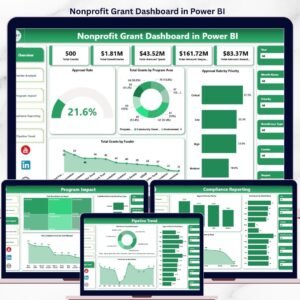
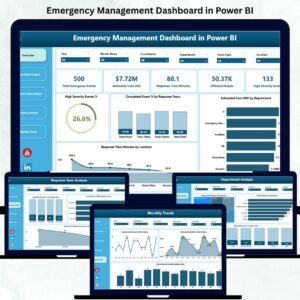
Working the wider emergency and non-profit space? See the Emergency Management Dashboard in Power BI, the Nonprofit Grant Dashboard in Power BI for grant utilization, and the Relief Distribution Data Entry System in Excel if you need to capture the response records this dashboard reports on. Browse the full range of Power BI Dashboards for other departments.
📖 Click here to read the Detailed Blog Post
🎥 Visit our YouTube channel for step-by-step video tutorials
👉 YouTube.com/@NextGenTemplates
📅 Last updated: September 2026
Watch the demo video:
Compatibility and Requirements
- Works in Power BI Desktop, which is free from Microsoft. Download it from Get Power BI Desktop.























Reviews
There are no reviews yet.