


Key Features of Finance Sales Supply Chain Resilience Calendar in Excel ✨
In today’s competitive business world, finance and sales leaders must stay resilient while dealing with supply chain disruptions, shifting market demands, and compliance pressures. Missing even a single deadline or failing to track critical events can impact revenue, profitability, and customer trust.
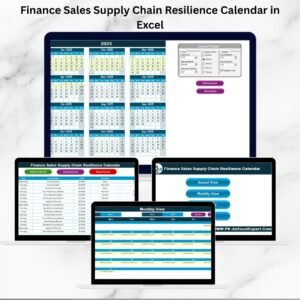
That’s why the Finance Sales Supply Chain Resilience Calendar in Excel is designed as a ready-to-use, interactive, and customizable tool. It helps businesses track, manage, and monitor operations in a structured way.
Key highlights include:
📅 Multi-Level Views – Annual, Monthly, and Daily views for complete visibility.
🛠️ Easy Navigation – Quick access buttons from the Home tab.
🎨 Custom Themes – Choose from five color themes.
📊 Central Database – All events captured in one Events sheet.
✅ Smart Controls – Add, update, or delete events with simple forms.
🔎 Highlight Options – Highlight weekends, important dates, or events automatically.
🚀 Scalable – Suitable for small businesses and large organizations alike.
This calendar is more than a planner—it is a resilience tool for finance, sales, and supply chain leaders.
What’s Inside the Finance Sales Supply Chain Resilience Calendar 📂
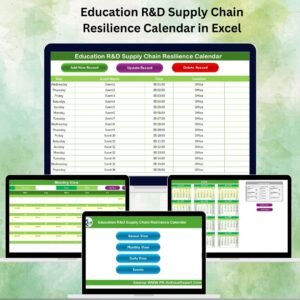
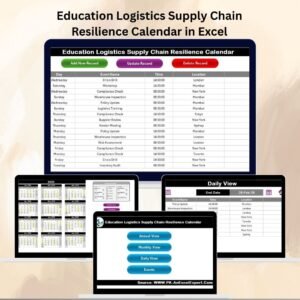
The template comes with five structured worksheets, each serving a unique purpose:
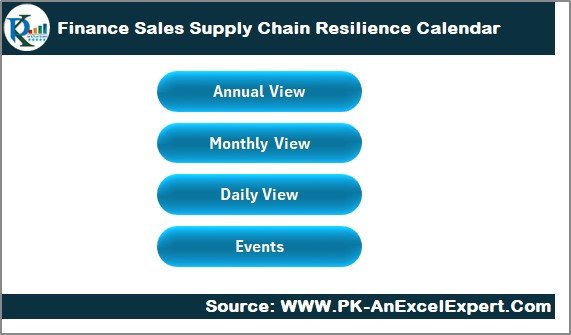
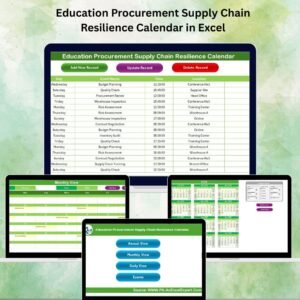
Home Sheet Tab
Acts as the control tower.
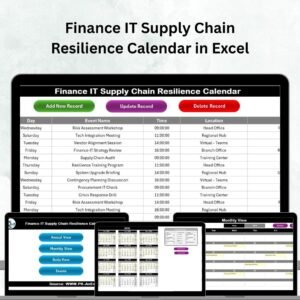
Includes four navigation buttons: Annual View, Monthly View, Daily View, and Events.
Saves time by letting users jump directly to the desired section.
Annual View Sheet Tab
Displays all 12 months in one view.
Control Panel Features:
Input Group: Select year, starting month, and start day.
Theme Group: Choose from five pre-set color themes.
Highlight Group: Highlight weekends or mark events in yellow.
Functional Buttons: Add New Event, Show Event.
Perfect for long-term planning such as financial reporting, supply chain milestones, and sales campaigns.
Monthly View Sheet Tab
Focuses on a single month at a time.
Shows one event per date directly; multiple events are flagged as “more than 1…”.
Functional Buttons: Add New Event, Show Event.
Best for monthly sales targets, supplier follow-ups, and client meetings.
Daily View Sheet Tab
Provides a detailed list of events within a chosen date range.
Features: Start/End Date selectors, Refresh button, Add Event button.
Helps in tracking daily operational tasks like reconciliations, supplier deliveries, or sales calls.
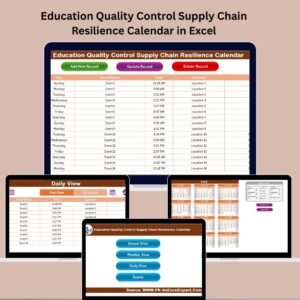
Events Sheet Tab
Functions as the database of all records.
Captures: ID, Date, Day, Event Name, Time, Location, Description.
Functional Buttons: Add New Record, Update Existing Record, Delete Record.
Acts as the master sheet for tracking and historical reporting.
How to Use the Finance Sales Supply Chain Resilience Calendar 🛠️
Open the template in Excel.
Use the Home tab buttons to navigate between sheets.
In Annual or Monthly views, add events using the Add Event button.
View detailed event lists via the Show Event button.
For daily management, set date ranges in the Daily View.
Track and manage all event data in the Events sheet.
Customize with themes, highlights, and inputs as per your organization’s needs.
Who Can Benefit from This Calendar 👥
🏦 Finance Managers – For tax deadlines, reporting, and reconciliations.
💼 Sales Directors – For client meetings, targets, and campaigns.
🚚 Supply Chain Leaders – For shipment tracking and vendor management.
📊 Business Owners – For aligning finance, sales, and operations in one place.
Advantages of Finance Sales Supply Chain Resilience Calendar 🌟
✅ Improved Coordination – Aligns finance, sales, and supply chain.
📌 Centralized Data – All events stored in one Excel file.
⏳ Time Efficiency – Quick navigation saves hours.
🎨 Customization – Themes and highlights for personalization.
🔒 Data Accuracy – Auto-generated IDs and event forms reduce errors.
📈 Decision Support – Identify risks, delays, and opportunities.
💡 Cost-Effective – Excel-based, no extra software required.
Opportunities for Improvement 💡
🔔 Add Outlook/Google Calendar integration for reminders.
📱 Enable mobile-friendly compatibility.
📊 Add KPI dashboards linked to event outcomes.
🌐 Share on OneDrive or Google Sheets for real-time collaboration.
Best Practices for Using the Calendar 📘
Update events regularly.
Use clear event titles for quick reference.
Review tasks weekly with the Daily or Monthly view.
Color-code events by department (finance, sales, supply chain).
Assign responsible persons for accountability.
Back up data regularly to avoid loss.
Conclusion 🎯
The Finance Sales Supply Chain Resilience Calendar in Excel is more than a scheduling tool—it is a business resilience framework. With structured sheets, automation features, and centralized tracking, it helps businesses stay agile, efficient, and prepared for disruptions.
Whether you are a finance leader, sales professional, or supply chain manager, this tool ensures clarity, accountability, and stronger operational control.
✅ Click here to read the Detailed blog post
📺 Visit our YouTube channel to learn step-by-step video tutorials
Watch the step-by-step video tutorial:
Compatibility and Requirements
- Works in Microsoft Excel desktop (Excel 2016 or later, or Microsoft 365).
- The Add Event, Show Event and record buttons are form-driven controls built into the workbook. Microsoft’s Excel for Windows training covers the basics if you are new to Excel.
Frequently Asked Questions
Which sheets are included?
Five sheets: Home, Annual View, Monthly View, Daily View and Events.
Where is the event data stored?
All events are saved on the Events sheet, which holds the ID, date, day, event name, time, location and description for each record.
Can I add, update and delete events?
Yes. The Events sheet has buttons to add a new record, update an existing record and delete a record. The Annual View and Monthly View sheets also have an Add New Event button.
Can I change the colors?
Yes. The Annual View control panel lets you pick from five color themes, and you can highlight weekends or mark event dates in yellow.
How do I see events for a date range?
Open the Daily View sheet, choose a start date and an end date, then press Refresh to list the events in that range.
Related Calendar Templates
- Sales Supply Chain Resilience Calendar in Excel: the same calendar built for sales teams
- Finance Procurement Supply Chain Resilience Calendar in Excel: finance and procurement deadlines in one calendar
- Finance Operations Supply Chain Resilience Calendar in Excel: for finance and operations schedules
- Finance Compliance Supply Chain Resilience Calendar in Excel: for compliance dates alongside finance tasks
- Calendar & Planner Pack: 12 calendar and planner templates in one download
Browse all Excel calendar templates.







Reviews
There are no reviews yet.