



Finance Procurement Supply Chain Resilience Calendar in Excel in an unpredictable global economy, supply-chain resilience has become essential for business continuity and financial stability. Disruptions such as supplier delays, currency swings, or compliance bottlenecks can derail procurement timelines and impact profitability.
The Finance Procurement Supply Chain Resilience Calendar in Excel helps you stay ahead of these challenges. This ready-to-use Excel template provides a centralized, automated calendar system that enables finance, procurement, and supply-chain teams to plan, track, and manage all key events — from audits and vendor reviews to payment milestones and risk assessments — throughout the year.
Built entirely in Microsoft Excel, it’s simple, interactive, and scalable — giving your organization total visibility and control over its operational calendar.
⚙️ Key Features of the Resilience Calendar
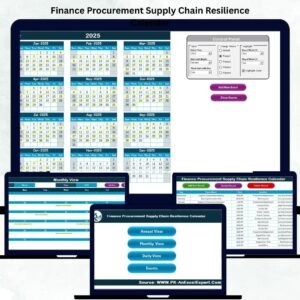
📅 Five Interactive Worksheets: Home Dashboard, Annual View, Monthly View, Daily View, and Events Database.
🧭 Quick-Navigation Buttons: Jump directly to any view — Annual, Monthly, or Daily — with one click.
🎨 Custom Themes: Five color options to match your corporate branding.
✅ Dynamic Year & Month Selection: Choose the year or fiscal start month and watch the entire workbook update instantly.
💡 Smart Highlights: Automatically mark weekends, holidays, or special events in yellow.
🗂️ Automated Event Forms: Add New, Show, Update, or Delete events via built-in VBA user forms — no coding required.
🔍 Multi-Level Views: Switch between strategic (Annual), operational (Monthly), and tactical (Daily) planning modes.
🧾 Event Database: Each record includes ID, Date, Day, Event Name, Time, Location, and Description — ensuring clean audit trails.
🏠 1️⃣ Home Sheet – Central Navigation Hub

The Home tab acts as your control center, with clearly labeled buttons that open any major page. It includes an overview graphic explaining how to navigate and use the calendar effectively — ideal for new users or cross-functional teams.
📆 2️⃣ Annual View – Year-Round Planning
See all 12 months at a glance with a customizable control panel on top.
Select fiscal year and start month.
Highlight weekends or event days automatically.
Use “Add New Event” or “Show Event” buttons for instant updates.
💡 Purpose: Strategic, high-level visibility of every major financial or supply-chain milestone.
🗓️ 3️⃣ Monthly View – Detailed Operational Focus
Perfect for monthly procurement, audit, or payment schedules.
Dropdowns for Month & Year.
Events display automatically on the correct dates.
Cells show “More than 1…” if multiple activities fall on a single day.
🎯 Purpose: Monitor supplier visits, renewals, or invoice approvals within one page.
📅 4️⃣ Daily View – Real-Time Execution
Enter a date range to view all activities scheduled for that period.
Use Add New Event to log fresh tasks.
Filter daily deliverables like shipment tracking, vendor calls, or budget approvals.
📋 5️⃣ Events Sheet – Database & Automation Core
Stores every entry made through the forms.
Each record carries a unique ID and can be added, edited, or deleted with one click.
Ensures full traceability for audits, internal reviews, or compliance checks.
🌟 Advantages of Using the Resilience Calendar
✅ Centralized Tracking – Finance, procurement, and logistics teams all share one master schedule.
✅ Automation Built-In – Pre-programmed buttons eliminate manual data entry.
✅ Scalable & Flexible – Use across departments or multiple business units.
✅ Professional Presentation – Ideal for planning reviews or management reports.
✅ Audit Ready – Unique IDs ensure complete record integrity.
✅ No Extra Software – Fully Excel-based, no subscriptions required.
🧠 Best Practices for Using the Calendar
📌 Use consistent event names (e.g., “Vendor Audit”, “Budget Review”).
📌 Clean old records monthly to maintain accuracy.
📌 Enable weekend color codes for better visual distinction.
📌 Back up your Events sheet weekly.
📌 Combine this calendar with Procurement or Supply-Chain KPI Dashboards for deeper analysis.
📌 Train all users on adding and updating events to ensure standardization.
👥 Who Can Use This Template
💼 Finance Departments: Plan audits, payment schedules, budget deadlines.
📦 Procurement Teams: Manage RFP cycles, contract renewals, supplier evaluations.
🚛 Supply Chain Managers: Track shipments, inventory audits, and delivery milestones.
🔍 Compliance & Risk Teams: Schedule ISO audits and policy reviews.
📊 Why Excel Is the Perfect Platform
Universally available and familiar to all users.
Offline operation without internet dependence.
Easily integrates with ERP exports or Power BI.
Completely customizable for any organization.
🧩 Conclusion
The Finance Procurement Supply Chain Resilience Calendar in Excel transforms ordinary scheduling into a strategic coordination tool. It merges financial, procurement, and operational events into one automated system — empowering teams to act early, minimize risk, and ensure continuous business flow.
Whether you’re a CFO, procurement lead, or supply-chain manager, this calendar ensures you never miss a deadline again — and keeps your organization resilient all year long.
🔗 Click Here to Read the Detailed Blog Post
📺 Visit our YouTube Channel for step-by-step tutorials.
Watch the step-by-step video tutorial:
Compatibility and Requirements
- Needs Microsoft Excel desktop on Windows with macros enabled, because the forms and buttons run on VBA.
- It does not work in Excel for the web, Google Sheets or Excel on mobile.
- To turn on macros, follow the Microsoft guide Enable or disable macros in Microsoft 365 files.
Frequently Asked Questions
What worksheets are in the Resilience Calendar?
Five: Home, Annual View, Monthly View, Daily View and the Events database.
How do I add an event?
Click Add New Event and fill in the form. Each event gets an ID, date, day, name, time, location and description.
What happens when two events fall on one day?
The Monthly View cell shows More than 1, and the Daily View lists every event for the dates you choose.
Can I change the colors?
Yes. There are five color themes, and weekends or event days can be highlighted.
Related Planning Calendar Templates
- Compliance Supply Chain Resilience Calendar in Excel: the same calendar for compliance teams
- IT Supply Chain Resilience Calendar in Excel: the same calendar for IT teams
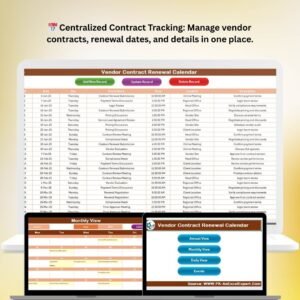
- Vendor Contract Renewal Calendar in Excel: track contract renewal dates
- Procurement Dashboard in Excel: analyze procurement results
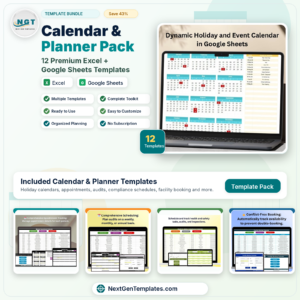
- Calendar & Planner Pack: 12 calendar templates in one bundle
Browse all Excel calendars or the Excel VBA tools.





Reviews
There are no reviews yet.