


In today’s fast-changing business landscape, staying on top of finance compliance deadlines while building a resilient supply chain can feel overwhelming. Missing a tax filing, ignoring a supplier audit, or overlooking a risk assessment can lead to costly penalties and operational disruptions. That’s why we’ve designed the Finance Compliance Supply Chain Resilience Calendar in Excel — a ready-to-use, fully customizable, and interactive tool that helps you take control of compliance and resilience with confidence. ✅📊
With its clean design, automation features, and user-friendly layout, this template turns Excel into a powerful compliance and supply chain tracking system. From annual high-level planning to daily task management, everything you need is built into one smart solution.
✨ Key Features of Finance Compliance Supply Chain Resilience Calendar

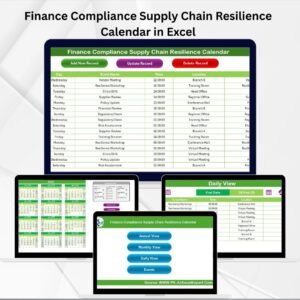
🏠 Home Sheet Tab – Navigate easily with quick buttons for Annual, Monthly, Daily, and Events views.
📅 Annual View – Plan your entire year with a 12-month calendar, customizable themes, and automatic event highlighting.
🗓 Monthly View – Get detailed insights into each month, track deadlines, and manage supplier schedules.
📖 Daily View – Monitor compliance obligations and supply chain activities day by day for critical precision.
📌 Events Database – Maintain a central record of all tasks with add, update, and delete functionality.
🎨 Customization Options – Choose from multiple color themes, highlight weekends/holidays, and set your own workflow preferences.
⚡ Automation – Simplify event entry with prebuilt forms and reduce manual errors.
📂 What’s Inside the Finance Compliance Supply Chain Resilience Calendar
This Excel template comes packed with 5 powerful worksheet tabs:
Home Sheet Tab – An easy-to-use index with navigation buttons.
Annual View – A full-year calendar with control panels for year, start month, and weekend highlighting.
Monthly View – A monthly planner showing events per day with quick entry buttons.
Daily View – A focused view for monitoring tasks in specific date ranges.
Events Sheet – A centralized database with auto-generated IDs, event names, dates, times, locations, and descriptions.
Every tab is built to keep your compliance deadlines visible and your supply chain plans crystal clear.
🛠 How to Use the Finance Compliance Supply Chain Resilience Calendar
Open the Template – Start from the Home sheet for easy navigation.
Set the Year & Customize Settings – Choose year, theme colors, and highlight weekends or key dates.
Add Events – Use the Add New Event button for quick data entry from any view.
Track Monthly Activities – Review upcoming compliance deadlines and supplier tasks month by month.
Drill Down Daily – Use the Daily View for high-pressure weeks like tax season or shipment schedules.
Update Database – Add, edit, or delete records in the Events Sheet to keep everything up to date.
👥 Who Can Benefit from This Finance Compliance Supply Chain Resilience Calendar
This template is versatile and designed for professionals across industries, including:
💼 Finance Teams – Stay on top of tax filings, audits, and reporting deadlines.
📦 Supply Chain Managers – Track deliveries, supplier checks, and logistics timelines.
🛡 Compliance Officers – Ensure no legal or regulatory task gets overlooked.
🏥 Healthcare & Retail Businesses – Manage compliance requirements while monitoring supplier schedules.
🚛 Logistics Firms – Track cross-border compliance and shipping deadlines with precision.
No matter the industry, this tool simplifies compliance management while strengthening operational resilience.
📌 Click here to read the Detailed blog post
Visit our YouTube channel to learn step-by-step video tutorials
Watch the step-by-step video tutorial:
Compatibility and Requirements
- Works in Microsoft Excel desktop (Excel 2016 or later, or Microsoft 365).
- The Annual, Monthly and Daily views use buttons and a control panel for year, start month, theme colors and weekend highlighting. Microsoft’s Excel for Windows training covers the basics if you are new to Excel.
Frequently Asked Questions
Which sheets are included?
Five sheets: Home, Annual View, Monthly View, Daily View and Events.
How do I add a compliance deadline or supplier task?
Click the Add New Event button from any view and fill in the form. The record is saved on the Events sheet.
What details can I store for each event?
The Events sheet keeps an auto-generated ID, event name, date, time, location and description. You can add, update and delete records there.
Can I change the colors or highlight weekends?
Yes. The Annual View has controls for the year, the start month, the color theme and weekend highlighting.
Is there a version for other departments?
Yes. This Excel calendar is also available for other teams, for example the Finance Operations Supply Chain Resilience Calendar in Excel and the Compliance Supply Chain Resilience Calendar in Excel.
Related Supply Chain Resilience Calendars
- Compliance Supply Chain Resilience Calendar in Excel: the same calendar for compliance teams
- Finance Procurement Supply Chain Resilience Calendar in Excel: for finance and procurement deadlines
- Finance Operations Supply Chain Resilience Calendar in Excel: for finance and operations schedules
- Procurement Supply Chain Resilience Calendar in Excel: for supplier and purchasing dates
- Logistics Supply Chain Resilience Calendar in Excel: for shipping and logistics timelines
Browse all Excel calendar templates.




Reviews
There are no reviews yet.