



In the age of Artificial Intelligence, finance and procurement teams are leading the transformation toward smarter, data-driven operations. 💡 Yet, implementing AI across departments can be complex — involving multiple milestones, deadlines, and teams. The Finance Procurement AI Implementation Calendar in Excel is designed to make that process seamless, structured, and stress-free. 📅🤖
This ready-to-use Excel calendar gives you full control over your AI implementation journey — from kickoff meetings and vendor evaluations to system deployment and performance review. Built with interactive forms, dynamic views, and automated updates, it’s the ultimate project planning companion for finance and procurement professionals.
✨ Key Features of Finance Procurement AI Implementation Calendar in Excel
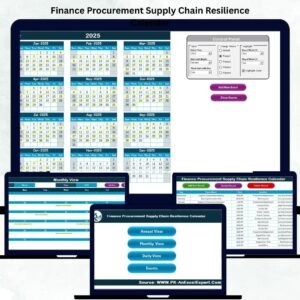
✅ Five Interactive Worksheets — Manage AI timelines with Annual, Monthly, and Daily views, plus an Event Database and Home Navigation Hub.
✅ Dynamic Event Forms — Add, view, and update events with a click — no manual entry needed.
✅ Customizable Themes — Choose from five color themes to match your corporate branding or preference.
✅ Real-Time Highlights — Highlight weekends and key events for better visibility.
✅ Centralized Event Database — Store and manage every milestone, meeting, or review in one place.
✅ Automatic Event ID Generation — Maintain data integrity and traceability effortlessly.
✅ One-Click Navigation — Jump between calendar views instantly using interactive buttons.
✅ Excel Automation — Built with embedded formulas and VBA for effortless updates.
With this all-in-one Excel calendar, managing complex AI projects becomes efficient, organized, and visually clear. 🌟
📂 What’s Inside the Finance Procurement AI Implementation Calendar in Excel
🏠 1. Home Sheet — Central Navigation Hub

The Home Sheet acts as the dashboard’s control center. It features four navigation buttons — Annual, Monthly, Daily, and Events — for quick access. You’ll also find a visual layout that connects every part of the calendar, ensuring intuitive navigation.
📅 2. Annual View Sheet — Yearly AI Roadmap
See your entire year at a glance! Track every milestone, meeting, and deliverable across 12 months.
Control Panel Features:
Select Year, Starting Month & Starting Day
Switch between five color themes
Highlight specific days (like weekends)
Highlight all events with one toggle
Add New Event & Show Event Buttons make updating your calendar effortless.
🗓️ 3. Monthly View Sheet — Detailed Month Planner
Focus on one month at a time with clear visuals for each day.
Each date box shows key events.
If multiple events exist, “more than 1…” appears.
Easily add or view events using buttons.
Perfect for weekly planning, team scheduling, or status tracking.
📆 4. Daily View Sheet — Actionable Event Tracker
Zoom into a selected date range for detailed day-to-day event management.
Filter by start and end date.
See Event ID, Date, Day, Time, and Description.
Add new events directly from this page.
Ideal for project managers who need precision and quick oversight.
🧾 5. Events Sheet — The Core Database
This is where every scheduled task, milestone, or meeting is stored.
Columns include:
ID, Date, Day, Event Name, Time, Location, Description.
You can Add, Update, or Delete events instantly using automated buttons.
🧭 How to Use the Finance Procurement AI Implementation Calendar in Excel
1️⃣ Open the Excel file and start at the Home Sheet.
2️⃣ Click the respective button to go to Annual, Monthly, or Daily view.
3️⃣ Use Add New Event to input your AI project milestones or meetings.
4️⃣ Explore different views to track events by year, month, or day.
5️⃣ Customize themes, highlight weekends, and manage data effortlessly.
6️⃣ Use the Events Sheet as your central log for all activities and records.
In just minutes, you’ll have a fully functional AI project calendar that’s easy to maintain and share. 💼📊
👥 Who Can Benefit from This Finance Procurement AI Implementation Calendar in Excel
🏦 Finance Teams: Track milestones for AI-driven reporting, invoicing, or analytics.
🛒 Procurement Departments: Schedule vendor evaluations, contract reviews, and training sessions.
💻 AI Project Managers: Plan and monitor multiple project phases efficiently.
📅 Executives & Leaders: Gain visibility into company-wide AI initiatives.
🏢 Consultants: Use it as a ready-to-deliver implementation tracker for clients.
💼 Corporate Teams: Manage digital transformation, automation, or compliance projects.
This tool is perfect for any organization driving AI adoption across finance or procurement operations — no coding, no extra software, just Excel power! ⚙️
🔗 Click here to read the Detailed blog post
🎥 Visit our YouTube channel to learn step-by-step video tutorials
Watch the step-by-step video tutorial:
Compatibility and Requirements
- Works in Microsoft Excel desktop (Excel 2016 or later, or Microsoft 365).
- The Add, Update and Delete buttons use Excel automation, so run it in Excel desktop on Windows with macros enabled. It does not run in Excel for the web, Google Sheets or mobile. Microsoft explains how to enable macros in Microsoft 365 files.
Frequently Asked Questions
Which worksheets does the calendar include?
Five worksheets: Home, Annual View, Monthly View, Daily View and Events.
How do I add an AI project milestone?
Click Add New Event on the Annual, Monthly or Daily view and fill in the form. The event is saved in the Events sheet with an automatic ID.
Can I change the colors?
Yes. The Annual View has a control panel with five color themes. You can also highlight specific days such as weekends and highlight all days that have events.
What happens when a date has more than one event?
The Monthly View shows “more than 1…” in that date box. Open the Daily View or the Events sheet to see every event for the day.
Is there a version for another department?
Yes. For example, see the Procurement AI Implementation Calendar in Excel and the Finance IT AI Implementation Calendar in Excel.
Related AI Implementation Calendars
- Procurement AI Implementation Calendar in Excel: the same calendar for the procurement team alone
- Finance Operations AI Implementation Calendar in Excel: for finance and operations AI rollouts
- Finance Compliance AI Implementation Calendar in Excel: for finance and compliance AI rollouts
- Finance Procurement Supply Chain Resilience Calendar in Excel: schedule supply chain resilience work for the same teams
- Finance Procurement Remote Work Calendar in Excel: plan remote work for finance and procurement
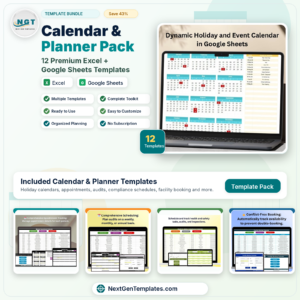
Browse all Excel calendar templates.








Reviews
There are no reviews yet.