

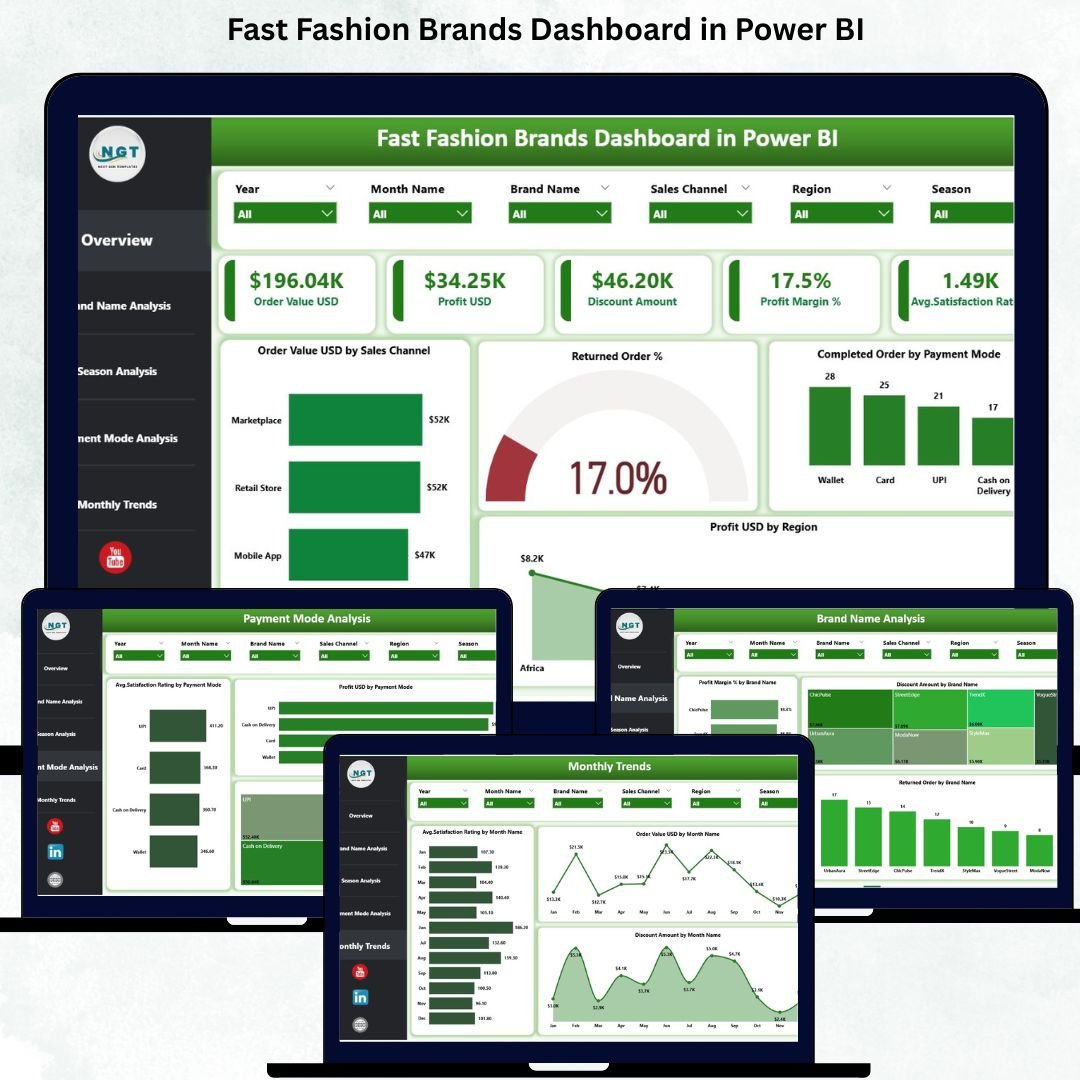

Fast fashion brands operate at lightning speed. New collections launch frequently, trends change weekly, and customer expectations evolve constantly. At the same time, brands must closely monitor sales, profit margins, discounts, returns, regional performance, seasons, and customer satisfaction. Fast Fashion Brands Dashboard in Power BI However, when this data is spread across multiple spreadsheets and reports, decision-making becomes slow and unclear.
The Fast Fashion Brands Dashboard in Power BI solves this challenge by transforming complex fashion data into clear, interactive, and visually powerful insights. Fast Fashion Brands Dashboard in Power BI This ready-to-use dashboard gives fashion brands a centralized view of performance across revenue, profitability, promotions, returns, customer experience, seasons, payment modes, and monthly trends. Fast Fashion Brands Dashboard in Power BI with Power BI’s interactivity and real-time analysis, teams can respond faster, reduce losses, and maximize profitability.
Fast Fashion Brands Dashboard in Power BI Whether you manage merchandising, marketing, finance, or operations, this dashboard empowers you to stay competitive in the fast-moving fashion industry.
🚀 Key Features of the Fast Fashion Brands Dashboard in Power BI
📊 All-in-One Fashion Performance Dashboard – Track sales, profit, discounts, returns, and satisfaction
🎯 Real-Time KPI Monitoring – Get instant visibility without manual reporting
🛍️ Brand-Level Performance Analysis – Compare multiple brands under one portfolio
🌦️ Seasonal Trend Analysis – Understand how seasons impact revenue and profit
💳 Payment Mode Insights – Evaluate customer payment behavior and profitability
📈 Monthly Trend Tracking – Analyze month-wise performance patterns
🎛️ Interactive Slicers & Filters – Filter by brand, region, season, channel, and date
🧭 User-Friendly Power BI Experience – Clean layout with intuitive navigation
📦 What’s Inside the Fast Fashion Brands Dashboard
This Power BI dashboard includes five powerful analytical pages, each focusing on a critical area of fast fashion performance:
🟢 Overview Page
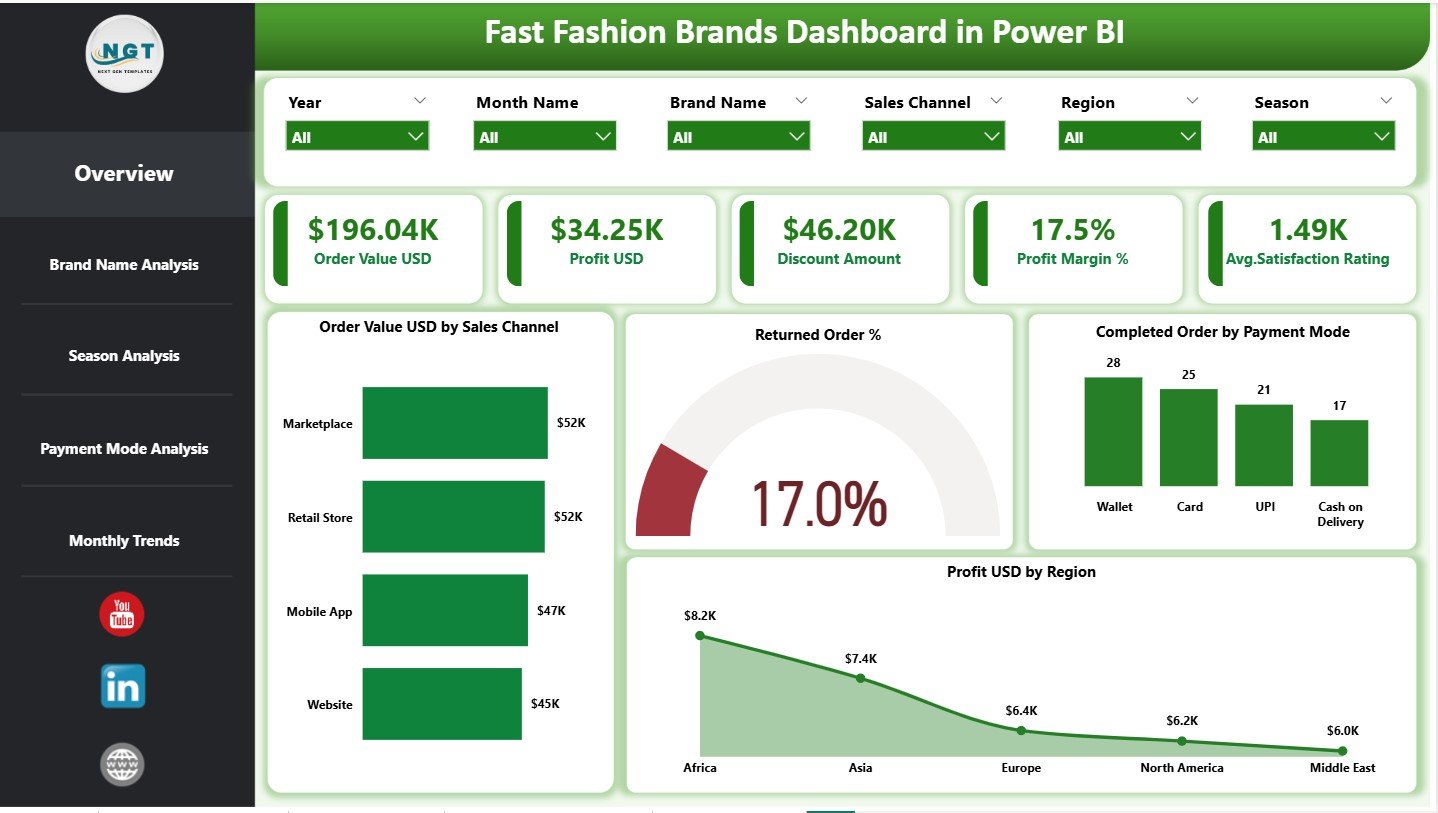
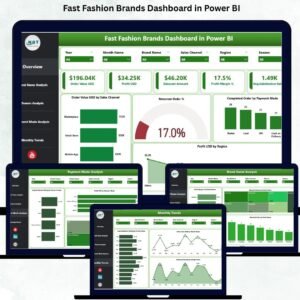
The main snapshot of business health. It displays key KPI cards such as Order Value USD, Profit USD, Discount Amount, Profit Margin %, and Average Satisfaction Rating. Charts highlight sales channel performance, return behavior, payment modes, and regional profitability.
👗 Brand Name Analysis Page
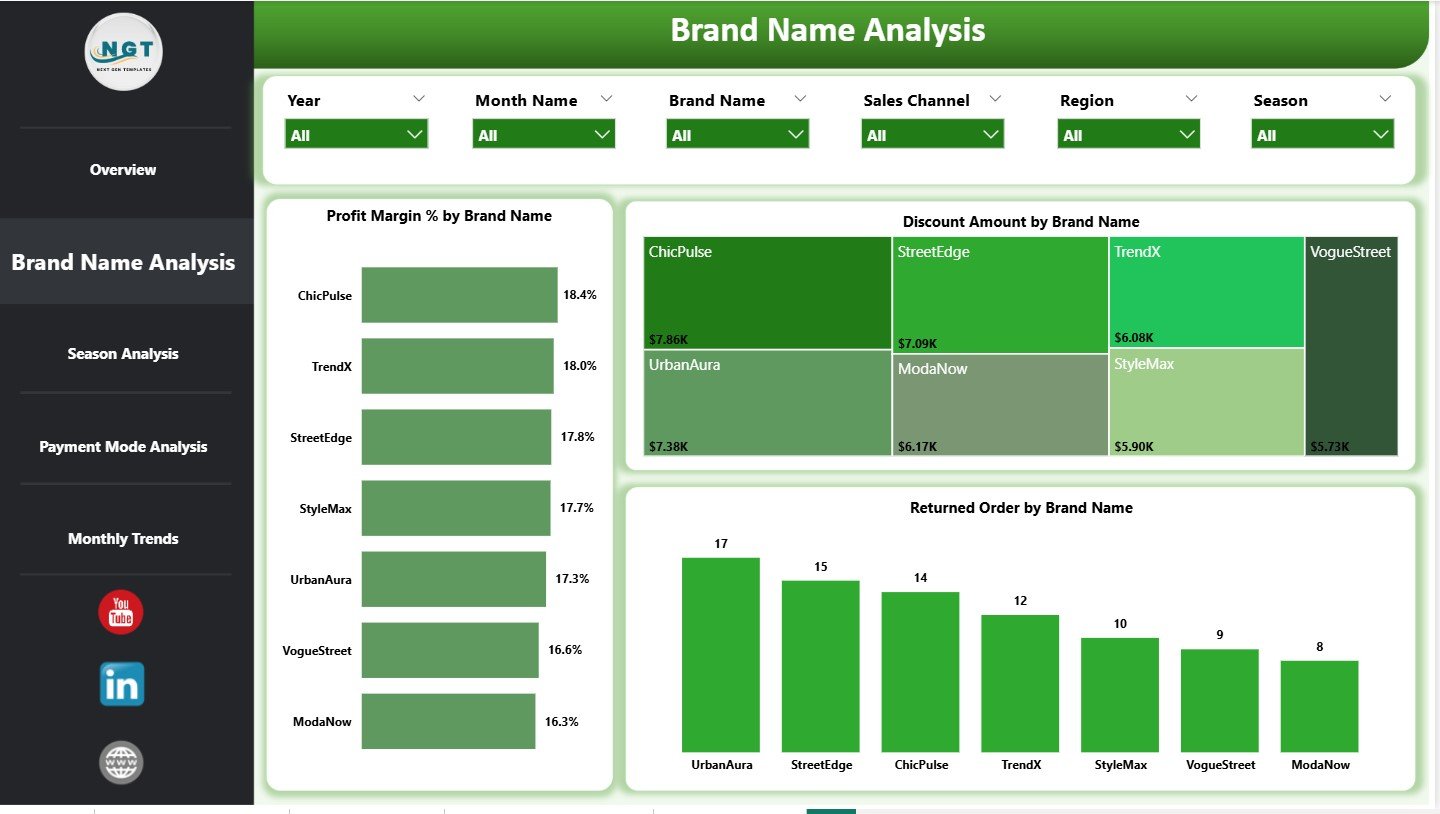
This page compares individual brands using Profit Margin %, Discount Amount, and Returned Orders. It helps identify top-performing brands and brands needing attention.
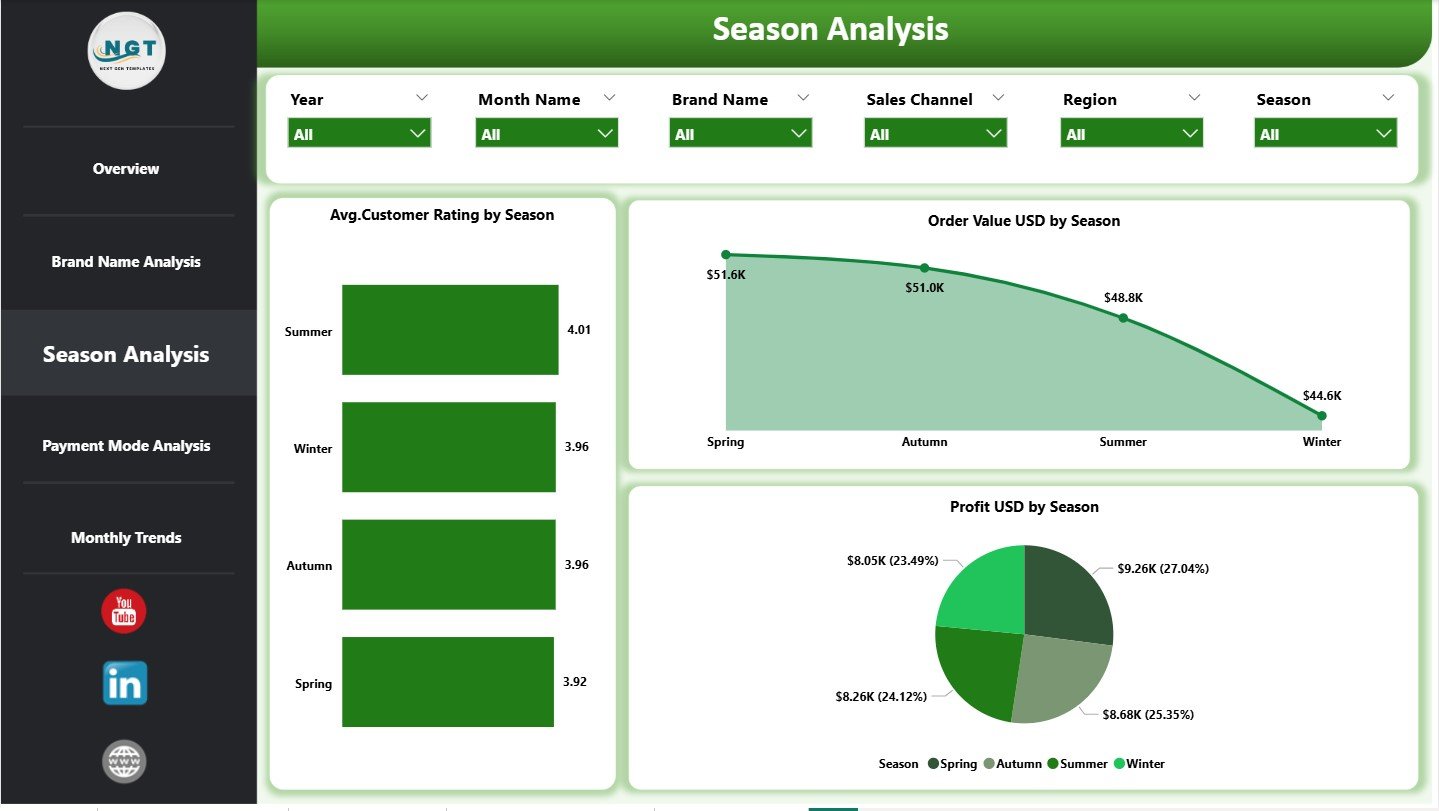
🌸 Season Analysis Page
Tracks performance across Spring, Summer, Fall, and Winter. Charts display Order Value, Profit, and Average Customer Ratings by season—supporting smarter collection planning.
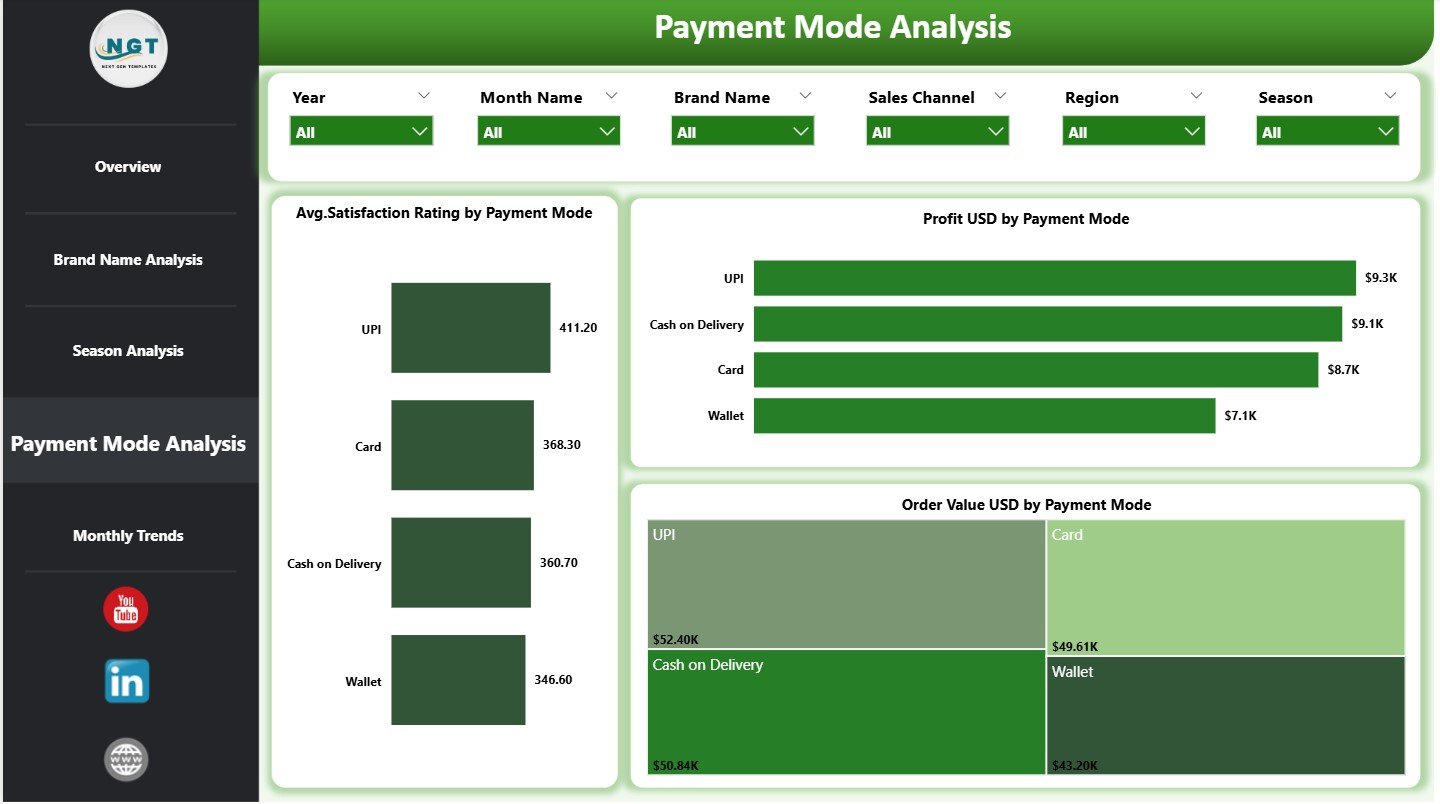
💳 Payment Mode Analysis Page
Analyzes customer payment preferences. It shows satisfaction, revenue, and profit by payment mode, helping optimize checkout experiences.
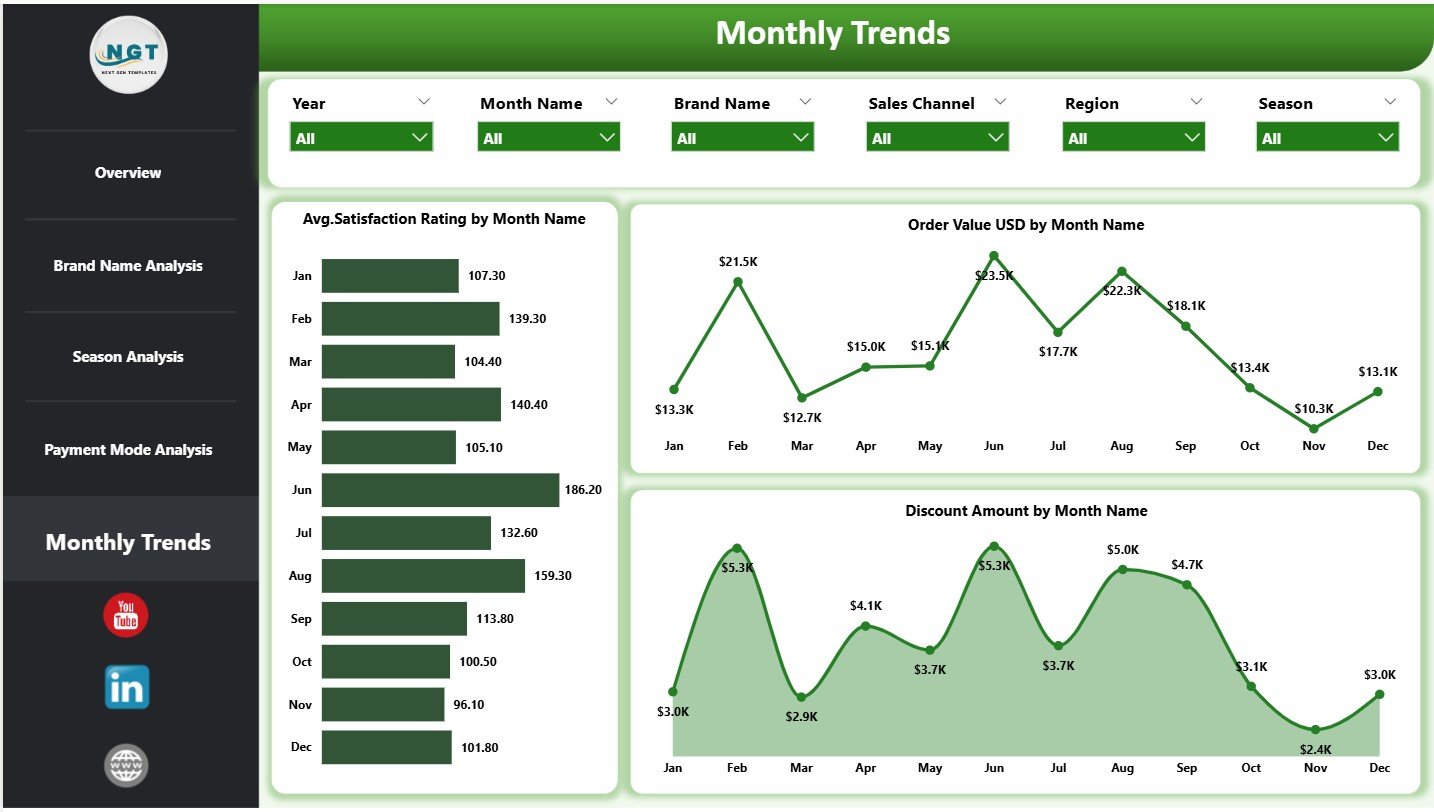
📆 Monthly Trends Page
Tracks month-wise trends for Order Value, Discounts, and Customer Satisfaction. This page helps estimate demand and plan campaigns effectively.
Each page works together to deliver complete fashion business visibility.
🛠️ How to Use the Fast Fashion Brands Dashboard
✅ Step 1: Load your sales and customer data into Power BI
✅ Step 2: Open the Fast Fashion Brands Dashboard file
✅ Step 3: Use slicers to filter by date, brand, season, region, or channel
✅ Step 4: Review KPIs, charts, and trends in real time
✅ Step 5: Share insights with teams or management
No advanced Power BI skills are required. The dashboard is ready to use and easy to customize.
👥 Who Can Benefit from This Fast Fashion Dashboard?
👗 Fast Fashion Brand Owners
📊 Retail & Fashion Analytics Managers
🛍️ Merchandising Teams
📣 Marketing Teams
🛒 E-commerce Managers
💼 Finance & Business Analysts
Any fashion business that wants speed, clarity, and data-driven growth will benefit from this dashboard.
🔗 Click here to read the Detailed blog post
🎥 Visit our YouTube channel to learn step-by-step video tutorials
Watch the step-by-step video tutorial:
Compatibility and Requirements
- Works in Power BI Desktop, which is free. Microsoft explains how to get it in Get Power BI Desktop.
- You load your own sales and customer data into the file, then use the slicers to filter by date, brand, season, region or channel.
Frequently Asked Questions
Which pages does the dashboard include?
Five pages: Overview, Brand Name Analysis, Season Analysis, Payment Mode Analysis and Monthly Trends.
Which KPIs appear on the Overview page?
Order Value USD, Profit USD, Discount Amount, Profit Margin % and Average Satisfaction Rating. Charts on the same page cover sales channels, returns, payment modes and regional profitability.
Can I compare brands?
Yes. The Brand Name Analysis page compares brands by Profit Margin %, Discount Amount and Returned Orders.
Can I filter the data?
Yes. Slicers filter by date, brand, season, region and channel.
Is there an Excel version?
Yes. See the Fast Fashion Brands Dashboard in Excel and the Fast Fashion Brands KPI Dashboard in Excel.
Related Fashion Templates
- Fast Fashion Brands Dashboard in Excel: the same topic in Excel
- Fashion & Apparel Dashboard in Power BI: a broader apparel view in Power BI
- Fashion KPI Dashboard in Power BI: fashion KPIs in Power BI
- Fashion Retail KPI Dashboard in Power BI: retail-focused fashion KPIs
- Power BI Dashboard Mega Collection: 15 Power BI templates in one download
Browse all Power BI dashboards.

































Reviews
There are no reviews yet.