

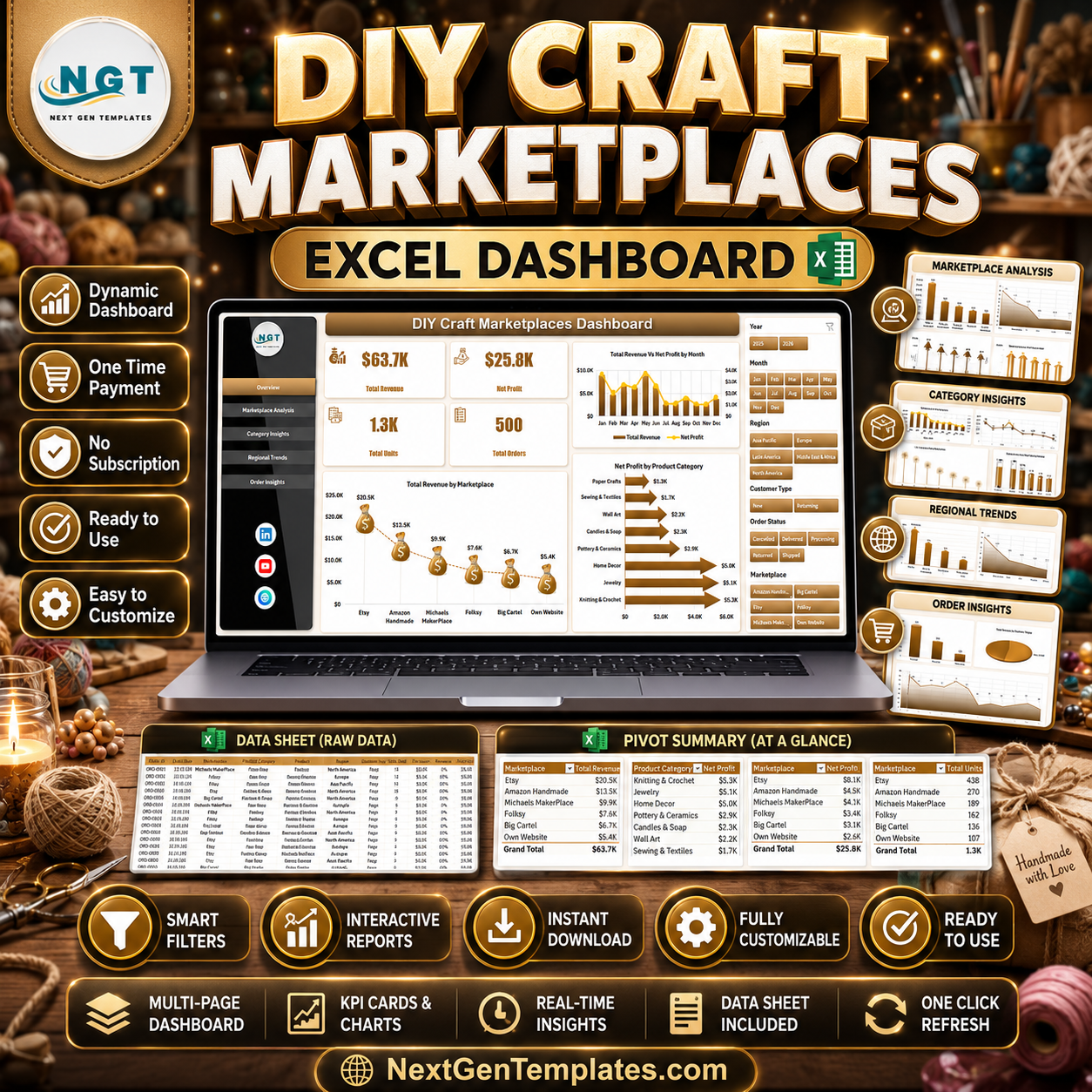




DIY Craft Marketplaces Dashboard in Excel helps Etsy-style sellers, handmade product founders, craft marketplace operators, and ecommerce analysts review marketplace revenue, net profit, units, orders, categories, regions, customer types, delivery status, and ratings in one editable Excel workbook. The dashboard includes 5 analysis pages, 4 executive KPI cards, multiple slicers, a structured Data Sheet, and a Support Sheet with pivot tables. Instead of manually checking every marketplace report one by one, you can update the Data Sheet, click Data > Refresh All, and review the refreshed dashboard. Instant download. One-time payment. No subscription.
Key Features of DIY Craft Marketplaces Dashboard in Excel
- 5 dashboard pages: Overview Page, Marketplace Analysis, Category Insights, Regional Trends, and Order Insights.
- 4 KPI cards: Total Revenue, Net Profit, Total Units, and Total Orders for fast business review.
- Marketplace analysis: Compare net profit, units, profit margin, and average rating by marketplace.
- Category insights: Review revenue, cost, units, order value, and product category performance.
- Regional trends: Track revenue, profit, orders, units, and delivery percentage by region.
- Order insights: Analyze order status, customer type, and monthly order movement.
- Interactive slicers: Apply filters quickly and see the dashboard refresh for selected marketplace, region, category, month, or status views.
- Pivot-driven workbook: Update the Data Sheet, click Refresh All, and let the Support Sheet pivots refresh the charts.
What’s Inside the DIY Craft Marketplaces Dashboard in Excel
1. Overview Page
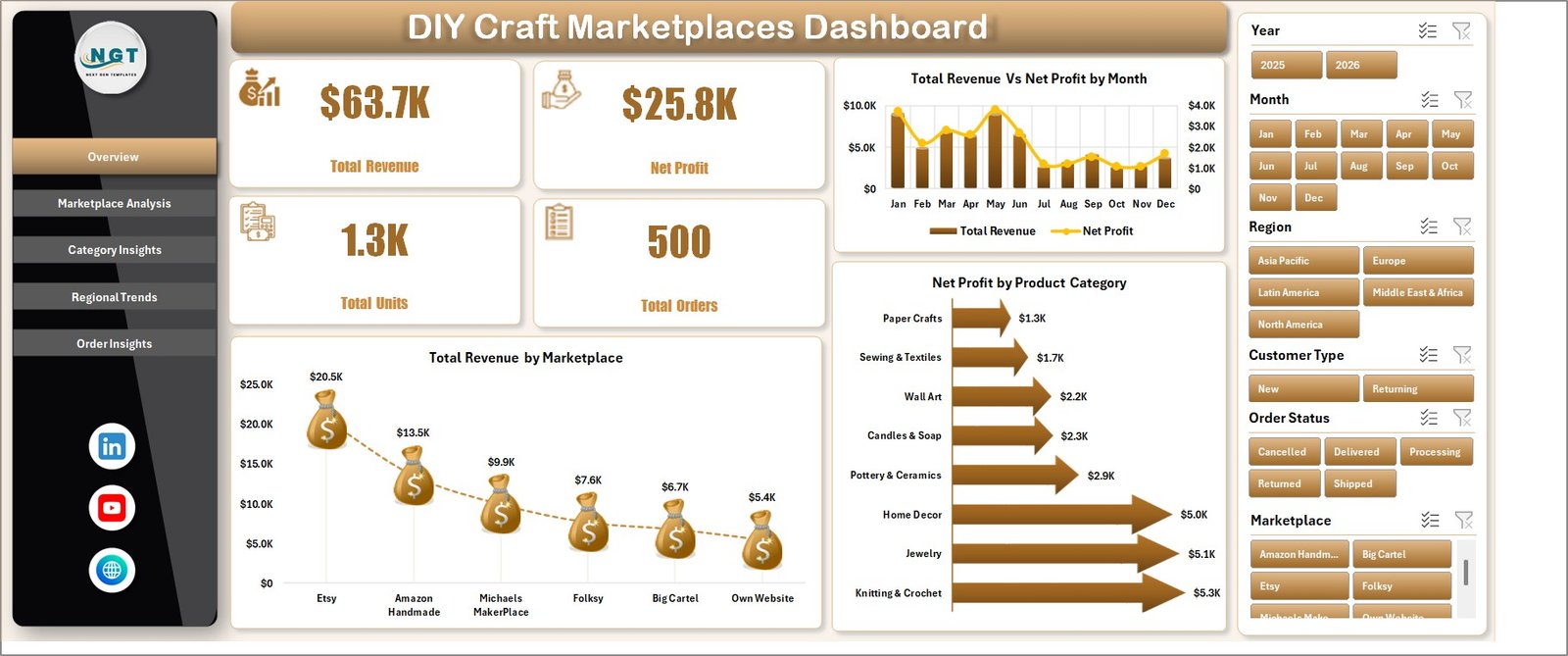
The Overview Page gives a high-level summary of the craft marketplace business. The KPI cards show Total Revenue, Net Profit, Total Units, and Total Orders so sellers can understand sales scale, profitability, product movement, and order volume before going deeper.
Total Revenue Vs Net Profit by Month: This chart compares monthly sales value with profit so you can see whether revenue growth is translating into real margin. It is useful for spotting months where costs, fees, or discounts reduce profit.
Total Revenue by Marketplace: This chart shows which marketplace contributes the most revenue across the selected filters. Use it to compare Etsy, Amazon Handmade, Shopify, local marketplaces, or any channels used in your source data.
Net Profit by Product Category: This visual highlights the product categories that create stronger profit. It helps craft sellers decide where to focus production, promotion, and inventory planning.
2. Marketplace Analysis
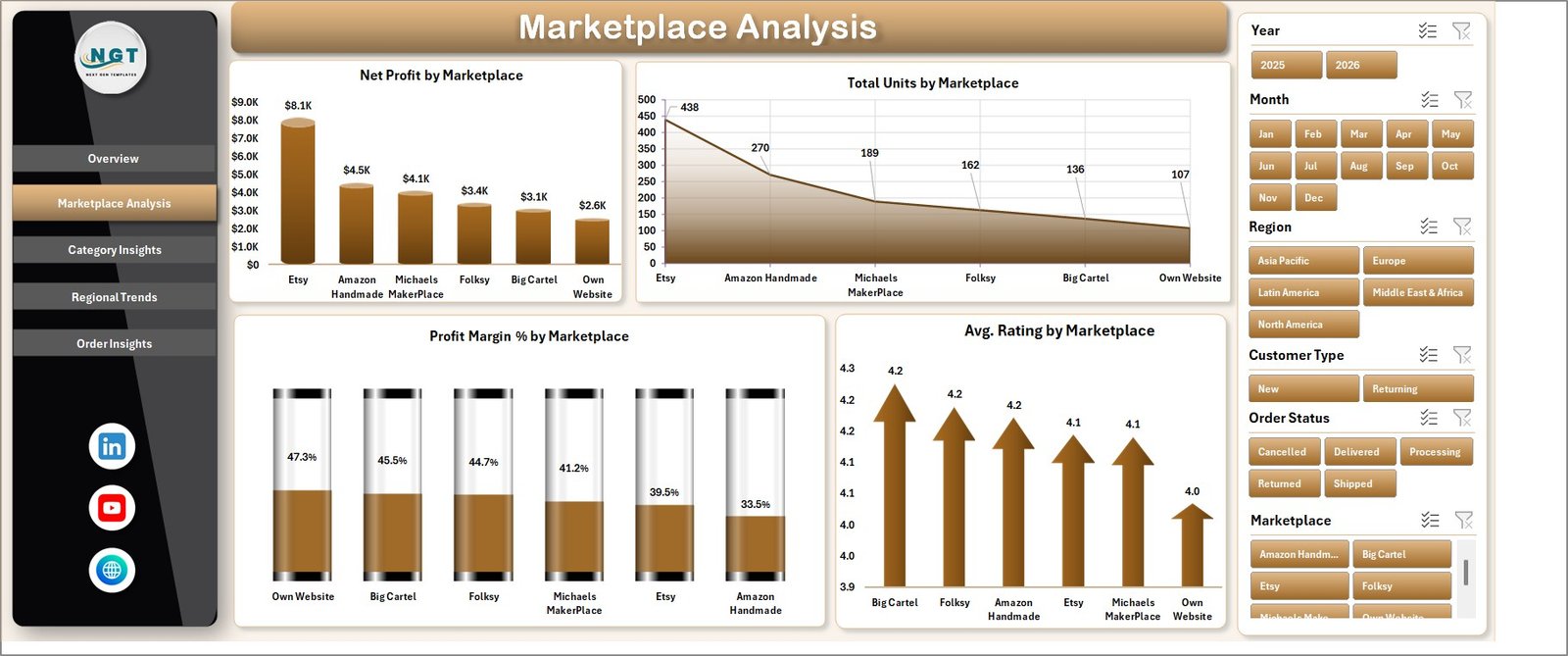
The Marketplace Analysis sheet helps compare performance across sales channels. It includes Net Profit by Marketplace, Total Units by Marketplace, Profit Margin % by Marketplace, and Avg. Rating by Marketplace.
Net Profit by Marketplace shows which marketplace keeps the strongest return after costs. Total Units by Marketplace explains product movement by channel, while Profit Margin % and Avg. Rating connect profitability with customer experience.
3. Category Insights
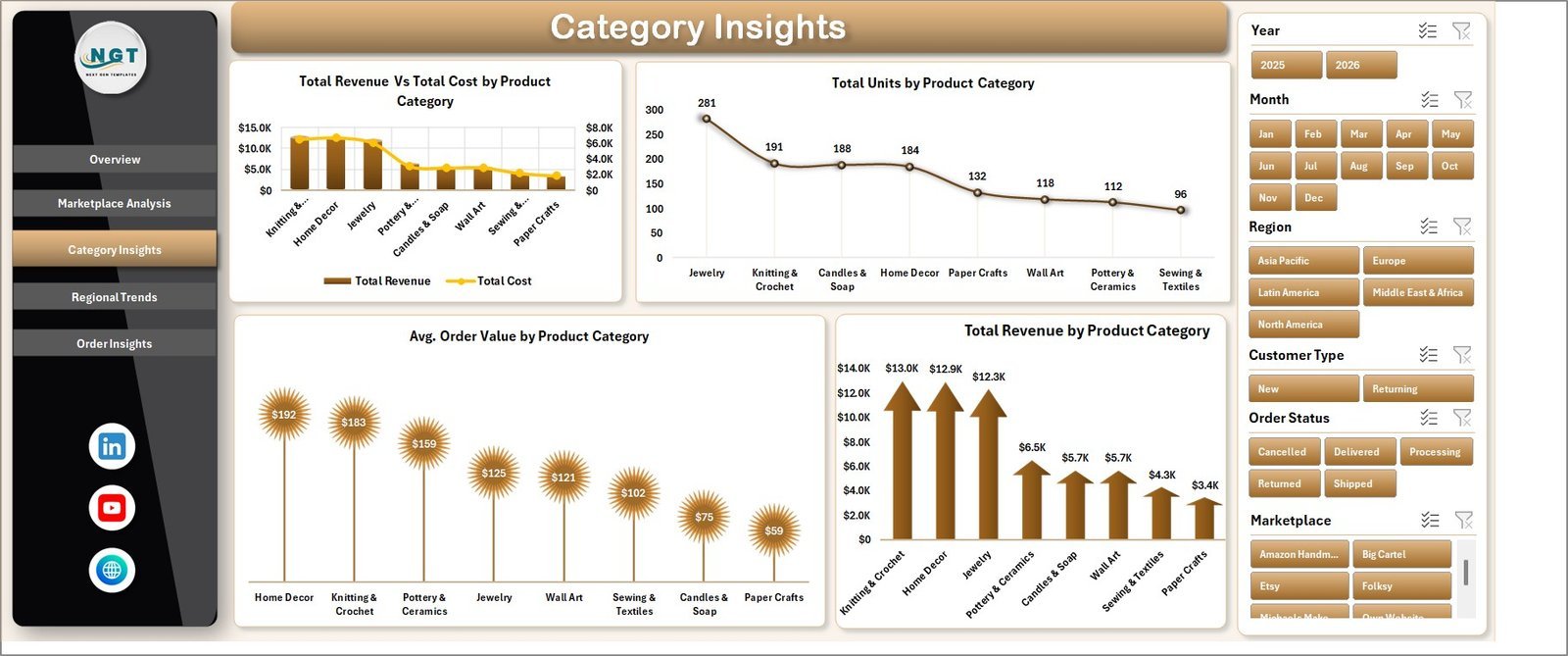
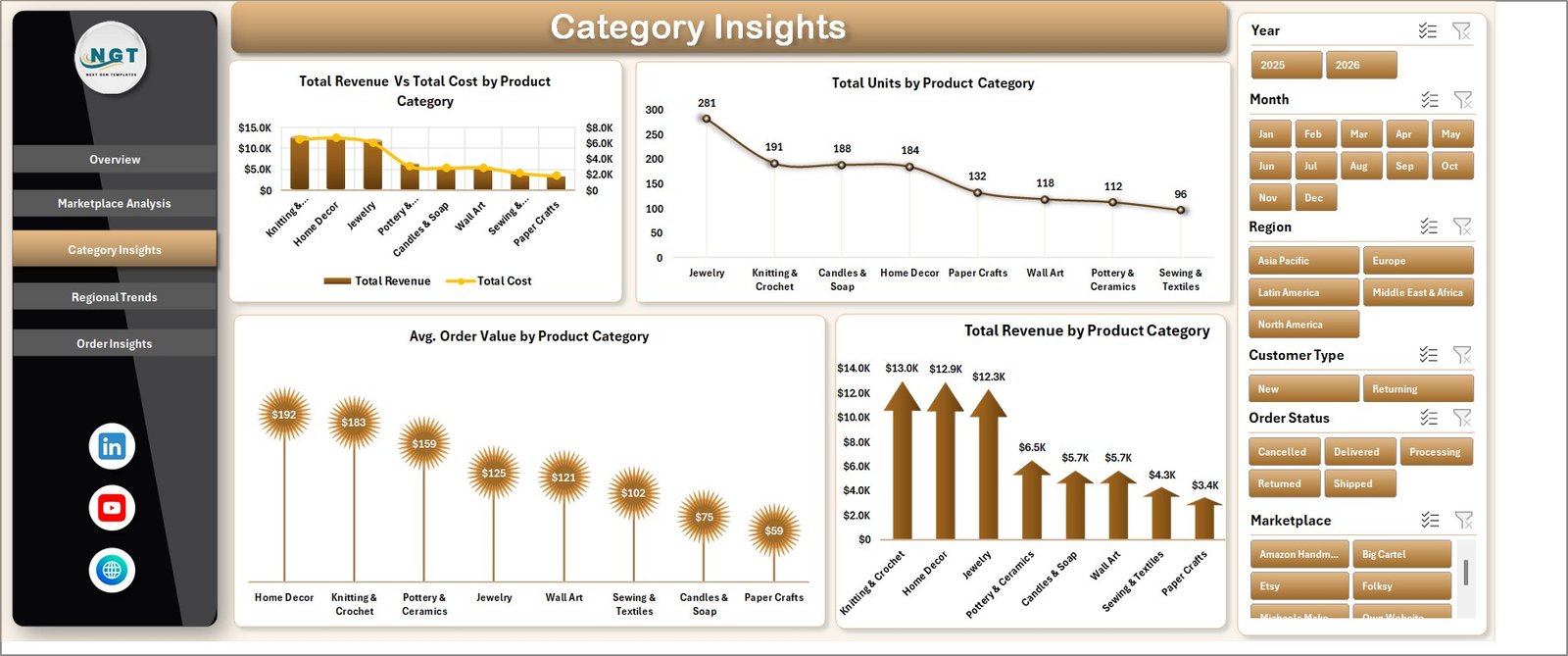
The Category Insights sheet focuses on handmade product groups. It includes Total Revenue Vs Total Cost by Product Category, Total Units by Product Category, Avg. Order Value by Product Category, and Total Revenue by Product Category.
These visuals help you understand which categories sell most, which categories cost more to produce, and which groups create higher order value. It is useful for pricing reviews, product mix planning, and seasonal craft collection decisions.
4. Regional Trends
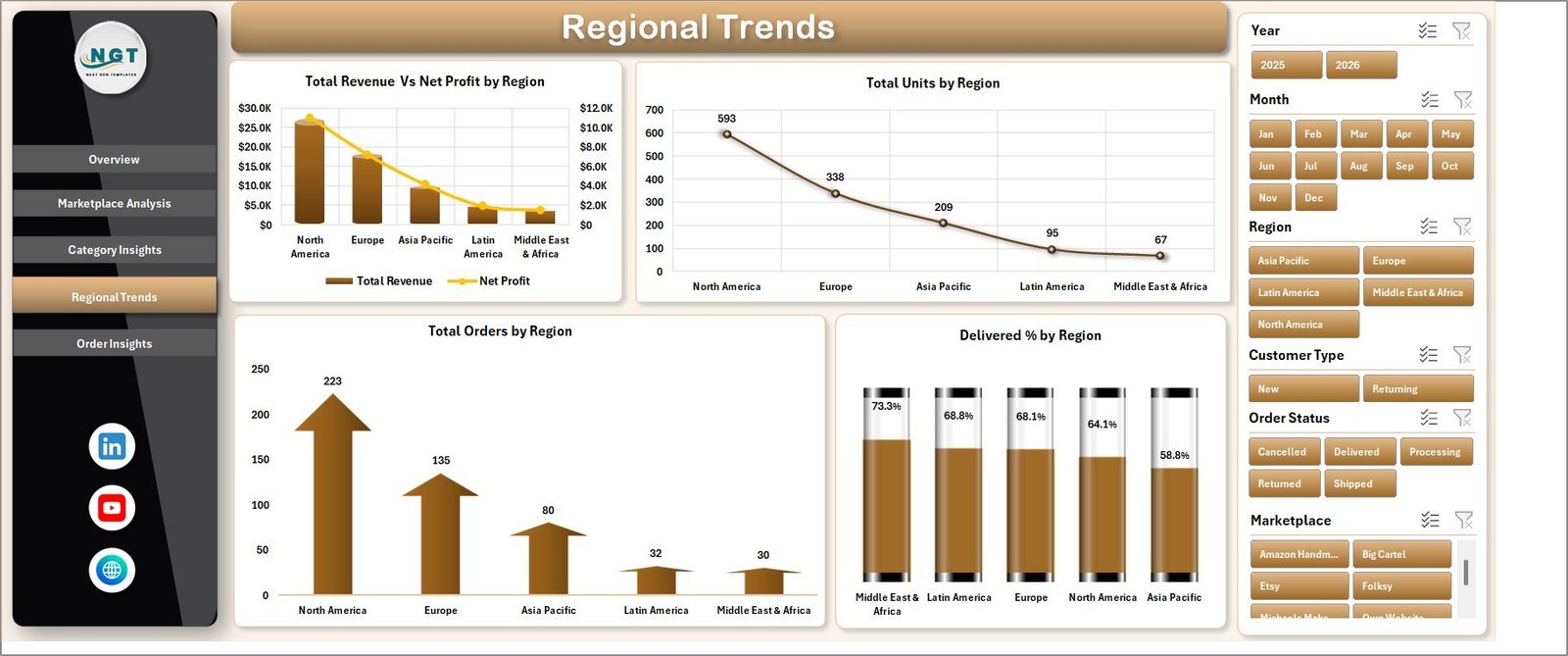
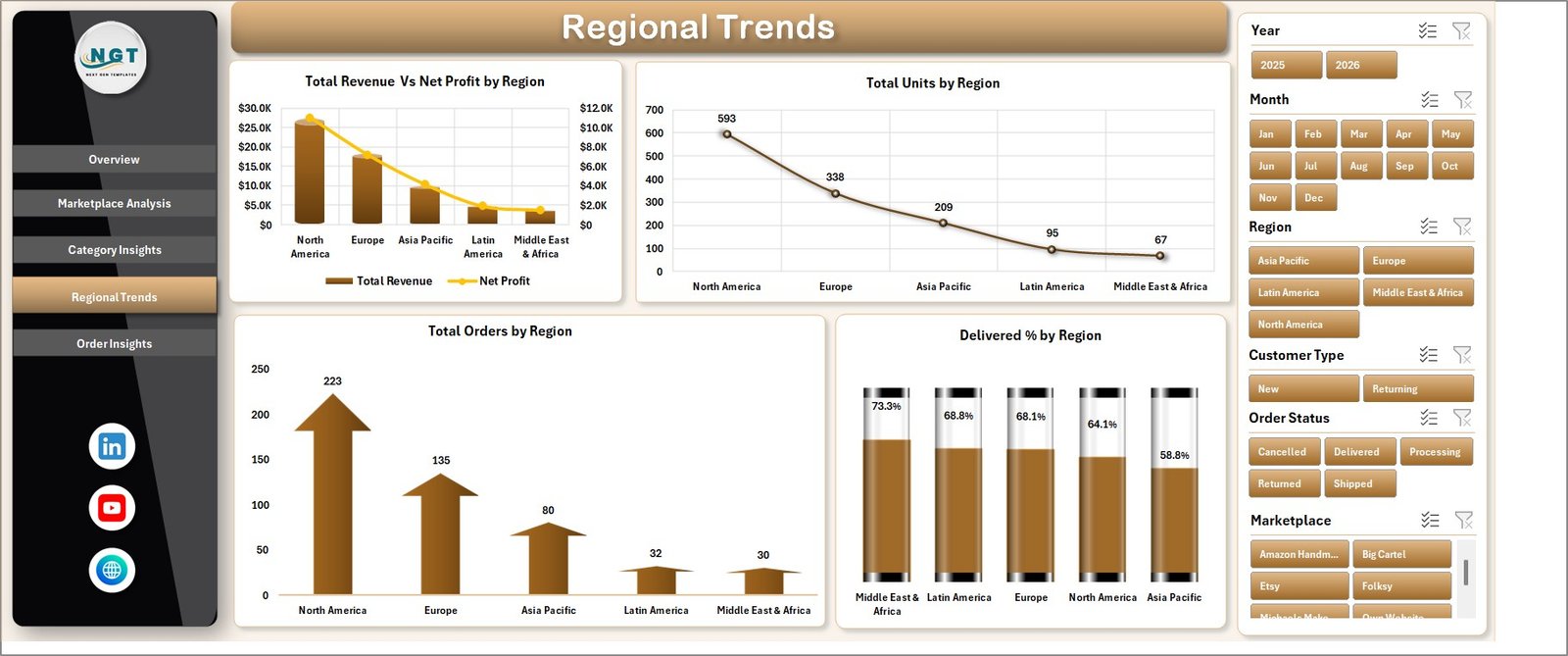
The Regional Trends sheet shows geographic sales and fulfillment behavior. It includes Total Revenue Vs Net Profit by Region, Total Units by Region, Total Orders by Region, and Delivered % by Region.
This page is helpful when sellers ship to multiple regions and want to identify profitable markets, strong order locations, and delivery-performance gaps. It can support shipping policy, marketing, and regional stock planning decisions.
5. Order Insights
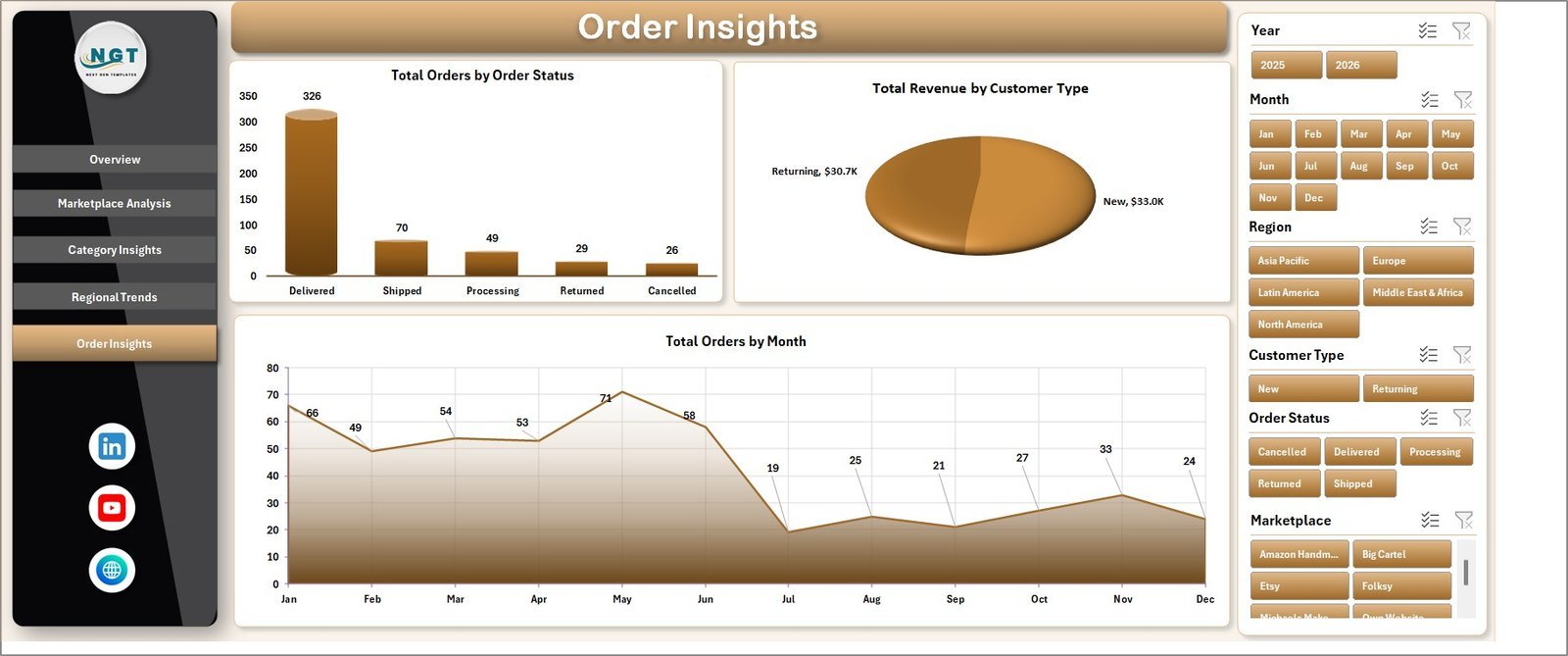
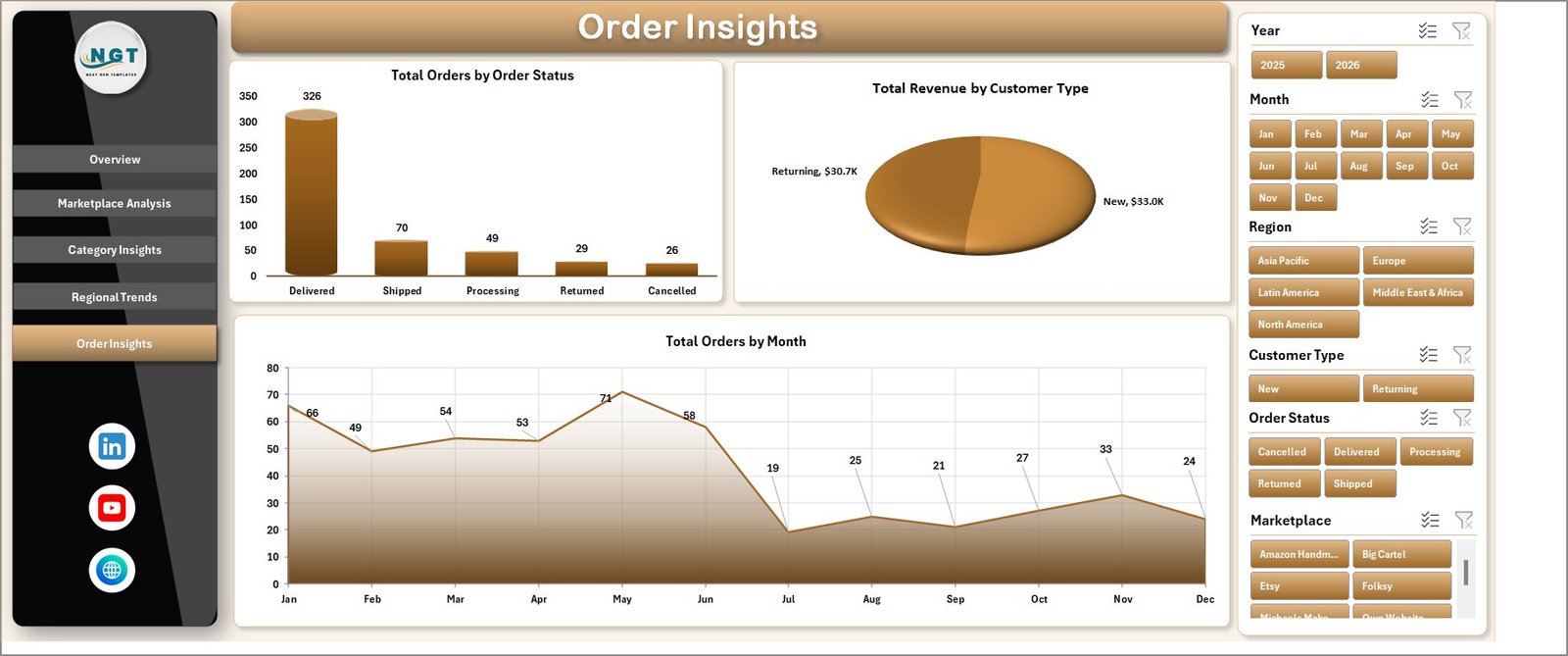
The Order Insights sheet looks at order status, customer type, and monthly order movement. It includes Total Orders by Order Status, Total Revenue by Customer Type, and Total Orders by Month.
Use this page to check how many orders are delivered, pending, cancelled, or in another status group. It also helps compare revenue from new and returning customers and understand order trends month by month.
6. Data Sheet Tab
The Data Sheet is where you add or replace the marketplace data in the same structured format. Keep the column headers and layout consistent so the pivots, slicers, and charts continue to work properly.

7. Support Sheet
The Support Sheet contains the pivot tables used to create the dashboard dynamically. After updating the Data Sheet, go to the Data tab in the Excel Ribbon and click Refresh All. You can keep this sheet hidden during normal use.

DIY Craft Marketplaces Dashboard in Excel vs. Google Sheets vs. Paid Ecommerce SaaS – Where This Fits
| Feature | This Excel Dashboard | Google Sheets Alternative | Paid Ecommerce SaaS |
|---|---|---|---|
| Cost | $17.99 one-time | Low tool cost, but build time required | Monthly or annual subscription |
| Platform | Microsoft Excel | Browser-based spreadsheet | Vendor cloud app |
| Setup time | Update data and refresh pivots | Requires manual dashboard setup | Requires onboarding and configuration |
| Customizable fields | Editable workbook | Editable but formulas can break | Limited by vendor settings |
| Marketplace profitability | Pre-built charts and slicers | Must be created manually | Depends on plan and integrations |
| Year-1 cost at 5 users | $17.99 plus existing Excel access | Low software cost plus build time | Often hundreds or thousands |
Who This Template Is For – and Who It’s Not For
This template is for handmade sellers, craft marketplace founders, ecommerce analysts, small retail teams, product category managers, and consultants who want an Excel-based view of craft sales, profit, units, orders, region performance, and customer behavior. It is not a live Etsy API connector, accounting system, inventory automation app, shipping label platform, or replacement for a full ecommerce ERP.
How to Use the DIY Craft Marketplaces Dashboard in Excel
- Download and unzip the Excel file.
- Open the workbook in Microsoft Excel.
- Go to the Data Sheet and replace the sample records with your marketplace data.
- Keep the same column structure so pivots and slicers continue to work.
- Click Data > Refresh All in the Excel Ribbon.
- Review the dashboard pages and use slicers to filter by the dimensions in your workbook.
Real-World Use Cases
Maya, handmade jewelry seller: Maya uses Marketplace Analysis to compare revenue, profit margin, units, and ratings across different selling channels before deciding where to spend promotion time.
Arjun, craft marketplace operator: Arjun reviews Regional Trends to see which regions produce stronger orders and delivery percentages before planning seller outreach.
Sophia, ecommerce consultant: Sophia updates the Data Sheet for clients, refreshes the workbook, and uses Category Insights to discuss pricing and product mix.
Frequently Asked Questions
What does this dashboard track?
It tracks revenue, net profit, units, orders, marketplaces, categories, regions, order status, customer type, ratings, delivered percentage, monthly trends, costs, and average order value.
Do I need macros?
No. The workbook is designed around Excel tables, pivot tables, slicers, and charts.
Can I use it for Etsy or Amazon Handmade?
Yes, if you export or prepare your data in the same structure as the Data Sheet. You can rename marketplace values based on your own channels.
How do I refresh the dashboard?
Update the Data Sheet, then click Data > Refresh All. The Support Sheet pivot tables and dashboard charts refresh together.
Can I customize it?
Yes. You can edit charts, fields, colors, slicers, and sheet names in Excel. Keep a backup before changing pivot source fields.
Is this a live marketplace connector?
No. It is an Excel dashboard template. You manually add or paste marketplace data into the Data Sheet.
About the Author
Built by PK – Microsoft Certified Professional with 15+ years of Excel, Google Sheets, and Power BI experience. Founder of NextGenTemplates, reaching 300K+ subscribers across YouTube channels. Every template is hand-built and tested before release.
Explore Related Templates
You may also like Content Personalization Startups Dashboard in Excel, Print Shop Dashboard in Excel, and Discount Stores Dashboard in Power BI. Browse more Excel Dashboard templates and Sales and Marketing Excel templates.
Download the DIY Craft Marketplaces Dashboard in Excel today and turn marketplace sales, profit, orders, units, categories, regions, and delivery data into clear Excel reporting.
Last updated: June 2026
Watch the step-by-step video tutorial:
Compatibility and Requirements
- Works in Microsoft Excel desktop (Excel 2016 or later, or Microsoft 365).
- The dashboard uses slicers to filter the charts. Microsoft explains them in Use slicers to filter data.
More Questions About This Template
Which dashboard pages are included?
Five pages: Overview Page, Marketplace Analysis, Category Insights, Regional Trends and Order Insights. The workbook also has a Data Sheet and a Support Sheet with the pivot tables.
Which KPI cards are on the Overview Page?
Four cards: Total Revenue, Net Profit, Total Units and Total Orders.
Is there a Power BI version?
Yes. See the DIY Craft Marketplaces Dashboard in Power BI.
Is there a version for craft stores instead of marketplaces?
Yes. See the DIY Craft Stores Dashboard in Excel.
Can I keep the Support Sheet hidden?
Yes. The Support Sheet holds the pivot tables, and you can keep it hidden during normal use. Click Data > Refresh All after you update the Data Sheet.































Reviews
There are no reviews yet.