

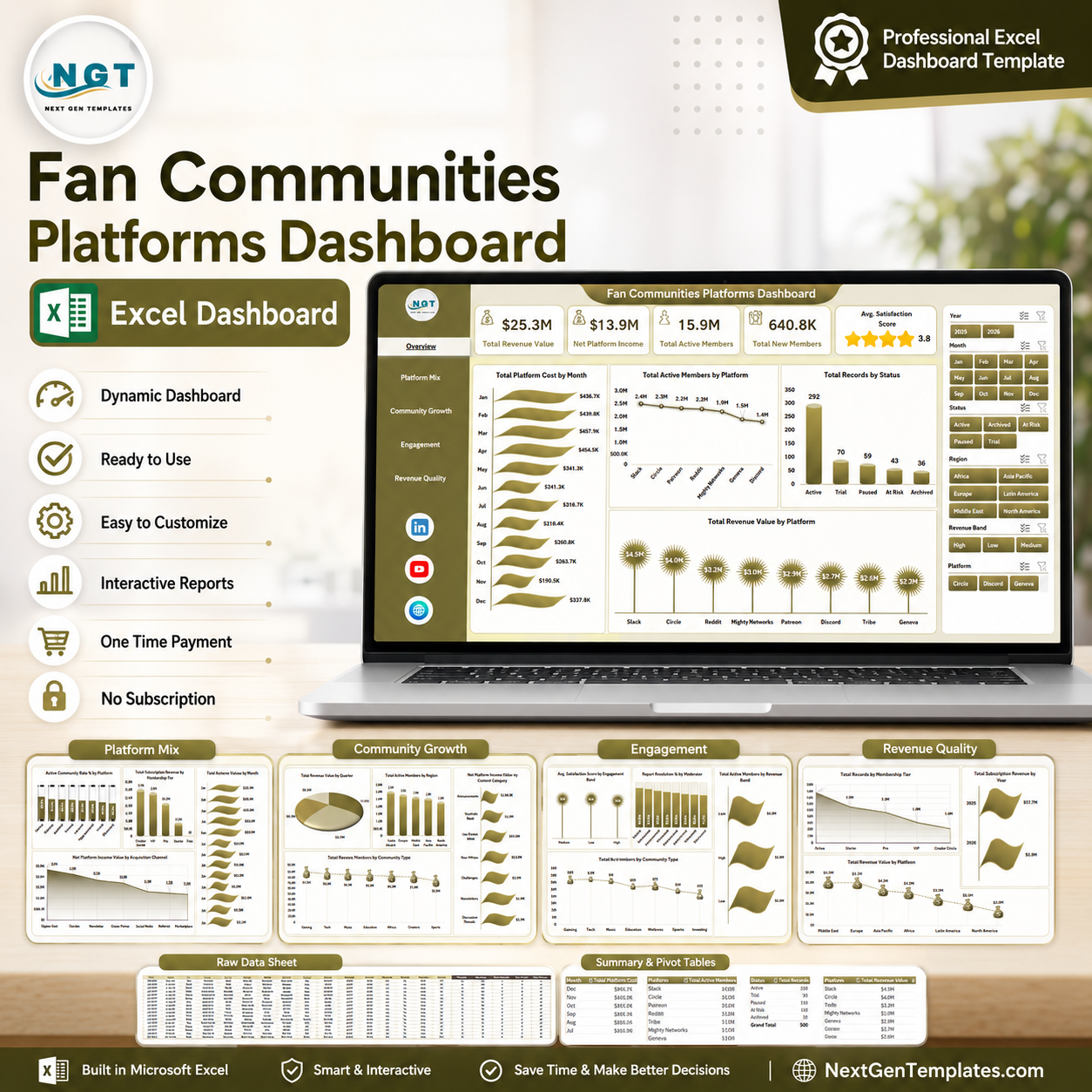




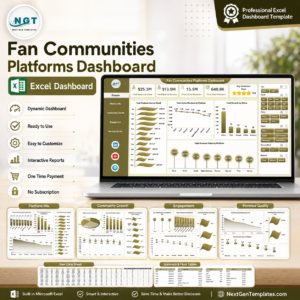
Fan Communities Platforms Dashboard in Excel gives community managers, creator economy teams, membership operators, and platform analysts a ready 7-sheet reporting workbook for revenue, active members, new members, satisfaction, moderation, platform cost, and income analysis. The dashboard includes 5 high-level KPI cards, 20+ visual analysis views, multiple slicers, a clean Data sheet, and a hidden Support sheet powered by pivot tables. Instant download, one-time purchase, no subscription, and editable Excel structure.
Key Features of Fan Communities Platforms Dashboard in Excel
- 7 worksheet tabs: Overview, Platform Mix, Community Growth, Engagement, Revenue Quality, Data Sheet, and Support Sheet.
- 5 KPI cards: Total Revenue Value, Net Platform Income, Total Active Members, Total New Members, and Avg. Satisfaction Score.
- Interactive slicers: Filter pages quickly by platform, status, membership tier, channel, region, content category, community type, moderator, and revenue band depending on the available fields.
- Pivot-based design: Update the Data sheet, then use Refresh All in Excel to refresh pivot tables, cards, and charts.
- Editable Excel workbook: Customize chart titles, colors, source fields, formulas, and slicers to match your own fan community data.
What’s Inside the Fan Communities Platforms Dashboard in Excel
1. Overview Page
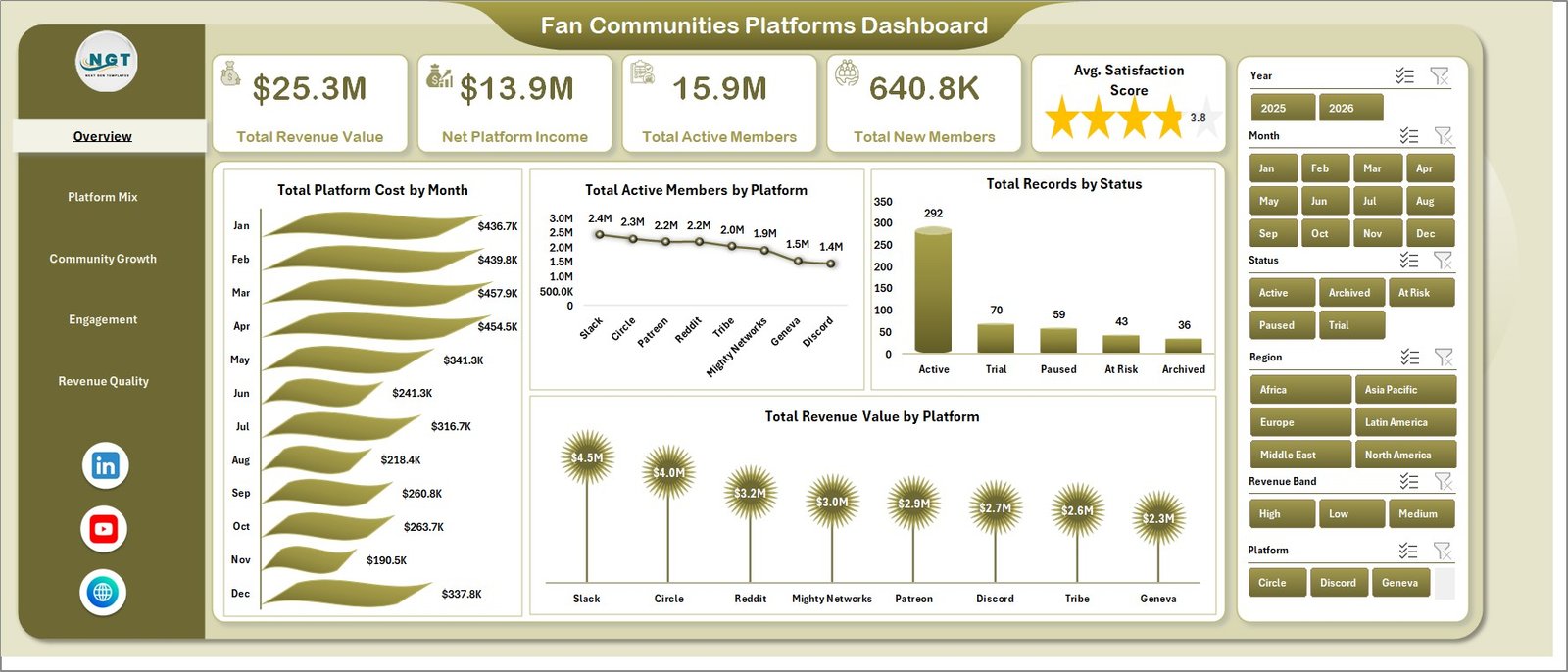
The Overview Page is the executive landing view. It shows Total Revenue Value, Net Platform Income, Total Active Members, Total New Members, and Avg. Satisfaction Score so managers can review scale, income, growth, and member experience in one place.
Total Platform Cost by Month: This chart shows how platform-related costs change month by month. It helps teams spot cost spikes, seasonal changes, and months that need deeper financial review.
Total Active Members by Platform: This visual compares member activity across fan platforms. It helps identify where the most engaged audience is concentrated.
Total Records by Status: This chart summarizes records by status so teams can monitor active, pending, inactive, paused, or closed community records. It is useful for operational cleanup and status tracking.
Total Revenue Value by Platform: This chart compares revenue contribution by platform. It helps teams see which channels or fan community platforms drive the strongest revenue.
Fan Communities Platforms Dashboard in Excel
2. Platform Mix
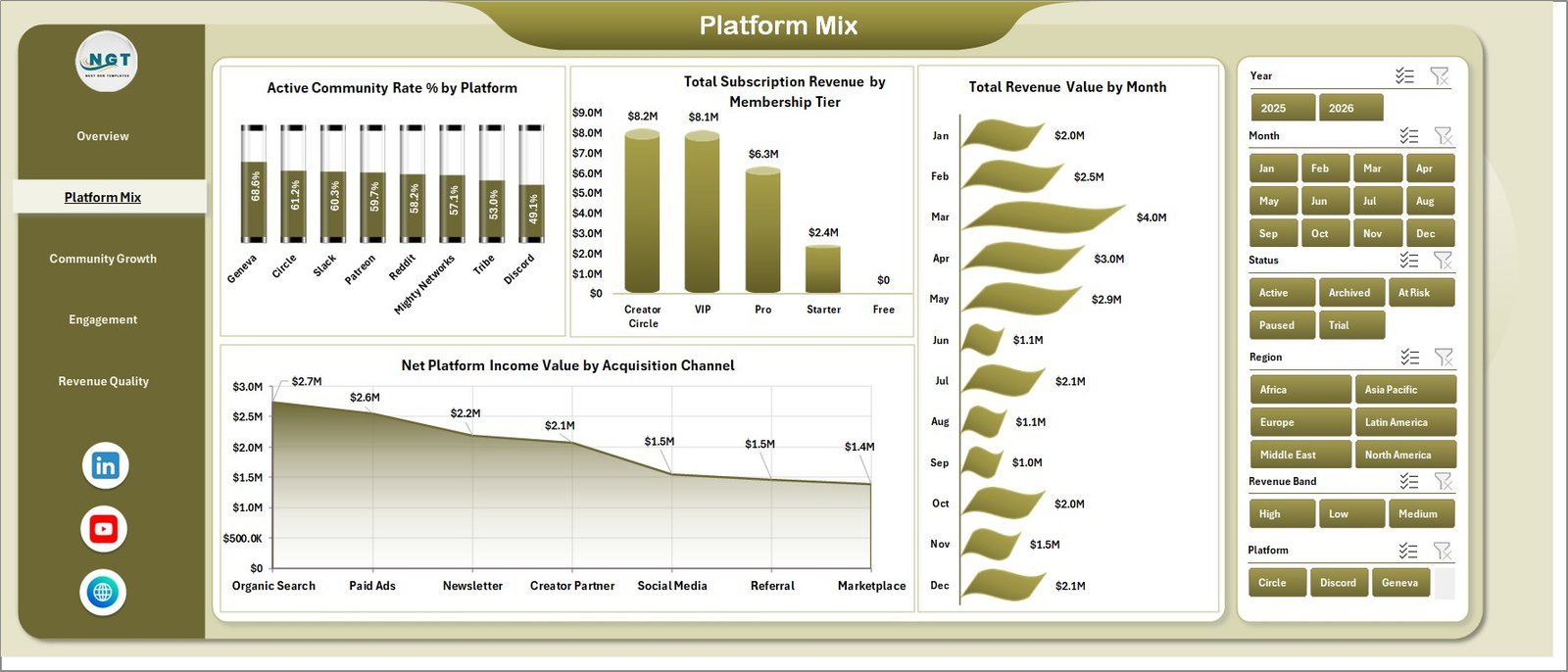
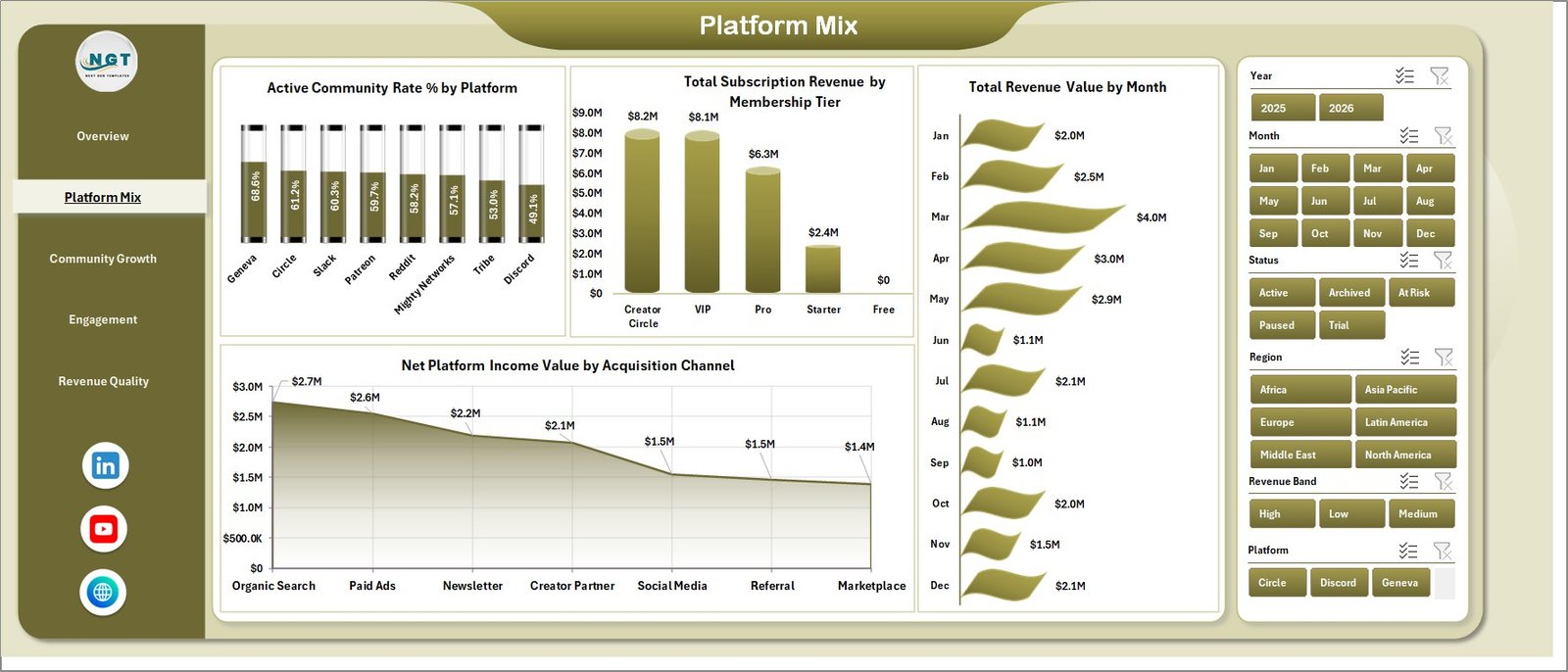
The Platform Mix sheet explains how platform, membership, time, and acquisition channels affect community performance. Active Community Rate % by Platform shows which platforms have the strongest active community share, while Total Subscription Revenue by Membership Tier highlights which plans create the most subscription income.
Total Revenue Value by Month helps review revenue movement over time. Net Platform Income Value by Acquisition Channel shows which acquisition sources are producing stronger income after platform economics are considered.
Platform Mix
3. Community Growth
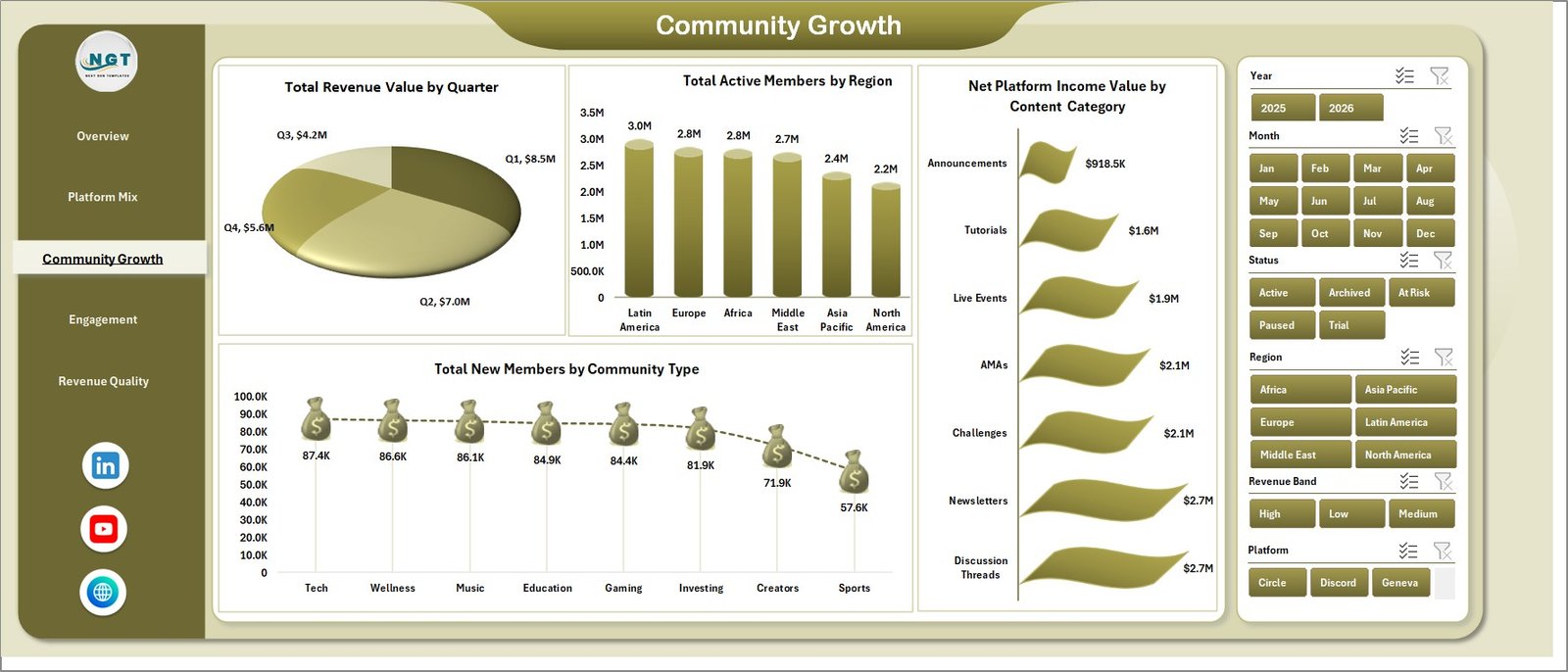
The Community Growth page focuses on quarterly revenue, regional member base, content category income, and new member acquisition by community type. Total Revenue Value by Quarter helps teams review seasonal growth and compare quarters.
Total Active Members by Region shows geographic concentration of community activity. Net Platform Income Value by Content Category identifies the categories that contribute the best income, while Total New Members by Community Type helps teams understand which community formats are attracting new members.
Community Growth
4. Engagement
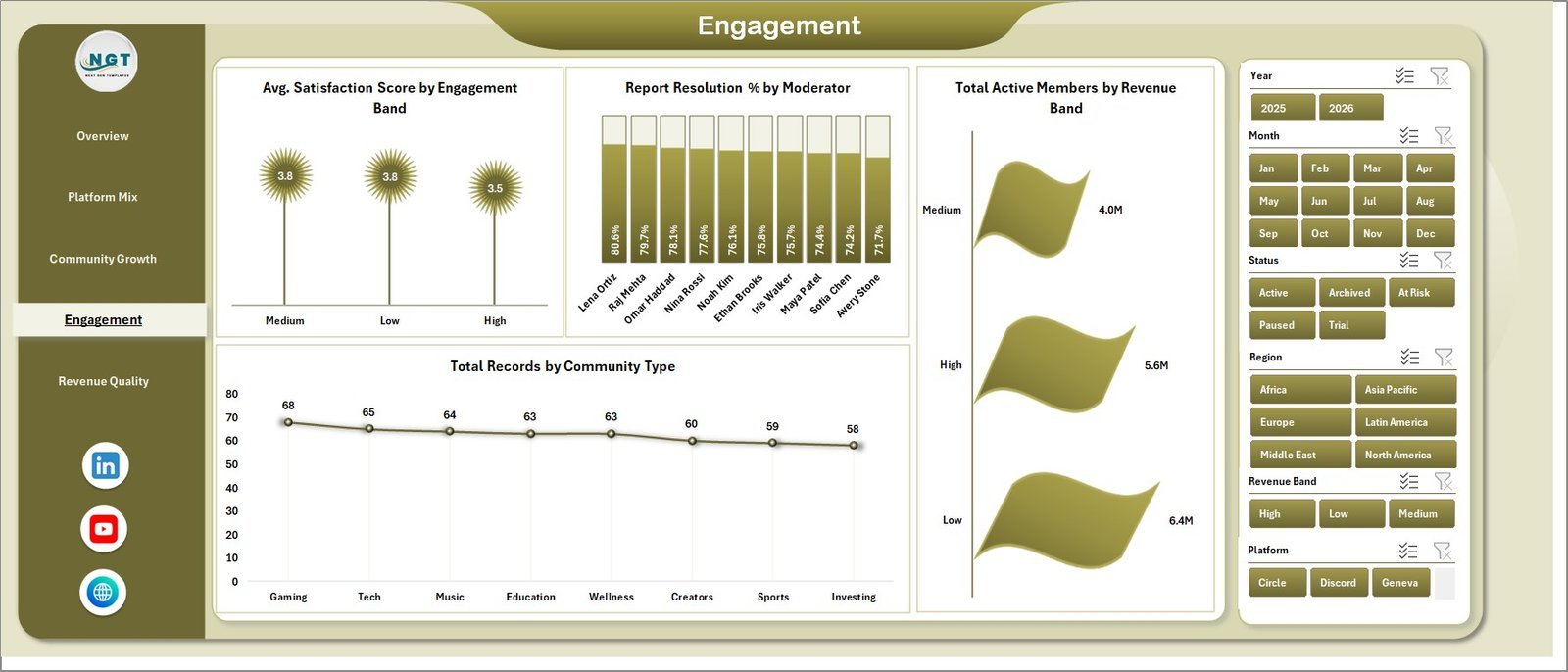
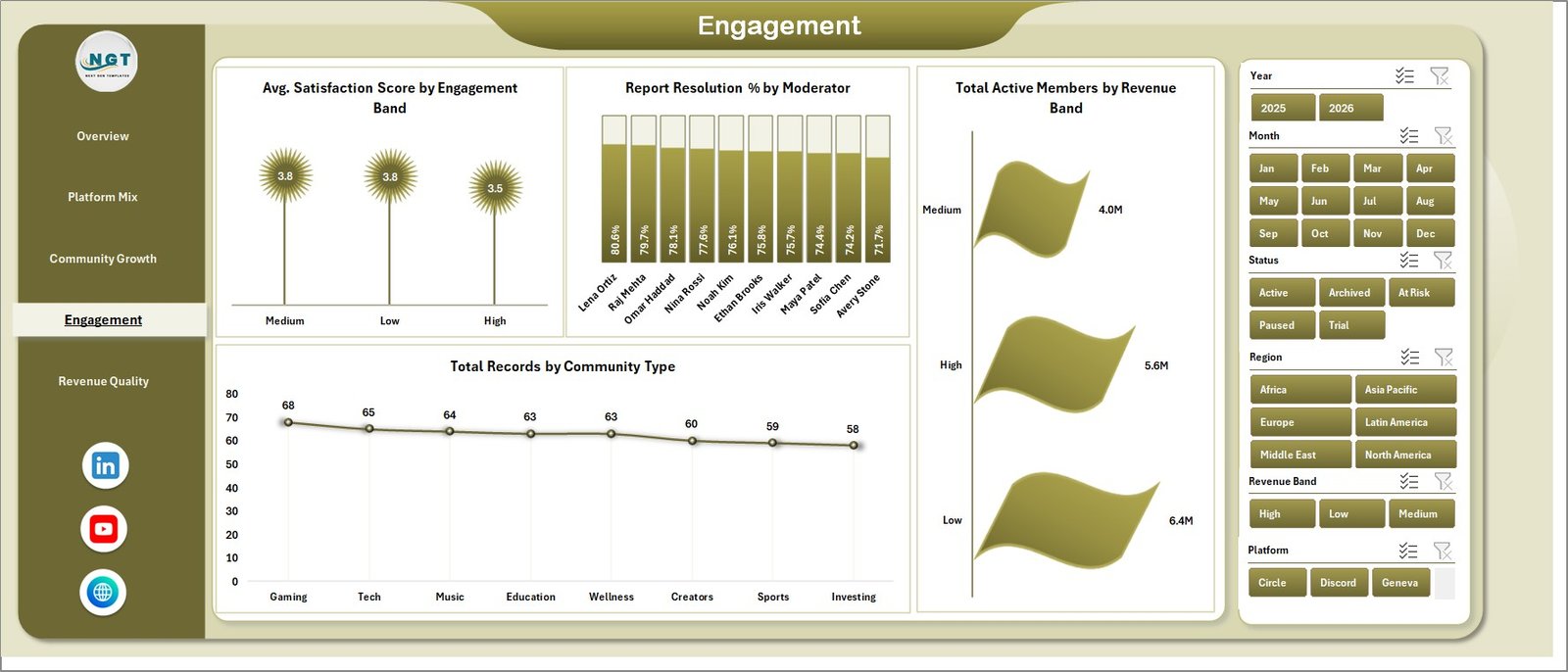
The Engagement page reviews satisfaction, moderation, revenue bands, and community type distribution. Avg. Satisfaction Score by Engagement Band helps compare satisfaction between low, medium, and high engagement segments.
Report Resolution % by Moderator highlights moderation effectiveness. Total Active Members by Revenue Band connects audience activity with revenue bands, while Total Records by Community Type shows the mix of community formats in the dataset.
Engagement
5. Revenue Quality
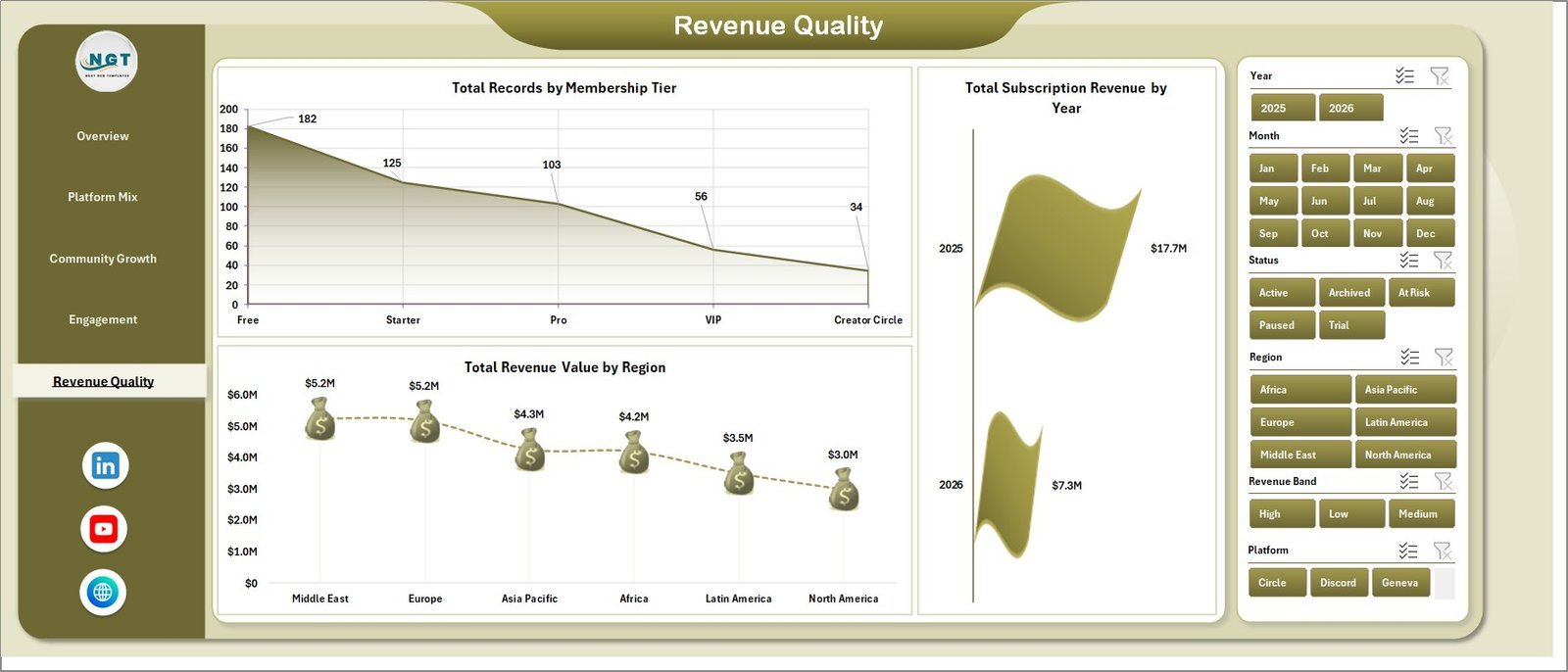
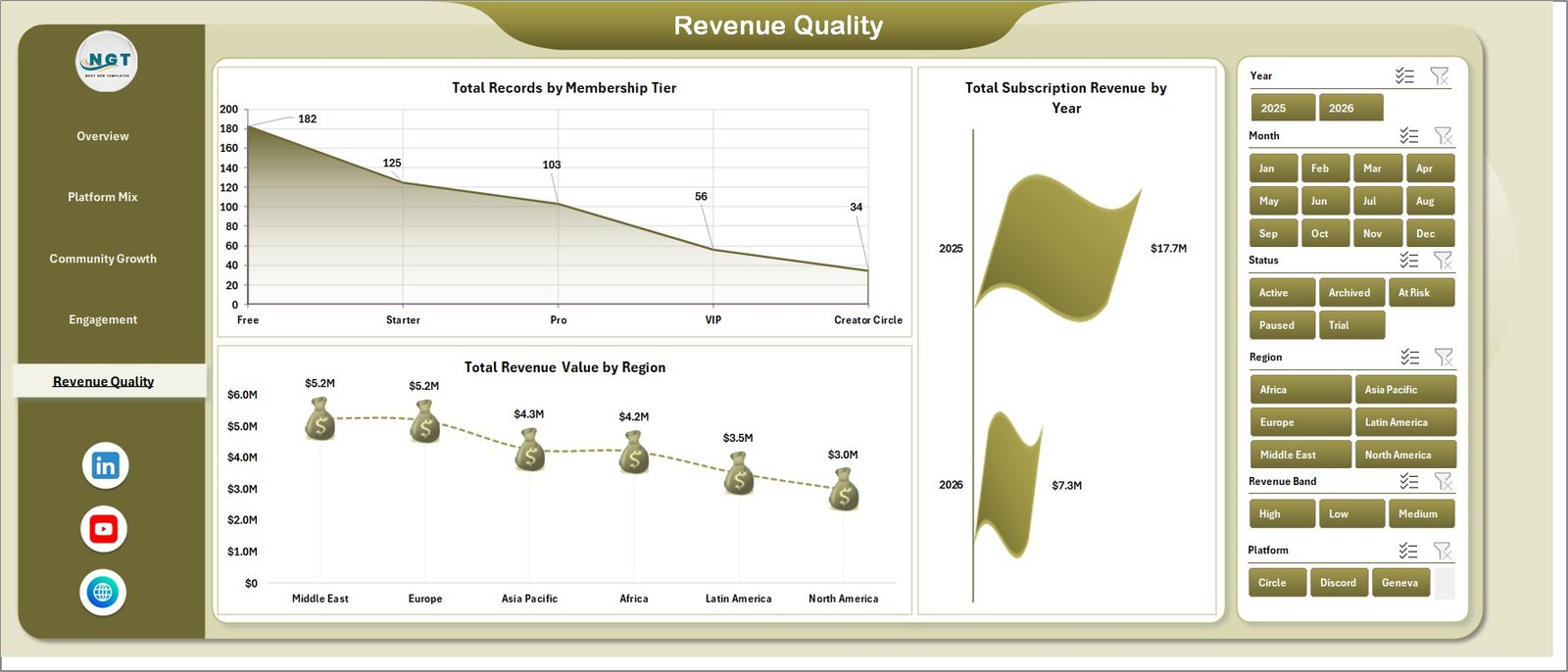
The Revenue Quality page focuses on membership tier, yearly subscription revenue, and regional revenue value. Total Records by Membership Tier helps explain the plan mix across the platform data.
Total Subscription Revenue by Year shows long-term subscription movement, while Total Revenue Value by Region helps teams compare regions and identify stronger markets.
Revenue Quality
6. Data Sheet Tab
The Data Sheet tab is where you paste or enter records in the same column format as the sample data. Keep the structure consistent, then refresh the workbook to update every pivot, chart, slicer, and KPI card.

Data Sheet tab
7. Support Sheet Tab
The Support Sheet contains the pivot tables used to build the dynamic dashboard. After updating the Data sheet, go to the Data tab in the Excel Ribbon and click Refresh All. You can keep this sheet hidden while using the dashboard.

Support sheet tab
Fan Communities Platforms Dashboard in Excel vs. Google Sheets vs. Paid CRM/SaaS – Where This Fits
| Feature | This Excel Dashboard | Google Sheets Alternative | Paid Community SaaS |
|---|---|---|---|
| Cost | $17.99 one-time | One-time or shared sheet setup | Monthly or annual subscription |
| Platform | Microsoft Excel | Browser-based spreadsheet | Vendor cloud platform |
| Setup time | Replace data and refresh | Copy sheet and paste data | Onboarding and configuration |
| Customizable fields | Fully editable workbook | Editable sheet | Limited by vendor settings |
| Year-1 cost at 5 users | $17.99 plus Excel licensing you already use | Usually low | Often hundreds or thousands |
| Fan community analytics | Built across 5 dashboard pages | Requires equivalent template | Depends on plan and exports |
Who This Template Is For – and Who It’s Not For
This template is for fan platform teams, community managers, creator membership operators, media analysts, moderation leads, and finance teams that need recurring reporting on member growth, revenue quality, engagement, platform cost, and income.
It is not a live community platform, payment processor, CRM, member portal, moderation queue, or automated data connector. It works best when you can export structured records from your community platform and refresh them in Excel.
How to Use the Fan Communities Platforms Dashboard in Excel
- Download and unzip the product file.
- Open the Excel workbook in Microsoft Excel.
- Go to the Data Sheet tab and replace the sample records with your own data in the same format.
- Open the Excel Data ribbon and click Refresh All.
- Use slicers and dashboard pages to review revenue, members, satisfaction, engagement, and platform performance.
Real-World Use Cases
Creator platform manager: Reviews active members, new members, and revenue by platform before monthly community growth meetings.
Membership revenue analyst: Uses Platform Mix and Revenue Quality to compare subscription revenue by tier, region, year, and acquisition channel.
Moderation lead: Uses Engagement to compare report resolution by moderator and satisfaction by engagement band.
Frequently Asked Questions
What KPI cards are included?
The Overview page includes Total Revenue Value, Net Platform Income, Total Active Members, Total New Members, and Avg. Satisfaction Score.
How many sheets are included?
The workbook includes 7 sheets: Overview, Platform Mix, Community Growth, Engagement, Revenue Quality, Data Sheet, and Support Sheet.
Can I use my own fan community data?
Yes. Replace the sample records on the Data Sheet tab, keep the same column structure, and refresh the workbook.
Do I need macros?
No macros are required for the dashboard workflow described here. The workbook is driven by Excel data, pivots, charts, and slicers.
Can I hide the Support Sheet?
Yes. The Support Sheet contains pivot tables for the dashboard and can be hidden after setup.
Is this a one-time purchase?
Yes. This is a one-time downloadable Excel template with no template subscription fee.
About the Author
Built by PK – Microsoft Certified Professional with 15+ years of Excel, Google Sheets, and Power BI experience. Founder of NextGenTemplates, reaching 300K+ subscribers across YouTube channels. Every template is hand-built and tested before release.
Explore Related Templates
Browse more MS Excel templates and Excel Dashboard templates. Related downloads include Digital Comic Startups Dashboard in Excel, Digital Comic Startups Dashboard in Power BI, and Music School Dashboard in Google Sheets.
Ready to analyze fan community growth and revenue in Excel? Download the Fan Communities Platforms Dashboard in Excel, update the Data sheet, refresh the workbook, and start reviewing platform performance today.
Last updated: June 2026
Watch the step-by-step video tutorial:
Compatibility and Requirements
- Works in Microsoft Excel desktop (Excel 2016 or later, or Microsoft 365).
- The dashboard uses pivot tables and slicers. Microsoft explains slicers in Use slicers to filter data.















Reviews
There are no reviews yet.