

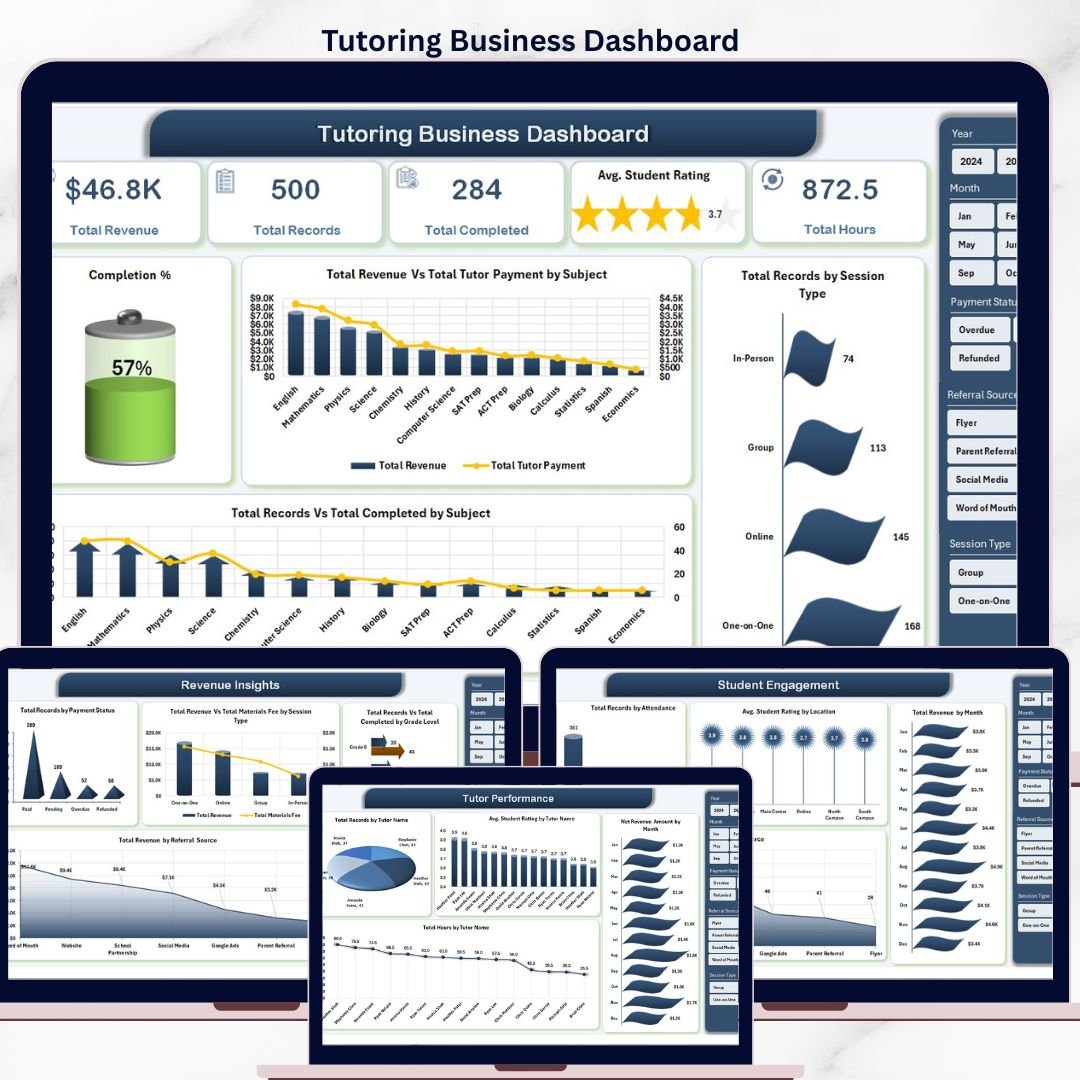



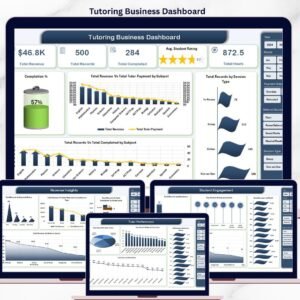
The Tutoring Business Dashboard in Excel tracks revenue, tutor performance, and student engagement across 5 analysis pages, 4+ KPI cards per page, and 16+ interactive charts — all driven by pivot tables that auto-refresh when you update the Data sheet. Setup takes under 10 minutes: replace the sample session records with your own, click Refresh All, and every metric recalculates instantly. No formulas to rebuild, no subscriptions to renew.
🌍 Join 8,400+ teams across 40+ countries using NextGenTemplates to run their tutoring centers, coaching businesses, and education practices without paying $29–$89 per month for SaaS tools like TutorBird, Oases Online, or Teachworks. This Tutoring Business Dashboard in Excel is a one-time purchase — instant download, no recurring fees, no per-tutor pricing, and it works offline on any device running Microsoft Excel 2016 or later.
📊 Dashboard Pages Explanation
The Tutoring Business Dashboard contains five analytical pages plus a Data sheet and a hidden Support sheet that powers every chart through pivot tables. Each page is filterable via slicers for Subject, Tutor, Grade Level, Session Type, and Month.
1. Overview Page
The Overview page gives owners and managers a single-screen snapshot of the entire tutoring business. Five KPI cards show high-level numbers, and four charts drill into completion rates, revenue versus tutor payments, and session mix — all filterable by the slicer panel at the top.
KPI cards on this page: Total Revenue 🔹 Total Records 🔹 Total Completed 🔹 Avg. Student Rating 🔹 Total Hours
Charts included:
- Completion % — Tracks the share of booked sessions that were successfully delivered, exposing cancellation and no-show patterns at a glance.
- Total Revenue Vs Total Tutor Payment by Subject — Compares gross revenue against tutor payouts subject-by-subject, instantly revealing which subjects deliver the strongest margin.
- Total Records by Session Type — Shows the mix of one-on-one, group, online, and in-person sessions so you can see where demand is concentrated.
- Total Records Vs Total Completed by Subject — Stacks booked versus completed sessions per subject to highlight subjects with the highest completion rates.
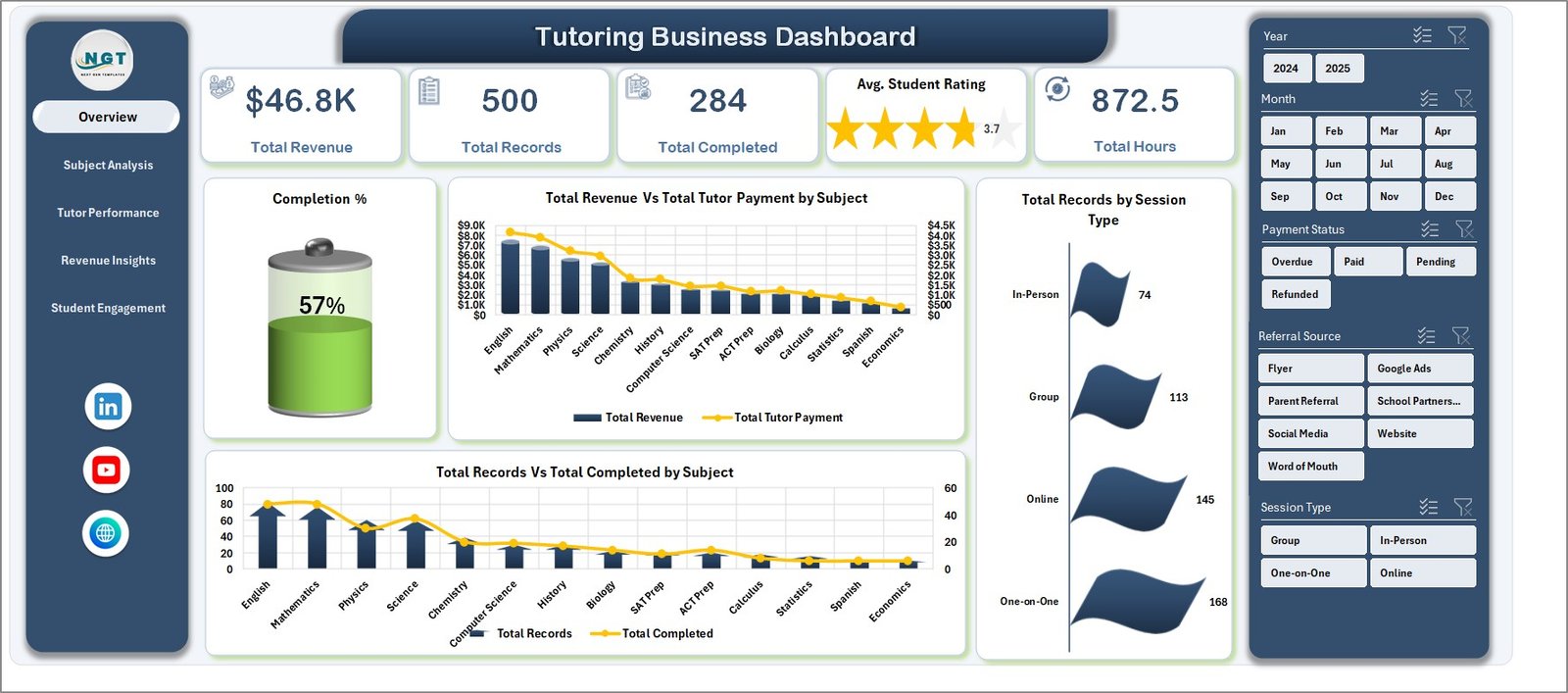
Tutoring Business Dashboard
2. Subject Analysis
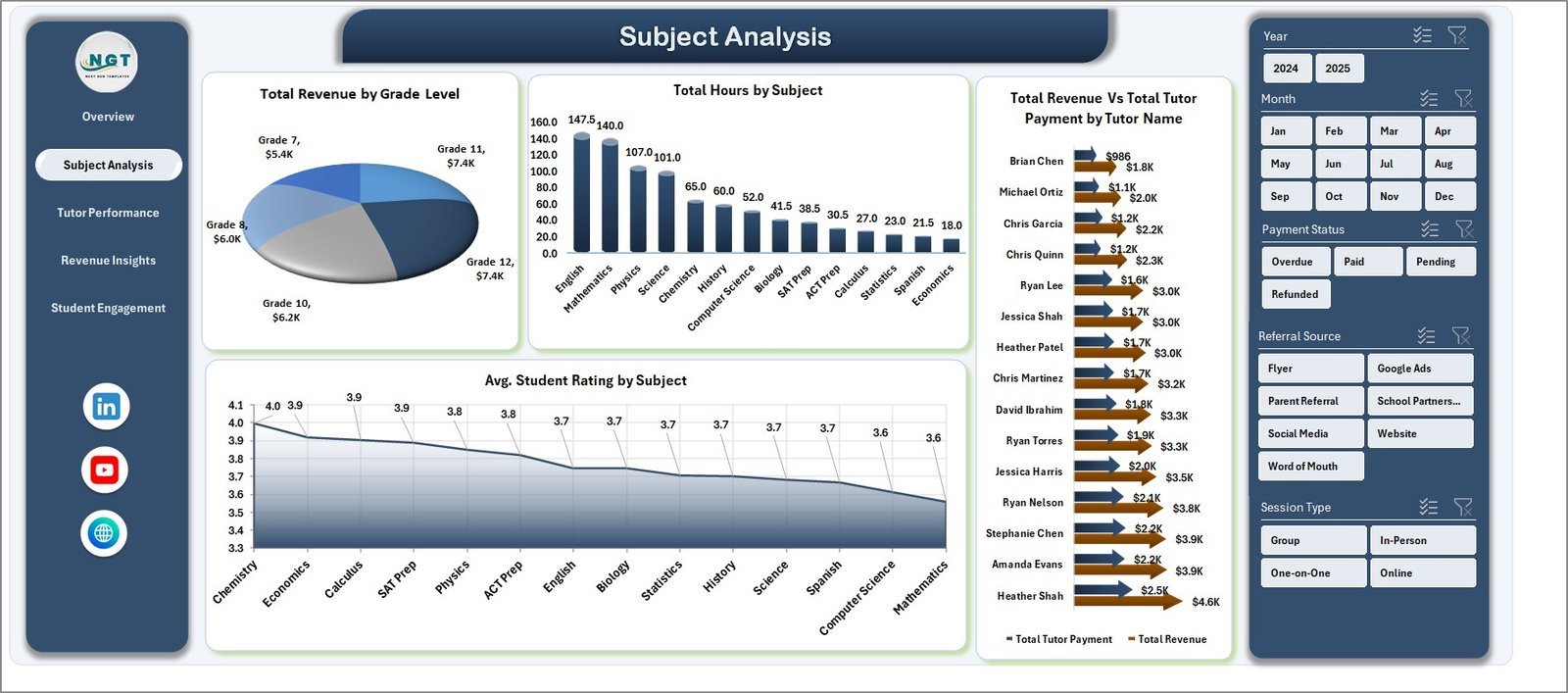
This page helps you understand which subjects and grade levels drive the business, who the top-performing tutors are by revenue, and how student ratings vary across subjects. Useful when pricing subjects and allocating tutor bandwidth.
Charts included:
- Total Revenue by Grade Level — Breaks revenue down by elementary, middle, high school, and college to show which segments pay best.
- Total Hours by Subject — Displays tutoring hours delivered per subject so capacity planning decisions become data-backed.
- Total Revenue Vs Total Tutor Payment by Tutor Name — Identifies the tutors generating the most revenue relative to their payout cost.
- Avg. Student Rating by Subject — Ranks subjects by student satisfaction to flag quality gaps.
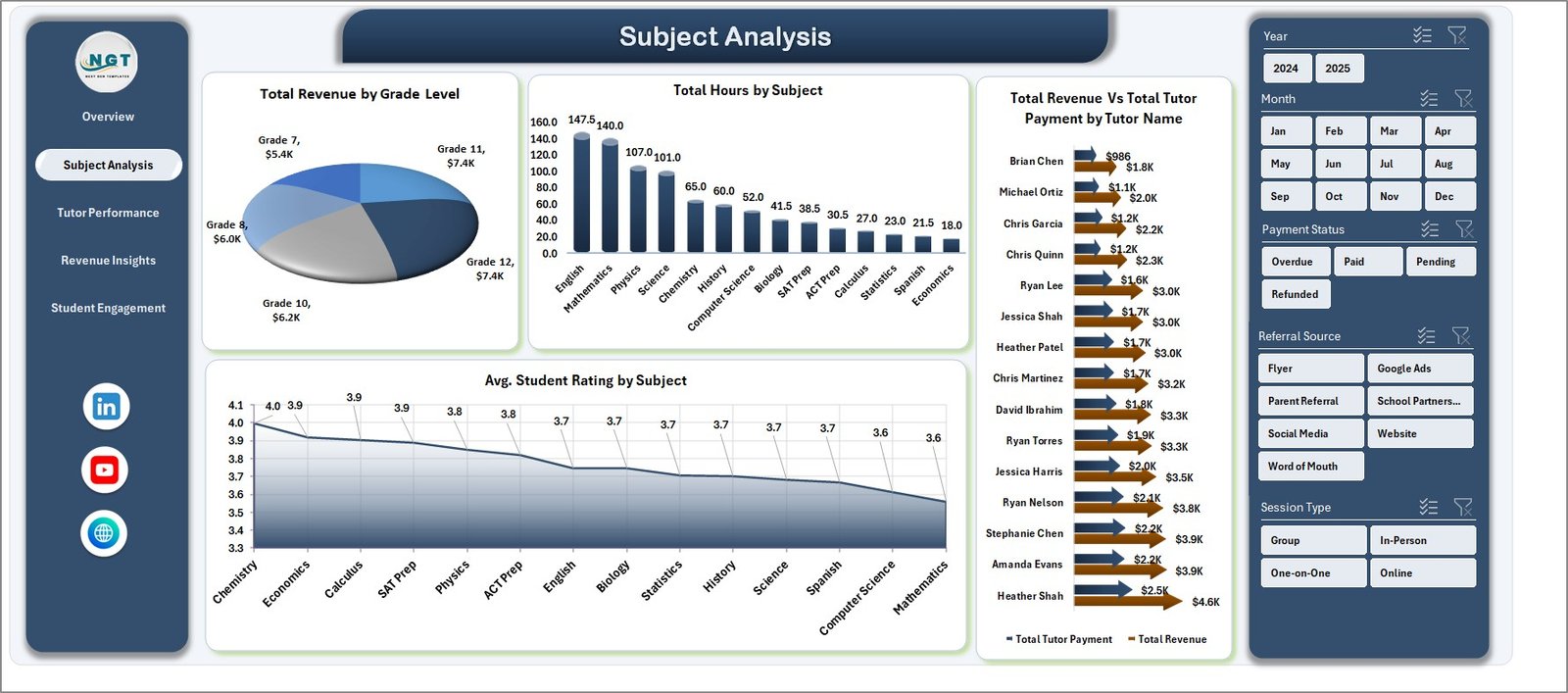
Subject Analysis
3. Tutor Performance
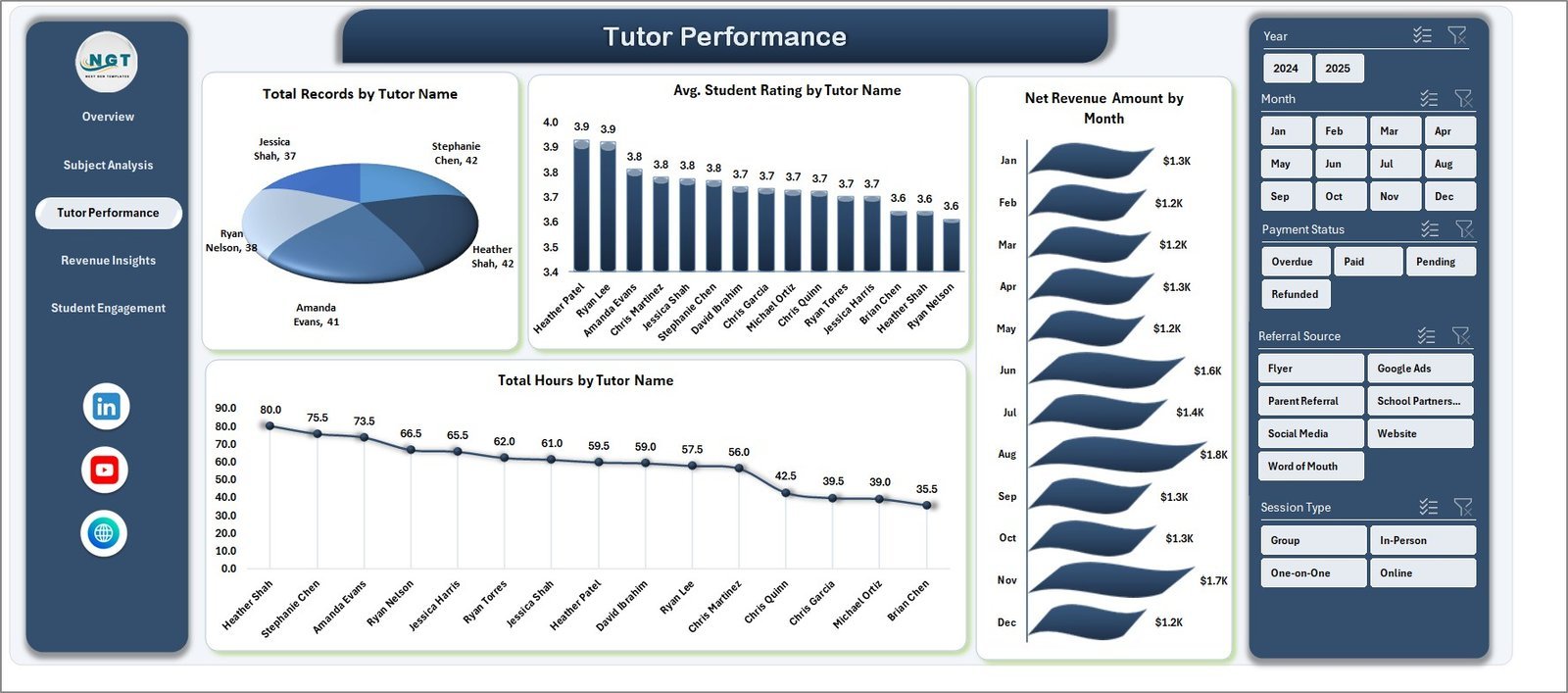
A manager-focused page for reviewing individual tutor contributions. Use it for monthly 1:1s, quarterly bonus decisions, and retention conversations with top-rated tutors.
Charts included:
- Total Records by Tutor Name — Ranks tutors by session volume so you can spot who is carrying the most load.
- Avg. Student Rating by Tutor Name — Surfaces rating leaders and underperformers for coaching conversations.
- Net Revenue Amount by Month — Plots net revenue (after tutor payouts) monthly to track seasonality and growth.
- Total Hours by Tutor Name — Shows tutor utilization and flags anyone with too many or too few teaching hours.
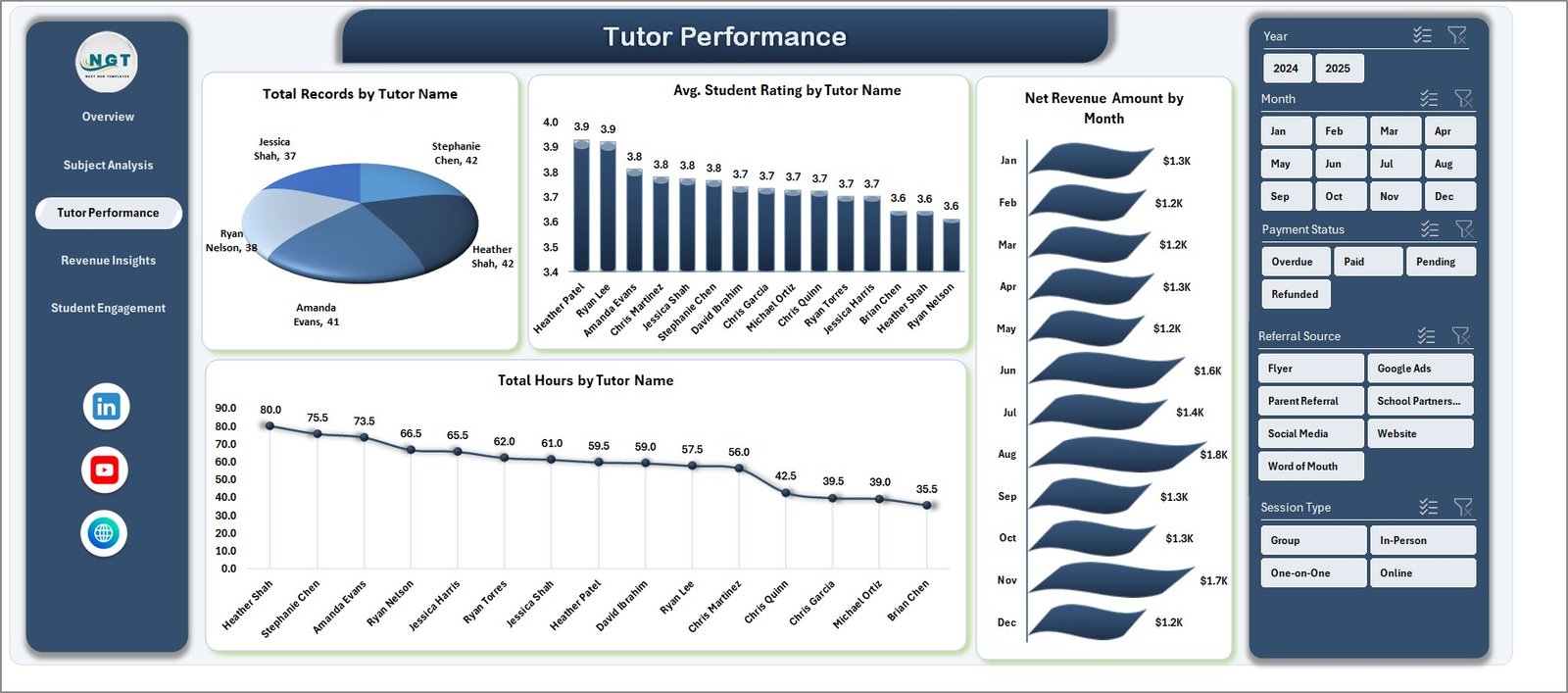
Tutor Performance
4. Revenue Insights
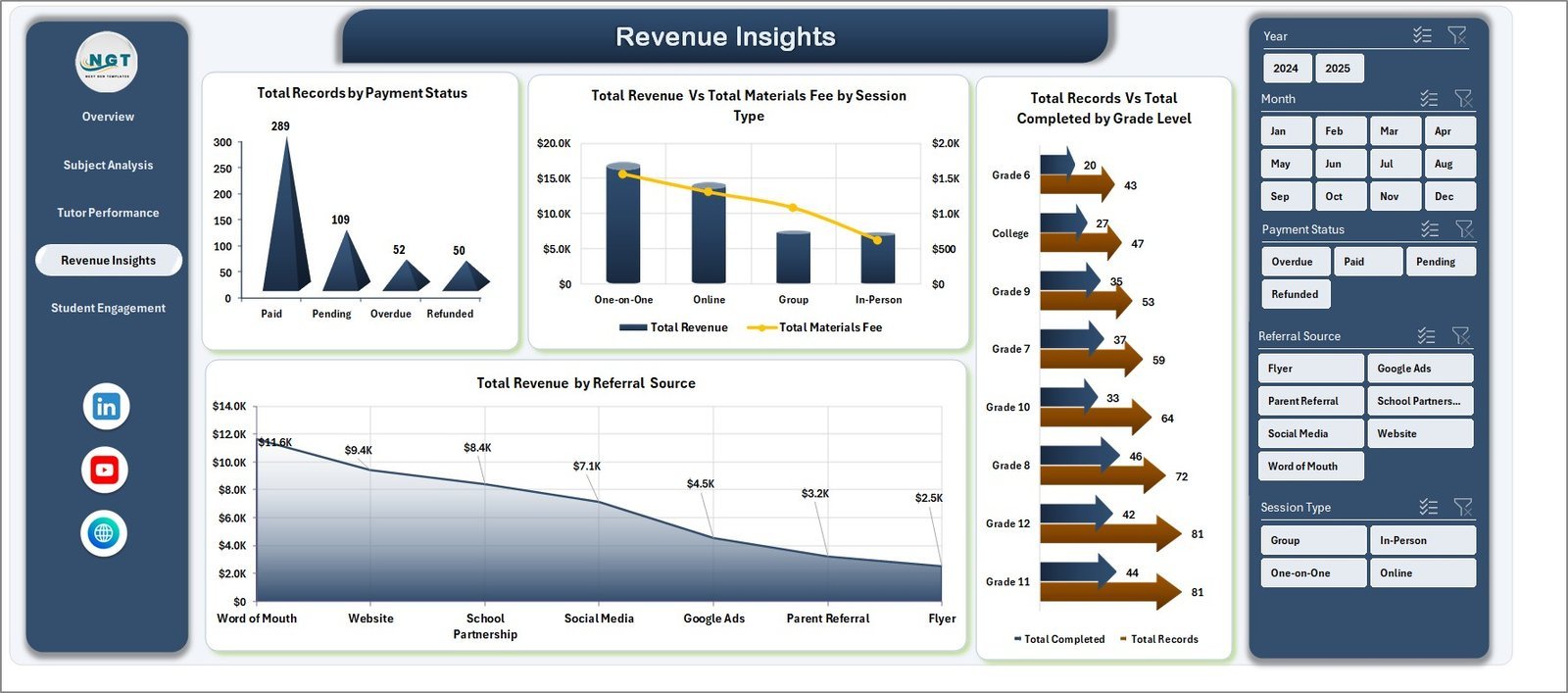
Built for finance and operations leads, this page exposes payment health, session-type profitability, and which acquisition channels generate the most revenue.
Charts included:
- Total Records by Payment Status — Breaks sessions into Paid, Pending, and Refunded to track cash flow health.
- Total Revenue Vs Total Materials Fee by Session Type — Compares revenue against materials cost to show net profitability by session format.
- Total Records Vs Total Completed by Grade Level — Shows completion reliability across grade segments for capacity planning.
- Total Revenue by Referral Source — Identifies which marketing channels (Google, referrals, Instagram, etc.) produce the most revenue.
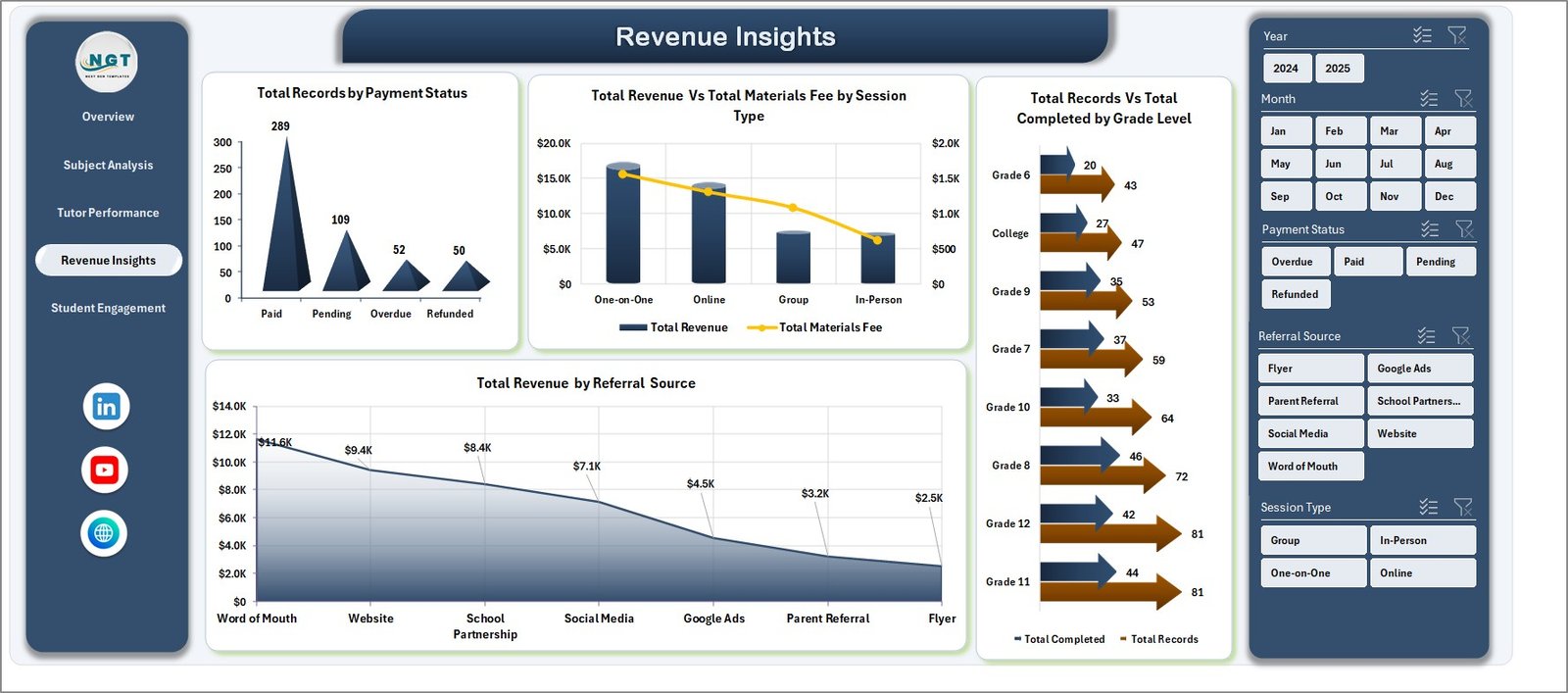
Revenue Insights
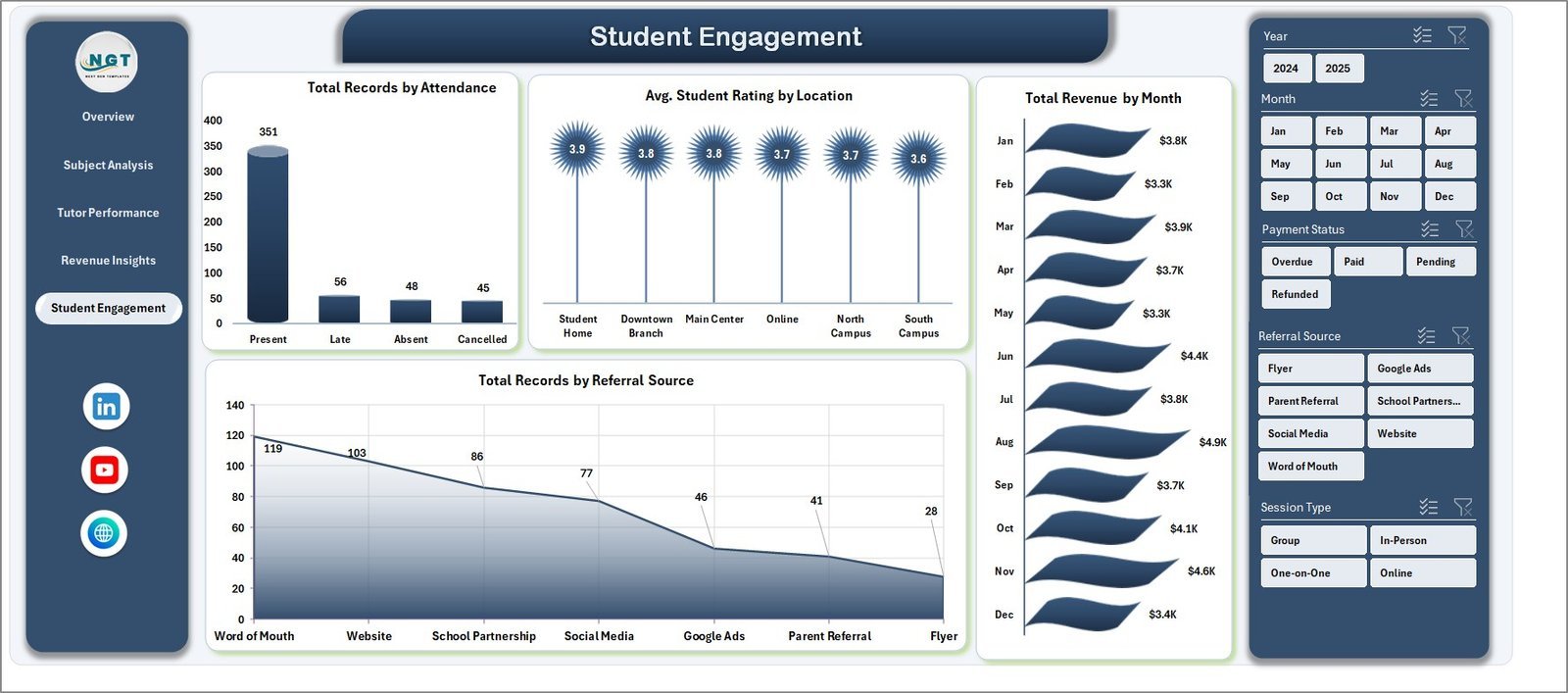
5. Student Engagement
Focuses on the student side — attendance patterns, rating variance by location, monthly revenue trends, and acquisition-source volume.
Charts included:
- Total Records by Attendance — Splits sessions by attendance status to expose no-show and cancellation rates.
- Avg. Student Rating by Location — Compares ratings across locations (online, home, center) to guide format decisions.
- Total Revenue by Month — Trends revenue month-over-month to forecast and plan.
- Total Records by Referral Source — Volume view of where students come from, paired with the revenue view on the Revenue Insights page.
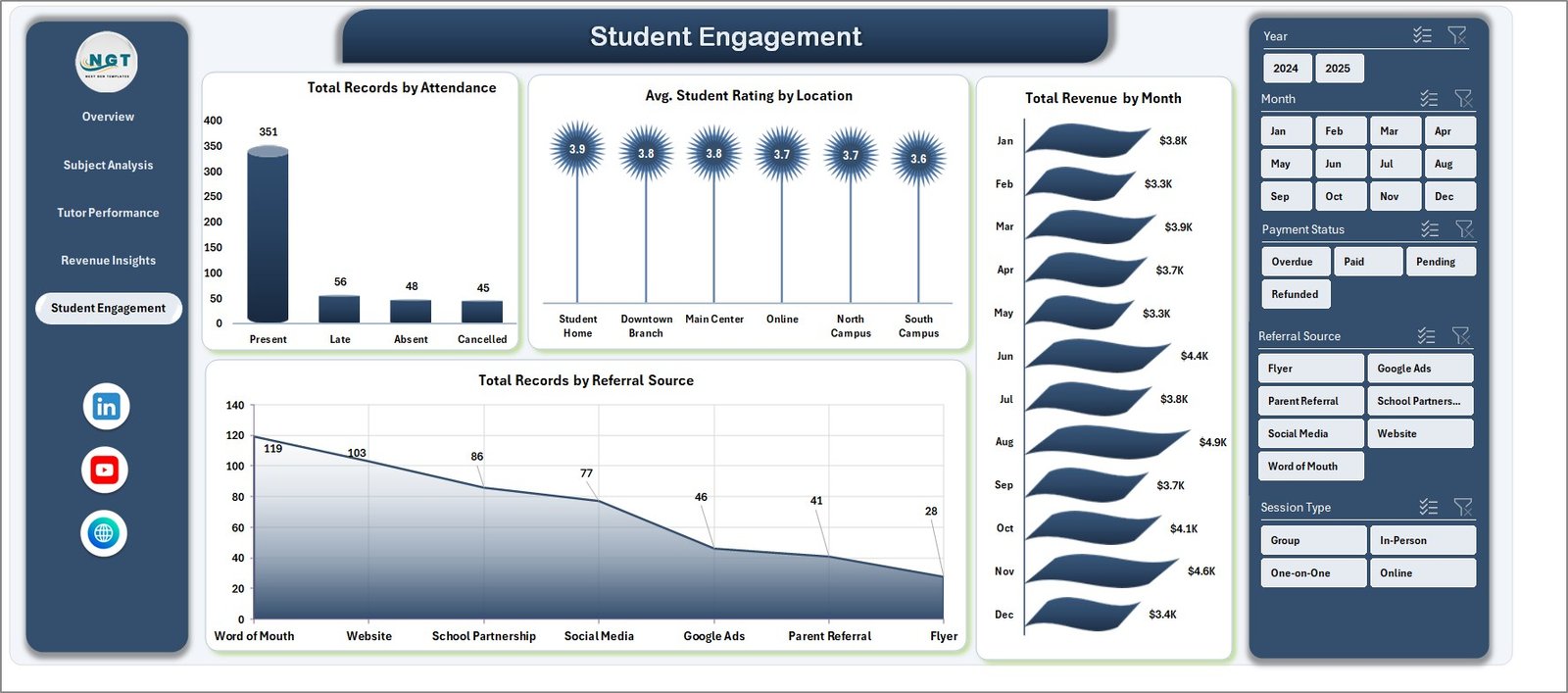
Student Engagement
6. Data Sheet
This is where you enter your session records. Each row is one tutoring session with fields for Date, Tutor, Student, Subject, Grade Level, Session Type, Hours, Revenue, Tutor Payment, Materials Fee, Rating, Payment Status, Attendance, Location, and Referral Source. Replace the sample data with your own in the same format and every chart updates.

Data Sheet tab
7. Support Sheet
A hidden sheet containing all the pivot tables that power the dashboard. After updating the Data sheet, go to the Data tab in the Excel Ribbon and click Refresh All — every pivot and chart recalculates automatically. Keep this sheet hidden in daily use.

Support Sheet tab
🆚 Tutoring Business Dashboard Excel vs. Google Sheets vs. Paid Tutoring SaaS
| Feature | Tutoring Business Dashboard (Excel) | Google Sheets Alternatives | TutorBird / Teachworks / Oases |
|---|---|---|---|
| Cost | $17.99 one-time | Mostly free, limited features | $29–$89 / month + per-tutor fees |
| Setup time | Under 10 minutes | 30–60 minutes | 3–7 days onboarding |
| Works offline | Yes — fully local Excel file | No, needs internet | No, cloud-only |
| Tutor payout tracking | Built-in, per-session | Manual formulas | Yes, but often add-on |
| Rating & engagement analytics | Pre-built across 5 pages | Must build manually | Yes, vendor-locked |
| Data ownership | 100% yours, local file | Stored in your Drive | Vendor-owned cloud database |
| Customizable | Fully — edit any formula, chart, KPI | Yes | Limited to vendor options |
| Annual cost (3 years) | $17.99 | $0 | $1,044–$3,204 |
For tutoring centers and independent tutors who want full analytics control without paying $30–$90 every month, the Tutoring Business Dashboard in Excel sits in the sweet spot.
👥 Who This Template Is For — and Who It’s Not For
✅ This template is built for:
- Tutoring center owners managing 5–50 tutors and 50–500 active students
- Independent tutors who want a professional dashboard to share with parents or clients
- Education franchises tracking multi-location revenue, ratings, and tutor performance
- Coaching academies (test prep, STEM, language) that need monthly business reviews
- Private tutoring networks migrating from paper/spreadsheet tracking to real analytics
❌ This template is NOT for:
- Schools needing integrated student information systems (SIS) with gradebooks and attendance for SOC 2 compliance
- Teams who require a mobile app for tutors to clock in and out in real time
- Businesses needing automatic payment processing and invoice generation (this is a reporting template, not a billing system)
⚙️ How to Use the Tutoring Business Dashboard
- Open the Excel file in Microsoft Excel 2016 or later — enable editing if prompted.
- Go to the Data sheet and replace the sample rows with your own session records, keeping the column order intact.
- Go to the Data tab in the Excel Ribbon and click Refresh All — every pivot table and chart rebuilds automatically.
- Use the slicers at the top of each dashboard page to filter by subject, tutor, grade, session type, or month.
- Export screenshots or the whole workbook as PDF for monthly reviews with your team or investors.
💼 Real-World Use Cases
Priya runs a 12-tutor math and science tutoring center in Bangalore. She uses the Tutoring Business Dashboard in Excel to review monthly revenue versus tutor payouts by subject, identify her top-rated tutors for retention bonuses, and present quarterly performance to her co-founder — without paying $59 per month for TutorBird.
Marcus is an independent SAT/ACT tutor in the US with 30 regular students. He uses the dashboard to track which referral sources (Google, alumni, parent referrals) generate the most revenue, what his completion rate is, and how his ratings trend month-over-month, so he can justify his $90/hour rate with hard data.
Ananya directs operations at a language-learning franchise with 4 locations. She filters the Tutoring Business Dashboard by location, compares average student ratings across branches, and surfaces payment-status issues to her finance lead — all inside one Excel file, no cloud login required.
👤 About the Author
Built by PK — Microsoft Certified Professional with 15+ years of Excel, Google Sheets, and Power BI experience. Founder of NextGenTemplates, reaching 300K+ subscribers across YouTube channels (@PK-AnExcelExpert, @NextGenTemplates, @NeoTechNavigators). Every template is hand-built and tested before release.
❓ Frequently Asked Questions
What does the Tutoring Business Dashboard in Excel track?
The Tutoring Business Dashboard tracks 5 core KPIs (Total Revenue, Total Records, Total Completed, Avg. Student Rating, Total Hours) and 16 pre-built charts across 5 pages — Overview, Subject Analysis, Tutor Performance, Revenue Insights, and Student Engagement. All metrics recalculate automatically when you update the Data sheet and click Refresh All.
How does this compare to TutorBird or Teachworks?
TutorBird and Teachworks charge $29–$89 per month plus per-tutor fees and lock your data in their cloud. The Tutoring Business Dashboard in Excel is a one-time $17.99 purchase, works fully offline, and gives you 100% data ownership. You trade automated billing and mobile apps for ownership, flexibility, and massive cost savings over 3+ years.
How long does setup take?
Setup takes under 10 minutes for most tutoring businesses. Open the Tutoring Business Dashboard file, replace the sample session records in the Data sheet with your own data following the same column format, click Refresh All on the Data ribbon tab, and every chart and KPI on the 5 dashboard pages updates automatically.
Can I add my own subjects, tutors, or grade levels?
Yes. The Tutoring Business Dashboard uses pivot tables sourced directly from the Data sheet, so any new subject, tutor name, grade level, or referral source you enter is picked up automatically after clicking Refresh All. No formula edits or chart rebuilds are needed.
Do I need macros or VBA enabled?
No. The Tutoring Business Dashboard in Excel is a pivot-table-driven workbook with no macros or VBA. It runs safely in any corporate Excel environment where macros are blocked, and it’s fully compatible with Excel 2016, 2019, 2021, Microsoft 365, and Excel for Mac.
Can multiple team members edit the same file?
Yes, if you save the Tutoring Business Dashboard file to OneDrive or SharePoint and open it in Excel for the web or Microsoft 365 desktop with co-authoring enabled. For local-only use, one person updates the Data sheet at a time and then shares the refreshed file with the rest of the team.
Is the Tutoring Business Dashboard a one-time purchase?
Yes — the Tutoring Business Dashboard in Excel is a one-time $17.99 purchase with instant download. There is no subscription, no per-tutor fee, and no renewal charge. You can use the template on unlimited devices within your business and keep using it as long as you have Microsoft Excel installed.
🔗 Explore Related Templates
- Driving School Dashboard in Excel — adjacent education vertical with the same pivot-driven architecture.
- Teacher Training Institutes KPI Dashboard in Excel — MTD/YTD KPI version for training institutions.
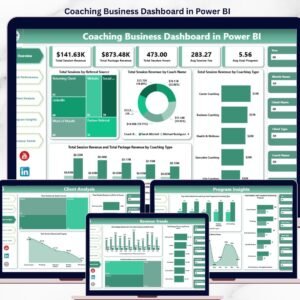
- Coaching Business Dashboard in Power BI — the Power BI sibling for teams already on Power BI Desktop.
- Browse the full Excel Dashboard category for more pivot-driven business dashboards.
📖 Click here to read the Detailed Blog Post
🎥 Visit our YouTube channel for step-by-step video tutorials
👉 YouTube.com/@NextGenTemplates
📅 Last updated: April 2026
Watch the step-by-step video tutorial:
Compatibility and Requirements
- Works in Microsoft Excel desktop (Excel 2016 or later, or Microsoft 365).
- The dashboard pages use slicers to filter by subject, tutor, grade level, session type and month. Microsoft explains them in Use slicers to filter data.
Related Tutoring and Education Templates
- Tutoring Business Dashboard in Power BI: the same dashboard for Power BI Desktop
- Tutoring Business Dashboard in Google Sheets: the Google Sheets edition
- Business Development Dashboard in Excel: a pivot-driven dashboard for growth tracking
- Business Intelligence KPI Dashboard in Excel: a KPI view across the business
Browse all Excel dashboards or the Education templates in Excel.









Reviews
There are no reviews yet.