



The Event Planning Calendar in Excel is a comprehensive and easy-to-use tool designed to streamline event management and ensure that all tasks are completed on time. Whether you’re planning a corporate event, a wedding, a conference, or any other special occasion, this Excel-based calendar provides you with a structured framework to organize your event from start to finish.
The calendar allows you to track important dates, deadlines, vendor contacts, task assignments, and more, all in one centralized location. With its user-friendly interface and customizable features, this tool is perfect for event planners, project managers, or anyone who needs to coordinate events efficiently.
Key Features of the Event Planning Calendar in Excel
📅 Event Timeline & Scheduling
Keep track of all important event dates, including deadlines, meetings, and milestones. The calendar helps you stay on top of tasks and ensures everything is completed on time.
📝 Task Assignment & Responsibility Tracking
Assign tasks to team members and track their progress. Ensure that everyone knows their responsibilities and that tasks are completed as planned.
📈 Budget & Expense Tracking
Manage your event budget by tracking expenses. Input costs for venues, catering, decorations, and more, and monitor whether you’re staying within budget.
🔑 Vendor & Contact Information
Store contact details for all event vendors, including caterers, venues, speakers, and suppliers. Easily access important contact information when you need it.
📊 Progress Tracking & Reporting
Monitor the status of tasks and milestones with clear visual indicators. Use the dashboard to assess progress and ensure that everything is on track.
⚙️ Customizable & Scalable
Customize the calendar to match your specific event needs. You can add new categories, tasks, and deadlines as necessary. Whether you’re managing a small gathering or a large conference, this calendar scales to meet your needs.
Why You’ll Love the Event Planning Calendar in Excel

✅ Stay Organized
Track all your event details in one place, ensuring nothing is overlooked. Keep your schedule, tasks, and contacts well-organized for smooth event management.
✅ Budget Control
Keep a close eye on your event budget. Track expenses in real-time and make adjustments if necessary to stay within budget.
✅ Task & Vendor Management
Assign tasks, track progress, and ensure that vendors are meeting deadlines. Have all contact information readily available to address any last-minute issues.
✅ Real-Time Tracking
Monitor event progress in real-time and make data-driven decisions to ensure timely completion of tasks and milestones.
✅ Customizable & Flexible
Tailor the calendar to suit any event. Add custom fields for specific event needs, ensuring it works for everything from small gatherings to large conferences.
What’s Inside the Event Planning Calendar in Excel?
Event Timeline & Scheduling: Track important event deadlines and milestones.
Task Assignment & Responsibility Tracking: Assign and monitor tasks to team members.
Budget & Expense Tracking: Track all event expenses and stay within budget.
Vendor & Contact Information: Store all vendor and supplier contact details.
Progress Tracking & Reporting: Monitor event progress and task completion.
Customizable Features: Modify the calendar to fit any event, large or small.
How to Use the Event Planning Calendar in Excel
1️⃣ Download the Template: Get the Event Planning Calendar in Excel instantly.
2️⃣ Add Your Event Details: Input your event dates, deadlines, and milestones.
3️⃣ Assign Tasks & Track Progress: Assign responsibilities and monitor task completion.
4️⃣ Manage Budget & Expenses: Track costs and adjust the budget as needed.
5️⃣ Monitor Event Progress: Use the progress tracking feature to ensure everything is on track.
Who Can Benefit from the Event Planning Calendar in Excel?
🔹 Event Planners
🔹 Corporate Event Organizers
🔹 Wedding Planners
🔹 Conference & Seminar Coordinators
🔹 Project Managers
🔹 Small Business Owners
🔹 Non-profit Organizations
🔹 Anyone involved in managing events
The Event Planning Calendar in Excel is the perfect tool to keep your events organized, on budget, and on time. Whether you’re planning a corporate event, wedding, or large conference, this calendar will help you manage all aspects of the event planning process seamlessly.
Click here to read the Detailed blog post
Visit our YouTube channel to learn step-by-step video tutorials
Youtube.com/@PKAnExcelExpert
Compatibility and Requirements
- Works in Microsoft Excel desktop (Excel 2016 or later, or Microsoft 365).
- No add-ins are needed.
- For help with Excel charts, see Microsoft’s guide Create a chart from start to finish.
Frequently Asked Questions
What kinds of events can I plan with it?
Corporate events, weddings, conferences, seminars and other special occasions, from small gatherings to large conferences.
Can I track the event budget?
Yes. Enter costs for venues, catering, decorations and other items, and check whether you are staying within budget.
Where do I keep vendor details?
The template stores contact details for caterers, venues, speakers and suppliers in one place.
Can I assign tasks to my team?
Yes. Assign each task to a team member and follow its progress against the deadline.
Related Event Planning Templates
- Event Planning Calendar in Google Sheets: the same calendar in Google Sheets
- Event Planning Checklist in Google Sheets: a step by step event checklist
- Event Planning KPI Dashboard in Excel: measure event results against targets
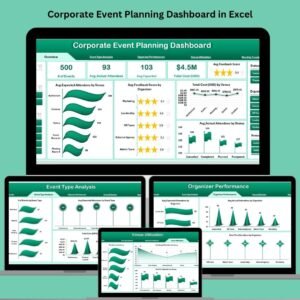
- Corporate Event Planning Dashboard in Excel: charts for corporate events
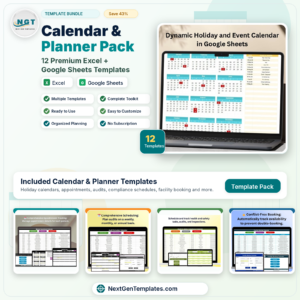
- Calendar & Planner Pack: 12 calendar and planner templates in one bundle
Browse all Excel calendars or the Google Sheets calendars.





Reviews
There are no reviews yet.