



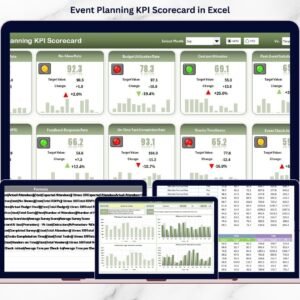
The Event Planning KPI Dashboard in Excel is an essential tool for event planners, coordinators, and businesses that organize events. This powerful Excel-based dashboard helps you track key performance indicators (KPIs) such as guest attendance, event budget, expenses, vendor management, and overall event performance. It enables you to have complete control over your event logistics, ensuring that every detail is accounted for and every milestone is achieved.
Whether you’re planning a small corporate gathering or a large-scale conference, the Event Planning KPI Dashboard in Excel simplifies event management. By providing real-time insights into your event’s performance, this dashboard helps you monitor progress, optimize resource allocation, and ensure that the event runs smoothly, while staying within budget.
Key Features of the Event Planning KPI Dashboard in Excel
🎉 Comprehensive Event Tracking
Monitor all aspects of your event, including budget, attendance, vendors, and timeline. Track progress across different stages of the event planning process and make necessary adjustments to ensure success.
⚡ Budget & Expense Tracking
Keep a close eye on your event’s budget and expenses. The dashboard helps you compare actual spending against the planned budget, helping you avoid overspending and stay within your financial limits.
📊 Guest Attendance & Engagement Metrics
Track guest RSVPs, attendance, and engagement levels throughout the event. Use this data to assess the success of the event and plan better for future events.
📅 Vendor & Logistics Management
Monitor vendor performance, contracts, and delivery schedules. Keep track of logistics, including venue setup, catering, and event equipment, to ensure that everything arrives, and functions as planned.
🖥️ Interactive & Customizable Dashboard
The Excel dashboard is user-friendly and fully customizable, allowing you to modify it based on your event’s unique needs. With interactive charts, slicers, and filters, you can explore different data points and make informed decisions.
Why You’ll Love the Event Planning KPI Dashboard in Excel

✅ Track Event Progress in Real-Time
Monitor the status of your event planning and execution in real time. Track key KPIs such as attendance, budget, vendor management, and guest satisfaction to ensure a seamless event experience.
✅ Manage Event Budget Efficiently
Stay on top of your event’s budget by tracking actual spending against your budget plan. Avoid overspending by identifying potential cost overruns early.
✅ Improve Guest Engagement & Attendance
Track guest RSVPs and attendance to evaluate event engagement. Use this data to improve future event planning, marketing, and guest relations.
✅ Optimize Vendor & Logistics Coordination
Ensure smooth logistics by tracking vendor performance and managing delivery schedules. Stay organized with a detailed overview of all vendor contracts and service level agreements (SLAs).
✅ Make Data-Driven Event Planning Decisions
Leverage real-time data to make informed decisions during event planning. Use the dashboard’s insights to optimize event logistics, budget, and guest experiences.
What’s Inside the Event Planning KPI Dashboard Template?
- Event Budget Tracking: Monitor expenses and stay within your planned budget.
- Guest Attendance & Engagement: Track RSVPs, attendance, and engagement levels.
- Vendor & Logistics Management: Keep track of vendor contracts, deliveries, and services.
- Real-Time KPI Insights: Stay updated with real-time data to ensure successful event execution.
- Interactive Dashboard: Explore data with dynamic charts, filters, and slicers.
How to Use the Event Planning KPI Dashboard in Excel
1️⃣ Download the Template: Get instant access to your Event Planning KPI Dashboard in Excel.
2️⃣ Input Your Event Data: Enter event details, guest information, budget, and vendor data into the dashboard.
3️⃣ Track & Monitor KPIs: Use the dashboard to track event performance, guest engagement, and budget compliance.
4️⃣ Analyze & Optimize: Use insights from the dashboard to optimize event planning, improve guest experience, and ensure successful event execution.
Who Can Benefit from the Event Planning KPI Dashboard in Excel?
🔹 Event Planners & Coordinators
🔹 Corporate Event Managers
🔹 Conference & Seminar Organizers
🔹 Wedding & Party Planners
🔹 Non-profit & Charity Event Organizers
🔹 Anyone Planning & Managing Events of Any Size
Stay organized and optimize every aspect of your event with the Event Planning KPI Dashboard in Excel. Track budgets, attendance, vendors, and more to ensure a smooth and successful event every time.
Click here to read the Detailed blog post
Visit our YouTube channel to learn step-by-step video tutorials
Youtube.com/@PKAnExcelExpert
Compatibility and Requirements
- Works in Microsoft Excel desktop (Excel 2016 or later, or Microsoft 365).
- Microsoft’s guide Use slicers to filter data explains the Excel feature this file is built on.
Frequently Asked Questions
What does the Event Planning KPI Dashboard track?
Event budget and expenses against plan, guest RSVPs, attendance and engagement, and vendor contracts, deliveries and logistics.
Can I compare spending with the budget?
Yes. The dashboard compares actual spending with the planned budget so you can spot overruns early.
Can I filter the dashboard?
Yes. It has interactive charts, slicers and filters for exploring different data points.
What data do I enter?
Event details, guest information, budget figures and vendor data. The KPIs update from these entries.
Related Event Planning Templates
- Event Planning KPI Scorecard in Excel: event KPIs against targets
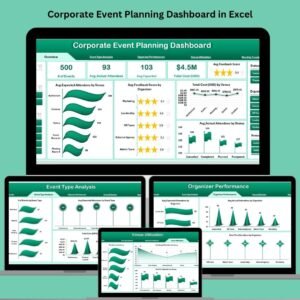
- Corporate Event Planning Dashboard in Excel: a full corporate event dashboard
- Corporate Event Planning Dashboard in Power BI: an interactive Power BI option
- Event Planning Calendar in Excel: map event dates across the year
- Event Planning Checklist in Google Sheets: tick off event tasks
Browse all Excel KPI dashboards.




















Reviews
There are no reviews yet.