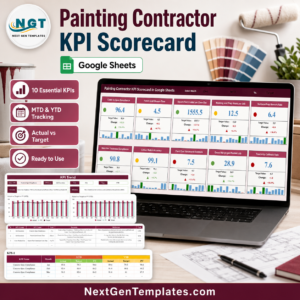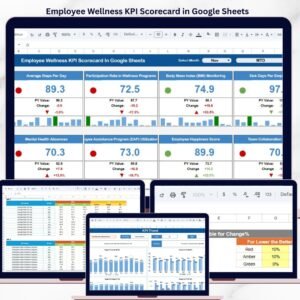
Organizations investing in employee wellness programs report 25% lower healthcare costs and 40% fewer sick days, according to multiple workplace health studies. Yet most HR teams still rely on scattered spreadsheets and manual tracking to measure the impact of their wellness initiatives. The Employee Wellness KPI Scorecard in Google Sheets changes that — it tracks 10+ wellness KPIs across 4 structured worksheets with MTD and YTD comparisons, trend charts, and conditional formatting indicators. Setup takes under 10 minutes, and the entire scorecard updates automatically when you enter new monthly data.
🌍 Join 8,400+ teams in 40+ countries using NextGenTemplates to replace paid SaaS tools with one-time-purchase Excel, Google Sheets, Power BI, and HTML templates.
✅ Instant download · One-time payment · No subscription · No per-user fees · Lifetime access
Key Features of Employee Wellness KPI Scorecard in Google Sheets
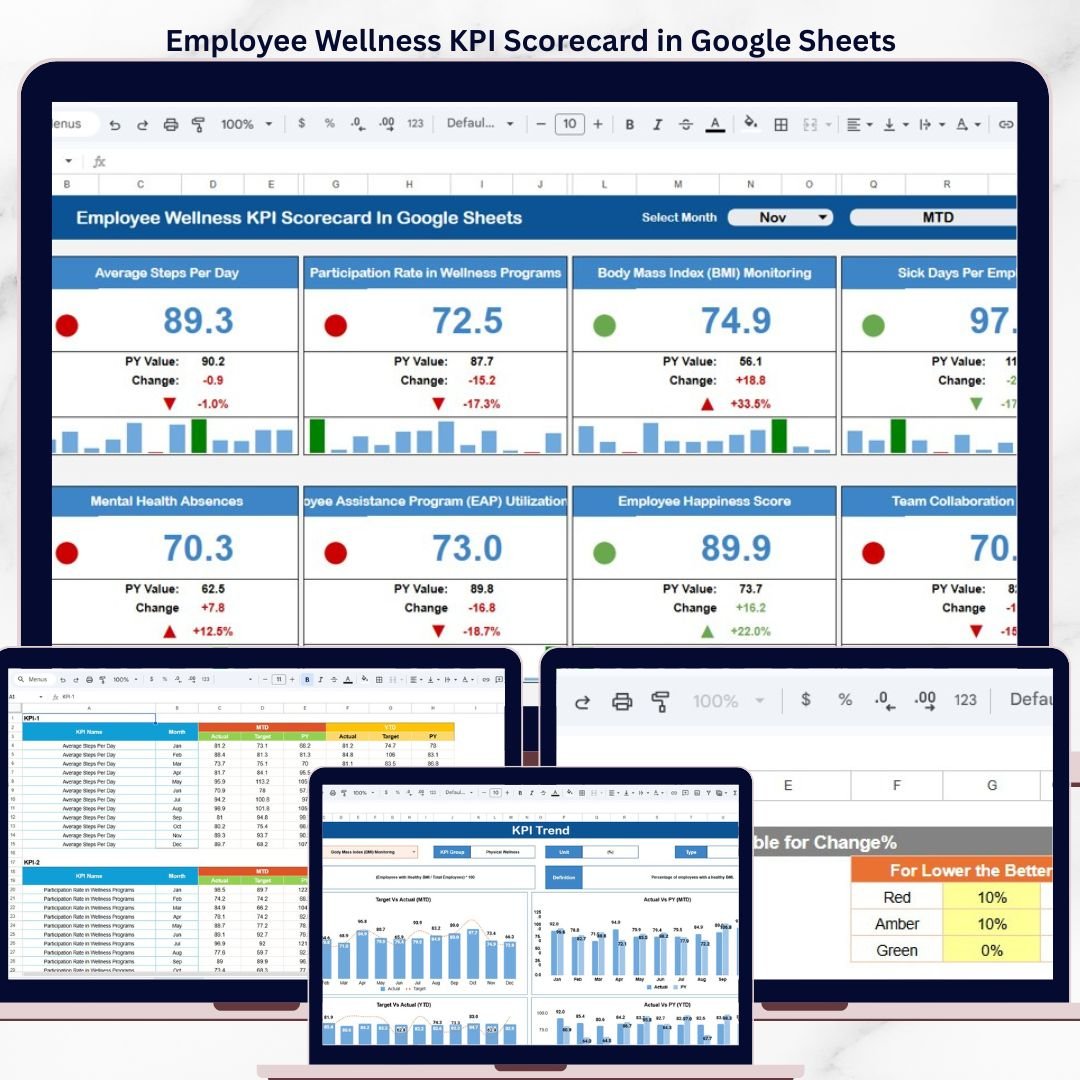
The Employee Wellness KPI Scorecard in Google Sheets delivers a complete wellness performance monitoring system with 4 worksheet tabs: Scorecard, KPI Trend, Input Data, and KPI Definition. Each KPI displays Actual vs Target values alongside MTD and YTD comparisons, with conditional formatting that flags underperforming metrics in red and strong performers in green.
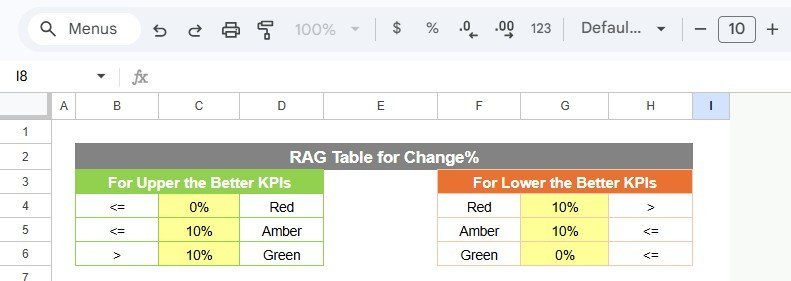
The scorecard supports both “Upper the Better” KPIs (like wellness program participation rate, employee satisfaction score, and gym utilization percentage) and “Lower the Better” KPIs (like absenteeism rate, healthcare cost per employee, and stress-related leave days). Every KPI includes its formula, unit of measurement, and classification for consistent understanding across your entire HR team.
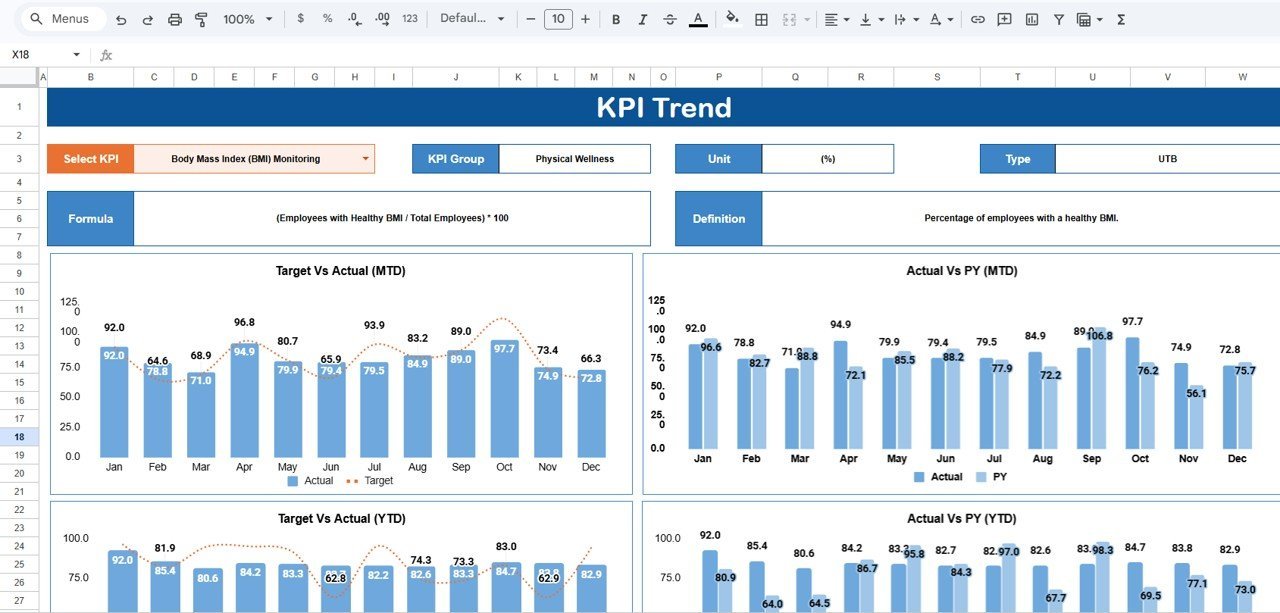
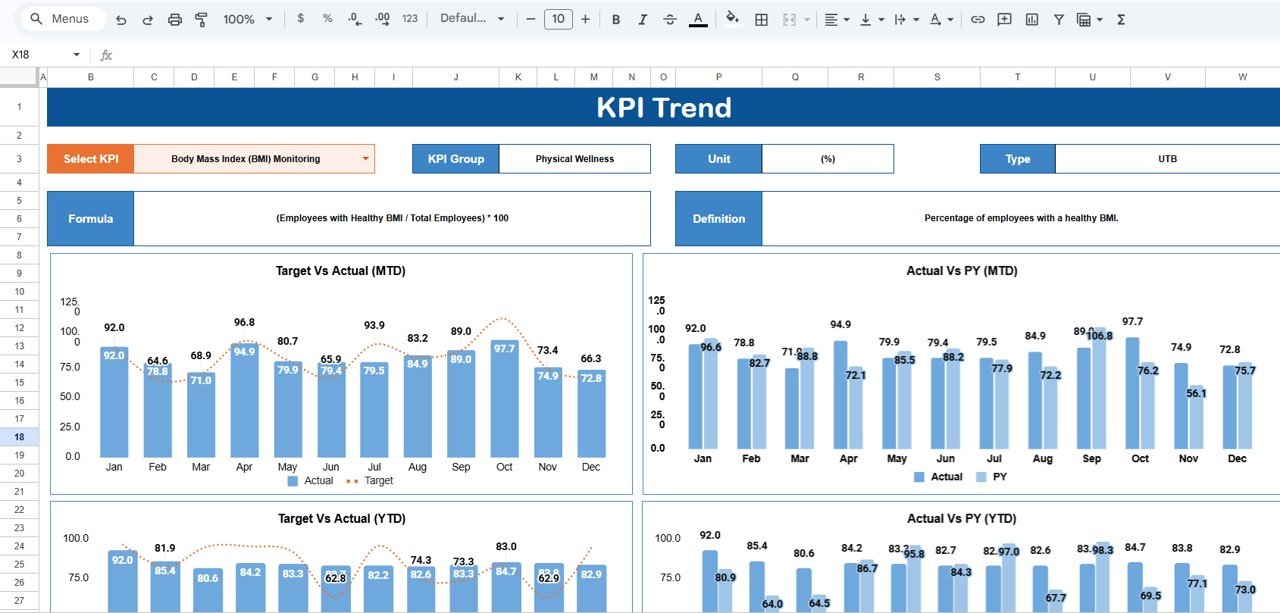
The KPI Trend sheet provides dynamic 12-month Actual vs Target vs Prior Year trend charts that update when you select any KPI from the dropdown in cell C3. HR managers get instant visibility into participation trends, satisfaction scores, and health metric patterns without building charts from scratch. The template runs entirely on native Google Sheets formulas and charts — no Apps Script, macros, or add-ons needed. For teams already using the Employee Wellness KPI Scorecard in Excel, this Google Sheets version provides the same structure with built-in cloud collaboration.
Sheets Explanation
1. Scorecard Sheet
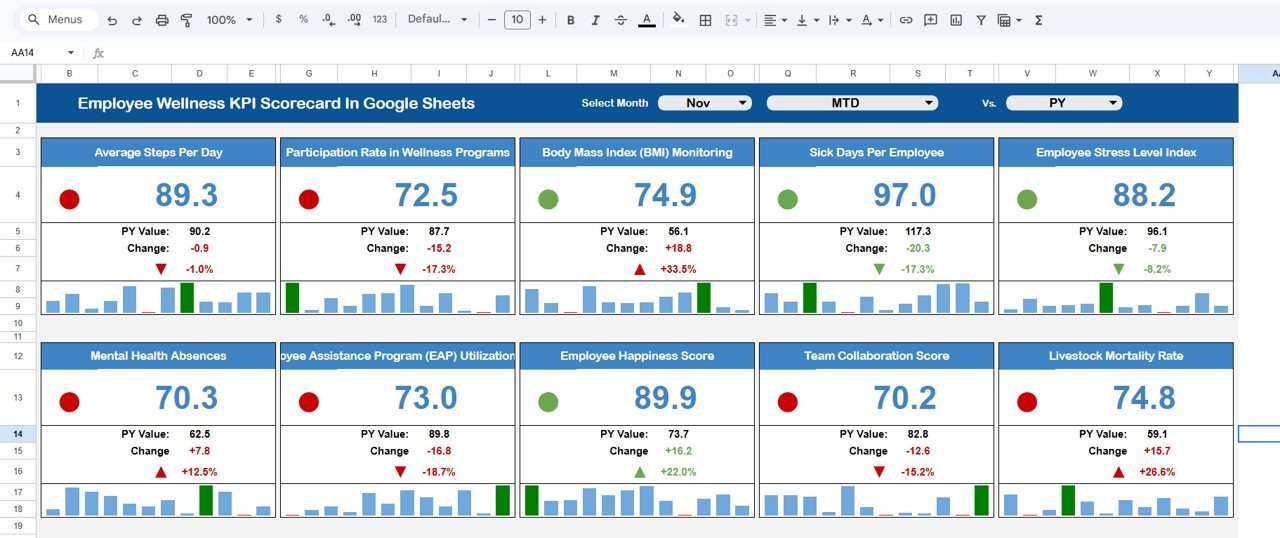
The Scorecard sheet is the main interface where you view KPI performance. Key features include:
- Dropdown Menus – Select the month, MTD (Month-to-Date), or YTD (Year-to-Date) for performance analysis
- Actual vs Target Values – Compare actual performance against targets for each KPI
- Visual Indicators – Quickly see performance status using color-coded visuals or conditional formatting
- KPI Overview – Display all relevant information about KPIs, including MTD and YTD comparisons
Employee Wellness KPI Scorecard in Google Sheets
2. KPI Trend Sheet
Select any KPI name from the dropdown available on range C3. The sheet displays the KPI Group, Unit of KPI, Type of KPI (Lower the Better or Upper the Better), Formula of the KPI, and Definition of the KPI. MTD and YTD trend charts show Actual, Target, and PY (Previous Year) numbers side by side, making it simple to spot improvements or declines in wellness initiatives over time.
KPI Trend Sheet
3. Input Data Sheet
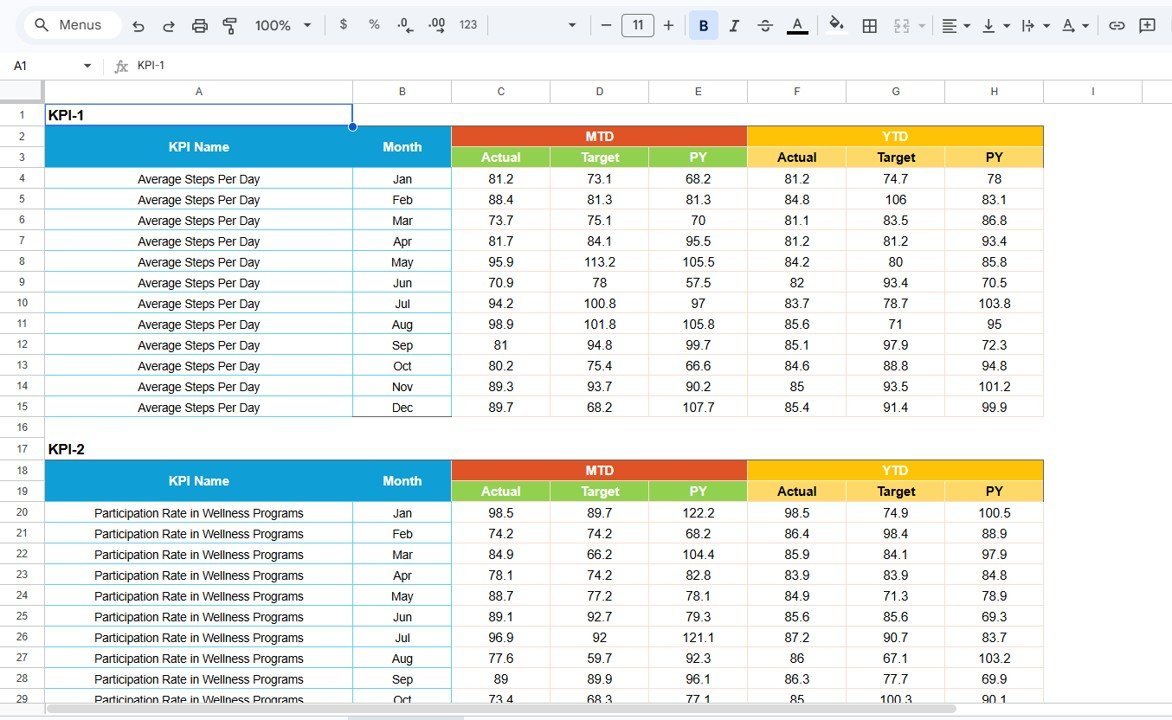
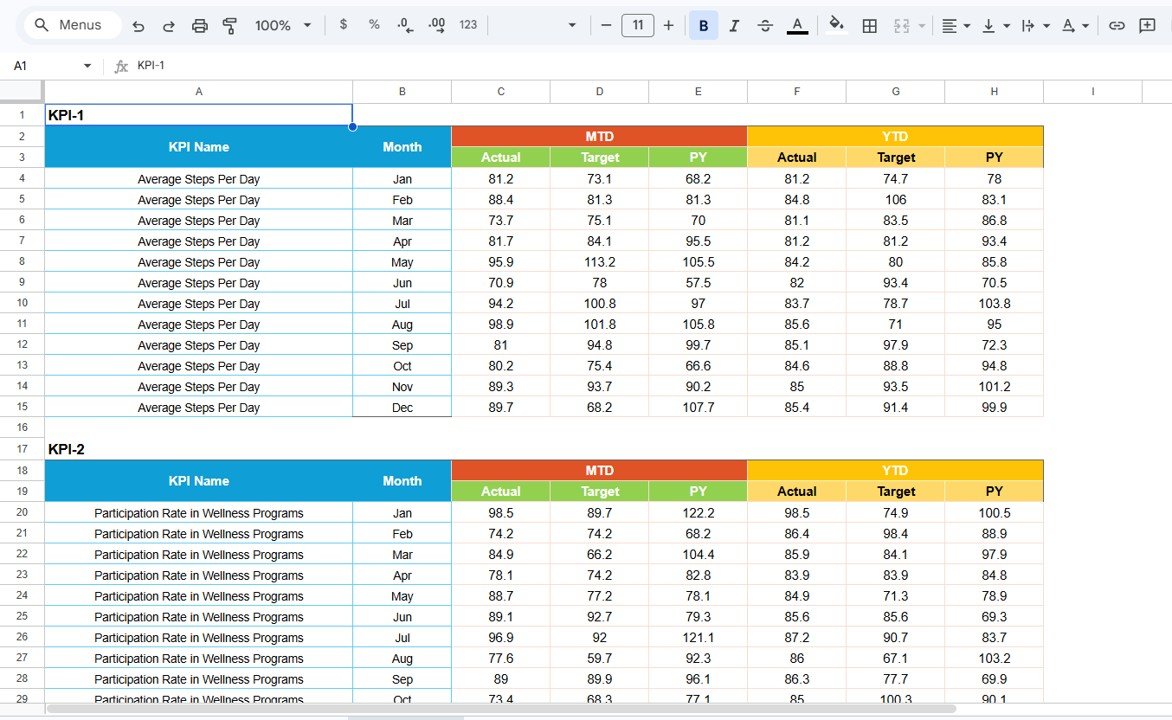
The Input Data sheet is where you enter all KPI data. Record actual values, targets, and other metrics for each KPI. The sheet structure uses months as columns and KPIs as rows, making data entry straightforward. As you update figures, every scorecard view and trend chart refreshes automatically — keeping the scorecard current without manual recalculations.
Input Data Sheet
4. KPI Definition Sheet
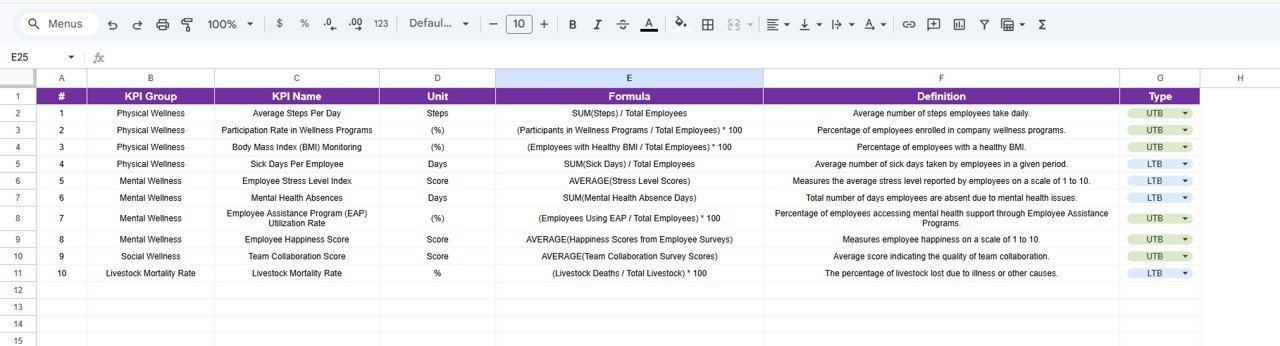
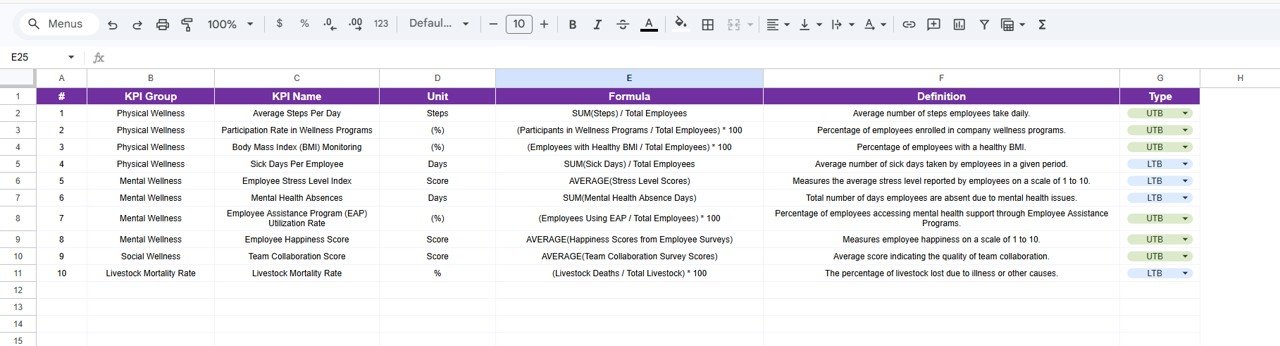
In this sheet tab, you enter the KPI Name, KPI Group, Unit, Formula, and KPI Definition. This acts as the master reference that feeds metadata to the Scorecard and KPI Trend sheets. You can add new KPIs, modify existing ones, or remove metrics at any time — the template adapts dynamically through dropdown menus and formula references.
KPI Definition Sheet
Employee Wellness KPI Scorecard in Google Sheets vs. Microsoft Excel Scorecard vs. BambooHR — Feature Comparison
| Feature | Employee Wellness KPI Scorecard (Google Sheets) | Microsoft Excel Scorecard | BambooHR / Workday |
|---|---|---|---|
| Cost | $8.99 one-time | $14.99 one-time | $6–25 / user / month |
| Platform | Google Sheets (free) | Microsoft Excel (license required) | Cloud SaaS |
| Setup Time | Under 10 minutes | Under 10 minutes | Weeks to months |
| Real-Time Collaboration | ✅ Built-in (Google Sheets) | Requires OneDrive/SharePoint | ✅ Yes |
| Mobile Access | ✅ Google Sheets app | Limited on mobile | ✅ Yes |
| Custom KPI Definitions | ✅ Dedicated sheet | ✅ Manual setup | Limited customization |
| Trend Charts | ✅ MTD + YTD built-in | ✅ Built-in | ✅ Built-in reports |
| Year-1 Cost at 5 Users | $8.99 total | $14.99 + Excel licenses | $3,600–15,000 |
| No IT Department Needed | ✅ Self-service | ✅ Self-service | ❌ Admin setup required |
For HR teams that want structured wellness KPI tracking without paying $6–25 per user per month for BambooHR, the Employee Wellness KPI Scorecard in Google Sheets sits in the sweet spot.
Who Should Use This Template
✅ Perfect for:
- HR managers at 10–500 person companies tracking wellness program participation, absenteeism, and employee satisfaction monthly
- Wellness coordinators monitoring program effectiveness, gym utilization, and mental health support usage
- Corporate leaders who need data-backed wellness reports for board presentations and annual planning
- HR consultants working with multiple clients who need a replicable wellness tracking framework
❌ Not a fit if:
- You need real-time API integrations to HRIS systems like Workday, SAP SuccessFactors, or Oracle HCM
- Your organization requires HIPAA-compliant health data storage with role-based access controls and audit trails
- You manage 5,000+ employees and need automated data feeds from wearable health devices or insurance providers
Real-World Use Cases
Meera manages HR at a 120-person fintech company in Mumbai. She uses the Employee Wellness KPI Scorecard in Google Sheets to track 12 wellness KPIs including gym membership utilization, mental health day usage, and wellness program enrollment rate. The KPI Trend Sheet revealed that stress-related leave requests spiked 22% in Q3. She presented the data to leadership, secured budget for an expanded counseling benefit, and tracked a 15% reduction in stress-related leave the following quarter — all within the same scorecard.
James runs people operations at a 45-person SaaS startup in Austin. He tracks employee satisfaction, absenteeism rate, and wellness event participation using the MTD/YTD toggles. The $8.99 template replaced a $400/month add-on module in their HRIS system. He shares the scorecard with department heads via Google Drive link — everyone sees the same live data without file-sharing conflicts.
Priya is an HR consultant serving 5 mid-size clients across Bangalore. She duplicates the Employee Wellness KPI Scorecard for each client, enters their data in the Input Data Sheet, and presents monthly wellness trend reports during strategy calls. She also uses the Corporate Wellness Program Dashboard in Google Sheets for clients needing detailed program-level analytics alongside the KPI scorecard.
Advantages of Employee Wellness KPI Scorecard in Google Sheets
The Google Sheets format provides built-in real-time collaboration that Excel cannot match without additional infrastructure. Multiple HR team members, wellness coordinators, and department heads can view and update the scorecard simultaneously from any device with internet access. The Google Sheets sharing model eliminates version control problems that commonly plague HR teams using email-attached Excel files.
At $8.99 one-time with no per-user fees, the scorecard delivers structured KPI tracking at roughly 1/400th the annual cost of BambooHR for a 5-person HR team. The KPI Definition sheet standardizes metric understanding across the organization — every team member works from the same formula, unit, and classification definitions.
The 4-sheet architecture (Scorecard → KPI Trend → Input Data → KPI Definition) separates data entry from visualization, reducing the risk of accidental formula overwrites. New KPIs can be added at any time by updating the KPI Definition sheet — the dropdowns and trend charts adapt automatically.
Opportunities for Improvement
The scorecard does not include automated data imports from HRIS systems, benefits platforms, or health insurance providers. All data entry is manual, which works well for monthly reporting cycles but may not suit organizations needing daily or weekly updates. Integration with Google Forms for automated data collection would be a natural extension for teams comfortable with Google Workspace.
The template does not include built-in benchmarking against industry averages. HR teams wanting to compare their wellness metrics against sector-specific benchmarks would need to source external data and add it to the Input Data sheet manually.
📖 Click here to read the Detailed Blog Post
🎥 Visit our YouTube channel: YouTube.com/@NeoTechNavigators