

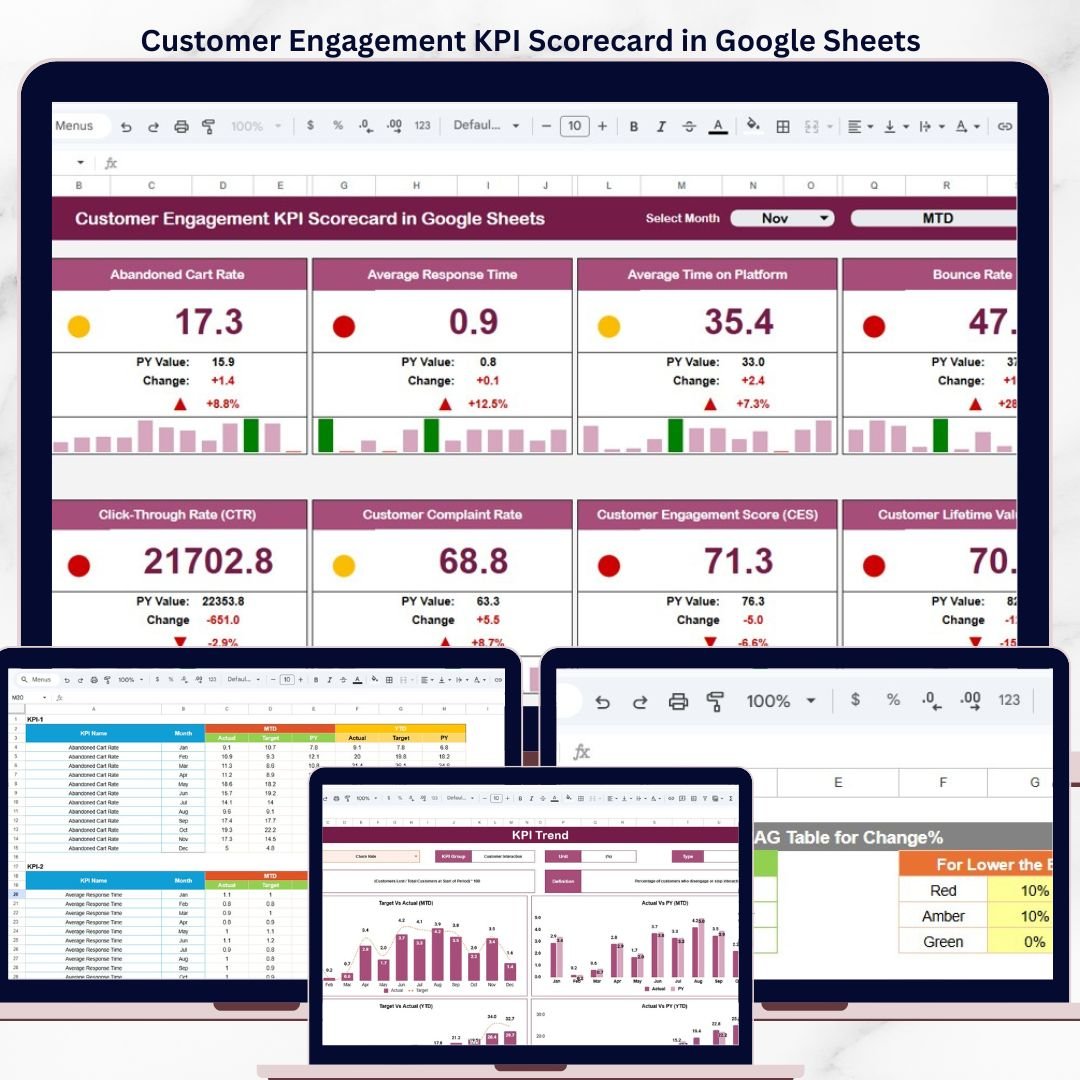

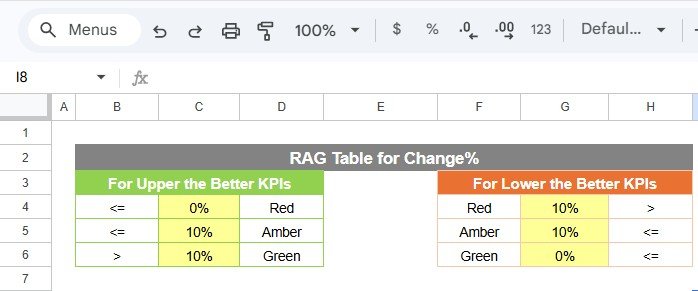

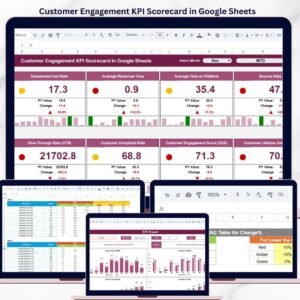
The Customer Engagement KPI Scorecard in Google Sheets tracks 10+ customer engagement KPIs across 4 structured worksheets, with MTD/YTD toggles, conditional formatting, and trend charts. Setup takes under 10 minutes — just enter your KPI data and the entire scorecard updates automatically.
🌍 Join 8,400+ teams in 40+ countries using NextGenTemplates to replace paid SaaS tools with one-time-purchase Excel, Google Sheets, Power BI, and HTML templates.
✅ Instant download · One-time payment · No subscription · No per-user fees · Lifetime access
🔑 Key Features of Customer Engagement KPI Scorecard in Google Sheets
The Customer Engagement KPI Scorecard in Google Sheets monitors key customer metrics including Customer Satisfaction Score (CSAT), Net Promoter Score (NPS), Customer Retention Rate, Customer Churn Rate, Average Response Time, First Contact Resolution Rate, Customer Lifetime Value (CLV), Repeat Purchase Rate, Engagement Rate, and Support Ticket Volume. Each KPI displays actual values alongside targets with color-coded conditional formatting that flags underperforming metrics instantly.
📌 The scorecard includes a dynamic month selector dropdown that refreshes all KPI values for Month-to-Date and Year-to-Date views. You can toggle between comparing actuals against targets or against previous year figures — no manual recalculation needed. Browse more Google Sheets Dashboard Templates for additional analytics solutions.
📊 The KPI Trend sheet provides detailed line-chart analysis for any selected metric, with an info bar displaying KPI Group, Unit, Type (Lower the Better or Upper the Better), Formula, and Definition. This makes it easy to present engagement data to stakeholders during monthly or quarterly reviews. Pair this with the Customer Onboarding Effectiveness Dashboard in Google Sheets for a complete customer lifecycle analytics setup.
📂 A dedicated KPI Definition sheet documents every metric’s name, group, unit, formula, and description — ensuring your entire team uses consistent definitions when reporting on customer engagement performance.
📦 What’s Inside the Customer Engagement KPI Scorecard in Google Sheets
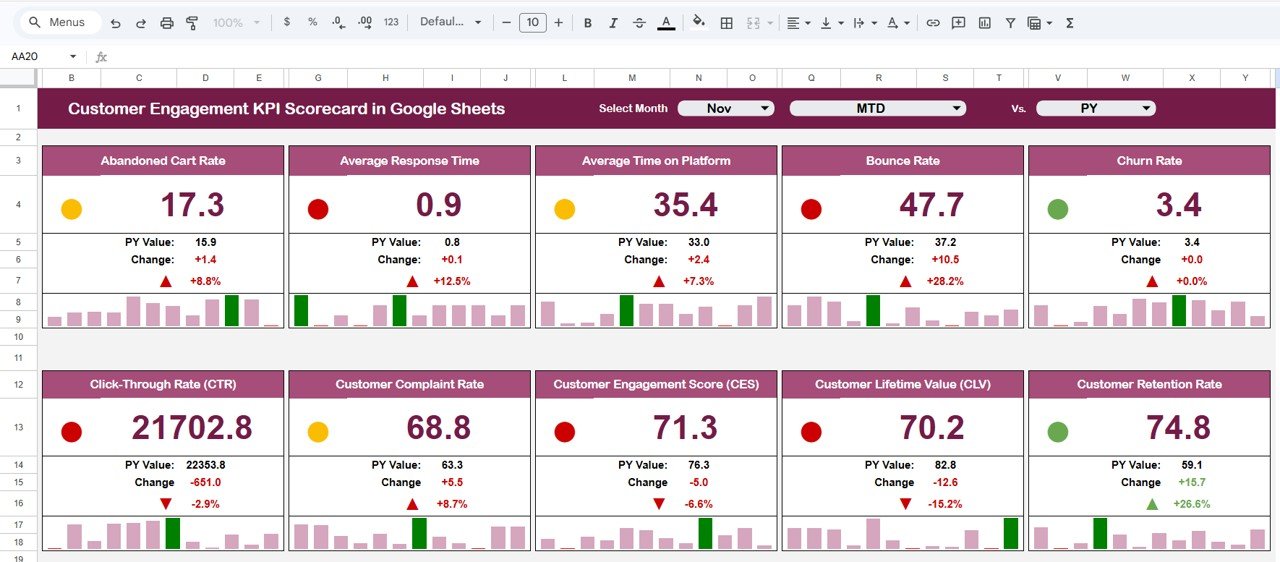
📄 Sheet 1 — Scorecard Sheet: The main interface where you view KPI performance. Select the month from a dropdown, toggle between MTD and YTD, and compare Actual vs Target values. Color-coded visual indicators and conditional formatting highlight which KPIs are on track, at risk, or below target. All relevant information including MTD and YTD comparisons is displayed in one comprehensive view.
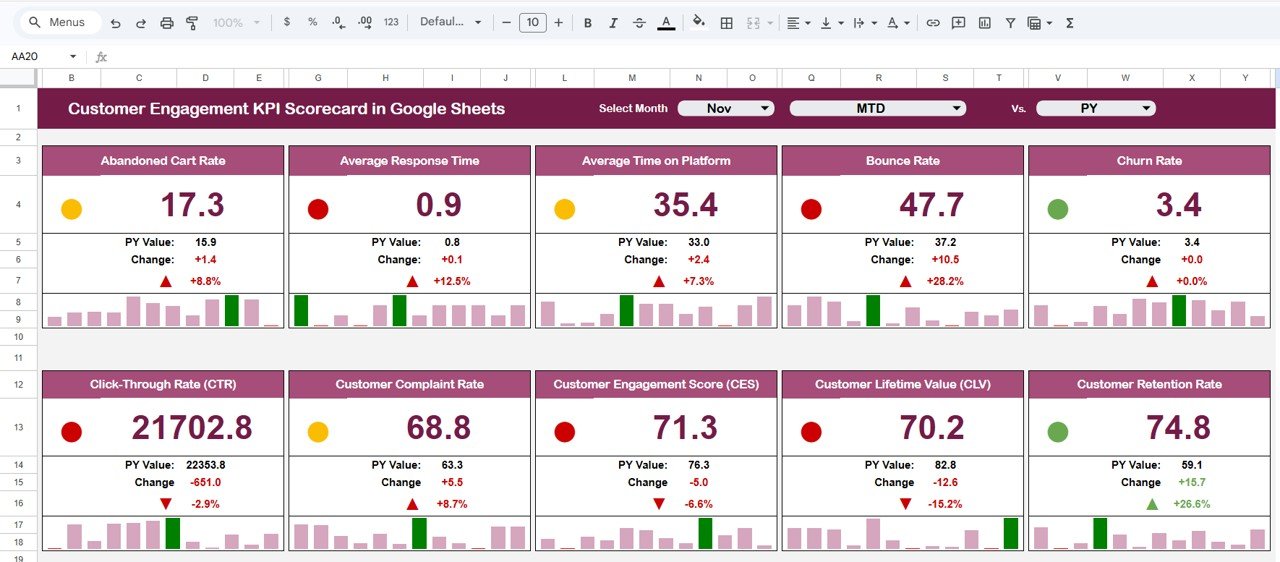 Customer Engagement KPI Scorecard in Google Sheets
📄 Sheet 2 — KPI Trend Sheet: Select any KPI name from the dropdown on range C3. The sheet displays the KPI Group, Unit, Type (Lower the Better or Upper the Better), Formula, and Definition. MTD and YTD trend charts show Actual, Target, and Previous Year numbers side by side for clear visual analysis.
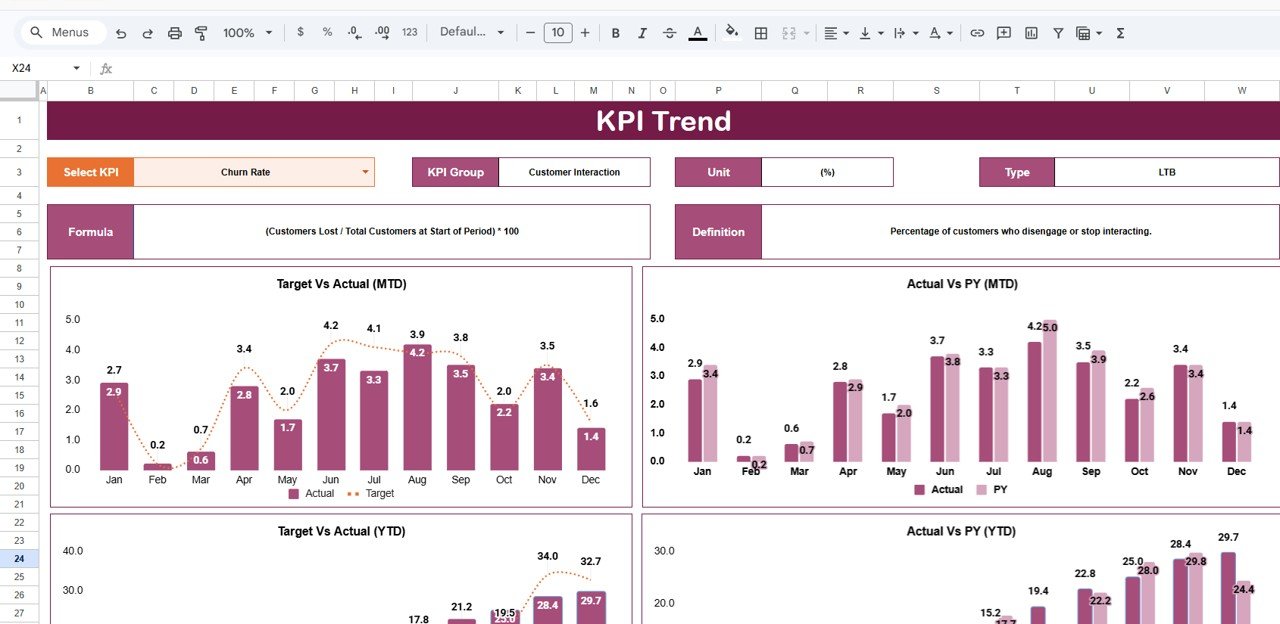 KPI Trend Sheet
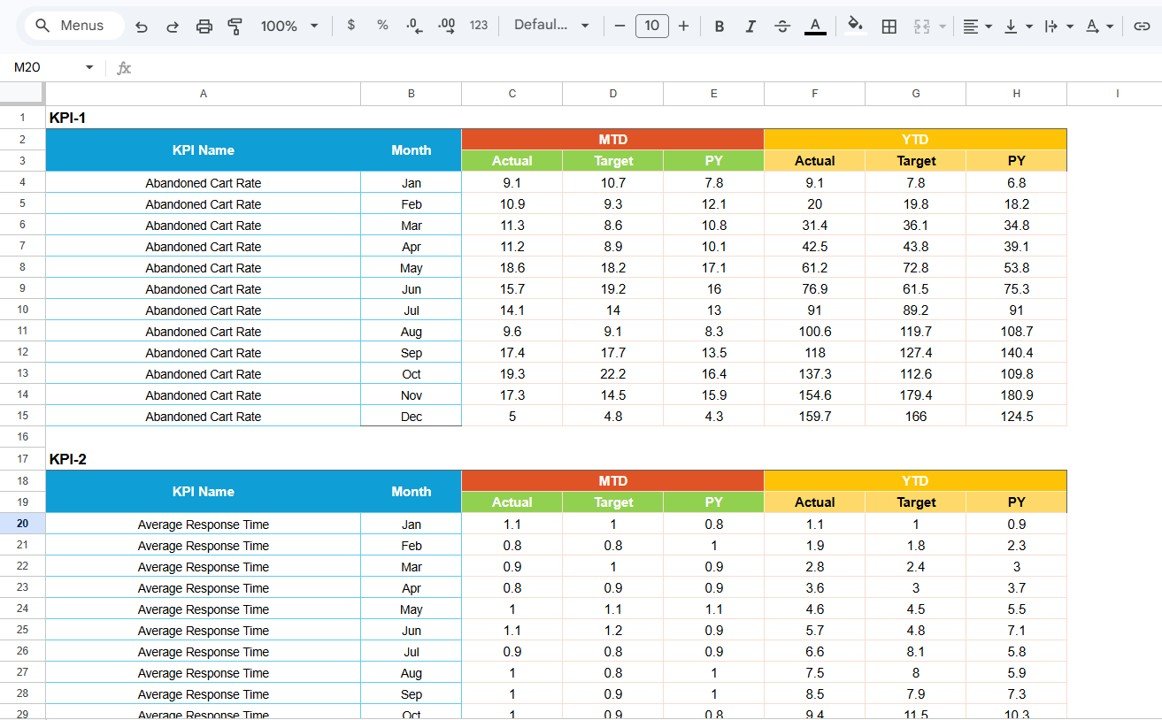
📄 Sheet 3 — Input Data Sheet: The data entry hub where you record actual values, targets, and other metrics for each KPI. Update data as new results become available to keep the scorecard current and accurate throughout the reporting period.
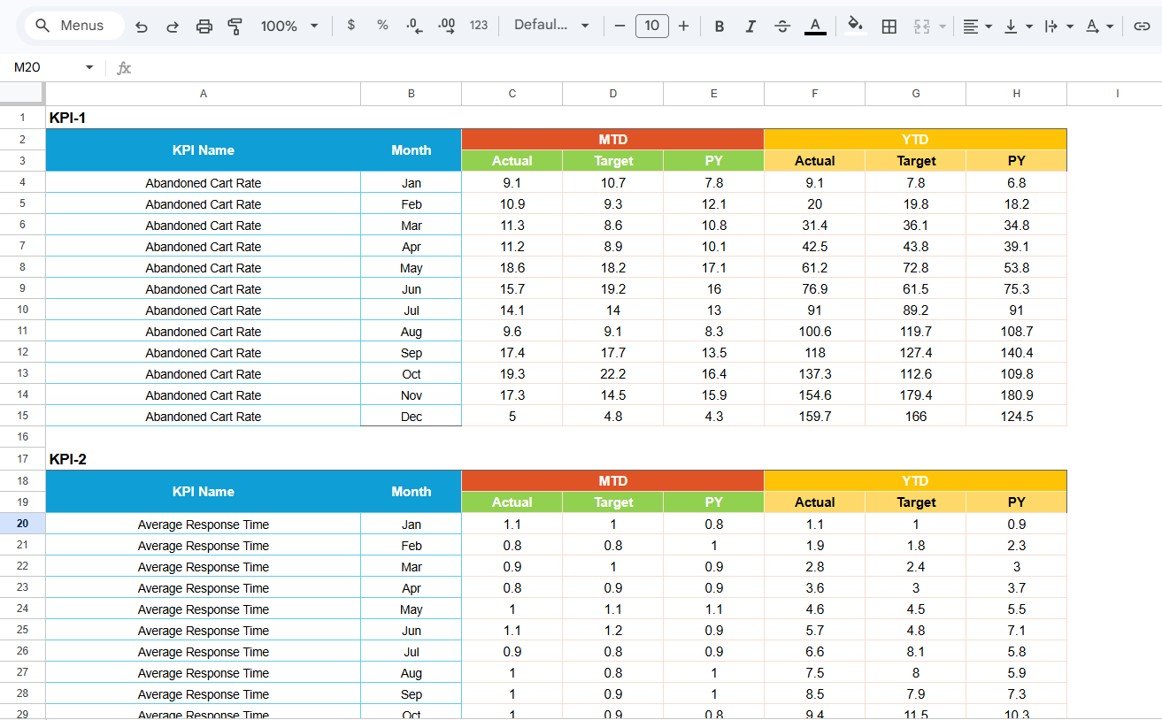 Input Data Sheet
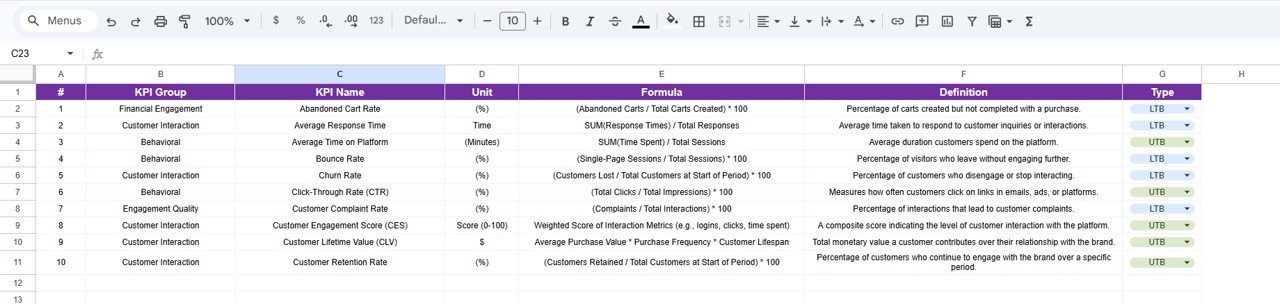
📄 Sheet 4 — KPI Definition Sheet: Enter the KPI Name, KPI Group, Unit, Formula, and KPI Definition for each metric. This sheet ensures consistency and clarity across your team when interpreting scorecard results.
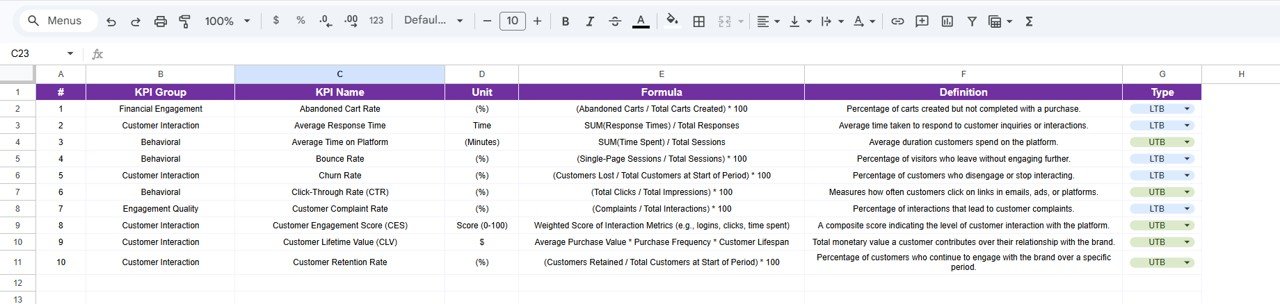 KPI Definition Sheet
📊 Customer Engagement KPI Scorecard in Google Sheets vs. Excel Scorecard vs. HubSpot Service Hub — Where This Fits
| Feature | Customer Engagement KPI Scorecard in Google Sheets | Excel KPI Scorecard | HubSpot Service Hub |
|---|---|---|---|
| Cost | $8.99 one-time | $12.99 one-time | $450+ / month (Professional) |
| Platform | Google Sheets (cloud) | Microsoft Excel (desktop) | Cloud SaaS |
| Setup time | Under 10 minutes | Under 10 minutes | 2-4 weeks |
| Real-time team collaboration | ✅ Built-in | ❌ File sharing needed | ✅ Built-in |
| Mobile access | ✅ Google Sheets app | Limited | ✅ Mobile app |
| MTD / YTD toggle | ✅ One-click switch | ✅ One-click switch | Custom reports |
| Customizable KPIs | ✅ Edit definition sheet | ✅ Edit cells | ✅ With setup |
| Share with link | ✅ Google Drive sharing | ❌ Email attachment | ✅ Built-in |
| Year-1 cost at 5 users | $8.99 total | $12.99 total | $5,400+ |
For customer success teams that want structured KPI tracking without paying $450/month for HubSpot, the Customer Engagement KPI Scorecard in Google Sheets sits in the sweet spot.
👥 Who This Template Is For — and Who It’s Not For
✅ This template is built for:
- Customer success managers at small-to-medium businesses tracking engagement metrics monthly
- Support team leads monitoring CSAT, NPS, and first contact resolution across reporting periods
- Marketing teams measuring customer retention rate and repeat purchase patterns
- Startup founders tracking CLV, churn rate, and engagement rate without a CRM subscription
❌ This template is NOT for:
- Enterprise teams needing real-time API integration with CRM platforms like Salesforce or Zendesk
- Organizations requiring automated data refresh from live customer databases
- Teams needing role-based access controls and SOC 2 compliance
⚙️ How to Use the Customer Engagement KPI Scorecard in Google Sheets
1️⃣ Open the PDF guide included in your download and click the Google Sheets copy link to create your own editable copy in Google Drive.
2️⃣ Navigate to the KPI Definition sheet and enter each KPI’s name, group, unit, formula, and definition.
3️⃣ Go to the Input Data sheet and enter your actual KPI values, target numbers, and previous year data for each month.
4️⃣ Switch to the Scorecard sheet and select the reporting month from the dropdown — all KPI values, variances, and visual indicators update automatically.
5️⃣ Use the KPI Trend sheet to select any individual metric and analyze its MTD and YTD performance with trend charts.
6️⃣ Share the Google Sheets link with your team for real-time collaborative access from any device.
💼 Real-World Use Cases
Anita manages customer success at a 60-person B2B SaaS company. She uses the Customer Engagement KPI Scorecard in Google Sheets to track NPS, CSAT, and churn rate across quarterly reviews. The MTD/YTD toggle lets her show the leadership team both monthly snapshots and cumulative trends — replacing the $450/month HubSpot Service Hub they were considering. She also uses the Customer Journey Mapping KPI Dashboard in Google Sheets for funnel-level analysis.
David runs a 15-person e-commerce support team. He tracks first contact resolution rate, average response time, and support ticket volume monthly using this scorecard. The conditional formatting instantly flags metrics that drop below target, and he shares the Google Sheets link with his director for transparent reporting — no expensive helpdesk analytics add-on needed.
Priya is a freelance customer experience consultant. She uses the Customer Engagement KPI Scorecard for client engagements, entering each client’s engagement data and presenting the trend charts during monthly strategy calls. The KPI Definition sheet ensures both she and her clients agree on how each metric is calculated. She pairs this with the Customer Experience & Service Quality Dashboard in Google Sheets for deeper analysis.
❓ Frequently Asked Questions
What KPIs does the Customer Engagement KPI Scorecard in Google Sheets track?
The Customer Engagement KPI Scorecard in Google Sheets tracks 10+ metrics including CSAT, NPS, Customer Retention Rate, Churn Rate, Average Response Time, First Contact Resolution Rate, CLV, Repeat Purchase Rate, Engagement Rate, and Support Ticket Volume. All metrics update automatically when you enter your data.
How does this compare to using HubSpot for customer engagement tracking?
HubSpot Service Hub Professional costs $450+ per month and requires weeks of onboarding. The Customer Engagement KPI Scorecard in Google Sheets costs $8.99 one-time, works in any browser in under 10 minutes, and tracks the same core engagement KPIs with conditional formatting and trend charts. For teams that need structured KPI reporting without a SaaS subscription, this template delivers equivalent visibility at a fraction of the cost.
Can I customize the KPIs in this Google Sheets scorecard?
Yes. All KPIs are defined in the KPI Definition sheet where you can modify names, groups, units, formulas, and descriptions. The Input Data sheet accepts your actual numbers and targets. No coding or advanced Google Sheets skills are required to customize the scorecard to your business.
Does the scorecard support team collaboration?
Yes. Since this is built in Google Sheets, you can share the file via Google Drive link with your entire team. Multiple users can view and edit simultaneously with real-time updates — a key advantage over desktop-only Excel scorecards.
How long does it take to set up this customer engagement scorecard?
Setup takes under 10 minutes. Open the PDF guide, click the Google Sheets copy link, enter your KPI definitions and data in the input sheets, and the Scorecard and KPI Trend sheets populate automatically with your engagement metrics, trend charts, and visual indicators.
Can I track both MTD and YTD performance in this scorecard?
Yes. The Scorecard sheet displays both Month-to-Date and Year-to-Date comparisons for every KPI. You can toggle between MTD and YTD views, compare actuals against targets, and benchmark against previous year figures — all from a single dropdown selector.
What data format do I need for this scorecard?
The Input Data sheet accepts monthly actual values, target values, and previous year numbers for each KPI. A sample dataset is pre-loaded in the template for reference. Replace the sample data with your own monthly customer engagement figures and the entire scorecard updates automatically.
👤 About the Author
Built by PK — Microsoft Certified Professional with 15+ years of Excel, Google Sheets, and Power BI experience. Founder of NextGenTemplates, reaching 300K+ subscribers across YouTube channels (@PK-AnExcelExpert, @NextGenTemplates, @NeoTechNavigators). Every template is hand-built and tested before release.
🔗 Explore Related Templates
📊 Customer Onboarding Effectiveness Dashboard in Google Sheets — Track onboarding funnels, time-to-value, and activation metrics for new customers.
📊 Customer Journey Mapping KPI Dashboard in Google Sheets — Visualize customer touchpoints and journey-stage metrics with interactive charts.
📊 Customer Experience & Service Quality Dashboard in Google Sheets — Monitor service quality KPIs including CSAT, response time, and resolution rates.
Browse all Google Sheets Dashboard Templates and Customer Service Templates for more analytics solutions.
📖 Click here to read the Detailed Blog Post
🎥 Visit our YouTube channel for step-by-step video tutorials
👉 YouTube.com/@NextGenTemplates
Compatibility and Requirements
- Works in Google Sheets with a free Google account and a web browser.
- Share the file through Google Drive so several people can view and edit it at the same time.
- New to Google Sheets? Google explains the basics in How to use Google Sheets.






























Reviews
There are no reviews yet.