

Cybersecurity Awareness KPI Scorecard in Google Sheets helps IT, HR, compliance, and security leaders turn employee behavior into measurable monthly KPIs. IBM reports the global average cost of a data breach at $4.99M, and the Verizon 2026 DBIR highlights higher mobile-threat click rates and continuing human-factor risk. This template gives your team a practical way to monitor training completion, phishing behavior, reporting discipline, policy adherence, and patch compliance without buying another SaaS seat. Join 8,400+ teams using NextGenTemplates for one-time-purchase reporting templates. One payment, no subscription, no per-user fee, and an editable Google Sheets copy you can adapt in your own Drive.
Key Features of Cybersecurity Awareness KPI Scorecard in Google Sheets
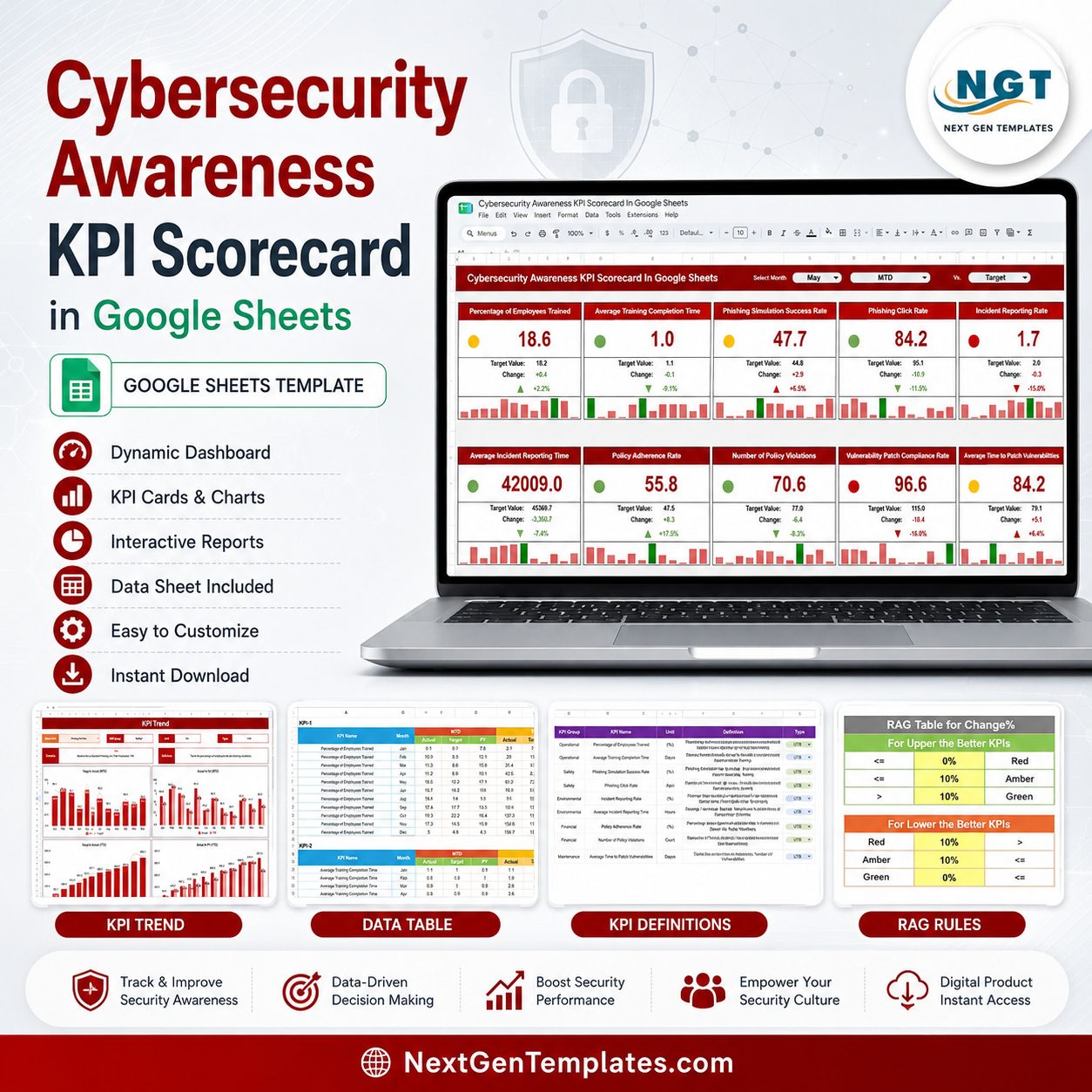
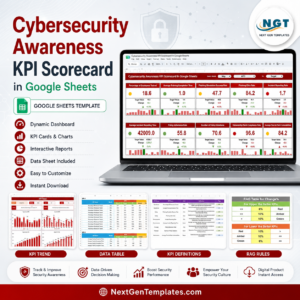
- Ten awareness KPIs in one scorecard. Track employee training, phishing simulation, reporting, policy, violation, and vulnerability patch behavior from a single screen.
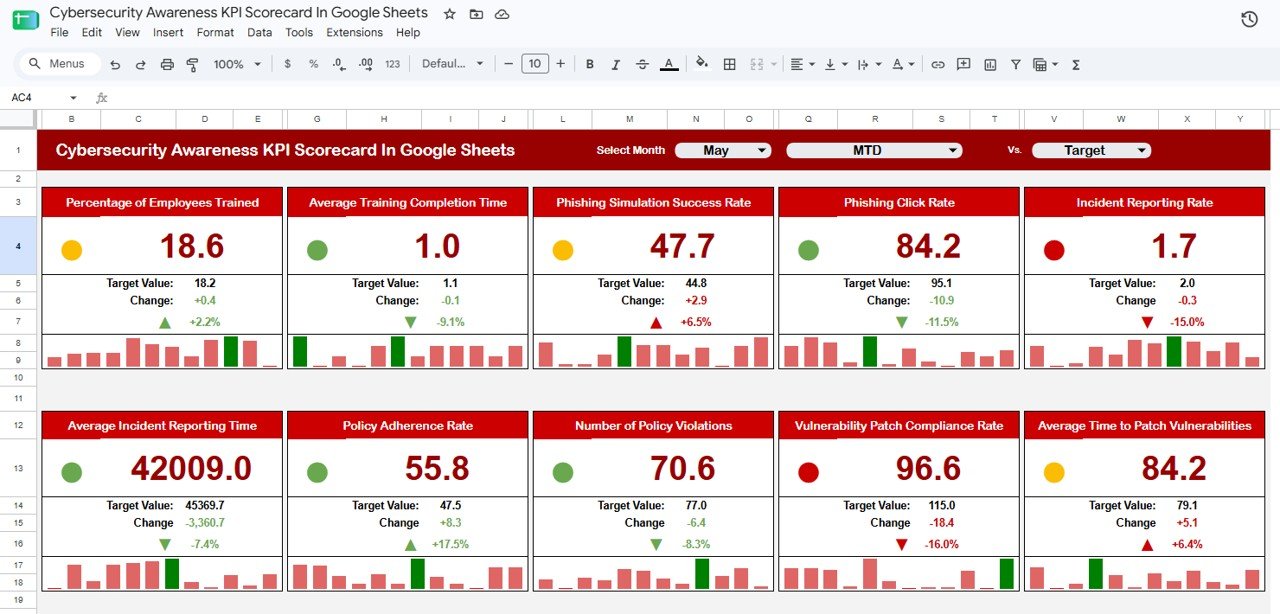
- Month selector with MTD and target comparison. Choose the reporting month and review Actual, Target, Change, status color, and mini trend bars.
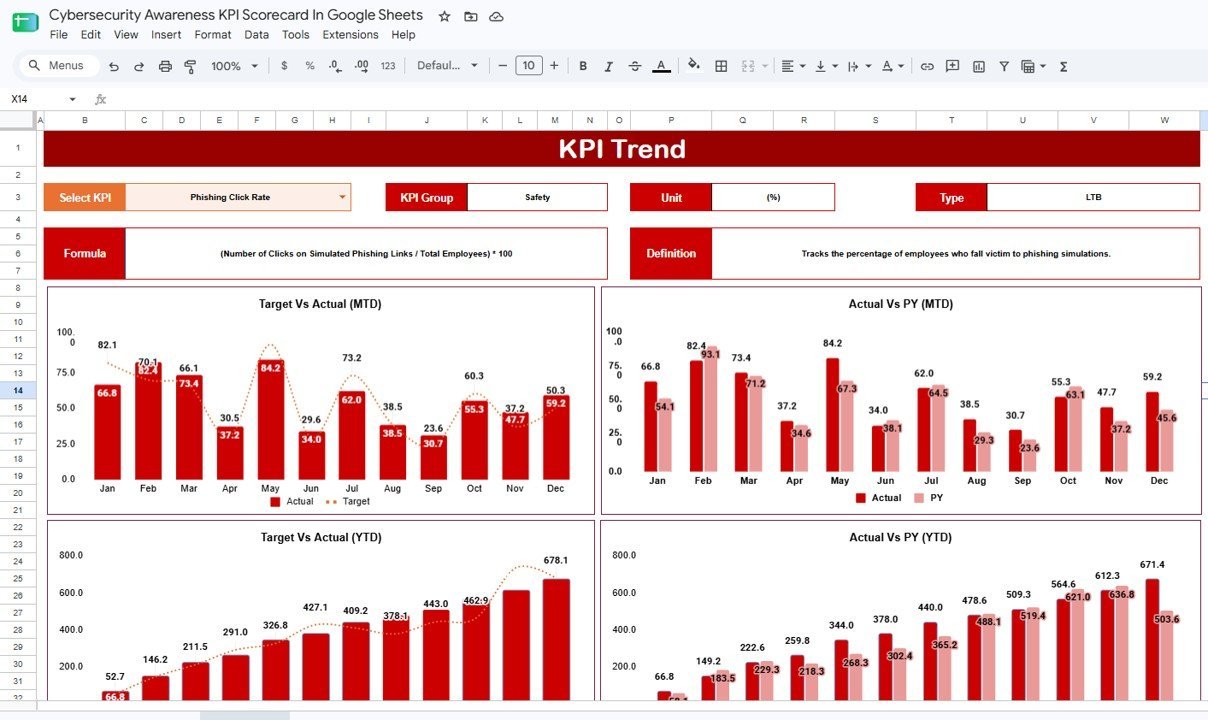
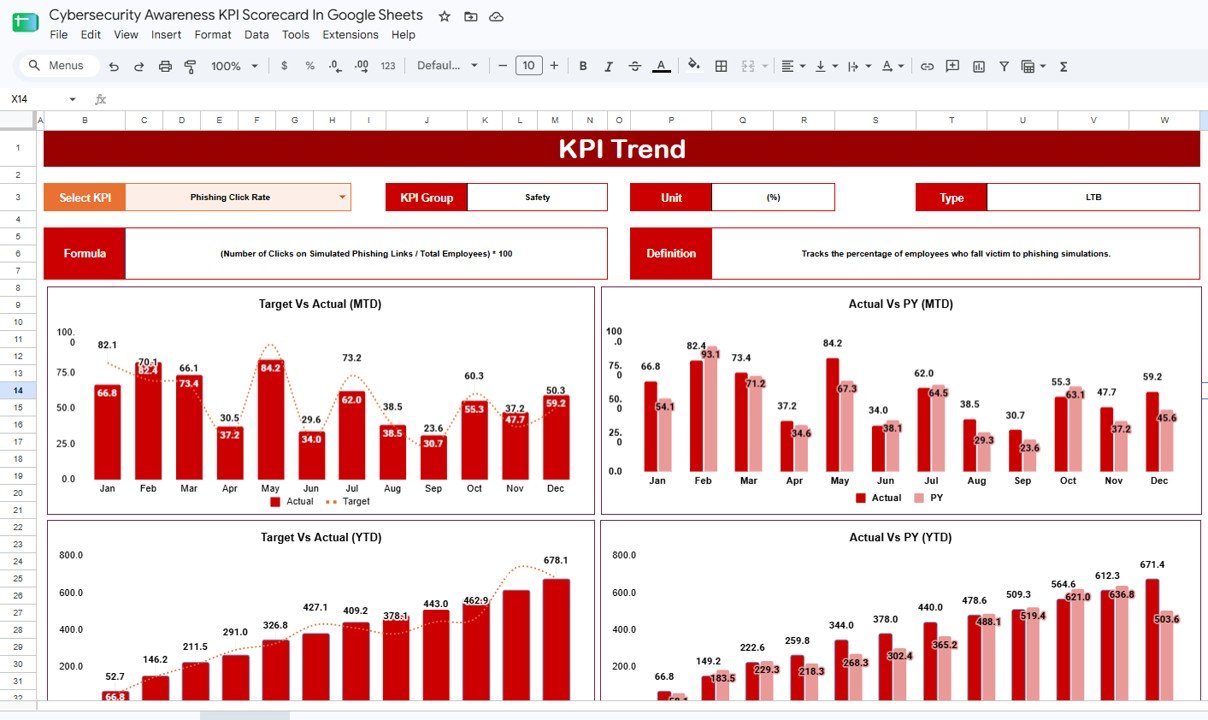
- KPI Trend page. Select one KPI and view monthly Target vs Actual, Actual vs PY, MTD, and YTD charts.
- UTB and LTB logic. The template handles both upper-the-better KPIs, such as training completion, and lower-the-better KPIs, such as phishing click rate.
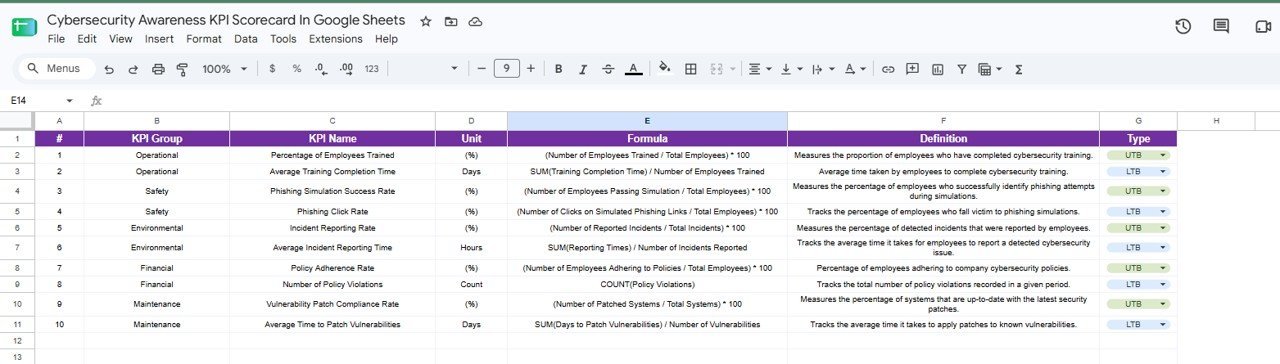
- Editable KPI definitions. Update KPI group, unit, formula, definition, and type as your security program matures.
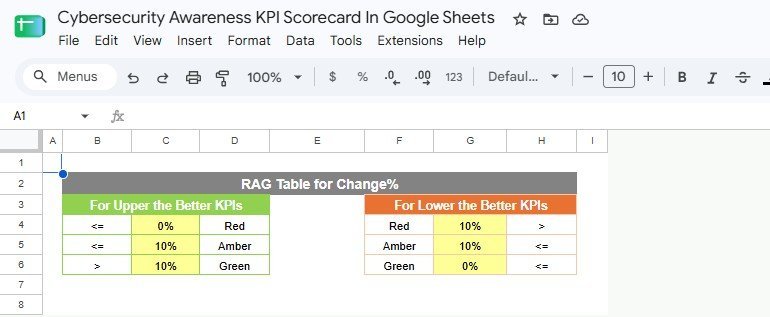
- RAG threshold table. Red, amber, and green rules are visible, making scorecard status easy to audit and adjust.
What’s Inside the Cybersecurity Awareness KPI Scorecard in Google Sheets
Scorecard Sheet
The scorecard sheet is the main review page. It shows ten KPI tiles, including Percentage of Employees Trained, Average Training Completion Time, Phishing Simulation Success Rate, Phishing Click Rate, Incident Reporting Rate, Average Incident Reporting Time, Policy Adherence Rate, Number of Policy Violations, Vulnerability Patch Compliance Rate, and Average Time to Patch Vulnerabilities. Each tile includes status color, target value, change, percentage movement, and a small monthly trend visual.
KPI Trend Sheet
The KPI Trend sheet lets you choose one KPI from a dropdown. The header displays its KPI group, unit, type, formula, and definition, while four charts compare Target vs Actual and Actual vs Previous Year for both MTD and YTD views.
KPI Input Sheet
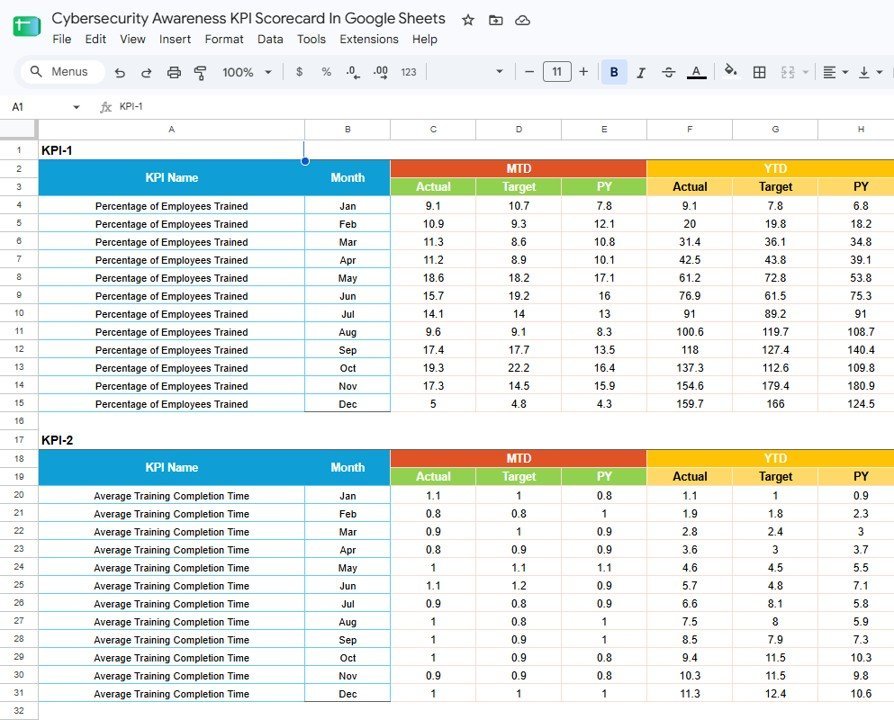
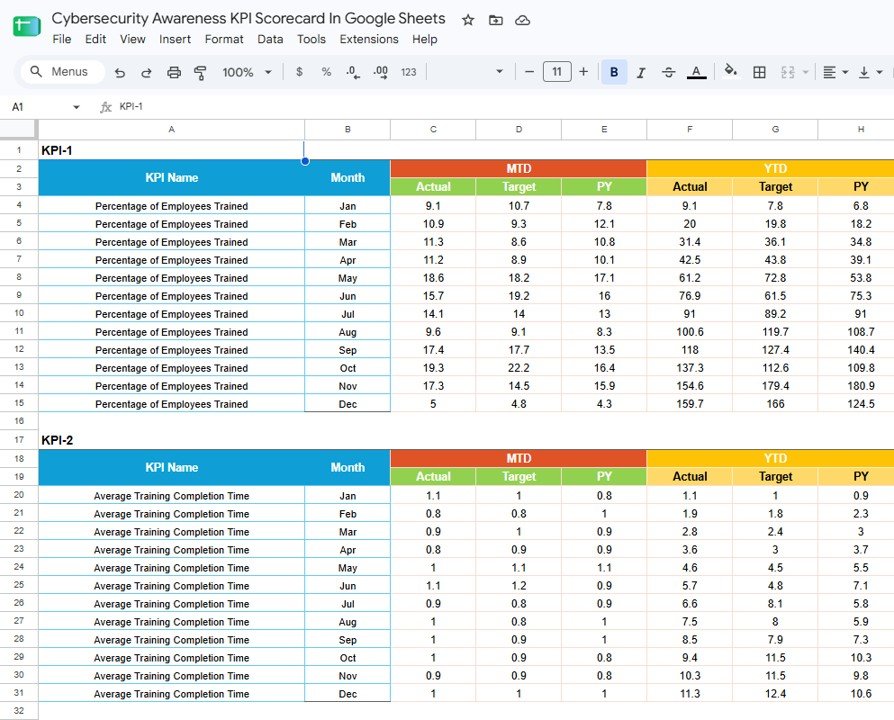
The input sheet stores month-by-month Actual, Target, and Previous Year values. The visible layout supports MTD and YTD tracking so the scorecard can compare current performance, goals, and historical baselines consistently.
KPI Definition Sheet
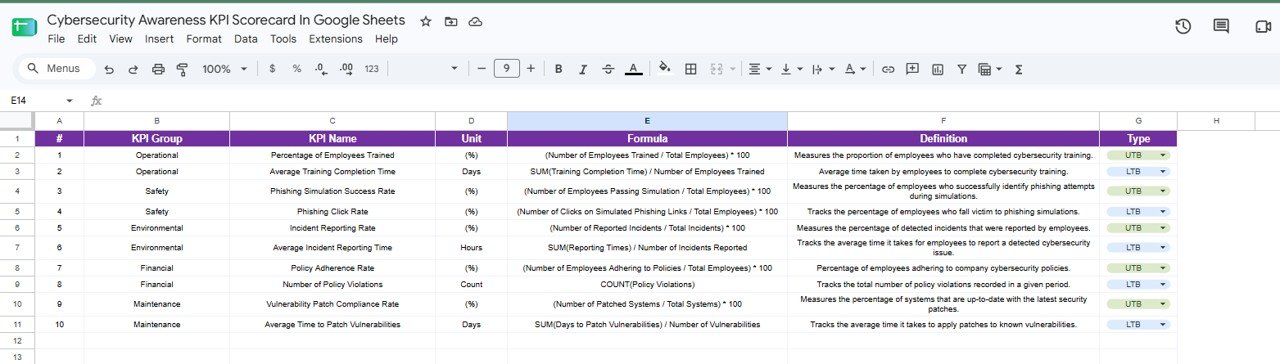
The KPI Definition sheet documents every metric with KPI group, KPI name, unit, formula, definition, and type. This is the control sheet for aligning IT security, HR, compliance, and leadership around the same calculation logic.
RAG Table
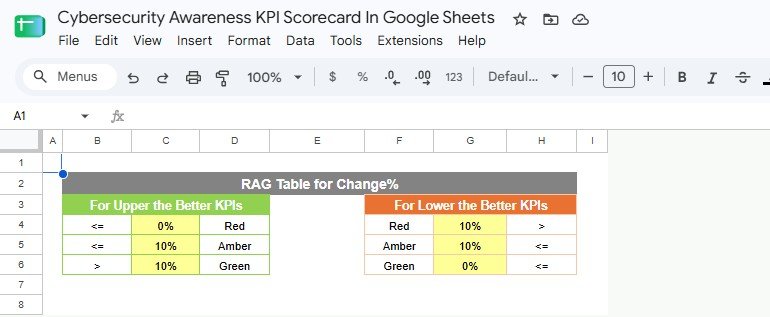
The RAG Table stores the red, amber, and green change thresholds separately for upper-the-better and lower-the-better KPIs. This makes it clear why a KPI is being flagged as healthy, watchlist, or problem status.
Cybersecurity Awareness KPI Scorecard in Google Sheets vs. Microsoft Excel Scorecard vs. Paid Security Awareness SaaS – Where This Fits
| Feature | This Google Sheets scorecard | Microsoft Excel scorecard | Paid awareness SaaS |
|---|---|---|---|
| Cost | $8.99 one-time | One-time template plus Excel license | Monthly or annual per-user fee |
| Platform | Google Sheets in the browser | Desktop or Microsoft 365 Excel | Vendor web portal |
| Setup time | Copy to Drive and edit data | Download and maintain local file | Procurement, onboarding, user sync |
| Collaboration | Native shared link collaboration | Best with OneDrive or SharePoint | Yes, inside the vendor account |
| Custom KPI formulas | Edit KPI Definition and RAG tables | Editable but file-based | Limited to vendor configuration |
| Best use | Monthly awareness KPI review | Offline analysis and board packs | Automated training delivery and simulations |
Who This Template Is For – and Who It’s Not For
This template is for IT security managers, CISOs, HR learning teams, compliance officers, GRC analysts, MSPs, and security consultants who need a repeatable awareness scorecard in Google Sheets. It is useful when training data, phishing simulation results, reporting behavior, and patch compliance are collected elsewhere but need one clean monthly management view.
It is not for teams needing automated phishing campaign delivery, LMS enrollment, SIEM ingestion, endpoint telemetry, or audit-certified reporting. Use it as a reporting layer, not as a replacement for security tools or formal compliance evidence.
How to Use the Cybersecurity Awareness KPI Scorecard in Google Sheets
- Open the PDF guide from your purchase and make your own Google Sheets copy.
- Review the KPI Definition sheet and rename or adjust KPIs for your awareness program.
- Enter Actual, Target, and Previous Year values in the input sheet.
- Set UTB or LTB for each KPI so status direction works correctly.
- Choose the month on the scorecard sheet and review the RAG status.
- Open KPI Trend for a deeper monthly view of any selected KPI.
- Share the Google Sheets link with stakeholders for monthly review.
Real-World Use Cases
Marcus, CISO at a 250-person SaaS company, uses the scorecard in his monthly risk meeting to show whether phishing clicks and incident reporting are improving after new training.
Priya, HR learning manager, tracks training completion time and policy adherence so security awareness is discussed as a behavior program, not only an IT issue.
Jamal, vCISO consultant, keeps one copy per client and standardizes cybersecurity awareness reporting across multiple small businesses.
Frequently Asked Questions
Is this template built in Google Sheets?
Yes. The template is designed for Google Sheets and can be copied into your Google Drive.
Does it run phishing simulations?
No. It tracks phishing simulation results that you enter from another tool or campaign report.
Can I change the KPIs?
Yes. Edit the KPI Definition sheet to rename KPIs, formulas, units, groups, and UTB or LTB direction.
What does UTB and LTB mean?
UTB means upper the better, such as training completion rate. LTB means lower the better, such as phishing click rate or average time to patch vulnerabilities.
Does this replace a GRC or security awareness platform?
No. It is a Google Sheets reporting template for monthly KPI monitoring. It does not automate training assignment, evidence collection, or control testing.
Can several people update the scorecard?
Yes. Because it runs in Google Sheets, you can share the file with editors, commenters, or viewers based on your internal access rules.
About the Author
Built by PK – Microsoft Certified Professional with 15+ years of Excel, Google Sheets, and Power BI experience. Founder of NextGenTemplates, reaching 300K+ subscribers across YouTube channels. Every template is hand-built and tested before release.
Explore Related Templates
For a wider security operations view, see the Cybersecurity Dashboard in Google Sheets. For broader scorecard tracking, compare the Cybersecurity KPI Scorecard in Google Sheets and the Cybersecurity Incident KPI Dashboard in Google Sheets. If you need a complete IT reporting package, review the IT Manager & CISO Toolkit. Browse the full Google Sheets templates catalog or the Google Sheets KPI Dashboard category.
Add the Cybersecurity Awareness KPI Scorecard in Google Sheets to your monthly security review. Replace sample values with your awareness metrics, share the scorecard with your team, and keep training behavior visible before small gaps become expensive incidents.
Watch the step-by-step video Demo:
Last updated: August 21, 2026.






















Reviews
There are no reviews yet.