



Employee recognition is no longer just a “nice-to-have” HR initiative—it is a strategic driver of engagement, productivity, and retention. However, many organizations still track recognition through emails, spreadsheets, or informal records. As a result, insights remain hidden, fairness becomes difficult to ensure, and leadership cannot measure real impact.
That is exactly where the Employee Recognition Dashboard in Power BI delivers powerful value.
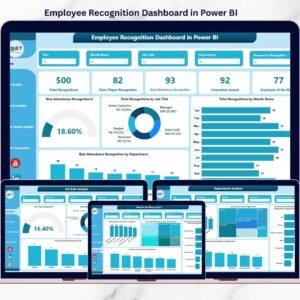
This ready-to-use Power BI dashboard transforms raw recognition data into clear, interactive, and actionable insights. Instead of guessing what motivates employees, HR teams and leaders gain complete visibility into recognition trends across departments, job roles, locations, and award categories. Ultimately, this dashboard helps organizations build a transparent, data-driven, and high-impact recognition culture.
🚀 Key Features of Employee Recognition Dashboard in Power BI
✨ Centralized Recognition Analytics
Track all employee recognition data in one interactive Power BI dashboard.
📊 Real-Time KPI Monitoring
View total recognitions, award-wise performance, and monthly trends instantly.
🎯 Department & Job Role Insights
Identify which teams and roles receive recognition—and where gaps exist.
🌍 Branch & Location Analysis
Compare recognition practices across branches and regions for consistency.
🏆 Award & Reason-Based Tracking
Analyze why employees are recognized and align rewards with company values.
🎛️ Interactive Slicers & Filters
Filter insights by time period, department, job role, location, or award type.
📈 Executive-Ready Visuals
Clean, professional charts designed for leadership reporting and reviews.

📦 What’s Inside the Employee Recognition Dashboard
This Power BI file includes five insight-rich pages, each designed to answer a specific recognition question:
📌 Overview Page
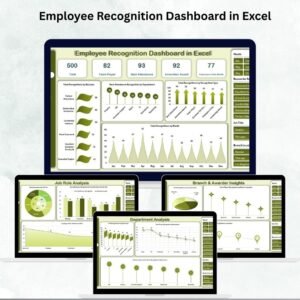
A high-level snapshot with KPI cards for total recognitions, employee of the month, best attendance, innovation awards, and team player recognitions.
📌 Job Role Analysis Page
Shows how recognition is distributed across job titles, helping ensure fairness across hierarchy levels.
📌 Department Analysis Page
Highlights department-wise recognition trends to identify high-performing and under-recognized teams.
📌 Branch & Awarder Insights Page
Provides location-based recognition analysis for multi-branch organizations.
📌 Reason for Recognition Page
Reveals the behaviors and achievements most frequently rewarded.
Together, these pages deliver a complete, 360-degree view of employee appreciation.
🛠️ How to Use the Employee Recognition Dashboard
Using this dashboard is simple and user-friendly:
1️⃣ Load your employee recognition data into Power BI
2️⃣ Refresh the dataset
3️⃣ Use slicers to filter by month, department, role, or location
4️⃣ Instantly explore recognition trends and KPIs
5️⃣ Share insights with HR leaders and management
No advanced Power BI expertise is required—this dashboard is built for quick adoption and immediate impact.
👥 Who Can Benefit from This Employee Recognition Dashboard?
This dashboard is ideal for:
👔 HR & People Analytics Teams – Track engagement and recognition effectiveness
📊 Business & HR Leaders – Make data-driven recognition decisions
🏢 Department Managers – Monitor team appreciation levels
🌍 Multi-Location Organizations – Ensure fair recognition across branches
🚀 Growing Companies – Build a strong recognition culture from day one
Whether your organization is small or enterprise-scale, this dashboard adapts seamlessly.
Click here to read the Detailed Blog Post
Watch the step-by-step video tutorial:
Visit our YouTube channel to learn step-by-step video tutorials
Compatibility and Requirements
- Works in Power BI Desktop, which is free. Microsoft explains how to get it in Get Power BI Desktop.
- You load your own employee recognition data and refresh the dataset. The slicers then filter the pages by month, department, job role, location or award type.
Frequently Asked Questions
Which pages are included?
Five pages: Overview, Job Role Analysis, Department Analysis, Branch and Awarder Insights, and Reason for Recognition.
What does the Overview page show?
KPI cards for total recognitions, employee of the month, best attendance, innovation awards and team player recognitions.
Can I filter the dashboard by department or location?
Yes. Slicers let you filter by time period, department, job role, location or award type.
Do I need advanced Power BI skills?
No. Load your recognition data, refresh the dataset and use the slicers to explore the pages.
Is there an Excel or Google Sheets version?
Yes. See the Employee Recognition Dashboard in Excel and the Employee Recognition Dashboard in Google Sheets.
Related Employee Recognition Templates
- Employee Recognition Dashboard in Excel: the same dashboard for Excel users
- Employee Recognition Dashboard in Google Sheets: a browser-based version
- Employee Recognition Nomination Tracker in Excel: log nominations before they reach the dashboard
- Employee Turnover Dashboard in Power BI: another HR dashboard for Power BI
- HR & Workforce Analytics Bundle: 10 HR templates in one download
Browse all Power BI dashboards or see HR and Payroll templates in Excel.



Reviews
There are no reviews yet.