


Building a workplace where every employee feels valued, respected, and empowered starts with understanding your workforce data clearly. But most organizations still rely on scattered spreadsheets and manual reports that fail to show the real picture.
The Diversity & Inclusion Dashboard in Power BI changes everything.
This ready-to-use, interactive dashboard brings all your important D&I insights into one powerful platform — helping HR teams, DEI leaders, and business executives track fairness, representation, retention, pay equity, and satisfaction through easy-to-understand visuals.
If your organization is serious about building a diverse, inclusive, and equitable workplace, this dashboard becomes your most important data companion.
✨ Key Features of the Diversity & Inclusion Dashboard in Power BI
⭐ 1️⃣ Overview Page — Your Main Diversity Snapshot
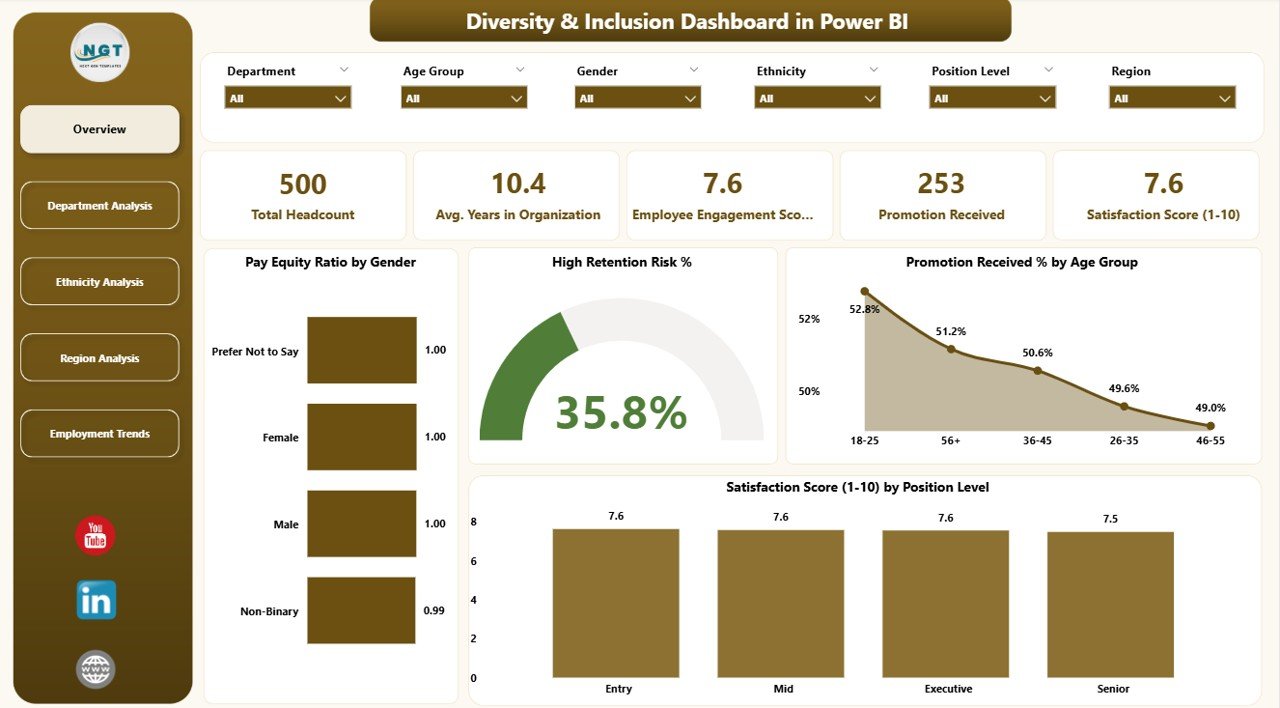
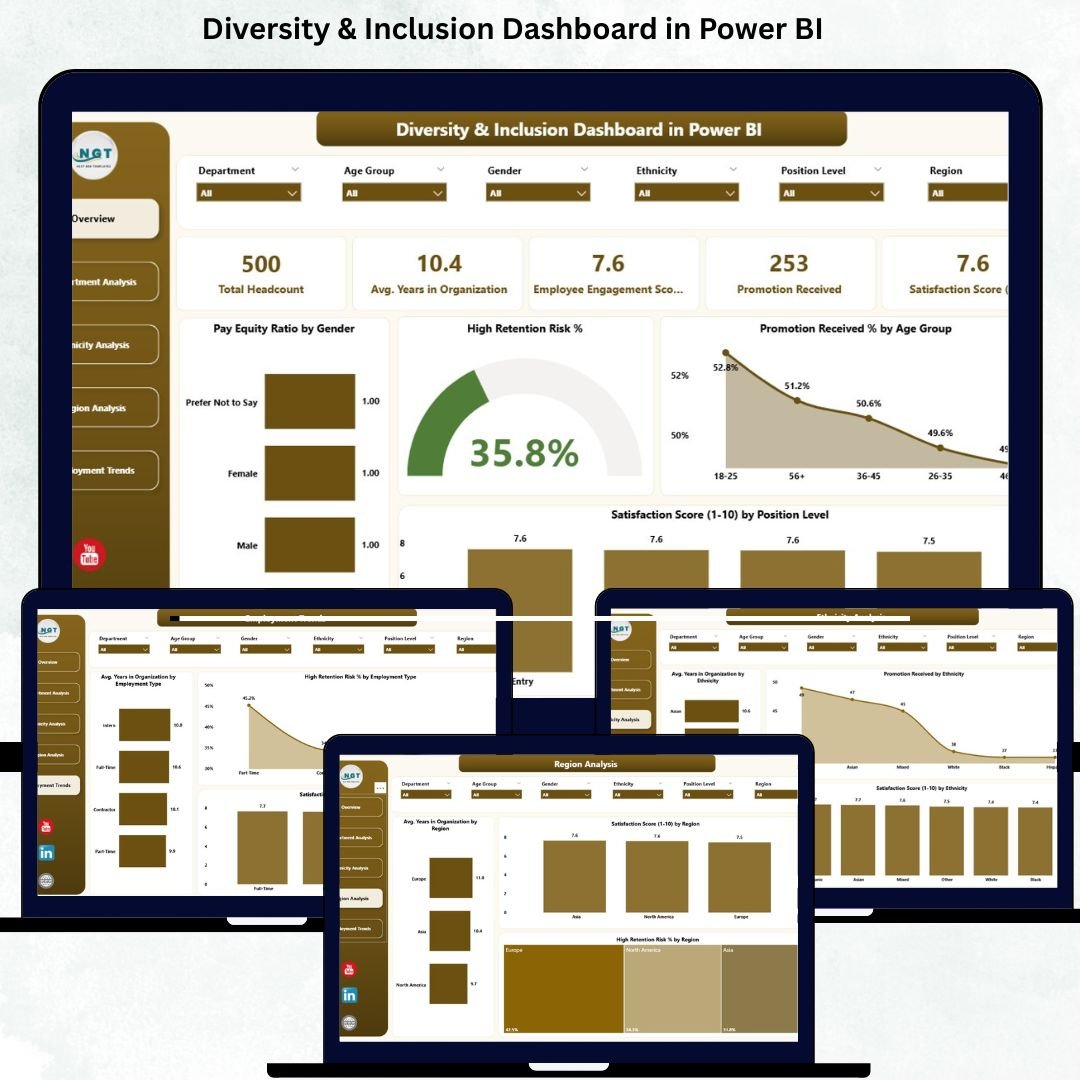
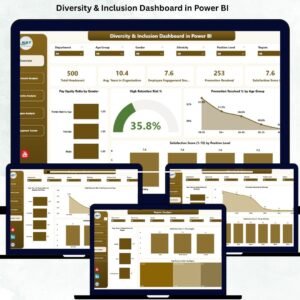
The Overview Page acts as the central hub of the dashboard. It summarizes your organization’s most important D&I indicators through:
🔹 5 KPI Cards showing top metrics
🔹 Dynamic slicers for easy filtering
🔹 4 powerful charts, including:
Pay Equity Ratio by Gender
High Retention Risk %
Promotion Received % by Age Group
Satisfaction Score by Position Level
This page highlights workforce health instantly — helping leaders detect gender pay gaps, identify promotion inequalities, and understand retention risk across different employee groups.
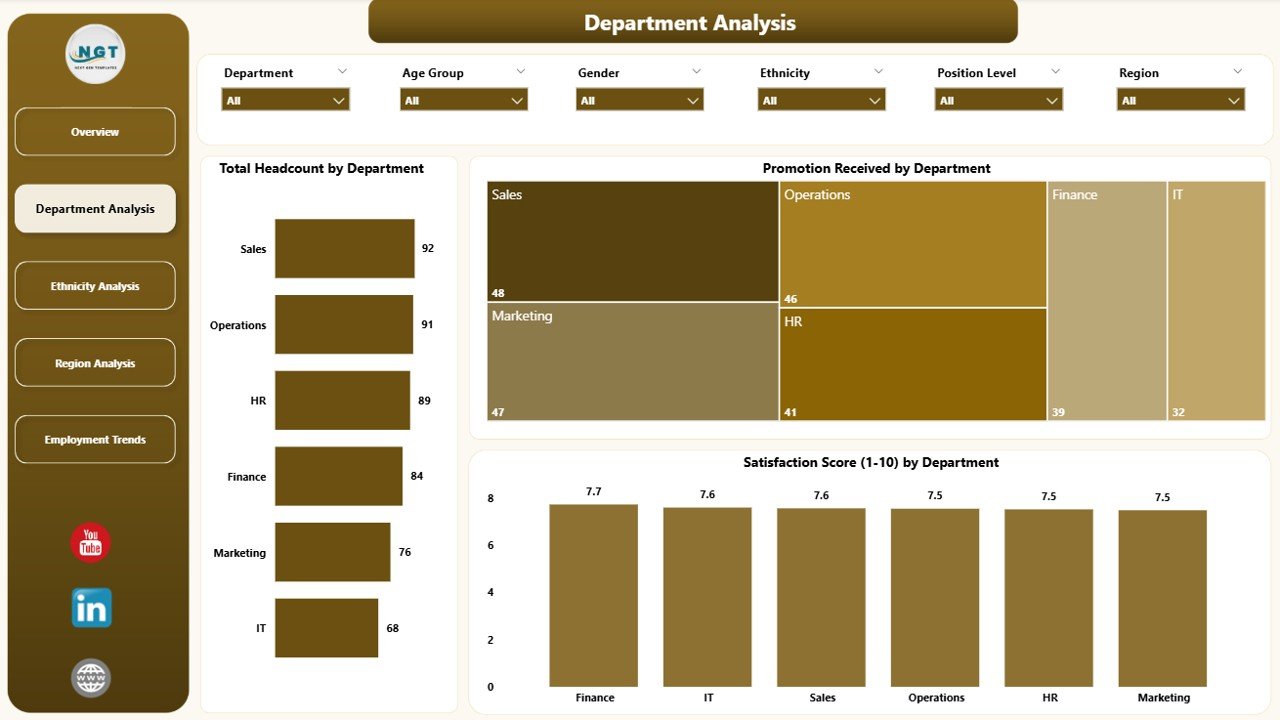
⭐ 2️⃣ Department Analysis Page — Understand Team-Level Insights
This page dives deeper into departmental patterns and inclusivity gaps.
You’ll find:
Total Headcount by Department
Promotion Received by Department
Satisfaction Score by Department
HR teams and department heads can easily identify which teams show strong engagement and which require support, development, culture changes, or leadership improvements.
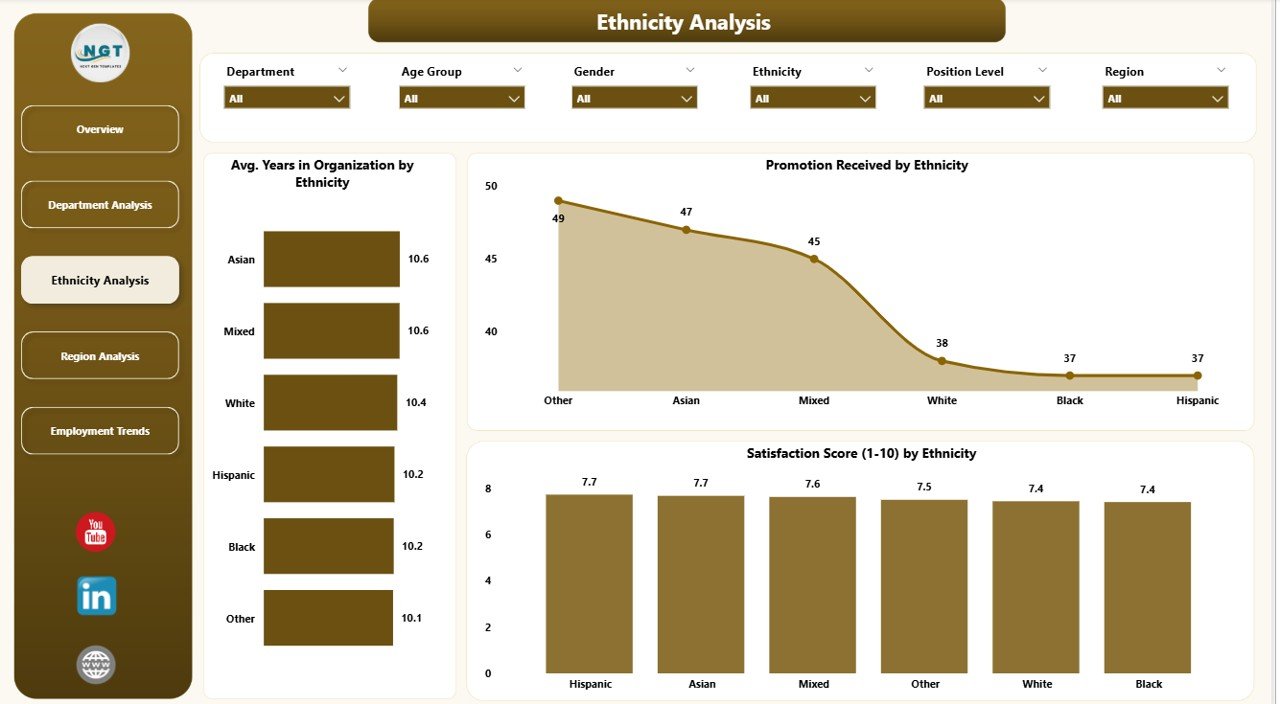
⭐ 3️⃣ Ethnicity Analysis Page — Track Representation & Fairness
Diversity is incomplete without understanding ethnic representation.
This page showcases:
Avg. Years in Organization by Ethnicity
Promotion Received by Ethnicity
Satisfaction Score by Ethnicity
With these insights, organizations can detect blind spots in engagement, retention, and career-growth opportunities across different ethnic groups.
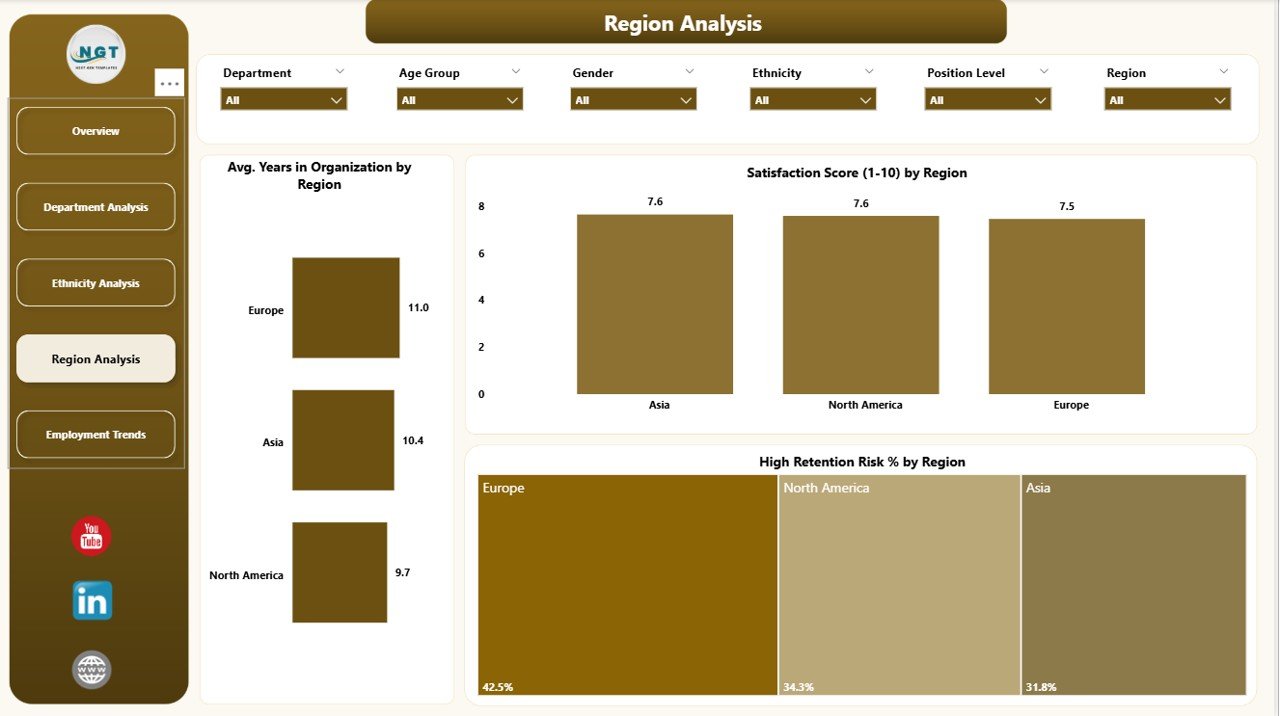
⭐ 4️⃣ Region Analysis Page — Location-Based Inclusion Trends
Companies with multiple offices or regions often experience different cultural, operational, and engagement patterns.
This page includes:
Avg. Years in Organization by Region
Satisfaction Score by Region
High Retention Risk % by Region
It helps leadership identify locations that need policy improvements, culture-building programs, or stronger communication efforts.
⭐ 5️⃣
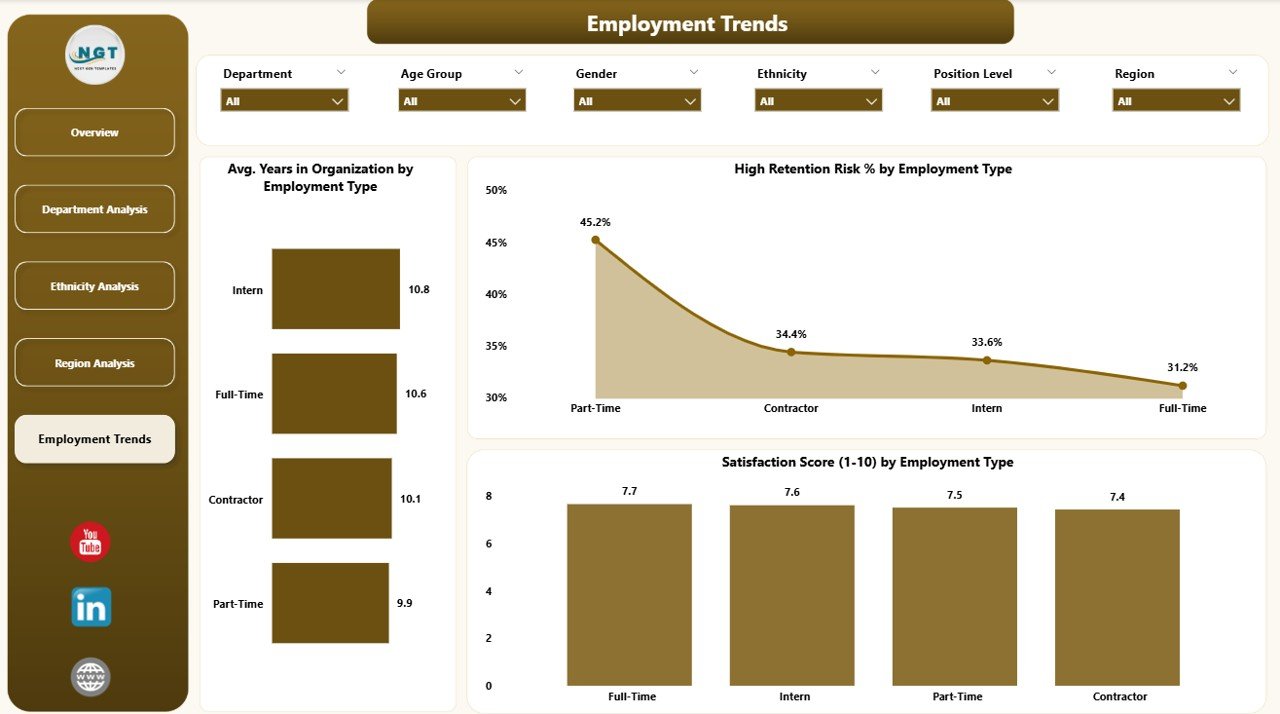
Employment Trends Page— Monitor Progress Over Time
This page helps you track long-term changes in inclusion and diversity indicators.
You’ll see:
Avg. Years in Organization by Employee Type
Satisfaction Score by Employee Type
High Retention Risk % by Employee Type
If your organization introduces new D&I policies, training, or initiatives, this page shows whether those actions are actually driving positive results.
🌟 What Makes This Dashboard Better?
The Diversity & Inclusion Dashboard in Power BI is not just visual — it’s strategic. Using automation, real-time refresh, and interactive drill-downs, it gives you:
✔ Accurate, data-driven insights
✔ Instant filtering and comparisons
✔ Easy internal reporting
✔ Secure sharing with leadership
✔ Clear visualization with no manual effort
Instead of spending hours creating reports, you get automatic performance tracking in seconds.
🎯 Advantages of Using the D&I Dashboard
🔍 Workforce Transparency — See representation, satisfaction, and pay trends clearly.
⚖️ Identify Inequalities Early — Track promotion fairness, pay equity, and retention gaps.
🧠 Stronger Leadership Decisions — Data helps eliminate bias in decision-making.
💬 Higher Employee Engagement — People feel valued when inclusion is measured and improved.
🛡 Better Retention — Spot high-risk groups before churn happens.
🌱 Cultural Improvement — Track progress of D&I initiatives continuously.
📈 Policy Effectiveness — Understand what works and what needs refinement.
🧠 How to Use the Dashboard Effectively
Start with the Overview Page to get instant insights.
Use slicers to drill deeper into department, region, or age-group data.
Compare trends monthly to track improvement.
Review satisfaction and retention together for culture insights.
Use ethnicity, gender, and promotion charts to identify fairness issues.
🧩 Best Practices
Keep HR data clean and updated.
Use consistent definitions for metrics like retention or satisfaction.
Review analytics monthly.
Share department-level insights for targeted actions.
Protect confidential employee data.
Compare historical patterns before implementing new D&I initiatives.
### Click here to read the Detailed blog post
Visit our YouTube channel for step-by-step tutorials
Watch the step-by-step video tutorial:
Compatibility and Requirements
- Opens in Power BI Desktop, which is a free download from Microsoft. Get it from Get Power BI Desktop.
- Slicers on each page filter the charts, and the report refreshes when your HR data changes.
Frequently Asked Questions
What pages does the Diversity & Inclusion Dashboard include?
Five: Overview, Department Analysis, Ethnicity Analysis, Region Analysis and Employment Trends.
What does the Overview page show?
Five KPI cards, slicers and four charts: Pay Equity Ratio by Gender, High Retention Risk %, Promotion Received % by Age Group and Satisfaction Score by Position Level.
Can I filter by department or region?
Yes. Use the slicers to drill into department, region or age group data.
Is there an Excel version?
Yes. See the Diversity & Inclusion Dashboard in Excel.
Related Diversity and HR Templates
- Diversity & Inclusion Dashboard in Excel: the same analysis in Excel
- Diversity & Inclusion KPI Dashboard in Power BI: track D&I KPIs against targets
- Diversity and Inclusion KPI Dashboard in Google Sheets: for teams that work online
- HR & Workforce Analytics Bundle: 10 HR templates in one download
Browse all Power BI dashboards or the Power BI KPI dashboards.




















Reviews
There are no reviews yet.