


Employee recognition is one of the most powerful tools for improving motivation, engagement, and workplace culture. When employees feel valued, productivity increases and retention improves. However, many organizations still manage employee recognition and award requests through emails, shared documents, or unstructured spreadsheets. As a result, award nominations get delayed, approvals lack transparency, and HR teams struggle with tracking and reporting.Employee Recognition Award Request Tracker in Google Sheets
That is exactly why the Employee Recognition Award Request Tracker in Google Sheets becomes an essential HR and people-operations solution.Employee Recognition Award Request Tracker in Google Sheets
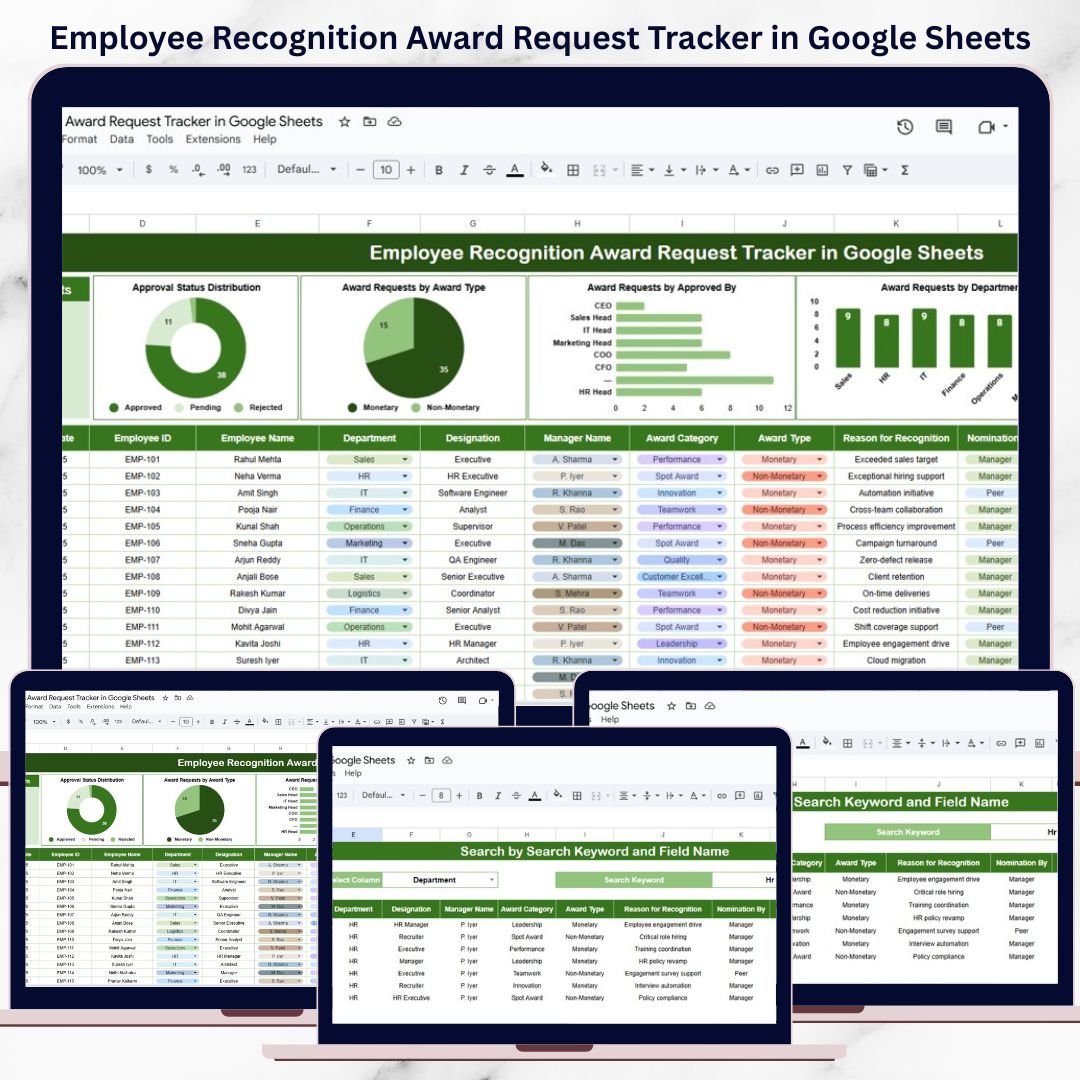
This ready-to-use tracker provides a centralized, structured, and visual system to manage the complete employee recognition award lifecycle—from nomination to approval—using a single Google Sheets file. Instead of chasing emails and approvals, HR teams and managers can track award requests clearly with status tracking, automated charts, and a smart search feature.
Because the tracker is built in Google Sheets, it is cloud-based, easy to share, fully customizable, and requires no technical skills. You can start using it immediately without additional software or setup.
⭐ Key Features of Employee Recognition Award Request Tracker
🔹 Centralized Award Request Management
All employee award nominations are stored in one structured tracker instead of scattered files.
🔹 Approval Status Tracking
Track requests as Approved, Pending, or Rejected with complete transparency.
🔹 Monetary & Non-Monetary Award Classification
Easily analyze reward budgets and recognition types.
🔹 Department & Approver Analysis
Understand which departments and leaders actively recognize employees.
🔹 Automated Charts & KPI Summary
Visual insights update automatically as data changes.
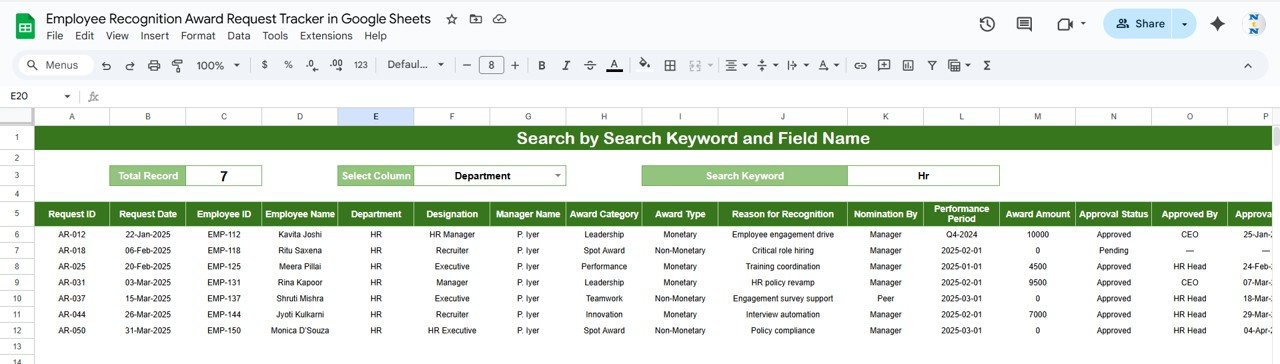
🔹 Advanced Search Functionality
Instantly locate records using keyword-based search.
📊 What’s Inside the Employee Recognition Award Request Tracker
📋 Tracker Sheet – Dashboard Overview
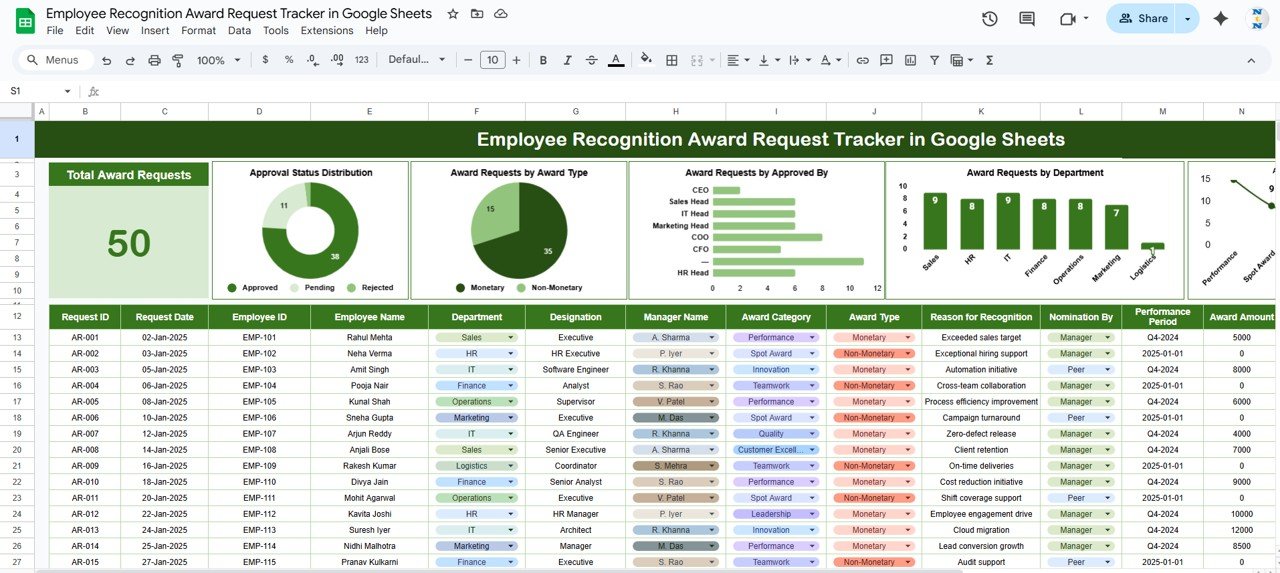
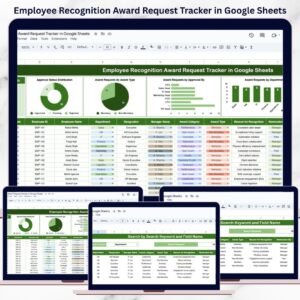
This is the main working and reporting sheet of the tracker.
🔹 KPI Card
Total Award Requests – Shows the total number of award nominations submitted.
📈 Charts Included on the Dashboard
Approval Status Distribution
Approved
Pending
Rejected
Helps HR quickly identify approval bottlenecks.
Award Requests by Award Type
Monetary
Non-Monetary
Useful for reward budgeting and planning.
Award Requests by Approved By
Displays approvals by:
CEO
HR Head
Sales Head
Marketing Head
IT Head
Award Requests by Department
Tracks recognition trends across departments such as:
Sales
HR
IT
Finance
Operations
Marketing
📑 Detailed Award Request Register
Each award request is captured in a clean, audit-ready format.
Key Columns Included:
Request ID
Request Date
Employee ID
Employee Name
Department
Designation
Manager Name
Award Category (Performance, Innovation, Leadership, etc.)
Award Type (Monetary / Non-Monetary)
Reason for Recognition
Nomination By (Manager / Peer)
Performance Period
Award Amount
Approval Status
Approved By
Approval Date
This structure ensures complete transparency, consistency, and easy reporting.
🔍 How to Use the Employee Recognition Award Request Tracker
🔹 Step 1: Enter Award Requests
Log each employee recognition request with all relevant details.
🔹 Step 2: Update Approval Status
Change status to Approved, Pending, or Rejected as decisions are made.
🔹 Step 3: Review Dashboard Insights
Monitor approval trends, department-wise recognition, and award types.
🔹 Step 4: Use Smart Search
Search by Employee Name, Department, Manager Name, or Approval Status to instantly find records.
👥 Who Can Benefit from This Tracker
HR & People Operations Teams
Department Managers
Talent & Engagement Teams
Corporate HR Heads
Medium to Large Organizations
Companies running formal recognition programs
🚀 Advantages of Using This Tracker
Eliminates manual follow-ups
Improves approval turnaround time
Enhances recognition transparency
Supports data-driven HR decisions
Reduces errors and duplication
Fully cloud-based in Google Sheets
### Click here to read the Detailed blog post
Watch the step-by-step video tutorial:
### Visit our YouTube channel to learn step-by-step video tutorials
👉 https://youtube.com/@NeotechNavigators
Compatibility and Requirements
- Works in Google Sheets with a free Google account and a web browser.
- Share the tracker with HR and department heads from Google Drive.
- New to Google Sheets? Google covers the basics in How to use Google Sheets.
Frequently Asked Questions
What does the Employee Recognition Award Request Tracker record?
Each request has columns such as Request ID, Employee Name, Department, Award Category, Award Type, Reason for Recognition, Award Amount, Approval Status, Approved By and Approval Date.
Which charts are on the dashboard?
Charts show Approval Status Distribution, Award Requests by Award Type, by Approved By and by Department, next to a Total Award Requests KPI card.
Can I search for a record?
Yes. You can search by Employee Name, Department, Manager Name or Approval Status.
How do I track approvals?
Change each request’s status to Approved, Pending or Rejected, and the dashboard charts update.
Related Employee Recognition Templates
- Employee Recognition Nomination Tracker in Google Sheets: log nominations before approval
- Employee Recognition Dashboard in Google Sheets: analyze recognition across teams
- Employee Recognition KPI Dashboard in Google Sheets: recognition KPIs against targets
- Employee Recognition Nomination Tracker in Excel: the Excel option
- HR Google Sheets Pack: 10 HR Google Sheets templates in one bundle
Browse all Google Sheets trackers or the Google Sheets HR templates.
































Reviews
There are no reviews yet.