New: NextGenTemplates Academy - video courses on Excel formulas with AI and Pivot Tables & dashboards. Early-bird: 20% off with code EARLYBIRD20 - first 20 orders only.See the courses →
SUMIFS, XLOOKUP, FILTER, LAMBDA and checking AI-written formulas, with real business projects. 11h 47m of video by PK, with practice files, quizzes and a capstone.
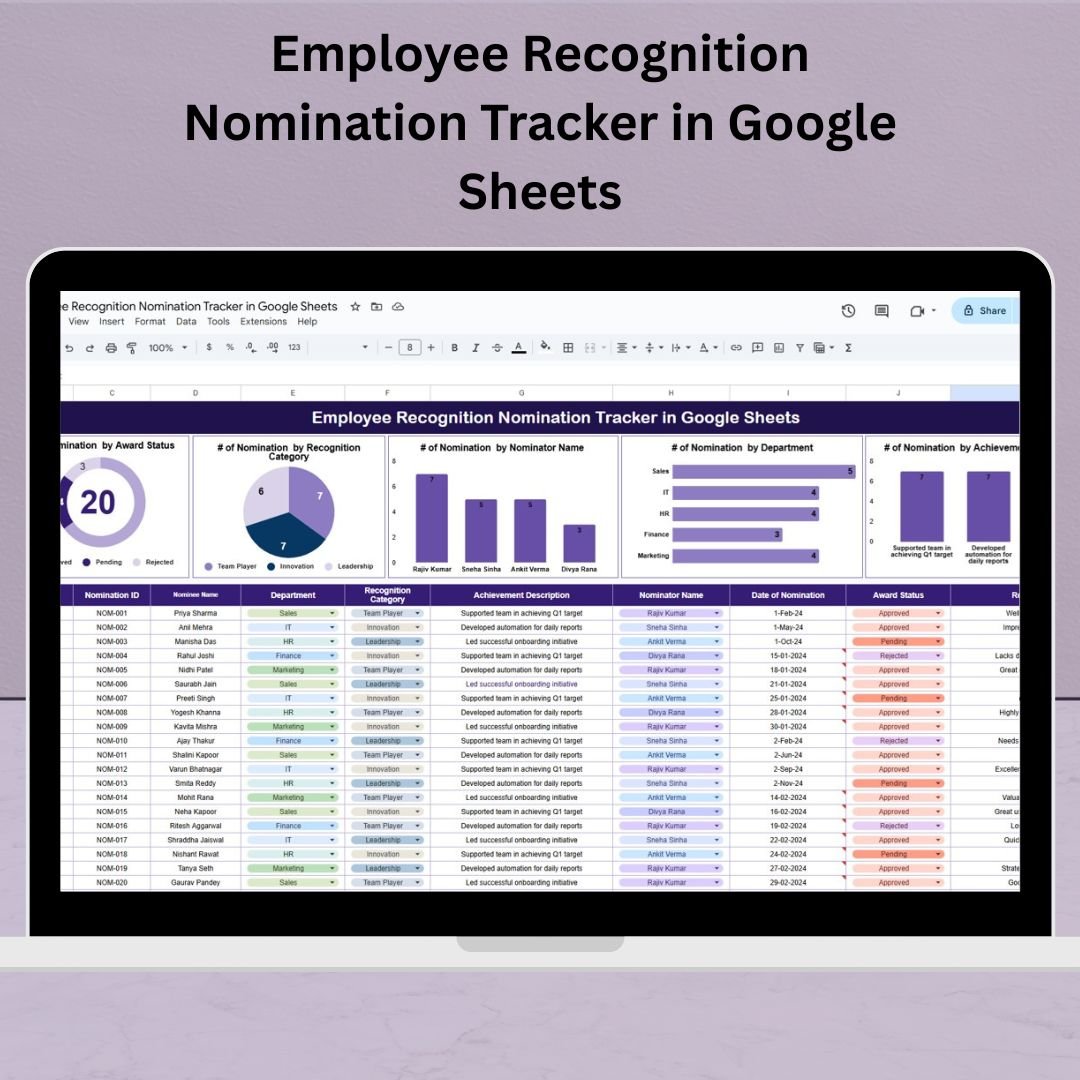
Recognize outstanding contributions across your organization with our Employee Recognition Nomination Tracker in Google Sheets—a ready-to-use, fully interactive tool for HR teams and team leaders. From tracking nominations to visualizing achievements by category, department, or status, this tracker simplifies your recognition program while boosting engagement and transparency.
Whether you’re awarding “Employee of the Month” or acknowledging innovation, leadership, and teamwork—this tracker ensures no achievement goes unnoticed. Built in Google Sheets, it’s easy to use, fully customizable, and ready for collaborative workflows.
Employee Recognition Nomination Tracker
✨ Key Features of the Employee Recognition Nomination Tracker
📋 Tracker Sheet Tab – All-in-One Dashboard
Manage and visualize all nominations from a single view:
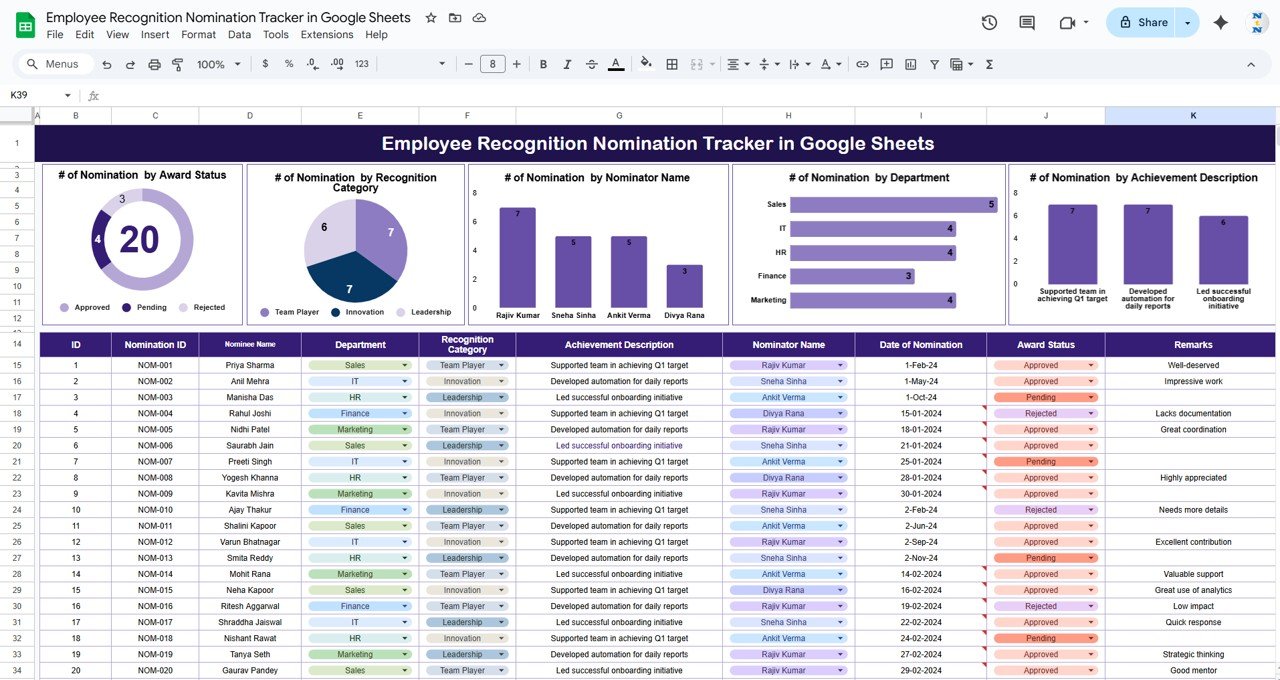
🟢 # of Nominations by Award Status (Approved, Pending, Rejected)
🏅 # by Recognition Category (Leadership, Innovation, Teamwork)
🧑💼 # by Nominator Name (Identify active contributors)
🏢 # by Department (Track participation by team)
📝 # by Achievement Description (Celebrate what matters most)
Charts auto-update as you enter data—no manual intervention needed.
📊 Data Section – Structured Nomination Capture
Capture all key details with predefined fields:
🔢 Nomination ID & Unique ID
🙋 Nominee Name
🧑💼 Nominator Name
🏢 Department
🏅 Recognition Category
📄 Achievement Description
📅 Date of Nomination
🚦 Award Status
💬 Remarks
This ensures transparency and simplifies auditing or reporting efforts.
🎯 Why Use This Tracker?
✅ Centralized Tracking: All nomination data in one place
📈 Real-Time Visuals: Auto-generated charts for quick insights
👀 Improved Transparency: Clear status and category overviews
⏱️ Efficient Management: Say goodbye to manual forms and sheets
🛠️ Fully Customizable: Add your categories, statuses, or columns
🌐 Collaborative: Easily share with HR, department heads, or leadership
🧠 Best Practices
🔄 Update nominations promptly to keep reports accurate
📊 Monitor trends in nominations by department or category
🗣️ Encourage more submissions using tracker insights
🛠️ Tailor recognition categories to your culture
✅ Use charts to inform recognition events or newsletters
👥 Who Can Use It?
👩💼 HR Managers
🧑🔧 Team Leaders
🧑🏫 People & Culture Teams
🏢 Small Business Owners
🧑💻 Remote/Hybrid Teams
🧑🎓 Educational Institutions
📥 What’s Included?
✅ 1 Google Sheet template
📈 Auto-updating charts for award status, categories, and nominators
After purchase you get a link to the Google Sheet. Open it while signed in to your Google account and use File > Make a copy - the copy in your Google Drive is fully yours and editable.
Do I need a paid Google account? Will it expire?
No. A free Google account is enough, and your copy lives in your own Google Drive - it never expires and there is nothing to renew.
Does it work on Mac, phone or tablet?
Yes - in any browser on Windows, Mac or Chromebook, and in the Google Sheets mobile app for viewing and quick entries.
Can I share it with my team?
Yes. Share your copy with colleagues using Google's normal sharing, with view or edit rights as you choose.
Can I change the design and formulas?
Yes, your copy is fully editable - colours, labels, logo, formulas and charts. If a range is protected, use Data > Protect sheets and ranges to remove it in your copy.
Are there macros or add-ons?
No macros or add-ons - it uses normal Google Sheets formulas and charts.
Is it a one-time payment or a subscription?
One-time payment. No subscription, no per-user fees and nothing to renew - the file is yours to keep.
How do I get the file after payment?
Instantly. The download link appears on screen after checkout, is emailed to you, and stays under My Account > Downloads on our website. If the email does not arrive within a few minutes, check your spam or promotions folder.
Is a user manual included?
Most of our newer products include a PDF user manual in the download. If yours does not have one, message us with your order number and we will send it.
Do I get free updates?
Bug fixes are always free - if something does not work as described, we fix it and send you the corrected file. New versions with new features are not included in the price, unless this product's description says otherwise.
Can you customise it for me?
Yes. Small changes to this template (your columns, categories, logo, colours, minor layout) cost the template price plus $40-80 (Rs 3,000-6,000 + GST), quoted once you send your list. A fully custom build is usually $100-200 (Rs 8,000-18,000 + GST) with two revision rounds. Email your requirements to [email protected] or message us on WhatsApp.
Can I use it for my business or my clients?
Yes, for your own personal or internal business use, for as long as you like. Reselling or redistributing the template is not allowed.
What is your refund policy?
Because these are digital downloads, they are non-refundable once delivered - except when the product does not match its description (report it within 48 hours of purchase) or there is a technical problem our team cannot fix within 72 hours. Email [email protected] with your order number.
How do I get help?
Email [email protected] (Mon-Fri, 10 AM-7 PM IST) or message us on WhatsApp +91 80770 90260 (chat only, no calls). Please include your order number.
Still have a question? Click Need help? at the bottom-left to ask our assistant, or message us on WhatsApp.
Application
Google Sheets
Template Type
Tracker
Price
Paid
Business Or Department
HR and Payroll
Reviews
There are no reviews yet.
Only logged in customers who have purchased this product may leave a review.





























Reviews
There are no reviews yet.