

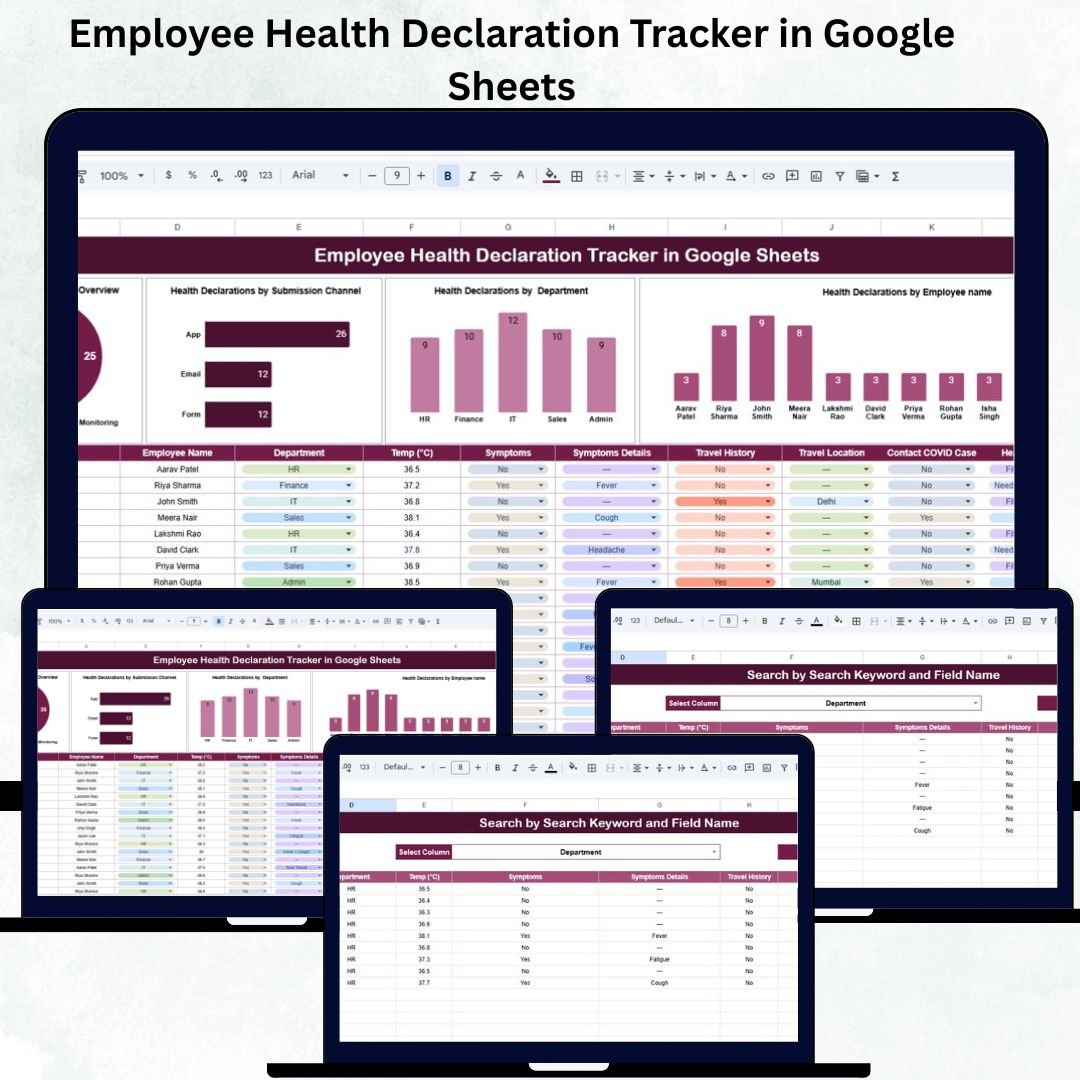

The health and safety of employees have become a top priority for every organization — and having a structured system to track health declarations is now essential. The Employee Health Declaration Tracker in Google Sheets is a ready-to-use, automated, and visually powerful tool that helps HR, Admin, and Safety teams monitor workforce health trends in real time.
Whether your company collects daily, weekly, or periodic health declarations, this tracker ensures you can quickly evaluate risks, identify symptoms, and maintain compliance — all inside Google Sheets without any additional software.
Packed with automated charts, search features, and easy-to-read dashboards, it transforms raw health entries into meaningful insights for smarter decision-making.
✨ Key Features of Employee Health Declaration Tracker in Google Sheets
This tracker comes with a professionally designed dashboard layout that automatically updates when you enter new information. It provides complete clarity on employee health trends across your organization.
🟦 What’s Inside the Employee Health Declaration Tracker
📊 1. Tracker Sheet Tab – Real-Time Dashboard
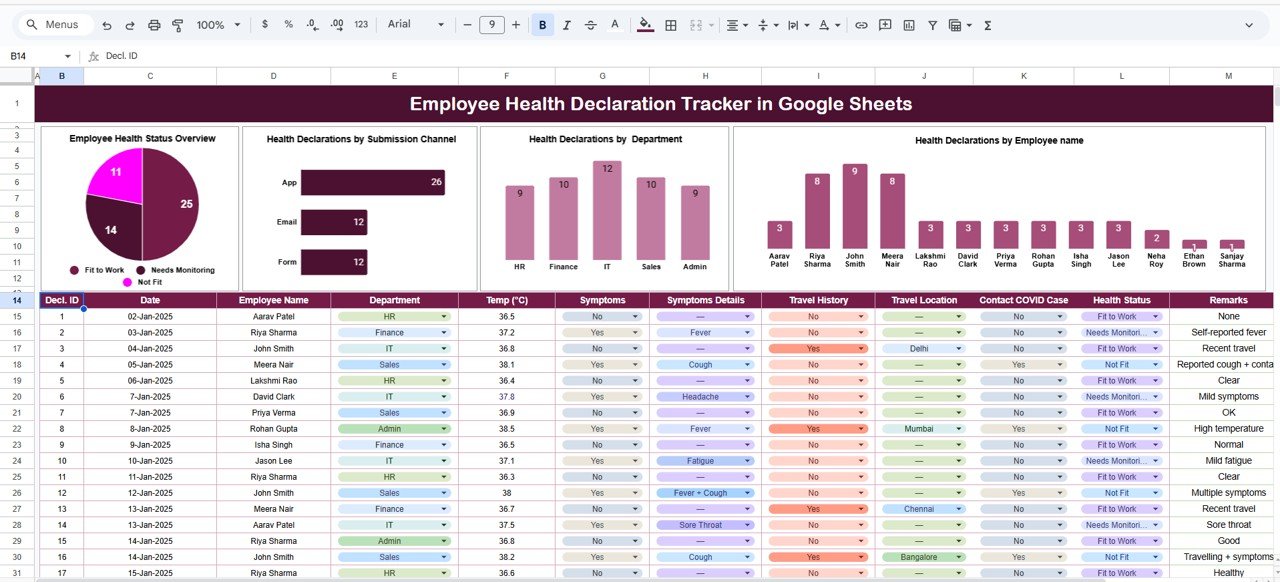
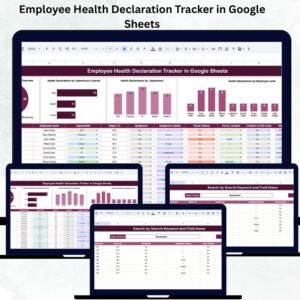
This is the heart of the tracker — a clean, interactive dashboard showing all vital health information using auto-generated charts.
Charts Included:
💠 Employee Health Status Overview
Shows the distribution of employees across different health conditions such as
Healthy, Symptoms Reported, Tested Positive, Recovered, and Pending Submission.
This helps HR identify risks instantly.
💠 Health Declarations by Submission Channel
View which channels employees use most — Google Form, Email, Manual Entry, App, or HR.
A great way to measure reporting efficiency.
💠 Health Declarations by Department
Understand department-wise health trends to detect potential clusters early.
💠 Health Declarations by Employee Name
Track individual compliance and follow-up easily.
All visuals update automatically when new records are entered — saving hours of manual work.
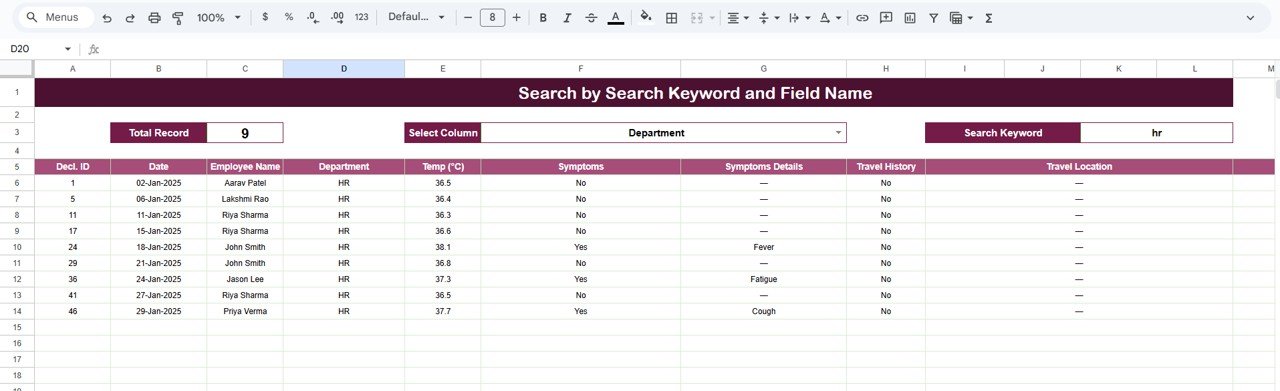
🔍 2. Search Sheet Tab – Smart & Fast Lookup
This sheet lets you filter and locate any health declaration within seconds.
You can search by:
🔎 Keyword (e.g., “Symptoms”, “Positive”, “Pending”)
🔎 Field Name (Employee Name, Department, Submission Channel, Health Status)
Examples:
➡ “Symptoms Reported” → shows all employees who reported symptoms
➡ “Operations” → lists all declarations from the Operations team
The Search Tab is perfect for audits, incident checks, and rapid follow-ups.
⚡ How to Use the Employee Health Declaration Tracker
1️⃣ Enter health declaration data into the Data Sheet.
2️⃣ Select predefined categories from dropdowns for accuracy.
3️⃣ Review real-time charts on the Tracker Sheet.
4️⃣ Use the Search Tab for quick filtering.
5️⃣ Export visuals for health reports or management meetings.
The tracker is completely beginner-friendly — no setup, no formulas, no coding needed.
🧑💼 Who Can Benefit from This Tracker?
👔 HR Teams: Monitor employee health trends and ensure submission compliance
🏢 Admin & Facility Teams: Maintain safety protocols and identify risk clusters
🩺 Safety & Compliance Officers: Track symptoms, cases, and reporting accuracy
🏭 Corporate Offices, Factories & Field Teams: Manage declarations across multiple departments
Any organization that values employee well-being will benefit from this structured and automated system.
🚀 Advantages of Using This Tool
💙 Easy to use and 100% automated
📊 Real-time health insights for proactive decision-making
☁️ Google Sheets-based — works anywhere, anytime
⚙️ Helps maintain a safe and compliant workplace
⏱ Saves time with automated calculations & charts
🔍 Fast searching for audits and follow-ups
🔧 Opportunities for Improvement
💡 Integrate Google Forms for automated submissions
💡 Add automated email reminders for pending declarations
💡 Add a risk score based on symptoms
💡 Include trend charts by project or location
💡 Apply conditional formatting to flag high-risk entries
📌 Best Practices
✔ Encourage employees to submit health declarations regularly
✔ Review department-wise charts daily
✔ Validate “Tested Positive” entries for accuracy
✔ Update statuses promptly to maintain record quality
✔ Use Search Tab during audits or investigations
Click here to read the Detailed blog post
Watch the step-by-step video Demo:
📺 Visit our YouTube channel to learn step-by-step video tutorials
Compatibility and Requirements
- Works in Google Sheets. You need a free Google account and a web browser.
- You pick health status, department and submission channel from dropdowns on the Data Sheet. Google explains dropdowns in Create an in-cell dropdown list.
Frequently Asked Questions
Which sheets are included?
The tracker has a Data Sheet where you enter declarations, a Tracker Sheet with the charts, and a Search Sheet for lookups.
What charts does the Tracker Sheet show?
Four charts: Employee Health Status Overview, Health Declarations by Submission Channel, Health Declarations by Department and Health Declarations by Employee Name. They update when you add new records.
How do I find a specific declaration?
Open the Search Sheet and search by keyword, such as Symptoms, Positive or Pending, or by field name such as Employee Name, Department, Submission Channel or Health Status.
Which health statuses can I record?
The Employee Health Status Overview groups employees as Healthy, Symptoms Reported, Tested Positive, Recovered or Pending Submission.
Is there an Excel or Google Sheets dashboard for workplace health and safety?
Yes. See the Employee Health and Safety Dashboard in Google Sheets and the Employee Health and Safety Dashboard in Excel.
Related Employee Templates
- Employee Health and Safety Dashboard in Google Sheets: a dashboard view of workplace health and safety data
- Employee Health and Safety Dashboard in Excel: the same topic in Excel
- Employee Health and Safety Report in Excel: a report format for health and safety data
- Employee Attendance Tracker in Google Sheets: track attendance in the same workspace
- HR Director Toolkit: 10 HR templates in one download
Browse all Google Sheets trackers and HR and Payroll templates for Google Sheets.































Reviews
There are no reviews yet.