



Handling employee complaints effectively is essential for maintaining a productive and positive work environment. Without a proper system, complaints may be lost, delayed, or mishandled, leading to dissatisfaction, conflicts, or potential legal issues.Employee Complaint Investigation Tracker in Google Sheets
The Employee Complaint Investigation Tracker in Google Sheets is a ready-to-use, cloud-based tool designed to help HR teams, managers, and investigators record, monitor, and manage employee complaints efficiently. This tracker provides insights into complaints by status, priority, department, and assigned investigator, helping streamline investigations and ensure timely resolutions.Employee Complaint Investigation Tracker in Google Sheets

✨ Key Features of the Employee Complaint Investigation Tracker
This tracker contains two main sheet tabs to optimize complaint management:Employee Complaint Investigation Tracker in Google Sheets
🔹 Tracker Sheet Tab – Main Dashboard
Capture all employee complaints in a single centralized sheet.
Visualize complaints with built-in charts:
Complaints by Status – Open, In-Progress, Resolved, Closed.
Complaints by Type – Harassment, policy violations, workplace conflicts, etc.
Complaints by Priority – Urgent, High, Medium, Low.
Complaints by Department – Identify departments generating more complaints.
Complaints by Assigned Investigator – Track accountability and workload.
Charts provide HR teams with quick insights to prioritize investigations and allocate resources effectively.
🔹 Search Sheet Tab – Quick Lookup
Search complaints by Complaint ID, Department, Type, Status, Priority, or Assigned Investigator.
Locate specific complaints instantly without scrolling through large datasets.
Improves efficiency and reduces response time for investigations.
📊 Advantages of Using This Tracker
Centralized Complaint Management – Monitor all complaints in one place.
Real-Time Updates – Multiple users can update complaint status simultaneously.
Prioritized Investigations – Identify urgent or high-priority complaints quickly.
Data-Driven Insights – Charts help analyze complaint trends and recurring issues.
Enhanced Accountability – Track assigned investigators and complaint progress.
Collaborative Tool – HR teams, managers, and investigators can work together efficiently.
🔍 Opportunities for Improvement
Automated Notifications – Alert HR or investigators when a complaint is submitted or updated.
Integration with Google Forms – Employees can submit complaints directly, auto-populating the tracker.
Conditional Formatting – Highlight overdue, unresolved, or high-priority complaints.
Mobile Access – Investigators can update complaint status on-the-go using Google Sheets mobile app.
Historical Analysis – Maintain records of past complaints for trend analysis and reporting.
🛠️ Best Practices for Using the Tracker
Update Status Regularly – Keep complaint statuses current to maintain transparency.
Standardize Complaint Types and Priorities – Use consistent categories to avoid confusion.
Assign Investigators Clearly – Update the “Assigned Investigator” field for accountability.
Monitor Charts Frequently – Review visual insights weekly to identify recurring issues.
Audit Data Periodically – Ensure accuracy of complaint information for reliable reporting.
Train HR and Managers – Ensure staff understand how to log and update complaints effectively.
👥 Who Can Benefit from This Tracker
HR Teams: Centralized complaint tracking, analytics, and reporting.
Managers: Monitor trends and ensure timely resolution.
Investigators: Track assigned complaints and manage workload efficiently.
✅ How to Get Started
Download the Tracker – Access the ready-to-use Google Sheets file.
Enter Existing Complaints – Input any current or past complaints.
Customize Fields if Needed – Add columns for severity, resolution notes, or investigation deadlines.
Update Complaints in Real-Time – Encourage staff and HR to log new complaints immediately.
Review Charts Regularly – Use visual insights to prioritize investigations and generate reports.
Conclusion
The Employee Complaint Investigation Tracker in Google Sheets is a simple yet powerful tool to manage employee complaints efficiently. By using this tracker, organizations can:
Ensure timely resolution of complaints
Monitor trends and identify recurring issues
Prioritize urgent complaints effectively
Maintain accountability and transparency
This tool empowers HR teams to improve workplace satisfaction, reduce conflicts, and streamline the investigation process.
Click here to read the Detailed blog post
Watch the step-by-step video Demo:
Visit our YouTube channel to learn step-by-step video tutorials
Youtube.com/@NeotechNavigators
Compatibility and Requirements
- Works in Google Sheets with a free Google account and a web browser.
- Make a copy to your own Google Drive, then share it with your team if you want to work on it together.
- New to Sheets? Google’s guide How to use Google Sheets covers the basics.
Frequently Asked Questions
What tabs are in the Employee Complaint Investigation Tracker?
Two tabs: a Tracker sheet where you log every complaint and see the charts, and a Search sheet for looking up complaints.
Which charts does the tracker show?
Complaints by status (Open, In-Progress, Resolved, Closed), by type, by priority, by department and by assigned investigator.
How do I find one complaint quickly?
Use the Search sheet. You can look up complaints by Complaint ID, department, type, status, priority or assigned investigator.
Can I add my own fields?
Yes. You can add columns such as severity, resolution notes or investigation deadlines.
Related Complaint and HR Templates
- Employee Complaint Resolution Tracker in Google Sheets: follow each employee complaint through to resolution
- Employee Complaint Resolution Tracker in Excel: the resolution tracker in Excel
- Complaint Management System V1.0 in Excel: a full complaint management system in Excel
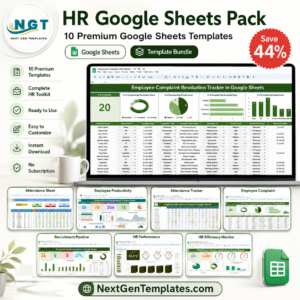
- HR Google Sheets Pack: 10 HR templates for Google Sheets in one bundle
Browse all Google Sheets trackers or the Google Sheets HR and payroll templates.








Reviews
There are no reviews yet.