



In today’s complex business landscape, regulatory compliance is not optional—it’s essential. That’s where the Compliance Audit Tracker in Google Sheets comes in. This ready-to-use, cloud-based template helps you track, manage, and resolve compliance audit issues in a streamlined, visual, and collaborative way. Whether you’re overseeing internal audits, third-party inspections, or departmental reviews, this tracker ensures every finding is monitored and resolved efficiently.

✅ Key Features of the Compliance Audit Tracker
📊 Real-Time Dashboard with Visual Insights
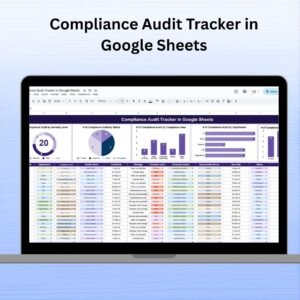
Visual charts for Audit by Severity, Audit by Status, Audit by Department, Compliance Area, and Responsible Person
Live progress indicators keep teams aligned and up-to-date
📝 Centralized Tracker Sheet
One single sheet to manage all audit entries
Includes details like Findings, Corrective Actions, Severity Level, Responsible Person, Due Date, and Status
Color-coded charts instantly show progress and bottlenecks
📅 Due Date Management
Assign deadlines to every action item and get clear visibility into overdue or pending tasks
🧩 Fully Editable & Customizable
Add, remove, or edit columns to suit your organizational structure
Tailor it to track financial, health, IT, HR, or operational audits
📦 What’s Inside the Compliance Audit Tracker
✅ Tracker Sheet Tab – The core working sheet with data and dynamic charts
✅ Auto-updating Charts – Including severity breakdowns, status analysis, and departmental distribution
✅ Drop-down lists for assigning responsible persons
✅ Color-coded status labels for quick status checks
✅ Real-time collaboration support via Google Sheets
🛠️ How to Use the Compliance Audit Tracker
1️⃣ Enter Audit Details – Start logging audits by department, compliance area, and findings
2️⃣ Assign Responsibilities – Tag a team member in charge of each corrective action
3️⃣ Set Deadlines – Add a due date to avoid compliance delays
4️⃣ Track Progress – Use the Status column to mark items as Pending, In Progress, or Resolved
5️⃣ Visualize Status – Let the automated charts do the reporting for you
No more chasing spreadsheets or wondering who’s doing what — everything is visible at a glance.
👥 Who Can Benefit from This Tracker
🔸 Compliance Officers – Centralized audit management and instant updates
🔸 Department Heads – Track audit progress within specific teams
🔸 HR & Admin Teams – Monitor policy-related compliance effortlessly
🔸 Quality Assurance Teams – Record ISO, safety, and SOP non-compliances
🔸 Small to Large Enterprises – Perfect for internal audits, regulatory prep, or vendor evaluations
Whether you’re a startup ensuring basic compliance or a large corporation handling multiple audits — this tool brings visibility, accountability, and control.
🔗 Click here to read the Detailed blog post
Watch the step-by-step video Demo:
🔔 Visit our YouTube channel to learn step-by-step video tutorials
Compatibility and Requirements
- Works in Google Sheets with a free Google account and a web browser. No installation is needed.
- The Responsible Person column uses a drop-down list. Google’s guide to creating an in-cell dropdown list shows how to edit the names.
Frequently Asked Questions
What does the Compliance Audit Tracker record?
Each audit entry has the department, compliance area, findings, corrective actions, severity level, responsible person, due date and status.
Which charts are on the tracker?
Audit by Severity, Audit by Status, Audit by Department, Compliance Area and Responsible Person. The charts update as you add or change entries.
What status values does it use?
Mark each item as Pending, In Progress or Resolved in the Status column. The color-coded labels show progress at a glance.
Can I use it for other kinds of audits?
Yes. Add, remove or edit columns to track financial, health, IT, HR or operational audits.
Is there an Excel version?
Yes, the Compliance Audit Tracker in Excel is available for teams that work in Excel.
Related Compliance Templates
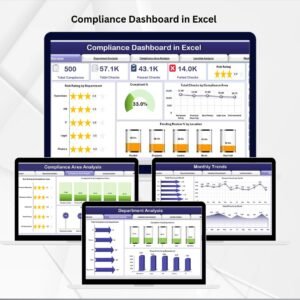
- Compliance Dashboard in Excel: a full dashboard view of compliance results.
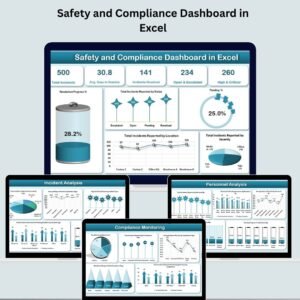
- Safety and Compliance Dashboard in Excel
- Internal Audit Compliance Checklist in Excel: prepare for each audit step by step.
- Legal Compliance Calendar in Excel: plan compliance deadlines for the year.
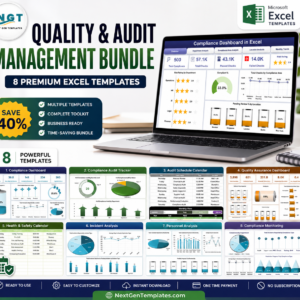
- Quality & Audit Management Bundle: 8 Excel templates for quality and audit teams.
Browse all Google Sheets tracker templates or the quality control templates.
Reviews
There are no reviews yet.