

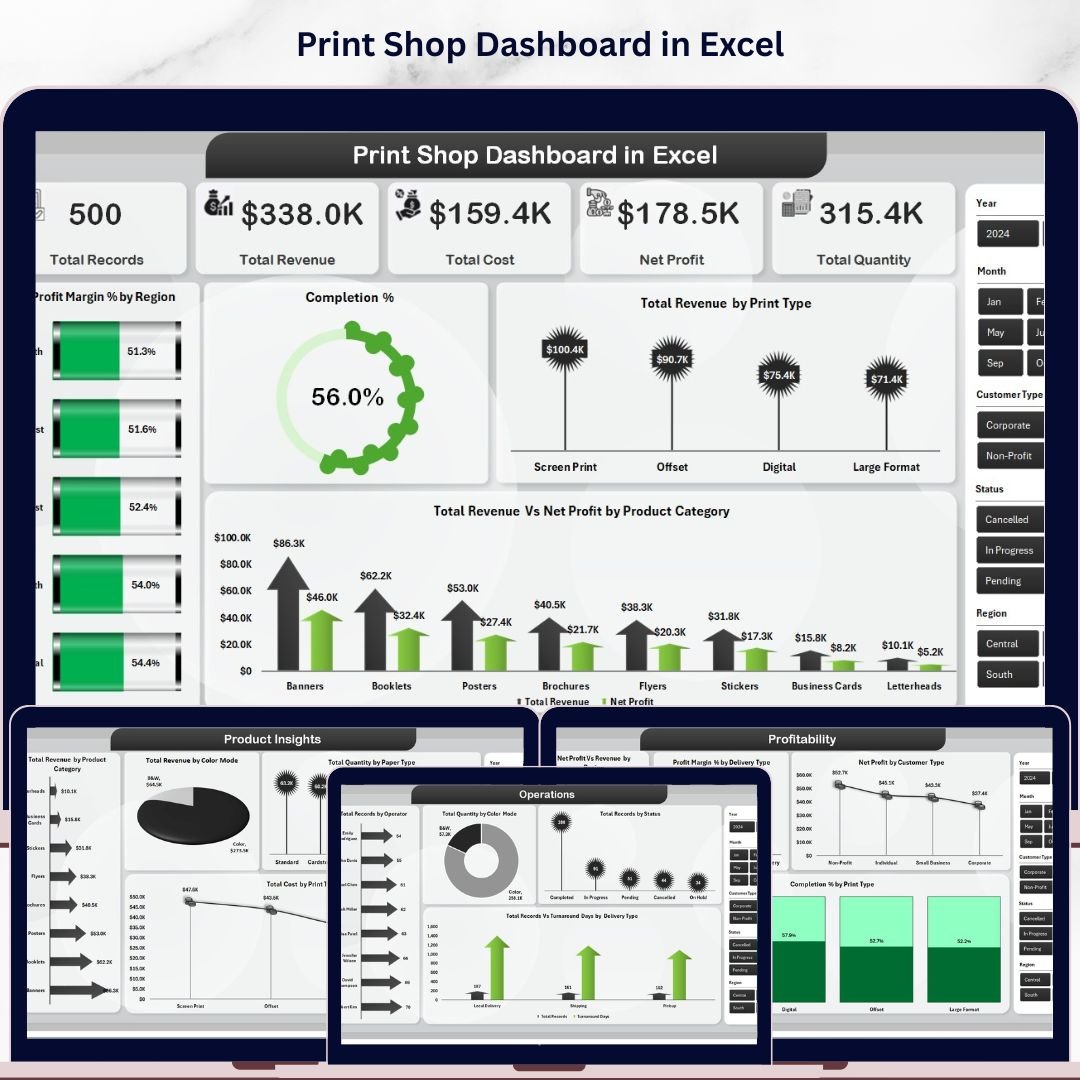


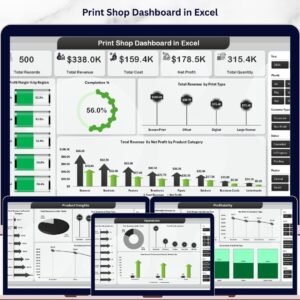
The Print Shop Dashboard in Excel tracks 5 core KPIs (Total Revenue, Total Cost, Net Profit, Total Records, Total Quantity) across 5 interactive analysis pages and 16+ pre-built charts covering sales trends, product insights, operations, and profitability. Setup takes under 10 minutes — replace the sample data and every chart, slicer, and KPI card refreshes automatically through the built-in pivot engine.
🌍 Join 8,400+ teams in 40+ countries using Nextgen Templates to replace paid SaaS analytics tools with one-time-purchase Excel, Google Sheets, Power BI, and HTML templates.
✅ Instant download · One-time payment · No subscription · No per-user fees · Lifetime access
🔑 Key Features of the Print Shop Dashboard in Excel
📊 5-Page Interactive Analytics Suite – The dashboard covers Overview, Sales Trend, Product Insights, Operations, and Profitability. Each page filters together through shared slicers, so a single click on a region, print type, or customer type instantly refreshes every chart and KPI card across all five tabs.
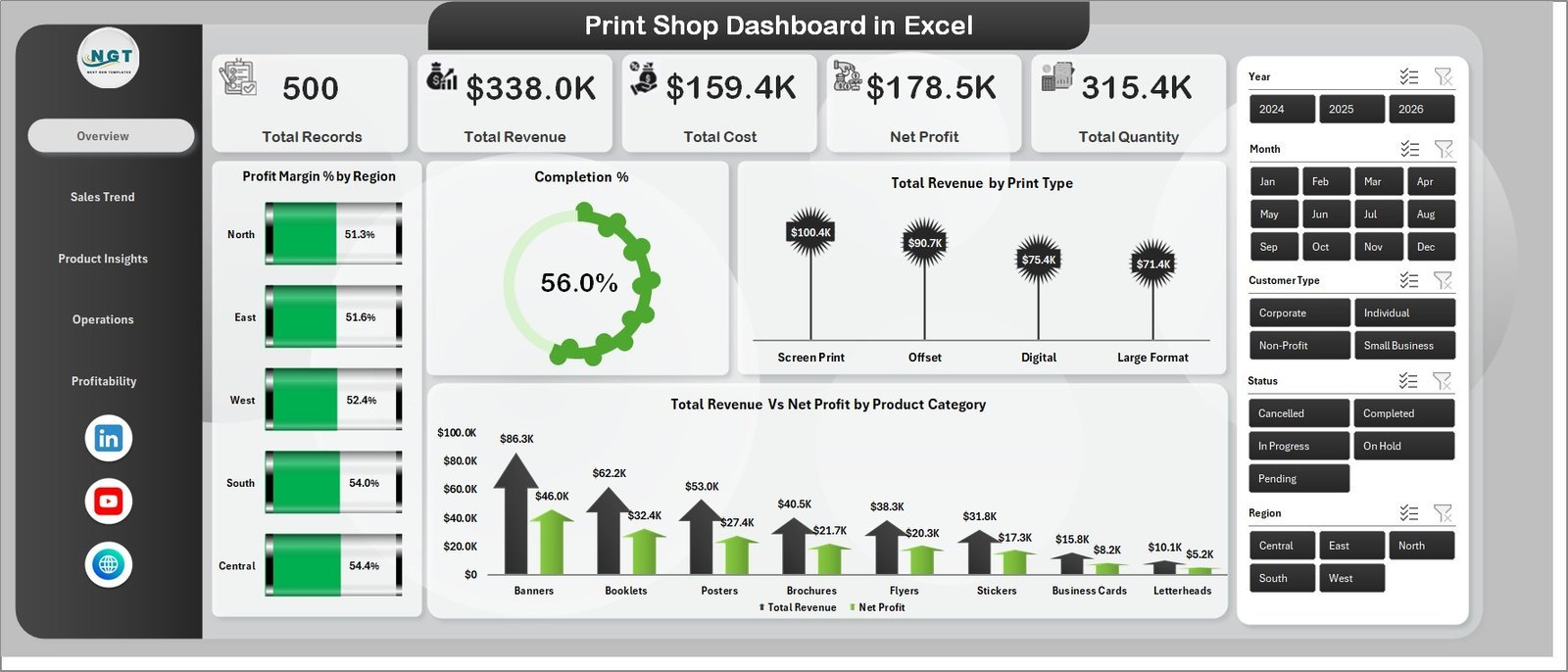
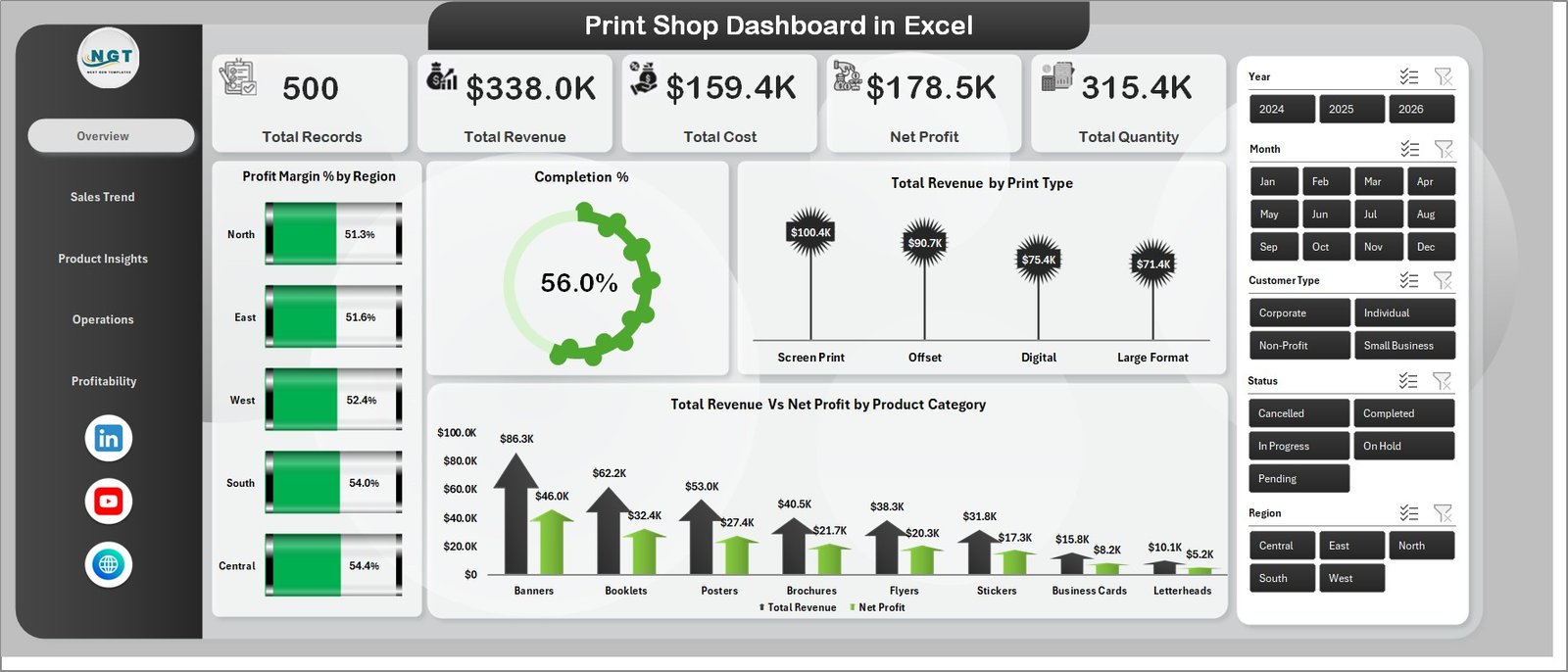
💰 5 Executive KPI Cards – The Overview page surfaces Total Records, Total Revenue, Total Cost, Net Profit, and Total Quantity — the five numbers every print shop owner needs first, calculated dynamically from the Data sheet using SUMIFS-driven formulas.
📈 16+ Pre-Built Charts – Every visual is connected to a pivot table on the Support sheet. Charts include Profit Margin % by Region, Completion %, Total Revenue by Print Type, Total Revenue vs Net Profit by Product Category, Total Revenue vs Net Profit by Month, Net Profit by Print Type, Total Revenue by Customer Type, Total Records by Payment Method, Total Revenue by Color Mode, Total Quantity by Paper Type, Total Cost by Print Type, Total Records by Operator, Total Records by Status, Total Records vs Turnaround Days by Delivery Type, Net Profit vs Revenue by Region, and Profit Margin % by Delivery Type.
🎛️ Multi-Slicer Filtering – Slicers on every page let you filter by Region, Print Type, Product Category, Customer Type, Payment Method, Color Mode, Paper Type, Delivery Type, Status, and Operator. A single slicer click cascades across the entire dashboard instantly.
🔄 One-Click Refresh Architecture – After updating the Data sheet, click Data > Refresh All in the Excel ribbon and every pivot, chart, and KPI updates simultaneously. No formulas to drag, no ranges to extend.
📦 Operations Visibility – Track job completion %, status distribution, turnaround days by delivery type, and operator workload — giving managers full visibility into production bottlenecks before they become missed deadlines.
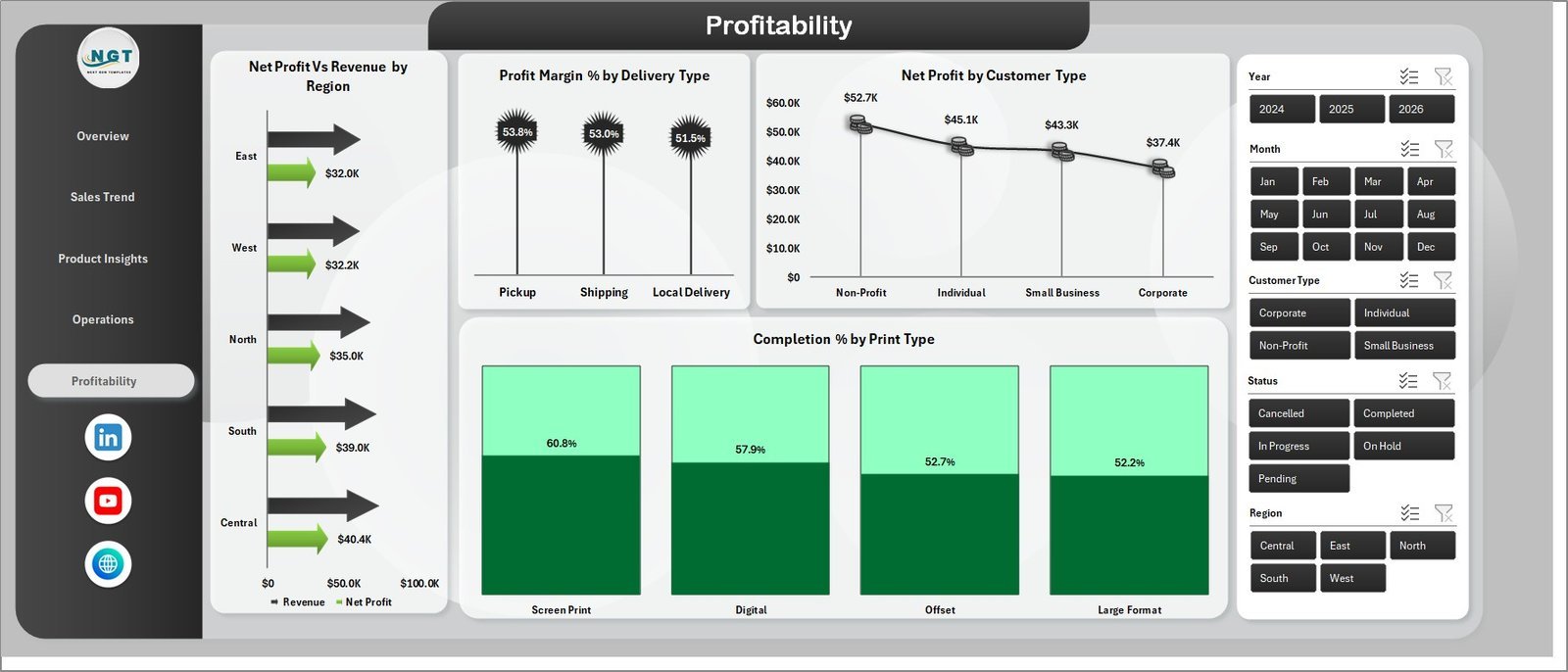
💹 Profitability Deep-Dive – The Profitability page breaks net profit vs revenue by region, profit margin by delivery type, and completion % by print type — helping owners identify which services and regions deliver the most profit per job.
📦 What’s Inside the Print Shop Dashboard in Excel
The file ships as a single .xlsx with 7 sheets:
📌 Page 1 — Overview: 5 KPI cards (Total Records, Total Revenue, Total Cost, Net Profit, Total Quantity) plus charts for Profit Margin % by Region, Completion %, Total Revenue by Print Type, and Total Revenue vs Net Profit by Product Category.
Print Shop Dashboard in Excel
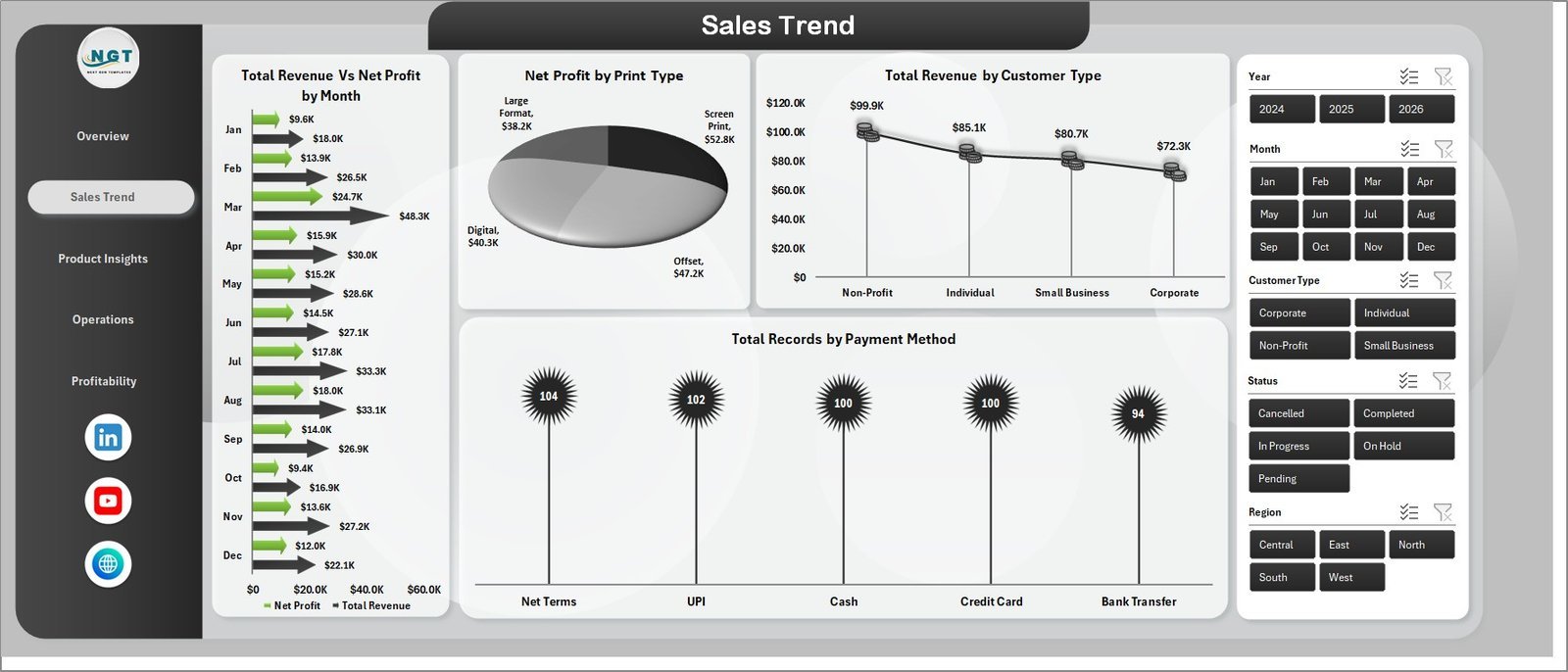
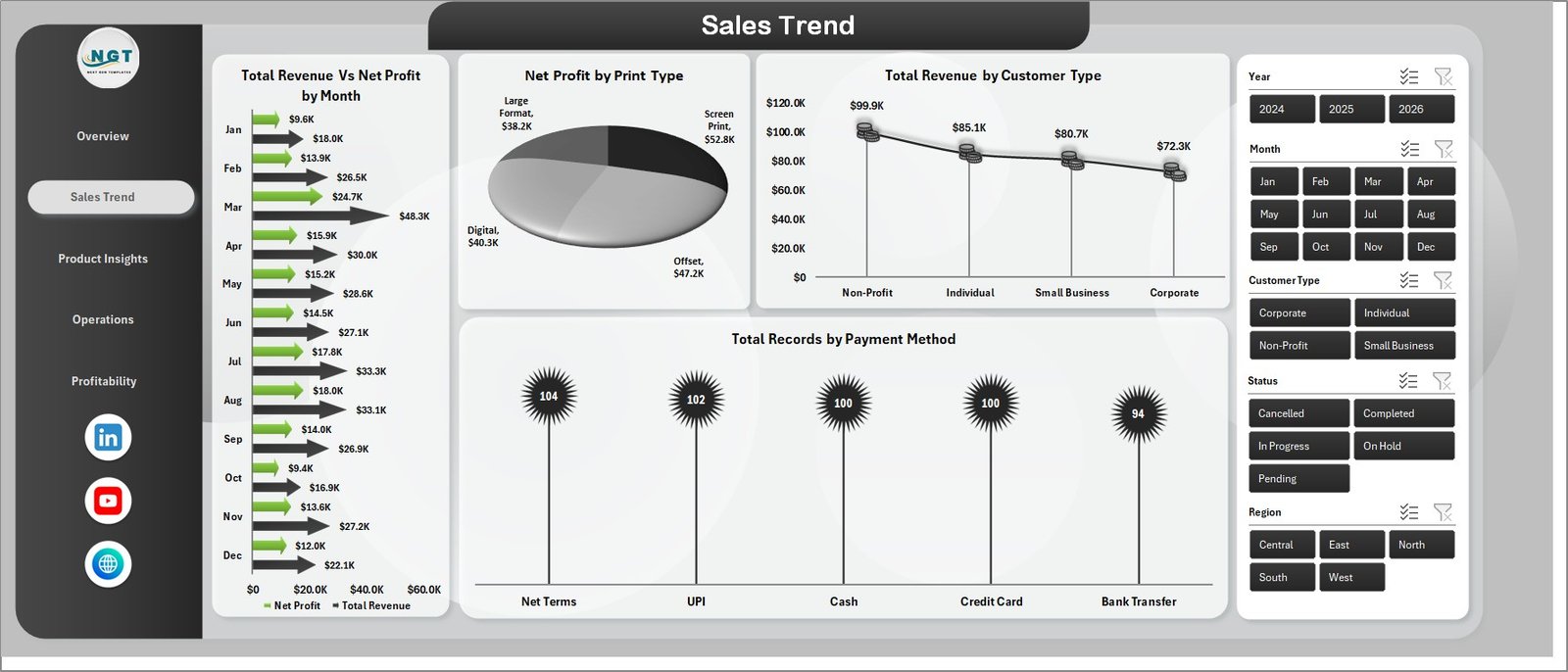
📌 Page 2 — Sales Trend: Total Revenue vs Net Profit by Month, Net Profit by Print Type, Total Revenue by Customer Type, and Total Records by Payment Method — answers which months, customer types, and payment methods drive the most revenue and profit.
Sales Trend
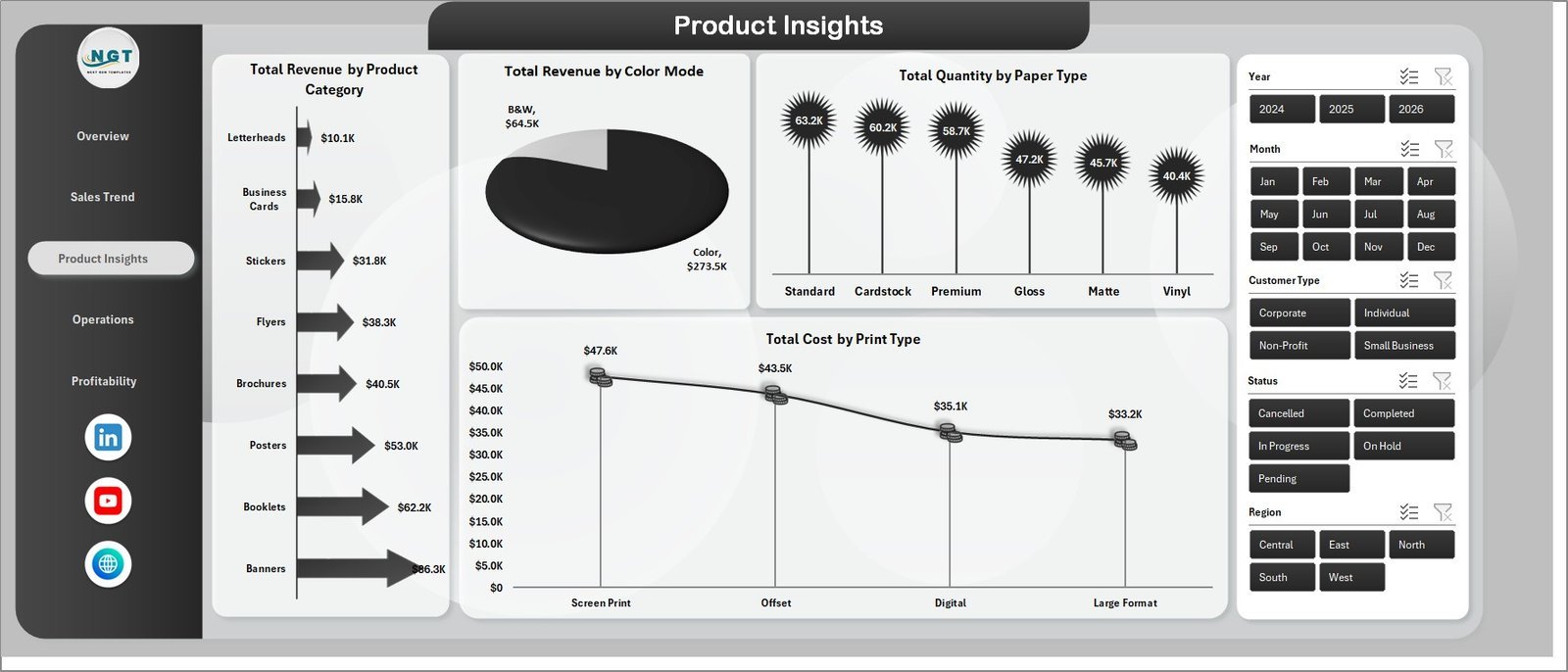
📌 Page 3 — Product Insights: Total Revenue by Product Category, Total Revenue by Color Mode, Total Quantity by Paper Type, and Total Cost by Print Type — identifies which products, paper types, and color modes drive the highest revenue and cost efficiency.
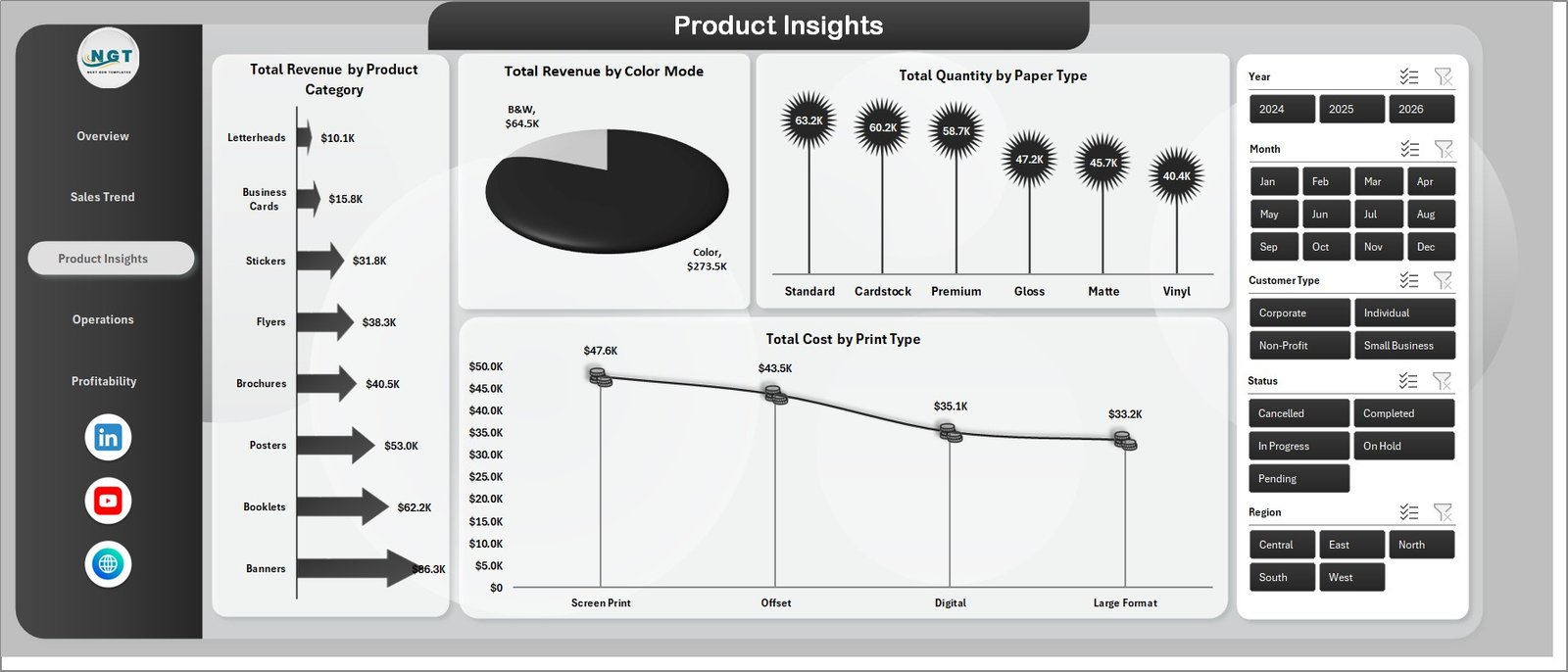
Product Insights
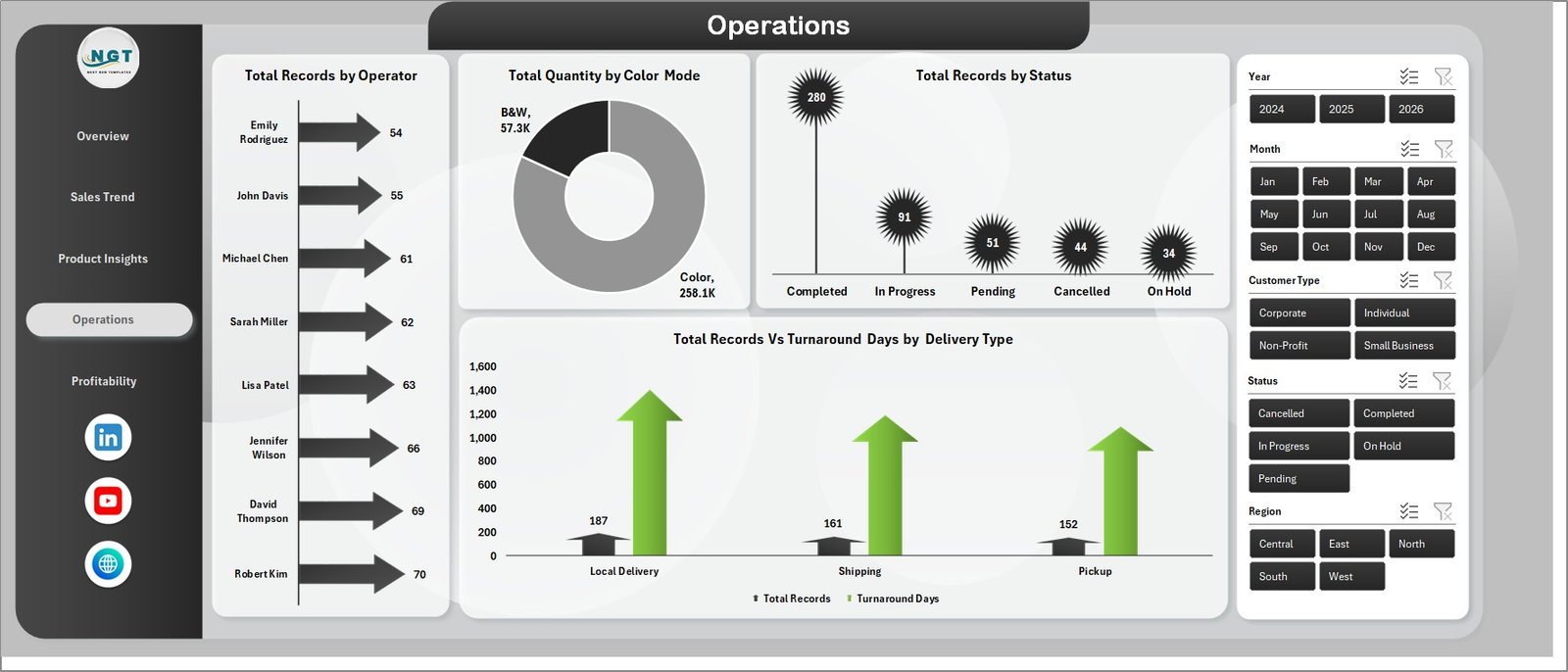
📌 Page 4 — Operations: Total Records by Operator, Total Quantity by Color Mode, Total Records by Status, and Total Records vs Turnaround Days by Delivery Type — shows which operators handle the most volume, where jobs are stalling, and how delivery type affects turnaround speed.
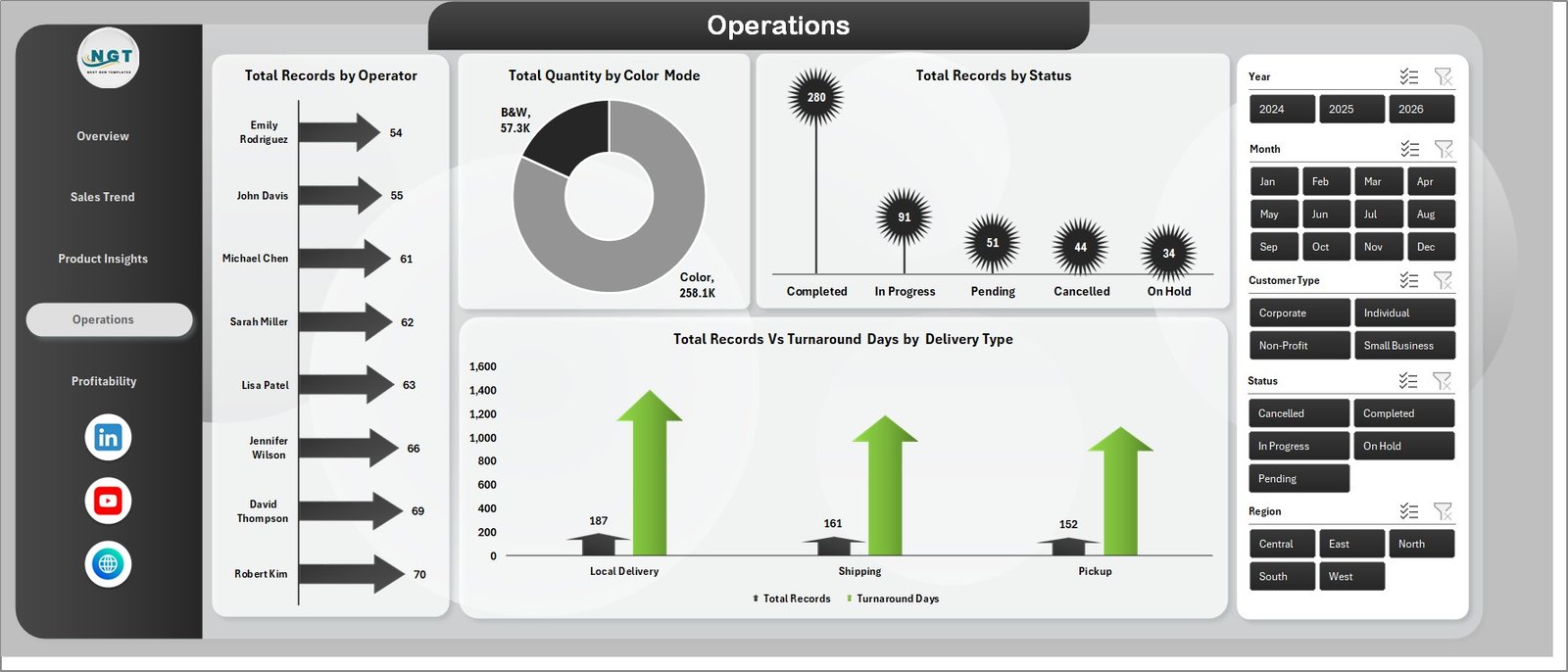
Operations
📌 Page 5 — Profitability: Net Profit vs Revenue by Region, Profit Margin % by Delivery Type, Net Profit by Customer Type, and Completion % by Print Type — reveals where highest-margin work comes from and which delivery methods preserve profit best.
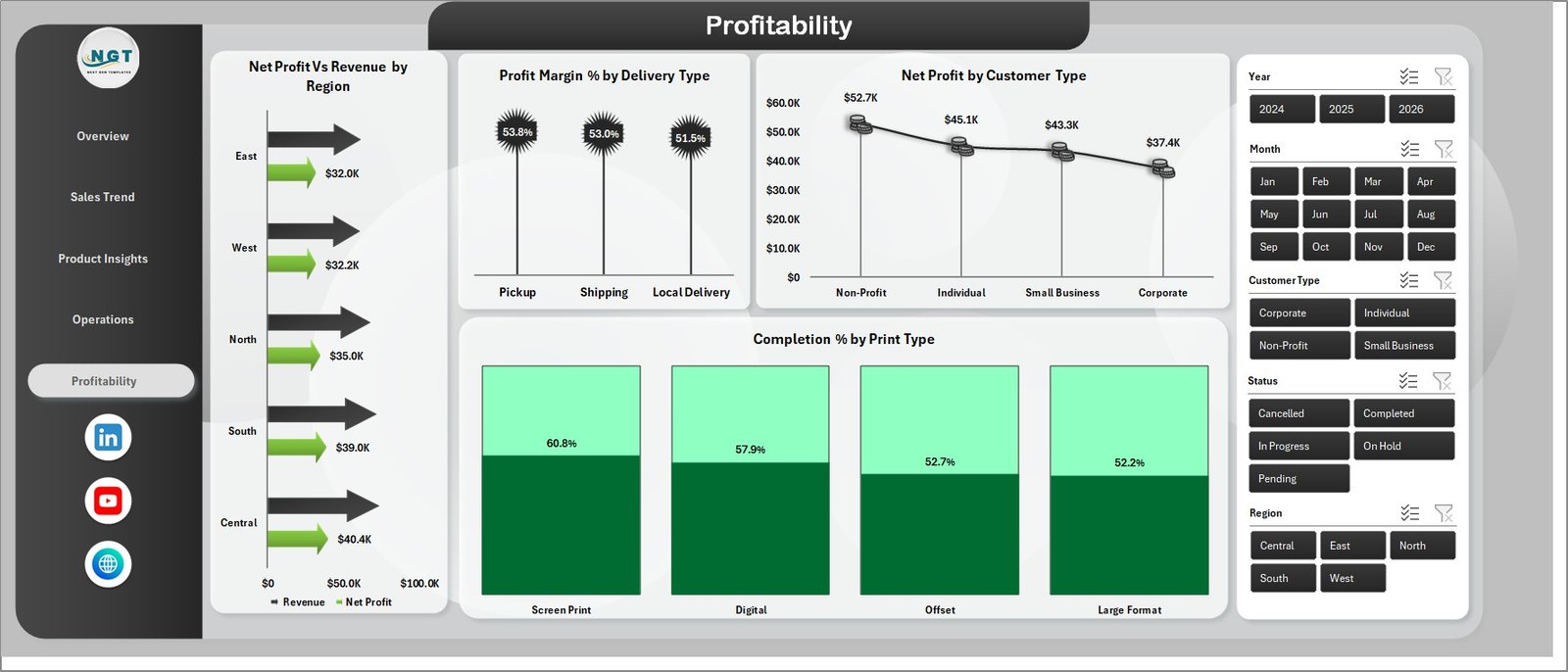
Profitability
📌 Sheet 6 — Data: The single source of truth. Replace the sample rows with your own job-level data in the same column format and the dashboard updates after one Refresh All click.

Data Sheet tab
📌 Sheet 7 — Support: Hidden-by-default sheet containing all pivot tables that power the dashboard. Keep hidden in production; right-click the tab and select Hide before sharing.

Support sheet tab
📊 Print Shop Dashboard in Excel vs. Google Sheets vs. Printavo — Where This Fits
| Feature | Print Shop Dashboard in Excel | Google Sheets Equivalent | Printavo / PrintSmith |
|---|---|---|---|
| Cost | $17.99 one-time | $9–15 one-time | $89–299 / month |
| Platform | Microsoft Excel (offline) | Google Sheets (browser) | Cloud SaaS |
| Setup time | Under 10 minutes | Under 15 minutes | 2–5 days |
| Profit margin by print type | ✅ Pre-built | Manual setup | ✅ Auto-tracked |
| Operations & turnaround tracking | ✅ Pre-built | Manual setup | ✅ Auto-tracked |
| Works offline / private data | ✅ | ❌ | ❌ |
| Customizable formulas | ✅ Full Excel access | ✅ Apps Script | Limited (UI only) |
| Year-1 cost at 5 users | $17.99 | $9–15 | $1,068–$3,588 |
| No per-user fee | ✅ | ✅ | ❌ |
For print shop owners who want revenue, profitability, and operations visibility in one file without paying $1,000+ per year for SaaS, the Print Shop Dashboard in Excel sits in the sweet spot.
👥 Who This Template Is For — and Who It’s Not For
✅ This template is built for:
- Print shop owners and managers tracking daily job revenue, cost, and profit margin across print types and regions
- Operations managers monitoring job status, operator workload, and turnaround times by delivery type
- Print business consultants delivering monthly performance reports to clients in a repeatable format
- Finance teams at printing companies needing a lightweight dashboard without expensive BI subscriptions
- Excel-comfortable professionals who don’t want to pay $89–299/month for print management SaaS
❌ This template is NOT for:
- Print shops needing real-time API sync with a POS or MIS system (use Printavo or PrintSmith instead)
- Teams working exclusively in Google Sheets
- Enterprises requiring SOC 2-compliant cloud BI (use Looker or Power BI Premium)
- Anyone needing automated job ticketing, customer portal, or quoting features
⚙️ How to Use the Print Shop Dashboard in Excel
- Download and unzip the file, then open in Microsoft Excel (2016 or later, or Microsoft 365).
- Open the Data sheet and replace sample rows with your job-level data — keep column headers exactly as-is.
- Go to Data > Refresh All in the Excel ribbon. Every pivot, chart, and KPI updates in 1–2 seconds.
- Use slicers at the top of each page to filter by region, print type, customer type, delivery type, or status.
- Customize colors by editing chart styles or the workbook theme.
- Hide the Support sheet when sharing with stakeholders (right-click tab > Hide).
💼 Real-World Use Cases
Rajan runs a 6-person commercial print shop in Pune offering digital, offset, and large-format printing. He uses the Print Shop Dashboard in Excel every Monday to review last week’s revenue by print type and net profit by region. The Profitability page surfaced that large-format jobs carried a 34% profit margin versus 18% for offset — he shifted outbound calls to upsell large-format and grew monthly net profit by 22%. Replaced his $199/month PrintSmith reporting module with this $17.99 file.
Divya manages finance for a 15-person printing company in Bangalore with B2B clients across three regions. She uses the Operations page to track average turnaround days by delivery type and exports the dashboard monthly for the leadership review. Before this, building the same report manually took 4 hours each month.
A print business consultant in Mumbai manages analytics for five print shop clients. She drops each client’s monthly job export into a copy of this dashboard and delivers a branded PDF report. Setup per client takes under 12 minutes.
❓ Frequently Asked Questions
What KPIs does the Print Shop Dashboard in Excel track?
The Print Shop Dashboard in Excel tracks 5 core KPIs: Total Records, Total Revenue, Total Cost, Net Profit, and Total Quantity. It also includes 16+ chart-level metrics including Profit Margin % by Region, Completion %, Net Profit by Print Type, Turnaround Days by Delivery Type, and Total Revenue by Customer Type.
How long does setup take?
Setup takes under 10 minutes. Open the Print Shop Dashboard in Excel, paste your job-level data into the Data sheet keeping column headers as-is, and click Data > Refresh All. Every chart, KPI card, and slicer updates automatically through the pre-built pivot engine on the Support sheet.
How does this compare to Printavo or PrintSmith?
The Print Shop Dashboard in Excel is a $17.99 one-time purchase versus Printavo’s $89–299 monthly subscription. The trade-off is manual data import versus Printavo’s auto-sync. For shops under $1M annual revenue, the Excel option saves $1,000–$3,500+ per year with no per-user fees.
Which versions of Excel does this support?
The Print Shop Dashboard in Excel runs on Excel 2016 and later for Windows and Mac, and on Microsoft 365. Slicers and pivot tables are fully supported. It is not compatible with Excel 2013 or earlier.
Can I track multiple print shop locations?
Yes. Add a Location or Branch column to the Data sheet and slicers auto-populate from your data on the next Refresh All click. No formula edits are needed.
Is my data private?
Yes. The Print Shop Dashboard in Excel is a local file — your job data, revenue figures, and customer information stay on your computer with no cloud sync or third-party access.
Can I customize the colors and add my logo?
Yes. Edit colors via the workbook theme, replace fonts, and insert your company logo on any page. All pivot tables and slicers are fully editable.
👤 About the Author
Built by PK — Microsoft Certified Professional with 15+ years of Excel, Google Sheets, and Power BI experience. Founder of Nextgen Templates, reaching 300K+ subscribers across YouTube channels (@PK-AnExcelExpert, @NextGenTemplates, @NeoTechNavigators). Every template is hand-built and tested before release.
🔗 Explore Related Templates
Browse our full Excel Dashboard Templates library, or explore these related options:
- 🛍️ Dropshipping Dashboard in Excel — multi-channel ecommerce analytics
- 👗 Fashion & Apparel Report in Excel — retail analytics and sales dashboard
- 🌿 Garden Center Dashboard in Excel — specialty retail operations tracking
- 🎂 Bakery KPI Scorecard in Excel — small business KPI scorecard template
📖 Click here to read the Detailed Blog Post
🎥 Visit our YouTube channel for step-by-step video tutorials
👉 YouTube.com/@NextGenTemplates
📅 Last updated: May 2026
Watch the step-by-step video tutorial:
YouTube






























Reviews
There are no reviews yet.