






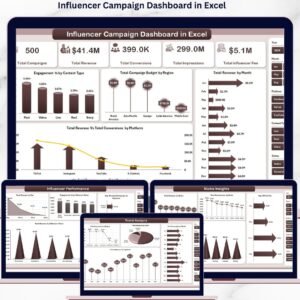
The Influencer Campaign Dashboard in Excel tracks 5 high-level KPIs, 20+ pre-built charts, and 7 sheet tabs of data across 5 interactive pages — Overview, Platform Analysis, Niche Insights, Influencer Performance, and Trend Analysis. Setup takes under 10 minutes: paste your campaign data into the Data Sheet, click Refresh All, and every chart, slicer, and KPI card updates automatically. The whole workbook runs on native Excel pivot tables — no macros, no add-ins, no monthly fees.
🌍 Join 8,400+ teams across 40+ countries using NextGenTemplates to replace expensive SaaS with one-time-purchase Excel, Google Sheets, Power BI, and HTML templates.
✅ Instant download · One-time payment · No subscription · No per-user fees · Lifetime access
🔑 Key Features of the Influencer Campaign Dashboard in Excel
This dashboard is engineered around the metrics influencer marketers actually report on every week. Every page is filterable with native Excel slicers, and every chart auto-refreshes from a hidden Support Sheet of pivot tables.
- 📊 Five KPI cards — Total Campaigns, Total Revenue, Total Conversions, Total Impressions, and Total Influencer Fee — anchor the Overview page and recalculate instantly when slicer filters are applied.
- 📈 Five interactive dashboard pages covering Overview, Platform Analysis, Niche Insights, Influencer Performance, and Trend Analysis, each with its own slicer set for platform, region, tier, niche, and content type.
- 🎯 20+ pre-built charts including Engagement % by Content Type, ROI % by Niche, Avg. CPC by Tier, Total Likes vs. Total Clicks, Revenue by Month, and Revenue vs. Conversions by Platform.
- 🔄 One-click auto-refresh — update the Data Sheet, click Refresh All on the Data ribbon, and every pivot, chart, and KPI card in the workbook updates at once.
- 🏆 Influencer tier benchmarking compares nano, micro, mid, macro, and mega creators by ROI %, average revenue per campaign, and engagement rate.
- 🌐 Niche and region insights reveal which verticals and geographies generate the highest revenue and conversion volume from influencer spend.
- 🎨 Fully editable design — change colors, add your logo, rename KPI cards and slicers, or extend the data model with new metric columns.
- 💻 Works in Excel 2016+ on Windows and Mac, including Excel for Microsoft 365 and Excel 2021. No macros, no add-ins required.
📦 What’s Inside the Influencer Campaign Dashboard in Excel
The workbook ships with seven sheet tabs — five interactive analysis pages plus a Data Sheet and a Support Sheet (which can be hidden in production).
1. Overview Page — Five KPI cards (Total Campaigns, Total Revenue, Total Conversions, Total Impressions, Total Influencer Fee) plus four charts: Engagement % by Content Type, Total Campaign Budget by Region, Total Revenue by Month, and Total Revenue vs. Total Conversions by Platform. Multiple slicers above the charts filter the entire page.
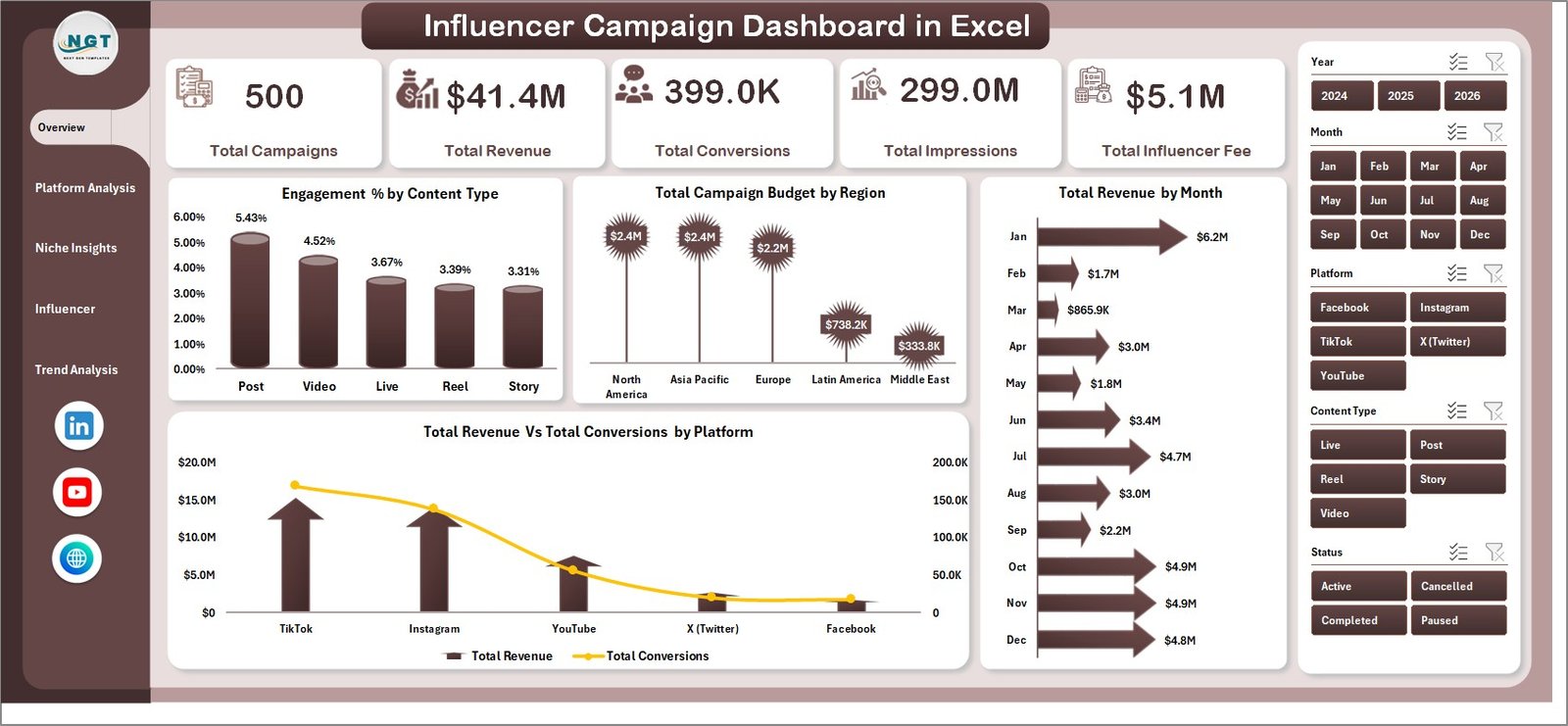
Influencer Campaign Dashboard in Excel
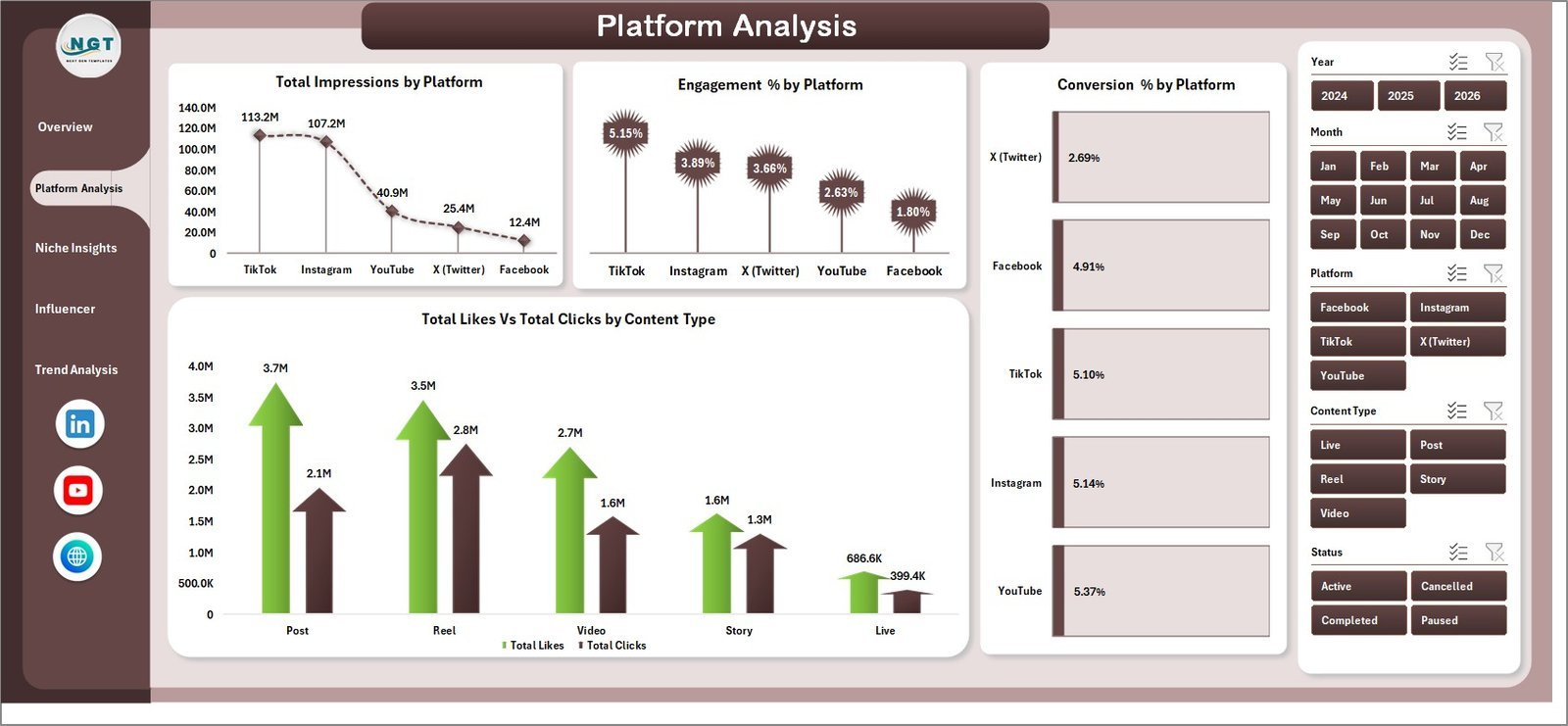
2. Platform Analysis — Charts: Total Impressions by Platform, Engagement % by Platform, Conversion % by Platform, and Total Likes vs. Total Clicks by Content Type. Spot platforms with high reach but weak conversion in seconds.
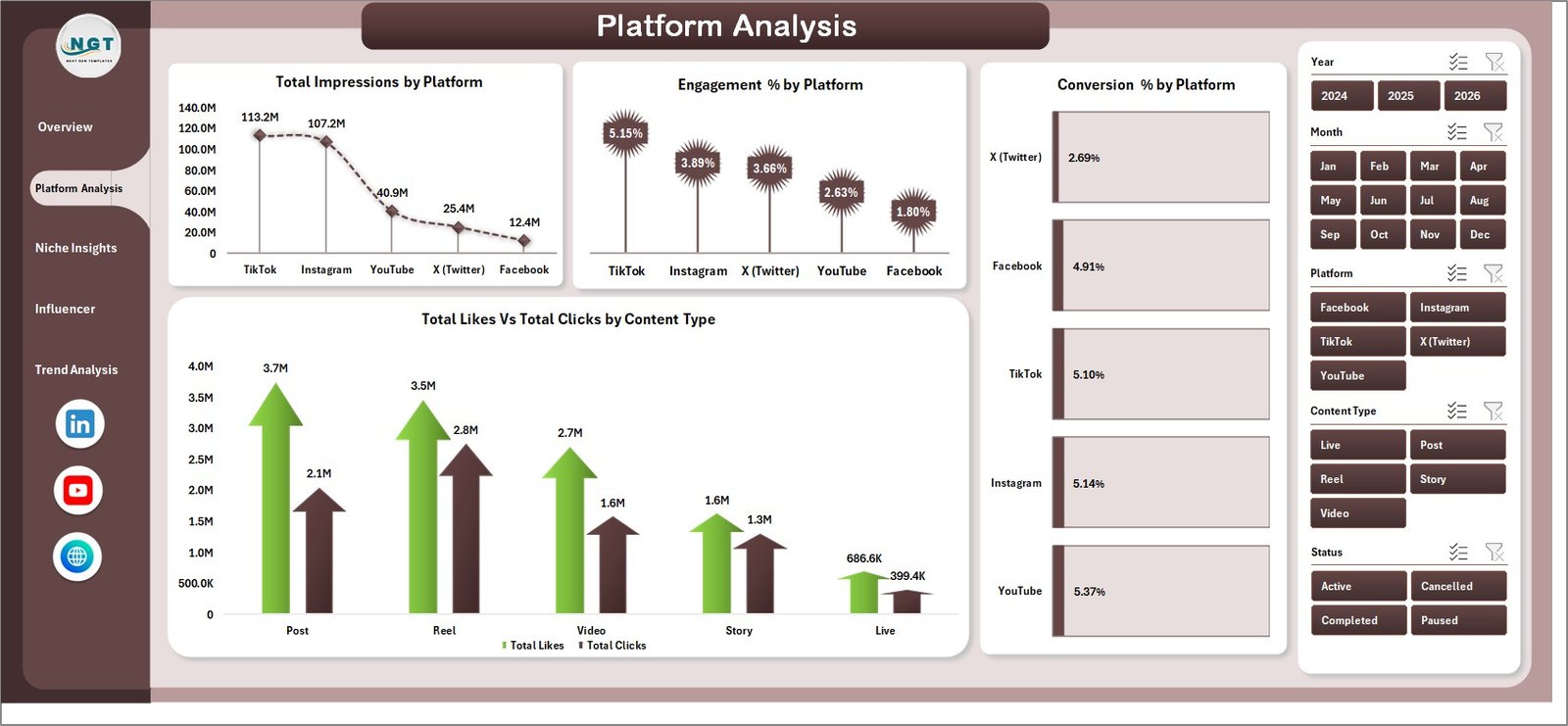
Platform Analysis
3. Niche Insights — Charts: Total Revenue by Niche, Total Conversions by Niche, Avg. CPC by Tier, and ROI % by Niche. Decide where to invest the next quarter’s budget.
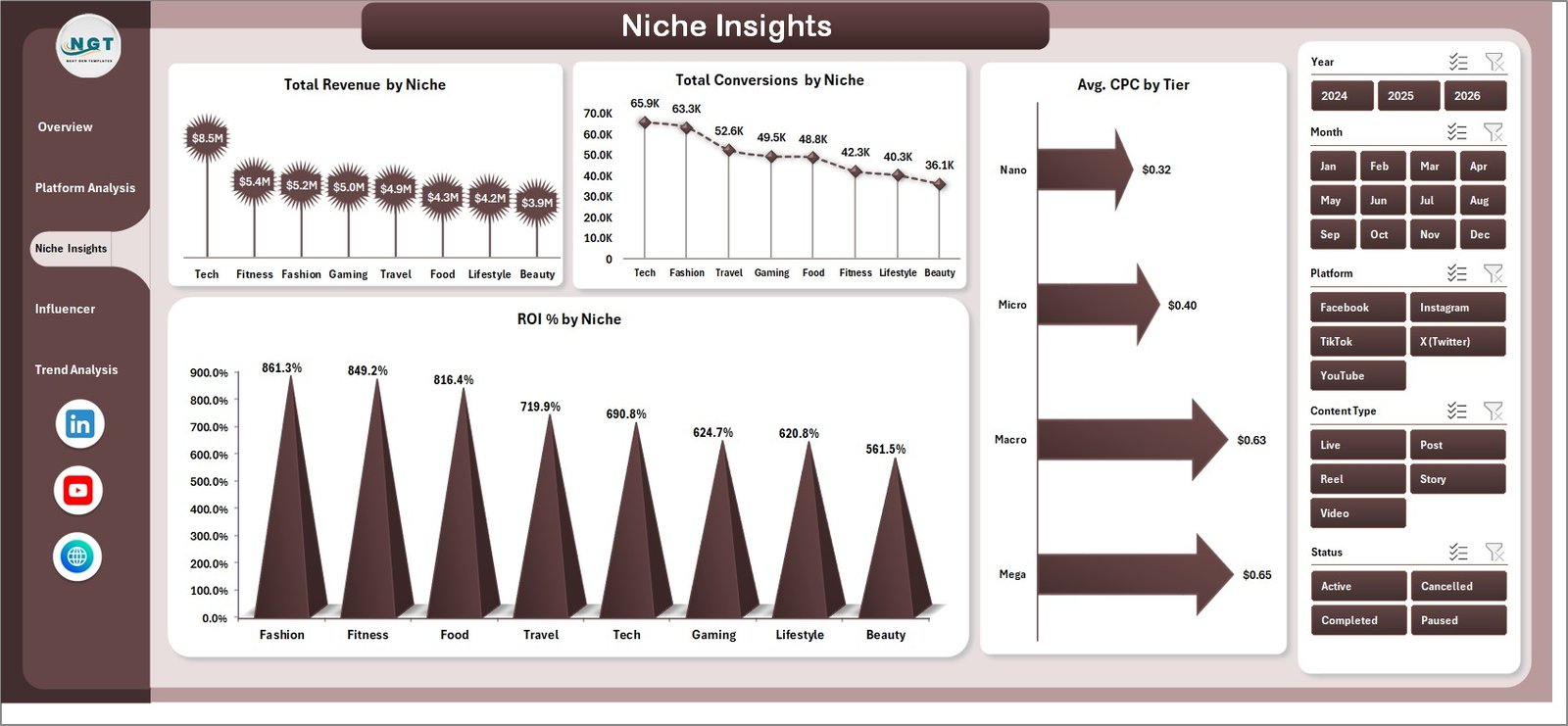
Niche Insights
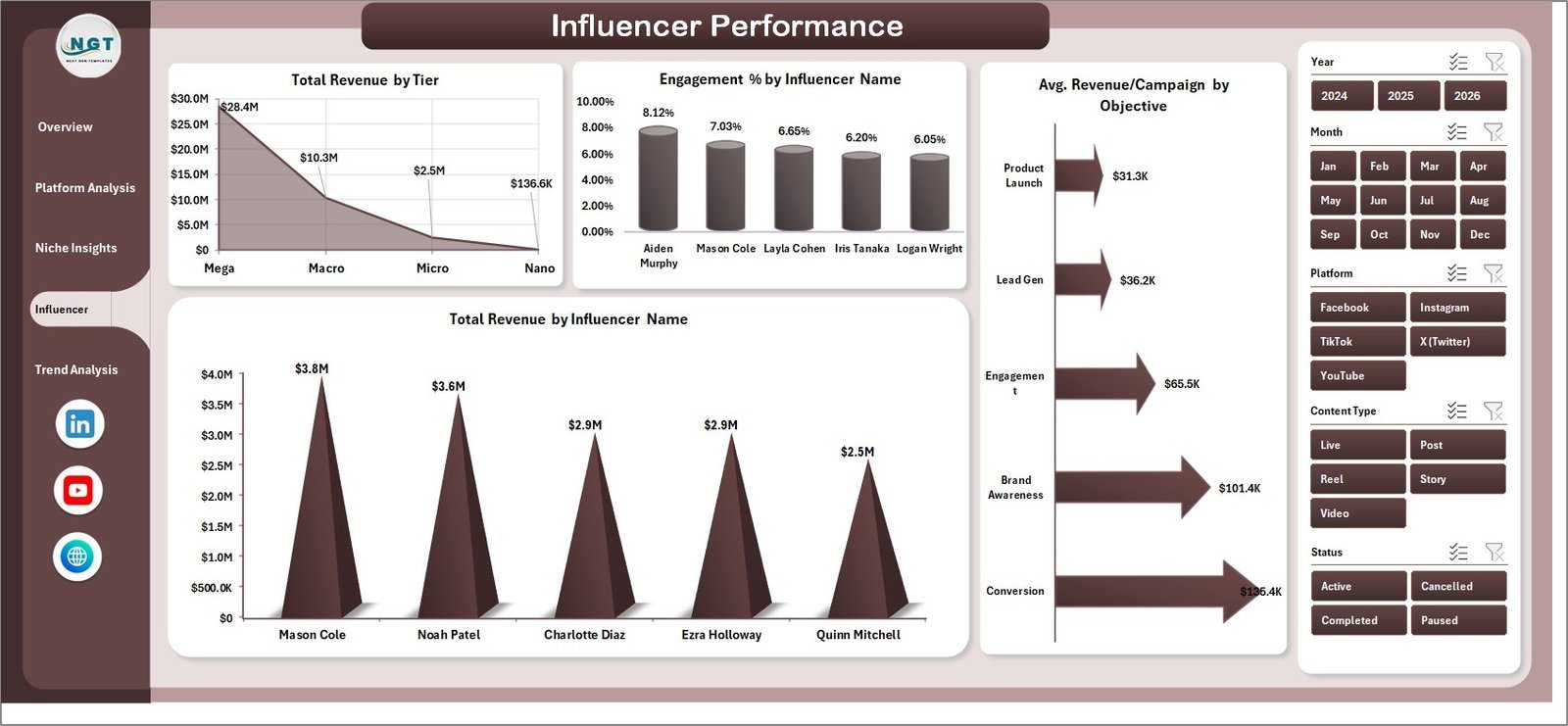
4. Influencer Performance — Charts: Total Revenue by Tier, Engagement % by Influencer Name, Avg. Revenue per Campaign by Objective, and Total Revenue by Influencer Name. Decide who to renew and who to drop.
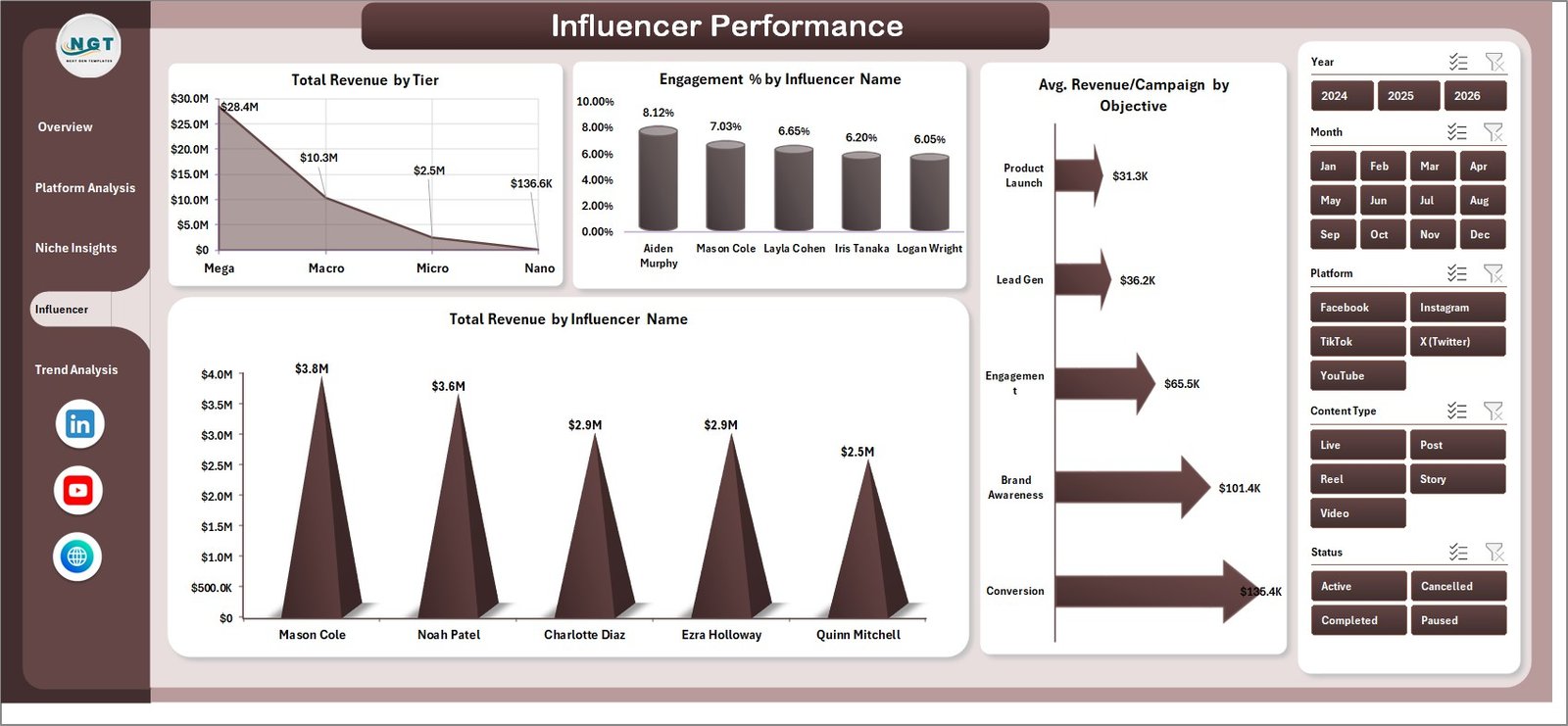
Influencer Performance
5. Trend Analysis — Charts: Total Impressions by Region, Total Revenue by Status, Total Campaigns by Month, and Total Influencer Fee by Month. Use in monthly business reviews to spot trends early.
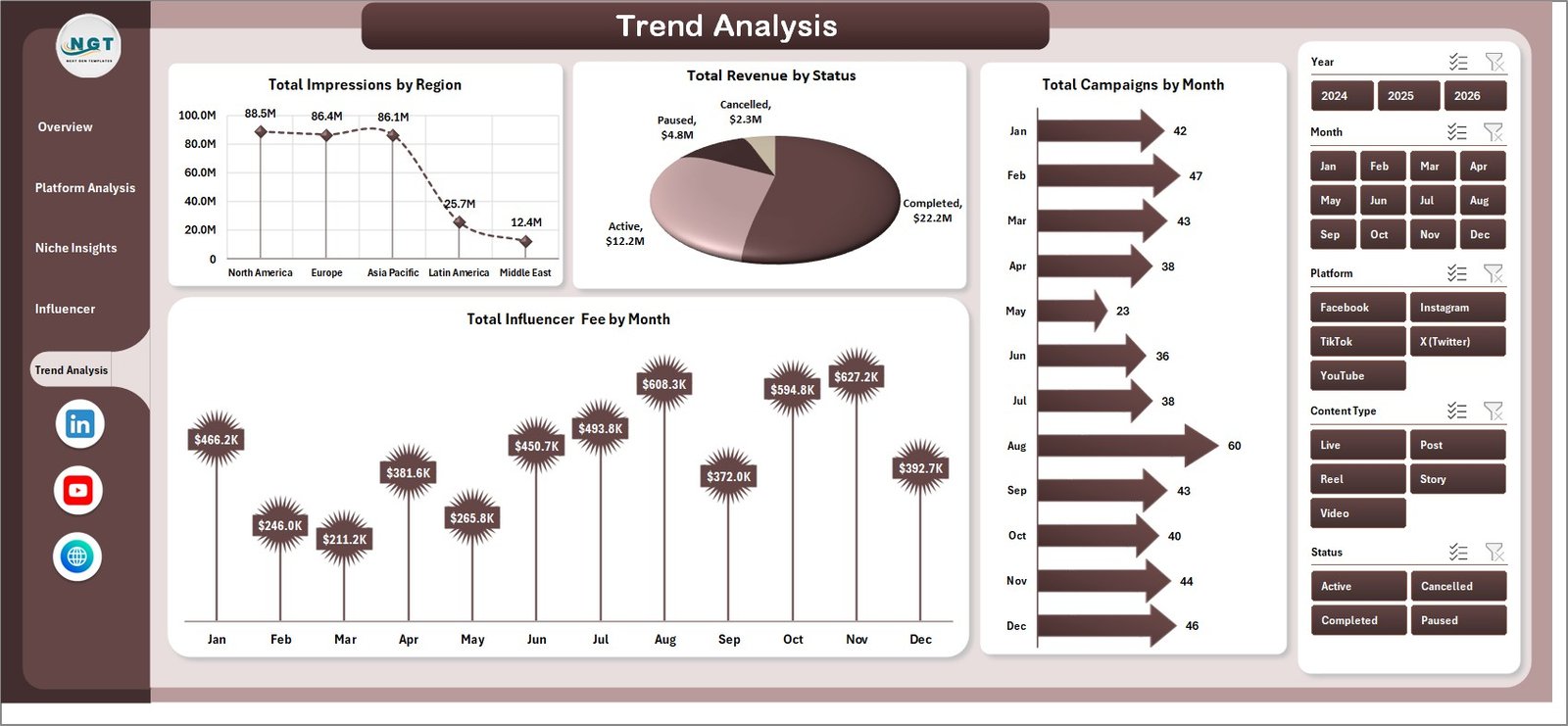
Trend Analysis
6. Data Sheet — The single source of truth. Each row is one influencer campaign with columns for date, platform, niche, tier, region, content type, objective, status, impressions, engagements, clicks, conversions, revenue, and influencer fee.

Data Sheet tab
7. Support Sheet — All pivot tables that feed the dashboard charts. After updating the Data Sheet, go to the Data ribbon and click Refresh All. Hide this sheet in production so end users only see the analysis pages.

Support sheet tab
📊 Influencer Campaign Dashboard in Excel vs. Google Sheets vs. Paid SaaS — Where This Fits
| Feature | Influencer Campaign Dashboard in Excel | Google Sheets equivalent | Aspire / GRIN / Modash |
|---|---|---|---|
| Cost | $17.99 one-time | $9-12 one-time | $200-1000+ / month |
| Platform | Excel 2016+ (Win/Mac) | Google Sheets (browser) | Cloud SaaS |
| Setup time | Under 10 minutes | Under 10 minutes | 1-3 weeks (CSM-led) |
| Works offline | ✅ Yes | ❌ No (browser) | ❌ No (cloud-only) |
| Customizable charts & KPIs | ✅ Full control | ✅ Full control | ⚠️ Limited to vendor templates |
| Native slicer-based filtering | ✅ Yes | ⚠️ Filter views only | ✅ Built-in filters |
| Pivot-driven auto-refresh | ✅ One-click Refresh All | ⚠️ Manual pivot refresh | ✅ Automatic |
| Year-1 cost at 5 users | $17.99 (one-time) | $9-12 (one-time) | $2,400-12,000+ / year |
| Lifetime access | ✅ Yes | ✅ Yes | ❌ Subscription only |
For brand and agency teams that want enterprise-grade campaign analytics without the enterprise price tag, the Influencer Campaign Dashboard in Excel sits in the sweet spot.
👥 Who This Template Is For — and Who It’s Not For
✅ This template is built for:
- In-house brand marketers running 5-200 influencer campaigns per quarter who need a single ROI view.
- Boutique influencer agencies delivering monthly client reports without paying for enterprise SaaS.
- DTC and e-commerce teams already tracking UTMs and revenue in Excel.
- Solo founders and consultants priced out of $200+/month influencer marketing platforms.
❌ This template is NOT for:
- Teams that need automatic creator discovery, outreach, or contract signing — those are SaaS-only features.
- Anyone who refuses to touch a pivot table or slicer.
- Teams requiring real-time API integrations with TikTok, Instagram, or YouTube data feeds.
⚙️ How to Use the Influencer Campaign Dashboard in Excel
- Download the .xlsx file and open it in Excel 2016 or later.
- Go to the Data Sheet tab and replace the sample rows with your campaign data, keeping the same column order.
- Click any sheet tab, then go to the Data ribbon and click Refresh All.
- Use the slicers at the top of each page to filter by platform, region, tier, niche, or content type.
- Hide the Support Sheet for end users (right-click the tab → Hide).
- Save monthly snapshots so you can compare year-over-year performance.
💼 Real-World Use Cases
Mia runs influencer marketing at a 40-person beauty DTC brand. Every Friday she pulls campaign data from her Aspire export and Shopify revenue feed, drops it into the Data Sheet, hits Refresh All, and presents the Overview page in the Monday standup — saving her team $600/month in SaaS fees.
Daniel manages a boutique influencer agency with eight brand clients. He duplicates the dashboard for each client, plugs in their campaign data, and ships a monthly Excel report. What used to take half a day in PowerPoint now takes 45 minutes.
Priya is a solo SaaS founder running her first 10 creator partnerships. Instead of $300/month for a SaaS tool, she paid $17.99 once and uses the Influencer Performance page to decide who to renew at the 90-day mark.
❓ Frequently Asked Questions
What KPIs does the Influencer Campaign Dashboard in Excel track?
The Influencer Campaign Dashboard in Excel tracks five primary KPIs — Total Campaigns, Total Revenue, Total Conversions, Total Impressions, and Total Influencer Fee — plus engagement %, ROI %, average CPC, and revenue per campaign across 20+ charts.
Which Excel versions are compatible?
The Influencer Campaign Dashboard in Excel works in Excel for Microsoft 365, Excel 2021, Excel 2019, and Excel 2016 on both Windows and Mac. It uses native pivot tables and slicers, so no add-ins or macros are required.
How long does setup take?
Setup takes under 10 minutes. Open the file, paste your campaign data into the Data Sheet using the existing column headers, click Refresh All on the Data tab, and every chart, KPI card, and slicer updates automatically across all five dashboard pages.
How does this compare to Aspire, GRIN, or Modash?
Aspire, GRIN, and Modash cost $200-1000+ per month and add creator discovery and outreach. The Influencer Campaign Dashboard in Excel is a one-time $17.99 purchase focused purely on campaign analytics — the same KPI and ROI views, with no recurring cost.
Can I add my own charts and KPIs?
Yes. The Influencer Campaign Dashboard in Excel is fully editable. Add new pivot tables on the Support Sheet, build additional charts on any analysis page, rename KPI cards, and swap brand colors. The pivot-driven architecture handles new metric columns without breaking existing charts.
Does it pull data automatically from Instagram or TikTok?
No — the Influencer Campaign Dashboard in Excel is a manual-data workbook. You export campaign data from your platforms or influencer tool and paste it into the Data Sheet. This keeps the file lightweight, offline-capable, and free of API dependencies.
Can multiple team members use the same file?
Yes. Save the dashboard to OneDrive, SharePoint, or Google Drive (in Excel format) and your team can co-author it. For real-time multi-user editing in a browser, see the Google Sheets edition.
👤 About the Author
Built by PK — Microsoft Certified Professional with 15+ years of Excel, Google Sheets, and Power BI experience. Founder of NextGenTemplates, reaching 300K+ subscribers across YouTube channels (@PK-AnExcelExpert, @NextGenTemplates, @NeoTechNavigators). Every template is hand-built and tested before release.
🔗 Explore Related Templates
- Influencer Campaign Dashboard in Google Sheets — the same dashboard ported to Google Sheets for cloud-first teams.
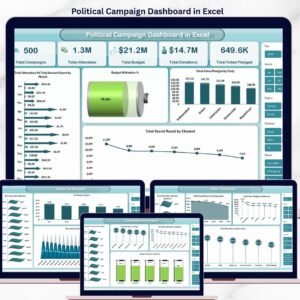
- Political Campaign Dashboard in Excel — same pivot/slicer architecture for campaign-finance and voter-outreach analytics.
- Multi-Platform Social Media Calendar in Excel — the planning companion to this analytics workbook.
- Public Relations (PR) Report in Excel — monthly PR-coverage reporting that pairs well with influencer analytics.
- Fundraising Campaign KPI Dashboard in Google Sheets — same campaign-tracking structure for nonprofit fundraising.
Browse more Excel Dashboard Templates in our library.
📖 Click here to read the Detailed Blog Post
🎥 Visit our YouTube channel for step-by-step video tutorials
👉 YouTube.com/@NextGenTemplates
Watch the step-by-step video tutorial:
YouTube





























Reviews
There are no reviews yet.