Bike & Scooter Sharing Dashboard in Power BI

Power BI - instant download

Original price was: ₹2,499.00.Current price is: ₹1,799.00.
Details, requirements and demo below
Sale!

Bike & Scooter Sharing Dashboard in Power BI

Original price was: ₹2,499.00.Current price is: ₹1,799.00.

  • 🚴‍♂️ Track shared mobility KPIs – trips, fares, promotions & city performance.

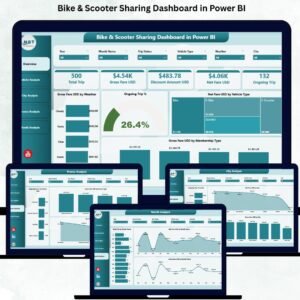
  • 🛴 5 interactive Power BI pages – overview, vehicle, city, promo & monthly trends.

  • 🌤 Weather-based insights – understand how weather affects demand.

  • 💰 Revenue clarity – track gross & net fare by city, vehicle & membership.

  • ⚡ Real-time performance tracking – monitor ongoing trips instantly.

  • 📈 Seasonal & monthly trend analysis – identify growth opportunities.

  • 🎁 Promo performance insights – measure which offers drive usage.

  • 🚚 Fleet optimization – compare bikes vs. scooters for smarter allocation.

  • 💼 Easy Excel-driven setup – simple data updates, automatic refresh.

  • 🌆 Ideal for mobility operators, planners & smart city teams.

- +

💡 Buy any 2 templates and save 20% automatically at checkout.

Pricing country
Prices follow your selected country; checkout uses your billing country.
Excel Pivot Tables & Dashboards: Basic to Advanced courseLaunch offer
🎓 NEXTGENTEMPLATES ACADEMY
Like this dashboard? Learn to build your own.
Excel Pivot Tables & Dashboards: Basic to Advanced

From your first Pivot Table to the Data Model, DAX, Power Query and a one-page KPI dashboard. 11h 51m of video by PK, with practice files, quizzes and a capstone.

Urban mobility is evolving faster than ever, and shared mobility services—especially bikes and scooters—have become an essential part of city transportation. As riders take thousands of trips daily, operators must track weather impact, trip duration, membership behavior, city-level performance, revenue trends, and promotional results. Doing this manually becomes nearly impossible. That’s why the Bike & Scooter Sharing Dashboard in Power BI is a must-have tool for every mobility operator.

This powerful dashboard transforms your raw trip, fare, and user data into clean, interactive visuals. With smart slicers, live charts, trend analysis, and real-time KPIs, this dashboard gives you complete clarity over your bike and scooter sharing business. Whether you are a startup, a city mobility operator, or a large-scale fleet provider, this dashboard helps you make fast, data-driven, and profitable decisions.

Built directly in Power BI and fully connected to Excel data sources, the dashboard updates automatically when you refresh your data. You can track gross fare, net fare, ongoing trip percentages, city performance, weather impact, and promotional outcomes—all in one clean interface. This makes operations smoother, planning easier, and business decisions smarter.


🚴‍♂️ Key Features of the Bike & Scooter Sharing Dashboard in Power BI

This dashboard contains five powerful analysis pages, each offering deep insights into a different part of your mobility operations.


⭐ 1. Overview Page – Your Complete Mobility Snapshot

Bike & Scooter Sharing Dashboard

The Overview Page gives you an instant view of your top KPIs and performance indicators.

🔹 What You’ll See:

  • ✔ Four key KPI cards

  • ✔ Live insights into trip behavior

  • ✔ Important charts showing real-time patterns

🔹 Charts on the Overview Page:

  • Gross Fare (USD) by Weather – Understand how weather influences demand.

  • Ongoing Trip (%) – Track how many trips are active at any moment.

  • Net Fare (USD) by Vehicle Type – Compare financial performance of bikes vs. scooters.

  • Gross Fare (USD) by Membership Type – Analyze revenue from casual vs. subscribed riders.

This page gives you the big picture instantly.


⭐ 2. Vehicle Analysis Page – Understand Vehicle-Level Performance

Different vehicles behave differently across weather conditions and usage patterns. This page helps you optimize your fleet.

🔹 Charts Included:

  • Trip Duration (Minutes) by Weather

  • Ongoing Trip (%) by Vehicle Type

  • Gross Fare (USD) by Vehicle Type

These insights help you decide fleet allocation, purchasing decisions, and city-level deployment for maximum performance.


⭐ 3. City Analysis Page – Compare City-Wise Performance

Every city has unique rider behavior. Some cities show higher demand, while others show better profitability.

🔹 Charts on This Page:

  • Ongoing Trip (%) by City

  • Net Fare (USD) by City

  • Gross Fare (USD) by City

This detailed view helps mobility operators plan expansions, optimize fleet distribution, and improve promotional targeting.


⭐ 4. Promo Analysis Page – Measure Promotion Success

Promotional campaigns drive user engagement, but they also affect revenue. This page helps you measure their true impact.

🔹 Charts Included:

  • Ongoing Trip (%) by Promo Type

  • Net Fare (USD) by Promo Type

  • Gross Fare (USD) by Promo Type

This analysis helps you decide which promotions to continue, adjust, or discontinue based on ROI.


⭐ 5. Monthly Trends Page – Identify Seasonality and Growth Patterns

Shared mobility demand changes across seasons, weather, and events. This page helps you understand long-term trends.

🔹 Charts Included:

  • Total Trip by Month

  • Net Fare (USD) by Month

  • Gross Fare (USD) by Month

These insights help you plan budgets, prepare for high-demand months, and run targeted campaigns.


📦 What’s Inside the Bike & Scooter Sharing Dashboard

You get a complete Power BI reporting system that includes:

  • 5 analysis pages

  • Clean dashboard navigation

  • Dynamic slicers and filters

  • Interactive, real-time charts

  • Excel-based data input

  • Automatic refresh

  • Fully customizable visuals

This dashboard delivers everything needed for accurate shared mobility analytics.


🧩 How to Use the Dashboard Effectively

  1. Enter your trip and fare data in Excel

  2. Refresh Power BI

  3. Use slicers for deep filtering

  4. Monitor weather, city, and promo impact

  5. Compare bike vs product performance

  6. Analyze trends monthly

  7. Make data-driven operational decisions

It’s simple, visual, and perfect for everyday use.


👤 Who Can Benefit from This Dashboard

This dashboard is ideal for:

  • 🚴‍♂️ Shared Mobility Operators

  • 🛴 Electric Scooter Companies

  • 🏙 City Planners & Urban Mobility Teams

  • 📊 Operations Managers

  • 💼 Mobility Startups

  • 💰 Finance & Pricing Teams

  • 📢 Marketing & Promotions Teams

Anyone who depends on shared mobility analytics will benefit immediately.


### Click hare to read the Detailed blog post

Visit our YouTube channel to learn step-by-step video tutorials

👉 Youtube.com/@PKAnExcelExpert
Watch the step-by-step video tutorial:

Compatibility and Requirements

  • Works in Power BI Desktop, which is free. Microsoft explains the download in Get Power BI Desktop.
  • Your trip and fare data goes in Excel, and the dashboard refreshes from that file.

Frequently Asked Questions

How many pages does the dashboard have?

Five pages: Overview, Vehicle Analysis, City Analysis, Promo Analysis and Monthly Trends.

Can I compare bikes and scooters?

Yes. The Overview and Vehicle Analysis pages show net fare, gross fare and ongoing trip percentage by vehicle type.

Does it show how weather affects trips?

Yes. It has charts for gross fare by weather and trip duration in minutes by weather.

Can I see which promotions work?

The Promo Analysis page shows ongoing trip percentage, net fare and gross fare by promo type.

How do I update the data?

Enter your trip and fare data in the Excel file, then refresh Power BI.

Is there an Excel version?

Yes. See the Bike & Scooter Sharing Dashboard in Excel and the Bike and Scooter Sharing KPI Dashboard in Power BI.

Related Bike and Scooter Sharing Templates

Browse all Power BI dashboards.

Frequently asked questions

What do I need to open it?
Power BI Desktop, which is free from Microsoft (Windows). No Power BI Pro licence is needed to open, edit or refresh the file.
Does it work on Mac?
Power BI Desktop runs on Windows only. On a Mac you can use a Windows virtual machine, or publish the report to the Power BI Service and view it in a browser.
What is in the download?
The .pbix report and the Excel data file that feeds it (newer products also include a PDF user manual).
How do I use my own data?
Paste your data over the sample rows in the Excel file (keep the column headers), then click Home > Refresh in Power BI Desktop. To use a different file, use Transform data to point the source to it.
Do I need Power BI Pro?
Only if you want to publish the report to the Power BI Service and share it online with colleagues. Opening and editing on your PC is free.
Can I edit the visuals?
Yes - every page, visual, measure and colour is editable in Power BI Desktop.
Is it a one-time payment or a subscription?
One-time payment. No subscription, no per-user fees and nothing to renew - the file is yours to keep.
How do I get the file after payment?
Instantly. The download link appears on screen after checkout, is emailed to you, and stays under My Account > Downloads on our website. If the email does not arrive within a few minutes, check your spam or promotions folder.
Is a user manual included?
Most of our newer products include a PDF user manual in the download. If yours does not have one, message us with your order number and we will send it.
Do I get free updates?
Bug fixes are always free - if something does not work as described, we fix it and send you the corrected file. New versions with new features are not included in the price, unless this product's description says otherwise.
Can you customise it for me?
Yes. Small changes to this template (your columns, categories, logo, colours, minor layout) cost the template price plus $40-80 (Rs 3,000-6,000 + GST), quoted once you send your list. A fully custom build is usually $100-200 (Rs 8,000-18,000 + GST) with two revision rounds. Email your requirements to [email protected] or message us on WhatsApp.
Can I use it for my business or my clients?
Yes, for your own personal or internal business use, for as long as you like. Reselling or redistributing the template is not allowed.
What is your refund policy?
Because these are digital downloads, they are non-refundable once delivered - except when the product does not match its description (report it within 48 hours of purchase) or there is a technical problem our team cannot fix within 72 hours. Email [email protected] with your order number.
How do I get help?
Email [email protected] (Mon-Fri, 10 AM-7 PM IST) or message us on WhatsApp +91 80770 90260 (chat only, no calls). Please include your order number.

Still have a question? Click Need help? at the bottom-left to ask our assistant, or message us on WhatsApp.

Application

Power BI

Template Type

Dashboard

Price

Paid

Business Or Department

Logistics

Reviews

There are no reviews yet.

Only logged in customers who have purchased this product may leave a review.

You may also like…

Bike & Scooter Sharing Dashboard in Power BIBike & Scooter Sharing Dashboard in Power BI
Original price was: ₹2,499.00.Current price is: ₹1,799.00.
- +
Scroll to Top