
🎉 Black Friday Sale: 40% OFF everything with code BF40 · ends 1 Dec  Shop now →

Aviation Maintenance Dashboard in Excel

MS Excel - instant download

Original price was: ₹2,499.00.Current price is: ₹1,799.00.
Details, requirements and demo below
Sale!

Aviation Maintenance Dashboard in Excel

Original price was: ₹2,499.00.Current price is: ₹1,799.00.

🚀 Take control of aircraft maintenance with the Aviation Maintenance Dashboard in Excel.

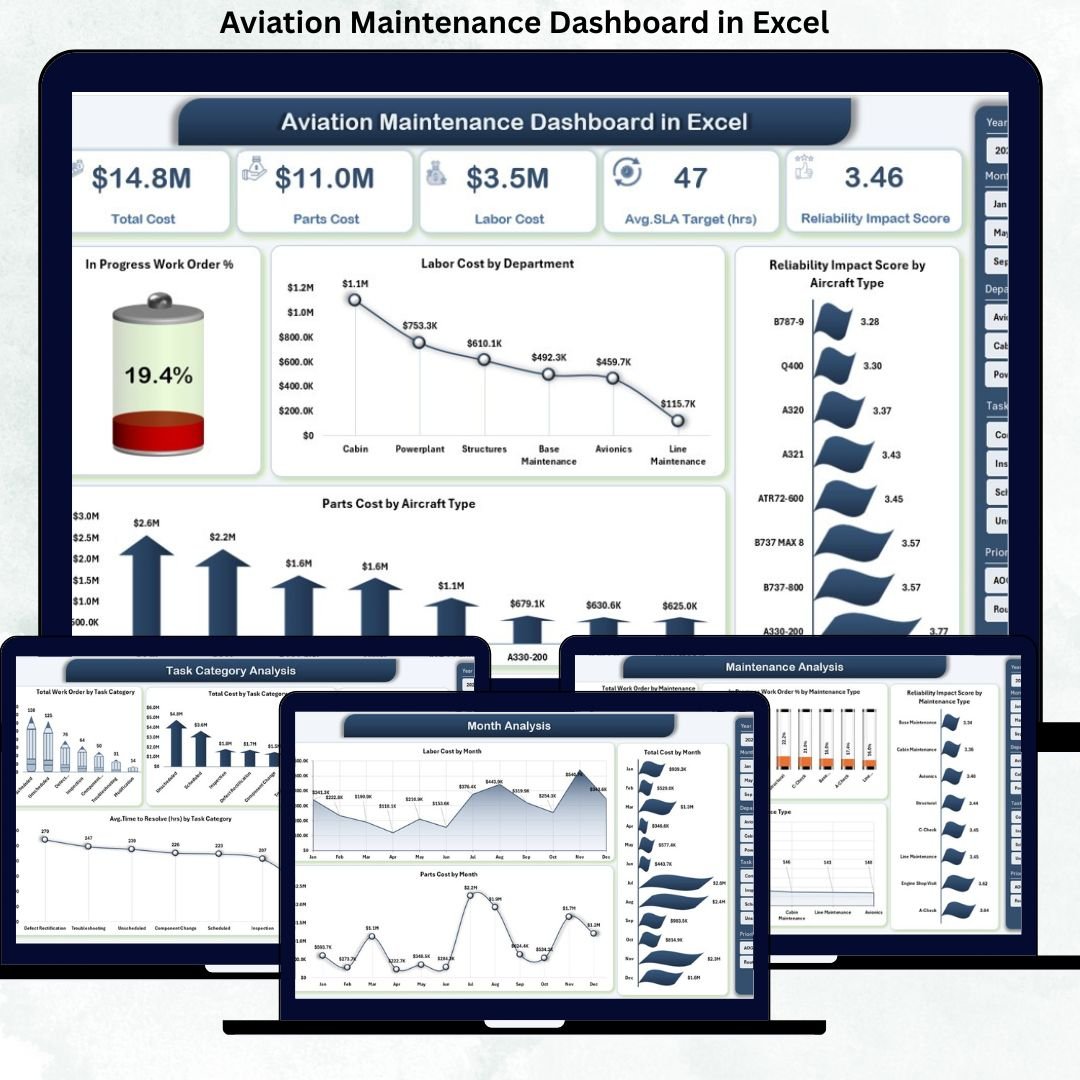
🔹 Centralized Maintenance KPIs – Work orders, cost, and reliability in one view
🔹 In-Progress Work Order Tracking – Identify workload pressure instantly
🔹 Labor & Parts Cost Analysis – Control maintenance spending proactively
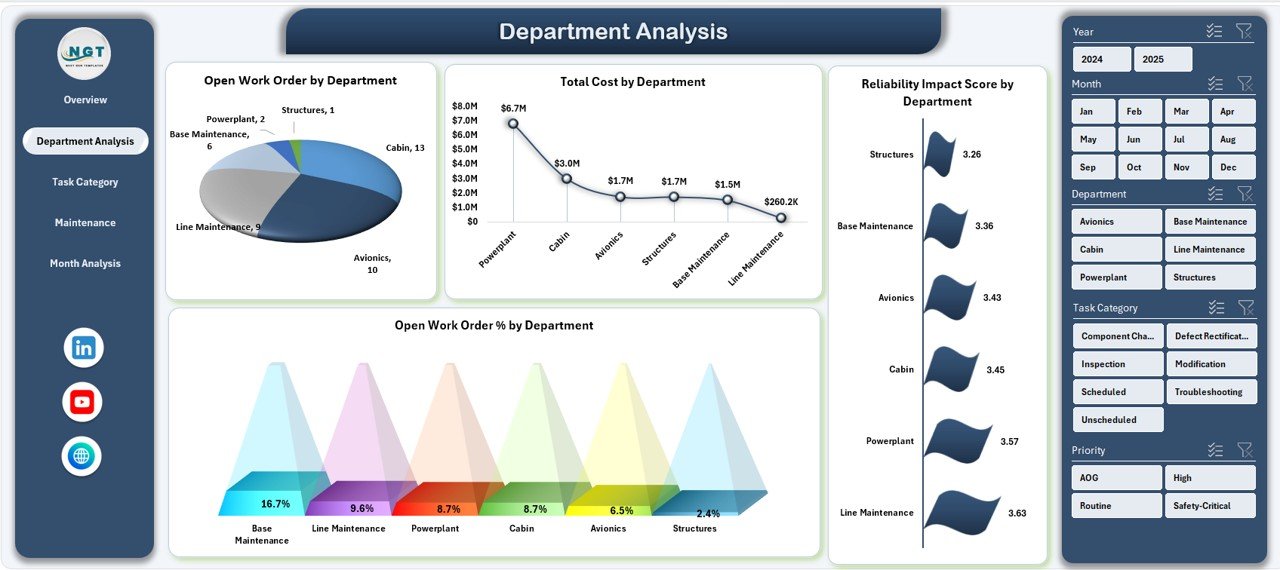
🔹 Department-Wise Performance Insights – Improve accountability and efficiency
🔹 Task Category & Maintenance Type Analysis – Optimize maintenance planning
🔹 Reliability Impact Monitoring – Prioritize safety-critical activities
🔹 Monthly Trend Analysis – Plan budgets and preventive actions
🔹 Easy Excel-Based Solution – No complex software or macros

Perfect for aviation teams seeking safety, efficiency, and cost control.

Customize this template for your business (optional)

Handled by email: we contact you within 1 business day. One revision round included. What is included

- +
Have your own data? Build a dashboard from your Excel, CSV or Google Sheets file free in Dashboard Studio →

💡 Buy any 2 templates and save 20% automatically at checkout.

Included in All-Access Templates. Get this plus 7,000+ templates for ₹4,999.00 a year. Compare plans →
Pricing country
Prices follow your selected country; checkout uses your billing country.
Excel Pivot Tables & Dashboards: Basic to Advanced courseLaunch offer
🎓 NEXTGENTEMPLATES ACADEMY
Like this dashboard? Learn to build your own.
Excel Pivot Tables & Dashboards: Basic to Advanced

From your first Pivot Table to the Data Model, DAX, Power Query and a one-page KPI dashboard. 11h 51m of video by PK, with practice files, quizzes and a capstone.

Aircraft maintenance is mission-critical. Even a small delay, cost overrun, or unresolved work order can impact safety, aircraft availability, compliance, and profitability. However, when maintenance data is scattered across spreadsheets, emails, and manual reports, visibility disappears and decisions slow down.

That is exactly why the Aviation Maintenance Dashboard in Excel becomes a powerful operational control tool.

This ready-to-use, interactive Excel dashboard converts raw maintenance data into clear KPIs, visual trends, and actionable insights—all in a single Excel file. Instead of manually tracking work orders and costs, aviation teams gain real-time visibility into labor, parts, reliability impact, and maintenance efficiency.

Built entirely in Excel, this dashboard is familiar, flexible, and cost-effective. It fits seamlessly into existing aviation workflows without requiring complex software or advanced technical skills. As a result, teams manage maintenance proactively, reduce downtime, and strengthen aircraft reliability with confidence.


🔑 Key Features of Aviation Maintenance Dashboard in Excel

🧭 Page Navigator for Fast Navigation
Quickly move between analysis pages using the left-side page navigator.

📊 Centralized Maintenance KPIs
Track work orders, labor cost, parts cost, total cost, and reliability impact in one view.

🛠️ Work Order Visibility
Instantly monitor in-progress and open work orders across departments and tasks.

💰 Cost Control Insights
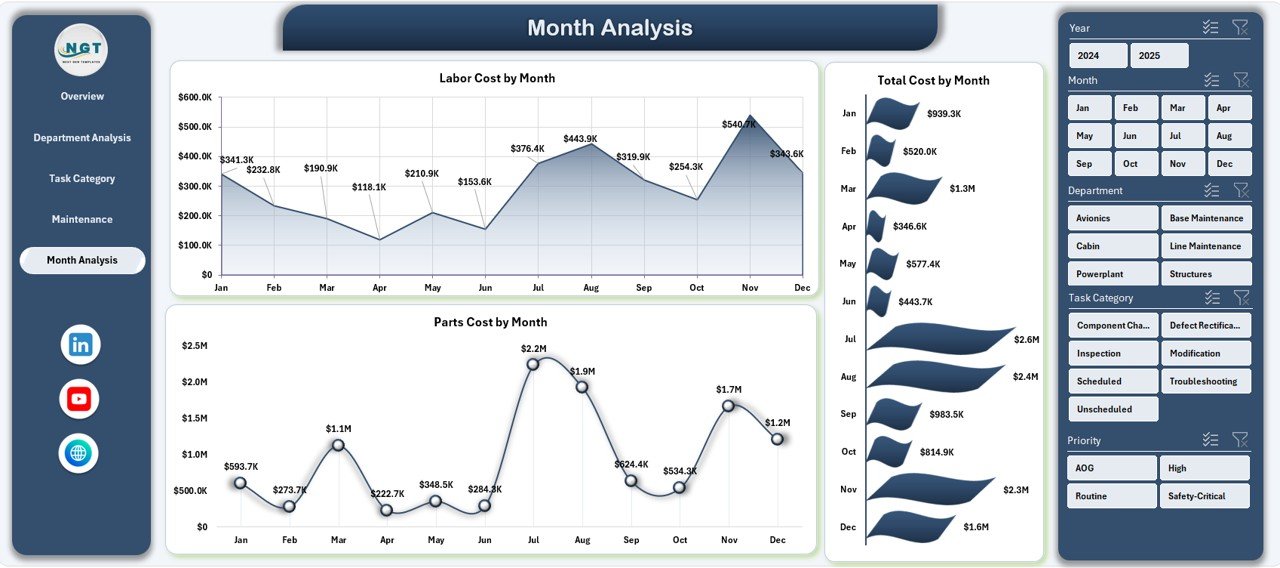
Analyze labor and parts costs by department, aircraft type, task category, and month.

✈️ Reliability Impact Tracking
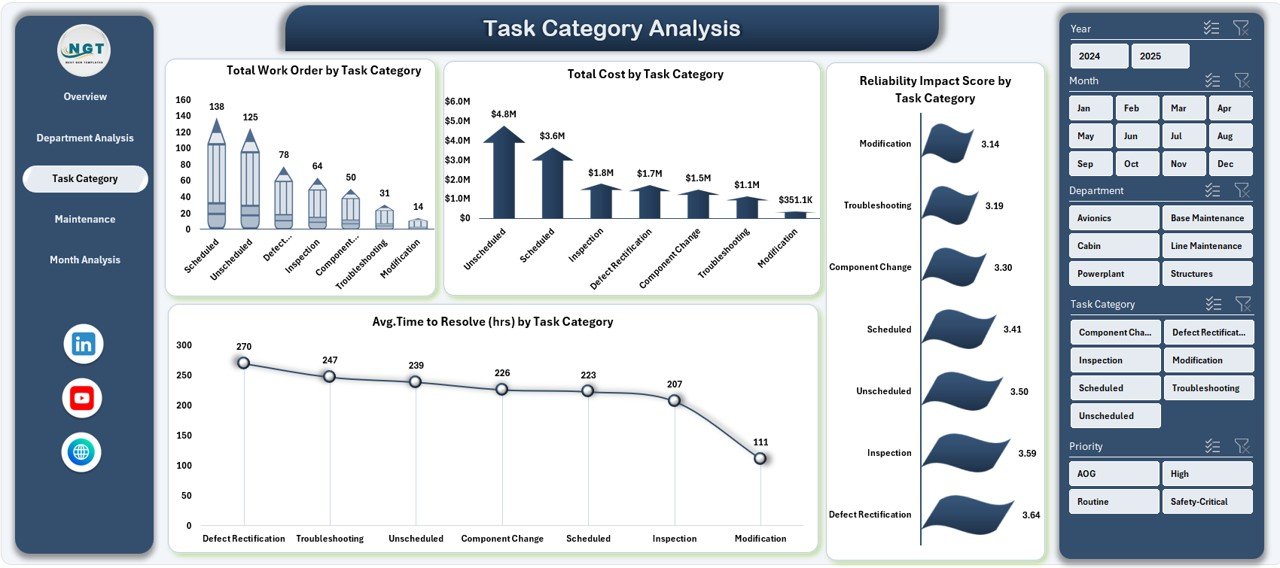
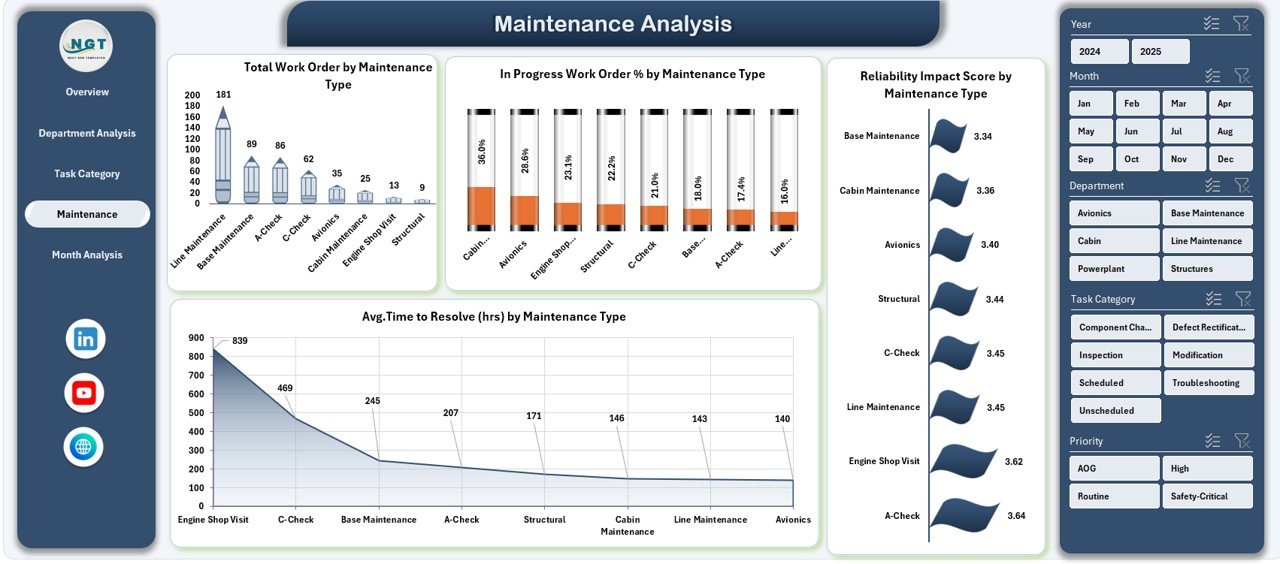
Identify aircraft types, tasks, and maintenance types affecting reliability the most.

⏱️ Resolution Time Analysis
Monitor average time to resolve maintenance issues to improve efficiency.

📈 Trend & Month Analysis
Detect seasonal patterns, cost spikes, and long-term maintenance trends.

⚙️ 100% Excel-Based Solution
Easy to update, customize, and scale—no complex software required.


📂 What’s Inside the Aviation Maintenance Dashboard in Excel
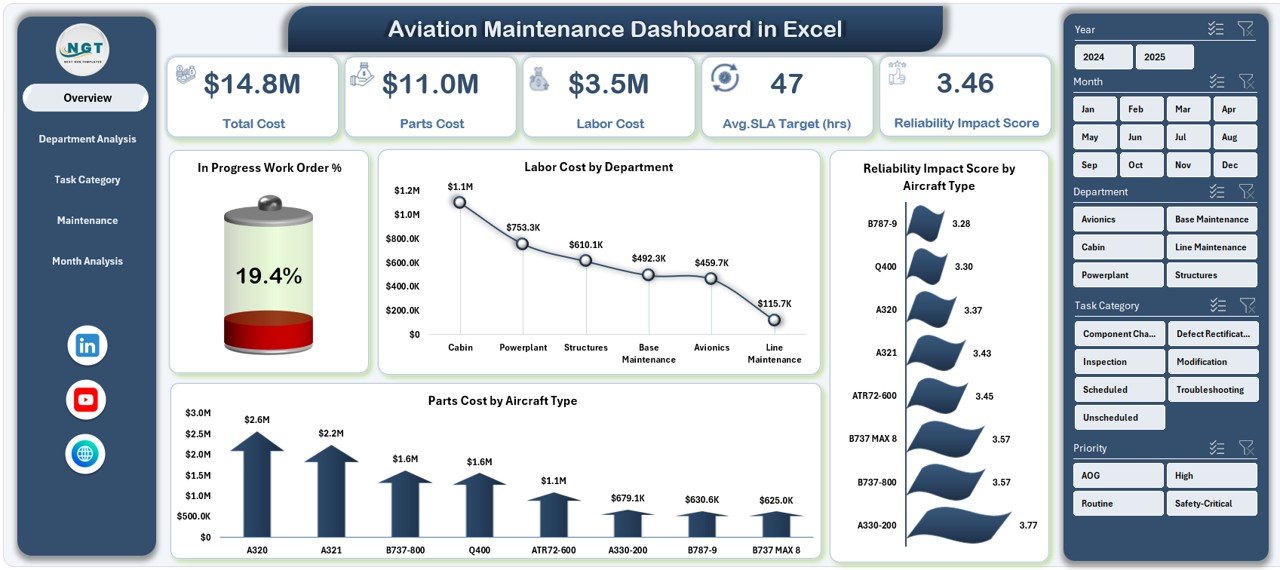
Aviation Maintenance Dashboard

📁 Overview Page – High-level snapshot with KPI cards and key charts
📁 Department Analysis Page – Maintenance workload, cost, and reliability by department
📁 Task Category Analysis Page – Performance analysis by maintenance task category
📁 Maintenance Type Analysis Page – Preventive vs corrective vs scheduled maintenance insights
📁 Month Analysis Page – Time-based trends for labor, parts, and total cost

📊 Supporting Sheets
• Data Sheet – Central source for all maintenance data
• Support Logic – Backend calculations and helper tables

Together, these components create a complete aviation maintenance intelligence system.


🛠️ How to Use the Aviation Maintenance Dashboard in Excel

1️⃣ Enter or update maintenance records in the Data Sheet
2️⃣ All charts and KPI cards refresh automatically
3️⃣ Use the Page Navigator to switch between analysis views
4️⃣ Review the Overview Page for daily health checks
5️⃣ Analyze departments, tasks, and maintenance types weekly
6️⃣ Use Month Analysis for cost planning and forecasting

No advanced Excel knowledge is required. The dashboard is designed for easy adoption and daily use.


👥 Who Can Benefit from This Aviation Maintenance Dashboard in Excel

✈️ Aircraft maintenance managers
🛠️ Engineering and reliability teams
📋 Operations managers
💰 Finance and cost-control teams
🏢 Aviation service providers
📊 Aviation consultants and analysts

If your organization manages aircraft maintenance, safety, and costs, this dashboard delivers immediate value.


📘 Click here to read the Detailed blog post

🎥 Visit our YouTube channel to learn step-by-step video tutorials
👉 YouTube Channel

Watch the step-by-step video tutorial:

Compatibility and Requirements

  • Works in Microsoft Excel desktop (Excel 2016 or later, or Microsoft 365).
  • Charts and KPI cards refresh from the Data Sheet. Microsoft’s guide Create a chart from start to finish covers the chart basics if you want to restyle them.

Frequently Asked Questions

Which pages are in the dashboard?

Overview, Department Analysis, Task Category Analysis, Maintenance Type Analysis and Month Analysis, plus a Data Sheet and a Support sheet for the calculations.

What does the dashboard measure?

Work orders, labor cost, parts cost, total cost, reliability impact and average time to resolve maintenance issues.

How do I move between pages?

Use the page navigator on the left side of each page.

How do I update the numbers?

Enter or update maintenance records in the Data Sheet. The charts and KPI cards refresh automatically.

Related Aviation and Maintenance Templates

Browse all Excel dashboards or the Excel operations templates.
Frequently asked questions

Which Excel version do I need?
Microsoft Excel 2016 or later on desktop (Microsoft 365 recommended). Many of our formula templates also open in Excel 2013 and Excel for the web - the exact requirement is listed in this product's description.
Does it work on Mac?
Yes. Formula-based Excel templates (no macros) work in Excel for Mac 2016 or later.
Does it work on mobile or Excel Online?
You can view it in the Excel mobile app and Excel for the web, but for entering data, using slicers and refreshing pivots we recommend desktop Excel.
How do I add my own data?
Replace the sample rows on the data sheet with your own (keep the column headers), then click Data > Refresh All so every chart and pivot updates.
Some sheets are protected - how do I edit them or change the logo?
A few of our trackers, data entry systems and dashboards protect sheets so formulas are not overwritten by mistake. Go to Review > Unprotect Sheet - most have no password. If Excel asks for one, message us with your order number and we will share it straight away.
How many records can it handle?
It has been tested with several thousand rows and suits normal small-business volumes. Excel itself handles over 1 million rows.
Is it a one-time payment or a subscription?
One-time payment. No subscription, no per-user fees and nothing to renew - the file is yours to keep.
How do I get the file after payment?
Instantly. The download link appears on screen after checkout, is emailed to you, and stays under My Account > Downloads on our website. If the email does not arrive within a few minutes, check your spam or promotions folder.
Is a user manual included?
Most of our newer products include a PDF user manual in the download. If yours does not have one, message us with your order number and we will send it.
Do I get free updates?
Bug fixes are always free - if something does not work as described, we fix it and send you the corrected file. New versions with new features are not included in the price, unless this product's description says otherwise.
Can you customise it for me?
Yes. Small changes to this template (your columns, categories, logo, colours, minor layout) cost the template price plus $40-80 (Rs 3,000-6,000 + GST), quoted once you send your list. A fully custom build is usually $100-200 (Rs 8,000-18,000 + GST) with two revision rounds. Email your requirements to [email protected] or message us on WhatsApp.
Can I use it for my business or my clients?
Yes, for your own personal or internal business use, for as long as you like. Reselling or redistributing the template is not allowed.
What is your refund policy?
Because these are digital downloads, they are non-refundable once delivered - except when the product does not match its description (report it within 48 hours of purchase) or there is a technical problem our team cannot fix within 72 hours. Email [email protected] with your order number.
How do I get help?
Email [email protected] (Mon-Fri, 10 AM-7 PM IST) or message us on WhatsApp +91 80770 90260 (chat only, no calls). Please include your order number.

Still have a question? Click Need help? at the bottom-left to ask our assistant, or message us on WhatsApp.

Application

MS Excel

Template Type

Dashboard

Price

Paid

Business Or Department

Logistics

Reviews

There are no reviews yet.

Only logged in customers who have purchased this product may leave a review.

You may also like…

Aviation Maintenance Dashboard in ExcelAviation Maintenance Dashboard in Excel
Original price was: ₹2,499.00.Current price is: ₹1,799.00.
- +
Have your own data? Build a dashboard from your Excel, CSV or Google Sheets file free in Dashboard Studio →
Scroll to Top