

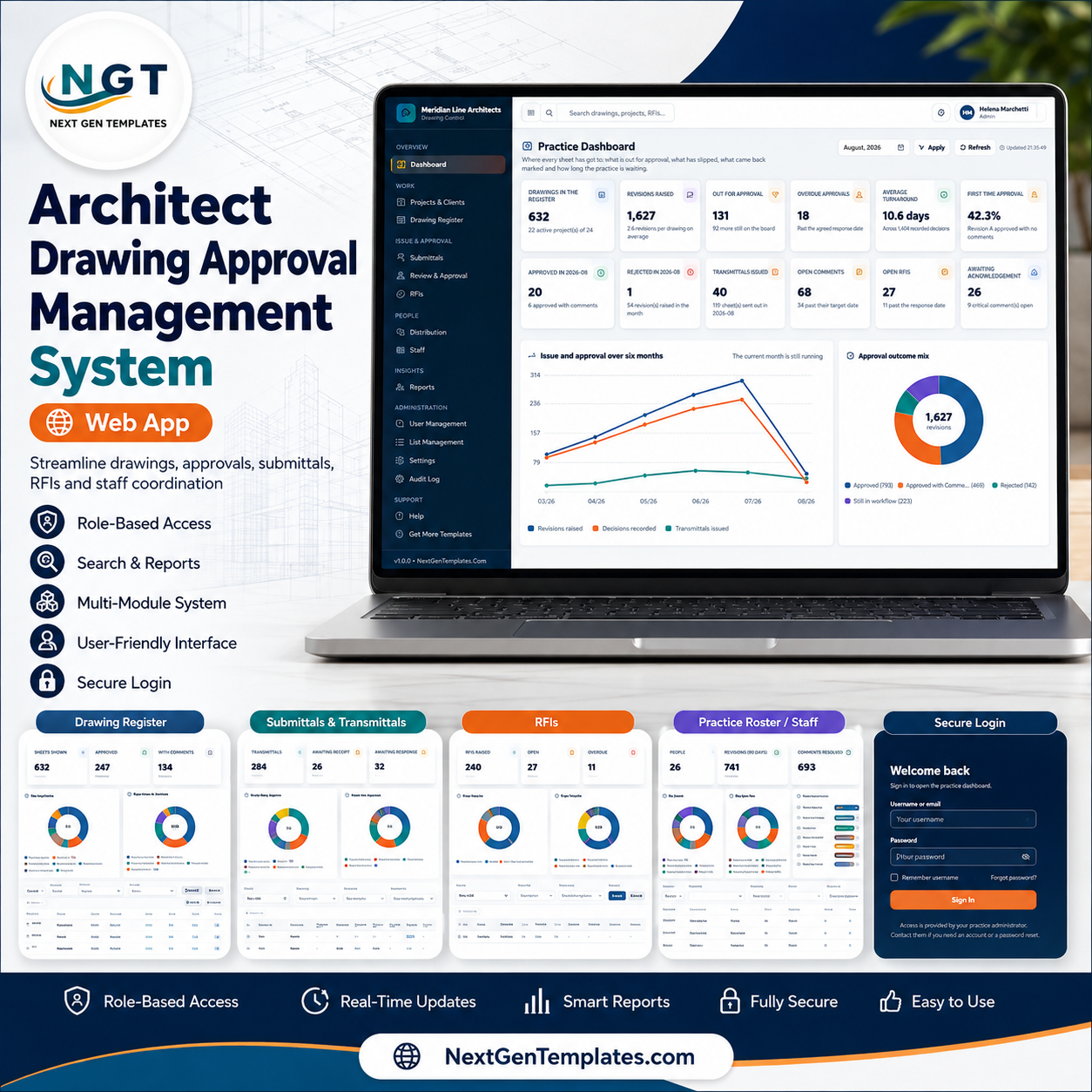
The Architect Drawing Approval Management System Web App runs the whole issue-and-approval loop for an architectural practice from one workspace: a register where only one revision per sheet is ever current, transmittals that start the review clock the moment they leave the office, reviewer comments that cannot be quietly closed, and an overdue list computed from dates rather than from memory. It is a Google Apps Script application – one script file and one HTML file – that you deploy into your own Google account in about fifteen minutes and then own outright.
The demo database is seeded with 11,504 rows across 20 sheets, so every screen is populated before you type anything: 632 drawings, 1,627 revisions, 24 projects, 284 transmittals, 2,178 reviews, 1,561 comments and 240 RFIs. That seeded content is demo data for evaluation – you clear it in one menu click and enter your own. Test every page and every one of the six roles in the live demo below before you buy.
Sign In and Role Selection
Access is by username and password against six seeded roles, with passwords stored only as salted SHA-256 digests. The sign-in card deliberately never displays credentials, and a first-run panel appears until the database has been set up.
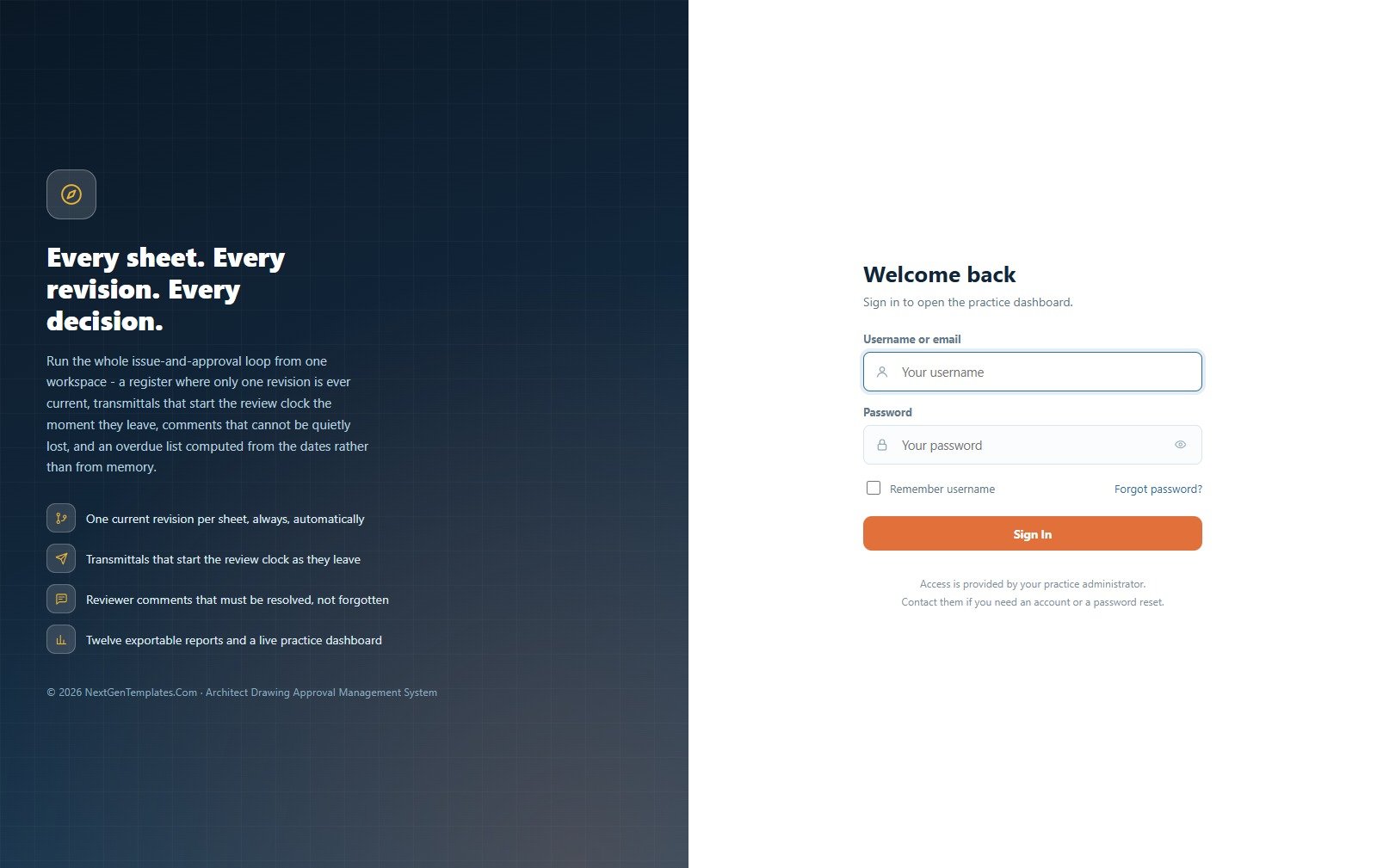
🚀 Try the Live Demo Before You Buy
We have deployed this web app in our own Google account so you can test every page, every role and every report – with the full sample database – before purchasing. No signup, no email required.
🔑 Test Login Credentials
Sign in as admin to see everything including settings, user management and the audit log, or as client to see how little an external reviewer is shown. Signing in as doccontrol is the fastest way to understand the product: that role can issue drawings but is deliberately blocked from recording an approval decision.
💡 These are public demo logins on a shared instance that resets periodically – not a customer deployment, and not your system. Anything you enter there may be wiped or seen by another visitor, so do not put real project data in it. What you get after purchase: the full source code (Code.gs + Index.html) plus a step-by-step deployment guide, so you can run your own private instance in your own Google account in under 15 minutes, with your own passwords.
Key Features of the Architect Drawing Approval Management System Web App
- Four rules the server enforces, not the browser. One current revision per sheet; no new revision over a sheet that is already out for approval and no decision against a revision that was never issued; a comment closes only with a named resolver, a date and a note; and overdue is always calculated from the response date plus the grace period.
- Approval cannot be faked. A revision cannot be marked plain Approved while a Critical or Major comment against it is still open – and that rule is a setting you control, not a hard-coded opinion.
- Six roles with genuine separation of duties. The Document Controller owns numbering, issue and distribution but cannot record an approval decision. The Consultant Reviewer sees no project, client or commercial data at all.
- Permissions drive the server, not just the menu. The same map that hides a sidebar item also guards the endpoint behind it, across five action rights: Create, Edit, Delete, Export and Approve.
- Twelve exportable reports grouped by register, approval, issue, comments, queries and people – each one printing at your chosen size.
- Print sizes for the plot station. A4, 4 inch and 3 inch; the narrow layouts drop the wider columns and the signature block so a thermal printer still produces something readable.
- Excel and CSV export on every table, plus import on projects, drawings, contacts and staff.
- A complete audit log of every create, update, delete, issue, decision, resolution, import, upload, email, archive and sign-in.
- Optional daily digest email of overdue approvals, overdue comments and overdue RFIs, driven by a time trigger you add yourself.
- Nothing is minified, obfuscated or locked. The source is plain commented JavaScript you can rename, recolour and extend.
What’s Inside the Architect Drawing Approval Management System Web App
Practice Dashboard
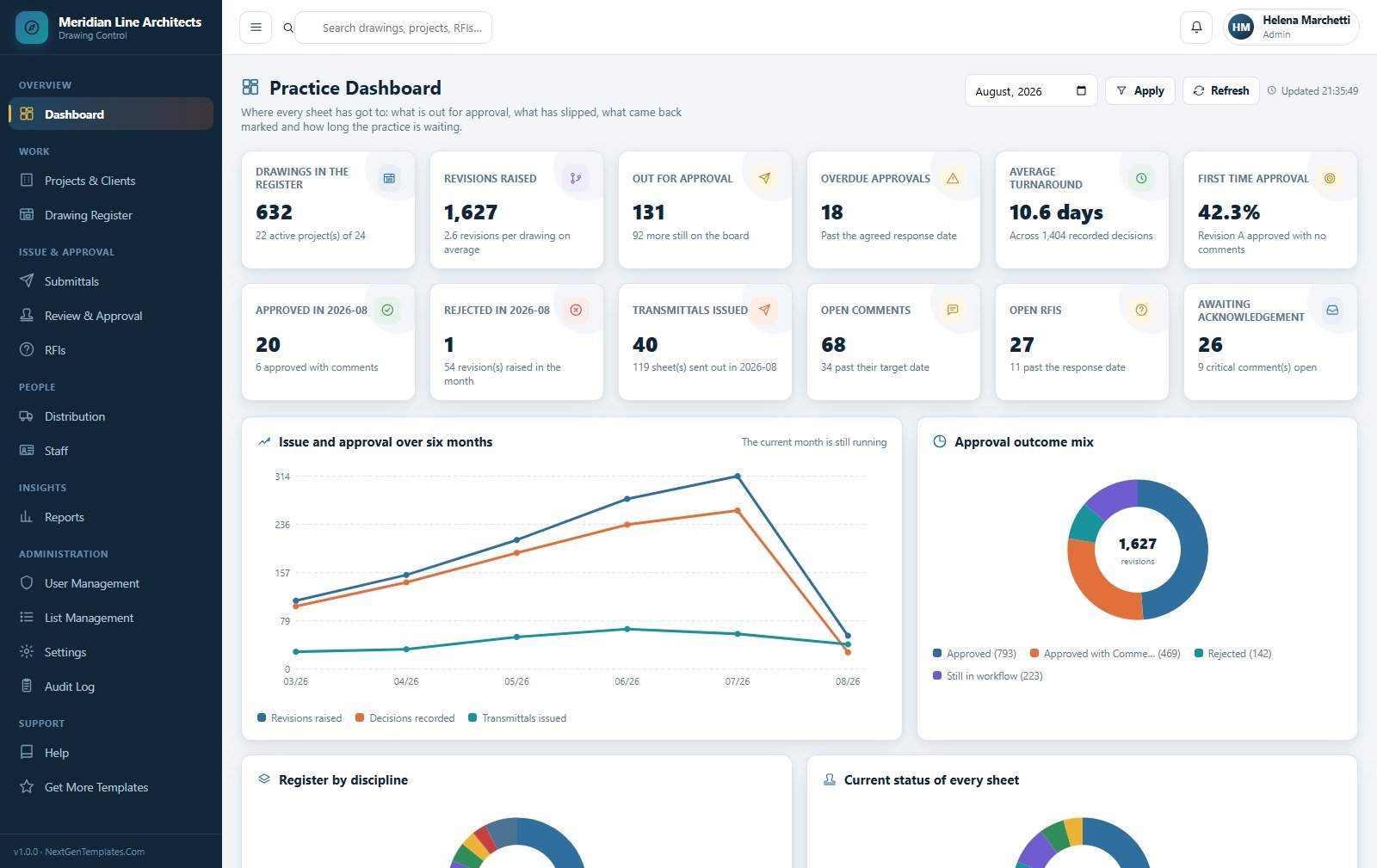
Twelve KPI cards covering the register, the workflow, comments and RFIs, above a six-month trend of revisions raised against decisions recorded and transmittals issued. The sample practice is carrying 632 drawings, 131 sheets out for approval, 18 past their response date, a 10.6-day average turnaround and a 42.3% first-time approval rate.
Projects and Clients
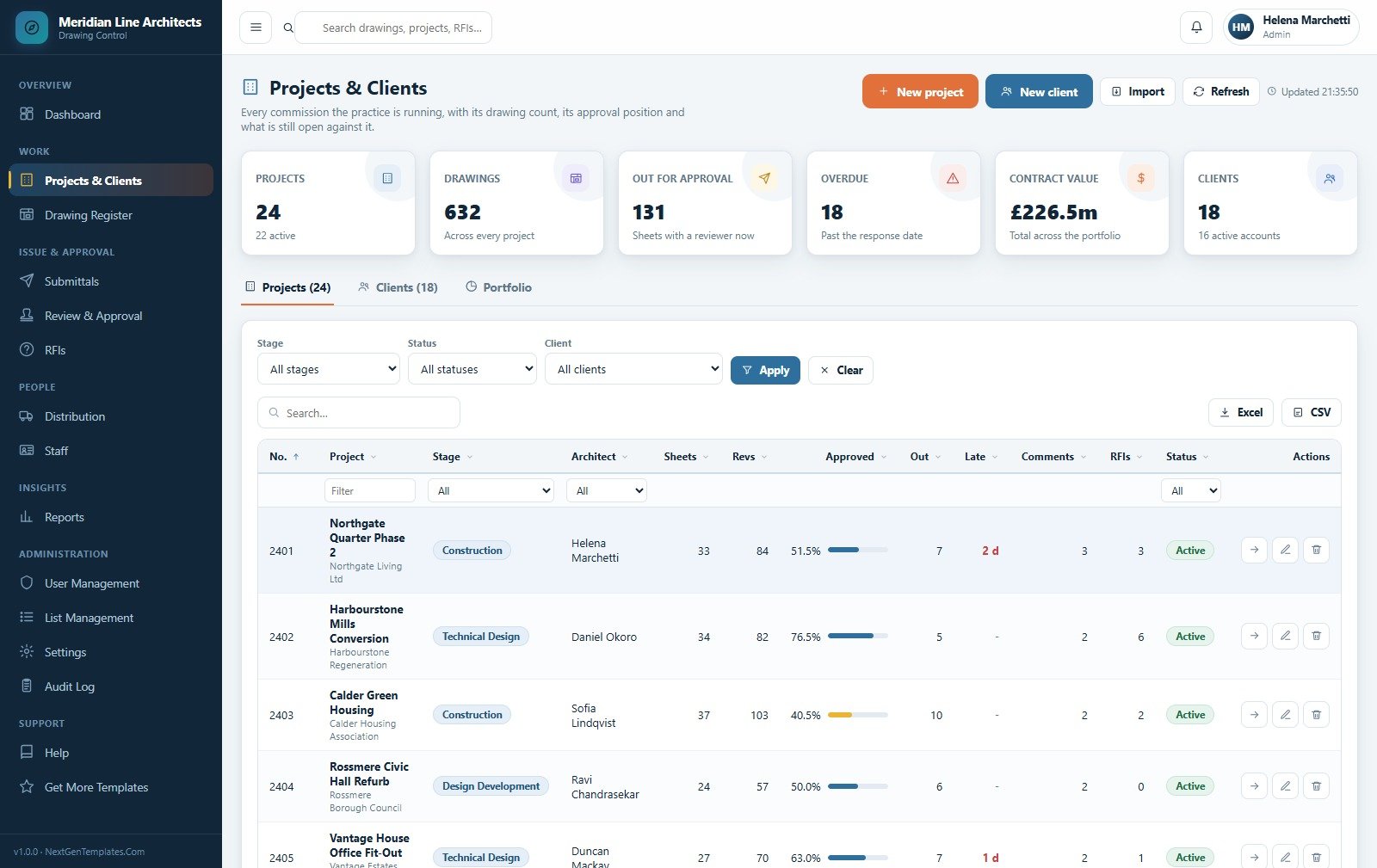
Every commission with its drawing count, approval percentage, what is out and what has slipped, plus a Clients tab that is the organisation directory behind it. Each project carries its own review period in days, which is what every response date is calculated from.
Drawing Register
One row per sheet showing the revision that is current right now and exactly where it has got to, broken down by discipline, workflow status and sheet size. Superseded revisions are never deleted – they move into the sheet history, where the full revision rail, comment log and issue trail stay attached.
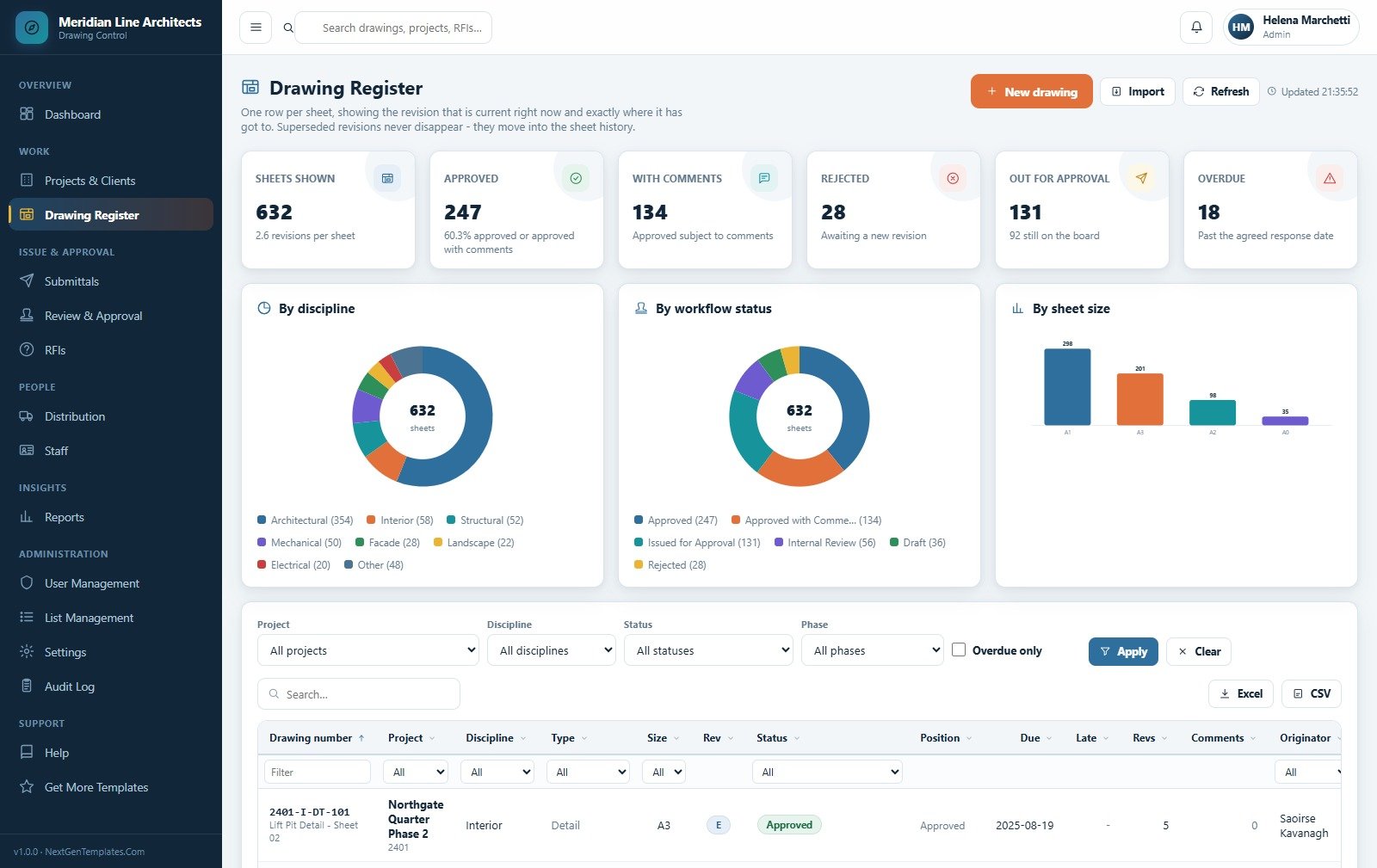
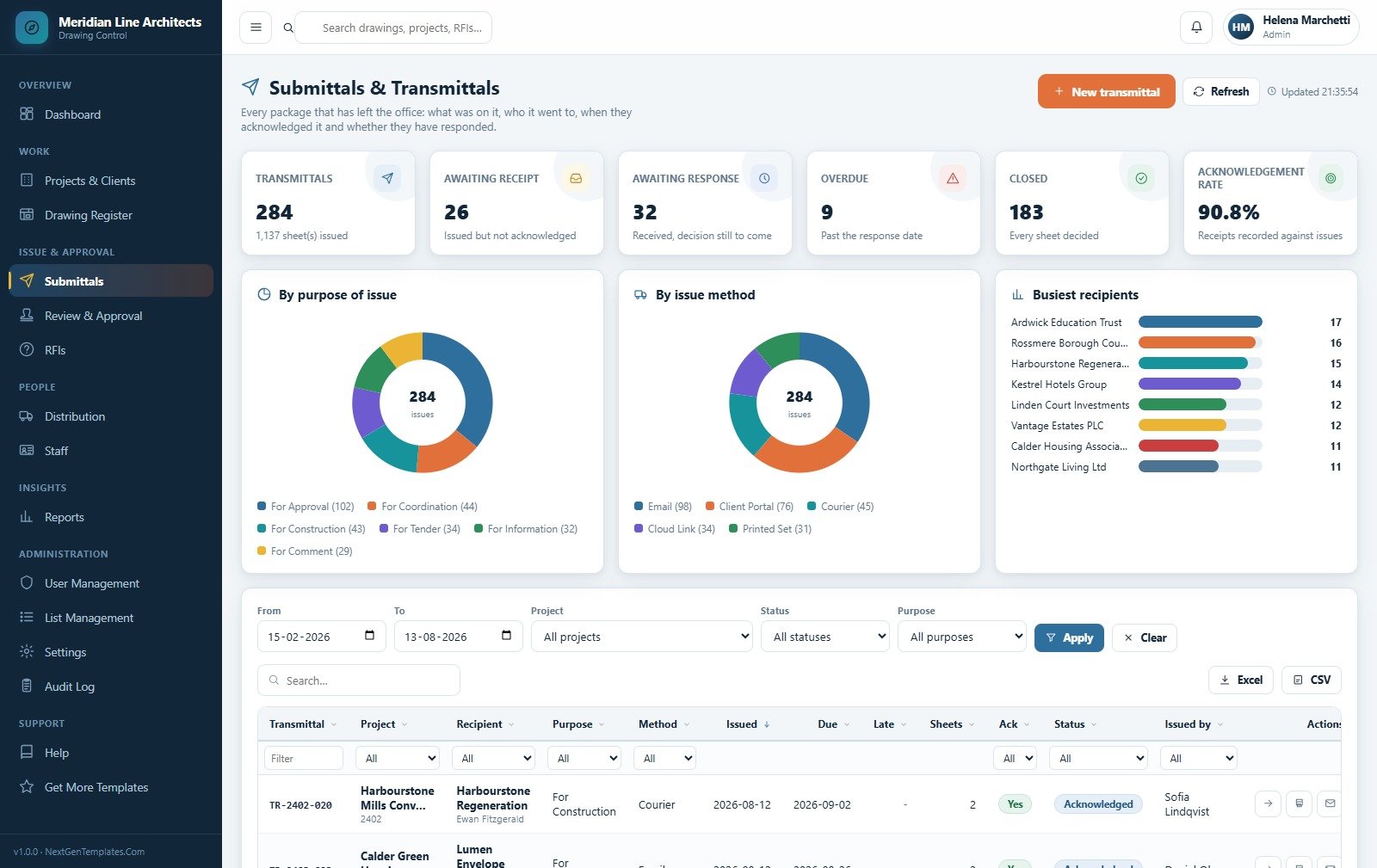
Submittals and Transmittals
Every package that has left the office: what was on it, who it went to, when they acknowledged it and whether they have responded. Issuing is a single action that stamps each sheet, starts the review clock, opens a review per sheet, writes the issue history and emails the covering note.
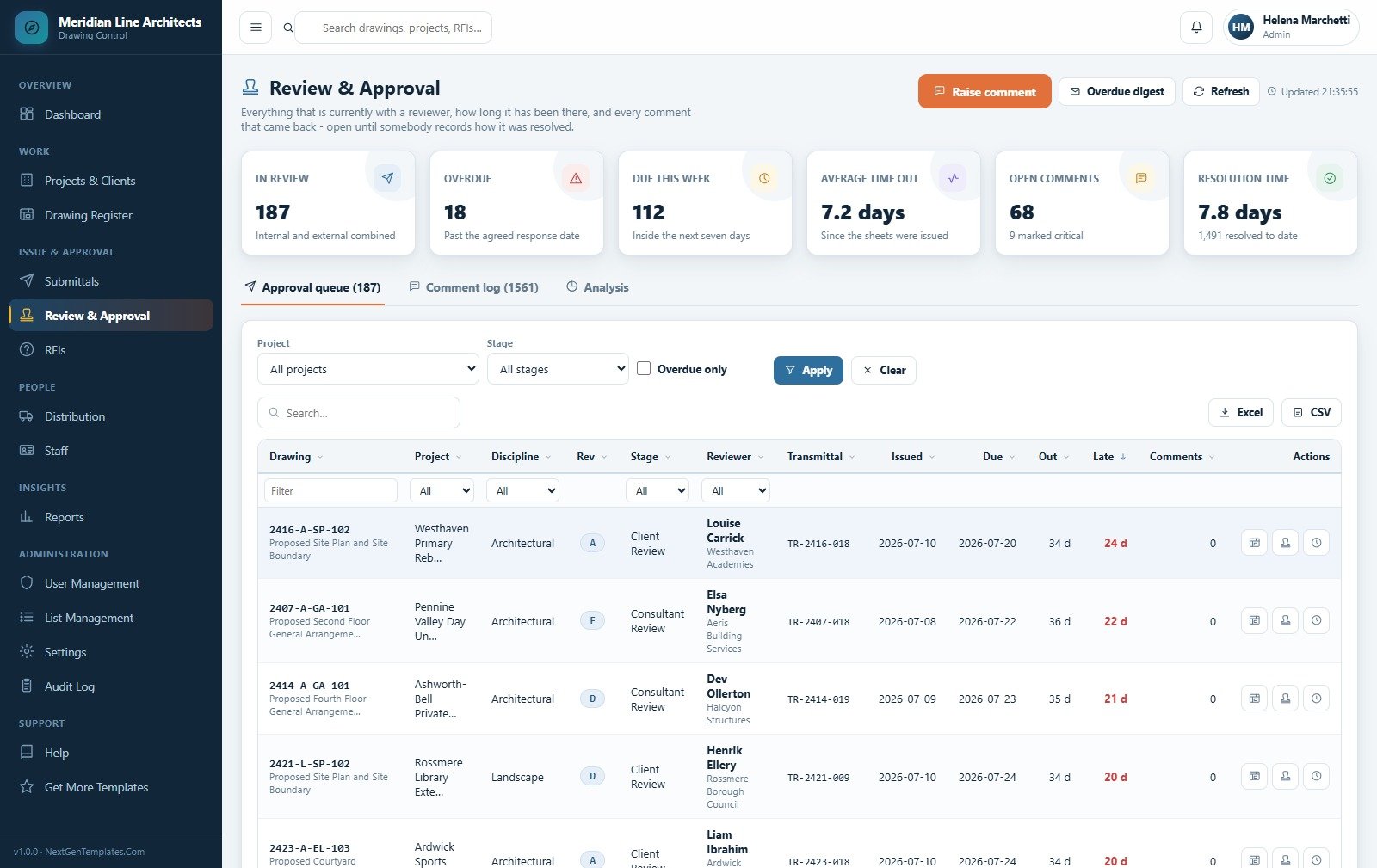
Review and Approval
The live queue of everything sitting with a reviewer, sorted by how late it is, with the comment log alongside it. Record a decision, attach the comments that came back, extend a response date with a reason, or reassign the reviewer – and every comment stays open until somebody records how it was resolved.
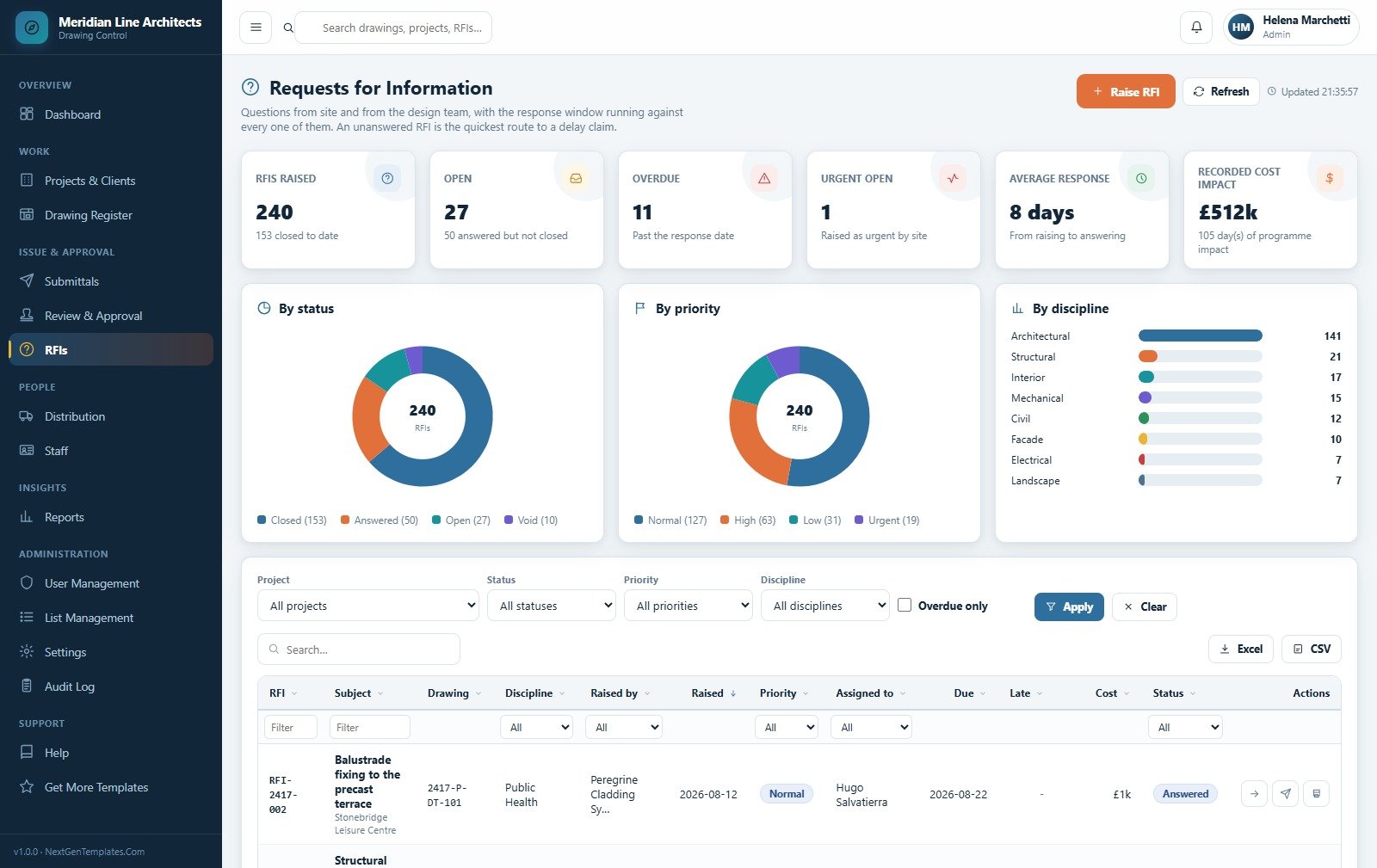
Requests for Information
Questions from site and from the design team with the response window running against every one of them, split by status, priority and discipline. An answer can carry a cost impact and a programme impact in days, which the RFI report then totals for the commercial team.
Distribution
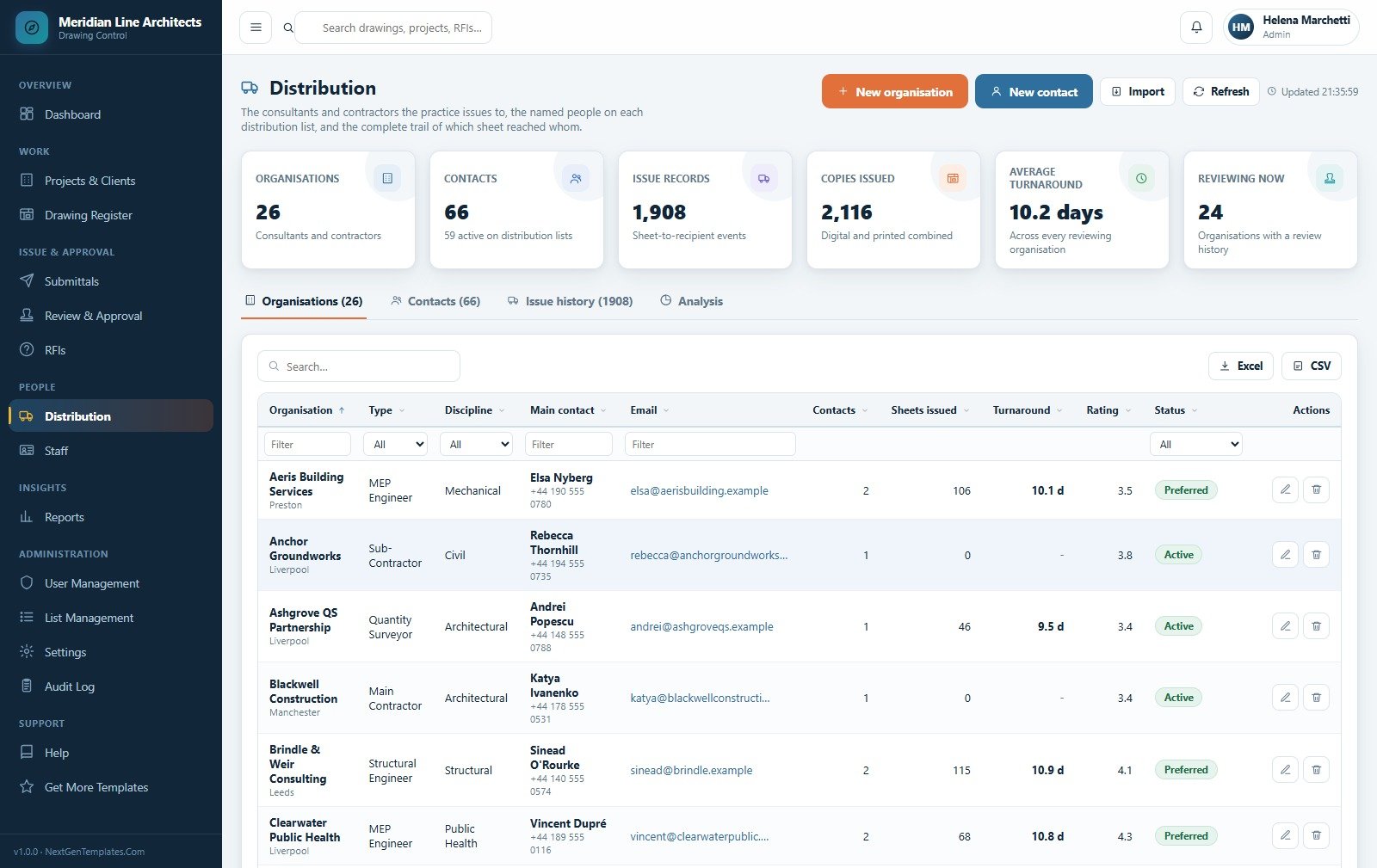
The consultants and contractors you issue to, the named people on each distribution list, and the complete trail of which sheet reached whom. Organisations carry a type, a discipline, a turnaround average and a rating, so you can see who actually comes back on time.
Reports
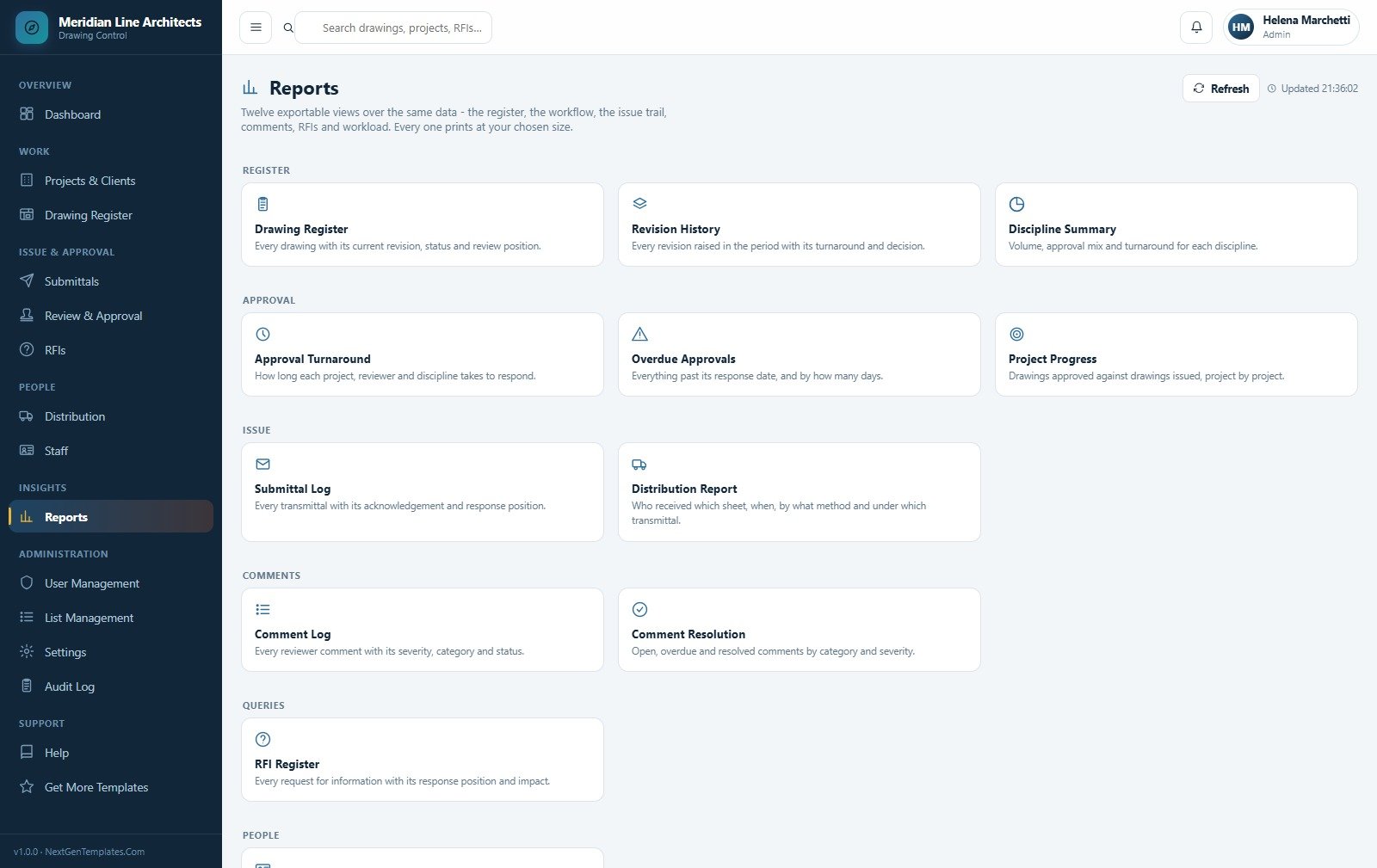
Twelve exportable views over the same data: Drawing Register, Revision History, Discipline Summary, Approval Turnaround, Overdue Approvals, Project Progress, Submittal Log, Distribution Report, Comment Log, Comment Resolution, RFI Register and a workload view by person.
Settings
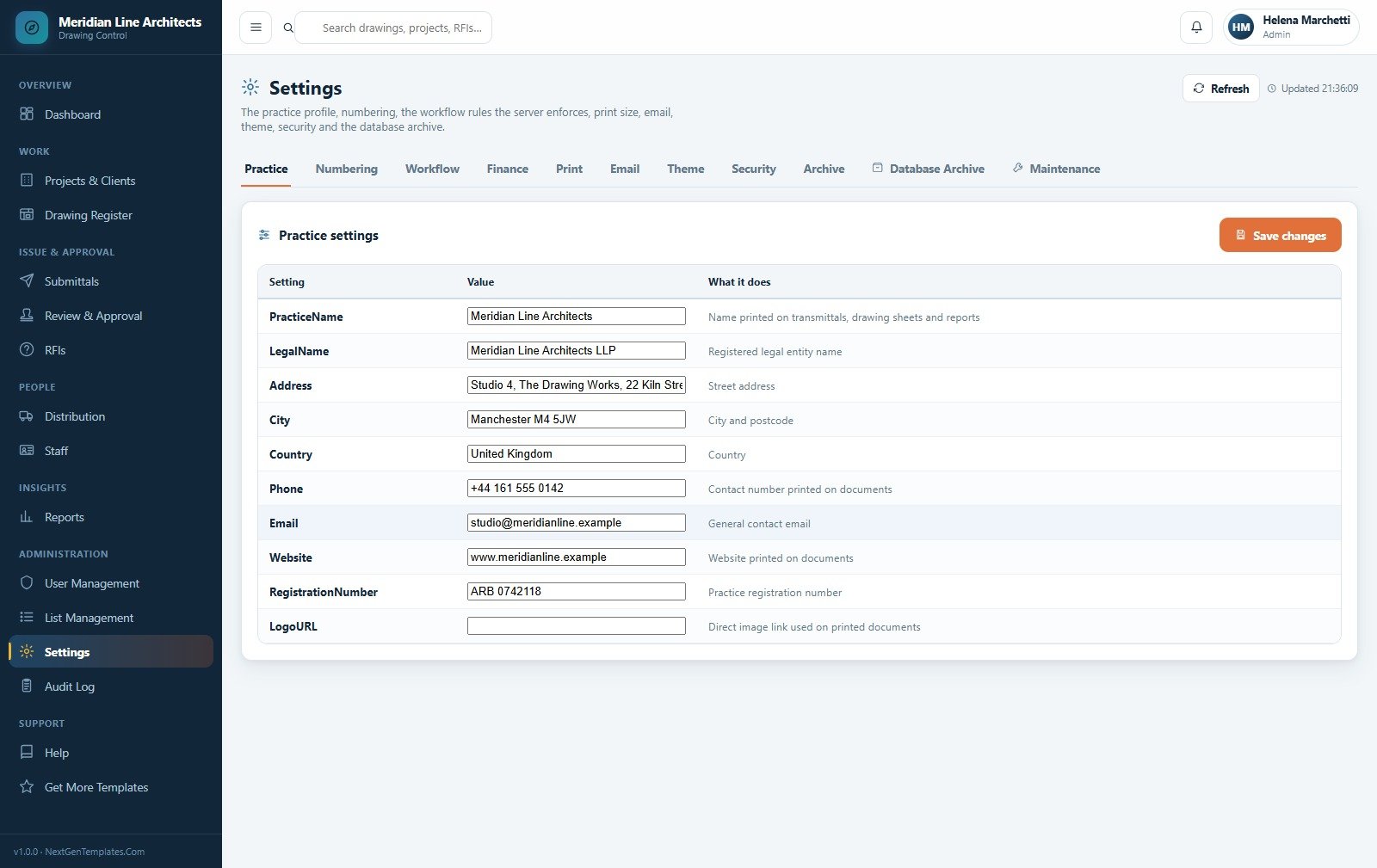
Eleven tabs covering the practice profile printed on your transmittals, drawing numbering, the workflow rules the server enforces, finance, print size, email, theme, security, the archive and maintenance. This is where you turn the open-comment approval block on or off and set the session timeout.
Practice Roster, User Management, List Management, Audit Log and Help
Five further pages ship with the system and are not shown in the gallery above. Practice Roster is who is in the studio, what they own on the register and what they have cleared in the last ninety days, by team and by job role. User Management holds the accounts and the role permission matrix. List Management is where every dropdown in the application lives – 194 seeded values across lists such as Comment Category, Comment Severity and Decision – and removing a value never rewrites records that already use it. Audit Log is the filterable history of who did what and when. Help explains the workflow, every module and each role in plain words, inside the app.
Architect Drawing Approval System vs. a Shared Spreadsheet vs. Paid Document-Control SaaS – Where This Fits
| This Web App | Shared spreadsheet log | Paid document-control SaaS | |
|---|---|---|---|
| Cost | One payment of $39.99 | Free | Typically $50-$100+ per user per month |
| Platform | Google Apps Script in your own account | Google Sheets or Excel | Vendor cloud |
| Setup time | About 15 minutes | Minutes, then months of drift | Days to weeks, often paid onboarding |
| Real-time team collaboration | Yes | Yes, with edit collisions | Yes |
| Mobile access | Yes, responsive browser app | Awkward | Yes, native apps |
| Customizable fields | Yes – lists, settings and source code | Yes | Limited to vendor options |
| Share with link | Yes, your own deployment URL | Yes | Yes |
| Year-1 cost at 5 users | $39.99 total | $0 | Commonly $3,000-$6,000 |
| Supersede rule enforced | Yes, server-side | No – two live revisions happen weekly | Yes |
| Comment cannot close without a resolution | Yes | No | Usually |
| You own the source | Yes, unminified | n/a | No |
Who This Template Is For – and Who It’s Not For
It is for small and mid-sized architectural practices, design studios and document controllers who are currently running the drawing register in a shared spreadsheet and losing track of which revision is live; interior, landscape and MEP consultancies with the same problem; and practices that want the issue-and-approval history in one auditable place without a per-seat subscription.
It is not for the following, and it is worth being blunt about each:
- Building-code, permit or planning compliance. This system records the approvals your own people and clients give. It does not check any drawing against a building code, a planning condition or a permit requirement, and it makes no claim that anything recorded in it satisfies a regulator.
- Structural or engineering review. Nothing here calculates, verifies or validates any design. The word Approved means a named person recorded a decision on a date – nothing more.
- Professional certification or stamping. It does not issue, hold or apply any architect’s or engineer’s seal, stamp or professional certification.
- Legally binding electronic signatures. Decisions are audited database records, not e-signatures, and no claim is made about their legal standing in any jurisdiction. If you need a qualified e-signature, use a dedicated e-signature service alongside this.
- CAD or BIM integration. There is no link to Revit, AutoCAD, ArchiCAD or IFC. It manages drawing records – numbers, revisions, statuses, comments and file attachments you upload yourself – not model geometry, and it will not read or write a CAD file.
- Very large contractors already tied into a client-mandated common data environment.
How to Use the Architect Drawing Approval Management System Web App
- Try the demo first. Open the live demo above and sign in as
doccontrol, then asadmin. Five minutes there will tell you more than the rest of this page. - Deploy your own copy. Create a Google Sheet, open Extensions > Apps Script, paste
Code.cs.txtintoCode.gs, pasteIndex.txtinto a new HTML file named exactlyIndex, and save. - Run setup once. Choose
setupin the editor’s function dropdown and run it, or deploy first and use the first-run panel on the sign-in card. It is idempotent, so you can run it as often as you like. - Deploy as a web app with Execute as Me and access set to Anyone, then open the URL and sign in as admin.
- Change every default password immediately, then remove the seeded accounts you will not use.
- Clear the demo data with Drawings > Reseed Workflow Data, then set your practice profile, numbering and review periods in Settings.
- Load your own work – import clients, consultants, staff and the existing register, then start raising revisions and issuing transmittals.
- Remember the version rule. Apps Script serves only the version you published, so after any code change use Deploy > Manage deployments > Edit > New version.
Real-World Use Cases
Marcus, document controller at a 26-person practice. He was maintaining the register in a spreadsheet and a separate transmittal folder, and twice in a year a contractor built from a superseded sheet. Here he issues a transmittal in one action; the sheets stamp themselves, the clock starts, and nobody can raise a new revision over one that is still out. He cannot record decisions himself – which is exactly what his principal wanted.
Priya, design team lead running three schemes. She lives in the Review and Approval queue sorted by lateness, chasing the eighteen sheets past their response date rather than re-reading a spreadsheet. When a client returns a drawing marked with a Critical comment, the system will not let it be signed off as plain Approved until somebody records how that comment was resolved.
Helena, practice principal. She opens the dashboard once a week for the six-month trend, the 42.3% first-time approval rate and the approval outcome mix, then the Distribution page to see which consultants are averaging ten days and which are dragging. The audit log answers the only question that ever really matters after a dispute: who decided what, and when.
Frequently Asked Questions
Can I try it before buying?
Yes. A full live demo is linked at the top of this page with all six role logins listed. It is a shared public instance seeded with demo data and it resets periodically, so treat it as a showroom rather than a workspace – but every page, every report and every permission rule behaves exactly as your own deployment will.
Does this make my drawings code-compliant, or count as a permit or engineering approval?
No. It is a record-keeping system for the approvals your own team, clients and consultants give. It performs no building-code check, no permit or planning review, and no structural or engineering verification, and it applies no professional stamp or certification. Approved here means a named person recorded a decision on a date.
Are the decisions legally binding electronic signatures?
No. They are audited database records with a user, a timestamp and an audit trail. No claim is made about their legal validity as signatures in any jurisdiction. If you need qualified e-signatures, run a dedicated e-signature service alongside this system.
Does it connect to Revit, AutoCAD or a BIM model?
No. There is no CAD or BIM integration of any kind. It manages drawing records – numbers, revisions, statuses, comments, RFIs – and any files you upload yourself to Drive. It does not read, write or interpret model geometry.
Where is the data stored, and who can see it?
In a Google Sheet in your own Google Drive, created the first time you run setup. Nothing is sent to us and there is no external service in the loop. Uploaded files go into a folder tree in the same Drive account.
Is the sample data included, and can I remove it?
The database seeds 11,504 rows of realistic demo data across 20 sheets so nothing looks empty on day one. Drawings > Reseed Workflow Data clears the workflow and rebuilds the register, keeping your settings, lists, roles and users.
Can I change the roles and what each one can do?
Yes. User Management > Role permissions is a matrix of modules against five action rights – Create, Edit, Delete, Export and Approve – and the same map guards the server endpoints, so it is a real permission change rather than a hidden menu item.
About the Author
Built by PK – Microsoft Certified Professional with 15+ years of Excel, Google Sheets, and Power BI experience. Founder of NextGenTemplates, reaching 300K+ subscribers across YouTube channels. Every template is hand-built and tested before release.
Explore Related Templates
If you run projects as well as drawings, the Home Renovation Project Management Web App and the App Development Project Management System Web App use the same schema-driven build. For the commercial side of a practice, see the Consulting Project and Billing Management System Web App and the Accounting Firm Client Management System Web App. Browse the full Web Apps category or the wider Google Sheets templates collection.
Ready to stop guessing which revision is current? Open the live demo, sign in as any of the six roles, and if it fits the way your practice works, buy it once and deploy it into your own Google account today.
Last updated: 15 August 2026.






























Reviews
There are no reviews yet.