

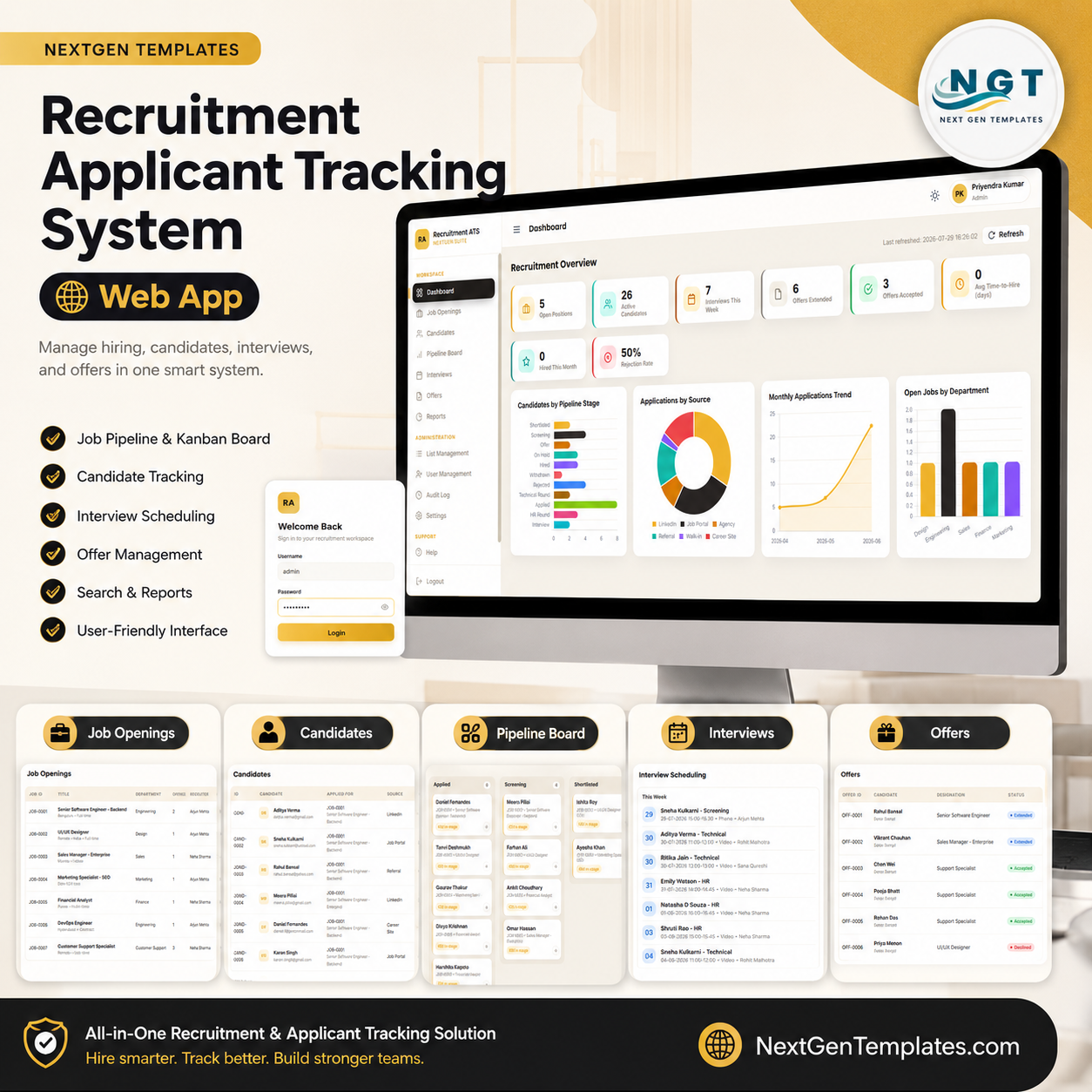


Recruitment Applicant Tracking System Web App gives HR teams a ready hiring workflow with 12 application pages, 8 overview KPI cards, 40+ tracking views, and a downloadable Google Apps Script/Google Sheets web app package for $39.99. Join 10,000+ customers in 180+ countries using NextGenTemplates to replace recurring SaaS tools with one-time-purchase templates. Instant download, lifetime access, no per-user subscription, and no locked vendor database.
Key Features of Recruitment Applicant Tracking System Web App
- End-to-end hiring workflow: manage job openings, candidates, pipeline stages, interviews, offers, reports, lists, users, audit logs, and settings from one browser interface.
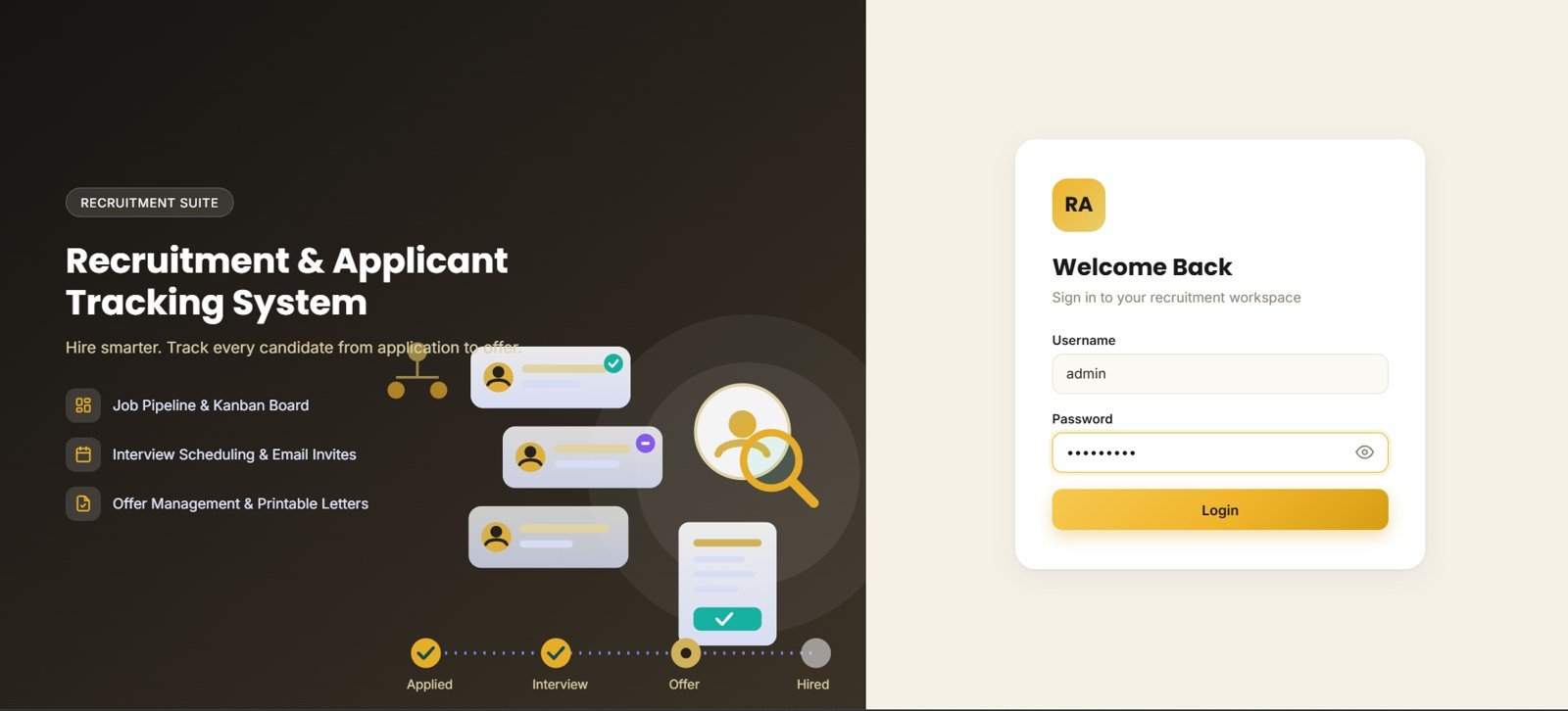
- Login and role-aware access: the opening page includes username, password, and login controls for a controlled recruitment suite experience.
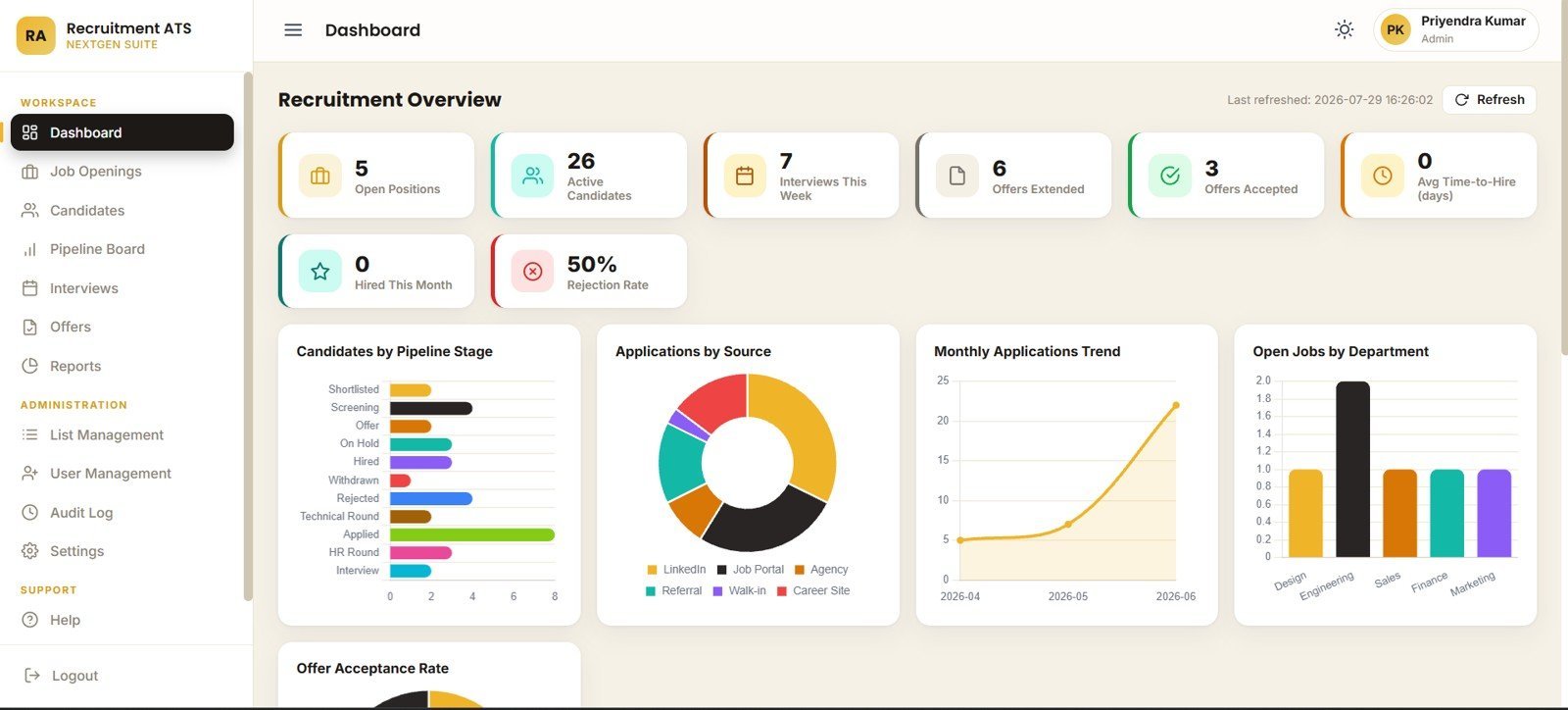
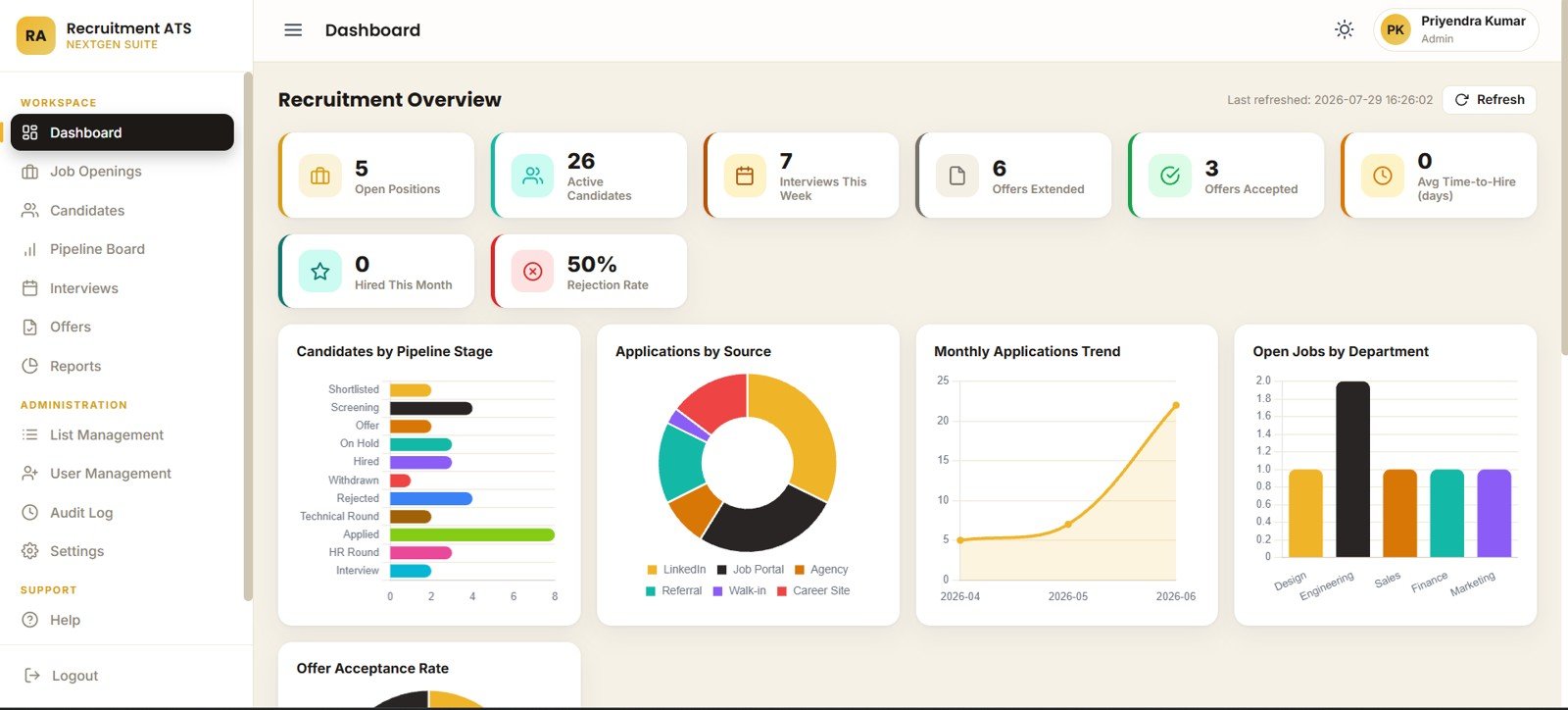
- Recruitment overview cards: see open positions, active candidates, interviews this week, offers extended, offers accepted, average time-to-hire, hires this month, and rejection rate.
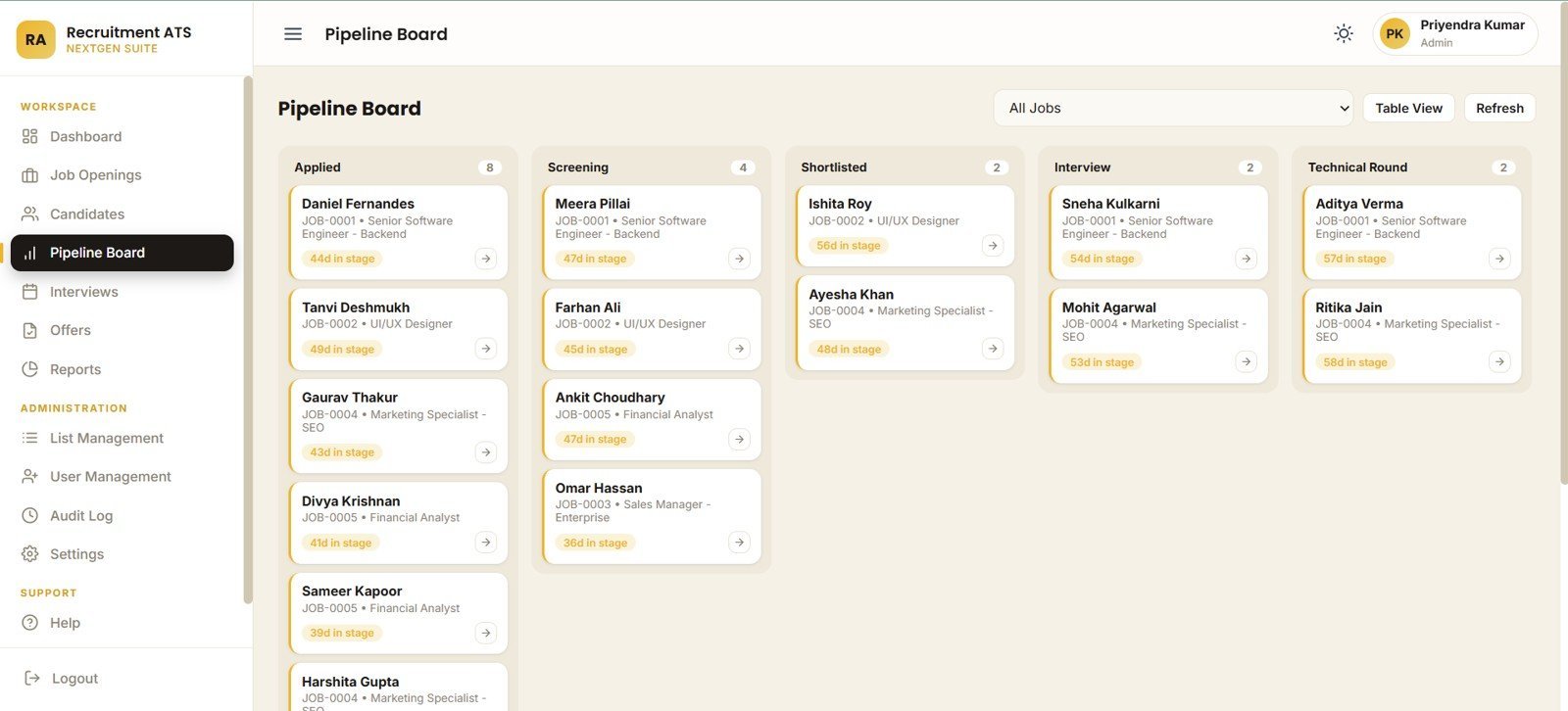
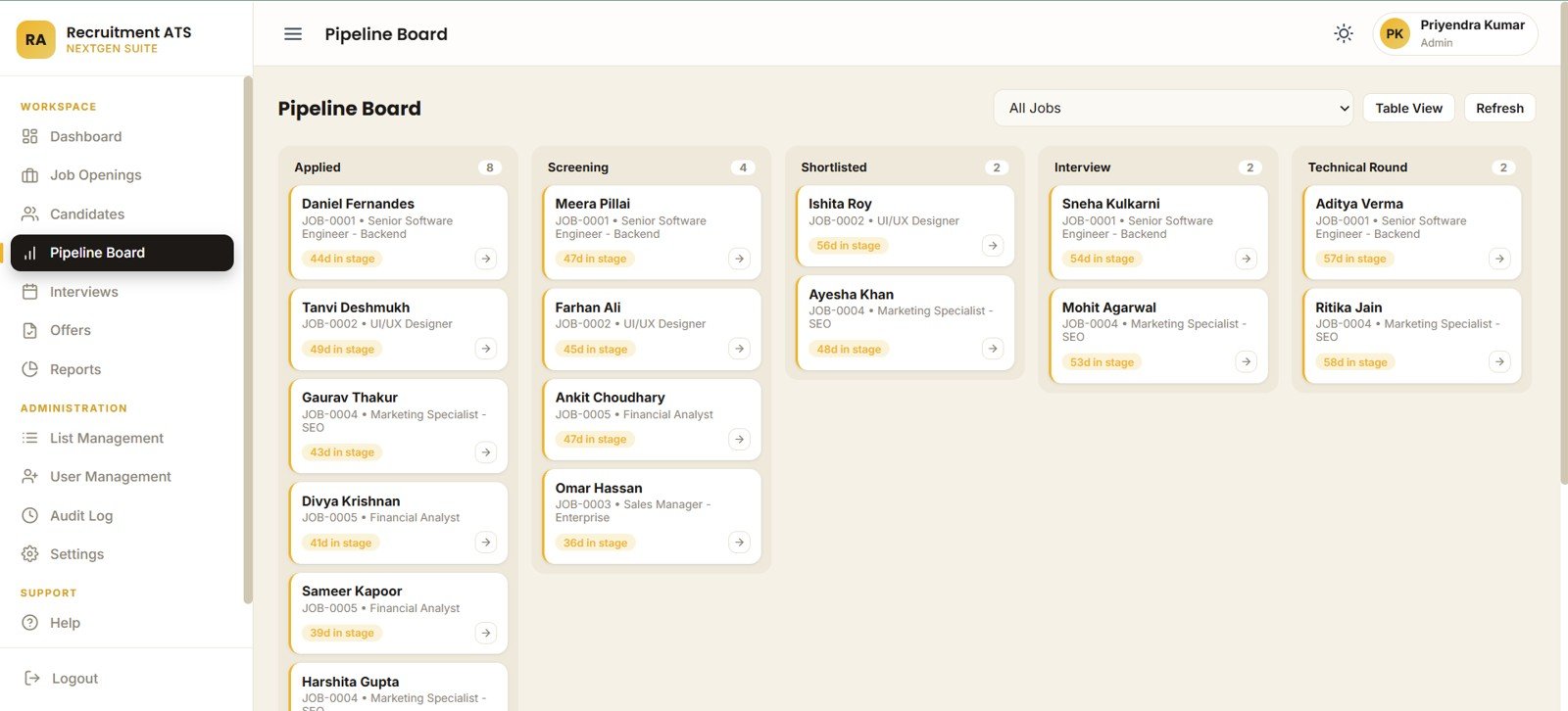
- Pipeline board: review candidates by applied, screening, shortlisted, interview, technical round, and days-in-stage views.
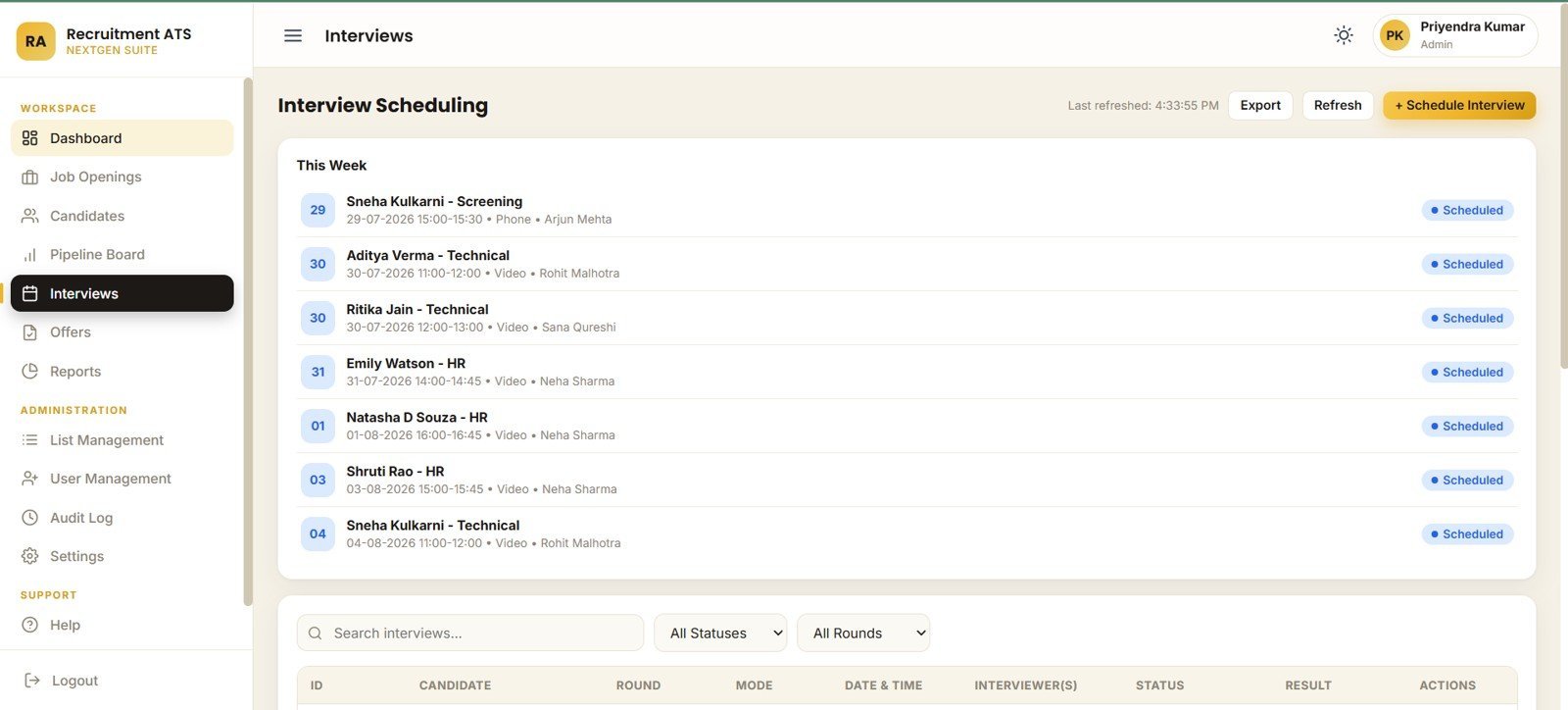
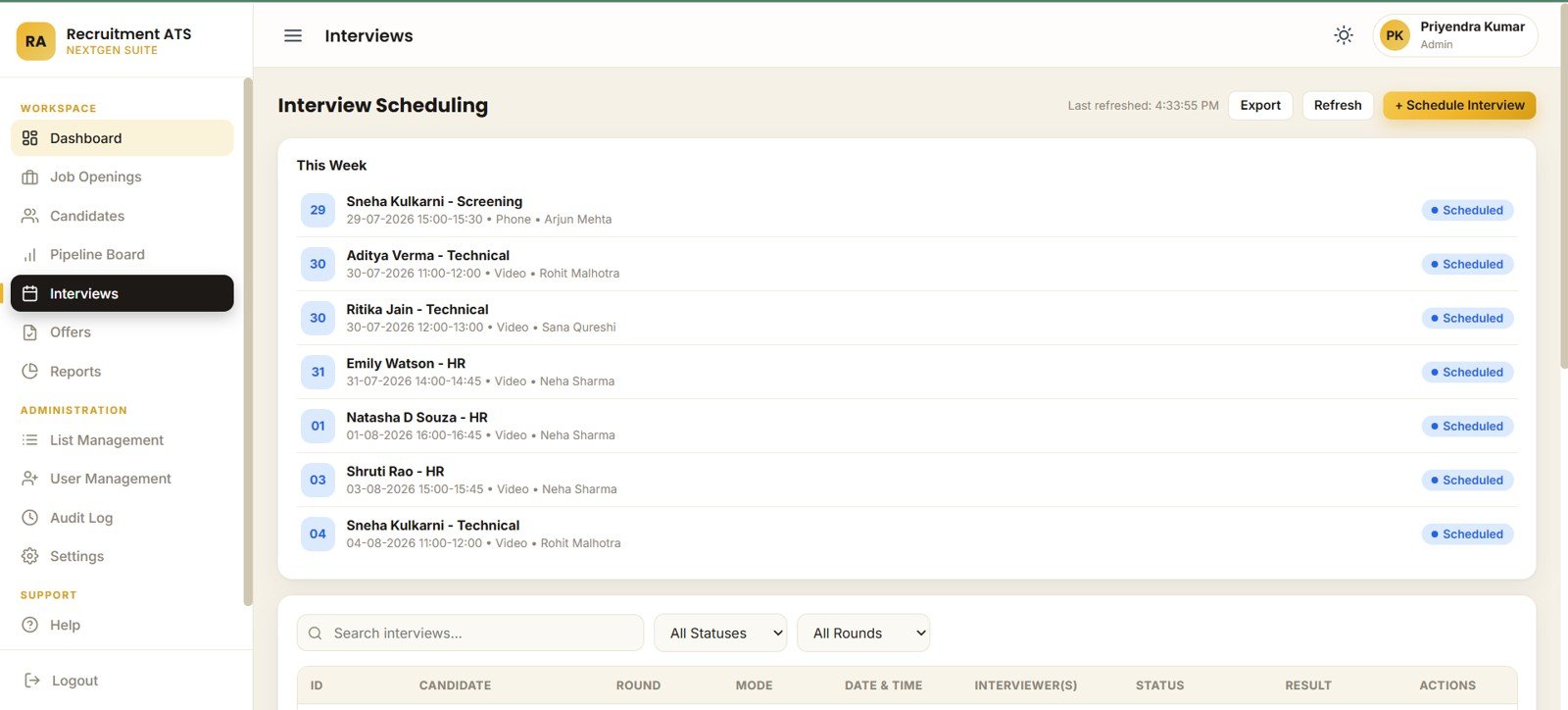
- Interview scheduling: track interview round, mode, date, time, interviewer, status, and weekly interview schedule views.
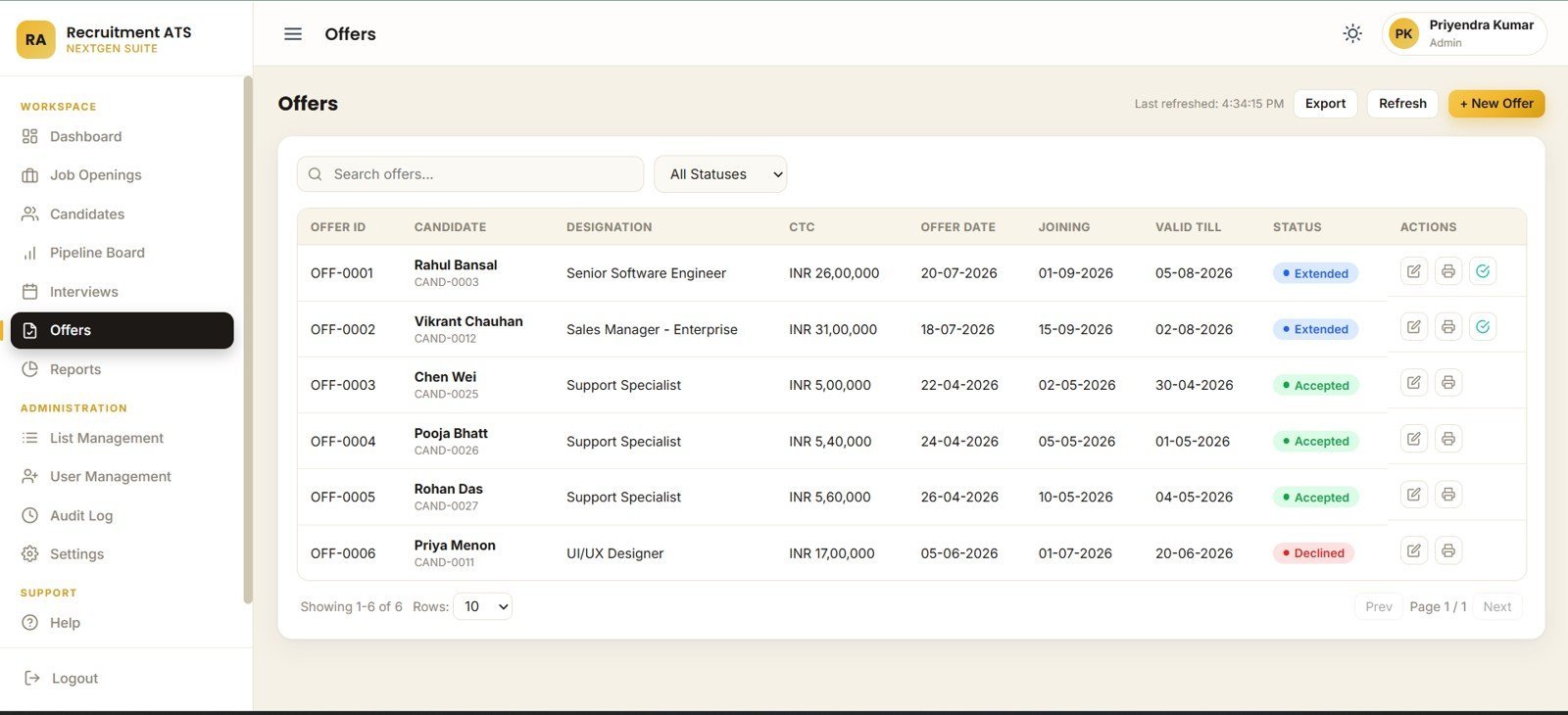
- Offer management: review candidate offers by designation, CTC, offer date, joining date, validity date, and acceptance status.
- Admin controls: maintain list values, departments, locations, dropdowns, user roles, access controls, company profile, preferences, ID prefixes, email notifications, and archive settings.
What’s Inside the Recruitment Applicant Tracking System Web App
1 – Login Page
The login page presents the recruitment suite introduction, welcome-back card, username field, password field, and login button. It also introduces the candidate journey, recruitment workflow, and login access flow before users enter the app.
🚀 Try the Live Demo Before You Buy
We have deployed this web app in our own Google account so you can test every page, every role, and the complete hiring pipeline — with real sample data — before purchasing. No signup, no email required.
🔑 Test Login Credentials
Sign in as admin to manage users, job requisitions, master lists and the full dashboard, as neha.hr to review candidates, approve offers and track hiring KPIs, or as arjun.rec to add applicants, schedule interviews and update pipeline stages. Log out and switch roles to see how permissions change on every screen.
💡 What you get after purchase: The full source code (Code.gs + Index.html) plus a step-by-step deployment guide so you can deploy your own private instance in your own Google account in under 15 minutes.
2 – Recruitment Overview
This page gives HR leaders the quick read: open positions, active candidates, interviews this week, offers extended, offers accepted, average time-to-hire, hired this month, and rejection rate. Candidates by Pipeline Stage shows stage load and bottlenecks.
Applications by Source helps compare sourcing channels. Monthly Applications by Month shows hiring seasonality, Open Jobs by Department shows workload distribution, and Offer Acceptance Rate by Status tracks conversion from offer to hire.
3 – Job Openings
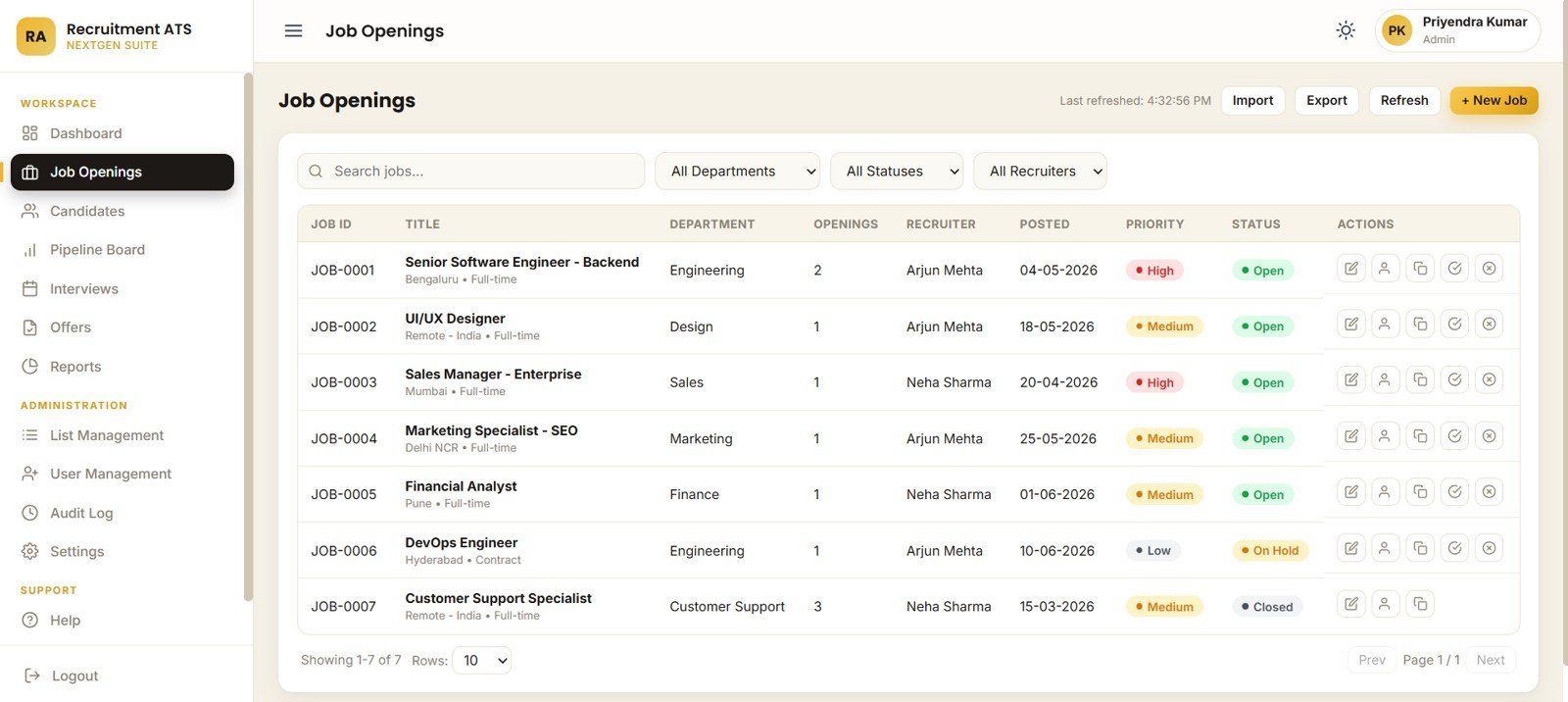
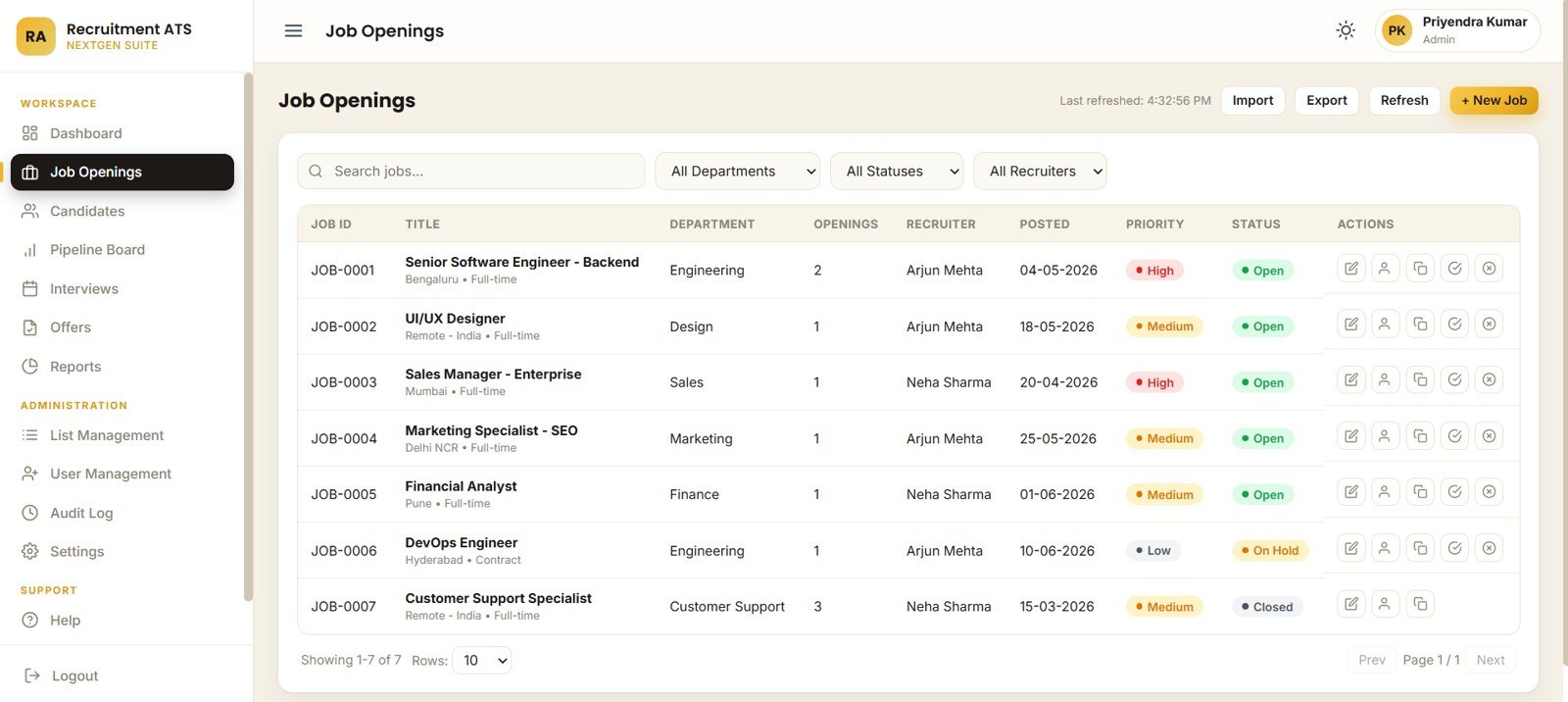
The Job Openings page tracks department, status, recruiter, priority, job title, posted date, and job actions for every opening record. Recruiters can review which roles need attention and which departments are carrying the largest hiring load.
4 – Candidates
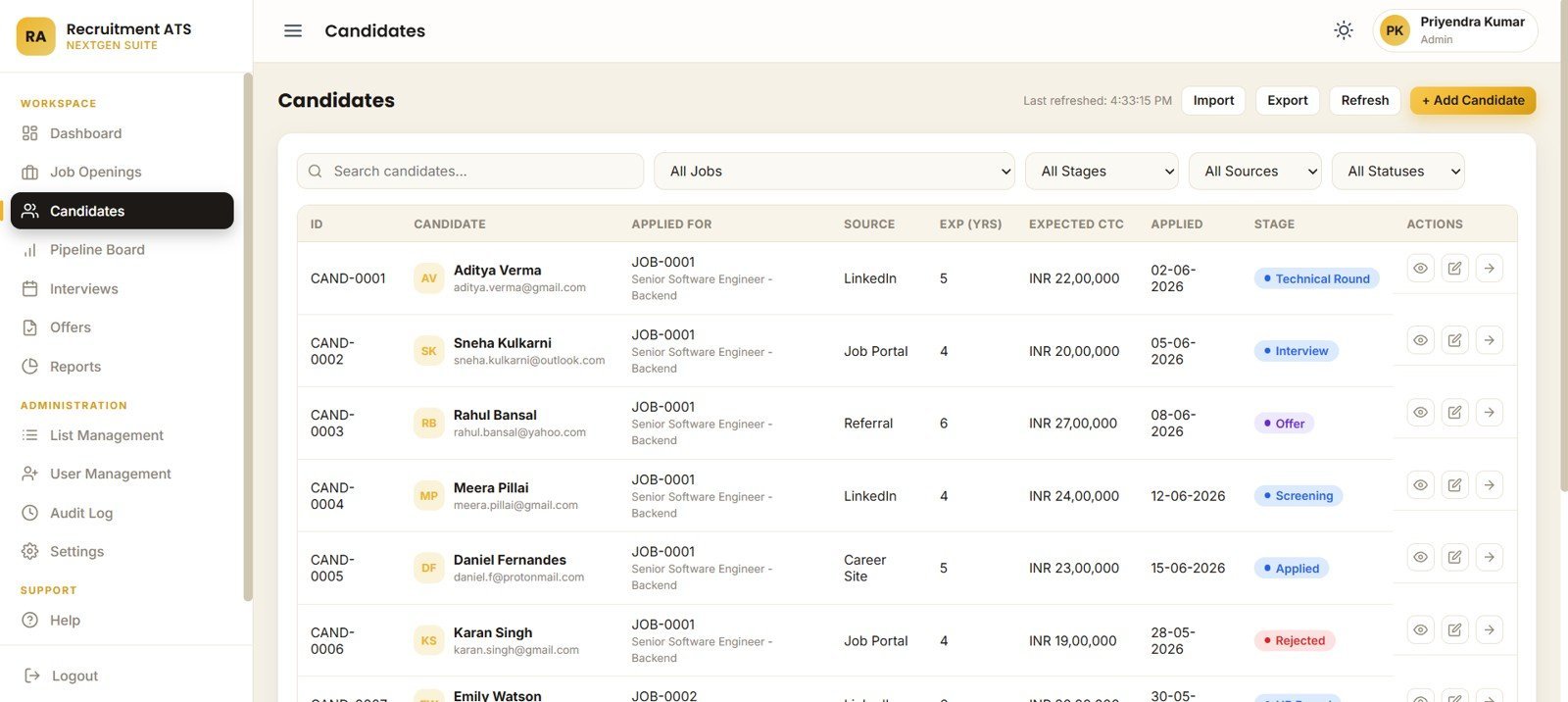
The Candidates page organizes applicants by job opening, pipeline stage, source, status, experience years, expected CTC, and applied date. It is built for daily candidate review and fast filtering during recruiter check-ins.

5 – Pipeline Board
The Pipeline Board groups candidates by applied, screening, shortlisted, interview, and technical round stages. It also tracks days in stage by candidate and candidate cards by job opening so managers can find stalled candidates quickly.
6 – Interview Scheduling
The Interview Scheduling page helps recruiters manage interviews by candidate, round, mode, date and time, interviewer, status, and weekly interview schedule. It keeps interview workload visible before calendar conflicts become delays.
7 – Offers
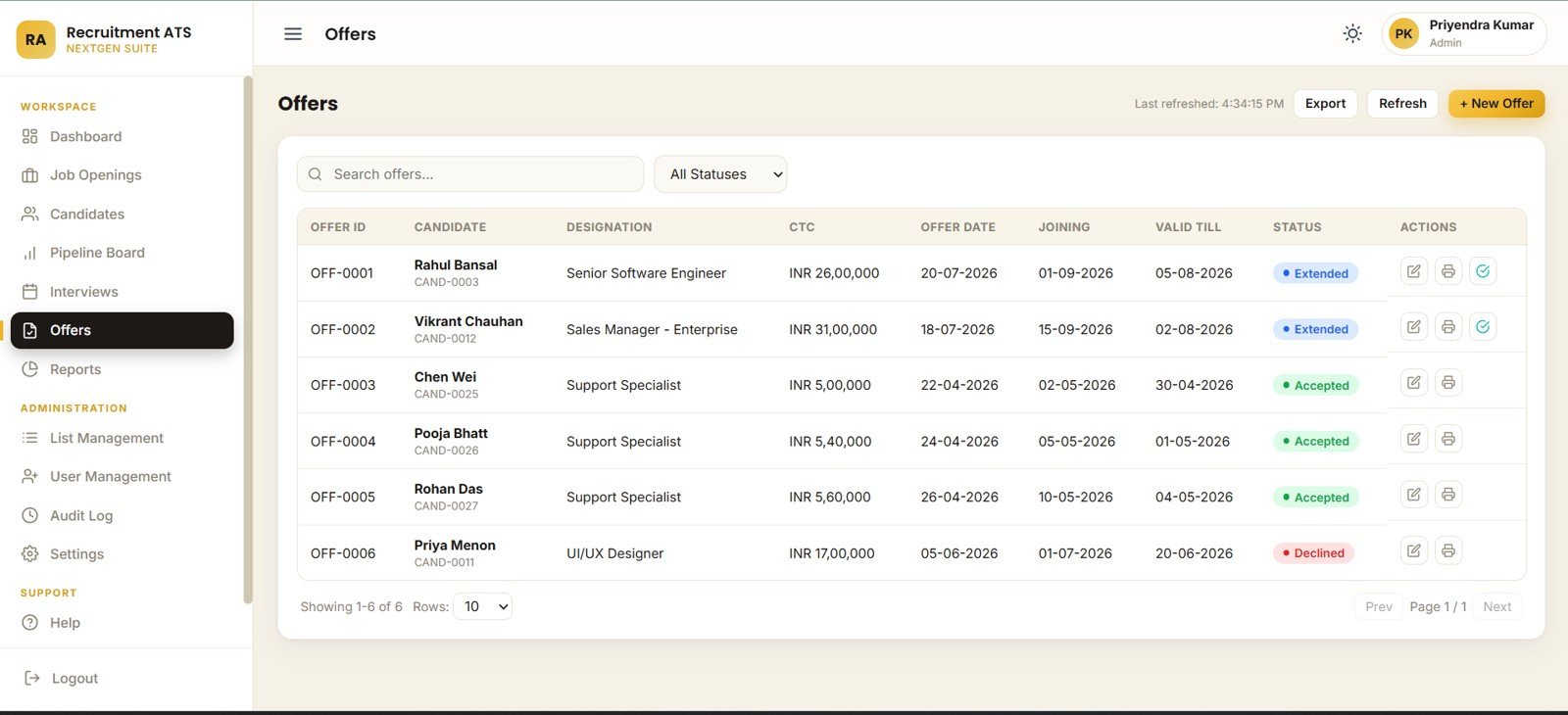
The Offers page tracks offer records by candidate, designation, CTC, offer date, joining date, valid-till date, and offer status. HR teams can see pending, accepted, declined, and expired offers without maintaining a separate tracker.
8 – Reports
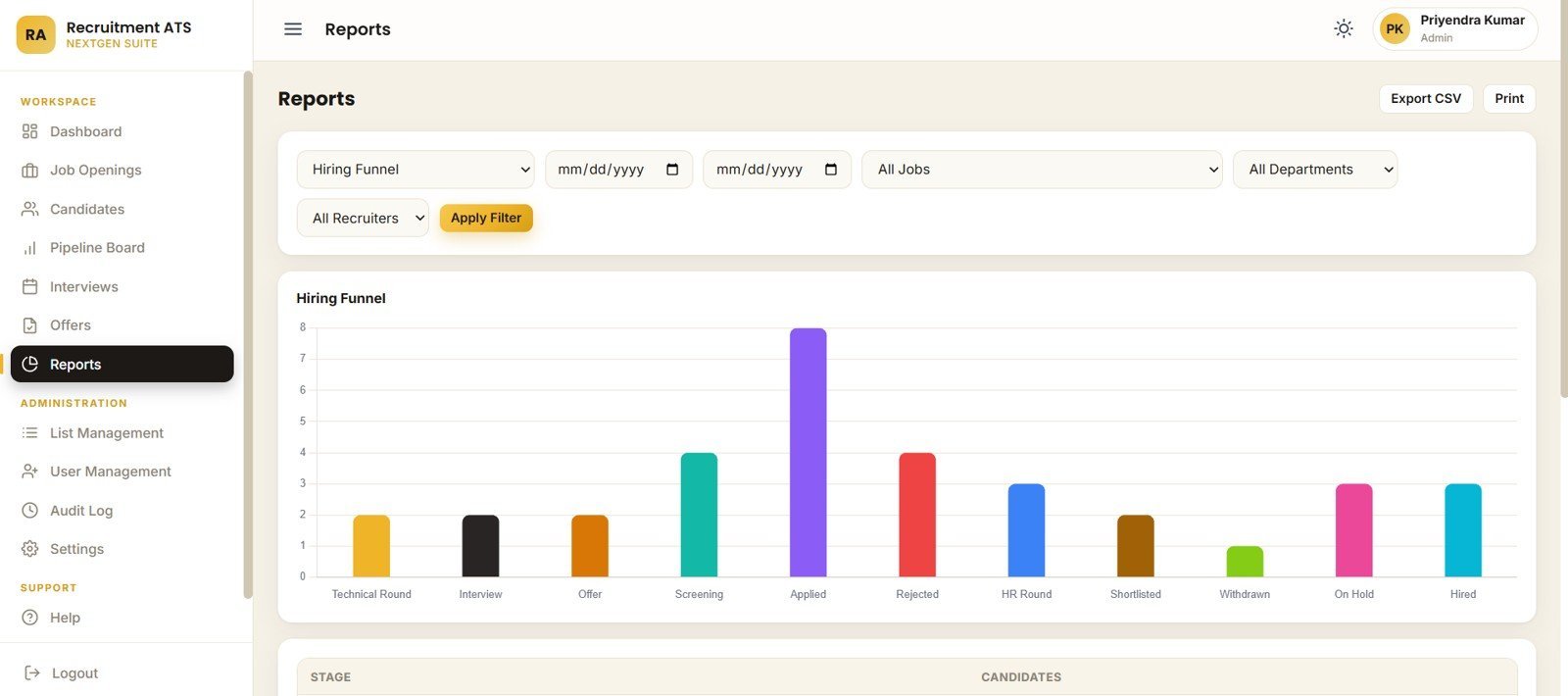
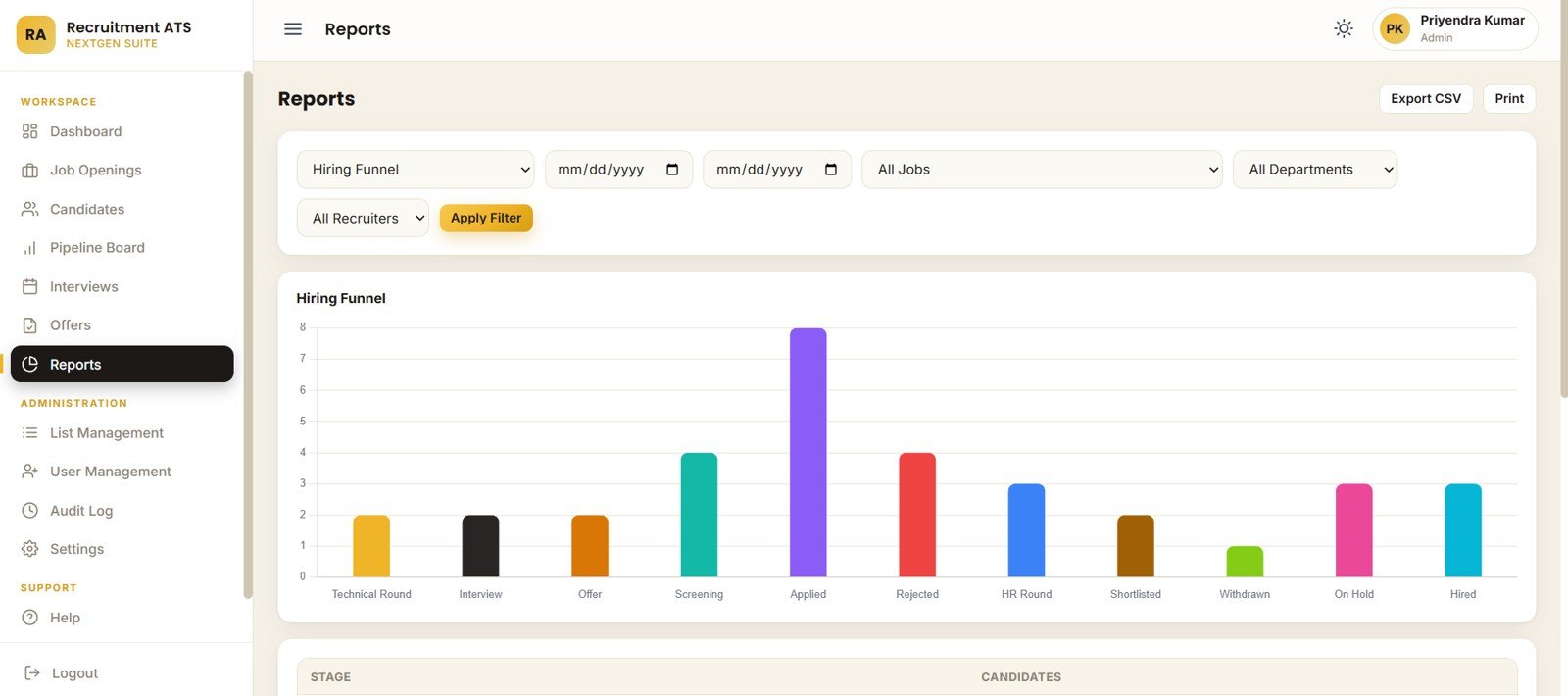
The Reports page brings together hiring funnel by stage, candidates by stage, date-range reports, job reports, department reports, and recruiter reports. It is useful for weekly HR meetings, hiring reviews, and founder or CHRO updates.
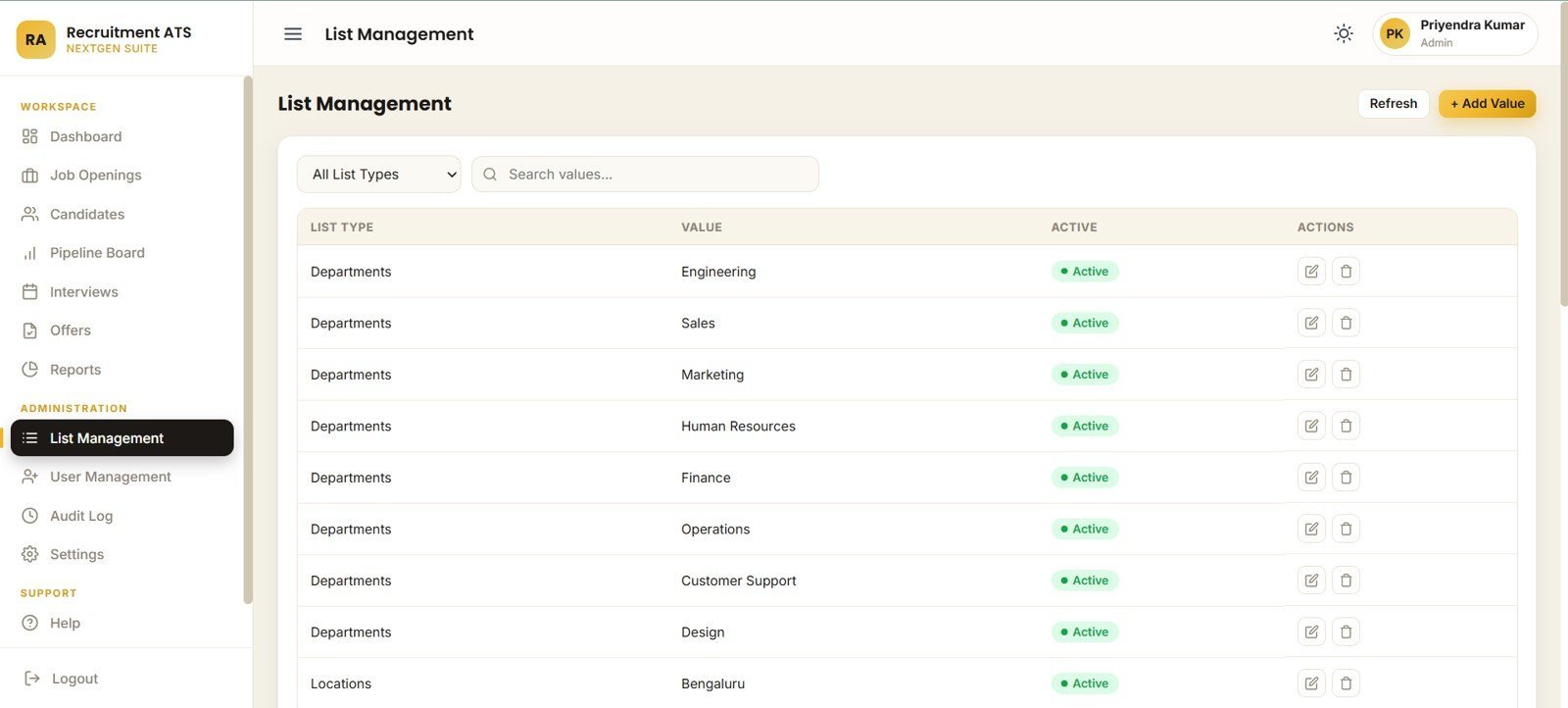
9 – List Management
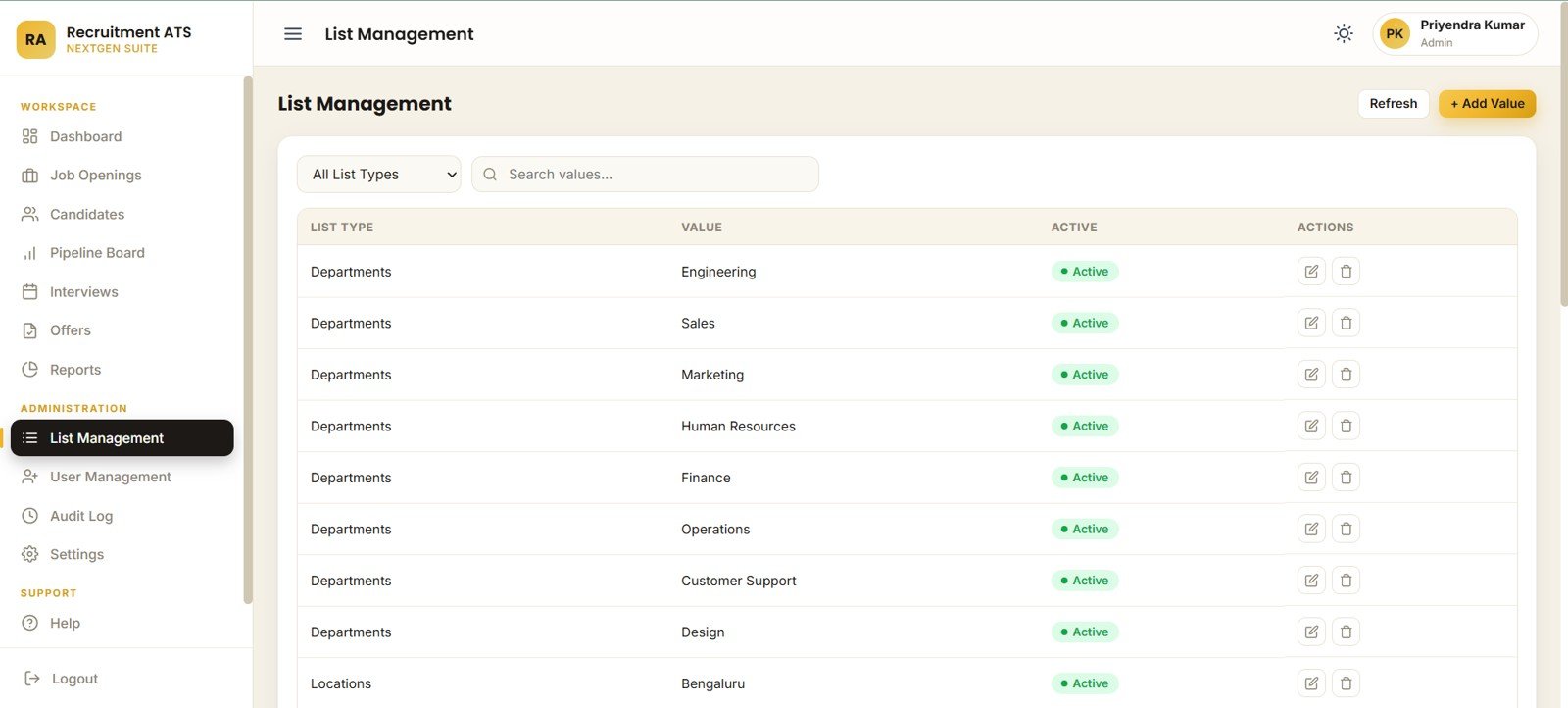
List Management controls list types, department active status, location active status, dropdown search, and list-record actions. It keeps master values clean without asking a developer to edit the code every time a dropdown changes.
10 – User Management
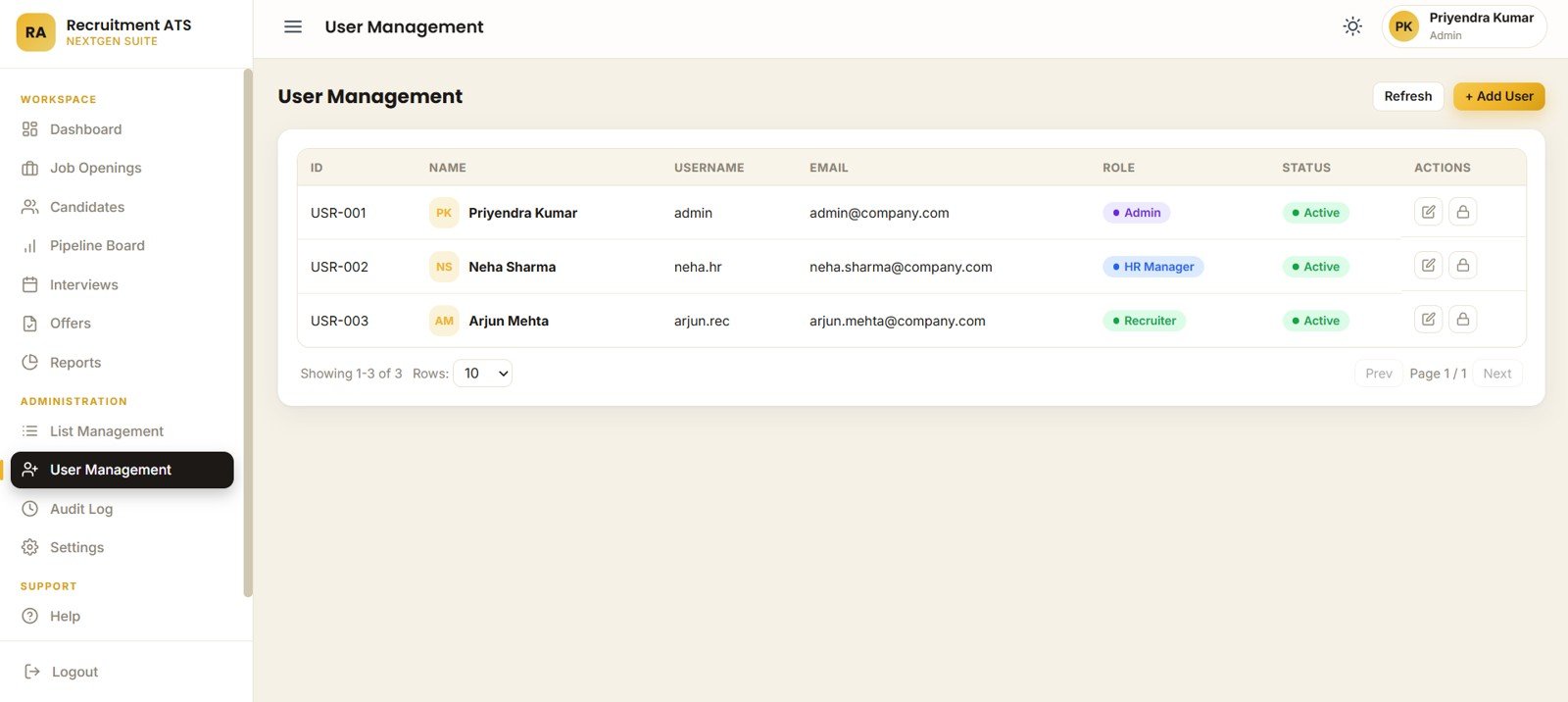
User Management tracks users by role, active status, username, email, access controls, and user-record actions. It is made for teams that need controlled access for recruiters, HR managers, and administrators.
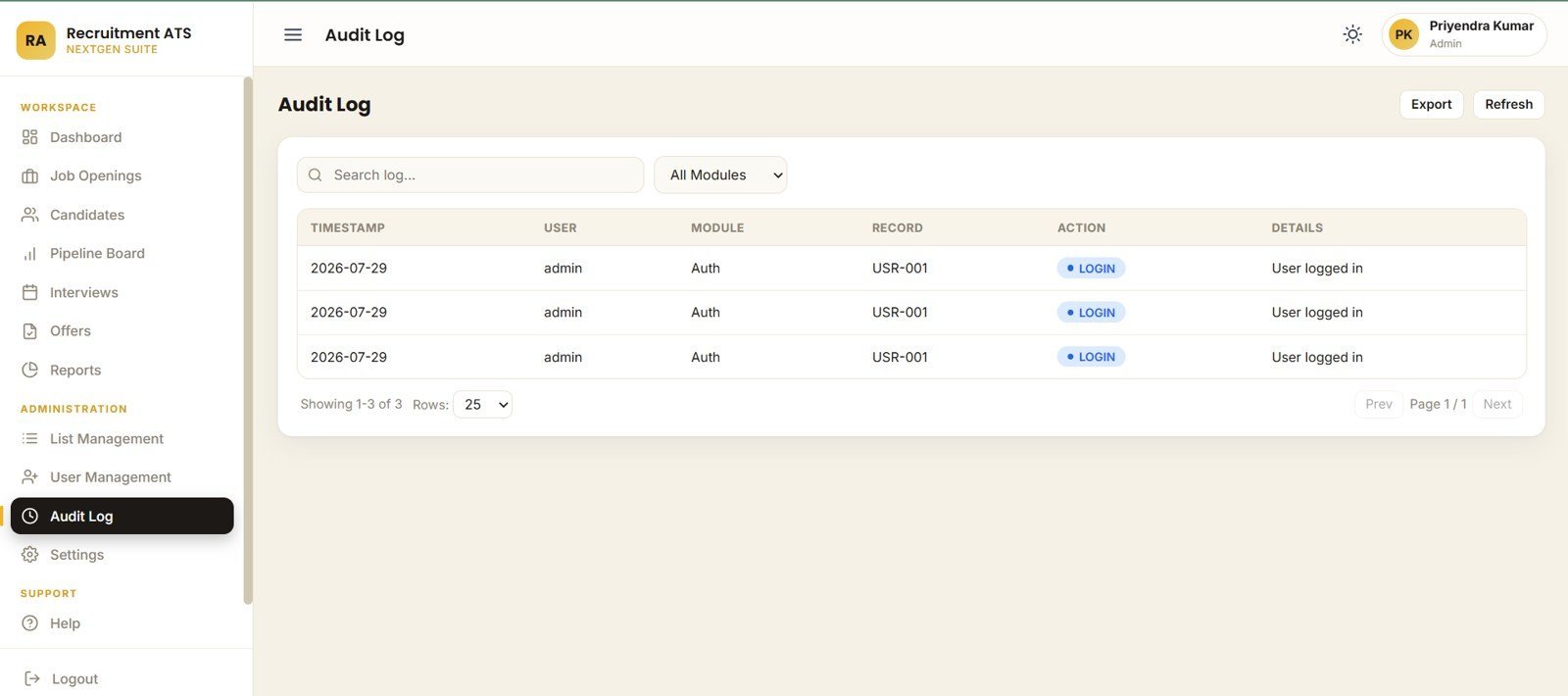
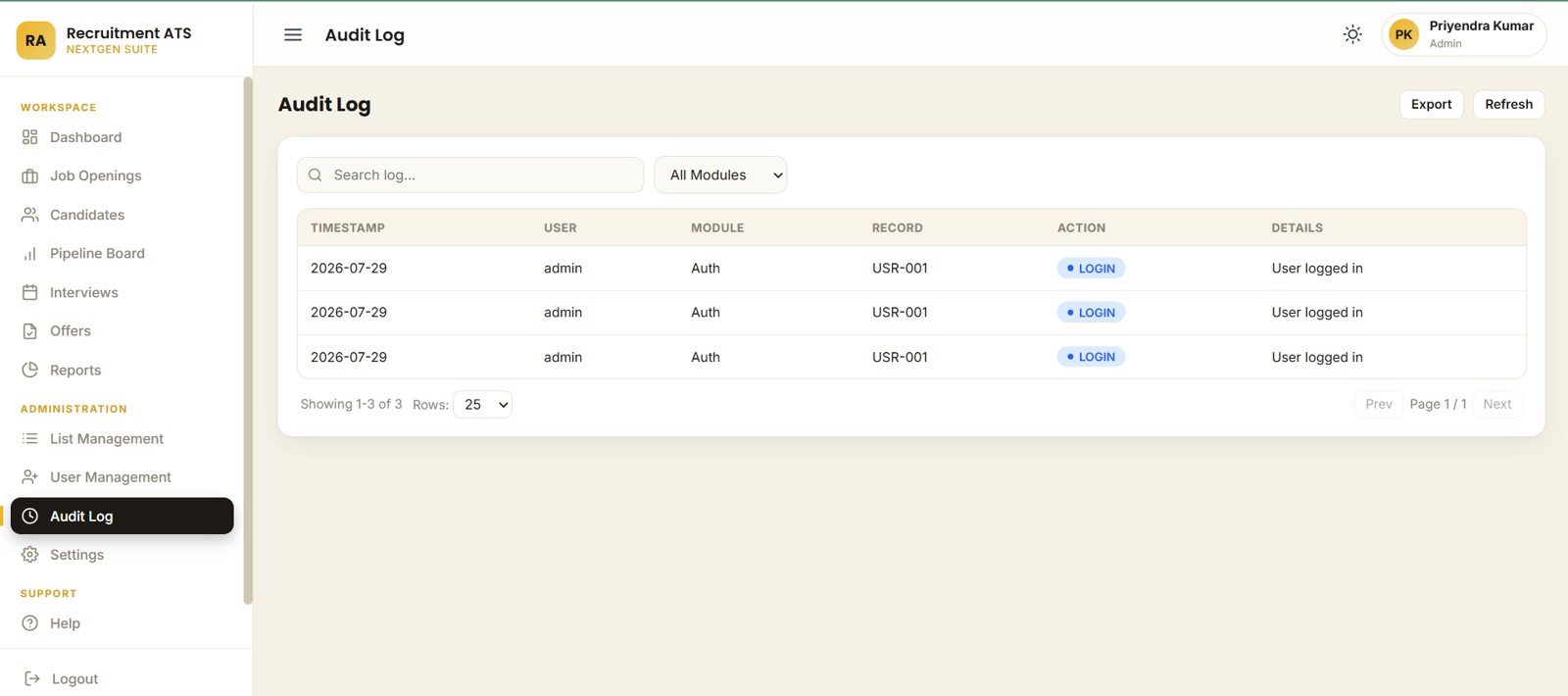
11 – Audit Log
The Audit Log page records timestamp, user, module, record, action, and activity details. It helps administrators review who changed what across recruitment records, settings, lists, and user controls.
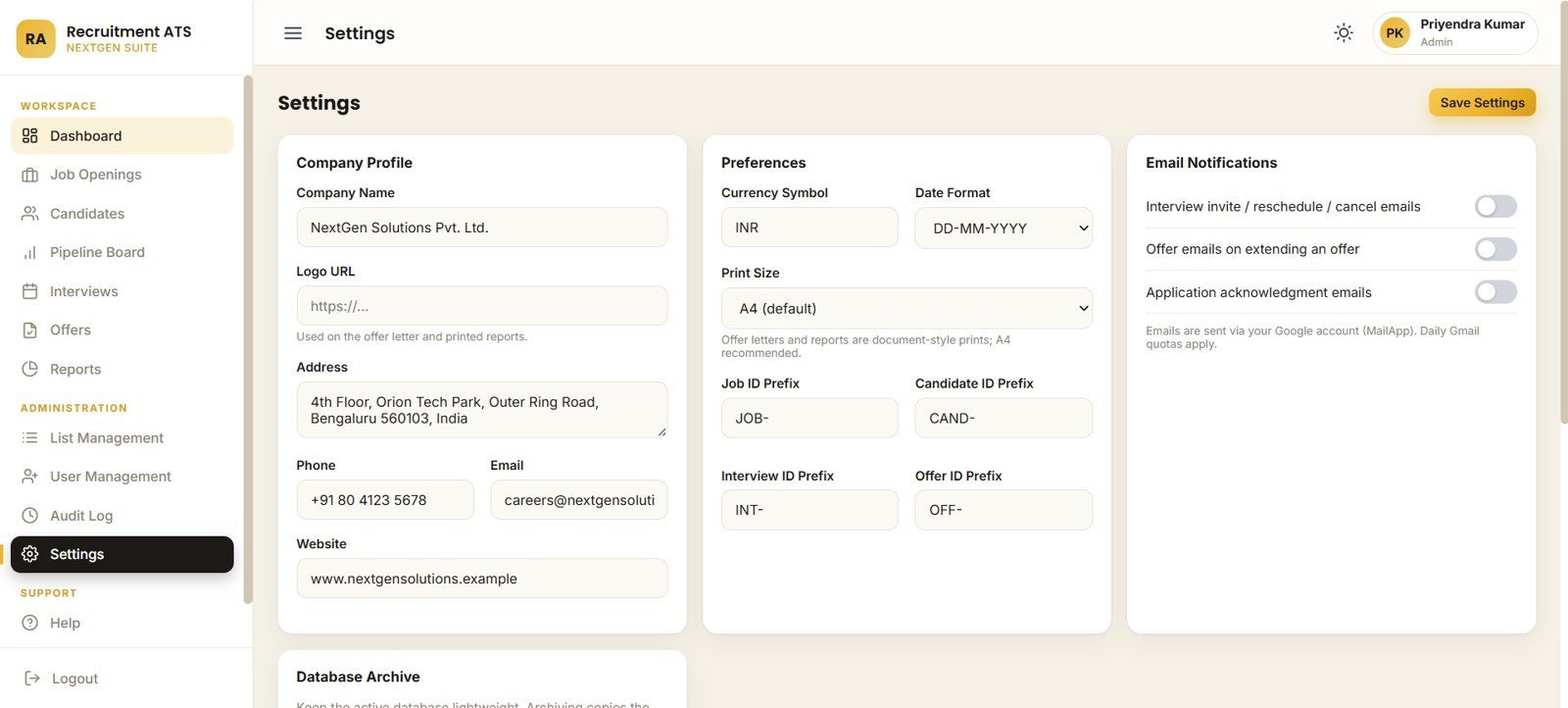
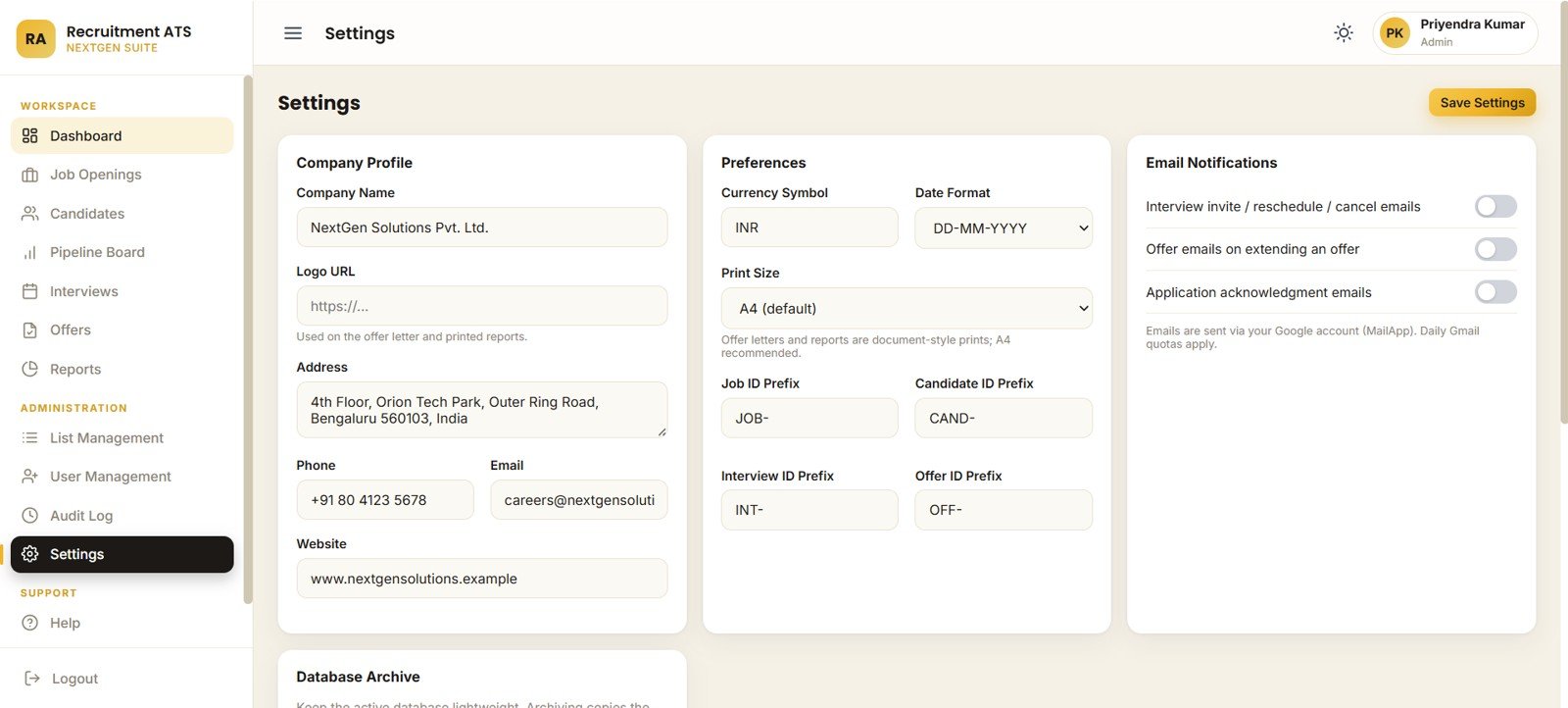
12 – Settings
Settings covers company profile, currency, date format, offer-letter print size, report print size, job/candidate/interview/offer ID prefixes, email notifications, and database archive controls. This is where the app is shaped for your recruitment workflow.
Recruitment Applicant Tracking System Web App vs. Spreadsheet Tracker vs. Paid ATS/HR SaaS – Where This Fits
| Feature | This web app | Spreadsheet tracker | Paid ATS/HR SaaS |
|---|---|---|---|
| Cost | $39.99 one-time | Low cost, but manual | Monthly or annual subscription |
| Platform | Browser web app on Google Sheets and Apps Script | Excel or Google Sheets file | Vendor-hosted app |
| Setup time | Deploy from included files and guide | Fast, but limited controls | Vendor onboarding and configuration |
| Recruitment workflow | Jobs, candidates, pipeline, interviews, offers, reports, users, audit logs | Usually separate tabs and formulas | Strong workflow, vendor rules apply |
| Customizable fields | Edit lists, settings, code, and Google Sheet structure | Editable but fragile | Often restricted by plan |
| Share with link | Yes, through your deployed web app URL | Yes, but spreadsheet access can get messy | Yes |
| Year-1 cost at 5 users | $39.99 template cost, plus your Google account choices | Low cash cost, higher manual effort | Often hundreds or thousands per year |
Who This Template Is For – and Who It’s Not For
Built for: small and mid-sized HR teams, recruitment agencies, startup founders, HR consultants, admin teams, and hiring managers who want a browser-based applicant tracking workflow without a full SaaS rollout.
Not for: enterprise teams that need SOC 2 paperwork, SSO, automated resume parsing, job-board posting integrations, payroll integration, background-check integrations, or complex multi-country compliance workflows out of the box.
How to Use the Recruitment Applicant Tracking System Web App
- Download and unzip the purchased file.
- Create or open the Google Sheet/database included in the setup guide.
- Open Apps Script, add the supplied code files, and run the setup function.
- Deploy the project as a web app from your Google account.
- Open Settings and enter company profile, currency, date format, prefixes, print settings, and notification preferences.
- Add users, departments, locations, job openings, candidates, interview schedules, and offer records.
- Use Overview, Pipeline Board, Reports, Audit Log, and archive controls for ongoing recruitment management.
Real-World Use Cases
Anita, HR manager at a 70-person services company: Anita uses the overview cards every Monday to review open positions, interviews this week, and offer acceptance before her leadership meeting.
Vikram, recruitment agency owner: Vikram keeps recruiters in the Pipeline Board during daily standups so screening, interview, and technical round bottlenecks are visible.
Meera, founder hiring her first team: Meera replaces multiple spreadsheets with one web app for candidates, interviews, offers, and audit history while keeping data in her own Google account.
Frequently Asked Questions
What is included in the Recruitment Applicant Tracking System Web App?
It includes 12 pages covering login, recruitment overview, job openings, candidates, pipeline board, interview scheduling, offers, reports, list management, user management, audit log, and settings.
Is this a subscription product?
No. It is a one-time downloadable template. You deploy and run your own copy instead of paying a per-user monthly ATS subscription.
Does it work in a browser?
Yes. It is designed as a web app workflow that can be deployed from your Google account and opened from a browser link.
Can I customize departments, locations, and dropdown lists?
Yes. The List Management and Settings pages are built so you can manage departments, locations, dropdown values, ID prefixes, company profile, and preferences.
Does it replace Greenhouse, Workable, or BambooHR?
No. It is best for teams that need a practical hiring workflow and reporting layer. Large companies that need enterprise integrations, automated resume parsing, SSO, and formal compliance controls should use a dedicated ATS or HRIS.
Is there an audit log?
Yes. The Audit Log page tracks timestamp, user, module, record, action, and activity details for administrator review.
About the Author
Built by PK – Microsoft Certified Professional with 15+ years of Excel, Google Sheets, and Power BI experience. Founder of NextGenTemplates, reaching 300K+ subscribers across YouTube channels. Every template is hand-built and tested before release.
Explore Related Templates
- Candidate Application Management System V1.0
- Interview Scheduling Management System V1.0
- Offer Letter Management System V1.0 in Excel VBA
- HR Analytics Dashboard in Power BI
- Browse Web Apps and Management Systems
Download the Recruitment Applicant Tracking System Web App when you want job openings, candidate records, pipeline stages, interviews, offers, reports, user access, audit logs, and settings in one practical recruitment web app.
Last updated: July 29, 2026.






























Reviews
There are no reviews yet.