

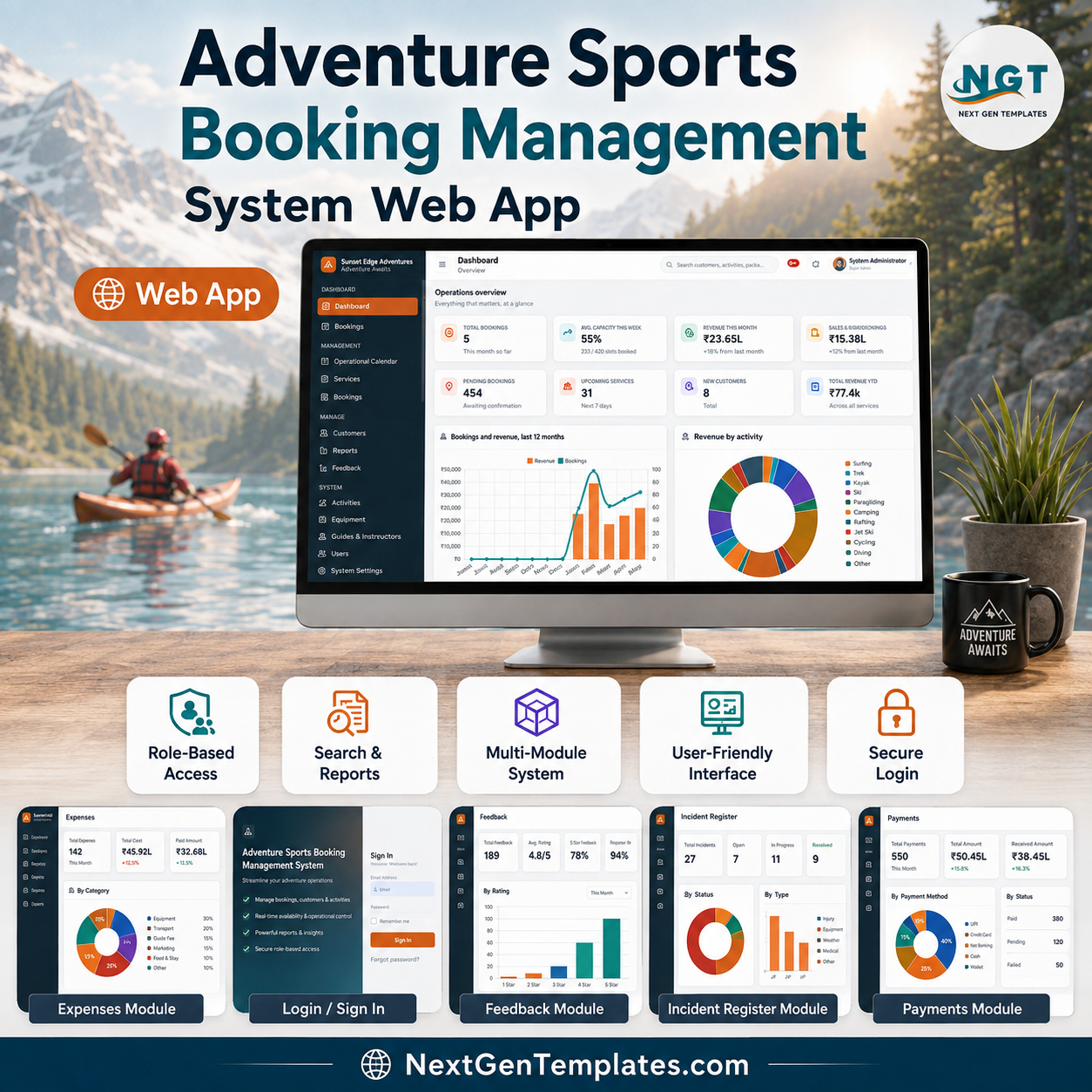
The Adventure Sports Booking Management System Web App is a 25-page operations system for adventure operators, built on Google Apps Script and Google Sheets. It ships with 24 configurable master lists holding 187 values, 24 operating reports, 7 seeded role accounts, and a demo database of 430 customers, 18 activities, 619 sessions, 994 bookings and 5,843 waivers. Deploy it to your own Google account and it runs from a browser with no server to rent.
🌍 Join 8,400+ teams in 40+ countries using NextGenTemplates to replace paid SaaS tools with one-time-purchase Excel, Google Sheets, Power BI and web app templates.
✅ Instant download · One-time payment · No subscription · No per-user fees · Lifetime access
🚀 Try the Live Demo Before You Buy
We have deployed this web app in our own Google account so you can test every page, every role and every report — with the full sample data set of 430 customers, 619 sessions and 994 bookings — before purchasing. No signup, no email required.
🔑 Test Login Credentials — All 7 Roles
Sign in as admin to reach all 25 pages including Users, Master Lists, Settings and the Audit Log. Then sign out and try safety — it lands on the waiver register, the equipment inspection list and the incident log, and genuinely cannot reach anything else. That is the role separation this system is built around, and the demo is the fastest way to see it.
💡 What you get after purchase: the full source code (Code and Index files) plus the complete user manual and a step-by-step deployment guide, so you can deploy your own private instance in your own Google account in under 30 minutes. The demo is shared and resets periodically — your instance is yours alone.
🔑 Key Features of the Adventure Sports Booking Management System
- 🧗 Capacity that the system enforces, not your memory. Each activity carries a seat capacity, a per-guide ratio, and age and weight limits. Bookings hold seats provisionally until the hold expiry set in Settings, and expired holds can be released in one action from the Bookings page.
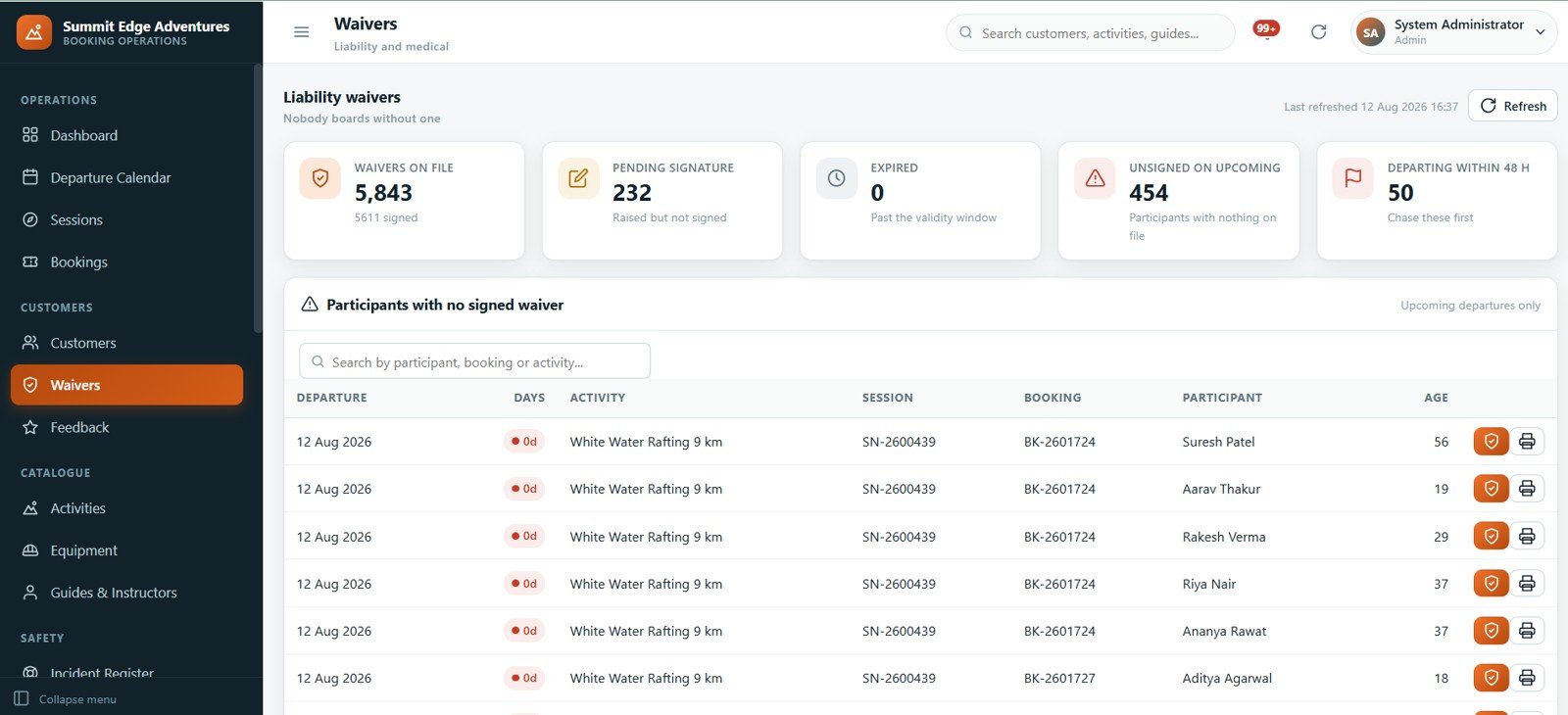
- 📝 A waiver register that blocks boarding. The Waivers page lists every participant with nothing signed, sorted by how many days until their departure, with a separate count for departures inside 48 hours. In the demo data that is 454 unsigned participants on upcoming trips — exactly the list a front desk needs each morning.
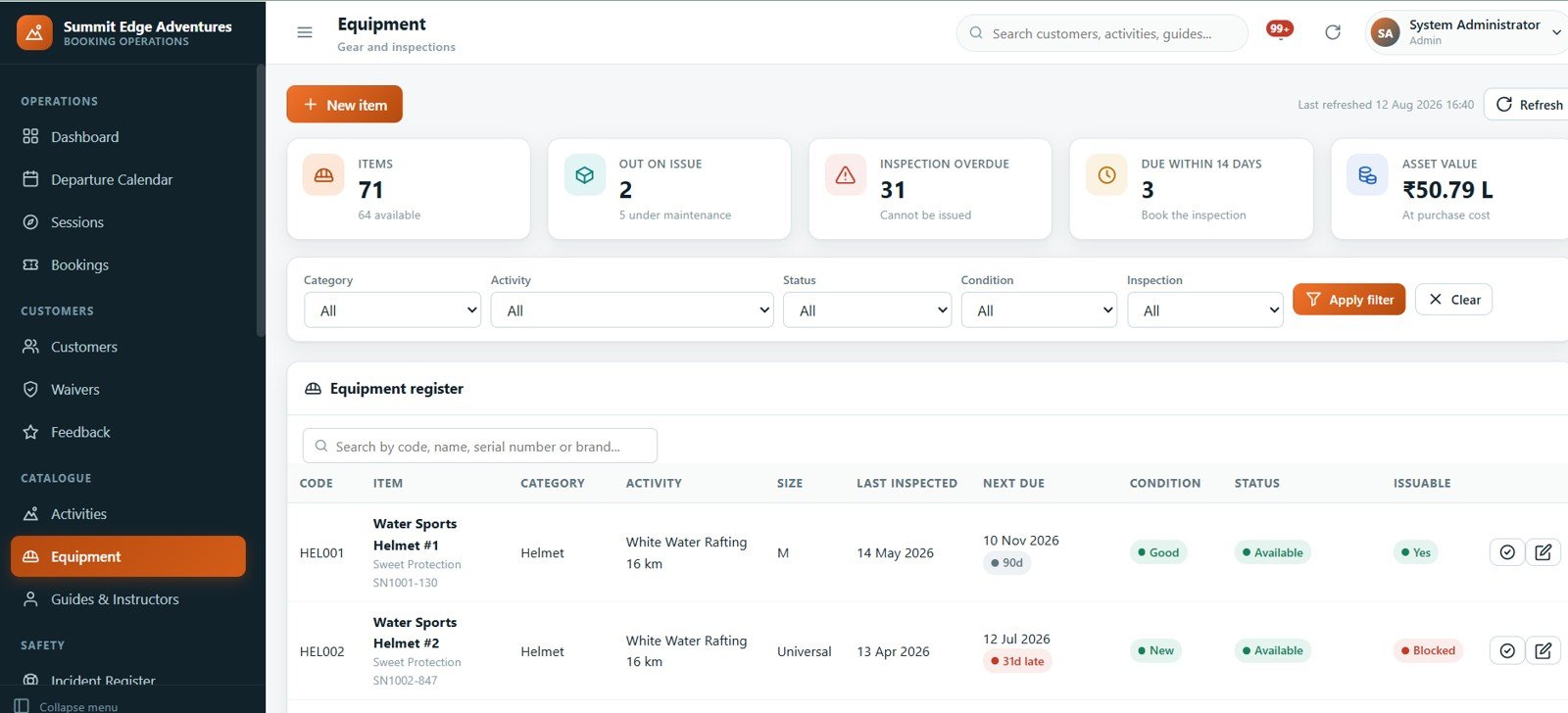
- 🪖 Gear that cannot be issued when it is overdue. The equipment register tracks 71 items with inspection intervals, condition, serial numbers and an issuable flag. An item 31 days past inspection shows as Blocked and stays blocked until it is signed off.
- 🧭 Guide certifications policed automatically. 22 team members carry certification bodies and expiry dates. An expired certification means that guide cannot lead a session, and a configurable warning window flags the ones expiring soon.
- 💰 One cancellation policy, applied identically every time. Five refund bands — more than 7 days 100%, 3 to 7 days 50%, 1 to 2 days 25%, same day or no show 0%, operator or weather cancellation 100% — all editable under Settings, and the figure is shown before you confirm.
- 🤝 Agent, OTA and corporate commission. 12 partners with per-partner rates applied to base fare or grand total, lifetime business sent, commission earned, commission still due and an agreement-expiry flag.
- 🔐 Real role security, not hidden menus. Every server entry point re-checks the caller’s session and role before it touches data. Passwords are stored only as salted SHA-256 hashes and can never be read back.
- 🔔 Alerts generated from the data, never stale. The Notifications page rebuilds 306 live alerts across money, bookings and safety, with the 62 critical ones surfaced first.
📦 What’s Inside the Adventure Sports Booking Management System
All 25 pages, in the order they appear in the sidebar.
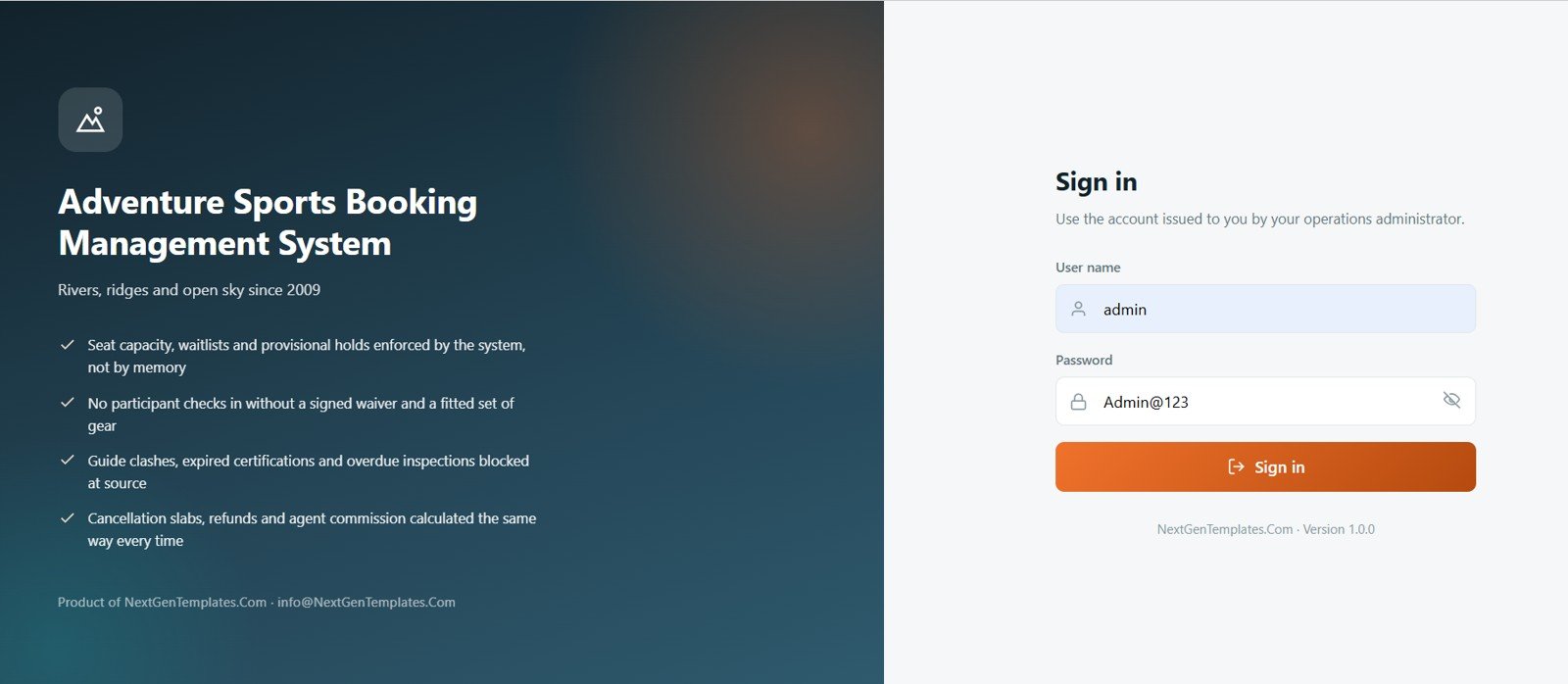
Sign In — Role-Based Access
Seven seeded accounts cover the whole operation: Admin, Operations Manager, Booking Agent, Lead Guide, Guide, Accounts and Safety Officer. Each role sees a different subset of the 25 pages, and guide accounts can be linked to a specific guide record so a guide sees only their own sessions.
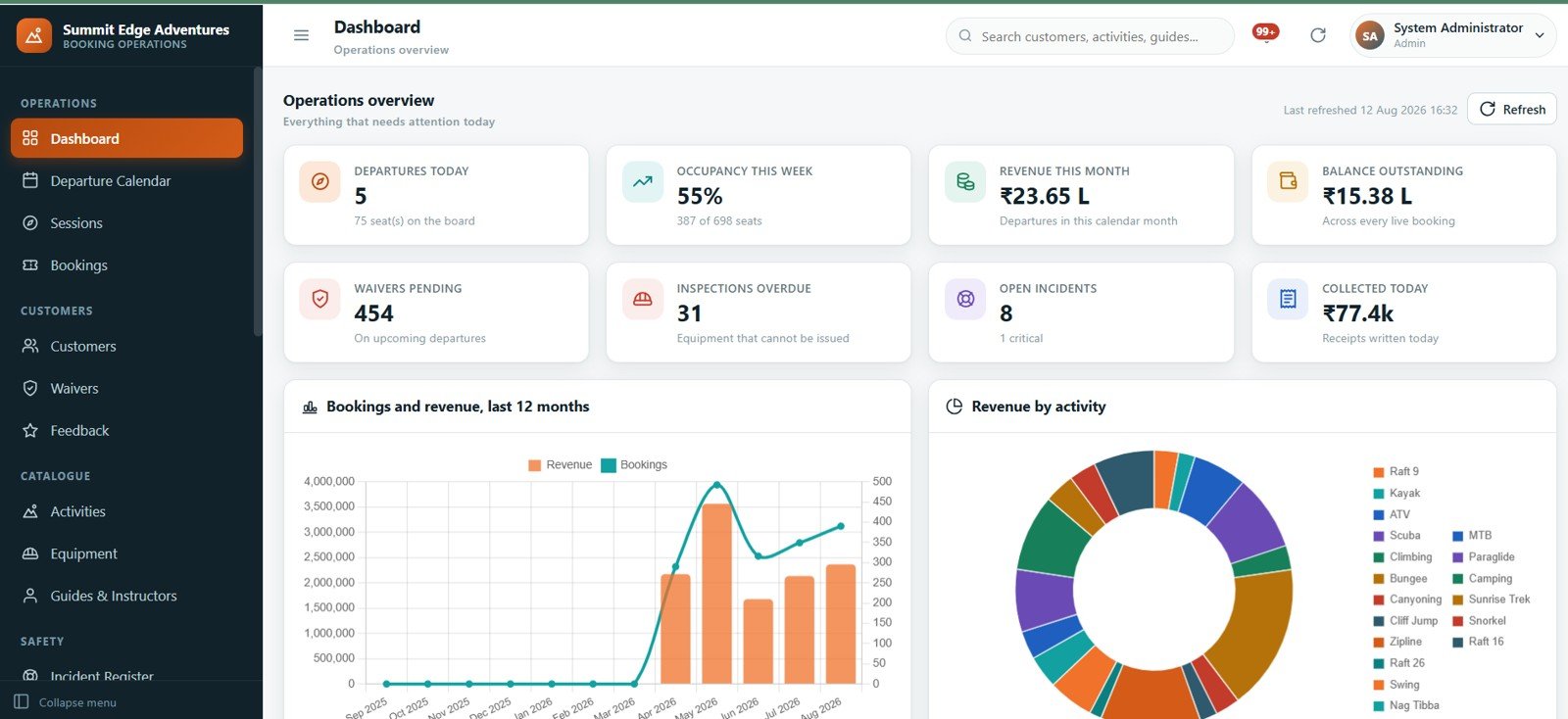
Dashboard — Everything That Needs Attention Today
Eight cards report departures today, occupancy this week, revenue this month, balance outstanding, waivers pending, inspections overdue, open incidents and cash collected today. Below them sit a 12-month bookings and revenue chart and a revenue-by-activity breakdown across all 18 activities.
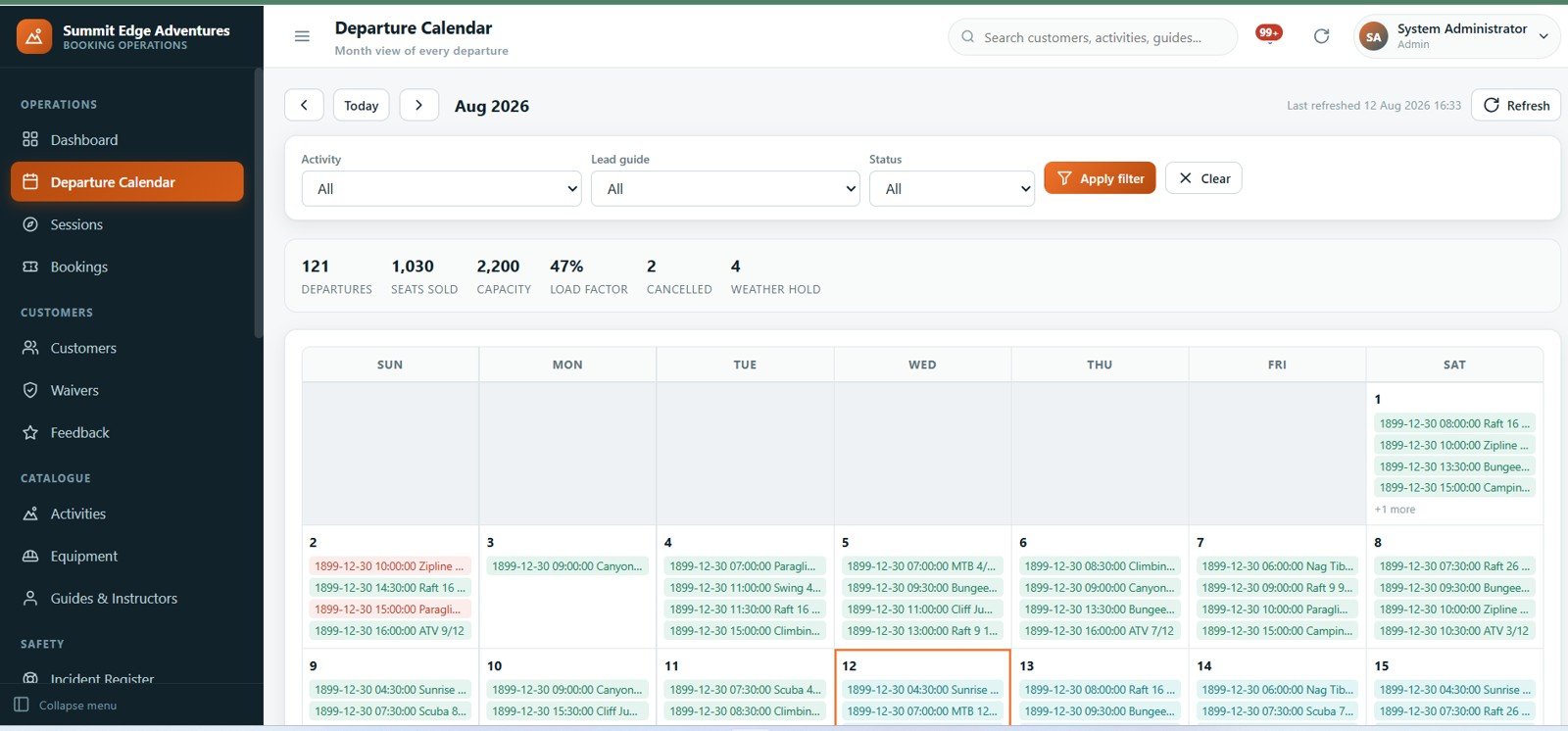
Departure Calendar — Month View of Every Departure
A month grid of every scheduled departure, filterable by activity, lead guide and status. The strip above it reports departures, seats sold, capacity, load factor, cancellations and weather holds for the month on screen.
Sessions — Scheduled Departures
Create sessions one at a time or use Generate a schedule to lay out a whole season. Each row shows date, time, session number, activity, meeting point, lead guide, seats sold against capacity, a fill bar and status. Cards flag sessions below the minimum to run and sessions with no lead guide assigned.
Bookings — Seats Sold and Checked In
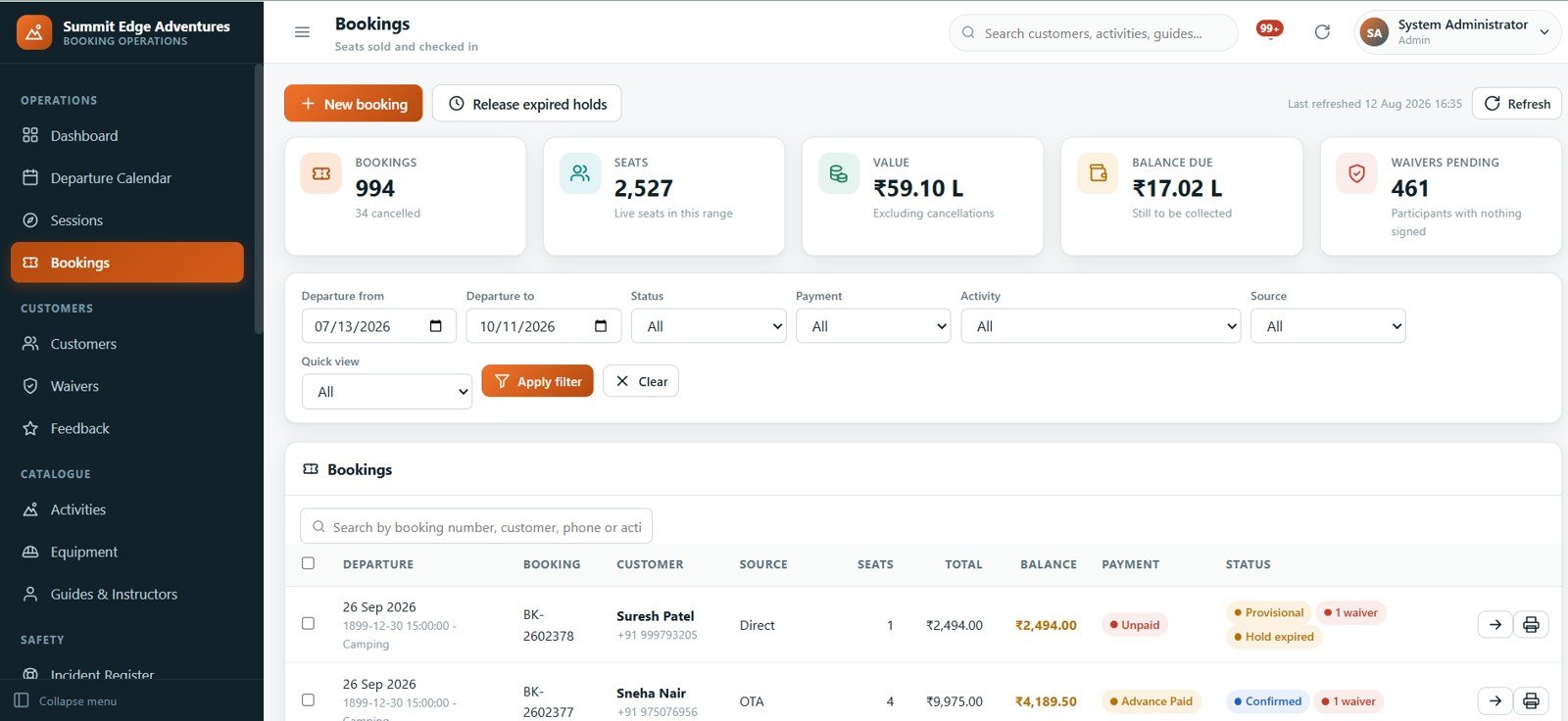
The booking register carries source (direct, OTA, agent, phone), seats, total, balance, payment state and status badges for provisional, confirmed, hold expired and waiver outstanding. Filters cover departure range, status, payment, activity and source, and Release expired holds clears stale provisional seats in one action.
Customers — The Guest Register
A 430-record register with customer code, phone, email, city, booking source, bookings taken, lifetime spend, loyalty tier and last activity date, filterable by status, tier, source, partner and city.
Waivers — Nobody Boards Without One
5,843 waivers on file, with counts for pending signature, expired, unsigned on upcoming departures and departing within 48 hours. The table underneath lists every participant with nothing signed, ordered by days to departure, so the front desk knows exactly who to chase first.
Feedback — Ratings and Reviews
699 reviews with average rating, promoter and detractor counts, a rating distribution chart and a queue of reviews awaiting a reply, filterable by date, activity, guide and rating.
Activities — What You Sell
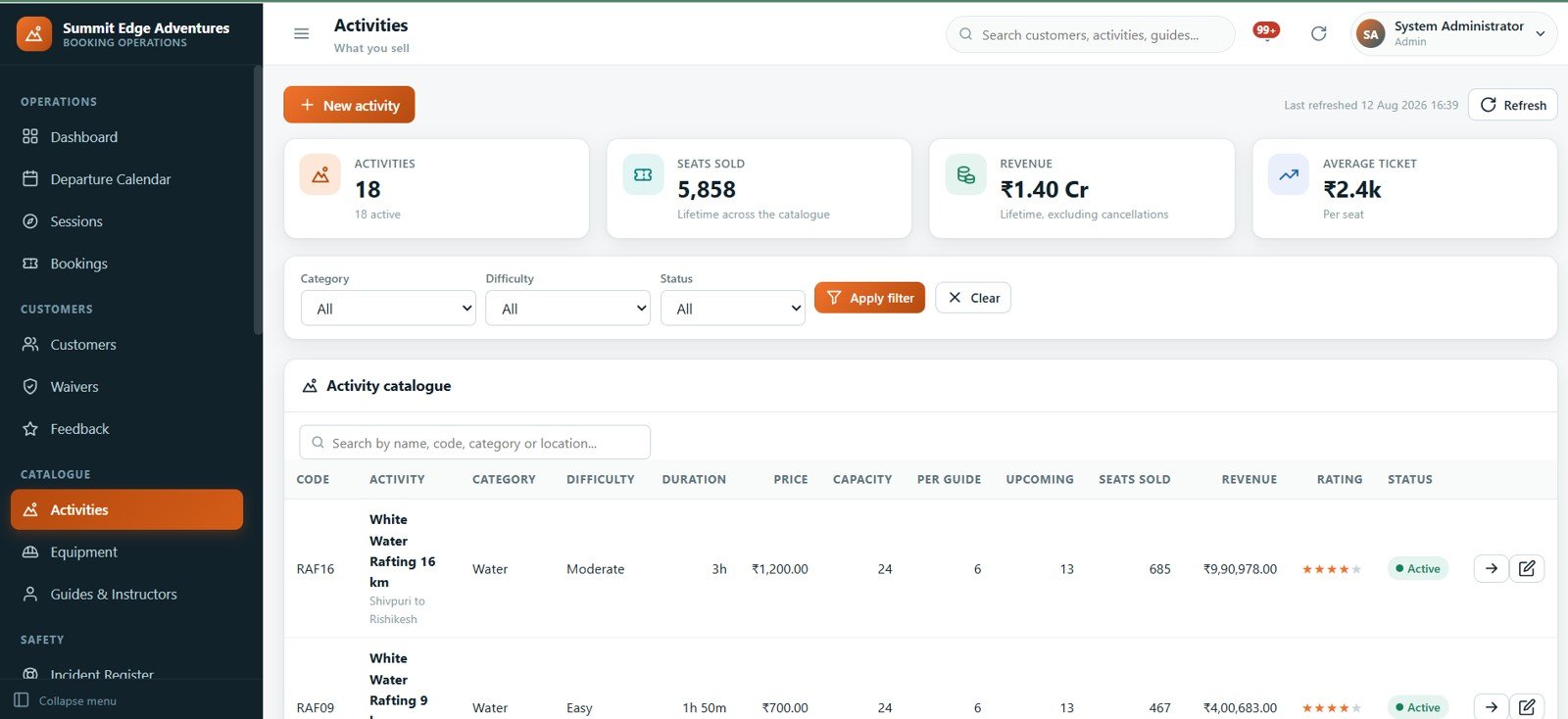
The activity catalogue holds 18 activities with code, category, difficulty, duration, price, capacity, guides required per ratio, upcoming departures, seats sold, lifetime revenue, rating and status — plus the safety briefing checklist that sits behind each one.
Equipment — Gear and Inspections
71 items tracked by code, brand, serial number, size, category and the activity they belong to, with last inspected and next due dates, condition, availability and an issuable flag. Anything past its inspection date is Blocked and cannot be issued to a departure.
Guides & Instructors — Team and Certifications
22 team members with designation, what they are qualified for, certifying body, certification expiry, years of experience, sessions led, upcoming sessions and rating. Expired certifications are flagged and stop that guide leading a session.
Incident Register — What Went Wrong and Why
36 incidents classified by severity and by category — weather, injury, lost property, near miss, complaint, medical, equipment failure and other — with open, critical, injury and hospital-referral counts.
Payments — Money Received
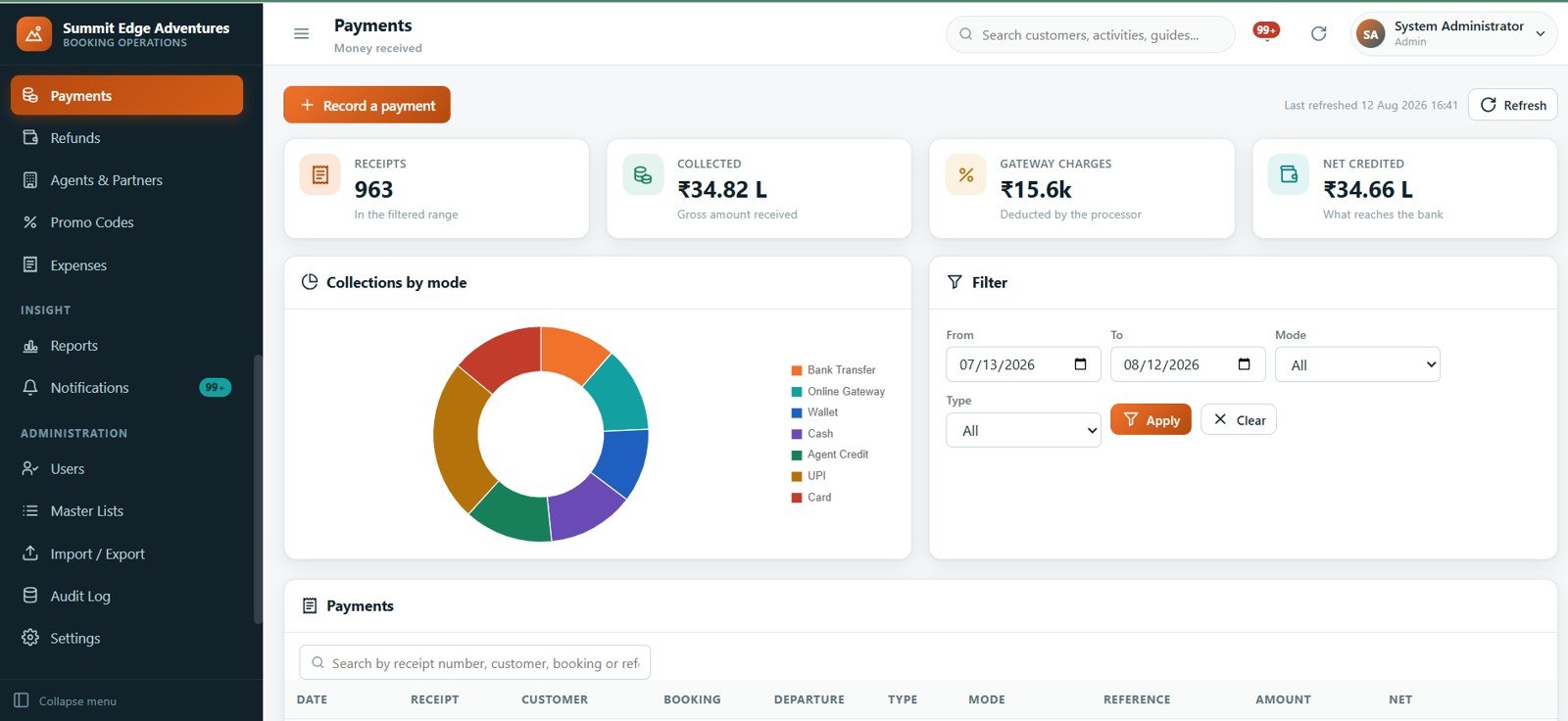
963 receipts with a collections-by-mode breakdown across bank transfer, online gateway, wallet, cash, agent credit, UPI and card. Gross collected, gateway charges and net credited are reported as three separate figures rather than one.
Refunds, Agents & Partners, Promo Codes and Expenses
Refunds shows the five-band cancellation policy in force above 171 settled refunds, with refunded, retained and awaiting-approval totals. Agents & Partners covers 12 corporate, travel-agent and OTA partners with per-partner commission rates, business sent, commission earned and commission due. Promo Codes covers 10 campaigns with percent or flat value, minimum booking, scope, validity, usage cap and discount given. Expenses tracks 142 entries across 12 categories with tax and an approval state.
Reports — 24 Operating Reports
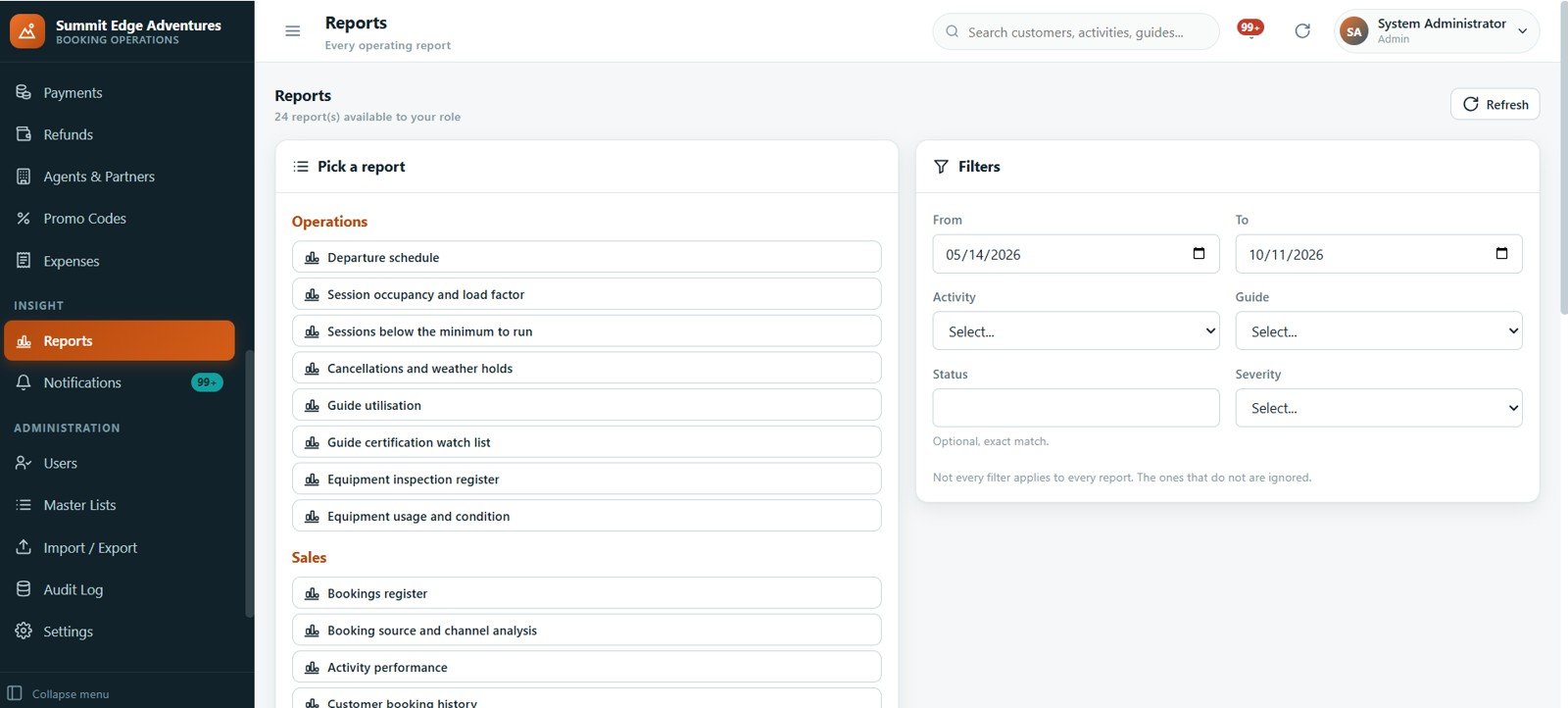
Grouped into Operations, Sales and more: departure schedule, session occupancy and load factor, sessions below the minimum to run, cancellations and weather holds, guide utilisation, guide certification watch list, equipment inspection register, equipment usage and condition, bookings register, booking source and channel analysis, activity performance and customer booking history. Each report respects the date, activity, guide, status and severity filters.
Notifications — What Needs Attention
306 alerts rebuilt live from the data and targeted at your role, split across money, bookings and safety, with 62 critical ones surfaced first and each row linking straight to the record that raised it.
Settings — Company Profile and Policy
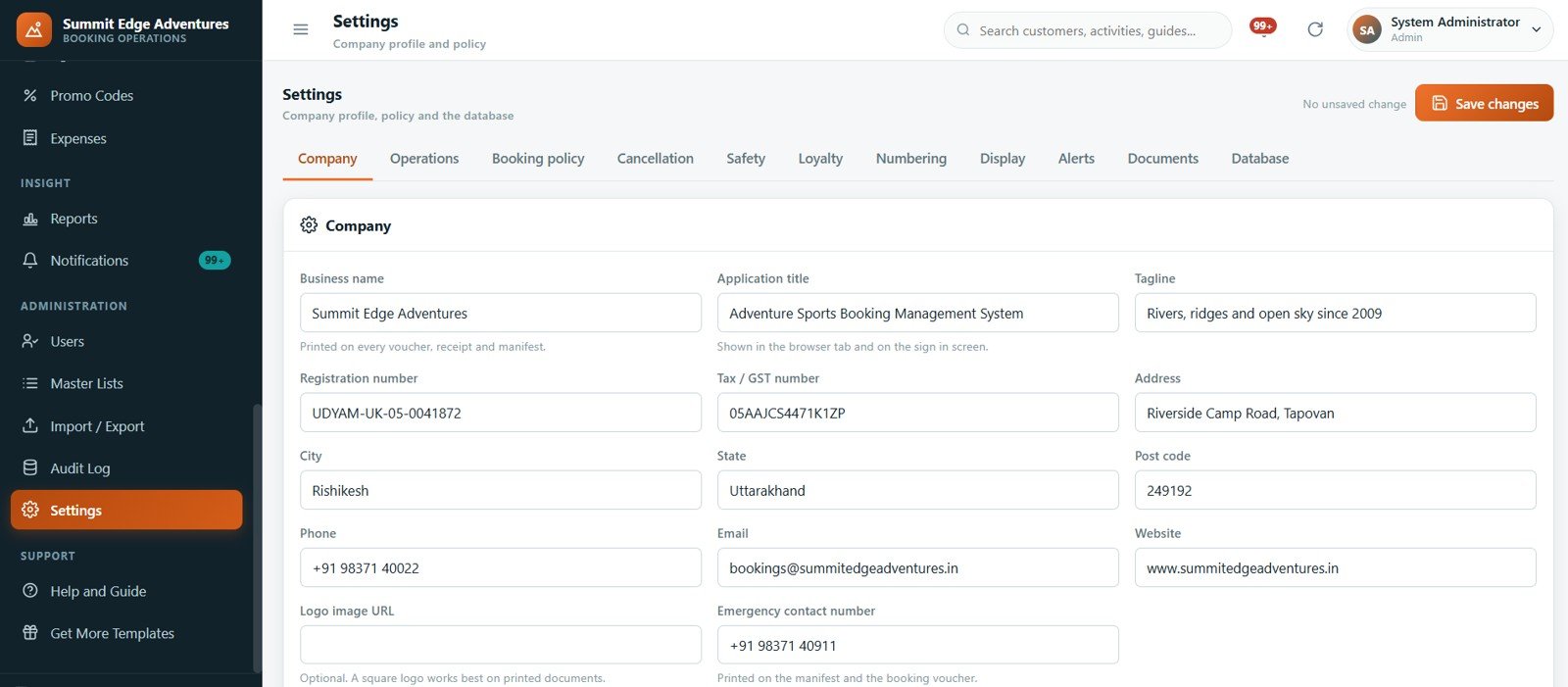
Eleven tabs — Company, Operations, Booking policy, Cancellation, Safety, Loyalty, Numbering, Display, Alerts, Documents and Database. This is where the currency, surcharges, hold expiry, refund bands, print size and document templates live.
Users, Master Lists, Import/Export and Audit Log
Users manages accounts and roles. Master Lists holds 24 dropdown lists and 187 values, so meeting points, payment modes, expense categories and incident types are edited without touching code. Import/Export moves any table in or out as CSV with per-row validation, so one bad line never stops the rest. The Audit Log records who did what, when, and to which record.
Help and Guide
An in-app guide covering the recommended setup order, the session lifecycle, the booking lifecycle and how a refund is worked out — so a new front-desk hire can find the answer without calling you.
📊 Adventure Sports Booking Web App vs. a Google Sheets Tracker vs. FareHarbor / Peek Pro / Checkfront — Where This Fits
| Feature | Adventure Sports Booking Management System Web App | Google Sheets booking tracker | FareHarbor / Peek Pro / Checkfront |
|---|---|---|---|
| Cost | $39.99 one-time | $7-19 one-time | Monthly fee or 6% booking commission |
| Platform | Your own Google account, browser-based | Google Sheets | Vendor-hosted |
| Setup time | Under an hour to deploy and configure | Minutes | Days, usually with an onboarding call |
| Role-based user accounts | Yes — 7 roles, server-side checks | No, whoever has the link sees everything | Yes, per-seat |
| Waiver tracking that blocks boarding | Yes, built in | Manual column | Yes, often a paid add-on |
| Equipment inspection blocking | Yes — overdue gear cannot be issued | No | Rarely included |
| Guide certification expiry control | Yes — expired certs cannot lead | No | Varies by tier |
| Agent and OTA commission | Yes — per-partner rates and payouts | Manual | Yes |
| Year-1 cost at 5 users | $39.99 total | Under $20 | Several hundred to several thousand |
| Who owns the data | You — it sits in your own Google Sheets | You | Vendor |
For operators who want real booking control without handing over a percentage of every seat sold, the Adventure Sports Booking Management System Web App sits in the sweet spot.
👥 Who This Template Is For — and Who It’s Not For
✅ This template is built for:
- Rafting, trekking, paragliding, bungee, zipline, scuba, ATV and MTB operators running 5 to 200 departures a month
- Multi-activity adventure companies that need one booking desk across water, aerial, mountain, motor and underwater activities
- Operators with a real safety obligation — waivers, gear inspections and guide certifications they must be able to evidence
- Businesses selling through agents and OTAs who need commission calculated rather than argued about
- Teams that want role-separated access for front desk, accounts, guides and a safety officer
❌ This template is NOT for:
- Operators who need a public-facing online booking page with card payment at checkout — this is the back office, not the storefront
- Anyone needing an offline mobile app for guides at a trailhead with no signal
- Very high-volume operations processing thousands of bookings a day, where a dedicated database will be faster
- Businesses that cannot hold customer data in a Google account for policy reasons
⚙️ How to Use the Adventure Sports Booking Management System
- Try the live demo above first — sign in as each role and confirm the system fits how you actually operate.
- Unzip the download, then paste
CodeandIndexinto a new Google Apps Script project and deploy it as a web app. The included tutorial video walks through this. - Sign in with the admin account from the login details file, then change the password immediately.
- Fill in the company profile, currency, surcharges and numbering under Settings, and set the cancellation slabs and safety rules while you are there.
- Add your guides and instructors with their certifications and expiry dates.
- Build the activity catalogue: price, age and weight limits, capacity, ratio per guide, and the safety briefing checklist behind each one.
- Add your equipment with inspection intervals.
- Use Generate a schedule on the Sessions page to lay out the season, then assign guides.
- Take bookings, collect the advance and confirm. Collect waivers, check people in, run the departure and complete the session.
💼 Real-World Use Cases
Vikram runs a rafting and kayaking outfit with eight guides. Before this system, seat counts lived in a WhatsApp group and two people once sold the same raft. Now capacity is enforced at booking time, expired holds are released in one click each morning, and the guide certification watch list told him a lead instructor’s ABVIMAS certification had lapsed before the trip, not after.
Anjali handles accounts for a multi-activity operator with three OTA partners. She reconciles 963 receipts against seven payment modes and reads gateway charges separately from net credited. Commission due per partner is a figure the system produces, so the monthly payout conversation takes minutes instead of an afternoon of spreadsheet archaeology.
Tenzin is the safety officer. His sign-in shows only safety pages: the waiver register, the equipment inspection list and the incident log. The 31 overdue inspections on the dashboard are his work queue, and blocked gear physically cannot be issued to a departure while it sits there.
❓ Frequently Asked Questions
Can I try it before buying?
Yes. The live demo linked at the top of this page is a full deployment of the Adventure Sports Booking Management System Web App with all 25 pages, the complete sample data set and all seven role logins. No signup and no email address are required.
What do I actually download?
A zip containing the Apps Script code file, the HTML interface file, the login details and a full user manual. The Adventure Sports Booking Management System Web App is deployed into your own Google account — there is no hosting to buy and no monthly fee.
How long does setup take?
Deploying the script takes under 30 minutes following the included video, and configuring your company profile, cancellation slabs, activities, guides and equipment is typically another hour. The Adventure Sports Booking Management System Web App ships fully seeded, so you can explore every page before loading your own data.
Do I need to know how to code?
No. You copy two files into a new Apps Script project and click Deploy. All 24 master lists, refund bands, numbering formats and alert thresholds are edited through the interface, never in the code.
How does this compare to FareHarbor or Peek Pro?
Those platforms include a public booking widget and card processing, and charge either a monthly fee or a commission on every booking. The Adventure Sports Booking Management System Web App is a one-time purchase back-office system: it manages sessions, seats, waivers, gear, guides, payments and commission, but it does not take card payments from the public.
Can several people use it at once?
Yes. Seven role accounts are seeded and you can add more. Every server call re-checks the caller’s session and role, so a guide account cannot reach the accounts pages even by URL — something you can verify yourself in the live demo.
Does it handle weather cancellations?
Yes. A session can be put on Weather Hold with a reason and released when conditions improve. Operator and weather cancellations sit in their own refund band at 100%, and cancelling a session cascades to every booking on it with refunds raised automatically.
Can I change the currency and the printed documents?
Yes. Currency, surcharges, numbering formats, print size and document templates are all under Settings. The demo data uses Indian Rupees; change it once and every page, voucher and receipt follows.
👤 About the Author
Built by PK — Microsoft Certified Professional with 15+ years of Excel, Google Sheets and Power BI experience. Founder of NextGenTemplates, reaching 300K+ subscribers across YouTube channels (@PK-AnExcelExpert, @NextGenTemplates, @NeoTechNavigators). Every template is hand-built and tested before release.
🔗 Explore Related Templates
- Car Rental Management System Web App — the same Apps Script architecture for a rental fleet.
- Catering Business Management System Web App — event-driven bookings with staffing and costing.
- Sports and Recreation Dashboard in Google Sheets — a reporting layer if you only need the analytics.
- Fitness and Wellness Dashboard in Google Sheets and Gym Membership Tracker in Google Sheets — for membership-based operations.
- Browse every Web App template or the full Dashboard template range.
📖 Click here to read the detailed blog post
🎥 Visit our YouTube channel for step-by-step video tutorials
👉 YouTube.com/@NextGenTemplates
📅 Last updated: August 2026






























Reviews
There are no reviews yet.