

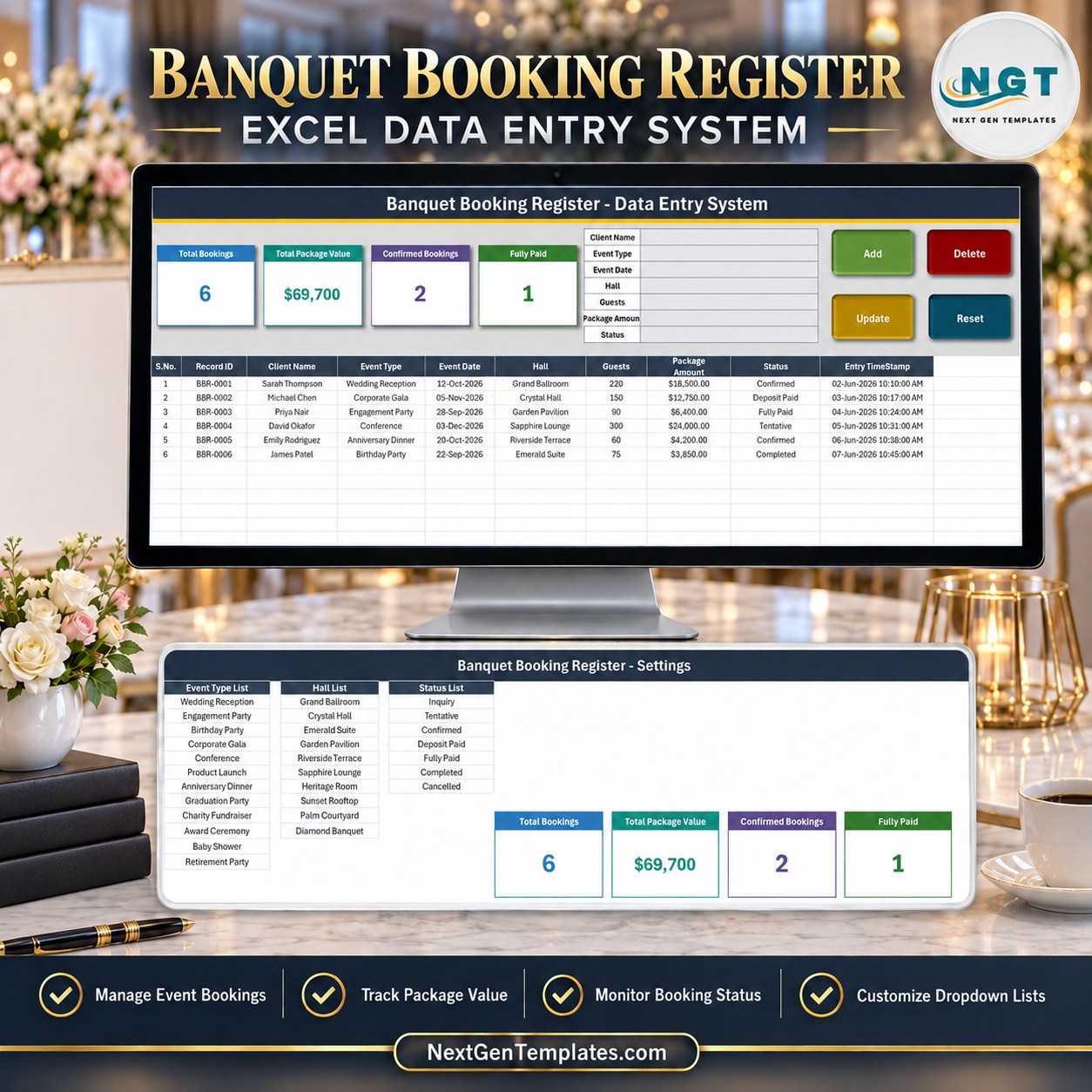
The Banquet Booking Register Data Entry System in Excel is a four-sheet macro-enabled workbook for logging hall and event bookings one at a time. A seven-field form feeds a ten-column records table, every booking gets its own BBR-0001 style Record ID and an automatic entry timestamp, and four live stat cards – Total Bookings, Total Package Value, Confirmed Bookings and Fully Paid – recalculate from the table. It ships with 12 event types, 10 hall names and 7 booking statuses ready to edit.
🌍 Join 8,400+ teams in 40+ countries using NextGenTemplates to replace paid SaaS tools with one-time-purchase Excel, Google Sheets, Power BI and HTML templates.
✅ Instant download · One-time payment · No subscription · No per-user fees · Lifetime access
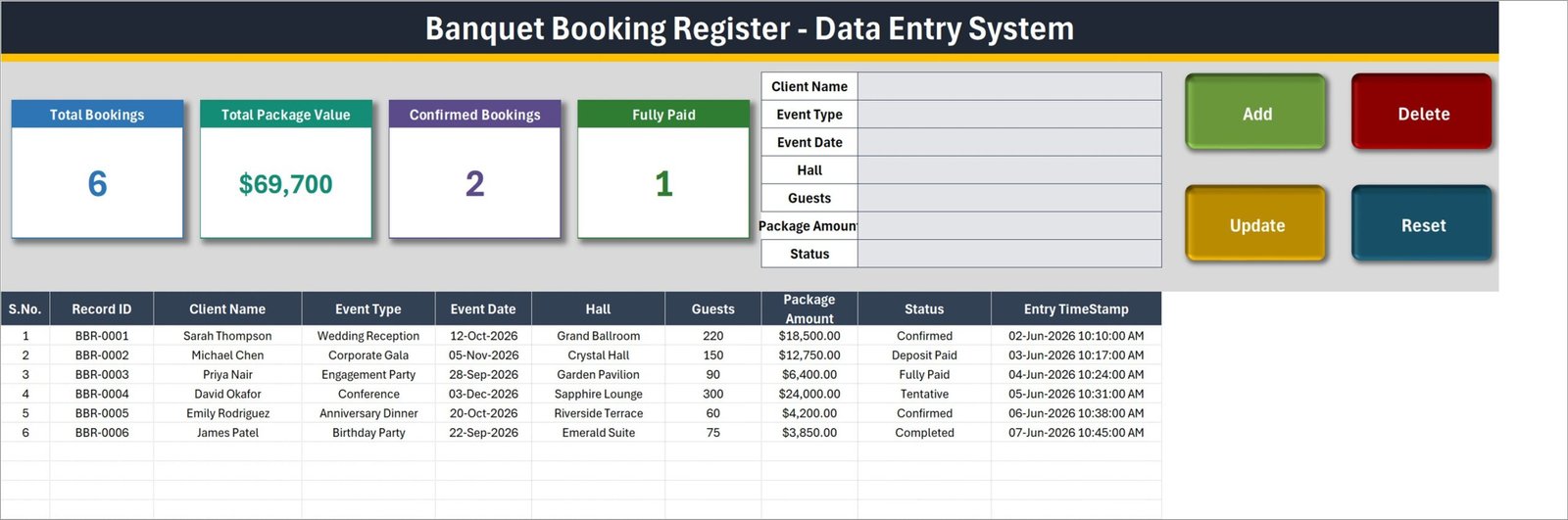
This is a booking register, not a venue management platform. It does not take payments or deposits, does not accept online bookings, has no calendar view, and does not warn you when two bookings land on the same hall and date – you can save a clash without any message. It keeps a tidy, timestamped list of who booked which hall, for which event, for how many guests and at what package amount.
🔑 Key Features of the Banquet Booking Register Data Entry System in Excel
- 📝 Seven-field entry form – Client Name, Event Type, Event Date, Hall, Guests, Package Amount and Status, next to four VBA buttons: Add, Delete, Update and Reset.
- 🔢 Automatic Record ID – each booking is filed as BBR-0001, BBR-0002 and onward, using one more than the highest ID already used, so IDs stay unique after deletions.
- 🕒 Entry TimeStamp column – the date and time each row was saved is written for you.
- ✏️ Update by ID, not by row – double-click any booking to load it into the form; Update finds it again by its Record ID wherever it now sits, and Delete shows the ID and asks you to confirm.
- 📊 Four live stat cards – Total Bookings, Total Package Value, Confirmed Bookings and Fully Paid, shown as linked pictures of the real cards on the Setting sheet.
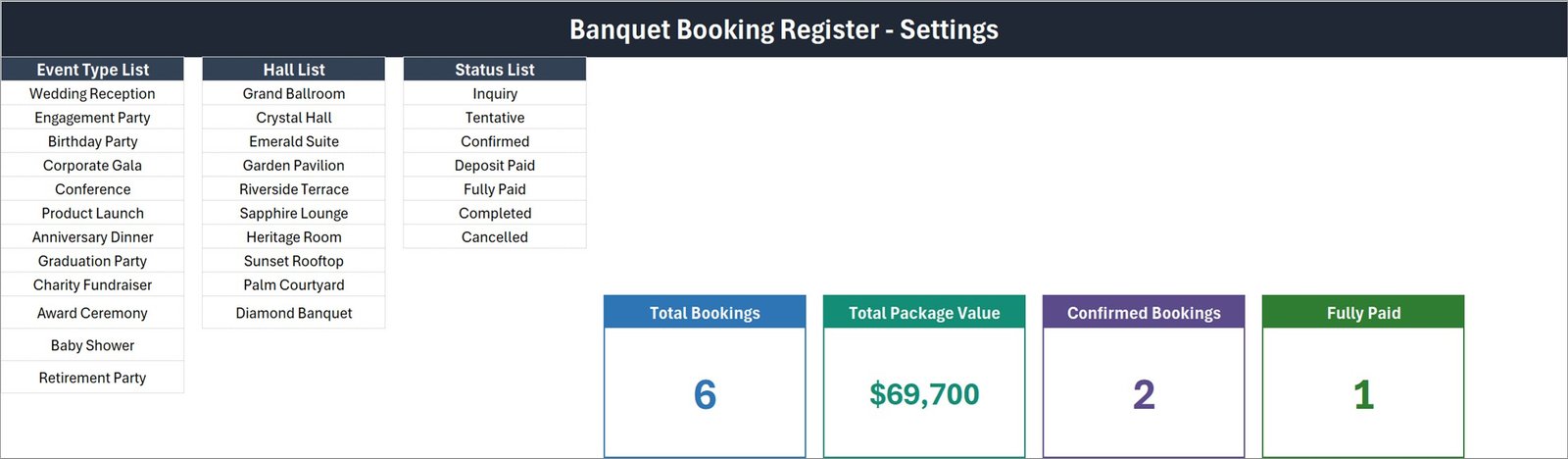
- 📋 Three dropdown lists you own – 12 event types (Wedding Reception to Retirement Party), 10 halls (Grand Ballroom to Diamond Banquet) and 7 statuses: Inquiry, Tentative, Confirmed, Deposit Paid, Fully Paid, Completed and Cancelled.
- 📄 200 pre-formatted rows – rows 15 to 214 carry the dropdowns, the dd-mmm-yyyy date format and the $ currency format.
📦 What’s Inside the Banquet Booking Register workbook
The download is a ZIP holding one workbook, Banquet_Booking_Register_System.xlsm. It has exactly four sheets.
Sheet 1: Data Entry
The title banner, the four stat cards, the form, the buttons and the records table: S.No., Record ID, Client Name, Event Type, Event Date, Hall, Guests, Package Amount, Status and Entry TimeStamp. Six sample bookings ship with it, such as a Wedding Reception for 220 guests in the Grand Ballroom at $18,500.00, so you can test Add, Update and Delete before clearing them.
Sheet 2: Setting
The Event Type List, Hall List and Status List, plus the four real stat cards the Data Entry sheet mirrors. This banquet hall booking template is meant to be renamed: type your own halls and event types over the samples.
Sheet 3: Instructions
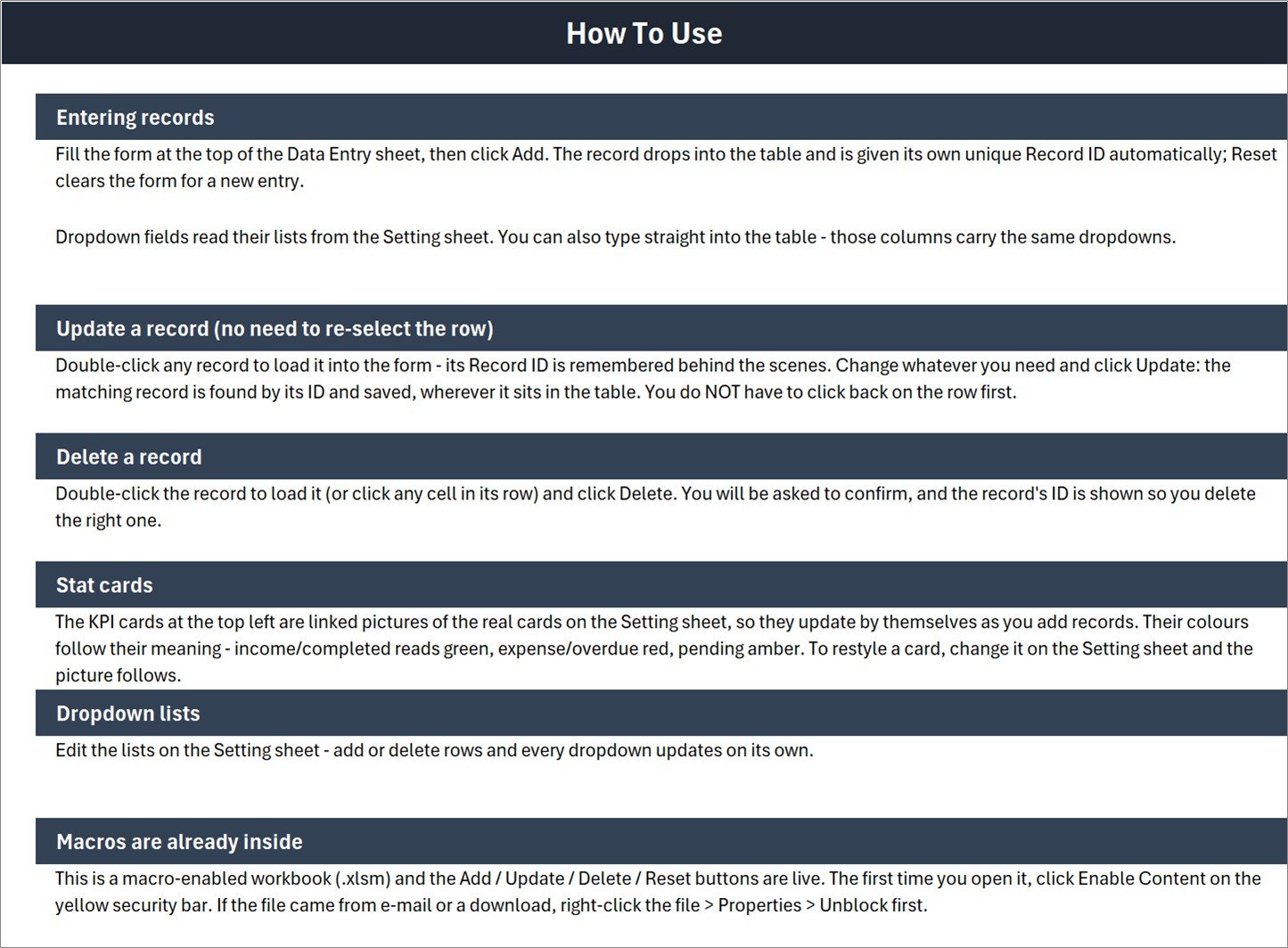
The tab is called Instructions and its banner reads “How To Use”: six sections on entering, updating and deleting records, the stat cards, the dropdown lists and enabling macros.
Sheet 4: Get More Templates
Links to the NextGenTemplates store sections.
⚠️ Read Before You Rely on the Cards
- 💲 Total Package Value is an unfiltered SUM. It adds every row whatever its Status, so Inquiry, Tentative and Cancelled bookings count. In the sample data, $24,000.00 of the $69,700 total is one Tentative booking.
- 🧮 Only 2 of the 7 statuses have a card (Confirmed and Fully Paid), so the cards will not add up to Total Bookings.
- 🆔 Total Bookings counts the Client Name column, not Record ID. Rows saved through Add always have a name, but a row typed straight into the table without one is not counted.
- 📋 The dropdown lists are fixed ranges, exactly full. The Instructions sheet says every dropdown updates when you add rows, but a 13th event type or an 11th hall typed below the list will not appear. Insert a row inside the list, or widen the name in Formulas > Name Manager (Microsoft: define and use names).
- 📅 Only Client Name is required. If Event Date is blank or not a date, Add writes today’s date instead, without a warning.
📊 Banquet Booking Register in Excel vs. Google Sheets vs. Venue Booking Software – Where This Fits
| Feature | Banquet Booking Register workbook | Google Sheets equivalent | Venue booking software (Tripleseat / Perfect Venue) |
|---|---|---|---|
| Cost | ✅ One-time payment | One-time template price | Monthly subscription |
| Platform | Desktop Excel for Windows (.xlsm) | Browser, any OS | Browser and apps |
| Setup time | ✅ Minutes – edit three lists | Minutes | Days of onboarding |
| Works offline | ✅ Yes | Limited | No |
| Real-time team collaboration | No – one user at a time | ✅ Yes | ✅ Yes |
| Mobile access | No | ✅ Yes | ✅ Yes |
| Customizable fields | ✅ Full VBA and formula access | ✅ Yes | Within vendor limits |
| Double-booking warning | No | Depends on template | ✅ Yes |
| Online payments and deposits | No | No | ✅ Yes |
For a small venue that wants a clean booking log without a monthly software bill, the Banquet Booking Register workbook sits in the sweet spot.
👥 Who This Template Is For – and Who It’s Not For
✅ Built for:
- Owners and managers of a single banquet hall or event venue with a few halls
- Hotel sales coordinators who want an event booking data entry form on their own PC
- Event planners keeping a simple register of client bookings and package amounts
❌ Not for:
- Venues needing online booking, payment collection or automatic double-booking checks
- Teams who must edit the same file at once, or who use a Mac, Excel on the web or Google Sheets
⚙️ How to Use the Banquet Booking Register Data Entry System in Excel
- Unzip the download, open the .xlsm in desktop Excel and click Enable Content (Microsoft guide to enabling macros).
- On the Setting sheet, type your own halls and event types over the samples.
- Delete the six sample bookings from the Data Entry table.
- Fill the form and click Add. The Record ID and timestamp are written for you.
- Double-click a booking, edit it in the form and click Update – or click Delete.
💼 Real-World Use Cases
Ravi manages a three-hall wedding venue. He logs every enquiry as Inquiry, moves it to Deposit Paid and then Fully Paid as money arrives, and filters the Status column each Monday to chase the Tentative bookings.
Laura coordinates events at a 60-room hotel. She uses the register to record conference and gala bookings by hall and guest count, and sorts the Event Date column to plan staffing for the coming month.
❓ Frequently Asked Questions
What does the Banquet Booking Register workbook track?
It records Client Name, Event Type, Event Date, Hall, Guests, Package Amount and Status for each booking, plus an automatic Record ID and entry timestamp. Four cards show Total Bookings, Total Package Value, Confirmed Bookings and Fully Paid.
How to track banquet bookings in Excel with this template?
Fill the seven-field form and click Add. Each booking drops into the table with a BBR Record ID. To change one, double-click it, edit the form and click Update. Filter or sort the Status and Event Date columns to see what is pending.
Does it stop double bookings of the same hall?
No. The Banquet Booking Register workbook accepts two bookings for the same hall on the same date without a warning. Sort by Event Date and Hall to spot clashes yourself.
Does it work on a Mac or in Google Sheets?
No. It is a macro-enabled .xlsm and the Add, Update, Delete and Reset buttons need desktop Excel for Windows. If you need a browser option, see the Banquet Hall Tracker in Google Sheets.
How does it compare to venue booking software?
Tools like Tripleseat add online enquiries, payments, contracts and calendars for a monthly fee. This workbook is a one-time purchase that only keeps a booking register – choose it when a clean, offline list is all you need.
👤 About the Author
Built by PK – Microsoft Certified Professional with 15+ years of Excel, Google Sheets and Power BI experience. Founder of NextGenTemplates, reaching 300K+ subscribers across YouTube channels (@PK-AnExcelExpert, @NextGenTemplates, @NeoTechNavigators). Every template is hand-built and tested before release.
🔗 Explore Related Templates
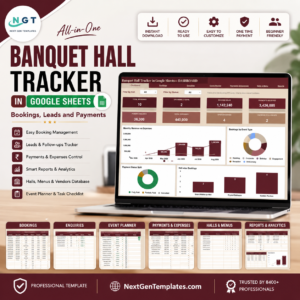
- 🌐 Banquet Hall Tracker in Google Sheets – a browser-based banquet tracker with charts; shareable, no macros.
- 🖥️ Banquet Hall Management System Web App – a full multi-user Apps Script system for venues that have outgrown a register.
- 📈 Event Management Dashboard in Excel – analyse events with charts rather than log them.
- 🍽️ Catering Order Book Data Entry System in Excel – the same form-and-table design for catering orders.
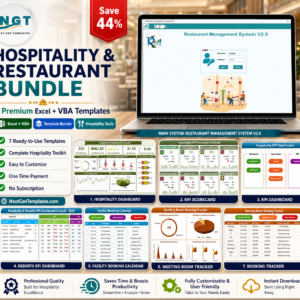
- 💎 Hospitality & Restaurant Bundle – seven Excel + VBA templates for hospitality businesses.
Browse more Excel templates and VBA tools.
📖 Click here to read the Detailed Blog Post
🎥 Visit our YouTube channel for step-by-step video tutorials
👉 YouTube.com/@NextGenTemplates
📅 Last updated: September 2026































Reviews
There are no reviews yet.