

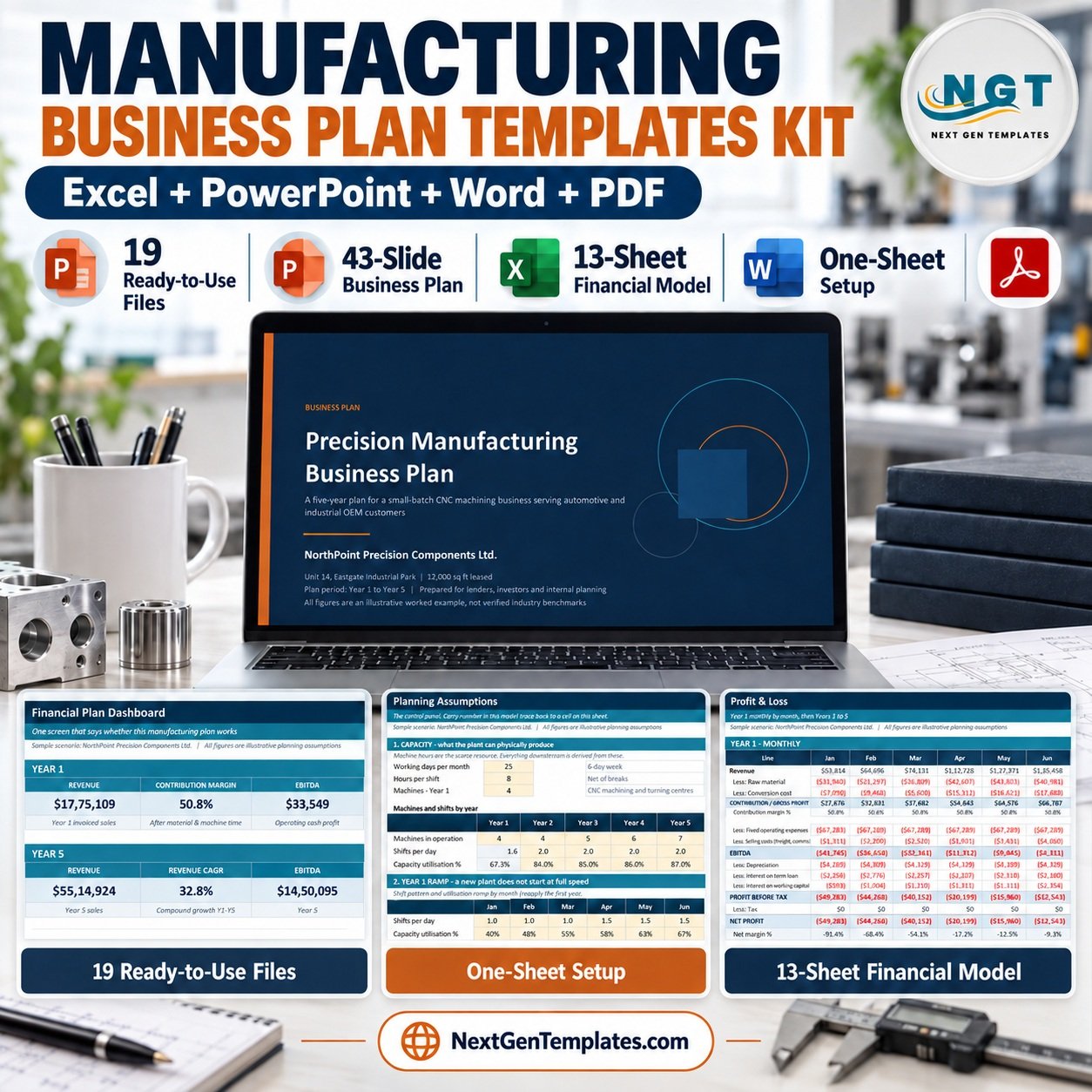

The Manufacturing Business Plan Templates Kit is 19 files: a 43-slide PowerPoint business plan, 10 Excel workbooks spanning 51 worksheets, 3 Word documents and a 9-page PDF guide. The five-year financial model alone carries 13 linked sheets — change one assumption and capacity, revenue, cost, profit, cash flow, break-even and 12 KPIs all move together. Setup is one sheet: open Assumptions, enter your machines, shifts, products and prices.
🌍 Join 10,000+ customers in 180+ countries using NextGenTemplates to replace paid SaaS tools with one-time-purchase Excel, PowerPoint and Word templates.
✅ Instant download · One-time payment · No subscription · No per-user fees · Lifetime access
🔑 Key Features of the Manufacturing Business Plan Templates Kit
🏭 Built on machine hours, not generic revenue lines. Machine hours are the scarce resource in a manufacturing business, so the model derives everything from them: available hours = machines × working days × shift hours × shifts, then units = (productive hours × product mix) ÷ cycle time. This is why the kit produces a plan a lender recognises instead of a spreadsheet of guesses.
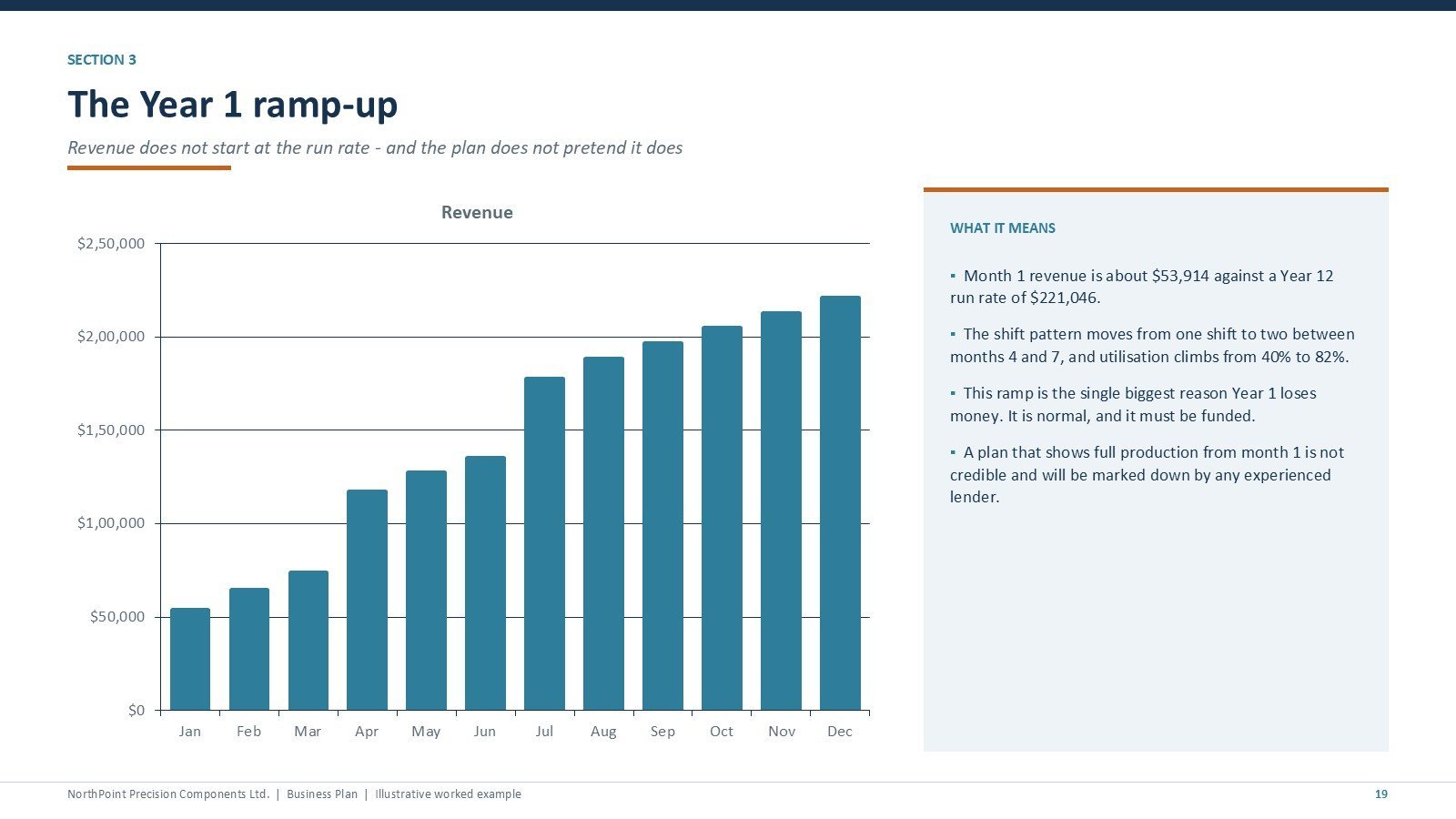
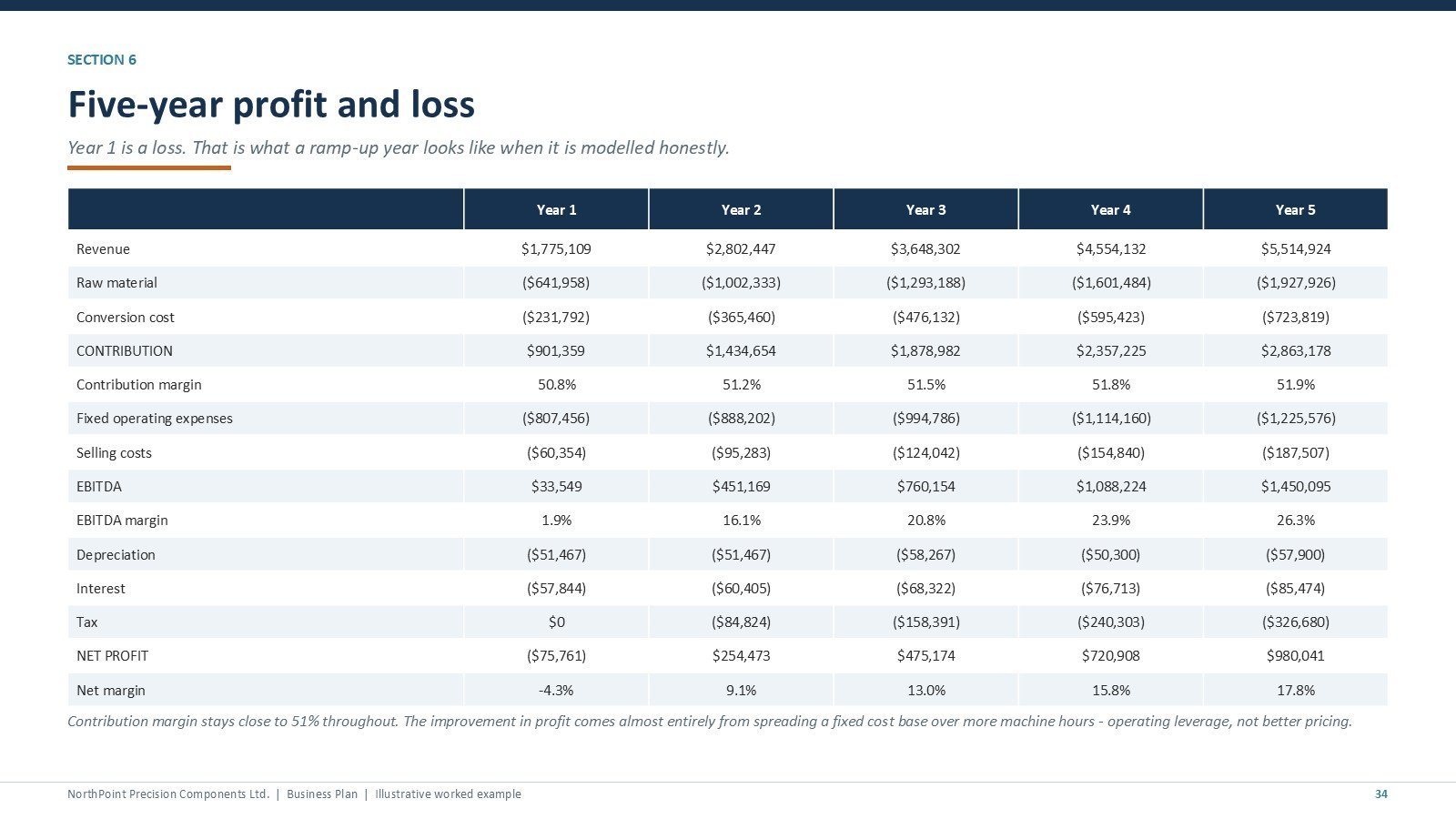
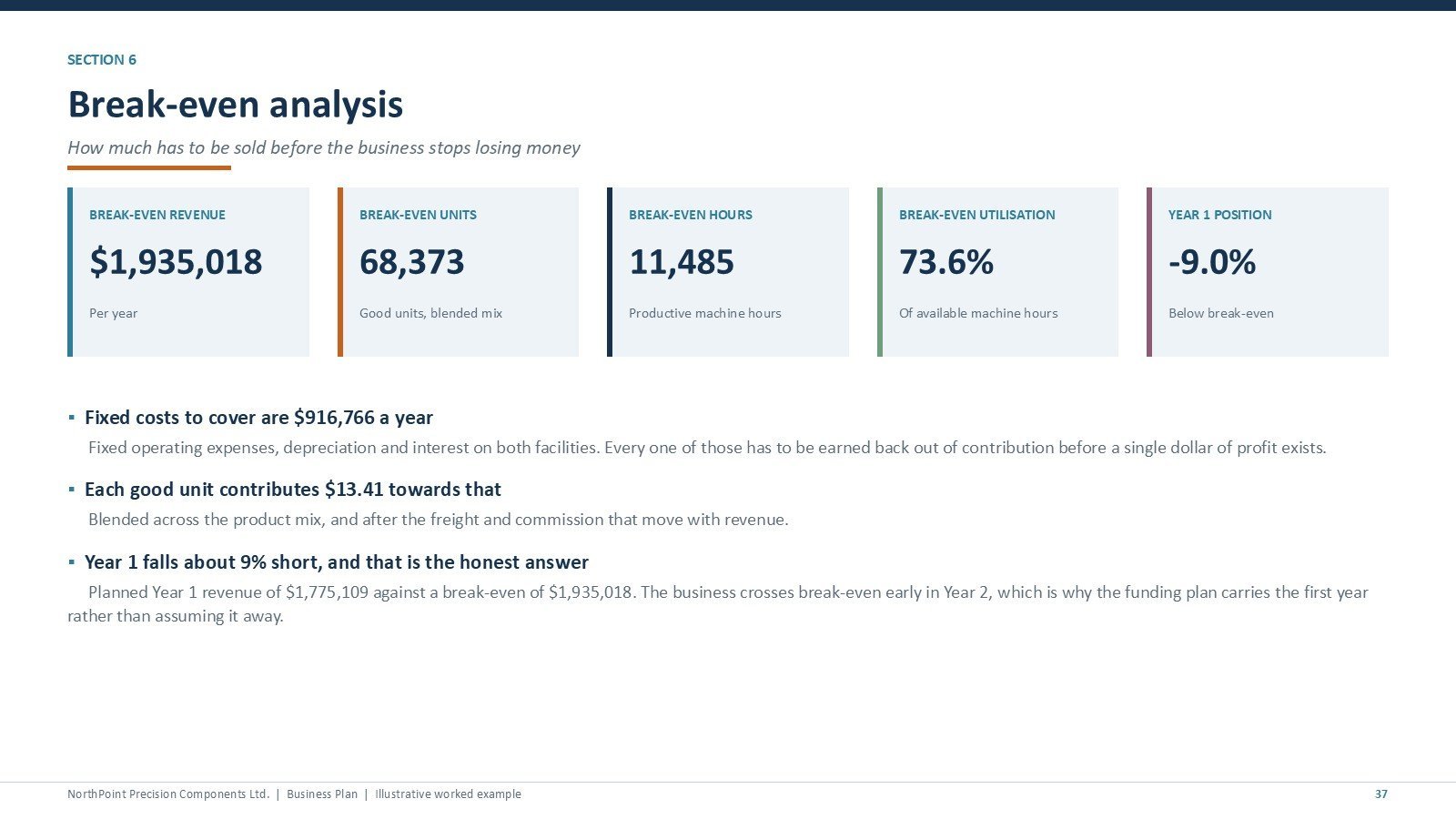
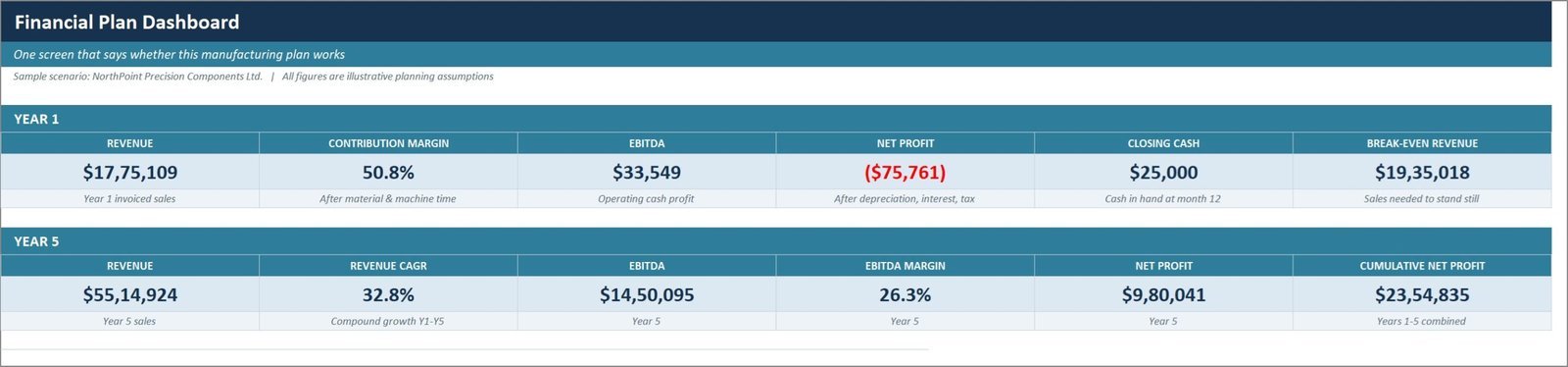
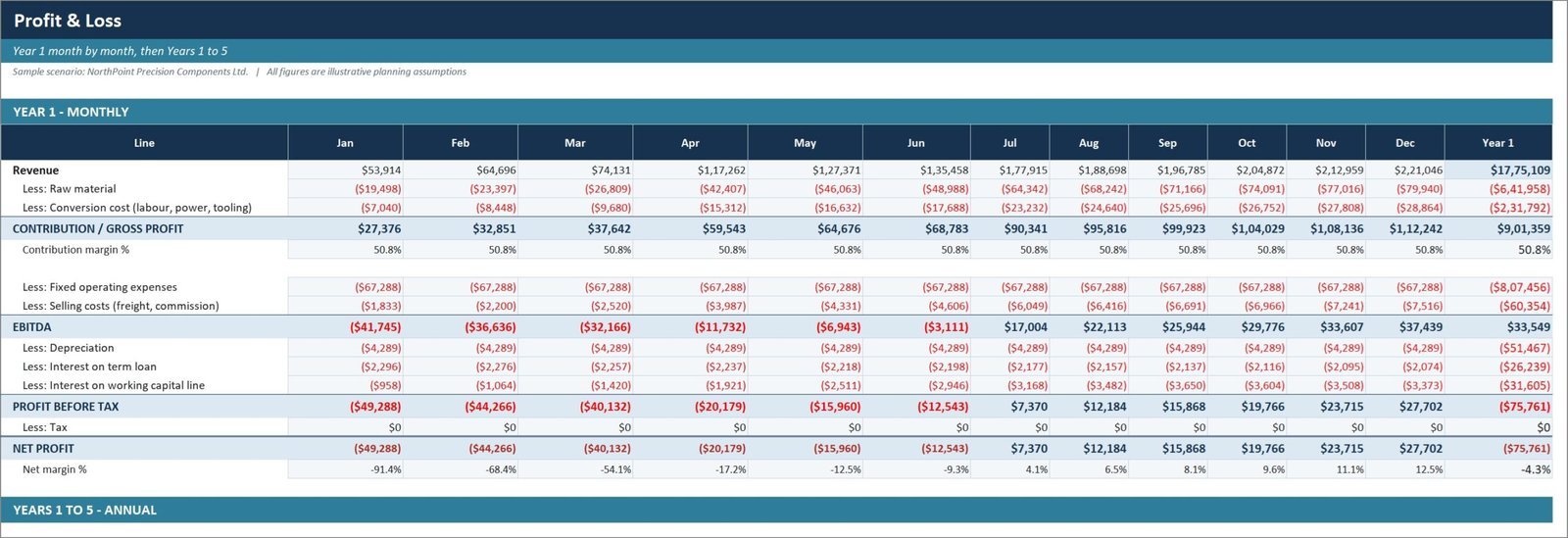
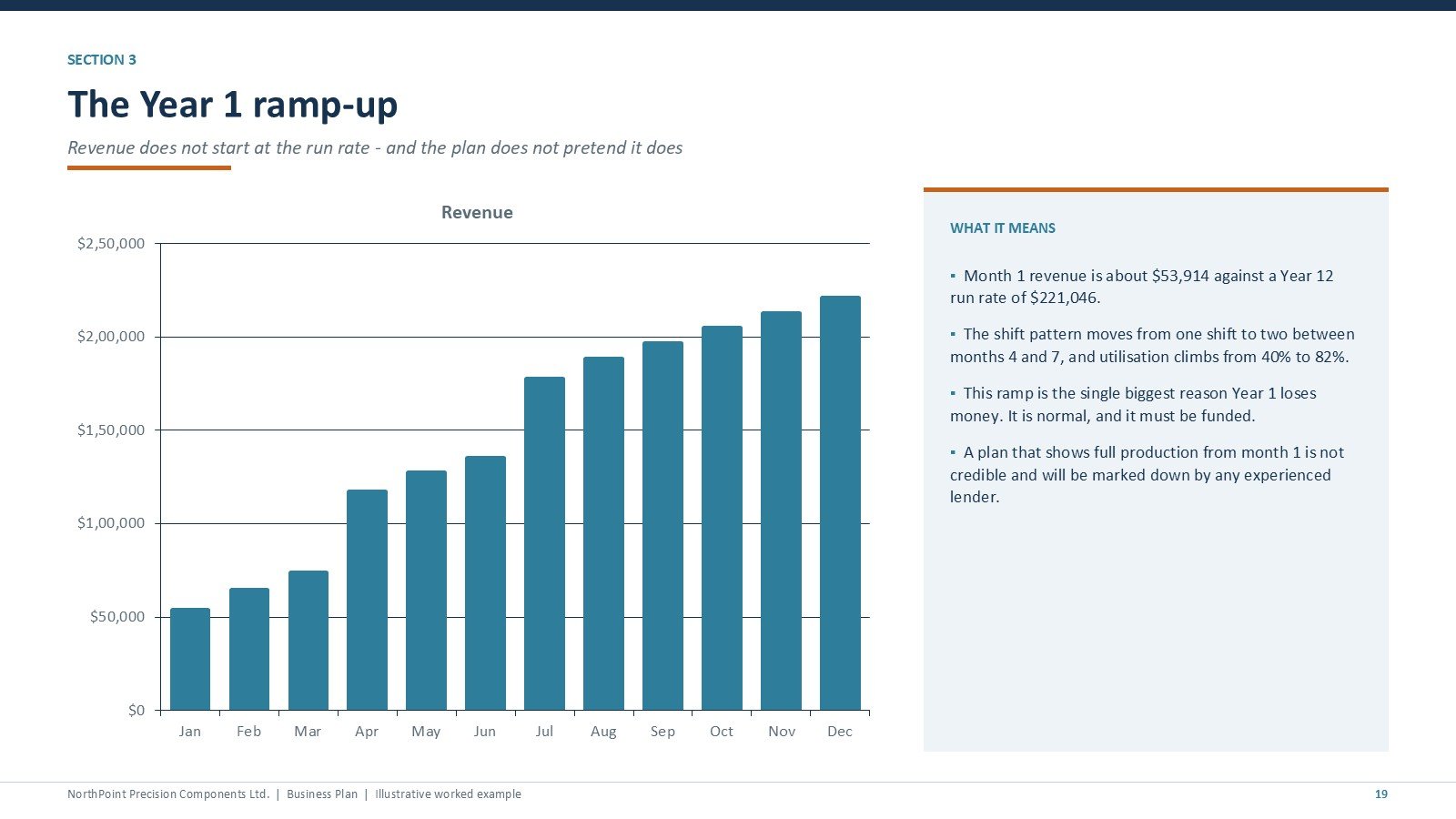
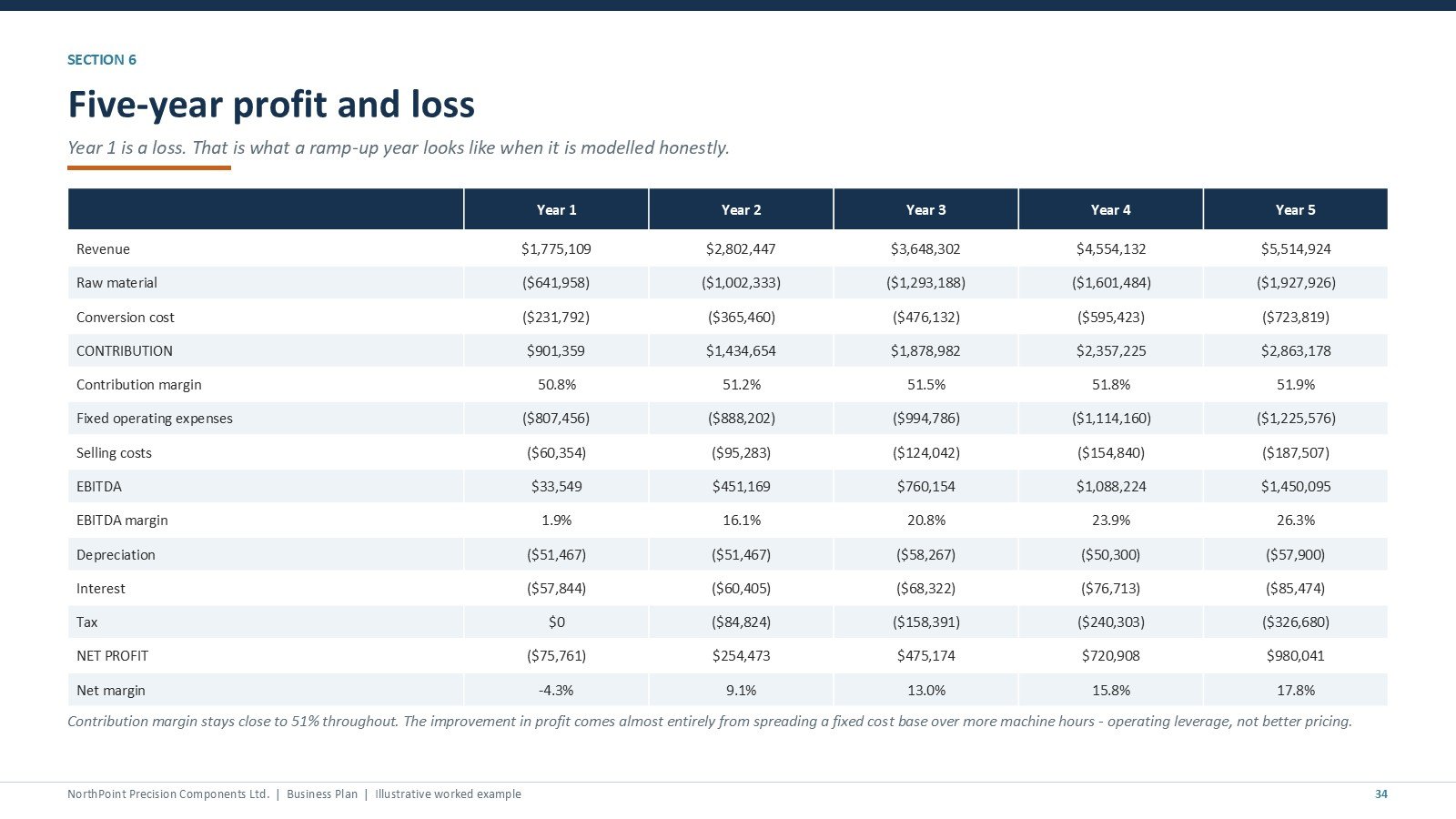
📉 The worked example loses money in Year 1 — on purpose. The sample company reaches $1,775,109 of revenue in Year 1 at 1.9% EBITDA and a $75,761 net loss while the plant ramps from one shift to two, then crosses break-even early in Year 2 and reaches $5,514,924 revenue at 26.3% EBITDA by Year 5. A plan showing instant profit is not credible and experienced lenders mark it down.
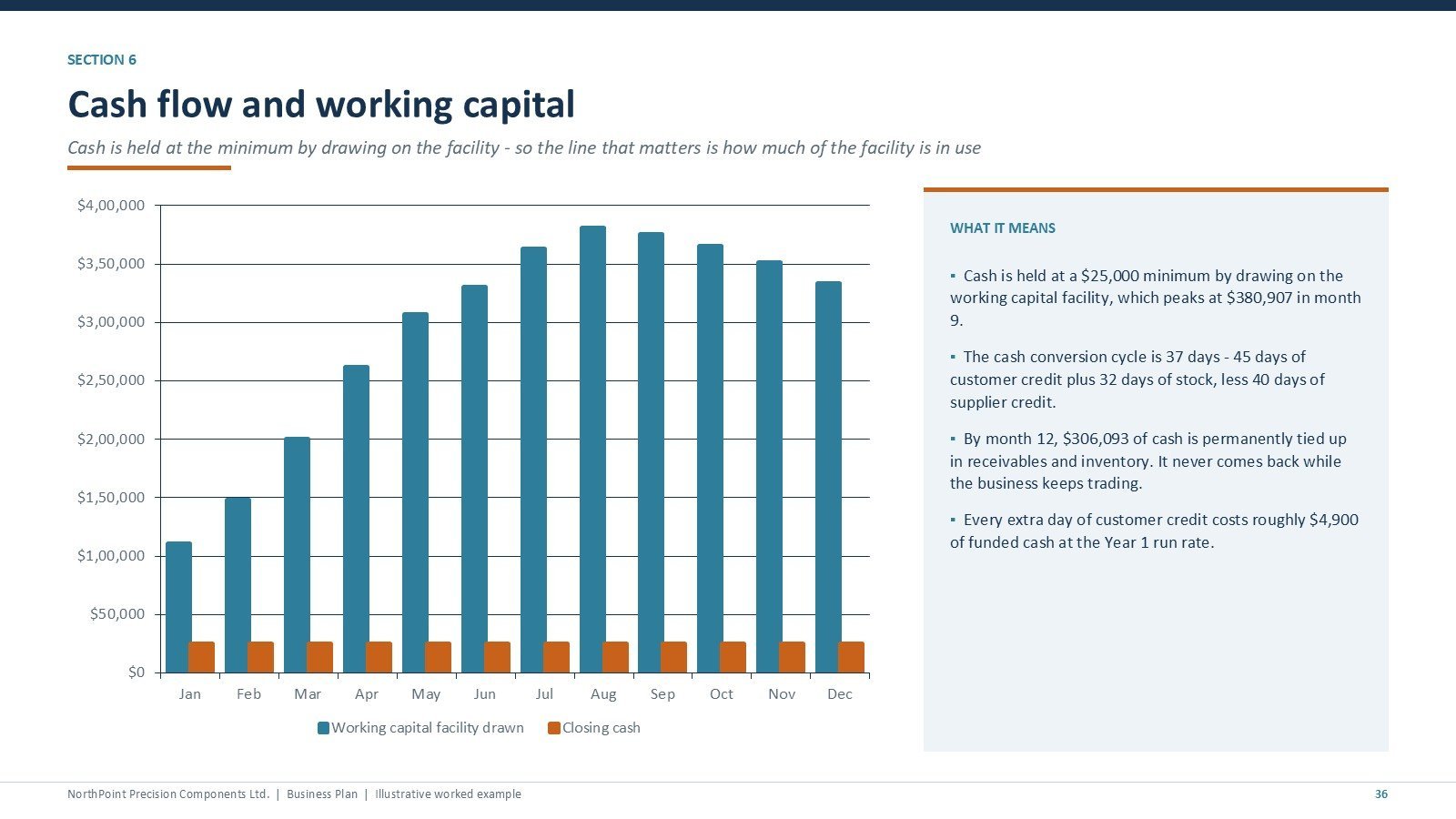
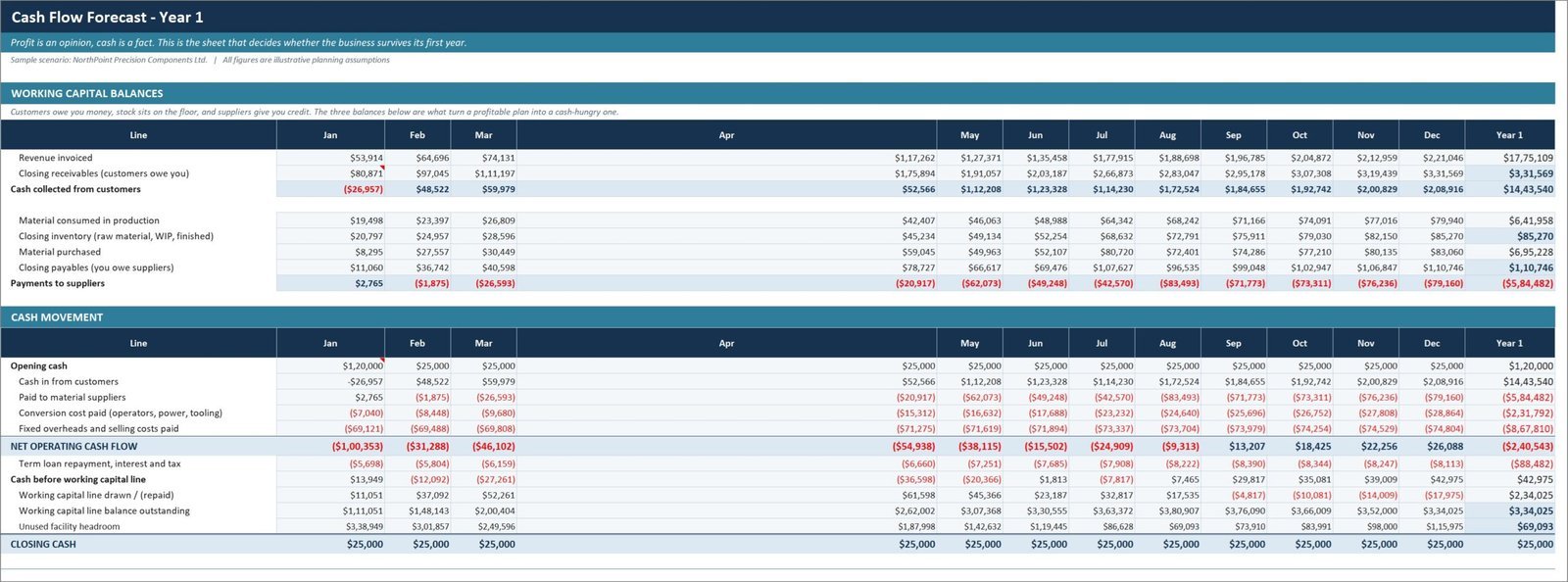
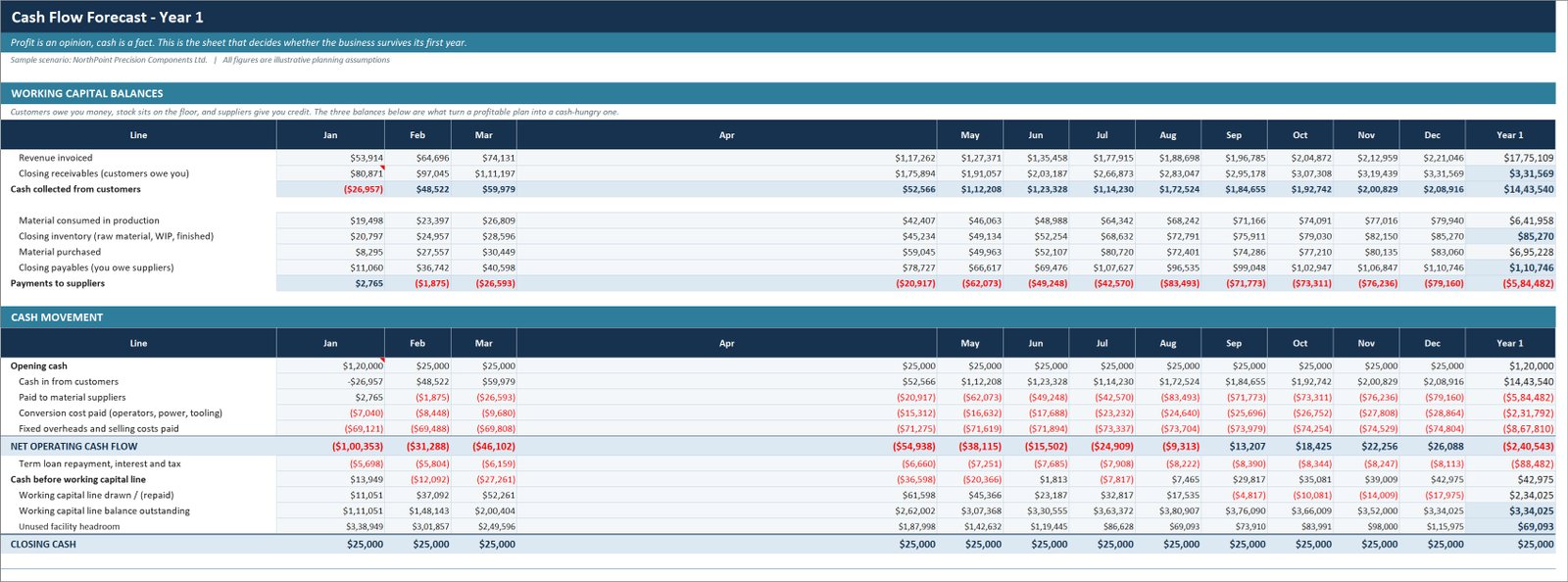
💵 Working capital is modelled, not assumed. The cash flow tracks receivables, inventory and payables separately and includes a revolving facility that draws automatically to hold a minimum cash balance. In the worked example the facility peaks at $380,907 in month 9 against a 37-day cash conversion cycle — the number that kills profitable manufacturers.
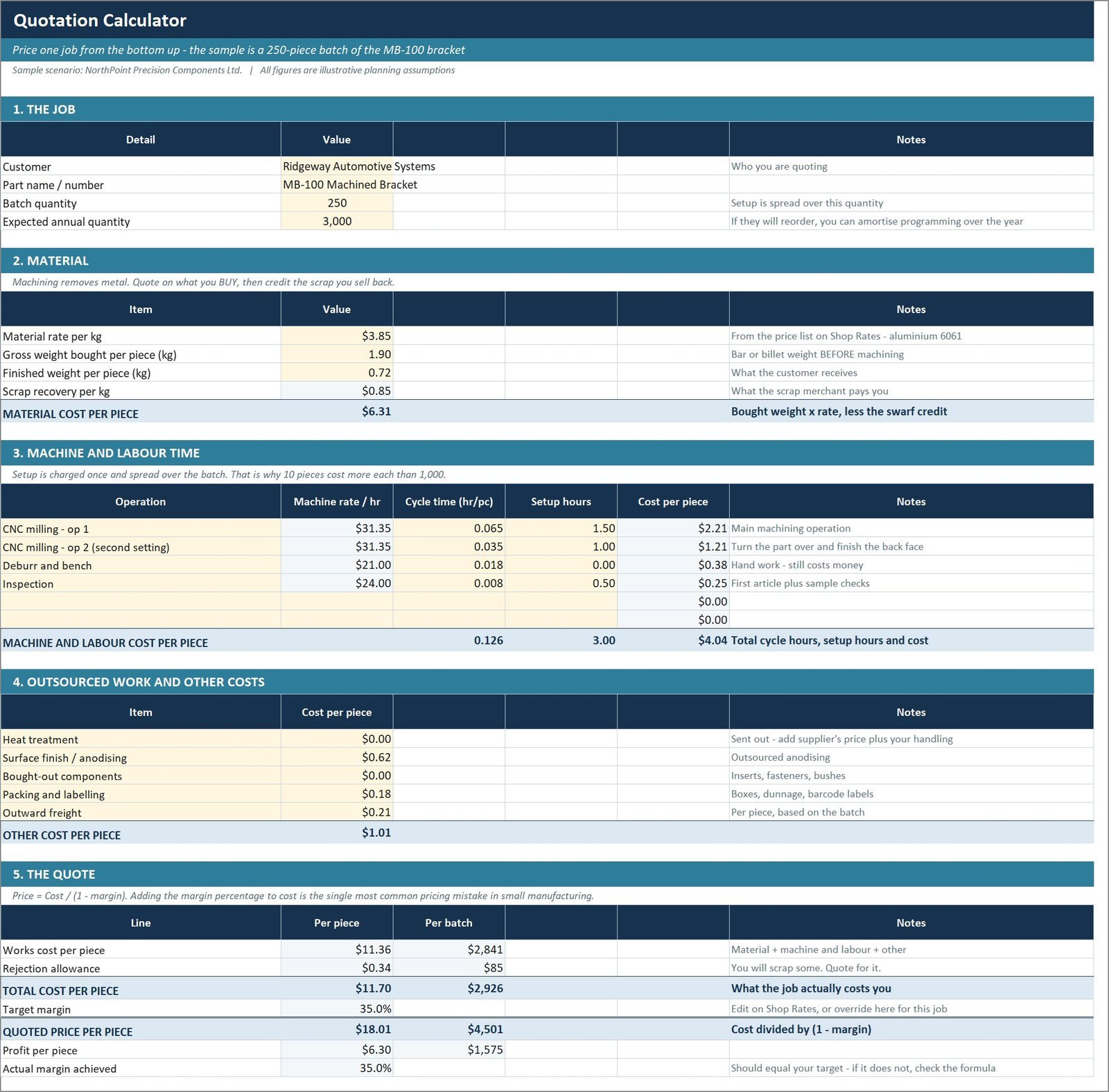
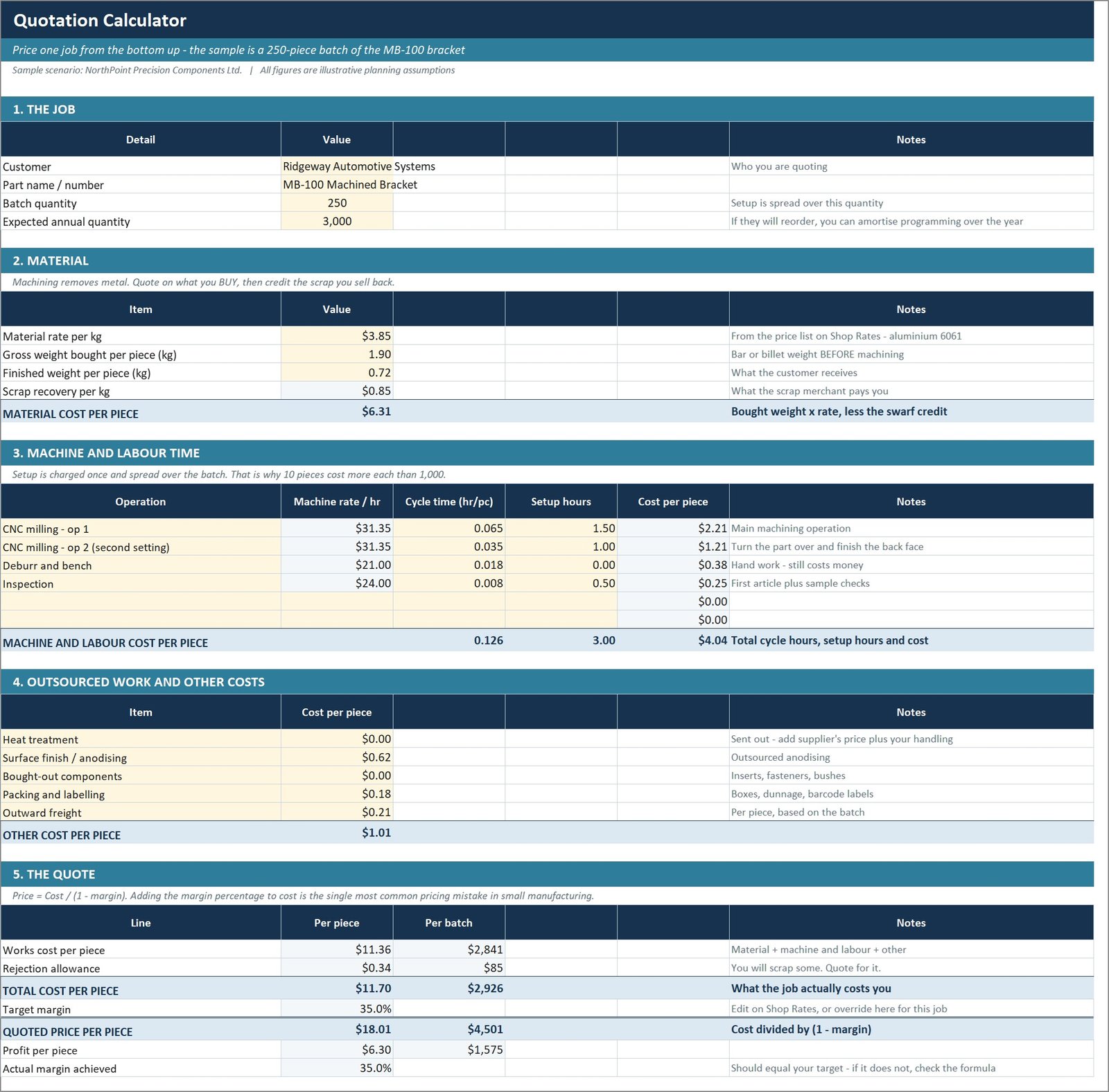
🧮 A real quotation and job-costing calculator. Build a price from material, machine time, setup amortised over the batch, secondary operations, outsourced work, packing and margin. It uses Price = Cost ÷ (1 − margin), not cost × (1 + margin) — a 25% mark-up is only a 20% margin, and that single error quietly costs small shops real money.
⚙️ Works in Excel 2010 and later. Every workbook deliberately avoids MINIFS, XLOOKUP, dynamic arrays and array formulas, so nothing silently returns a wrong answer on an older build. No add-ins. Only one file uses macros — the bundled organisation chart, which needs them to draw itself.
📦 What’s Inside the Manufacturing Business Plan Templates Kit
The 43-slide PowerPoint business plan
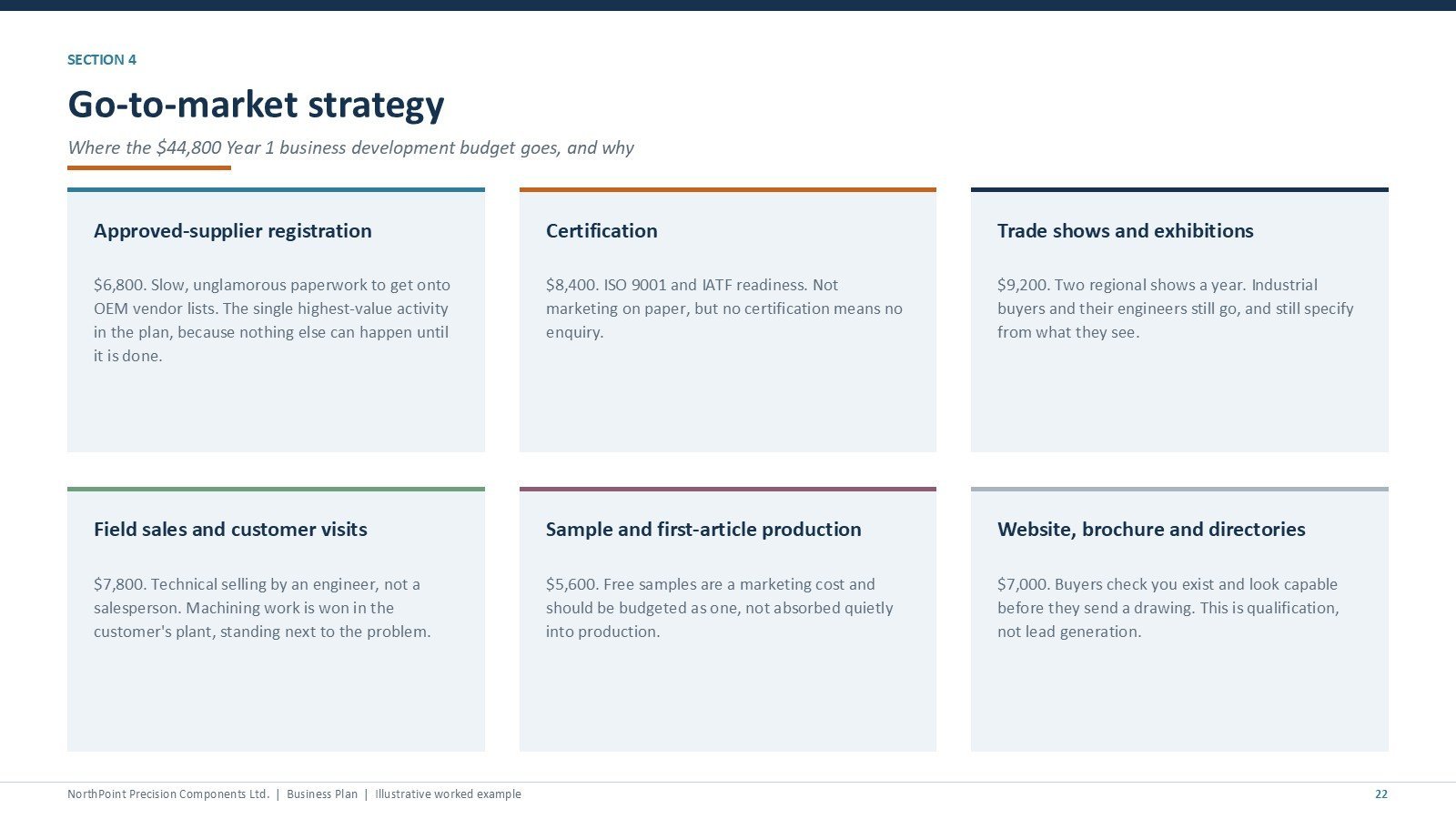
Seven sections covering the business, market, products and operations, sales and marketing, organisation, the financial plan and execution. Native editable charts and tables, 34 speaker notes explaining what a lender is actually looking for on each slide, and a subtle float-in animation on every content slide.
Manufacturing process and plant capacity slides
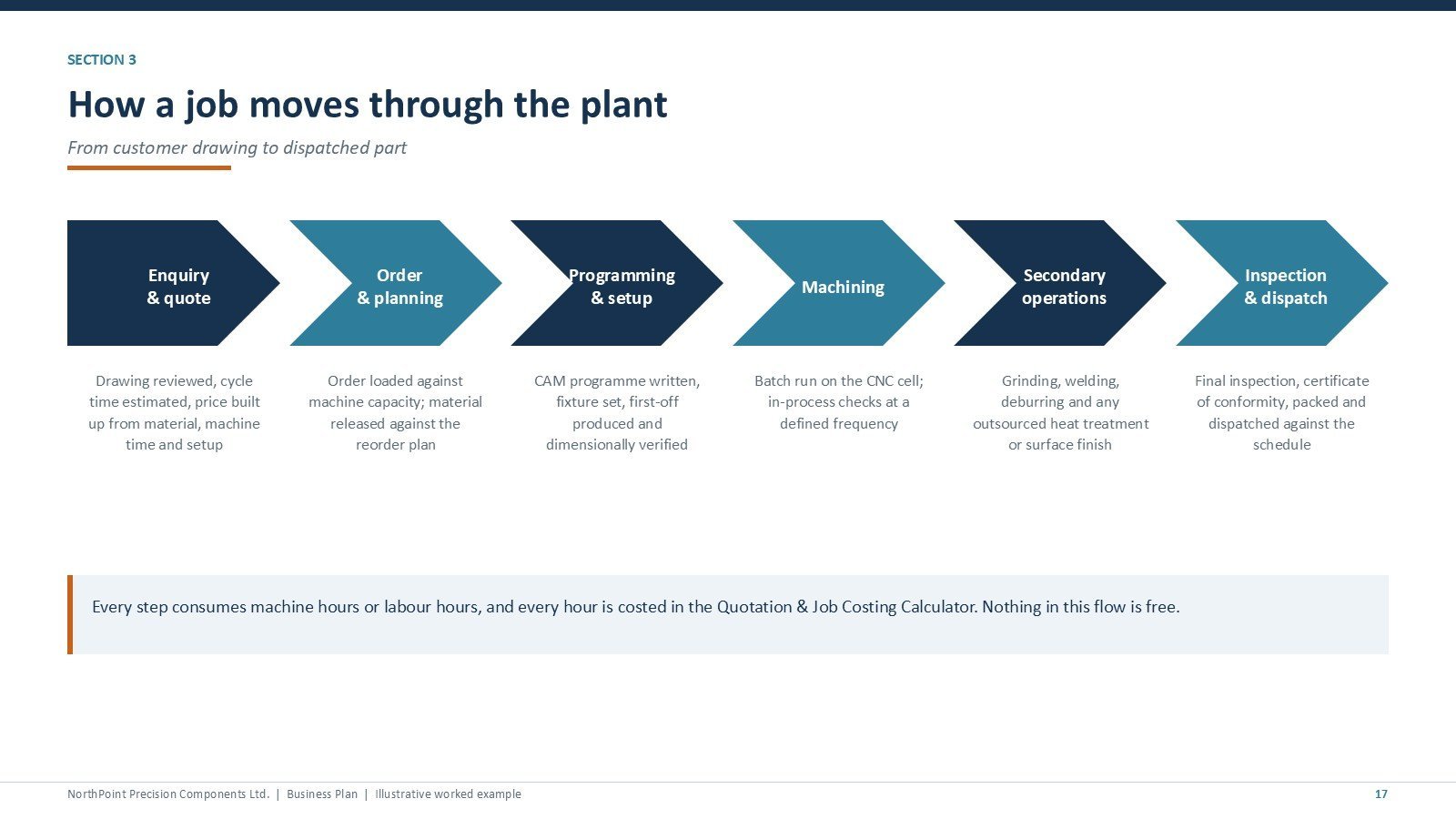
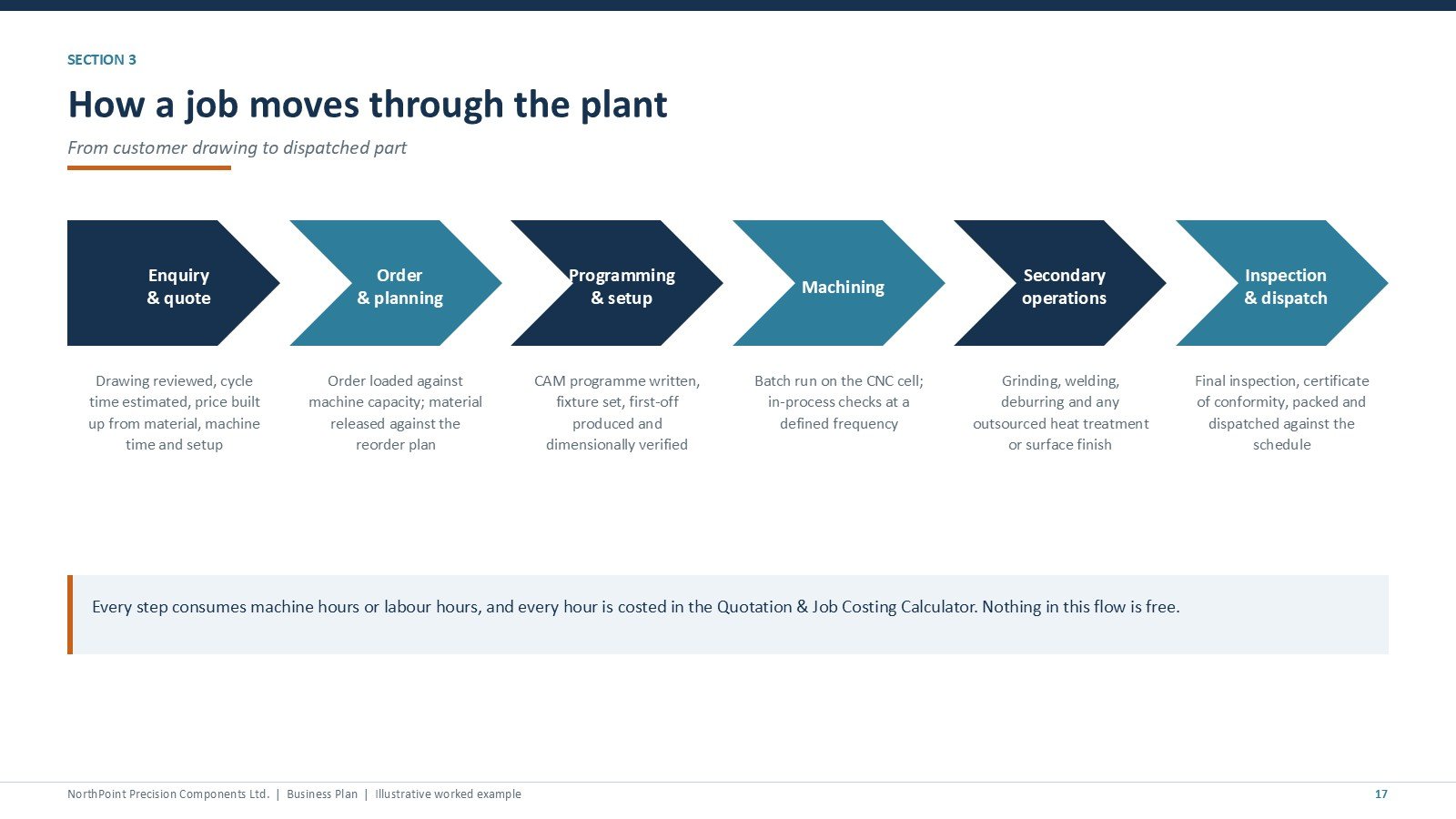
A six-step process flow from enquiry through quoting, programming, machining, secondary operations and dispatch, plus a capacity slide showing available versus productive machine hours and the Year 1 ramp.
Funding, profit and loss, cash flow and break-even slides
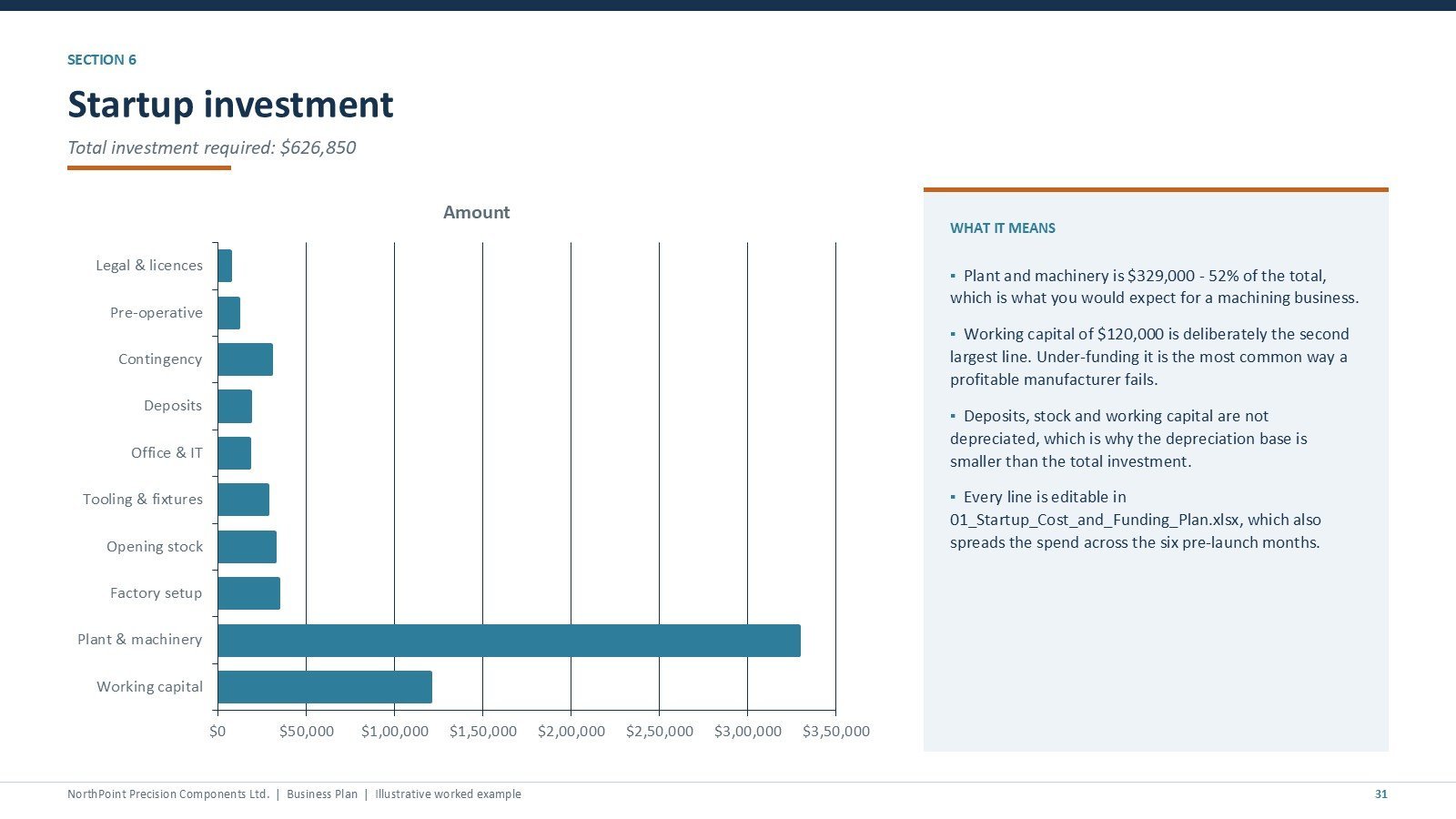
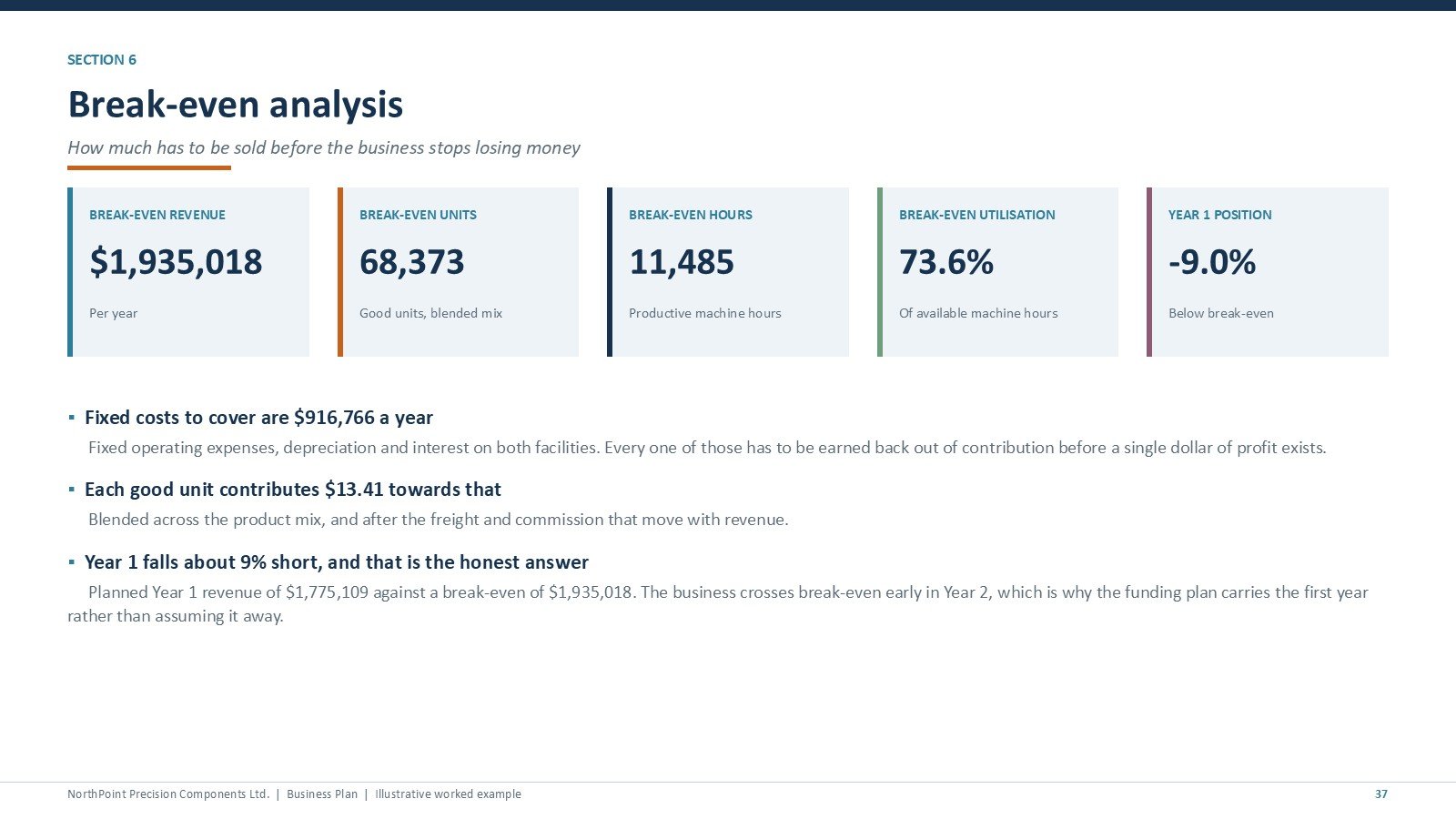
Sources and uses of funds, a five-year profit and loss table, the monthly working-capital facility drawdown, and a break-even slide stating break-even revenue, units, machine hours and the utilisation you must hold just to cover fixed cost.
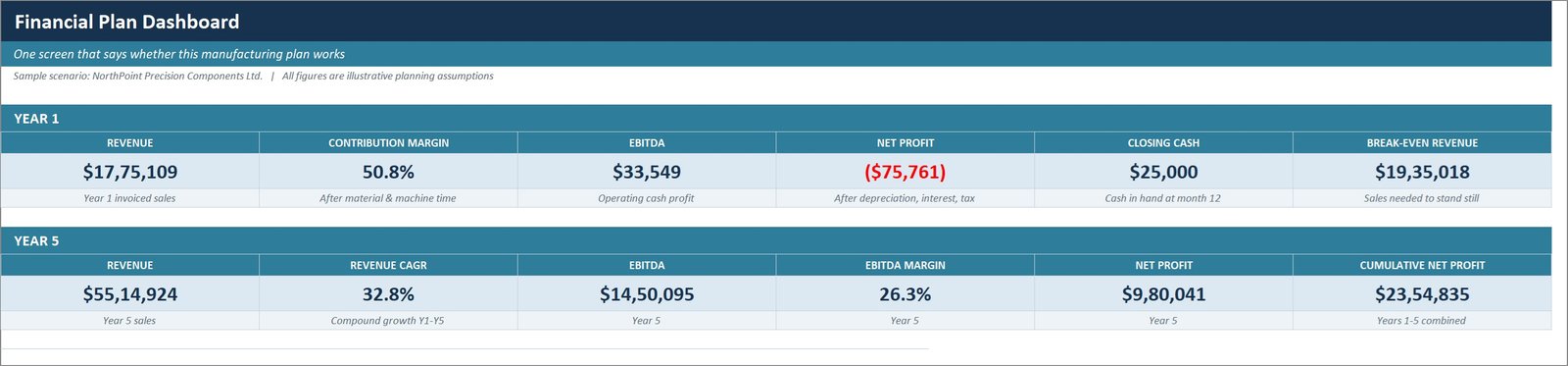
Workbook 02: the five-year financial model dashboard
One screen showing Year 1 and Year 5 revenue, contribution margin, EBITDA, net profit, closing cash and break-even revenue, with charts for revenue, contribution, EBITDA and net profit by year and the monthly cash balance.
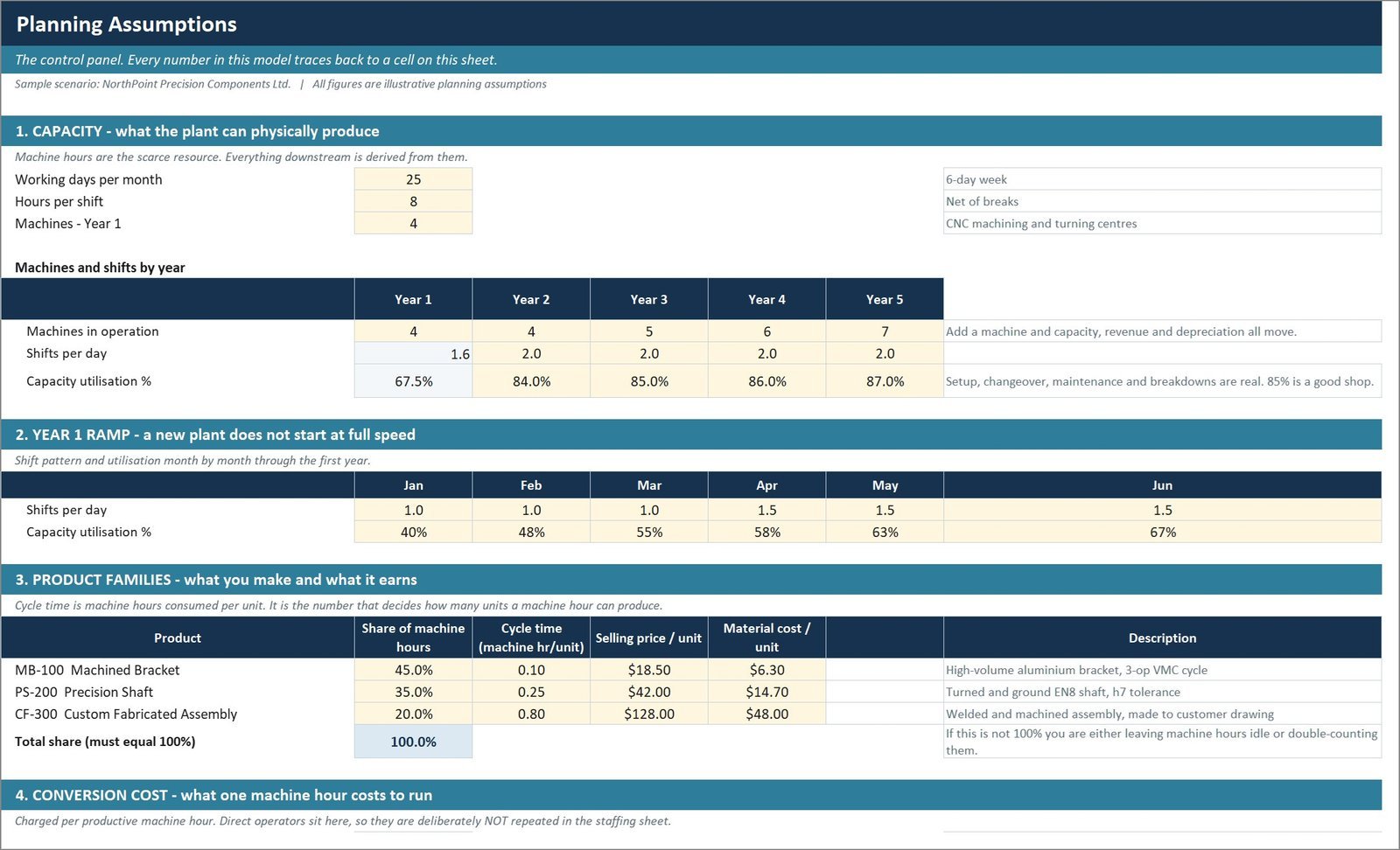
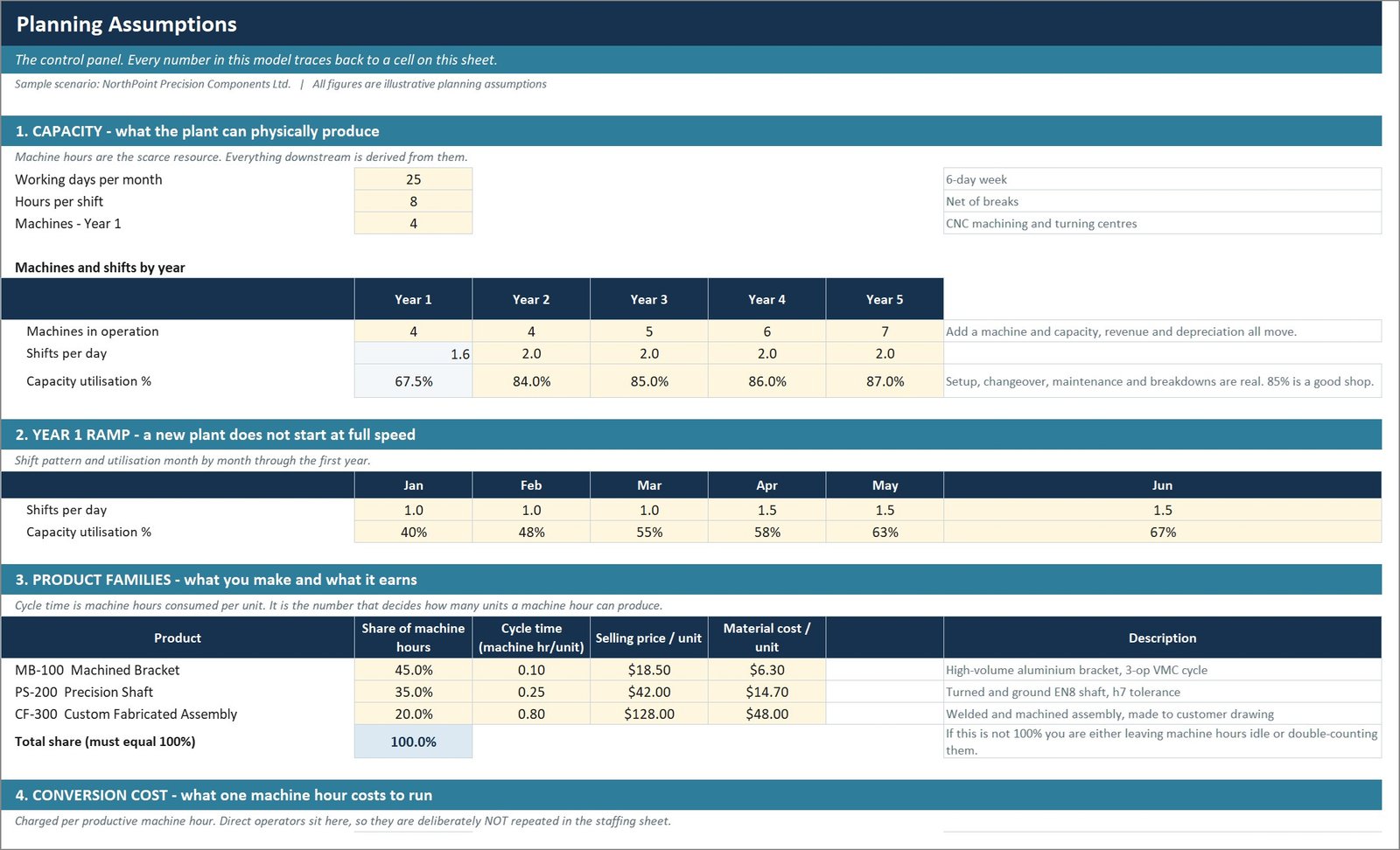
The Assumptions sheet — the only sheet you normally edit
Capacity, the Year 1 ramp, three product families with mix, cycle time, price and material cost, conversion cost per machine hour, scrap, inflation, funding and working-capital terms. Every other sheet is formulas.
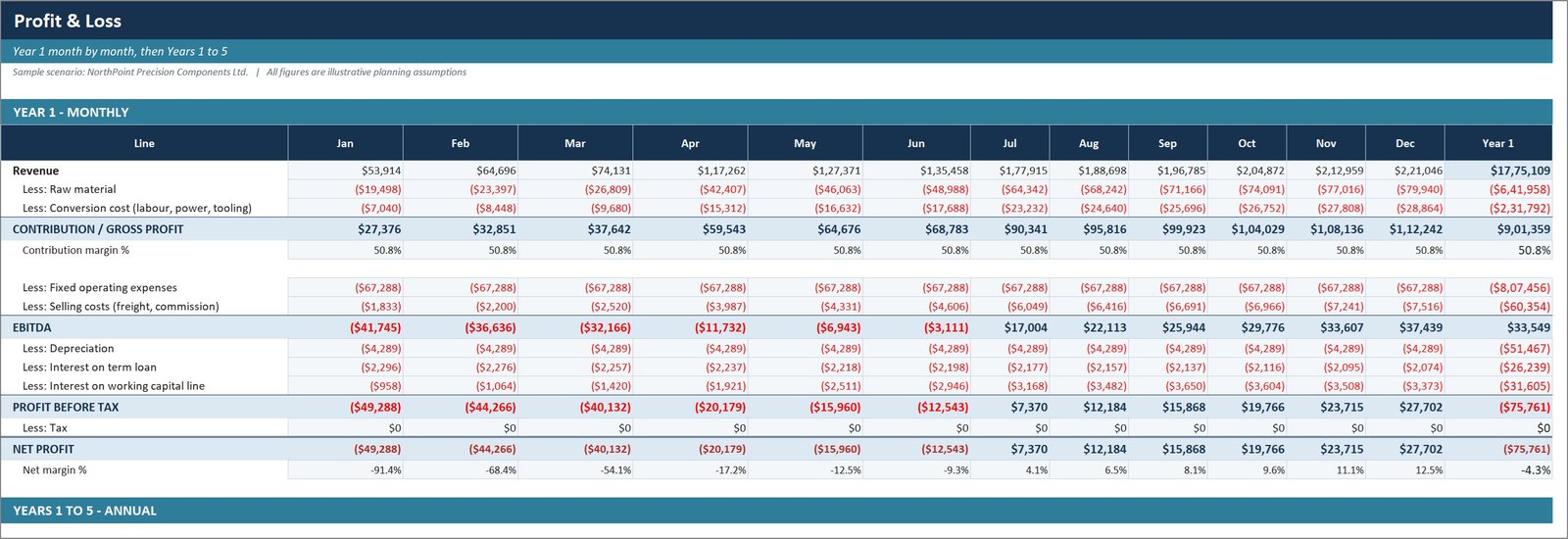
Profit and loss, and the cash flow with the revolving facility
Year 1 month by month then Years 1 to 5 annually, splitting material and conversion cost, contribution, fixed overheads, selling costs, EBITDA, depreciation, interest and tax. The cash flow adds receivables, inventory and payables balances and a facility that draws and repays automatically.
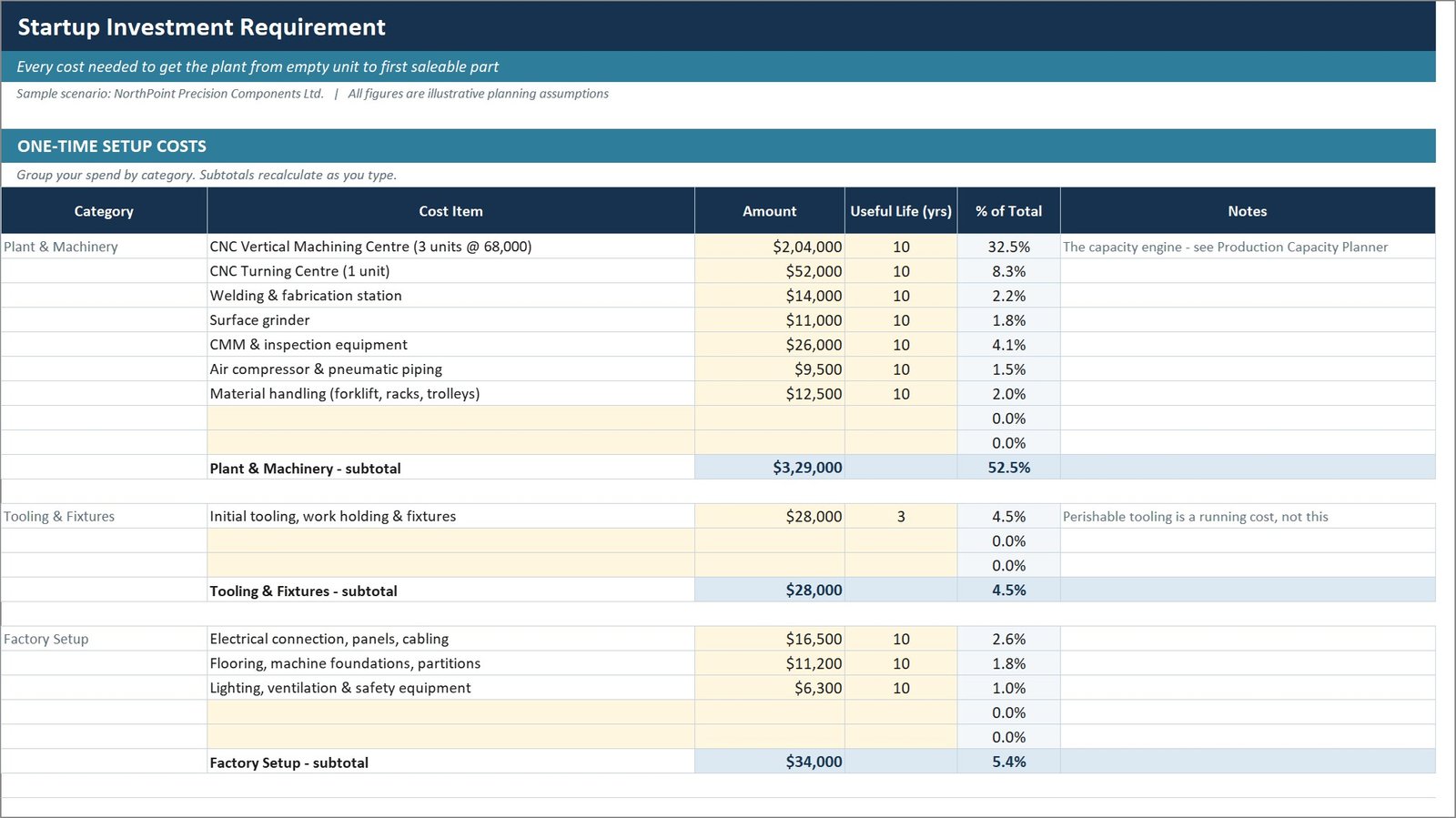
Workbook 01: startup cost and funding plan
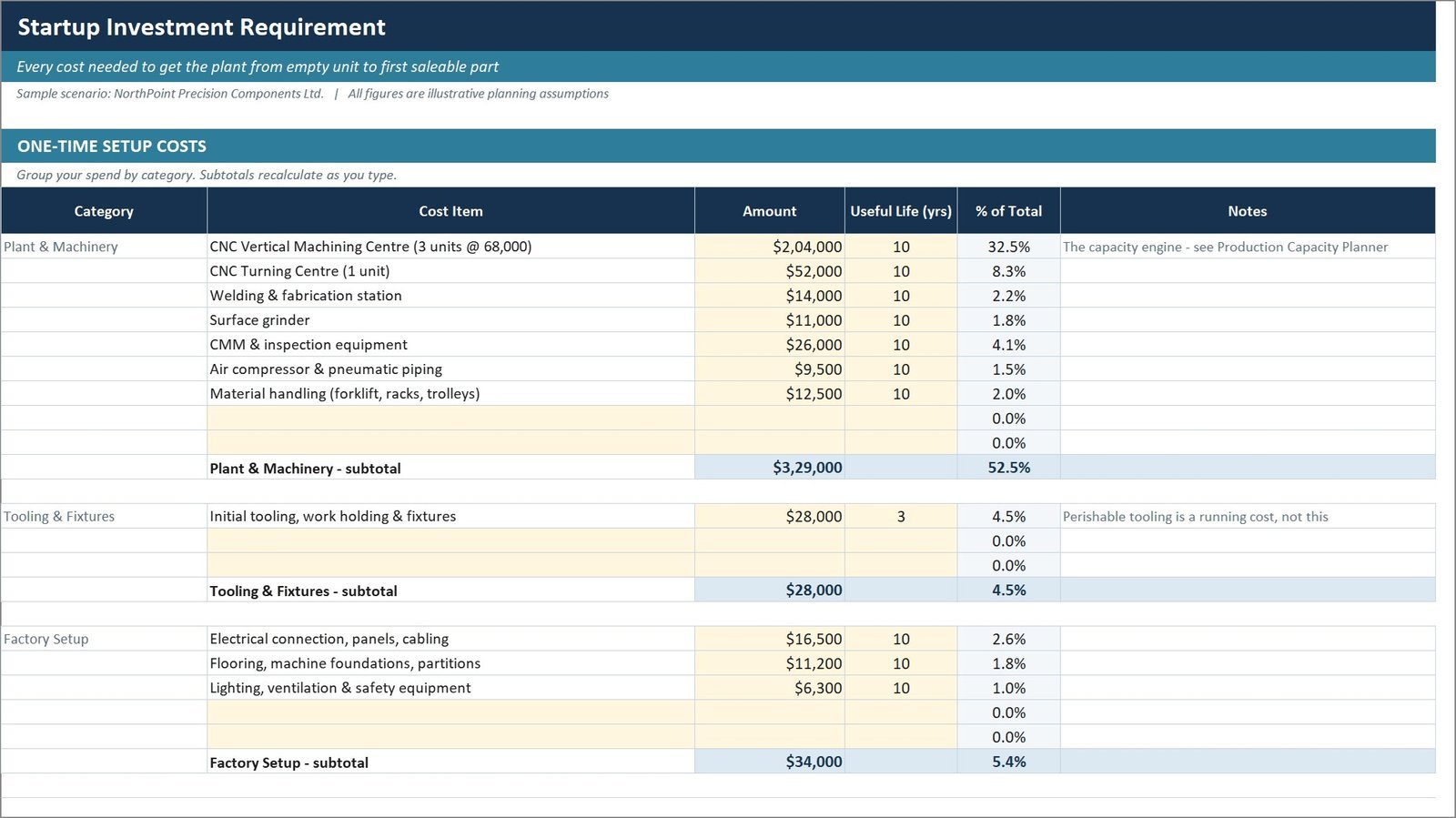
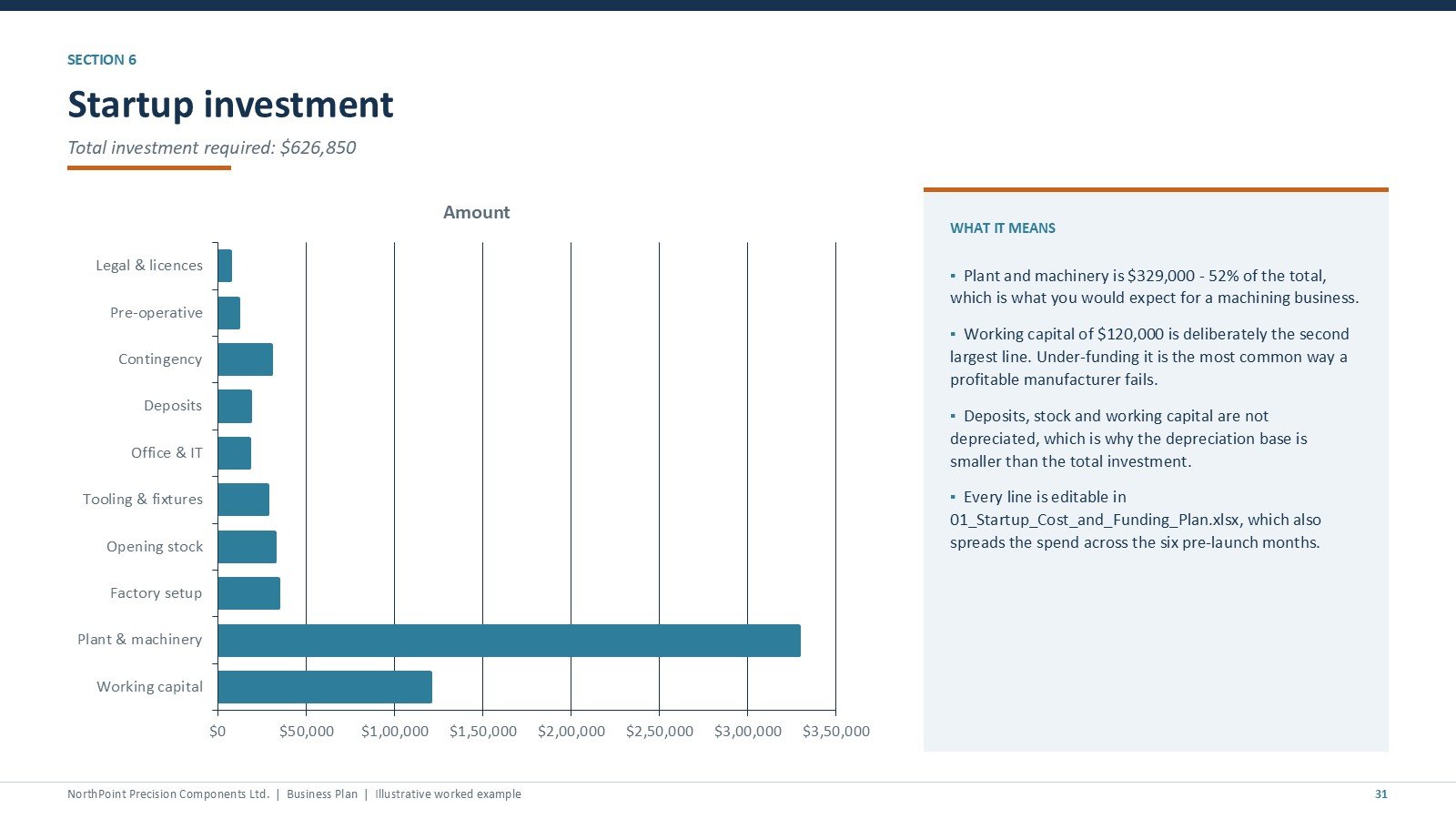
Every cost from empty unit to first saleable part, grouped into plant and machinery, tooling, factory setup, deposits, licences, opening stock, pre-operative and working capital, with a contingency percentage and a sources-and-uses statement. A payment schedule spreads the spend across the six pre-launch months.
Workbook 05: quotation and job costing calculator
Shop rates per machine built from depreciation, allocated overhead, power, consumables and the operator, then a job priced from the bottom up with sanity checks on revenue per machine hour, setup as a share of cost and the price at ten times the batch size.
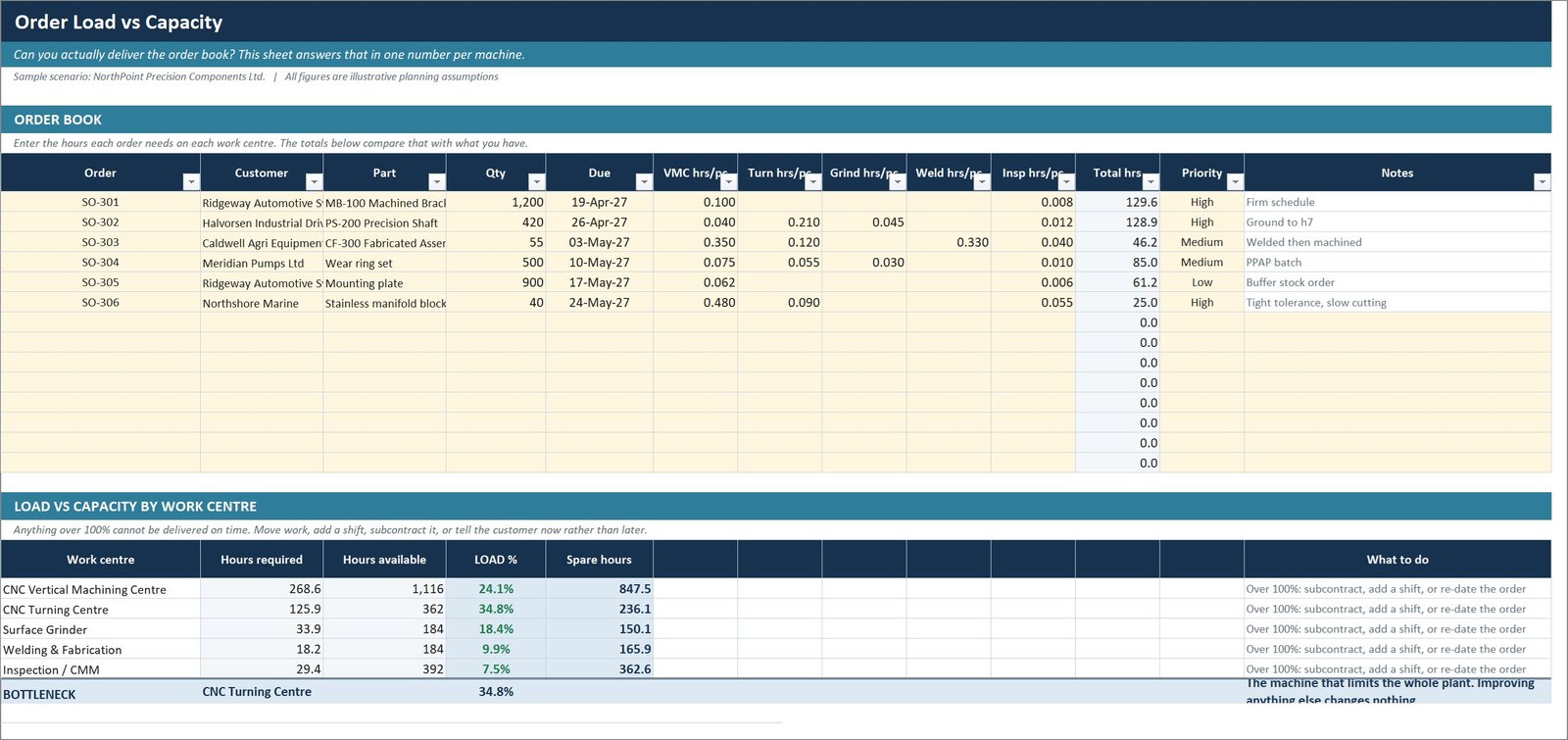
Workbook 07: production capacity planner, and Workbook 09: KPI dashboard
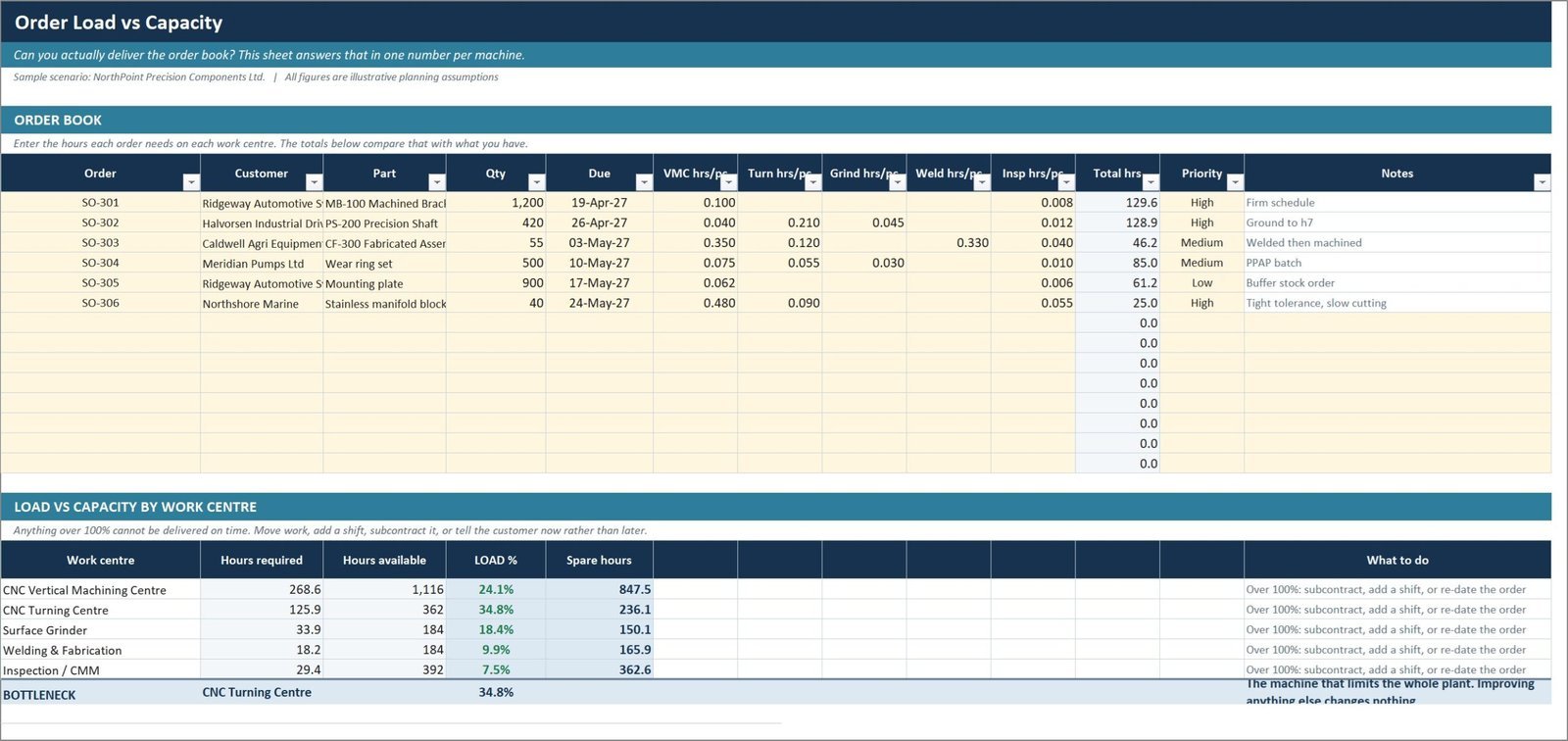
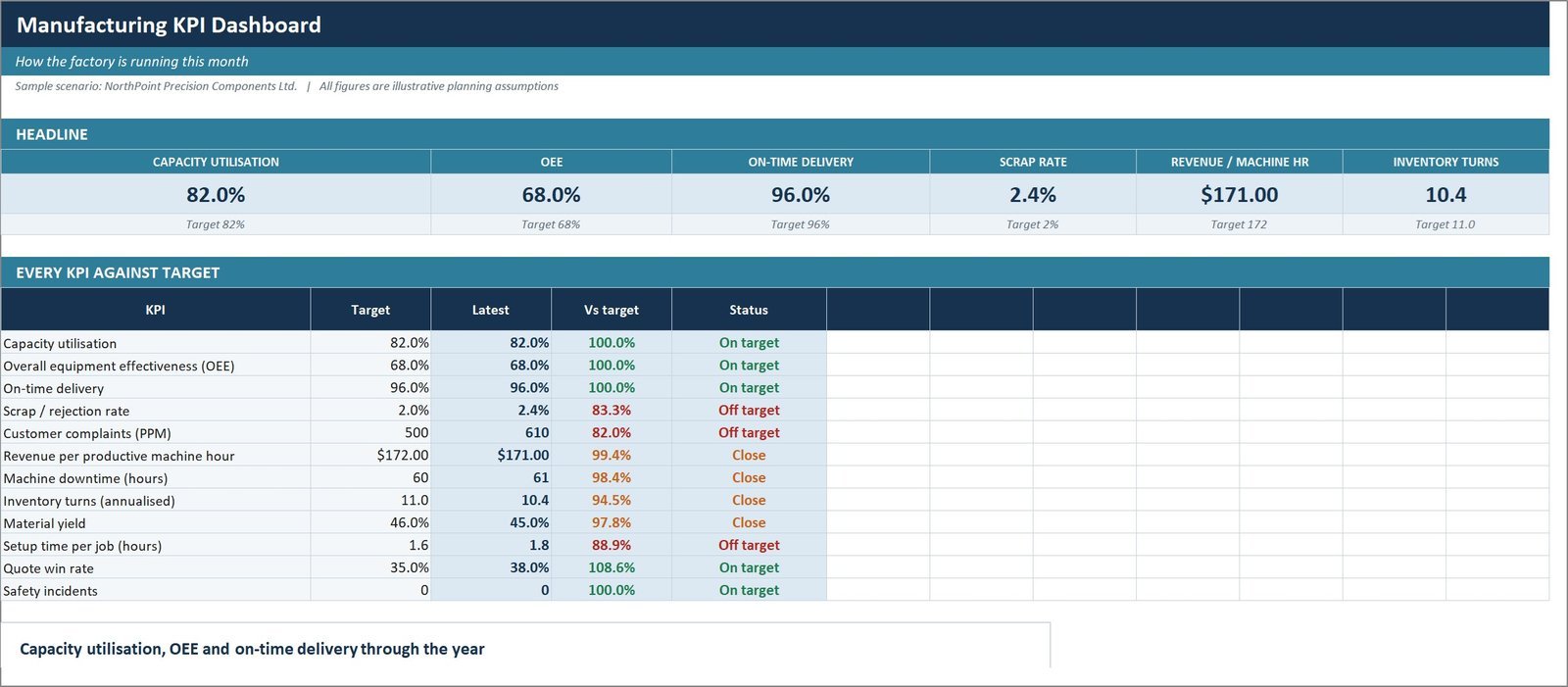
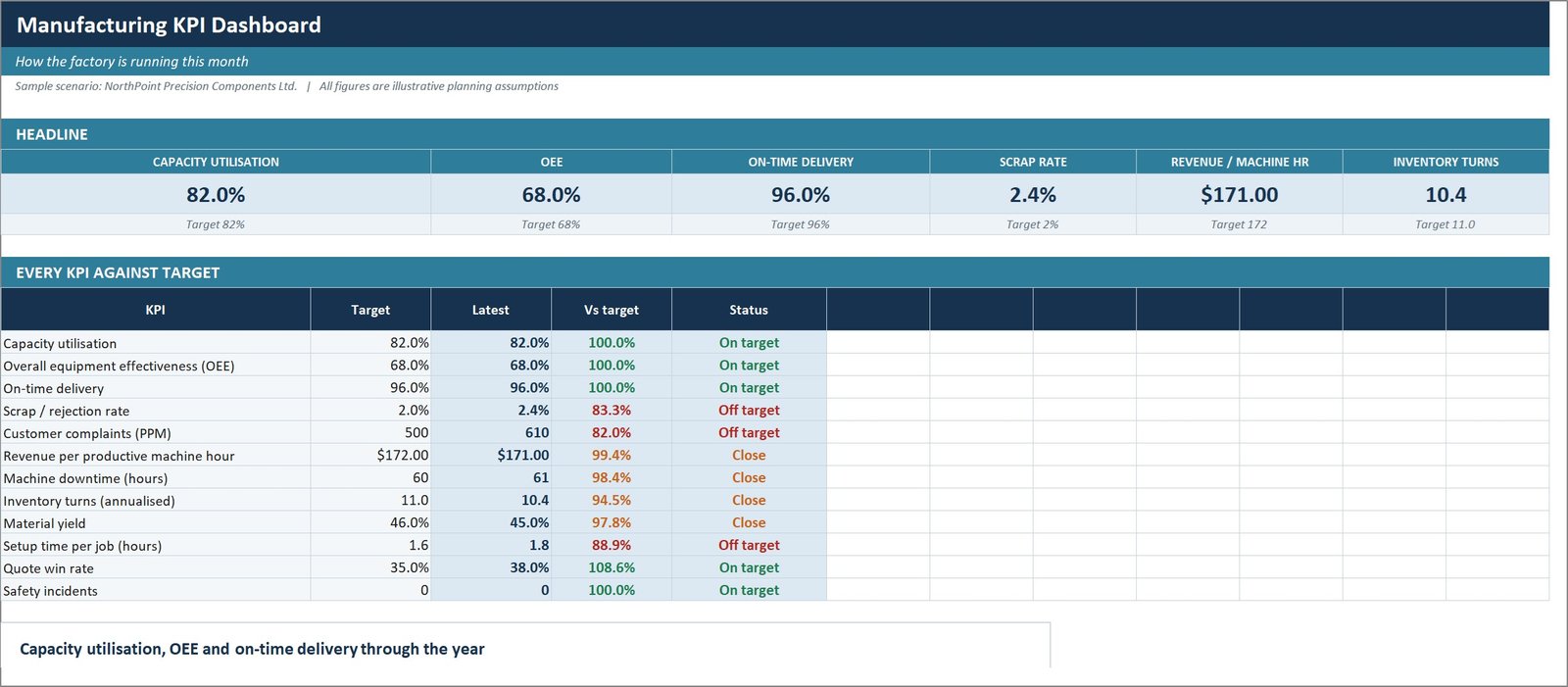
Order load against available hours per work centre with the bottleneck identified automatically, plus an OEE tracker. The KPI dashboard tracks 12 operational measures monthly against target with traffic lights that work correctly for both higher-is-better and lower-is-better KPIs.
Workbook 10: implementation roadmap and risk register
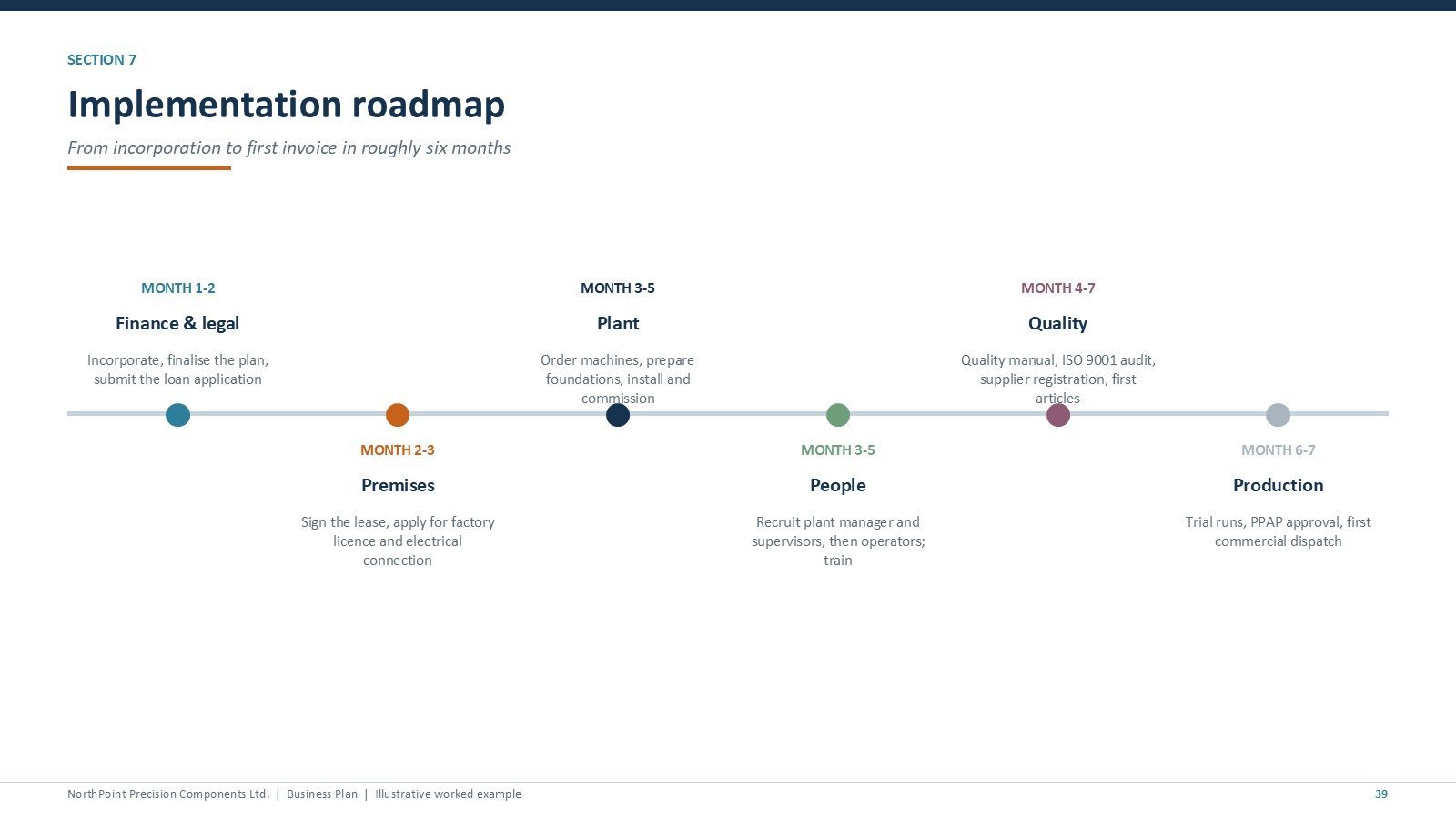
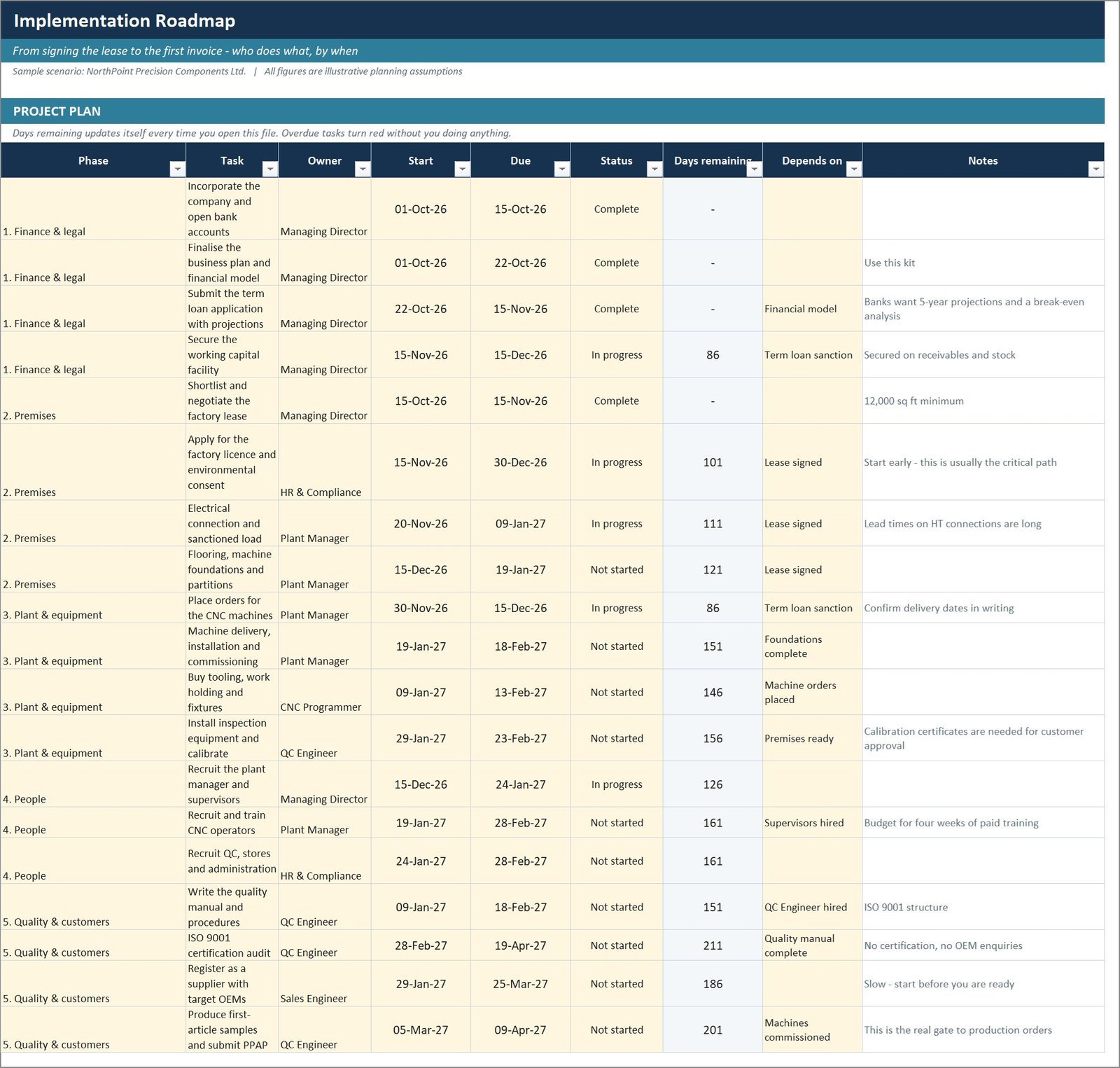
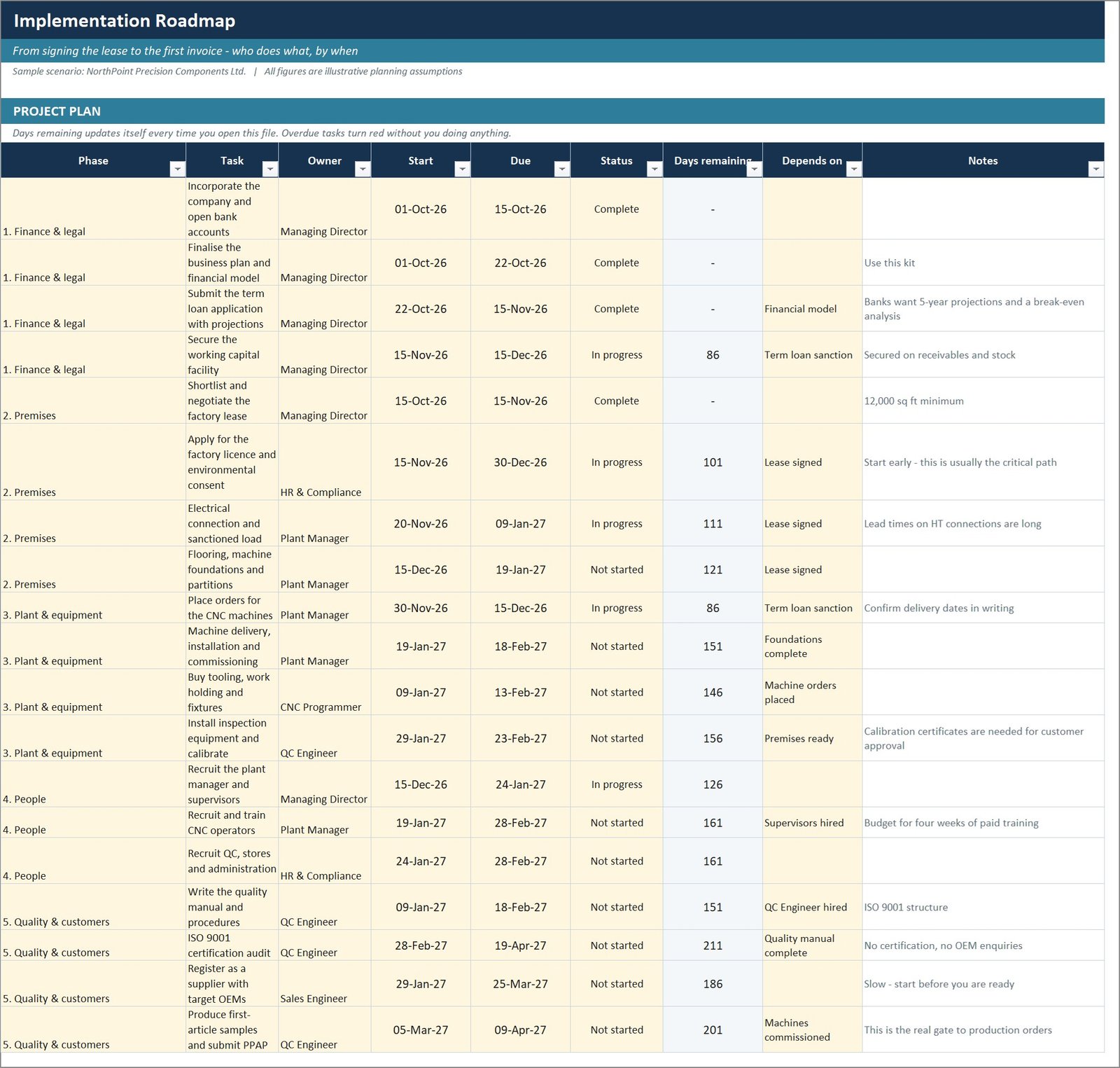
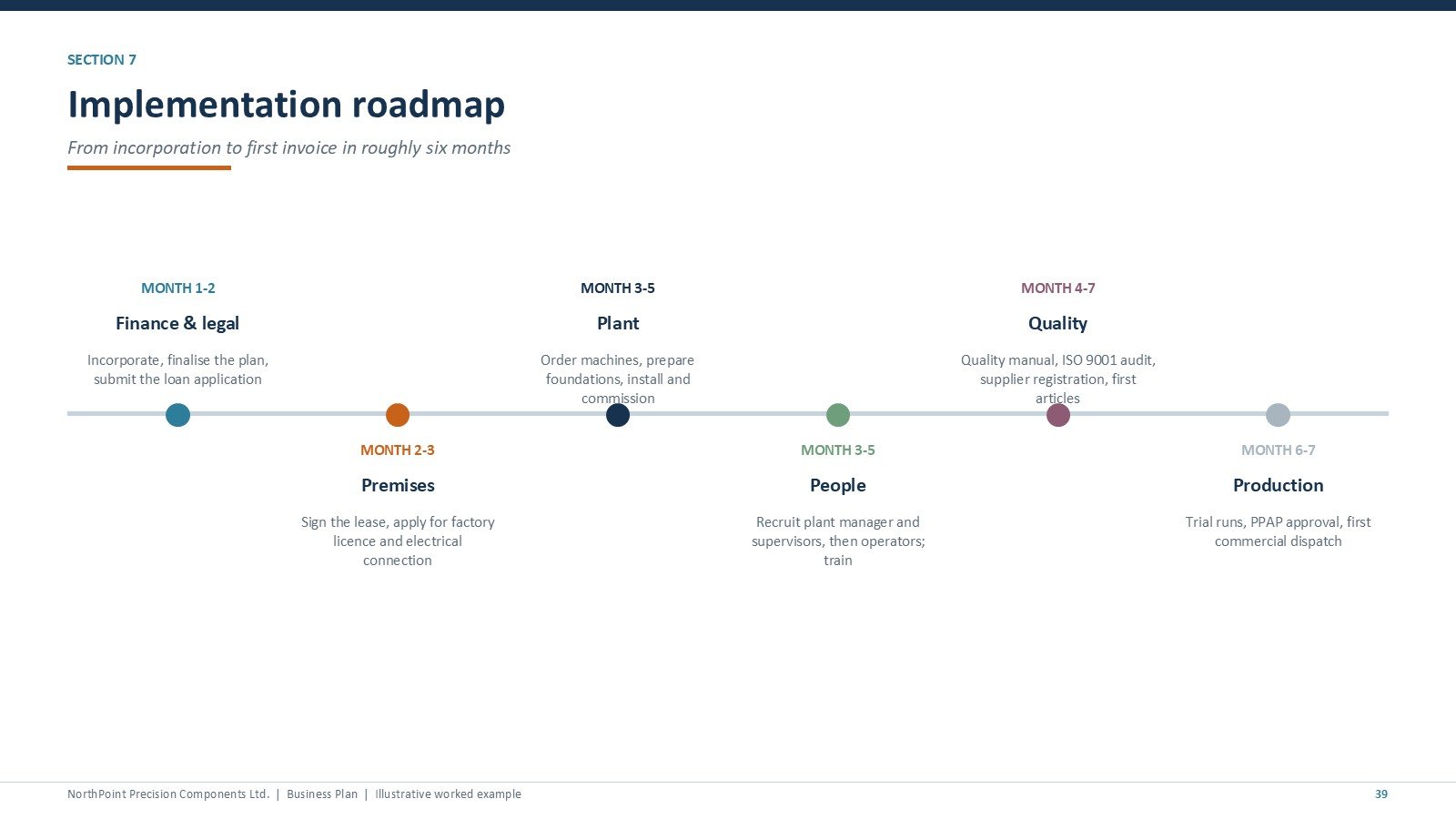
Twenty-two dated tasks across six phases with owners and dependencies, where overdue items turn red from TODAY() without anyone maintaining them, plus twelve risks scored for likelihood and impact and a weekly action list.
Also included
The full written business plan in Word across 13 sections, a six-phase startup checklist with tick boxes, an SOP and quality plan framework for OEM approval, a 9-page PDF guide explaining every file and formula, and three ready-made tools: an automatic organisation chart, a quality control checklist and a financial planning calendar.
📊 Manufacturing Business Plan Templates Kit vs. a Business Plan Writer vs. LivePlan / Bizplan — Where This Fits
| Feature | Manufacturing Business Plan Templates Kit | Freelance business plan writer | LivePlan / Bizplan |
|---|---|---|---|
| Cost | $23 one-time ✅ | $500 – $3,000 per plan | $20 – $50 / month, ongoing |
| Platform | Excel, PowerPoint, Word — files you own ✅ | Whatever they send back | Browser only, data on their servers |
| Setup time | Under 30 minutes to your own numbers ✅ | 2 – 6 weeks | Several hours of form filling |
| Manufacturing-specific model | Machine hours, cycle time, scrap, OEE ✅ | Depends entirely on the writer | Generic revenue lines |
| Quotation / job costing tool | Included ✅ | Not included | Not included |
| Edit after delivery | Unlimited, you own the formulas ✅ | Paid revisions | Only while subscribed |
| Keeps working if you stop paying | Yes — lifetime access ✅ | Yes | No |
| Year-1 cost | $23 ✅ | $500 – $3,000 | $240 – $600 |
| Lender-ready presentation | 43 slides, editable ✅ | Usually a document only | Template export |
For founders who want a manufacturing-specific financial model without paying a consultant or renting software forever, the Manufacturing Business Plan Templates Kit sits in the sweet spot.
👥 Who This Template Is For — and Who It’s Not For
✅ This kit is built for:
- Founders opening a machine shop, fabrication unit, small factory or contract manufacturing business
- Existing small manufacturers preparing a bank or investor pack and needing a defensible five-year model
- Consultants and accountants who build plans for manufacturing clients and want a tested starting point
- Operations managers who need capacity, quoting and KPI tools alongside the plan
❌ This kit is NOT for:
- Service, retail, SaaS or ecommerce businesses — the model is built on machine hours and will not fit
- Large plants needing ERP-grade MRP, shop-floor scheduling or barcode integration
- Anyone expecting industry benchmark data — every figure is an illustrative worked example you replace
- Anyone who wants the plan written for them; this is a template you complete, not a done-for-you service
⚙️ How to Use the Manufacturing Business Plan Templates Kit
- Open workbook 02 and go to the Assumptions sheet. Set machines, working days, shift pattern and utilisation.
- Enter your three product families: share of machine hours, cycle time, selling price and material cost per unit.
- Open workbook 01 and list your startup costs, then split the funding into equity, term loan and working capital facility.
- Set your true shop rates in workbook 05 and price one real job to check your pricing against the model.
- Read the Profit & Loss sheet — contribution margin first, then EBITDA.
- Read the Cash Flow sheet and check the facility peak. This is the step most people skip.
- Open the PowerPoint and the Word plan, and replace the example company with yours.
- Load workbook 10 with your own dates and owners, and score your own risks.
💼 Real-World Use Cases
Daniel is opening a four-machine CNC shop. He uses the kit to size his startup investment, discovers from the cash flow that his 45-day customer terms need a working capital facility far larger than he assumed, and takes the sources-and-uses statement and five-year model to his bank — without paying a consultant $2,000 for a plan he would have had to revise anyway.
Priya runs a 12-person fabrication unit and wants to add a second shift. She replaces the assumptions with her own, models the shift change, and sees that fixed cost absorption — not price — is what lifts her margin. She uses the capacity planner weekly to find the bottleneck work centre before accepting new orders.
Marcus is a consultant with three manufacturing clients. He uses the quotation calculator to show each client their true machine-hour rate, and reuses the kit as the starting point for every plan instead of rebuilding a model from scratch each time.
❓ Frequently Asked Questions
What exactly do I get in the Manufacturing Business Plan Templates Kit?
You get 19 files in one ZIP: a 43-slide PowerPoint business plan, 10 Excel workbooks covering 51 worksheets, 3 Word documents, a 9-page PDF guide and three ready-made tools. Everything is editable and there is no subscription.
How long does setup take?
Under 30 minutes for the core model. The Manufacturing Business Plan Templates Kit is driven from one Assumptions sheet — set your machines, shifts, products and prices, and the capacity, revenue, cost, profit, cash flow and KPI sheets all update automatically.
How does this compare to LivePlan or hiring a business plan writer?
A writer costs $500 to $3,000 and takes weeks; LivePlan is a subscription you lose access to when you stop paying. The Manufacturing Business Plan Templates Kit is $23 once, you own the files and formulas, and the model is manufacturing-specific rather than generic.
Does it work in older versions of Excel?
Yes. The Manufacturing Business Plan Templates Kit works in Excel 2010 and later, Microsoft 365 and Excel for Mac. The workbooks deliberately avoid MINIFS, XLOOKUP, dynamic arrays and array formulas so nothing breaks or silently miscalculates on an older build.
Are the numbers in the kit real industry benchmarks?
No. The example company, NorthPoint Precision Components, is fictional and every figure is an illustrative planning assumption included to show how a complete plan fits together. Replace them with your own research before using the plan for any real purpose.
Why does the worked example lose money in Year 1?
Because a new plant genuinely does. The Manufacturing Business Plan Templates Kit models the ramp from one shift to two over seven months, ending Year 1 at a $75,761 loss and crossing break-even early in Year 2. A plan showing instant profit is not credible to a lender.
Do I need macros or add-ins?
No add-ins, and nothing is password protected. Every workbook built for the Manufacturing Business Plan Templates Kit is macro-free. The one exception is the bundled Organization Chart Template, which uses macros to draw the chart itself.
👤 About the Author
Built by PK — Microsoft Certified Professional with 15+ years of Excel, Google Sheets and Power BI experience. Founder of NextGenTemplates, reaching 300K+ subscribers across YouTube channels (@PK-AnExcelExpert, @NextGenTemplates, @NeoTechNavigators). Every template is hand-built and tested before release.
🔗 Explore Related Templates
Pair the kit with a reporting dashboard once you are trading: the Flooring Materials Manufacturing Dashboard in Excel and the ERP Systems Dashboard in Excel both plug into the same operating picture, and the Glass Installation KPI Dashboard in Excel shows the scorecard format in a related trade.
Browse more in Manufacturing Templates, Excel Dashboard Templates and Template Bundles.
Planning an online store instead? The Ecommerce Store Business Starter Templates Kit is the same format built around traffic, conversion and stock.
📖 Click here to read the Detailed Blog Post
🎥 Visit our YouTube channel for step-by-step video tutorials
👉 YouTube.com/@NextGenTemplates
📅 Last updated: September 2026















Reviews
There are no reviews yet.