

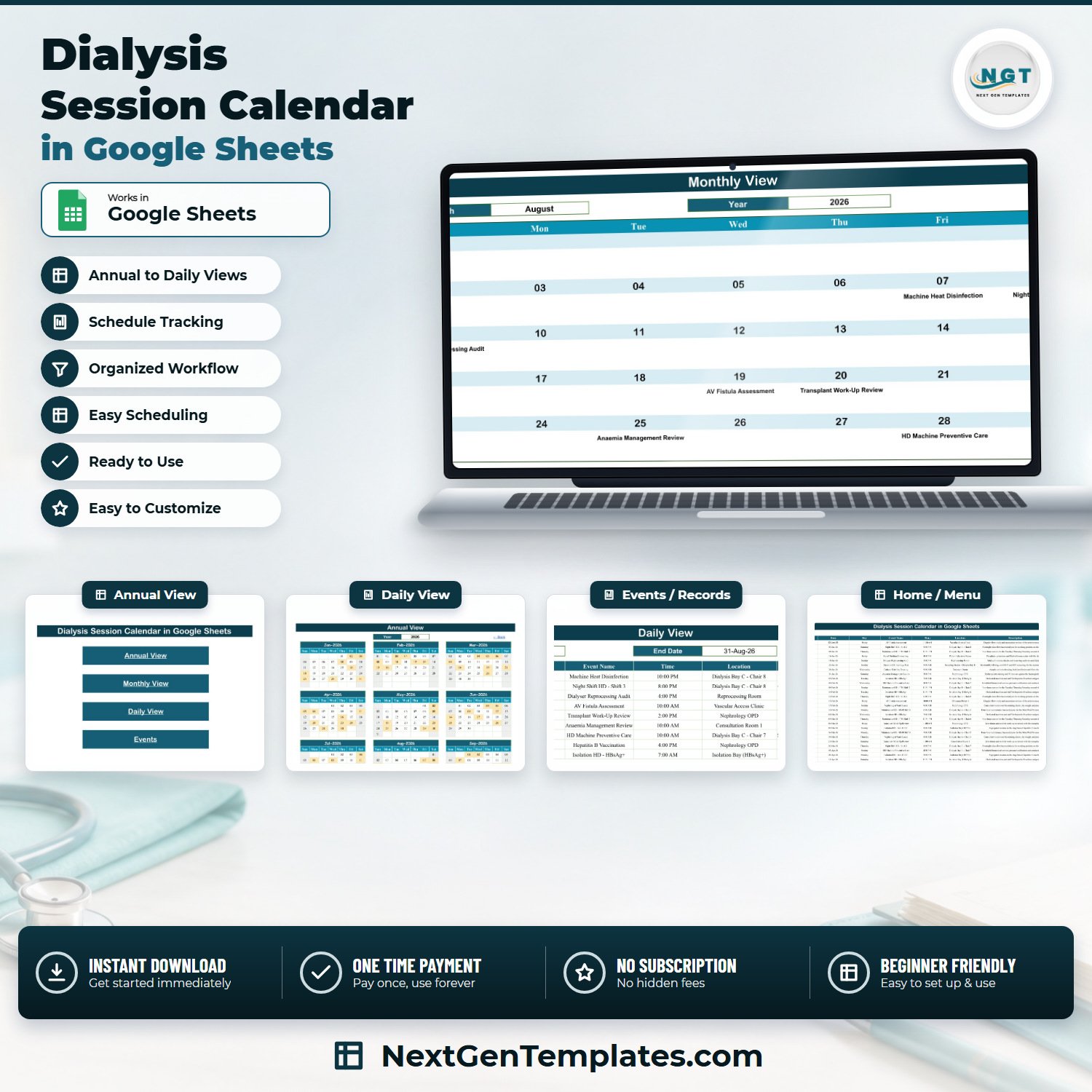

The Dialysis Session Calendar in Google Sheets is a ready-to-copy scheduling workbook with six tabs, three linked calendar views and 100 sample entries loaded across 2026, covering 20 session and unit-task labels in 25 named chairs, bays and rooms. Buy it once at $4.99, open the PDF in your download, click the copy link, and the calendar lands in your own Google Drive in about two minutes. No subscription and no per-user licence. Built and tested by NextGenTemplates, reaching 300K+ subscribers across our YouTube channels. If the file does not open or copy correctly, contact us for a replacement or a refund.
Please read this before you buy. This is a spreadsheet that holds dates, times and room labels. It is not a patient record, not an EHR or EMR, not a dialysis or renal-unit management system, not a medical device, and not a treatment-planning tool. It does not determine, validate or optimise anybody’s treatment schedule, and it carries no HIPAA, GDPR, CMS, ESRD-network, Joint Commission, NABH, CQC or any other regulatory or accreditation claim. Your clinical scheduling, your patient safety and your record-keeping obligations remain entirely yours.
Key Features of Dialysis Session Calendar in Google Sheets
- Six tabs, five visible – Home, Annual View, Monthly View, Daily View and Events, plus one hidden List tab that feeds the Month and Year dropdowns.
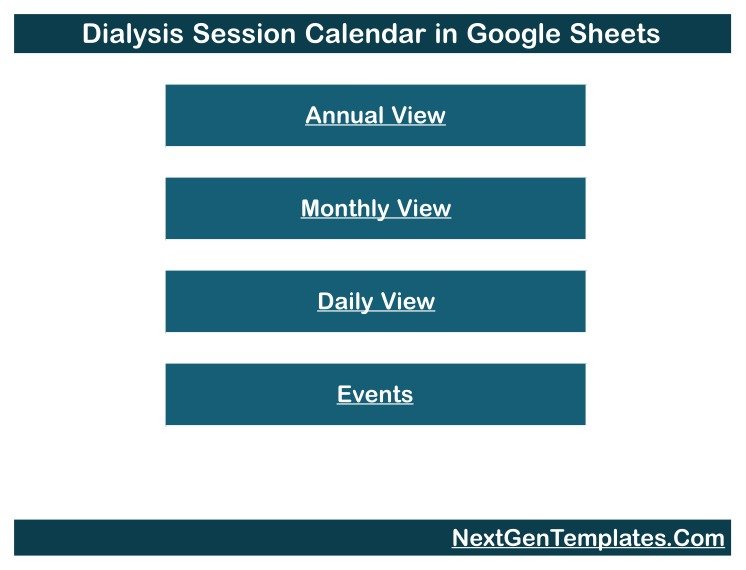
- Four navigation buttons on Home jump straight to each view, and every view carries a “Back” link home.
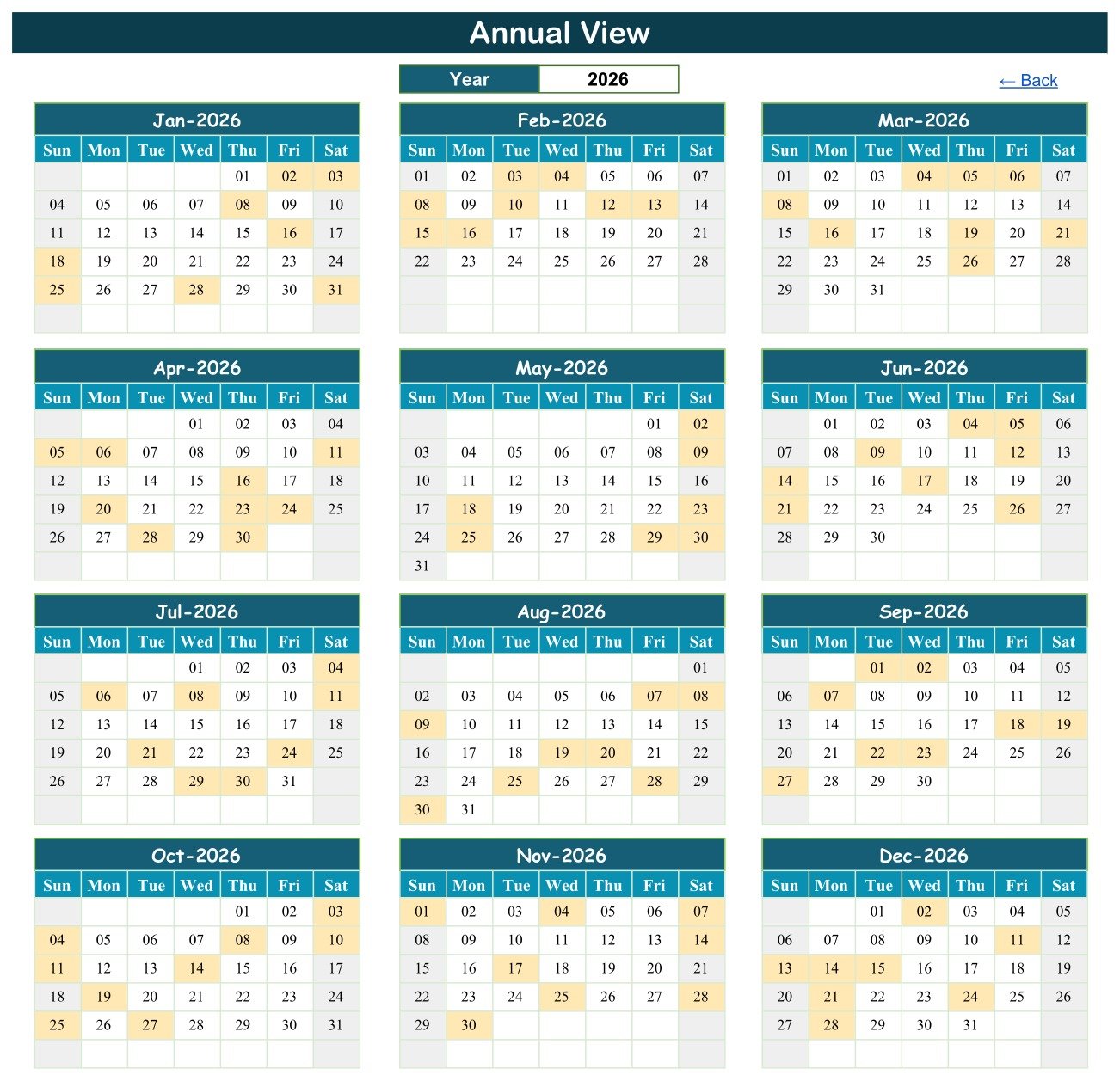
- Annual View driven by one cell – type a year into the Year box and all twelve month grids rebuild, three across and four down, with every scheduled day shaded. In the sample data, January 2026 shades the 2nd, 3rd, 8th, 16th, 18th, 25th, 28th and 31st.
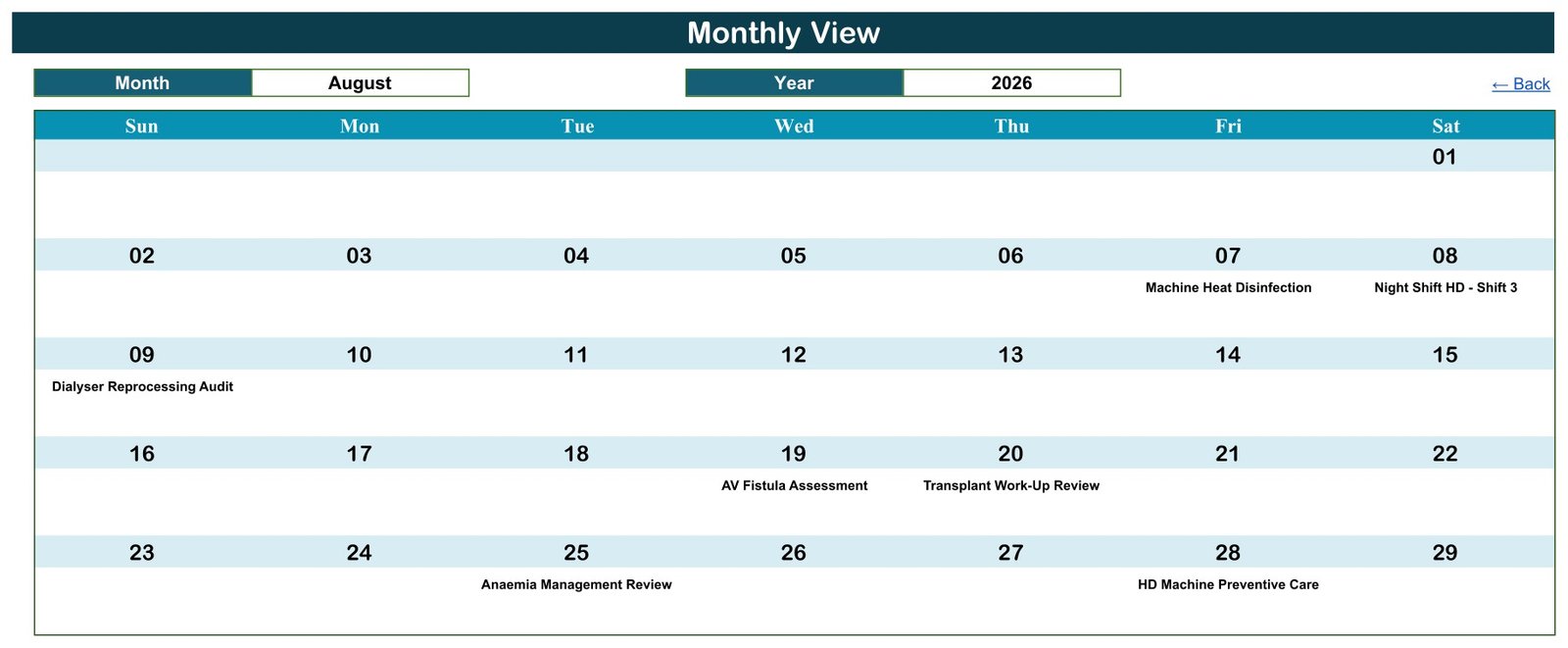
- Monthly View with Month and Year dropdowns – pick August and 2026 and the Sun-to-Sat grid fills with that month’s entries by date.
- A “more” counter on busy days – the month grid prints the first entry on a date, and a
COUNTIFunderneath adds a “1 more…” note when that date carries another one, so a stacked day never looks empty. - Daily View date range – set a Start Date and an End Date and a
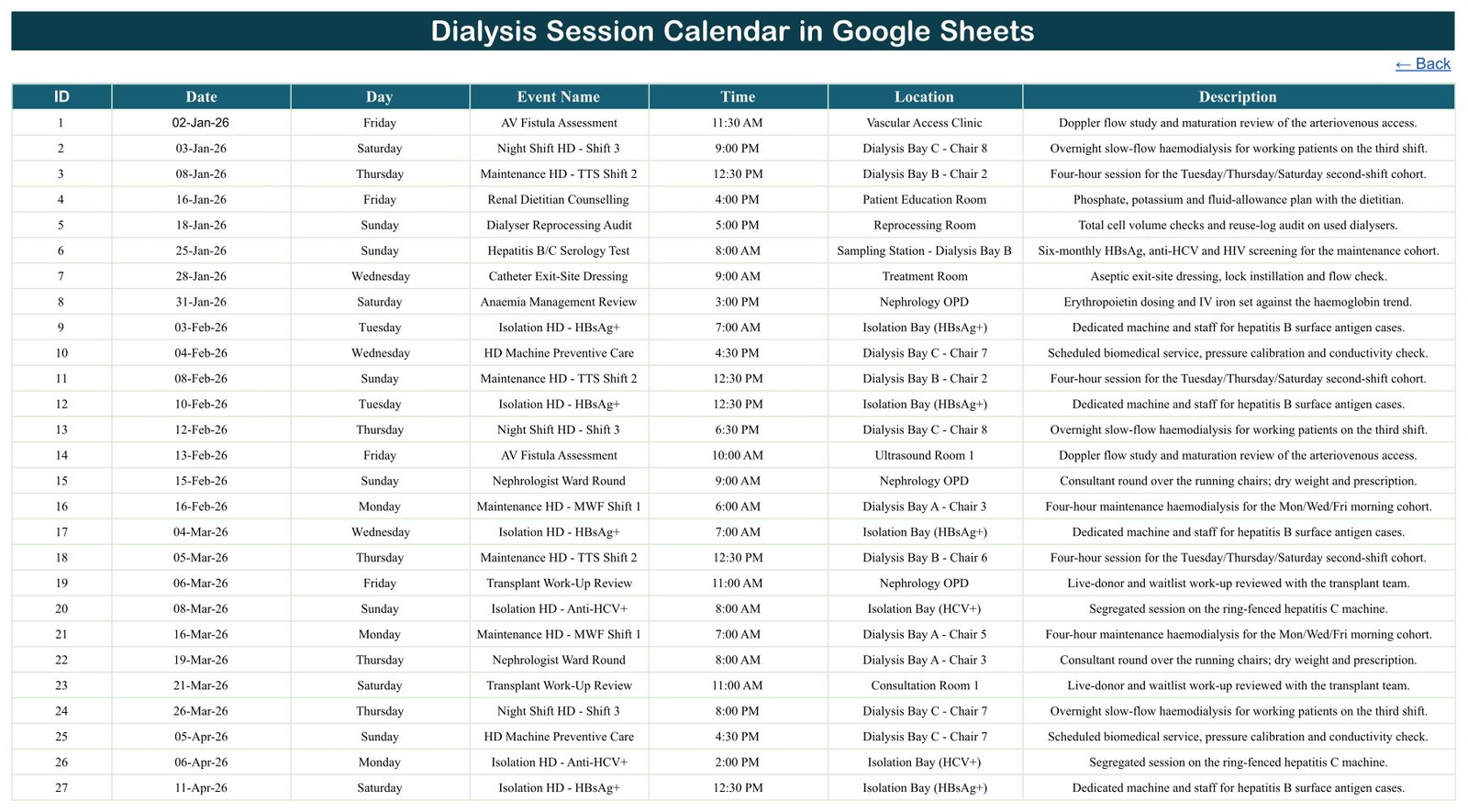
FILTERformula returns every entry between them across all seven columns, in date order. - 100 sample entries on the Events tab, numbered 1 to 100 and dated 02-Jan-2026 to 28-Dec-2026, eight or nine a month for all twelve months – and room for roughly 896 more rows before you touch a formula.
- Seven columns and nothing else – ID, Date, Day, Event Name, Time, Location and Description. There is no patient name, patient ID, hospital number, date of birth, contact, diagnosis, clinical value or notes column anywhere in the workbook. That omission is deliberate; see the section below.
- 20 sample Event Name labels covering the rhythm of a renal unit: Maintenance HD – MWF Shift 1, Maintenance HD – TTS Shift 2, Night Shift HD – Shift 3, Emergency Unscheduled HD, Isolation HD – HBsAg+, Isolation HD – Anti-HCV+, CAPD Training Session, Nephrologist Ward Round, AV Fistula Assessment, Catheter Exit-Site Dressing, Transplant Work-Up Review, Anaemia Management Review, Renal Dietitian Counselling, Monthly KT/V & Adequacy Labs, Hepatitis B/C Serology Test, Hepatitis B Vaccination, HD Machine Preventive Care, Machine Heat Disinfection, Dialyser Reprocessing Audit and RO Water Quality Testing.
- 25 named locations, chair by chair rather than “the unit” – Dialysis Bay A Chairs 1, 3, 4 and 5; Dialysis Bay B Chairs 2 and 6; Dialysis Bay C Chairs 7 and 8; Acute Dialysis Bay Chair 9; Isolation Bay (HBsAg+); Isolation Bay (HCV+); Reprocessing Room; RO Plant Room; Water Loop Sampling Point; Biomedical Workshop; Unit Side Laboratory; Sampling Station Dialysis Bay A; Sampling Station Dialysis Bay B; Vascular Access Clinic; Ultrasound Room 1; Nephrology OPD; Consultation Room 1; Treatment Room; CAPD Training Room; and the Patient Education Room.
- Real round-the-clock timings – 27 distinct start times from 5:00 AM to 11:30 PM, so a morning shift, an afternoon clinic and a late-evening machine task all sit on the same grid instead of being flattened into “all day”.
- The work around the chair is scheduled too – machine servicing, heat disinfection, dialyser reprocessing audits and water-loop testing appear on the same calendar as the treatment shifts, so the tasks that quietly take a chair out of service are visible before the week starts.
- Rolling year list – the hidden List tab carries a 36-year range, 2021 to 2056, so the Year dropdown keeps working long after the sample data is gone.
- Nothing to install – native Google Sheets functions only (
DATE,DATEVALUE,TEXT,VLOOKUP,COUNTIF,FILTER,IFERROR). No Apps Script, no macros, no add-on permissions.
The Missing Patient Column Is the Point
Open the Events tab and count the columns: ID, Date, Day, Event Name, Time, Location, Description. Seven. There is no eighth column waiting for a name, a hospital number, an NHS or MRN number, a date of birth, a phone number, a diagnosis or a clinical note – and there is no hidden one either. We checked every one of the 100 sample rows: not a single individual is identified anywhere in the file.
That is not an oversight to be patched. A Google Sheet is not appropriate storage for protected health information. A shared spreadsheet has no access control worth the name, no encryption you control, no audit trail, no retention policy and no way to prove after the fact who saw what. The moment a patient’s name goes into a cell, a scheduling convenience becomes a records problem, and it becomes your records problem.
So this calendar answers one question – what is scheduled, when, and in which chair or room – and leaves the question of who to the system your unit is actually licensed and governed to use for it. Chair 7 at 4:30 PM on a Wednesday is a scheduling fact. The person in it is a clinical record. Keep them in different places.
You can of course add a column – it is your copy of a spreadsheet, and nothing stops you. Please think hard before you do, and check with whoever owns information governance where you work.
What’s Inside the Dialysis Session Calendar in Google Sheets
Home is a title banner over four stacked buttons – Annual View, Monthly View, Daily View, Events. It is the menu, not a dashboard: there are no counters, no charts and no totals on it, and it exists so that a colleague you have shared the sheet with can find the right view without being told which tab to click.
Annual View is the year on one screen. A single Year box at the top drives everything below it through DATE formulas – twelve month grids laid out three across and four down, each one a proper Sun-to-Sat calendar, with every day that carries an entry shaded. Change 2026 to 2027 and the whole page rebuilds around the new year’s weekdays. It is the view for spotting the shape of a quarter: which weeks are dense, where the machine-maintenance days fall, which month is thin.
Monthly View is the working view. Two dropdowns – Month and Year, both fed by the hidden List tab – fill a Sun-to-Sat grid with that month’s entries printed under their dates. It uses a VLOOKUP against the Events tab, which means it prints the first entry on any given date, and a COUNTIF line beneath it adds “1 more…” when the date carries a second. In the sample year exactly three dates do: 30-May-2026, 04-Jun-2026 and 30-Aug-2026. Click through to Daily View or the Events tab to see all of them.
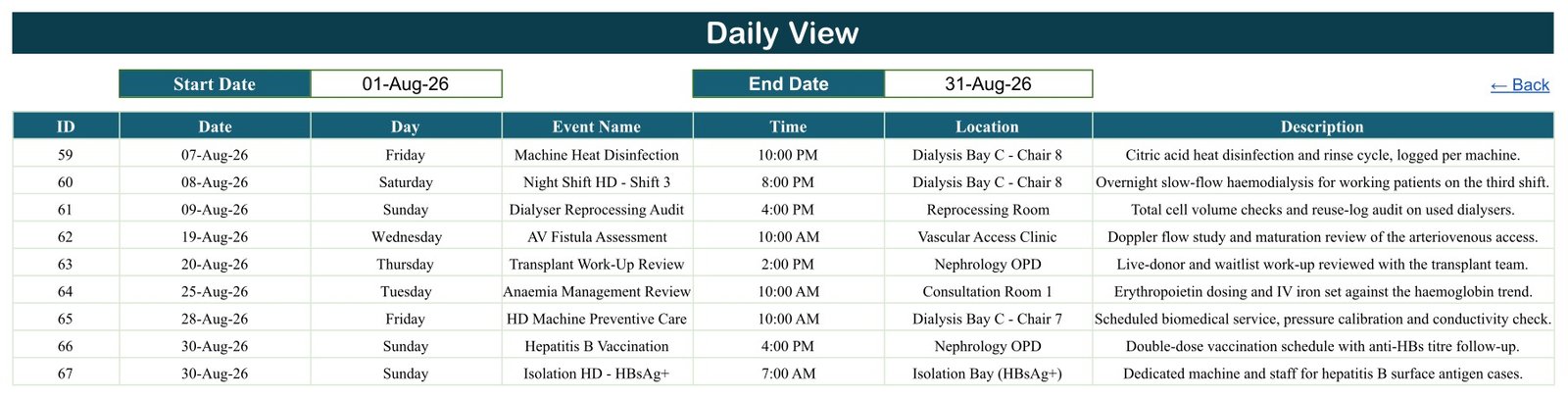
Daily View is the range view, and the one you print. Set a Start Date and an End Date – the sample ships with 01-Aug-26 to 31-Aug-26 – and a single FILTER formula returns every matching row with all seven columns intact: ID, Date, Day, Event Name, Time, Location and Description. Narrow it to one day for a shift handover, or to a week for a planning meeting. Unlike Monthly View it hides nothing on a stacked date.
Events is the single source of truth and the only tab you type into. One hundred rows are already in it, numbered 1 to 100, spread across all twelve months of 2026 at eight or nine a month. The three views all read from this one table, so a corrected time, a renamed session or a brand-new row appears everywhere the moment you press Enter. The formulas are written against rows 4 to 999, so there is room for roughly 896 more entries before anything needs extending.
List is hidden and you can leave it that way. It holds the twelve month names and a 36-year range from 2021 to 2056, and those two columns are what the Month and Year dropdowns read.
Dialysis Session Calendar in Google Sheets vs. the Excel Edition vs. Renal Unit Software – Where This Fits
| What you need | This Google Sheets calendar | The Excel edition | Dialysis / renal unit software |
|---|---|---|---|
| See a year, a month and a date range of scheduled sessions and unit tasks | Yes – three linked views off one table | Yes – plus a This Month summary page | Yes |
| Share with the whole unit and edit together, live | Yes – it is a Google Sheet, share the link | No – a file you email or put on a drive | Yes, with accounts and licences |
| Works on a phone or a tablet at the nursing station | Yes – browser or the Sheets app | Desktop Excel for Windows, macros enabled | Usually yes |
| Store patient identities, clinical values or treatment records | No – and deliberately so | No – and deliberately so | Yes, that is what it is for |
| Prevent a double-booked chair, warn on a clash, enforce a rule | No – it validates nothing | No – it validates nothing | Yes |
| Send reminders, texts or emails to anyone | No | No | Usually yes |
| Audit trail, access control, retention, certification | No | No | Yes, that is the difference |
| Cost | $4.99 once | $4.99 once | Recurring, per seat or per unit |
The honest summary: if your unit already runs proper renal software, this is a wall-planner you can share, not a replacement for it. If your unit currently runs on a paper diary, a whiteboard and a group chat, this is a large step up for the price of a coffee – and it still is not clinical software, so keep the records where they belong.
Who This Template Is For – and Who It’s Not For
It is for the person who keeps the unit’s diary: a dialysis unit manager or charge nurse planning shift patterns and chair allocation; a renal ward clerk who needs the month on a screen instead of a paper diary; a small standalone or satellite unit with no scheduling software at all; a biomedical or technical lead who wants machine servicing, disinfection cycles and water testing on the same calendar as the treatment shifts; a nephrology practice manager coordinating clinic sessions around dialysis days; and a trainer running peritoneal-dialysis teaching sessions who needs the training room booked and visible.
It is not for anyone who needs to hold patient records – use your clinical system. It is not for anyone who needs the calendar to decide anything: it will not build a shift pattern for you, will not check a clash, will not balance chair utilisation and will not flag a gap. It is not for a unit that needs an audit trail or access control on the schedule itself. And it is not a substitute for your unit’s official rota or your clinical system’s booking record – if the two disagree, the official one wins, every time.
How to Use the Dialysis Session Calendar in Google Sheets
- Open the PDF in your download and click the “Make a copy” link. Google creates a private copy of the whole six-tab workbook in your own Drive, under your own account. The original stays untouched, so you can always come back for a fresh one.
- Look around with the sample data still in. Home to Annual View to Monthly View to Daily View. Change the Year on Annual View, change the Month dropdown on Monthly View, move the Start and End dates on Daily View. Five minutes here will tell you whether the layout suits how your unit works.
- Go to the Events tab and clear rows 4 to 103. Delete the values, not the rows – the formulas in the three views are written against the range, and deleting whole rows is the one thing that can disturb them.
- Type your own schedule in, one row at a time. Fill ID, Date, Day, Event Name, Time, Location and Description. Keep the Date column as a real date so the views can match on it. Leave the person out of it – put the session, the time and the chair or room, and keep the identity in your clinical system.
- Rename the locations to your own bays, chairs and rooms. They are plain text. Whatever you type appears in every view immediately, because all three read the same table.
- Check a date that carries two entries. Monthly View shows the first plus a “1 more…” note; Daily View and the Events tab show them all. Knowing that difference before you rely on the month grid saves an awkward morning.
- Share it read-only with the people who only need to look. Give edit access to the one or two people who keep the diary, and Viewer to everyone else – it keeps the source table clean and stops a stray click rewriting a date.
- Print or export Daily View for the handover. Set the range, then File to Print or File to Download as PDF. It is the only view that shows every entry on a stacked date.
Real-World Use Cases
A charge nurse planning next month’s chair usage. She sets Monthly View to the coming month, sees at a glance which days already carry machine servicing or a disinfection cycle, and plans around them instead of discovering a chair is out on the morning. The Annual View tells her which weeks in the quarter are already dense.
A ward clerk running the morning handover. He sets Daily View to today and tomorrow, prints the two-day range, and the sheet on the desk lists every session and unit task by time and by chair – no scrolling, no interpreting a wall planner from three metres away.
A biomedical technician planning preventive maintenance. She adds her servicing, heat-disinfection and water-testing dates as ordinary rows, so for the first time the technical calendar and the treatment calendar are the same calendar, and a service that would have collided with a busy shift is visible weeks earlier.
A small satellite unit with no software at all. The manager copies the sheet, shares it read-only with the whole team and edit-access with two people, and replaces a paper diary that only existed in one building with something the whole unit can see on a phone.
Frequently Asked Questions
Is this a dialysis management system, an EHR or a patient record?
No. It is a calendar of scheduled sessions and unit tasks. There is no patient record, no treatment record, no prescription, no lab result, no billing and no clinical workflow of any kind. It sits alongside your clinical system, never instead of it.
Where do the patient names and hospital numbers go?
Nowhere, by design. The seven columns are ID, Date, Day, Event Name, Time, Location and Description – there is no patient field of any kind, and none of the 100 sample rows identifies anybody. A Google Sheet is not appropriate storage for protected health information: it has no access control you can rely on, no encryption you control, no audit trail and no retention policy. Schedule the session here; keep the person’s identity in the system your unit is licensed to use for it.
Does it decide, validate or optimise treatment schedules?
No, and it must not be used as though it does. It performs no validation whatsoever. It does not know a shift pattern, a session frequency, a chair-capacity limit or any clinical rule, and it will accept any date, time and room you type without comment. Every scheduling and clinical decision, and the patient safety that follows from it, stays with your clinical team.
Is it certified, compliant or approved for clinical use?
No. It is a spreadsheet of dates and text. It is not a medical device, and it makes no HIPAA, GDPR, CMS, ESRD-network, Joint Commission, NABH, CQC or any other regulatory or accreditation claim. It will not help you achieve compliance with any of them, and it must not be used as a system of record.
Will it stop me double-booking a chair and a time?
No. Nothing prevents a clash and nothing warns you about one. In the sample data three dates deliberately carry two entries – 30-May-2026, 04-Jun-2026 and 30-Aug-2026 – so you can see exactly what that looks like. Monthly View prints the first and adds a “1 more…” note; Daily View and the Events tab show them all.
Can I track session counts, chair utilisation or any numbers?
No. There is no numeric column in the file and no end-time field, so nothing sums, counts, charts or calculates utilisation. The calendar answers “what is scheduled, when and where”; anything that needs arithmetic belongs somewhere else.
Does it send reminders, texts or emails?
No. It notifies nobody, ever. It is a sheet people look at.
What exactly is in the download?
A PDF holding the “Make a copy” link to the Google Sheet, plus how-to notes. Click the link and the whole six-tab calendar – all 100 sample entries included – is copied into your own Google Drive under your own account.
Can I change the session names, times and rooms?
Yes, and you should – the sample entries are illustrative placeholders written to fill the calendar, not a recommended schedule and not clinical guidance. Every event name, time, location and description is plain text you overwrite. All three views read the Events tab directly, so a renamed room or a new session type appears everywhere the moment you type it.
Do I need Apps Script, macros or an add-on?
No. It runs on native Google Sheets functions – DATE, DATEVALUE, TEXT, VLOOKUP, COUNTIF and FILTER. Nothing to authorise, nothing to install, and it opens on the free tier of a personal Google account.
The sample data is 2026 – does it expire?
The 100 sample rows are dated 2026 because that is the year they were written for, and you overwrite them with your own. The calendar itself does not expire: the hidden List tab carries a 36-year range from 2021 to 2056, so the Year dropdown keeps working for decades.
How many entries can it hold?
The view formulas are written against Events rows 4 to 999, so roughly 996 rows in total – about 896 free once you have cleared the 100 samples. That is comfortably more than a year of a busy unit’s diary.
About the Author
Built by PK – Microsoft Certified Professional with 15+ years of Excel, Google Sheets, and Power BI experience. Founder of NextGenTemplates, reaching 300K+ subscribers across YouTube channels. Every template is hand-built and tested before release.
Explore Related Templates
If you would rather have a desktop workbook than a browser sheet, the Dialysis Session Calendar in Excel is the same idea built as a macro-enabled Excel file, with Annual, Monthly, Daily and This Month views. Its sample data is its own, so the two editions are companions rather than copies.
For the rest of the hospital diary, the Operation Theatre Booking Calendar in Google Sheets and the Radiology Slot Booking Calendar in Google Sheets use exactly this layout for theatre lists and imaging rooms, and the Patient Follow-Up Visit Calendar in Google Sheets covers the review clinics that sit around a treatment programme.
If the staffing side is your problem rather than the chairs, look at the Nurse Duty Roster Calendar in Google Sheets and the Doctor On-Call Calendar in Google Sheets. For a general clinic diary there is the Medical Appointment Calendar in Google Sheets, and for outpatient therapy the Physiotherapy Session Calendar in Google Sheets.
And when a calendar stops being enough – when you need records, roles, logins and reports rather than a shared diary – the Hospital Management System Web App is the step up.
Watch the step-by-step video Demo:
Visit youtube.com/@PKAnExcelExpert for walkthroughs of our Google Sheets calendars and trackers.
Watch the step-by-step video Demo:
Compatibility and Requirements
- Works in Google Sheets. You need a free Google account and a web browser.
- Month and Year are picked from dropdowns. Google explains dropdowns in Create an in-cell dropdown list.
































Reviews
There are no reviews yet.