


The Operation Theatre Booking Calendar in Google Sheets is a shared theatre diary that opens in a browser, needs no install and no licence, and arrives already loaded with 100 sample bookings across all twelve months of 2026 – 02-Jan to 30-Dec, spread over 26 named locations and 18 booking types. One entry table drives an Annual heat map, a Monthly grid and a date-range Daily list, so a scheduler types a booking once and three views update. One-time payment of $4.99 (regular $8.99), no subscription, unlimited copies inside your organisation. No. – to say it plainly up front – this is a scheduling spreadsheet, not a patient record, not an EHR/EMR or theatre-management system. It stores no clinical data and makes no clinical or safety recommendation.
Key Features of the Operation Theatre Booking Calendar in Google Sheets
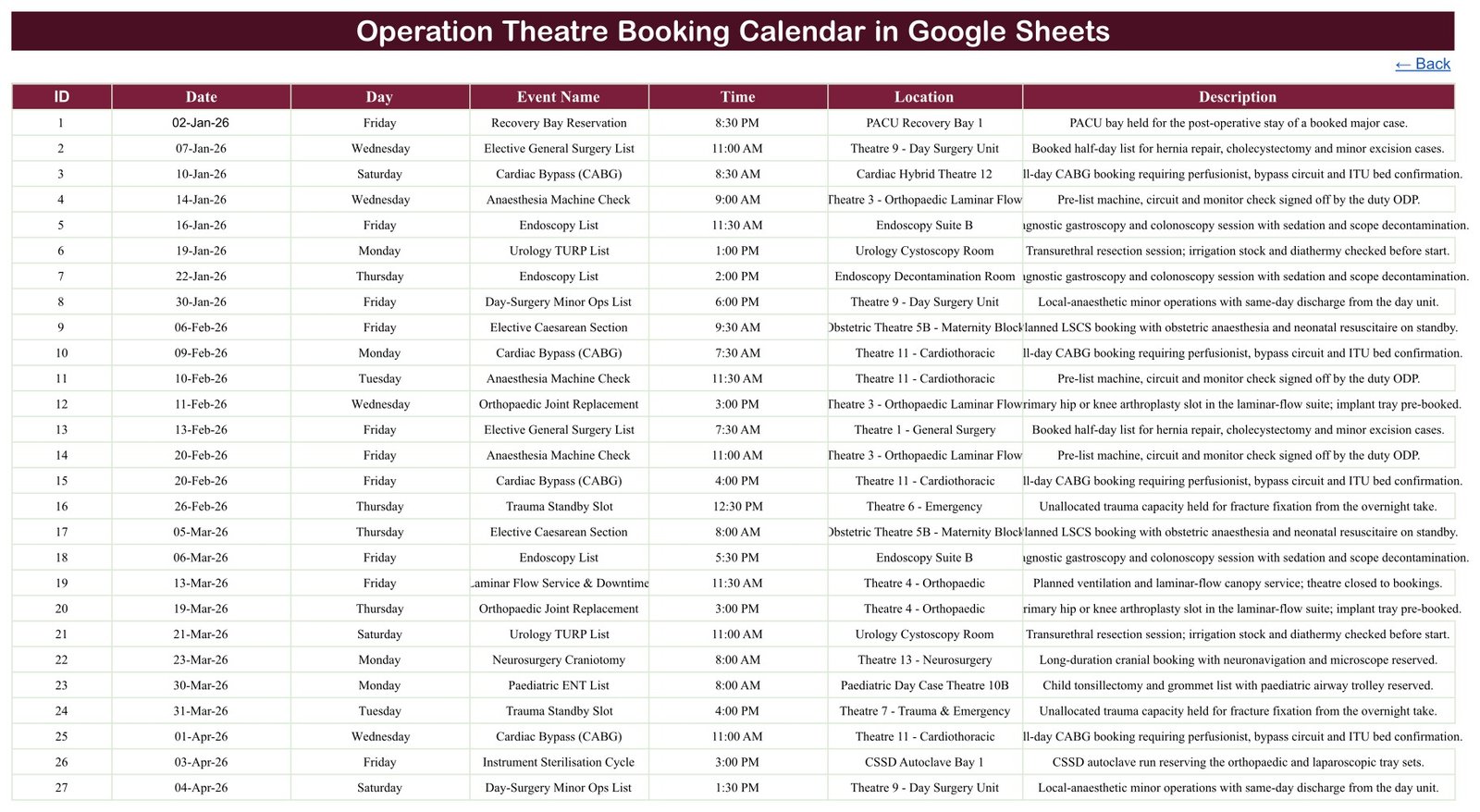
- One entry table, three views. The Events sheet holds every booking in seven columns – ID, Date, Day, Event Name, Time, Location, Description. Annual, Monthly and Daily read from it by formula.
- 100 worked sample bookings, IDs 1 to 100, dated 02-Jan-2026 to 30-Dec-2026 with every month populated (8, 8, 8, 9, 8, 9, 8, 9, 8, 9, 8, 8).
- The whole theatre day, not only the operations. Alongside lists such as Cardiac Bypass (CABG), Neurosurgery Craniotomy and Elective Caesarean Section, the sample books the things that also consume theatre time – Instrument Sterilisation Cycle, Terminal Clean & Turnover, Anaesthesia Machine Check, Laminar Flow Service & Downtime and a held Trauma Standby Slot.
- 26 locations already modelled – Theatre 1 to Theatre 14 by speciality, plus Obstetric Theatre 5B, Paediatric Day Case Theatre 10B, the Interventional Suite, two PACU recovery bays, two CSSD autoclave bays, an endoscopy suite and decontamination room, and an ophthalmic minor-ops room.
- 18 start times from 7:30 AM to 8:30 PM, so early lists, afternoon sessions and out-of-hours slots all sit on the same grid.
- A 36-year date range. A hidden List helper sheet feeds the Month and Year dropdowns with all twelve months and the years 2021 to 2056 – the calendar does not expire in 2026.
- Nothing to install. It runs in Google Sheets on desktop, tablet and phone; share it with a link and the whole theatre office sees the same diary at the same time.
What Is Inside the Operation Theatre Booking Calendar in Google Sheets
Six sheets – five you use and one helper.
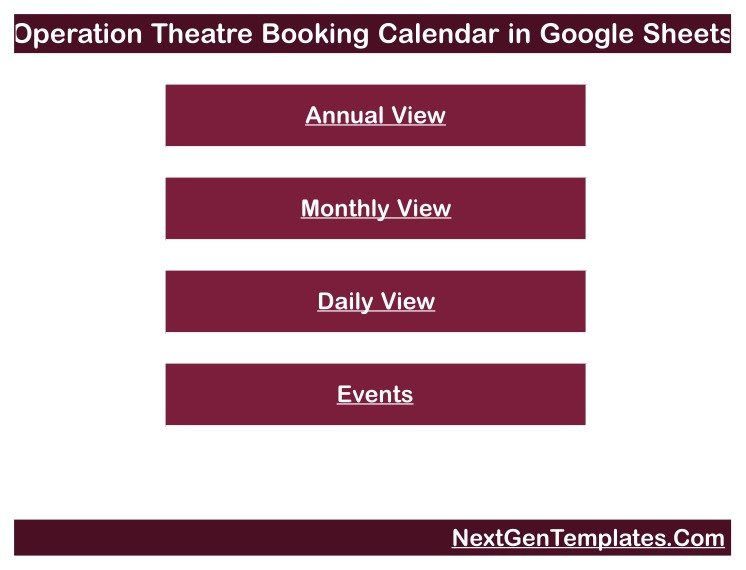
- Home – a four-button menu linking to Annual View, Monthly View, Daily View and Events. Every view carries a Back link home.
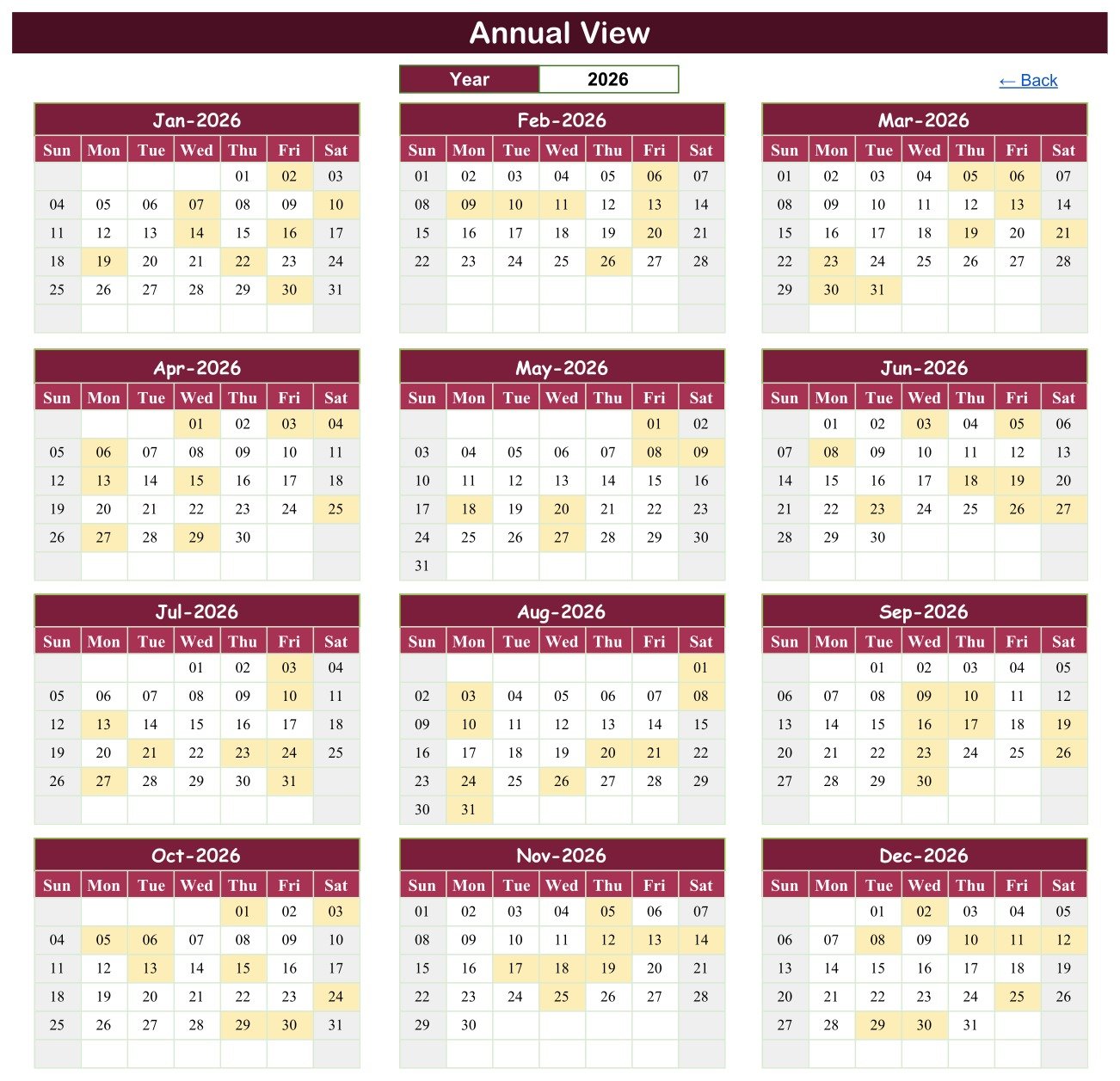
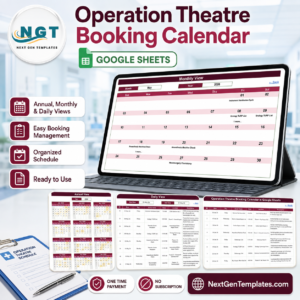
- Annual View – all twelve months of the chosen year in a 3×4 grid, with every booked date shaded. Change one Year cell and the whole page redraws.
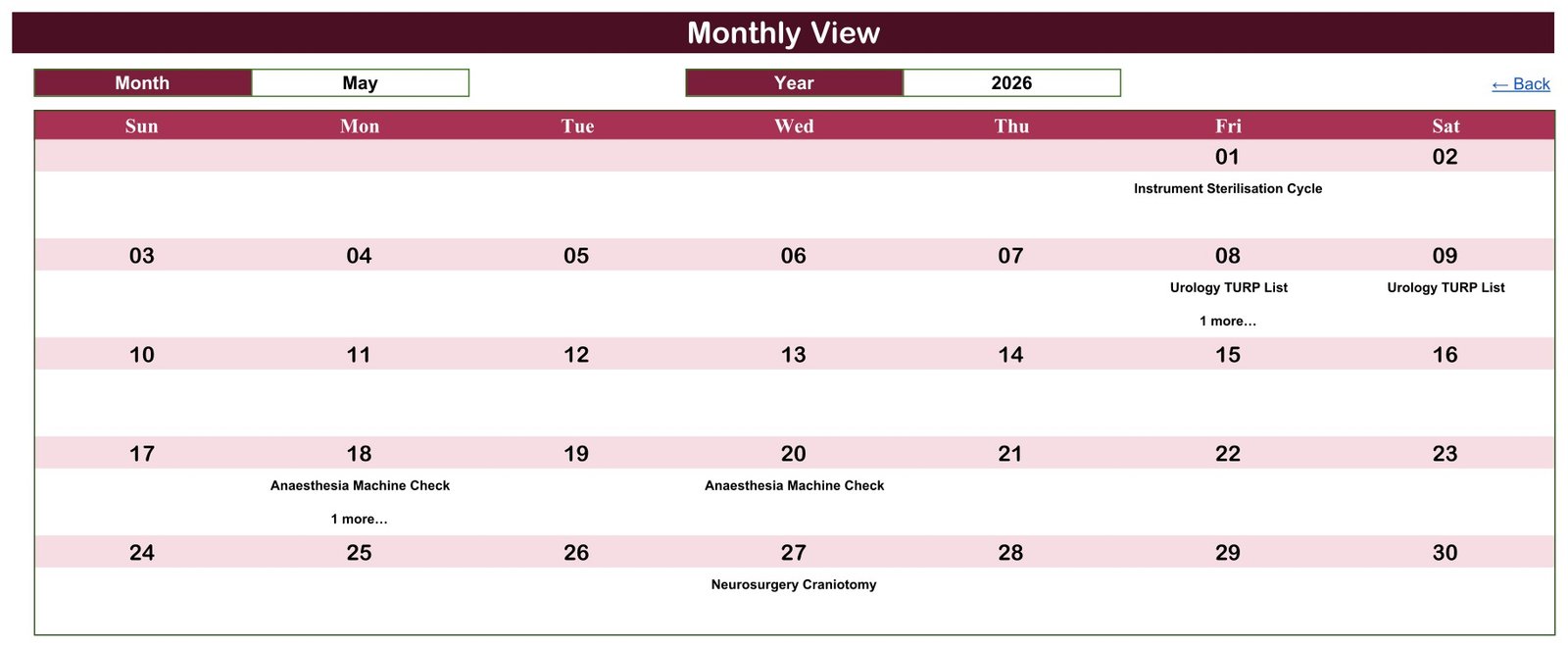
- Monthly View – a Month and Year dropdown over a seven-column week grid, each booked date showing the booking name underneath.
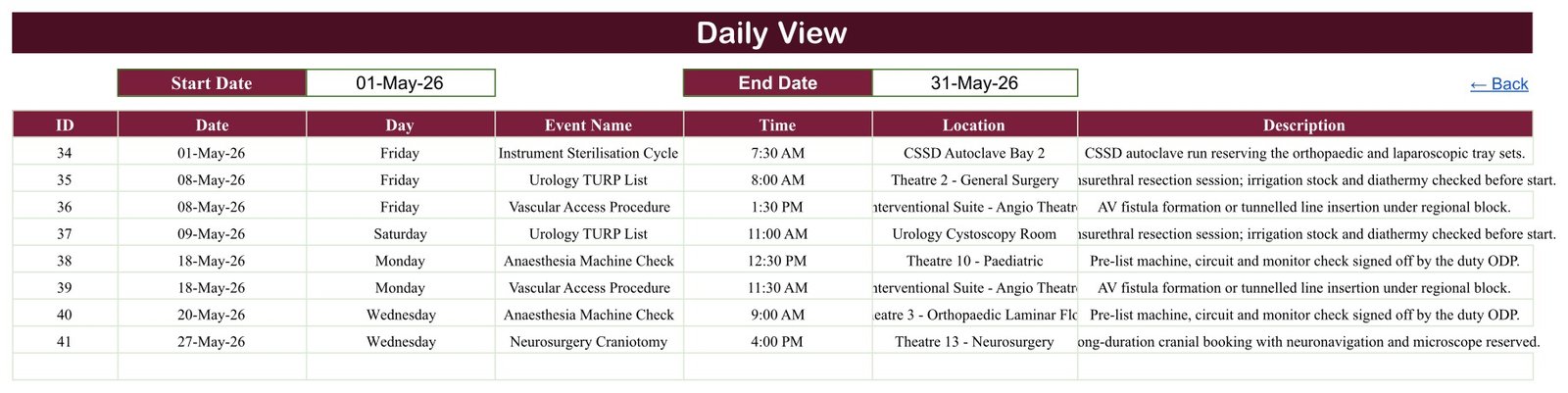
- Daily View – a Start Date and End Date pair that filters the booking list to any window you type; the May 2026 sample returns eight rows, IDs 34 to 41.
- Events – the master table. This is where you type, edit and delete bookings.
- List – the hidden helper holding the month names and the 2021-2056 year list.
Operation Theatre Booking Calendar in Google Sheets vs. Excel vs. Paid Theatre Software – Where This Fits
| This Google Sheets calendar | Excel theatre calendar | Paid theatre / OR management software | |
|---|---|---|---|
| Cost | $4.99 once | $4.99 once | Typically four to five figures a year |
| Platform | Any browser, any OS | Windows desktop Excel | Vendor web app, often server-side |
| Setup time | Under 5 minutes – open the copy link | Under 5 minutes – open the file | Weeks, with implementation fees |
| Real-time team collaboration | Yes, built in | Only via a shared drive | Yes |
| Mobile access | Yes, the Sheets app | Limited | Yes |
| Customisable fields | Yes – add columns freely | Yes | Vendor-controlled |
| Share with link | Yes | No | Account-based |
| Year-1 cost at 5 users | $4.99 | $4.99 | Thousands |
| Double-booking prevention | No – no conflict warning | No | Yes |
| Patient records / clinical data | None – by design | None | Yes, and regulated accordingly |
| Theatre utilisation % | No – no duration field | No | Yes |
Who This Template Is For – and Who It Is Not For
It is for a theatre scheduler or coordinator keeping the next quarter of lists on one page; a small private hospital, day-surgery unit or standalone eye or endoscopy centre with no theatre-software budget; a department that currently runs the diary on a whiteboard or a printed grid and wants it shared and searchable; a manager who needs to see at a glance which days are already committed to servicing, deep cleans and sterilisation cycles.
It is not for anyone who needs the things it deliberately does not do. No. It is not a patient record, an EHR/EMR, or a theatre-management or scheduling system, and it holds no patient names, identifiers, diagnoses or clinical notes anywhere. It does not sit between you and a regulator: it carries no HIPAA, GDPR, NHS DSPT or ISO certification, no access control beyond Google’s own sharing, no encryption you control and no audit trail. It will not warn you about a clash, will not calculate theatre utilisation, and it makes no clinical or safety recommendation about what should be booked, when, or by whom.
How to Use the Operation Theatre Booking Calendar in Google Sheets
- Open the PDF in your download and click the “Make a copy” link. Google Drive creates your own editable copy – the original stays untouched.
- Clear the 100 sample bookings from the Events sheet once you have seen how they are written, keeping the header row.
- Rename the locations to your own theatres, bays and rooms. Nothing is hard-coded to the sample names.
- Type your bookings – one row each: ID, Date, Day, Event Name, Time, Location, Description. Keep the Date column as a real date so the views can read it.
- Read them back: pick a Year on Annual View for the shape of the year, a Month and Year on Monthly View for the working grid, or a date range on Daily View to print a week of lists.
- Share it with the theatre office. Give schedulers edit access and everyone else view-only.
Real-World Use Cases
Priya, theatre scheduler at a 60-bed private hospital. She builds the six-week list on Events, then prints Daily View filtered Monday to Friday for the theatre noticeboard. Because sterilisation cycles and terminal cleans are booked as rows too, the printed sheet shows the real capacity, not only the operating sessions.
Daniel, manager of a standalone day-surgery unit. He uses Annual View in the autumn to plan next year: shaded dates show where the Laminar Flow Service & Downtime entries already close a theatre, so he schedules the cataract day lists around them before the diary fills.
Amara, ODP team lead. She has view-only access on her phone and checks Monthly View the night before to see which theatres have an Anaesthesia Machine Check booked and at what time, then tags the machines in the morning.
Frequently Asked Questions
Is this a patient record system or an EHR?
No. It is a booking calendar. There is no patient name column, no patient ID, no date of birth, no diagnosis and no clinical notes field anywhere in the workbook – and none of the 100 sample rows contains a patient identifier. That is deliberate: book the theatre slot here, and keep the person’s identity in the clinical system that is built and regulated to hold it.
Does using this make my theatre department compliant or safe?
No. It carries no certification, no accreditation and no assurance of any kind. It checks no safety standard, enforces no staffing rule and applies no booking policy. It is a spreadsheet that shows you what you typed into it, and it makes no clinical or safety recommendation.
Will it stop me double-booking a theatre?
No. Nothing prevents two rows sharing the same location and time – there is no validation and no warning. The sample shows the shape of the problem: 26-Jun-2026 carries two bookings, both at 8:30 PM, in two different theatres. Checking for a clash is still a human job.
Can it show me theatre utilisation?
No. Each booking has a start Time but no duration or end-time column, so the calendar cannot work out how many hours of a session are used. If you need utilisation percentages, add your own duration column – or use a system built for it.
What happens when two bookings fall on the same date?
Monthly View prints the first booking on that date and then a small “1 more…” note underneath. Daily View lists every booking in the range, so use Daily View whenever a date carries more than one. In the sample this affects four dates: 20-Feb, 08-May, 18-May and 26-Jun 2026.
Does it work beyond 2026?
Yes. The hidden List sheet feeds the Year dropdown with 2021 through 2056, so the same file carries a theatre diary for 36 years. The 2026 dates are only sample data.
Do I need a Google Workspace subscription?
No. A free personal Google account is enough. The file is yours after the copy, there is no recurring fee, and nothing phones home.
About the Author
Built by PK – Microsoft Certified Professional with 15+ years of Excel, Google Sheets, and Power BI experience. Founder of NextGenTemplates, reaching 300K+ subscribers across YouTube channels. Every template is hand-built and tested beforeOperation Theatre Booking Calendar in Google Sheets release.Operation Theatre Booking Calendar in Google Sheets
Explore Related Templates
The same calendar engine, other corners of the hospital: Medical Appointment Calendar in Google Sheets for outpatient clinics, Radiology Slot Booking Calendar in Google Sheets for scanner and imaging-room slots, Dental Clinic Appointment Calendar in Google Sheets, Physiotherapy Session Calendar in Google Sheets and Patient Follow-Up Visit Calendar in Google Sheets. For rostering the people rather than the rooms, see the Doctor Duty Roster Data Entry System in Excel. Browse the whole Google Sheets calendar range or every Google Sheets template.
Prefer Excel? An Excel edition of this same theatre calendar – Operation Theatre Booking Calendar in Excel – is being released alongside this one. It is the macro-enabled Windows-desktop build with a form-driven entry screen; this Google Sheets edition is the browser-based, share-by-link one. Same 100-booking sample, same four views, different platform.Operation Theatre Booking Calendar in Google Sheets
Get the Operation Theatre Booking Calendar
$4.99 today instead of $8.99. One payment, instant download, yours to copy as many times as you need. The download is a PDF that carries the “Make a copy” link straight into your own Google Drive.Operation Theatre Booking Calendar in Google Sheets
Watch the step-by-step video Demo:
Last updated: 26 August 2026.
































Reviews
There are no reviews yet.