

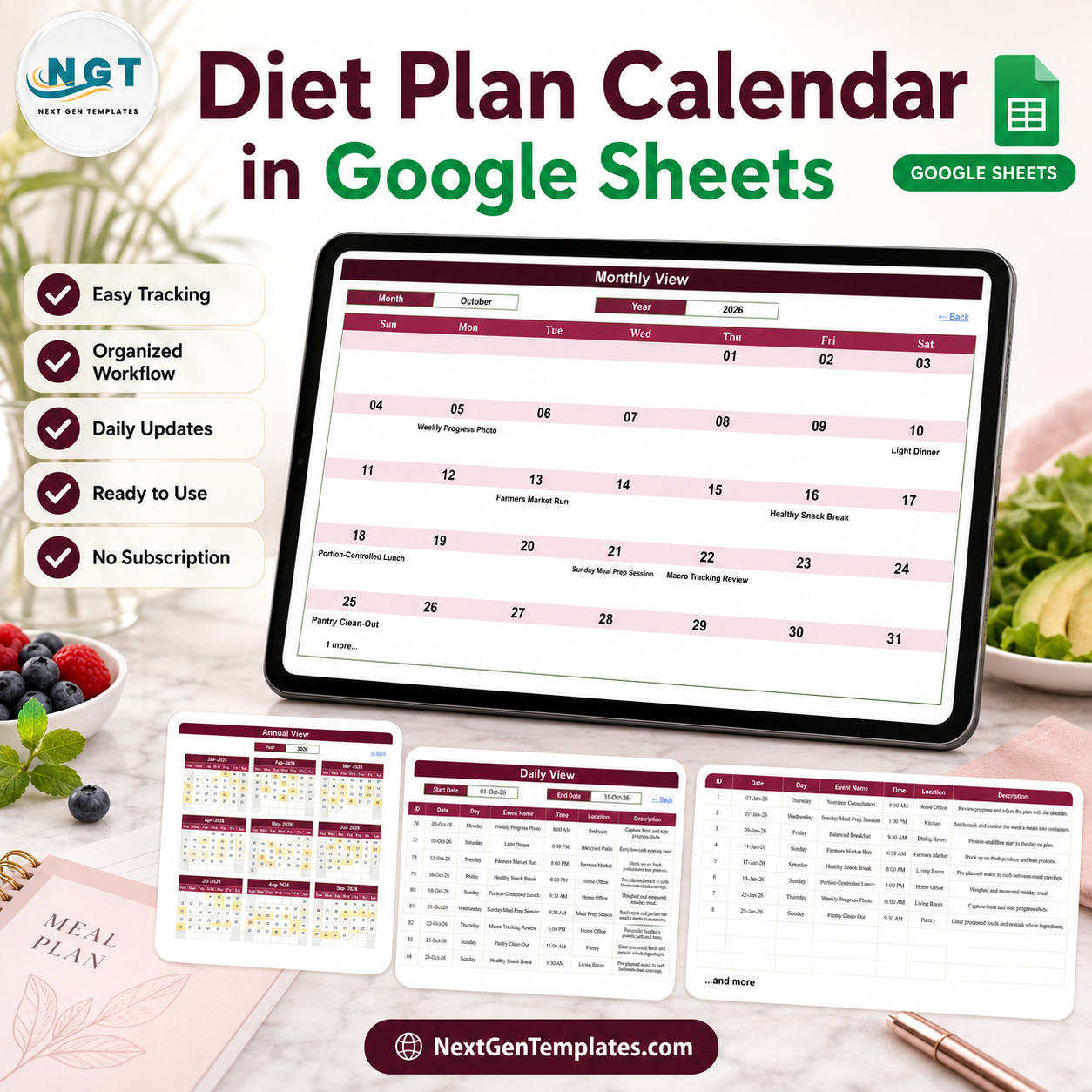

The Diet Plan Calendar in Google Sheets is a formula-driven spreadsheet of five working tabs that turns one list of planned meal-related appointments into three linked calendar views – a full-year planner, a month grid and a date-range day list – all reading from a single Events table. It ships with exactly 100 sample entries, IDs 1 to 100, running from Thursday 01-Jan-2026 to Tuesday 29-Dec-2026, across 13 named locations and 16 entry labels, with eight or nine entries in every one of the twelve months. Every one of the 100 sample rows was re-checked before release: the weekday printed against each date is correct in all 100.
Read this first – what this is not. This is a scheduling calendar and nothing more. It is not medical, dietary or nutritional advice, and it is not a substitute for a registered dietitian, nutritionist, physician or any other qualified professional – talk to your own clinician or dietitian before starting or changing how you eat. It does not count calories, macros, portions or nutrients. It holds no food database, does no calculation about food or the body, and makes no claim about weight, energy, blood sugar or any other health outcome. It does not name, recommend or follow any diet, fasting or eating protocol. It has no numeric measurement column at all – the seven columns are ID, Date, Day, Event Name, Time, Location and Description, and every one of them holds only what you type. No dietitian or clinician reviewed it, and none was involved in making it.
An Excel edition of this same calendar is being prepared and is not on sale yet, so there is no page to link to. It is a separate build rather than a port of this one – a macro-enabled workbook with a pop-up entry form, Add/Update/Delete buttons, a This Month summary sheet and one-click colour themes. This Google Sheets edition has none of those, and needs no macros in return: it runs on plain worksheet formulas in any browser.
Key Features of the Diet Plan Calendar in Google Sheets
- Five working tabs: Home, Annual View, Monthly View, Daily View and Events, plus one hidden helper tab that holds the month and year drop-down lists.
- One master table drives every view. The Events sheet holds 7 columns – ID, Date, Day, Event Name, Time, Location and Description – and all three calendar views read from it, so an entry typed once appears everywhere.
- No macros, no Apps Script, no add-ons, no permissions to grant. The Annual View is built with DATE, EOMONTH and TEXT; the Monthly View places entries with VLOOKUP and counts extras with COUNTIF; the Daily View is a single FILTER formula. There is no script to review and nothing to authorise before the file works.
- Exactly 100 sample entries across a full year, sorted by date from a Nutrition Consultation on Thursday 01-Jan-2026 to Grocery Planning on Tuesday 29-Dec-2026 – eight or nine in every month.
- 16 placeholder labels already written in – Macro Tracking Review, Sunday Meal Prep Session, Farmers Market Run, Healthy Snack Break, Balanced Breakfast, Weekly Progress Photo, Morning Weigh-In, Smoothie & Juice Prep, Nutrition Consultation, Hydration Check, Portion-Controlled Lunch, Fitness-Nutrition Sync, Light Dinner, Grocery Planning, Pantry Clean-Out and Cheat-Day Planning. They are demo text to show the layout, not a plan to follow – delete them and type your own.
- 13 named locations so the day list tells you where to be: Home Office, Kitchen, Dining Room, Living Room, Bedroom, Meal Prep Station, Farmers Market, Bathroom, Backyard Patio, Grocery Store, Nutrition Clinic, Pantry and Home Gym.
- Twelve distinct sample times from 6:30 AM to 8:00 PM, so early market runs, midday slots and evening entries all sit in the same grid.
- Double-booked days are visible. Where a date carries more than one entry the month cell prints the first and adds a “1 more” note underneath. One date in the sample year – 25-Oct-2026 – carries two.
- Click-through navigation. The Home tab carries four in-sheet links to the views, and every view carries a “Back” link home. It works the same in the Google Sheets mobile app.
- Month and year drop-downs on the Monthly View (January to December; years 2021 to 2056) and a year cell on the Annual View, both fed from the hidden list tab. The year list is generated from a formula, so it rolls forward on its own instead of freezing on 2026.
- No name, contact, address, weight, measurement, calorie or nutrient column anywhere in the file. The row is built around what is scheduled, when and where – not around a person or a number.
- Works in the browser on Google Sheets, and downloads to .xlsx if you want an offline copy of the data.
What is Inside the Diet Plan Calendar in Google Sheets
Tab 1: Home – Navigation
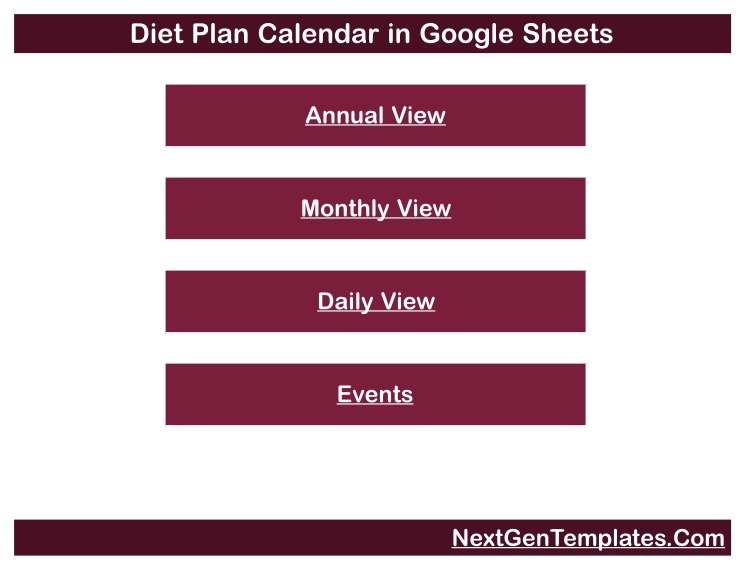
A branded landing tab with four links – Annual View, Monthly View, Daily View and Events – so anyone can move around the file without knowing Google Sheets. The footer carries the NextGenTemplates link.
Tab 2: Annual View
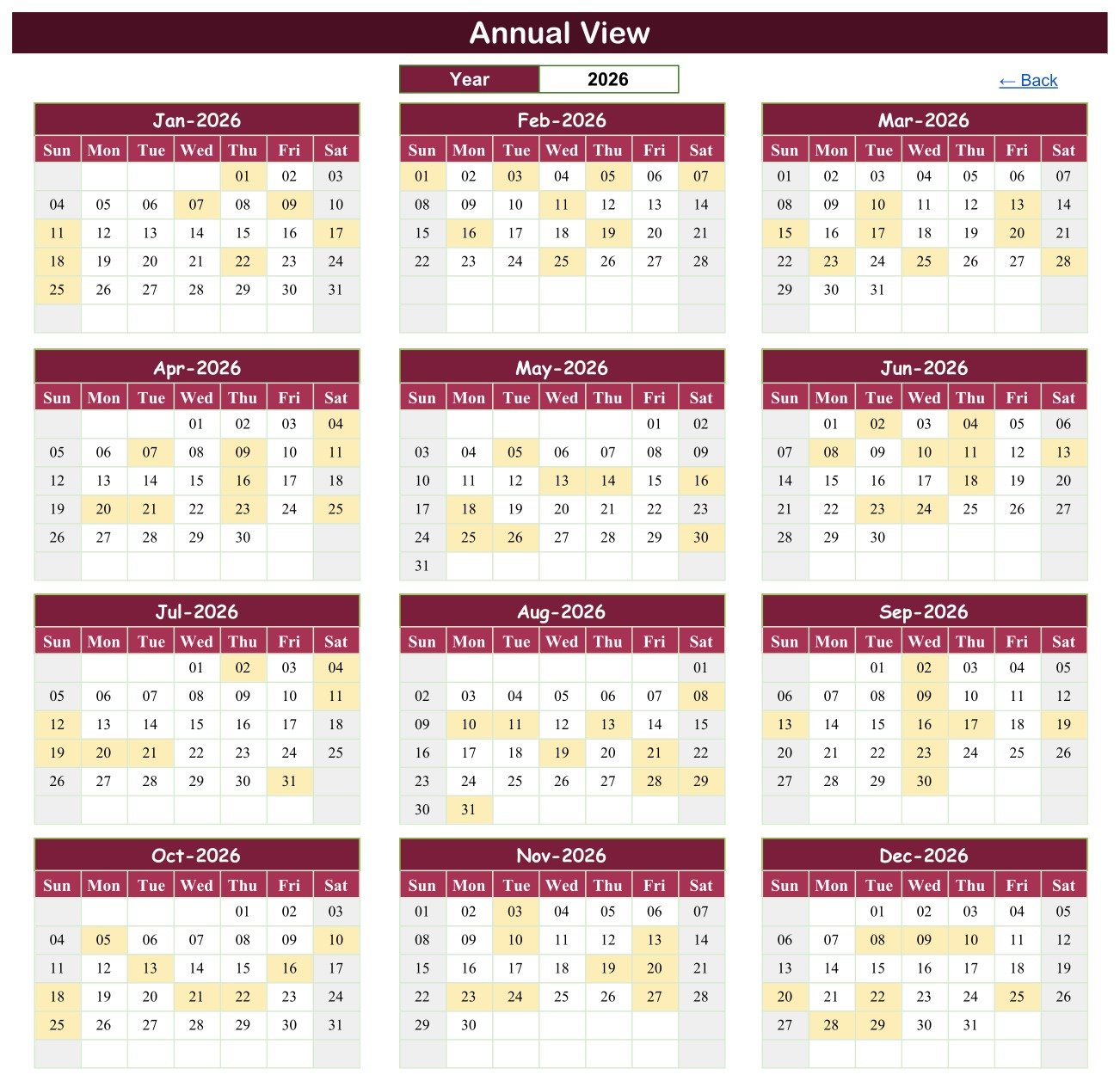
All twelve months of the chosen year on one screen in a three-across, four-down grid, with every day that carries an entry shaded amber so a whole year reads at a glance. Change the year in the single Year cell and all twelve month blocks rebuild themselves from formulas. This is the tab to print and stick on the fridge.
Tab 3: Monthly View
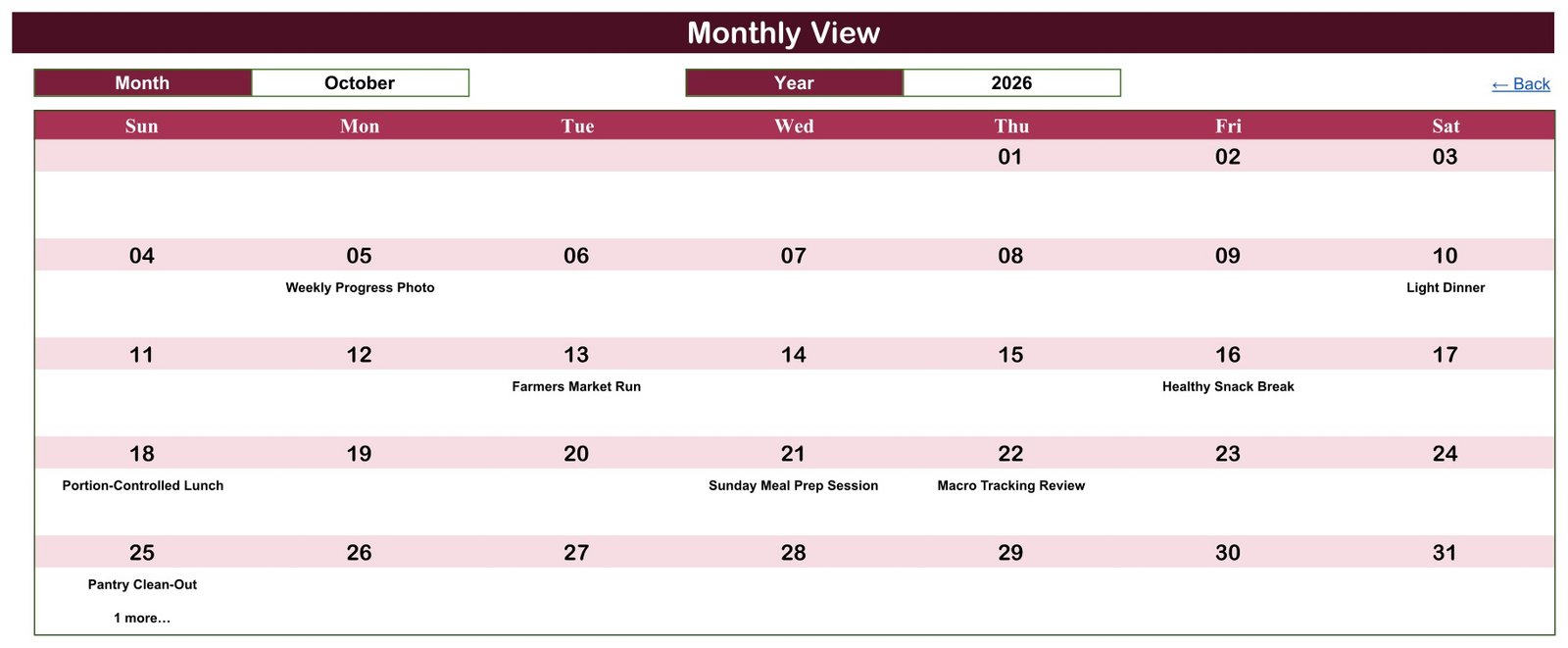
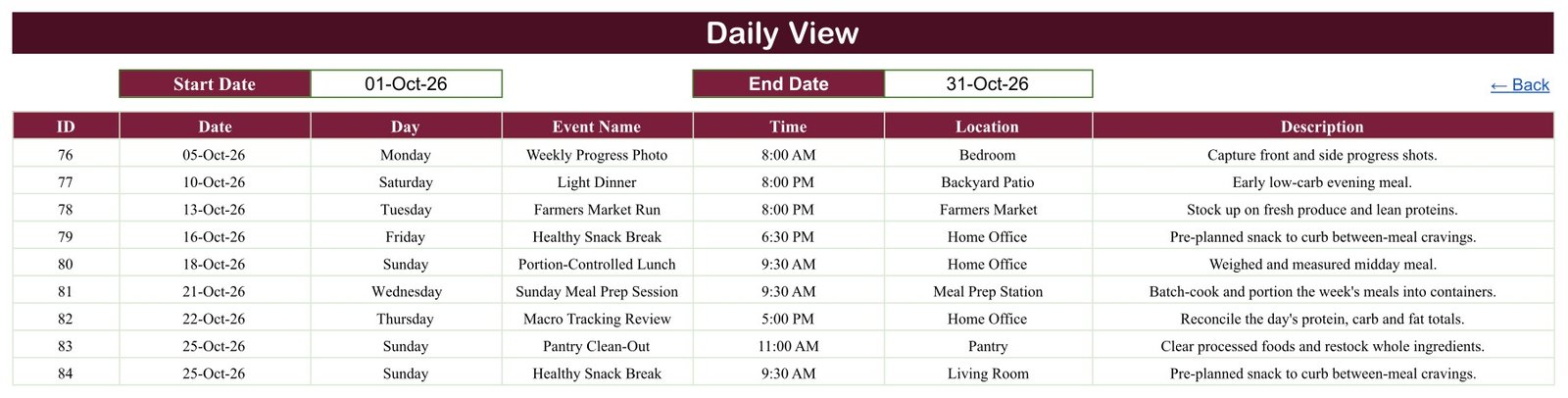
The working grid. Pick a month and a year from the two drop-downs and the month redraws Sunday to Saturday, printing the entry name inside the day cell. In the October 2026 sample the grid shows Weekly Progress Photo on the 5th, Light Dinner on the 10th, Farmers Market Run on the 13th, Healthy Snack Break on the 16th, Portion-Controlled Lunch on the 18th, Sunday Meal Prep Session on the 21st, Macro Tracking Review on the 22nd, and Pantry Clean-Out on the 25th with “1 more” beneath it.
Tab 4: Daily View
Set a Start Date and an End Date and the sheet lists every entry that falls between them, with all seven columns – ID, Date, Day, Event Name, Time, Location and Description. It is one FILTER formula, so it updates the instant you change a date box. Set both boxes to the same day for a single-day list, or to a Monday and a Sunday for the week ahead. This is the tab to print or screenshot.
Tab 5: Events – the master table
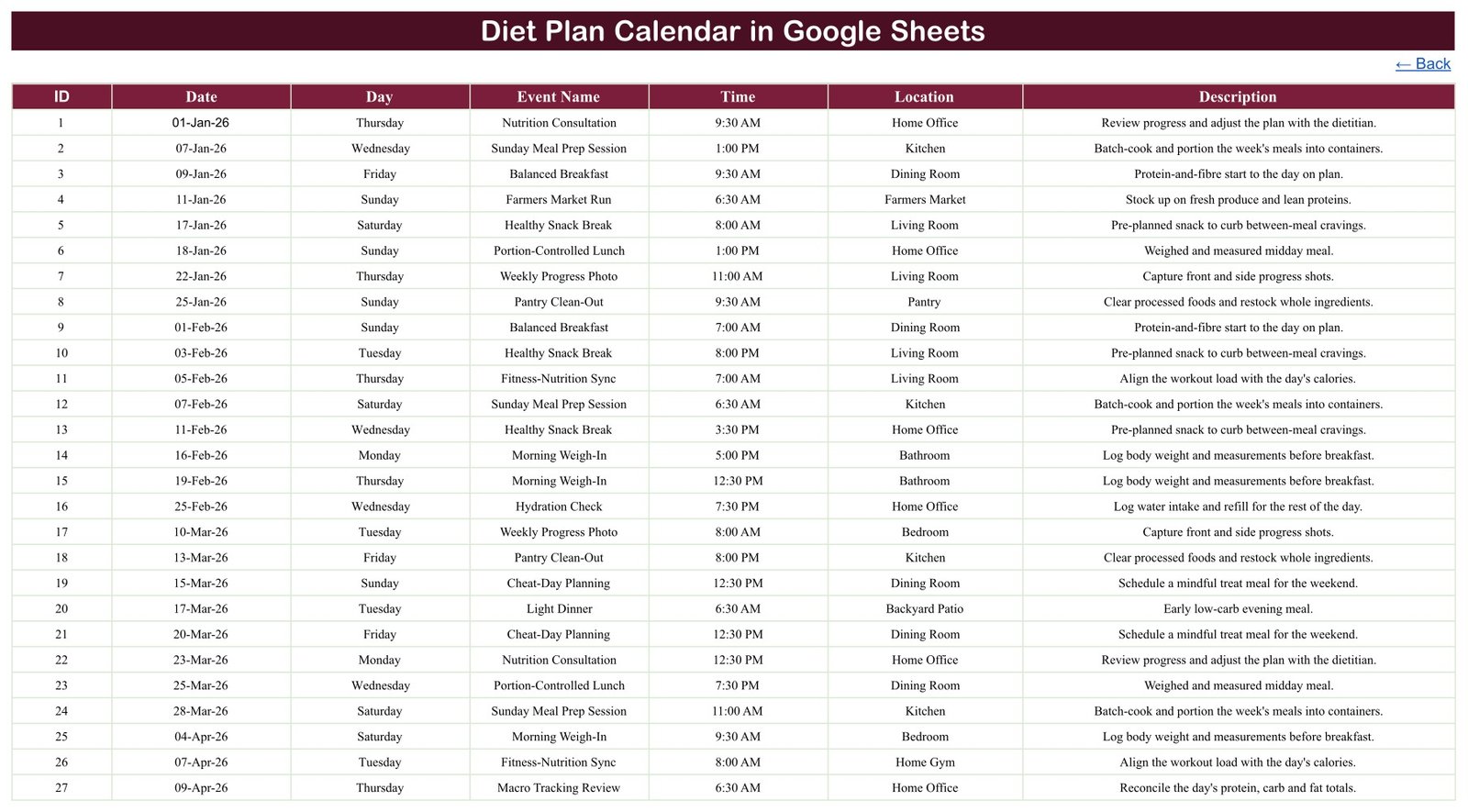
The one table you actually maintain. Rows 4 to 103 hold the 100 sample entries under seven headers, sorted by date. Clear them, type your own, and every other tab follows. There is no form and no button – it is an ordinary spreadsheet table, which is exactly why several people can be in it at once.
Google Sheets vs. a Paper Planner vs. a Paid Meal-Planning App – Where This Fits
| This template (Google Sheets) | Paper planner or notebook | Paid meal-planning app | |
|---|---|---|---|
| Cost | 8.99 one-off (4.99 on offer) | A few pounds a year | Typically 3-10 per month |
| Platform | Any browser; Sheets mobile app | Wherever you carry it | Web and mobile app |
| Macros or add-ons required | None – plain formulas | Not applicable | Account and app install |
| Setup time | Make a copy, clear 100 rows, start typing | None | Sign-up, profile and preferences |
| Year view, month view and day list from one table | Yes, all three | One layout only | Usually month and day |
| Share with family or a partner | Yes, Google sharing controls | No | Paid tiers, usually |
| Editable fields and labels | Yes – it is a spreadsheet | Yes | Usually fixed |
| Calorie, macro or nutrient counting | No – none, by design | No | Yes |
| Recipe database and shopping-list generation | No | No | Yes |
| Push reminders and notifications | No | No | Yes |
| Where your data lives | Your own Google Drive | On paper | The vendor’s servers |
| Year-1 cost | 8.99 total | Low | Roughly 36-120 |
Who This Template Is For – and Who It Is Not For
It fits anyone who wants their own eating-related plans written down on a calendar and visible: a household planning meal-prep days, grocery runs and market trips around a working week; a couple sharing one file so both know which night is the batch-cook night; a personal trainer or coach blocking out check-in appointments with a client; a family scheduling a shared shopping and cooking rota. It fits anyone currently keeping this on sticky notes, a phone note or a blank spreadsheet.
It does not fit anyone who wants calories, macros or nutrients counted, a recipe or food database, a generated shopping list, barcode scanning, weight or measurement charts, progress analytics, or push notifications – it provides none of those, and no spreadsheet should be asked to. It is also not a clinical record: if you are managing a medical condition through diet, work with your own dietitian or doctor and use whatever tool they recommend. This file is a place to write down what you have already decided with them, not a place to decide it.
How to Use the Diet Plan Calendar in Google Sheets
- Open the PDF you receive after purchase and click its Make a copy link. The template lands in your own Google Drive – the master file stays read-only, and your copy is yours alone.
- Open the Events tab and clear rows 4 to 103, keeping the header row in row 3.
- Type your own entries: ID, date, day, a short label, a time, a location and a one-line description.
- Open the Monthly View, pick the month and year from the drop-downs, and check the grid fills as expected.
- Use the Daily View Start Date and End Date boxes to print the day or the week ahead.
- Use the Annual View once a quarter to see how the year is shaping up, and print it if you want it on the wall.
- Share with Share > specific people so only the people you name can open or edit it.
Real-World Use Cases
Meera, planning a household week. She blocks Sunday as the batch-cook slot, Saturday morning as the market run and Wednesday evening as the grocery top-up, then prints the Daily View for the week and pins it to the kitchen door. Nothing is calculated – it is simply written down where everyone can see it.
Tom and Alex, sharing one file. Both have edit access, so whoever is cooking that week fills in the Events rows and the other reads the Monthly View on their phone. Because it is a Google Sheet rather than a file emailed back and forth, there is only ever one version.
Reena, a personal trainer. She keeps one copy per client for the appointments she has agreed with them – check-in sessions and planning calls – using the Location column for the studio or the video-call link. She records no health information in it and leaves anything clinical to the qualified professionals her clients see.
Frequently Asked Questions
Does this tell me what to eat, or count calories or macros?
No. It does neither, and it is not designed to. There is no food database, no nutrient table and no calculation of any kind about food or the body – the sheet only lays dates, times, labels and locations onto a calendar. It is not medical, dietary or nutritional advice and it is not a substitute for a registered dietitian, nutritionist or doctor. Speak to your own clinician or dietitian before starting or changing how you eat.
Does it follow a particular diet or fasting plan?
No. It names, recommends and follows no eating protocol whatsoever. The 100 sample rows are placeholder scheduling text written to show the layout – delete them and type whatever you and your own professional have agreed.
Do I need macros, Apps Script or an add-on?
No. Every view is built from ordinary worksheet formulas – DATE, EOMONTH, TEXT, VLOOKUP, COUNTIF and FILTER. Nothing needs to be enabled or authorised, there is no script attached, and you are never asked to grant a permission.
The Day column does not change when I edit a date. Is that a bug?
It is a known limitation, and worth knowing before you start. In the Events sheet the Day column is typed text, not a formula, so editing a date leaves the old weekday sitting next to it. All 100 sample rows are correct as shipped – we recomputed every one of them against its date and found zero mismatches – but if you plan to move dates around, put =TEXT(B4,"dddd") in cell C4 and fill it down column C. The Day column then follows the date automatically from then on.
Why does a day cell say “1 more” in the Monthly View?
The month grid has room for one label per day, so it prints the first entry on that date and tells you how many others share it. Open the Daily View and set both date boxes to that date to see them all. Exactly one date in the sample year – 25-Oct-2026 – carries a second entry.
Can I use a year other than 2026?
Yes. The Annual View year cell and the Monthly View year drop-down currently run from 2021 to 2056, and the list is generated by formula from the current year rather than hard-typed, so it moves forward on its own. Every grid is drawn from formulas, so changing the year simply redraws the calendar; your own rows decide which days are shaded.
Is it private? Can I put personal details in it?
As shipped the file holds no personal data at all – no names, no contact details, no addresses, no weights or measurements, and no health information. It is an ordinary Google Sheet: Google’s own sharing controls are the only access control, and the file itself has no permissions, no encryption and no audit trail. If you do add anything personal, share it with named people rather than “anyone with the link”, and keep anything clinical out of it altogether.
Will it remind me?
No. There is no alert, notification, alarm, email, SMS or calendar sync of any kind. It shows you what you wrote down when you open it, and that is all it does.
Is there an Excel version?
An Excel edition is being prepared and is not on sale yet, so there is nothing to link to today. It will be a separate build – a macro-enabled workbook with a pop-up entry form, Add/Update/Delete buttons and a This Month summary sheet – rather than this file converted. This Google Sheets edition has five tabs, no macros and no form, but runs in any browser and supports several editors at once.
About the Author
Built by PK – Microsoft Certified Professional with 15+ years of Excel, Google Sheets, and Power BI experience. Founder of NextGenTemplates, reaching 300K+ subscribers across YouTube channels. Every template is hand-built and tested before release.
Explore Related Templates
- Meal Prep & Batch Cooking Tracker in Google Sheets – the natural companion: batch-cook sessions, containers and portions in a tracker rather than a calendar.
- Medication & Pill Tracker in Google Sheets – a scheduling log for a different daily routine.
- Lab Results & Health Metrics Tracker in Google Sheets – for recording numbers a professional has already given you.
- Doctor Appointments & Medical History Tracker in Google Sheets – appointments and visit notes in one place.
- Medical Appointment Calendar in Google Sheets – the same three-view calendar layout for appointments.
- Mood & Mental Health Tracker in Google Sheets – a daily self-log with the same no-advice, no-diagnosis approach.
- Browse more Google Sheets templates and the full Google Sheets Calendar category.
Get the Diet Plan Calendar in Google Sheets for 4.99 (regular 8.99). You receive a PDF containing the Make a copy link – the template lands in your own Google Drive in seconds, with all 100 sample entries in place so you can see how it behaves before you clear a single row.
Read the full walkthrough on the blog: Diet Plan Calendar in Google Sheets. More Google Sheets tutorials on YouTube: @PKAnExcelExpert.
Watch the step-by-step video Demo:
Last updated: 04 September 2026.
Compatibility and Requirements
- Works in Google Sheets. You need a free Google account and a web browser. The Sheets mobile app also works.
- No macros, Apps Script or add-ons are used. Every view is built from ordinary worksheet formulas.
- The Monthly View has month and year drop-downs. Google explains dropdowns in Create an in-cell dropdown list.































Reviews
There are no reviews yet.