

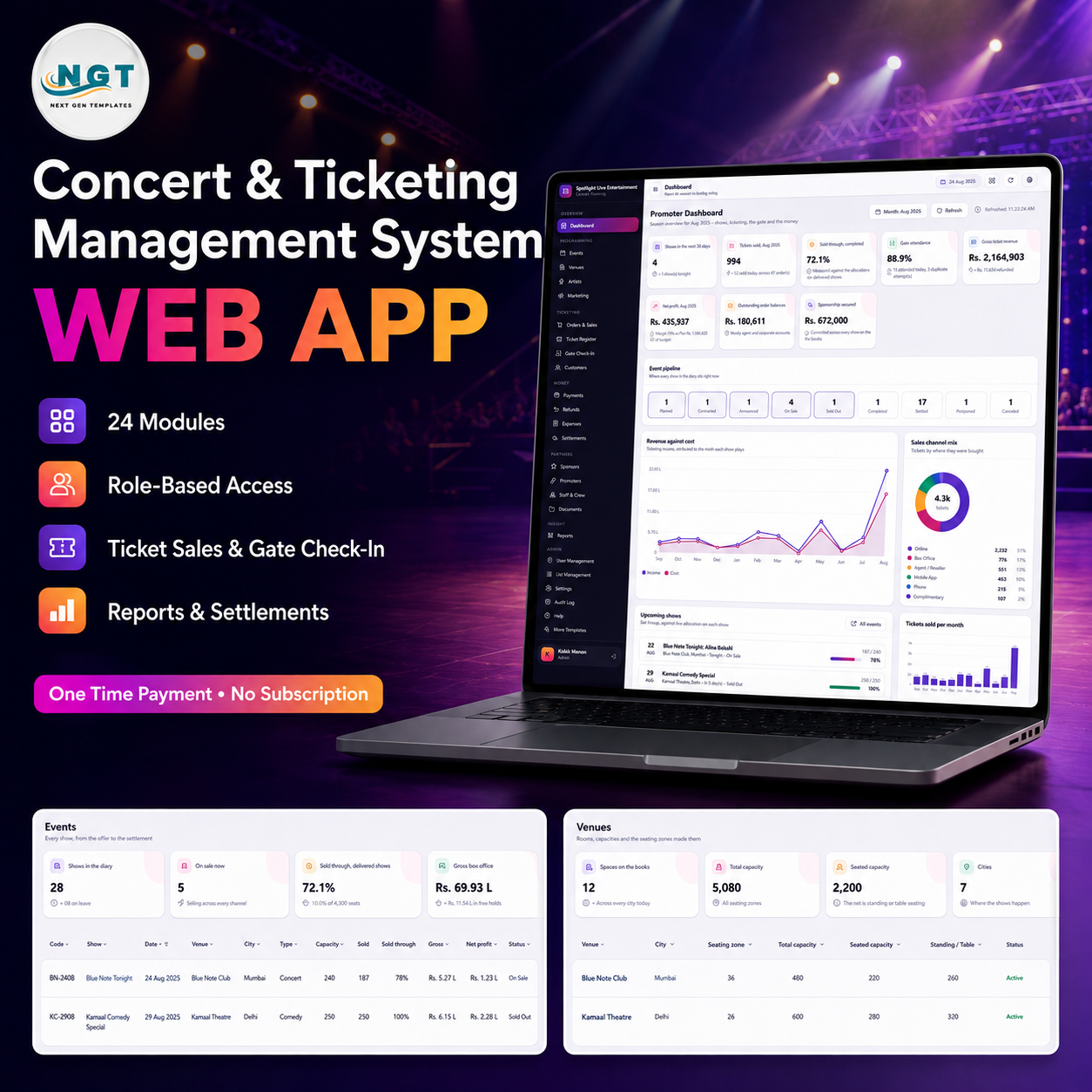

The Concert & Ticketing Management System Web App is a finished Google Apps Script back office for live-music promoters: 24 modules, 16 reports and 6 roles running on a Google Sheets database you own. Install it and the seeded book opens with 28 shows, 12 venues, 44 artists, 600 customers, 1,357 orders, 4,334 tickets, 2,896 gate scans and 18 settled statements – about 13,500 rows across 29 sheets – so you can see the whole offer-to-settlement chain working before you type a single record of your own. One payment, no subscription, no seat licences, and the code is yours to edit. Try it first with the live demo below, then buy. Concert & Ticketing Management System Web App
Try the Live Demo
Open the working system in your browser and sign in as any role. Nothing to install, nothing to pay.
| Role | Username | Password | What that sign-in reaches |
|---|---|---|---|
| Admin | admin | Concert@2026 | Everything, including User Management, List Management, Settings, the Audit Log and the database archive |
| Promoter / Owner | promoter | Promote@2026 | Every operational module, approvals, margins and all 16 reports. No archive |
| Event Manager | events | Events@2026 | Venues, artists, events, lineups, ticket types, campaigns, the crew roster and the gate |
| Box Office | boxoffice | BoxOffice@2026 | Customers, orders, the ticket register, payments, refunds and gate check-in |
| Box Office (second seat) | boxoffice2 | BoxOffice@2026 | Same rights as boxoffice – proves two people can work the window at once |
| Gate & Operations | gate | GateOps@2026 | The door only – check-in, ticket register, show list, roster, documents. Every money figure is stripped on the server |
| Gate & Operations (second seat) | gate2 | GateOps@2026 | Same door-only rights – use it to test two scan terminals |
| Finance | finance | Finance@2026 | Payments, refunds, expenses, settlements, sponsorships, customers and every money report |
Sign in as gate and then as finance, one after the other. The sidebar changes and the money columns disappear – that is the permission map doing its job. These credentials belong to a shared demo copy that is reset periodically; your purchase installs a private copy in your own Google account with passwords only you know.
Key Features of the Concert & Ticketing Management System Web App
- 24 modules on one event spine – the venue booking, lineup, ticket types, orders, tickets, scans, costs, sponsorship, campaigns, crew roster and the settlement all hang off a single show row. Nothing floats loose.
- Availability that cannot oversell – a ticket type’s remaining count is computed from the zone allocation, never typed. The server refuses an order that would exceed it, and refuses any order against a show that is not On Sale.
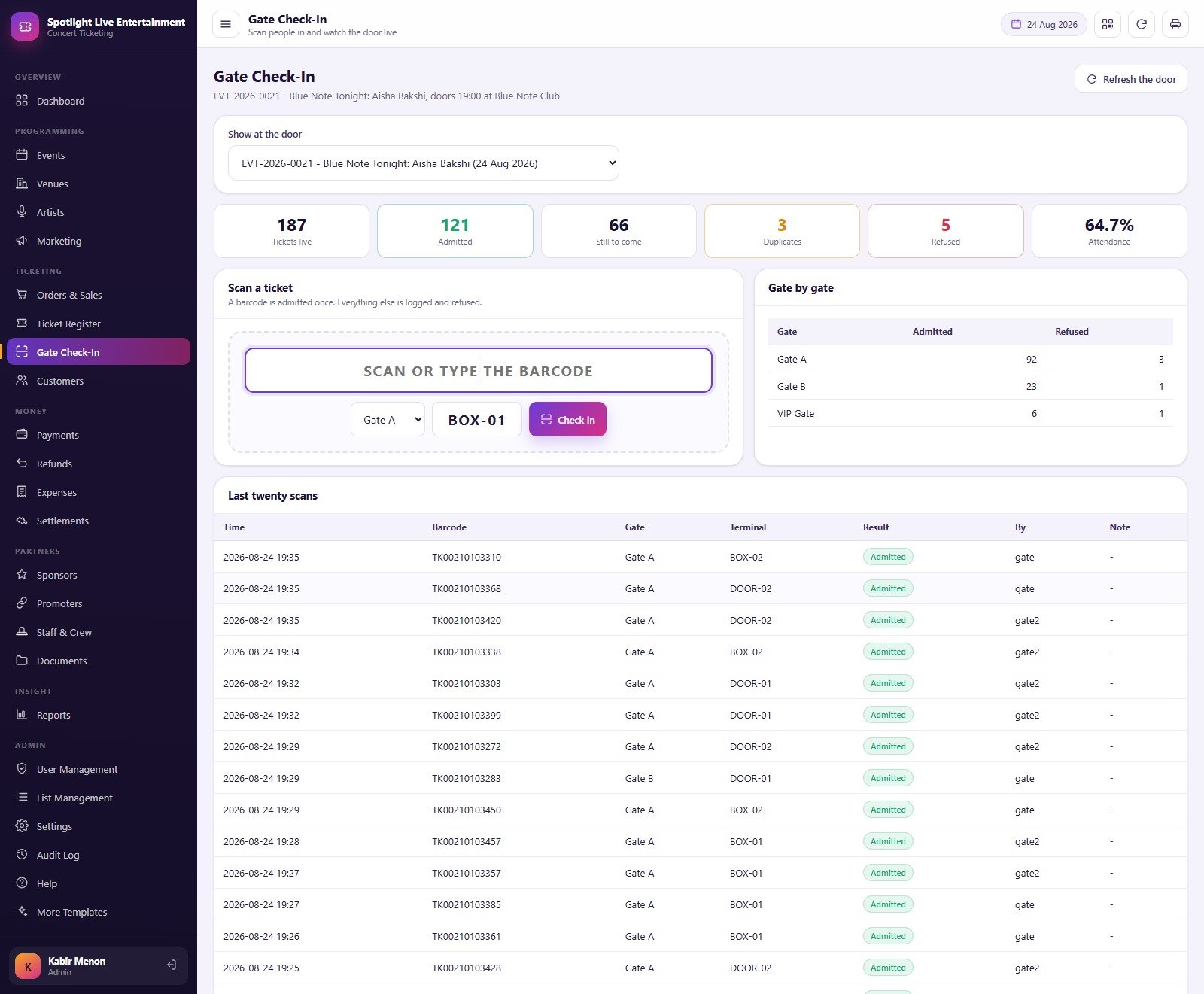
- A gate that scans once – the Gate Check-In screen showed 187 tickets live, 121 admitted, 3 duplicate attempts and 5 refusals at 64.7% attendance. A second scan of the same barcode is written to the gate log as a duplicate and refused; so is a refunded or cancelled ticket. Concert & Ticketing Management System Web App
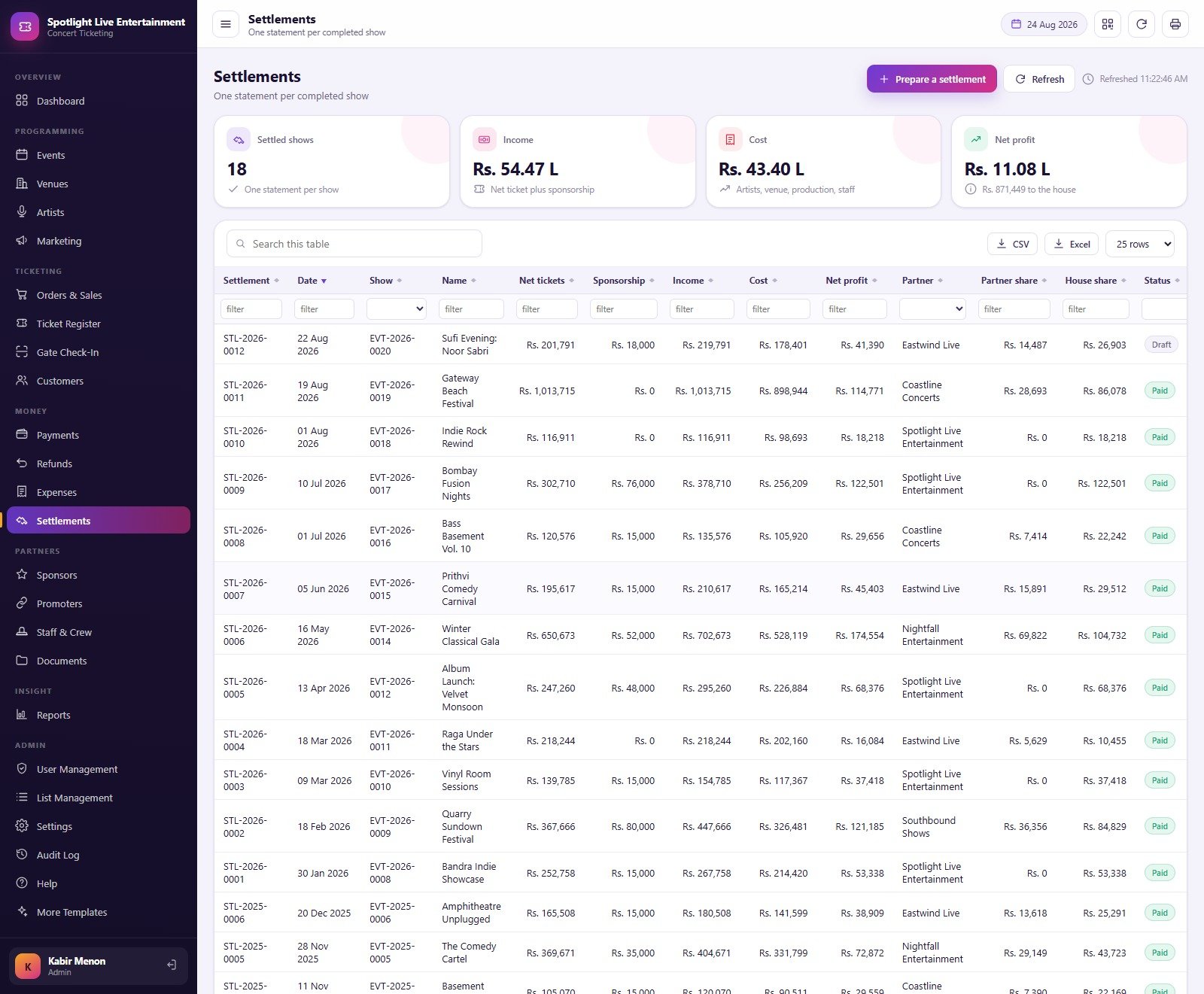
- Settlements that reconcile – one statement per completed show takes gross ticket revenue, subtracts refunds, adds sponsorship, subtracts artist fee, venue, production, marketing and staff cost, then splits the net between the house and the co-promoter at the agreed share.
- Nine-stage event pipeline – Planned, Contracted, Announced, On Sale, Sold Out, Completed, Settled, with Postponed and Cancelled as the two exits. Cancelling a show with live tickets warns you how many need refunding.
- Six roles, enforced twice – one permission map builds the sidebar the browser is given, and the same map is re-checked by a guard on every server endpoint. Gate & Operations has money switched off at the server, so editing the page in a browser reveals nothing.
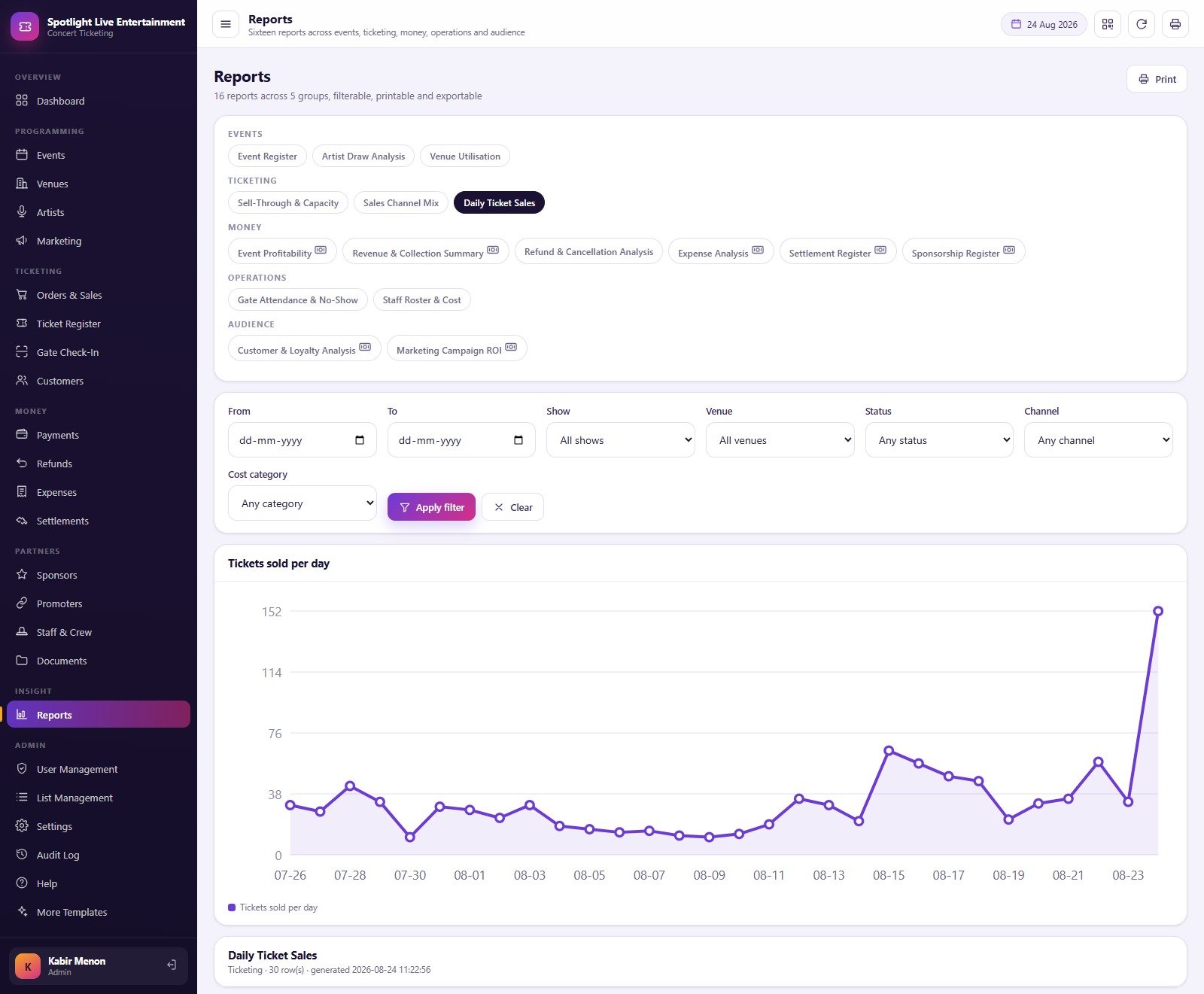
- 16 reports in 5 groups – Event Register, Artist Draw Analysis, Venue Utilisation, Sell-Through & Capacity, Sales Channel Mix, Daily Ticket Sales, Event Profitability, Revenue & Collection Summary, Refund & Cancellation Analysis, Expense Analysis, Settlement Register, Sponsorship Register, Gate Attendance & No-Show, Staff Roster & Cost, Customer & Loyalty Analysis and Marketing Campaign ROI – all filterable by date, show, venue, status, channel and cost category.
- Campaign attribution – the Marketing screen tracked 55 campaigns across 9 channels against tickets attributed and a blended ROAS of 4.19, so you can see which channel actually sold the seats.
- Every table exports – CSV and Excel buttons, column filters and a search box sit on every list screen, and e-tickets print on a 3 inch or 4 inch thermal roll while receipts, settlement statements, day sheets and reports print on A4.
- 36 editable dropdown lists – 216 values behind Act Type, Age Rating, Approval Status, Attendance and 32 more, all changed from List Management without touching code.
What’s Inside the Concert & Ticketing Management System Web App
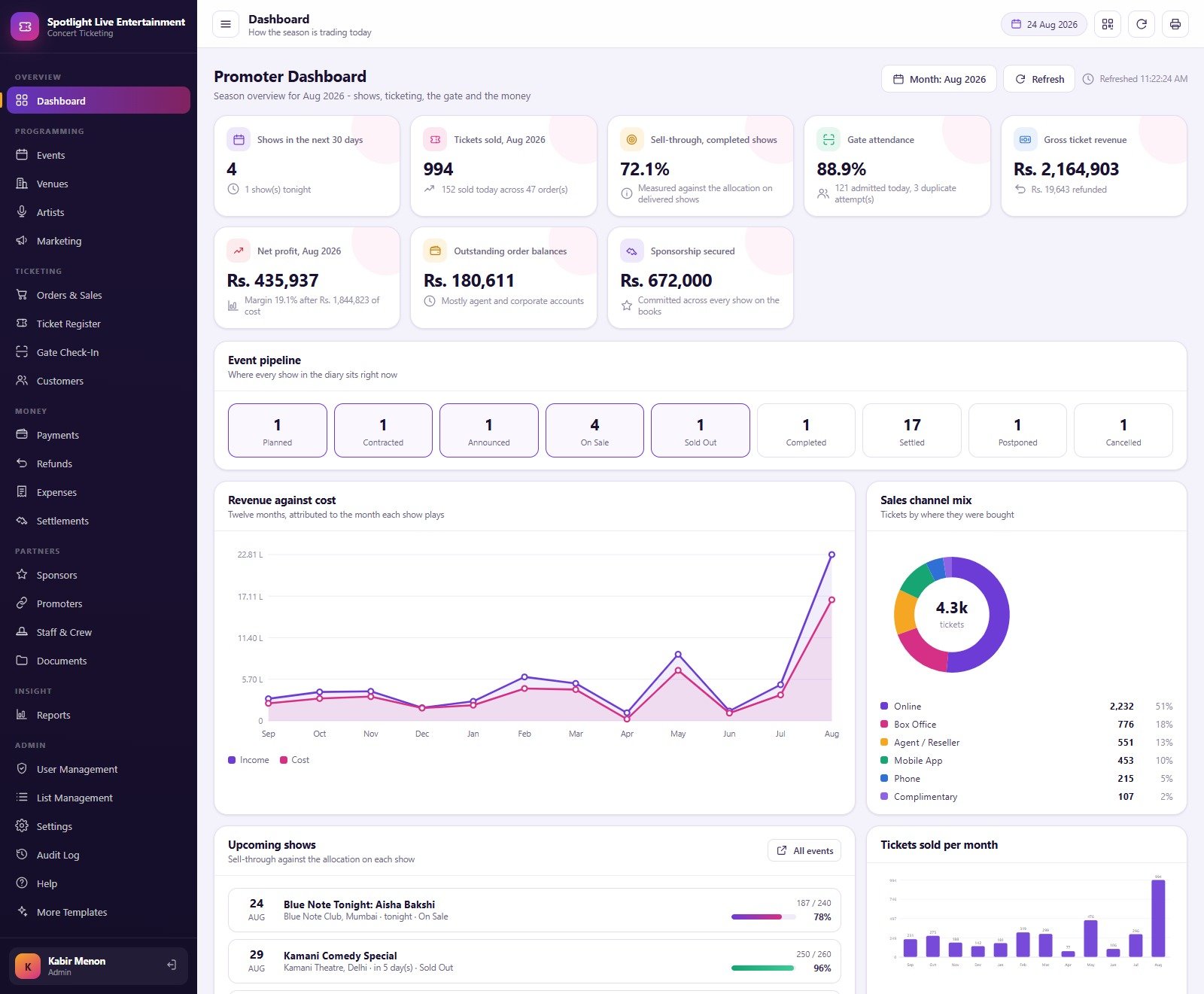
- Overview – a promoter Dashboard with eight KPI cards (shows in the next 30 days, tickets sold, sell-through on completed shows, gate attendance, gross ticket revenue, net profit, outstanding order balances and sponsorship secured), the event pipeline strip, a Revenue against cost line chart over twelve months, a Sales channel mix donut, Tickets sold per month, and an Upcoming shows list with a sell-through bar per date.
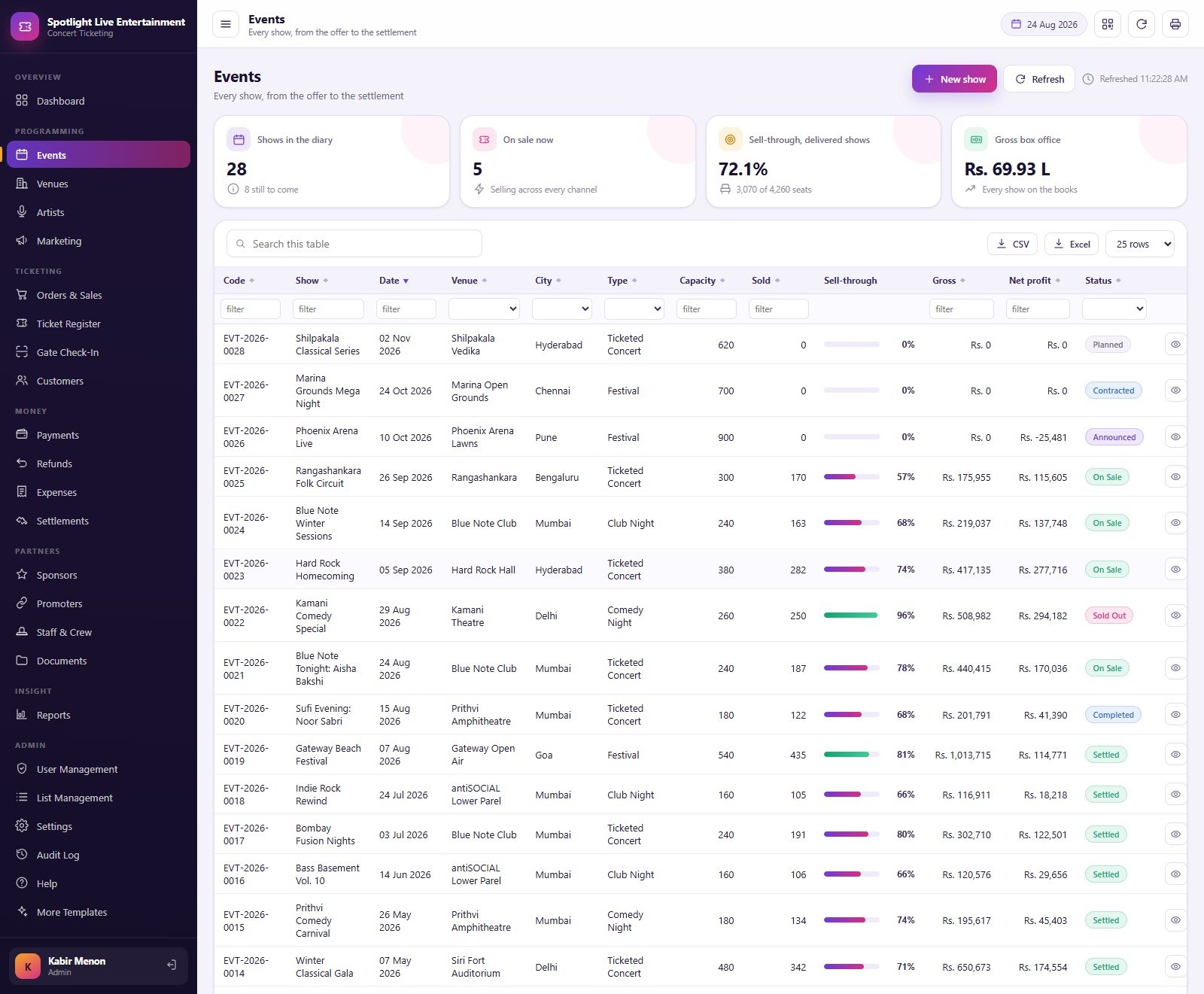
- Programming – Events, Venues (12 rooms, 36 seating zones, hire charge and house share per venue), Artists (44 acts with fee type, draw rating and last show) and Marketing Campaigns.
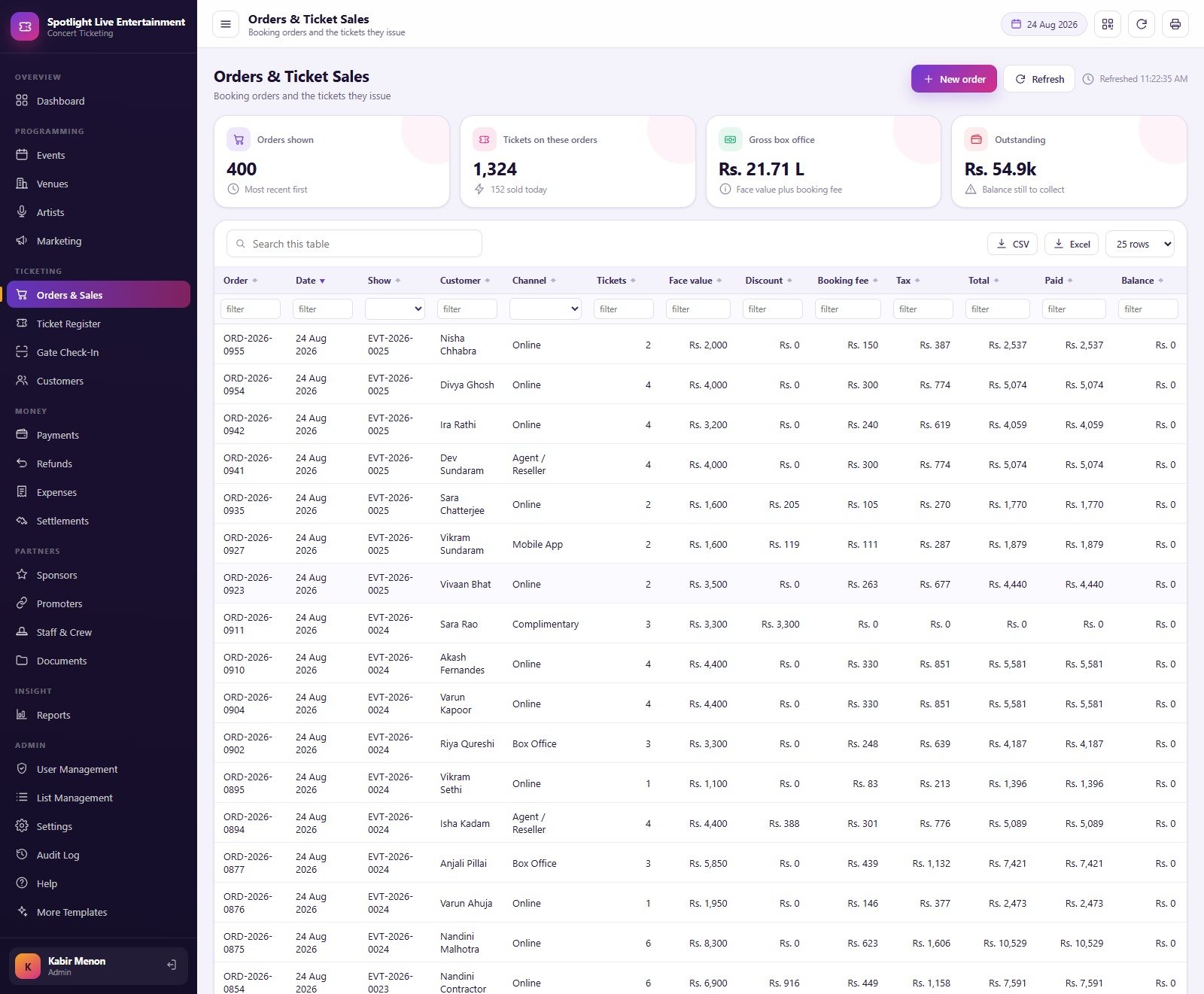
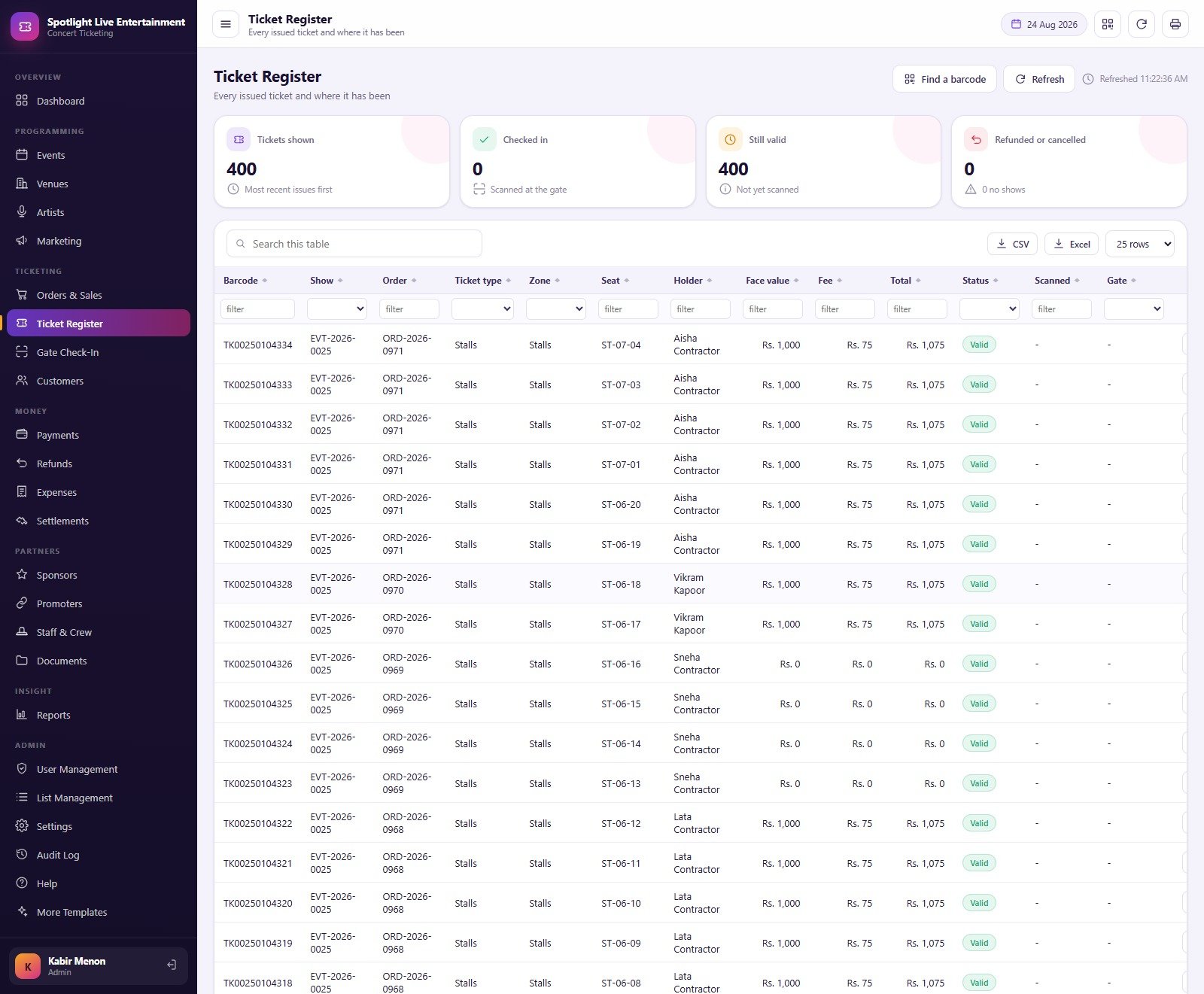
- Ticketing – Orders & Sales with face value, discount, booking fee, tax, paid and balance per order; the Ticket Register showing every barcode, zone, seat, holder and where it has been; Gate Check-In with a scan box, gate-by-gate admitted/refused counts and the last twenty scans; and Customers with tier, lifetime spend and outstanding balance.
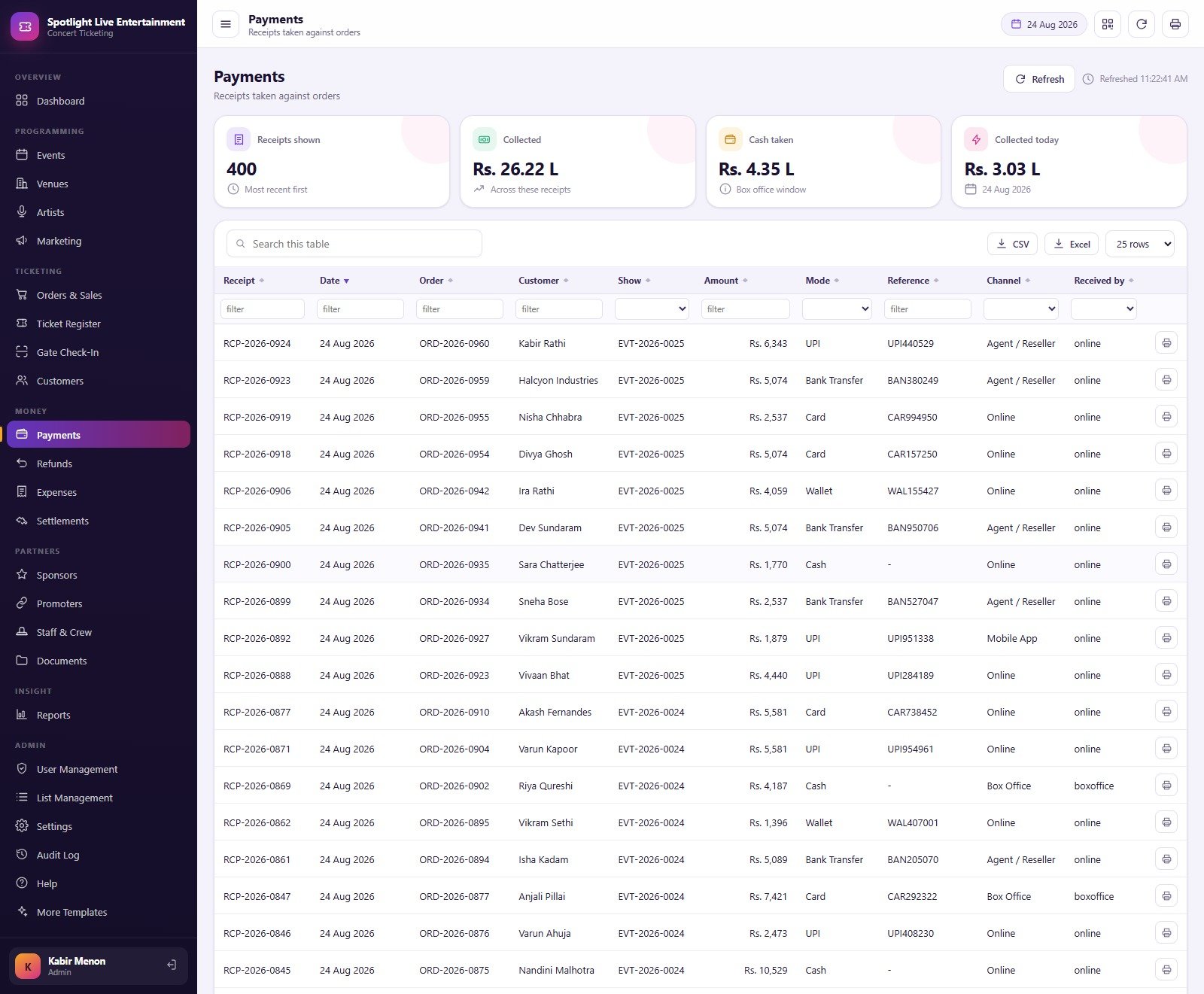
- Money – Payments (receipt, mode, reference, channel, taker), Refunds & Cancellations with the fee retained and the reason, Expenses across 14 cost categories with an approval step, and Settlements.
- Partners – Sponsors and sponsorship deals, co-Promoters with their share and what they have earned, Staff & Crew with a shift roster, and Documents filed in Drive against a record.
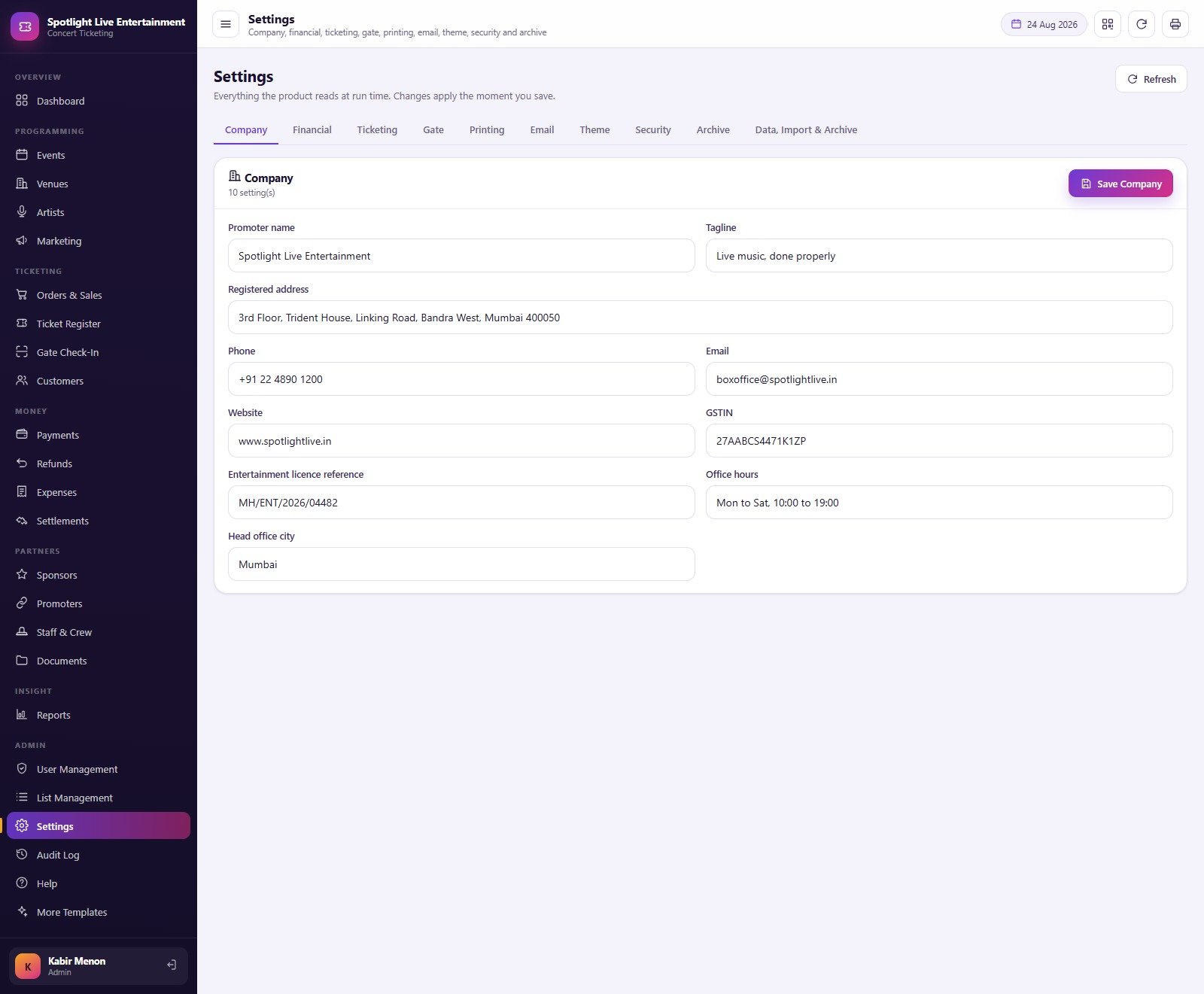
- Insight and Admin – the Reports centre, User Management with a Roles & Permissions editor, List Management, ten Settings tabs (Company, Financial, Ticketing, Gate, Printing, Email, Theme, Security, Archive, Data Import & Archive), the Audit Log and a Help page that states the four rules the server enforces.
- The download –
Code.cs.txt,Index.txtand a user manual PDF. That is the whole product; there is nothing else to buy.
Concert Ticketing Web App vs. a Spreadsheet vs. Paid Ticketing SaaS – Where This Fits
| This Web App | Plain spreadsheet / Google Sheets | Paid ticketing SaaS | |
|---|---|---|---|
| Cost | One payment, no subscription | Free | Monthly fee, or a per-ticket cut of every sale |
| Platform | Google Apps Script web app on your own Google Sheets database | Google Sheets or Excel | Vendor cloud |
| Setup time | About 15 minutes: paste two files, run setup, deploy | Days of building, then months of patching | Onboarding call, then a contract |
| Real-time team collaboration | Yes – named accounts with roles | Yes, but with no permission control | Yes |
| Mobile access | Yes – the URL opens in any browser | Awkward on a phone | Yes |
| Customisable fields and code | Full source, edit anything | Full control, no structure | Only what the vendor exposes |
| Share with a link | Yes – one deployment URL | Yes, but everyone sees everything | Yes |
| Year-1 cost at 5 users | The purchase price, once | Free plus your own build time | Typically a four-figure subscription, plus per-ticket fees |
| Overselling protection | Computed from the zone allocation and refused server-side | None – a typed number drifts | Yes |
| Your data stays in your Drive | Yes | Yes | No – it lives in the vendor’s system |
Who This Template Is For – and Who It’s Not For
It is for independent concert promoters and gig companies running 20-60 shows a year; club, theatre and amphitheatre operators who sell their own tickets; comedy and festival producers who co-promote with partners and need a settlement each side agrees with; and box-office teams who currently run a booking spreadsheet, a gate list and an expense file that never quite match.
It is not for you if you need a public-facing ticket store that takes card payments from the audience – this is the back office behind that, and it records payments rather than processing them. It is not a ticketing marketplace, a payment gateway or a PCI-DSS environment. It does not connect to turnstile hardware, printers with SDKs, RFID wristbands or an access-control system; the gate screen takes a barcode typed or scanned into a text field. It confers no entertainment licence, venue-safety certification, crowd-management approval or tax compliance of any kind, it files no GST, e-invoice or e-way bill, and it is not accounting software. If your promoter business already runs on a vendor platform with a signed contract, use this alongside it for costing and settlement rather than instead of it.
How to Use the Concert & Ticketing Management System Web App
- Try the live demo first. Open the URL above, sign in as promoter, then as gate, and confirm the role separation is what you want before you spend anything.
- Deploy your own copy. Unzip the download, create a new Apps Script project, paste
Code.cs.txtintoCode.gs, add an HTML file named exactlyIndexand pasteIndex.txtinto it. - Run
setuponce and accept the permission prompt. It builds every sheet and loads the demo book in resumable stages, so Google’s six-minute script limit cannot break it. Running it again is always safe. - Deploy as a web app – Execute as Me, Who has access Anyone – then open the URL and sign in as
admin. - Change every password immediately under User Management > Users, and delete the seeded accounts you do not need.
- Set Settings first. Company (promoter name, address, licence reference), Financial (currency symbol, tax percent, booking fee, refund fee retained, default promoter share), Ticketing (on-sale window, max tickets per order, sold-out threshold), Gate (gate names, doors-open lead, re-entry) and Printing (3 inch, 4 inch or A4).
- Load your own masters – venues and their seating zones first, then artists, promoters and sponsors, because events reference all of them.
- Run one real show end to end – create the event, add the lineup and ticket types, move it to On Sale, take orders, scan the gate, log costs, mark it Completed and prepare the settlement. Then clear the demo transactions and go live.
Real-World Use Cases
Ira, an independent promoter with a four-city circuit. She books a 240-capacity club and a 900-capacity arena lawn in the same month. The Events screen shows both with capacity, sold, sell-through, gross and net profit side by side, so when the arena sits at 0% two weeks out she moves marketing spend from the club that is already at 78%. The Marketing screen tells her which channel earned the last uplift.
Dev, running the door on a sold-out comedy night. He signs in on a tablet as gate, picks the show, and scans. Duplicates and refunded barcodes bounce with a reason, the gate-by-gate table shows Gate A pulling 92 admits against Gate B’s 23 so he moves an usher, and he never sees a single price – the server strips them before the payload leaves it.
Meera in finance, closing a co-promoted festival. The show is Completed, so she prepares the settlement: gross ticket revenue minus refunds, plus the sponsorship committed, minus artist fees, venue hire, production, marketing and crew cost, split 35/65 with the co-promoter. The statement prints on A4 and the partner’s share posts to the Promoters screen, where their running total is already visible.
Frequently Asked Questions
Can I try it before buying?
Yes. The live demo above is the real system with the seeded book loaded, and every role’s password is listed. Sign in as the most restricted role, gate, and you will understand the product in about ten seconds. Those credentials are for a shared demo copy that resets; your purchase gives you a private deployment.
Does it take card payments from ticket buyers?
No. It records a payment against an order – amount, mode, reference, channel and who took it – so your books balance. It is not a payment gateway, it holds no card data and it is not a PCI-DSS environment. Take the money however you take it now and record the receipt here.
Where does my data live?
In a Google Sheets file inside your own Google Drive, created when you run setup. Nothing is sent anywhere else. Passwords are stored only as a salted SHA-256 hash – the plain text never touches the spreadsheet.
Can I change what each role can reach?
Yes, from User Management > Roles & Permissions. Tick or untick each module, the action rights (Create, Edit, Delete, Export, Approve) and the “this role may see money” switch. Admin always holds every permission and cannot be reduced. Every change is written to the Audit Log.
The demo shows Rupees and lakh figures – can I use my own currency?
Yes. The seeded demo book is an Indian promoter, so the sample money is in Rupees. Change the currency symbol, tax percent and booking fee in Settings > Financial and every screen follows. No figure in the demo is a claim about what your shows will earn.
How many people can use it at once?
As many as your Google account allows. The seeded book ships eight accounts across six roles, including two box-office seats and two gate seats, precisely so you can test two people working the same screen.
What do I actually download?
A ZIP holding Code.cs.txt, Index.txt and the user manual PDF. Two files to paste, one manual to read. There is no installer, no add-on and no recurring charge.
About the Author
Built by PK – Microsoft Certified Professional with 15+ years of Excel, Google Sheets, and Power BI experience. Founder of NextGenTemplates, reaching 300K+ subscribers across YouTube channels. Every template is hand-built and tested before release.
Explore Related Templates
- Amusement Park Ticketing Management System Web App – the same gate-and-ticket engine applied to a gated attraction.
- Bowling Alley Management System Web App – front-desk POS, bookings and memberships for a venue that sells time rather than seats.
- Cafeteria and Canteen Management System Web App – useful if you also run the concessions inside the room.
- Concert Promoters Dashboard in Power BI – reporting-only, if you already have a ticketing system and just want the analysis.
- Music and Performing Arts Dashboard in Google Sheets and Event Success Tracking Dashboard in Google Sheets – lighter, cheaper starting points.
- Browse the whole Mini Web Apps catalogue, or the Google Sheets templates.
Ready to run your season from one screen? Open the live demo, sign in as promoter, and look at the Settlements page. If that is the statement you wish you had after your last show, buy the system – one payment, full source, deployed in about fifteen minutes.
Last updated: 26 August 2026.





























Reviews
There are no reviews yet.