

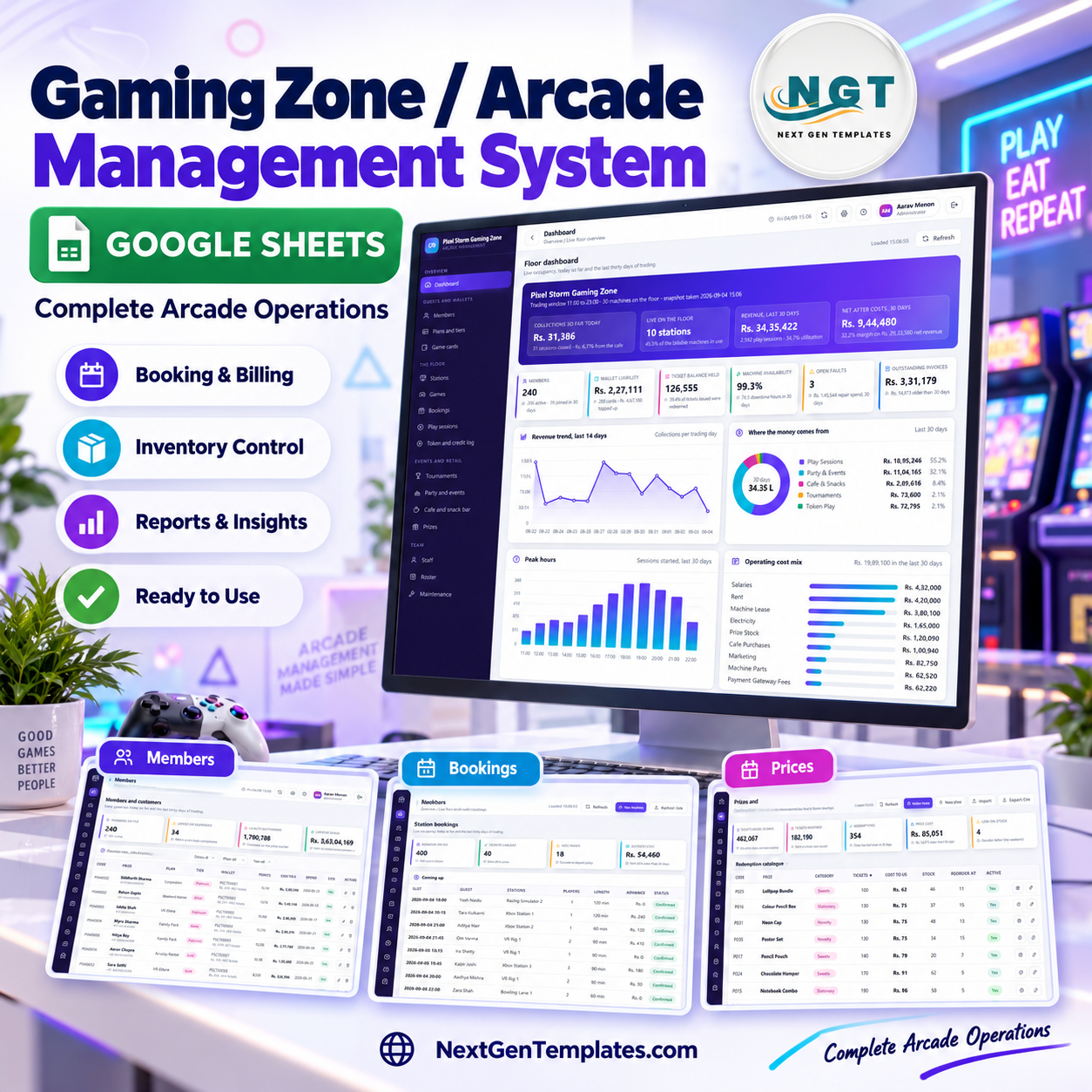

The Gaming Zone & Arcade Management System Web App is an arcade management system that runs a whole entertainment floor from one browser tab: 30 machines with the clock ticking, prepaid game cards, ticket balances, party bookings, the snack counter, the prize wall, the staff roster and thirteen business reports. It is a Google Apps Script web app that builds its own Google Sheets database on first run, so there is no server to rent, no database to configure and no monthly platform fee.
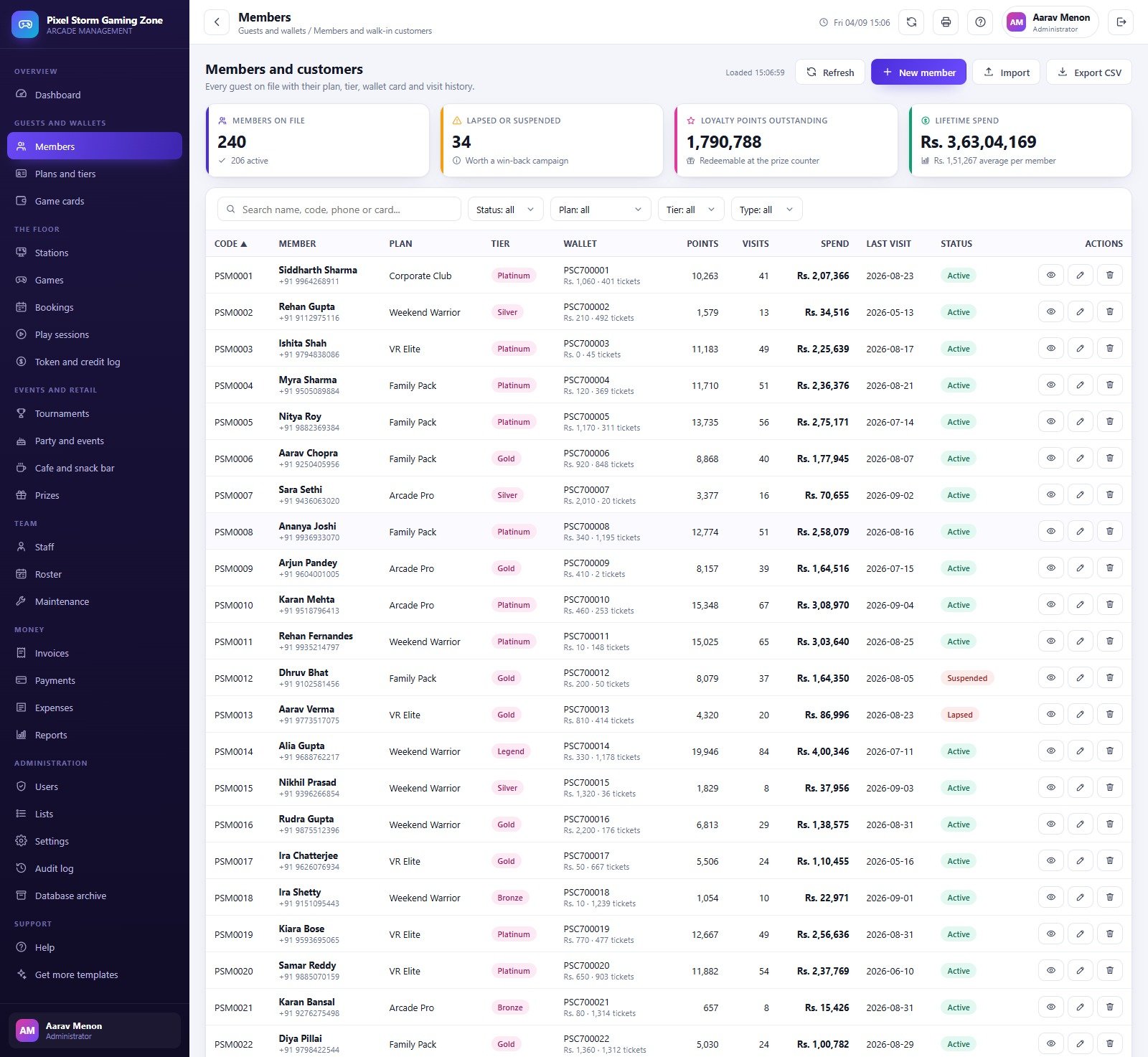
Everything below is a screenshot of the shipped build with its demonstration dataset loaded – 240 members, 30 stations, 48 game titles, 3,993 play sessions and 14,450 rows in total. The numbers you see are the seeded demo, not a promise about your business.
Try the Live Demo
Open the deployed system and sign in as any role. Nothing to install, nothing to pay – you are looking at the same build you receive.
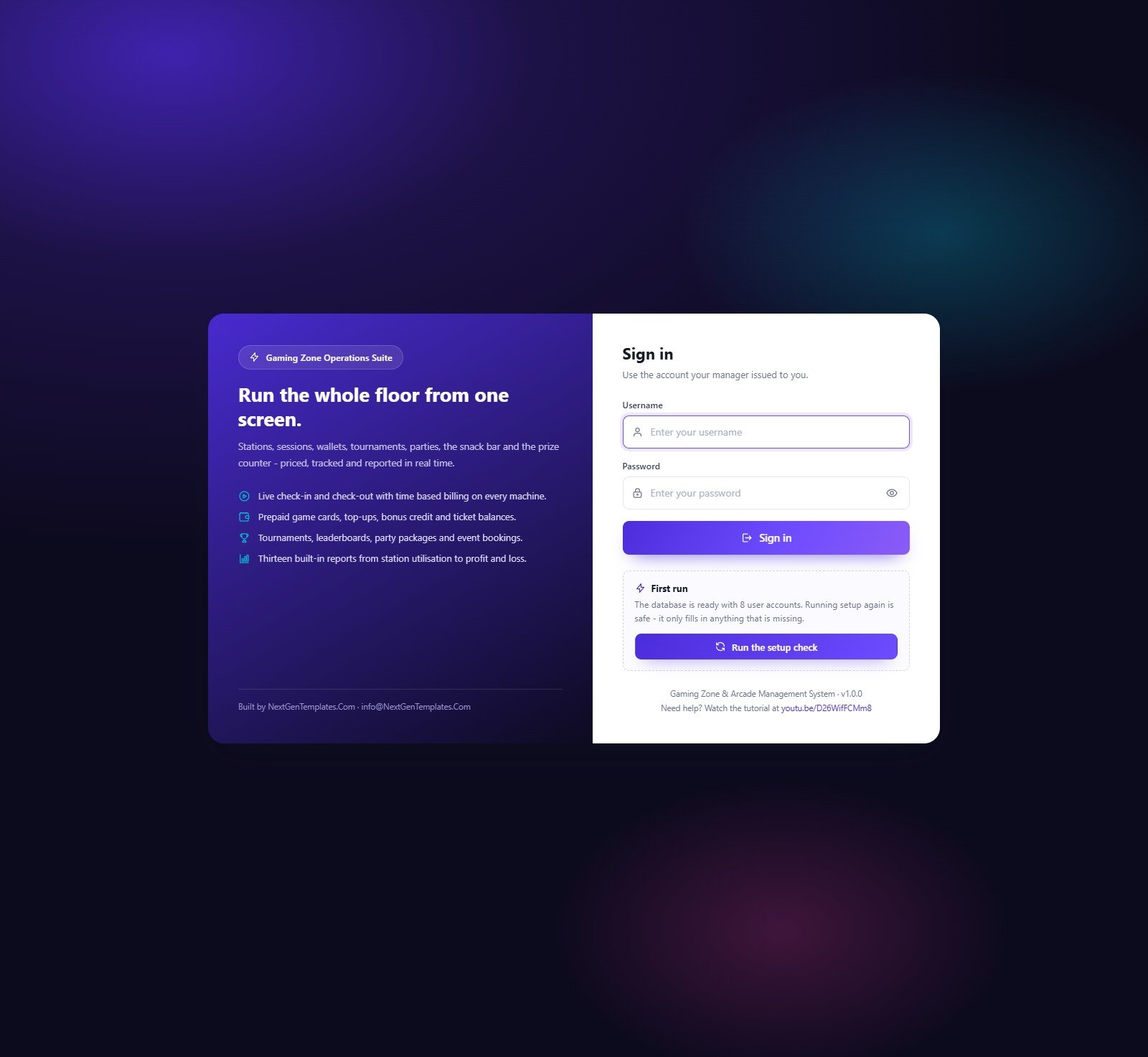
Demo sign-in details – all eight seeded accounts
| Role | Username | Password | What that role can reach |
|---|---|---|---|
| Administrator | admin | Arcade@2024 | Everything, including Users, Settings, Audit log and Database archive |
| Manager | manager | Manager@2024 | All operations, all reports, expenses, staff and lists – no user management, no archive |
| Floor Supervisor | supervisor | Floor@2024 | Stations, games, bookings, sessions, tournaments, parties, prizes, roster, maintenance, read-only reports |
| Floor Supervisor | floor2 | Shift@2024 | Second supervisor account, same permission set |
| Cashier | cashier | Cashier@2024 | Check in and check out, snack bar counter, wallet top-ups, prize redemption, invoices, payments, bookings |
| Cashier | cashier2 | Counter@2024 | Second counter account, same permission set |
| Technician | tech | Tech@2024 | Stations, games, maintenance and the roster only |
| Technician | tech2 | Service@2024 | Second technician account, same permission set |
These credentials are public on purpose. The demo is a shared instance seeded with sample data, not a customer deployment, and it resets. Your own copy builds its own private database in your own Google Drive, and the manual asks you to change all eight passwords on day one.
Key features of this arcade management system
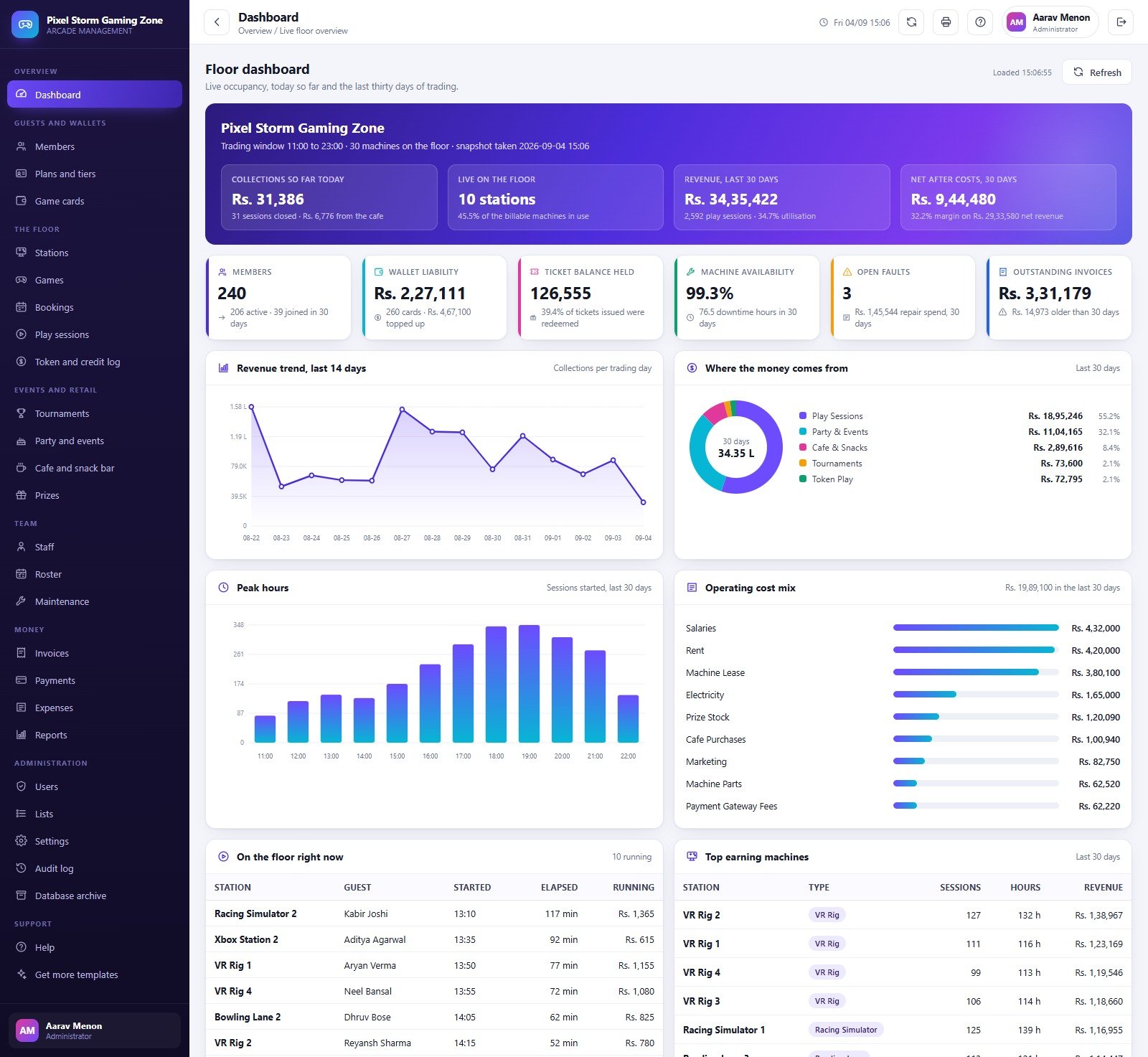
- Live floor dashboard. Collections so far today, machines running right now, thirty-day revenue and net-after-costs across the top; then members, wallet liability, ticket balance held, machine availability, open faults and outstanding invoices as six status cards. Below that a fourteen-day revenue trend, a revenue-mix donut, a peak-hours histogram by trading hour, an operating cost mix, an on-the-floor-right-now table and a top-earning-machines table.
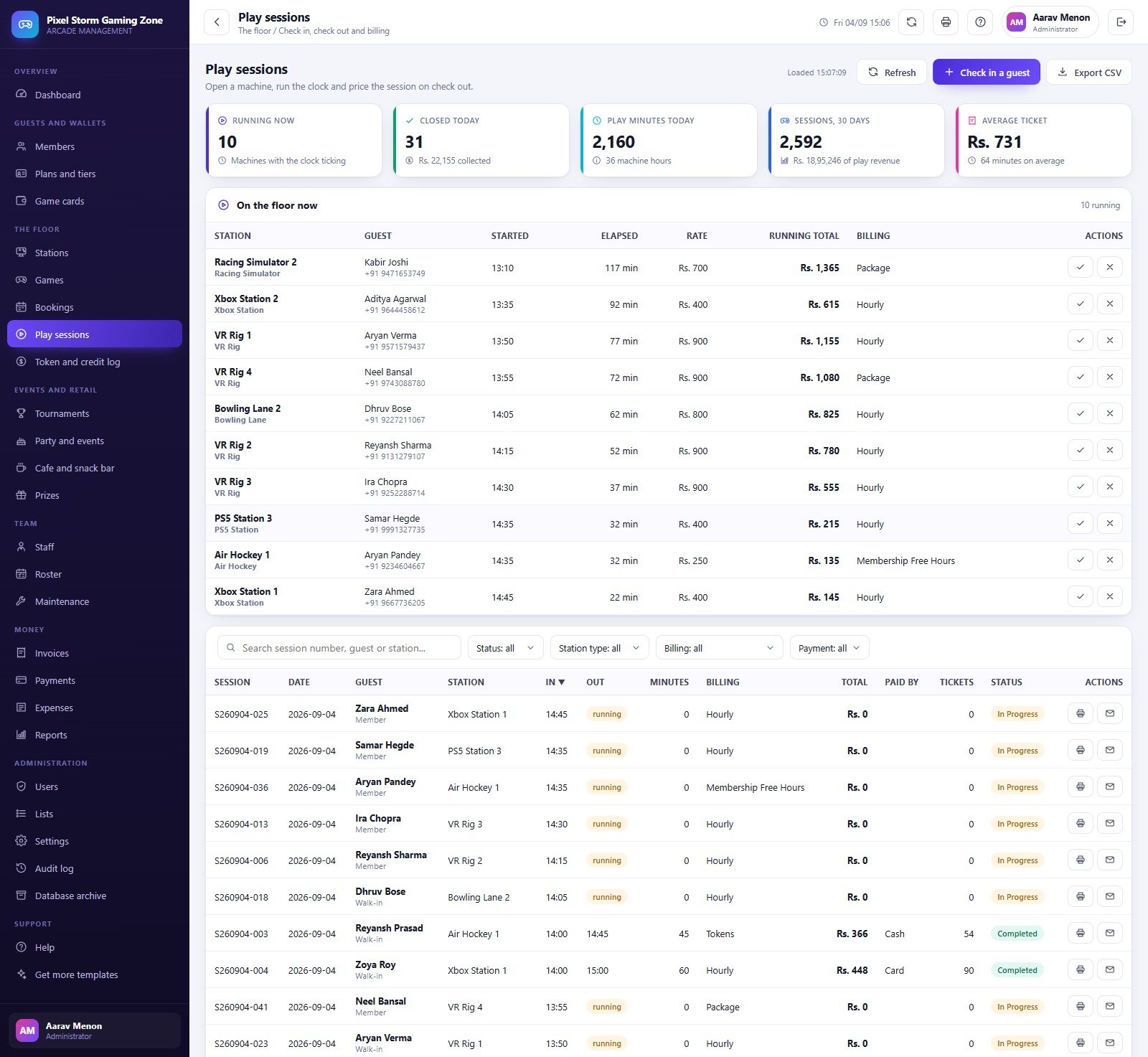
- Time-based billing on every machine. Check a guest in from Play sessions, the clock starts, and check-out prices the elapsed minutes against the station rate, applies the membership discount, adds tax and settles the wallet. Minimum billable minutes, grace minutes and the extra-player charge are all settings, not code.
- Four billing modes. Hourly, Package, Tokens and Membership Free Hours – all four appear on live sessions in the shipped data, and they are list values you can rename.
- Prepaid game cards and wallets. Issue a card, record a top-up, and a configurable bonus percentage is credited automatically. The Game cards screen tracks balance, bonus, ticket count, issue and expiry dates and card status (Active, Lost, Expired).
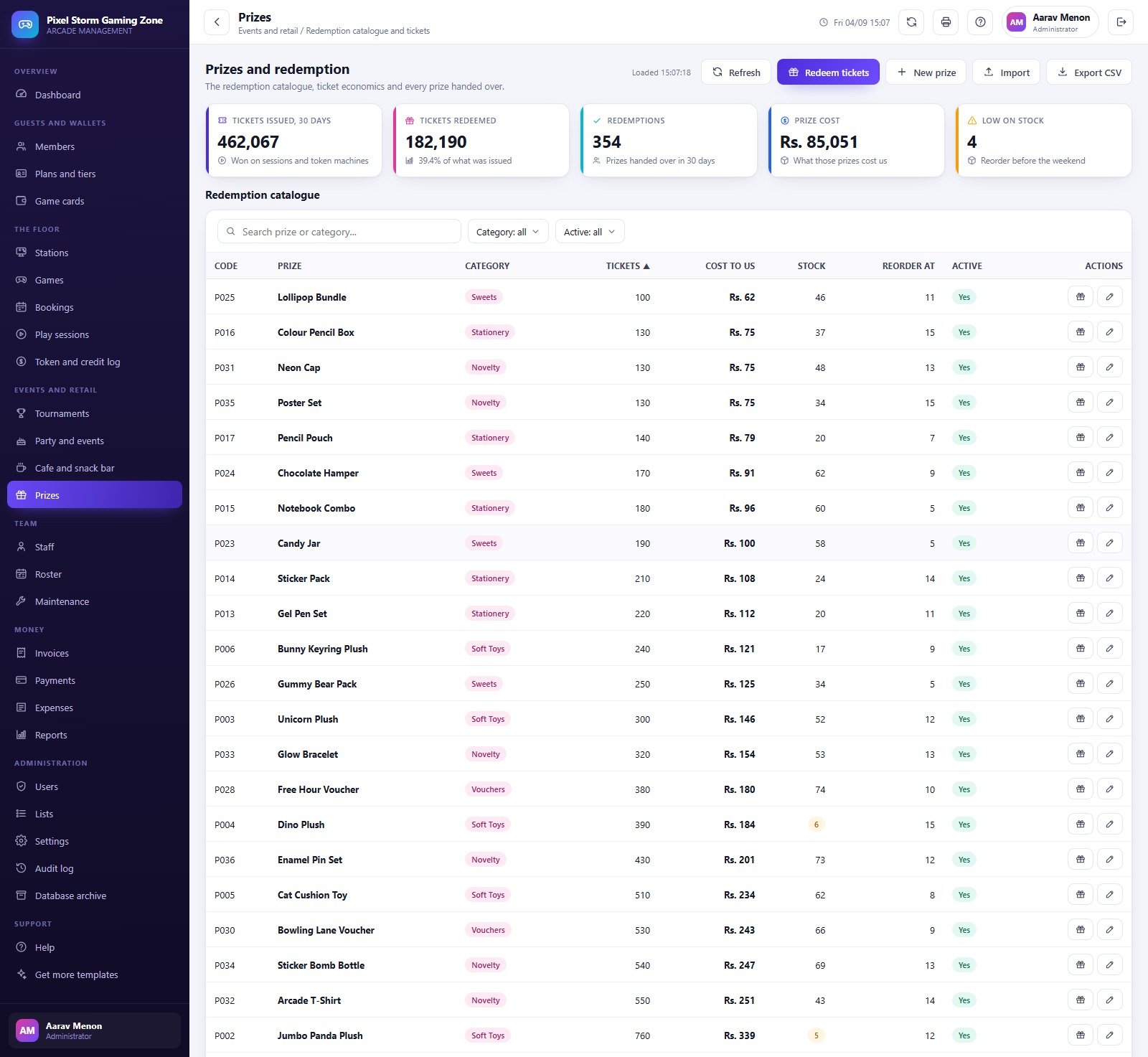
- Tickets and a prize counter. Token machines pay out tickets, tickets sit on the guest’s card, and the Prizes screen is a full redemption catalogue with ticket price, cost to you, stock level and reorder point, plus a low-stock warning.
- Advance bookings. Slot start and end, station, player count, advance held, and a booking source of Walk-in, Phone, Online or Corporate. A “Coming up” panel lists the next confirmed slots.
- Tournaments and leaderboards. Five formats (League, Knockout, Score Attack, Team Relay, Time Attack), entry fees, prize pools, registration caps and a per-event leaderboard with scores and prize money.
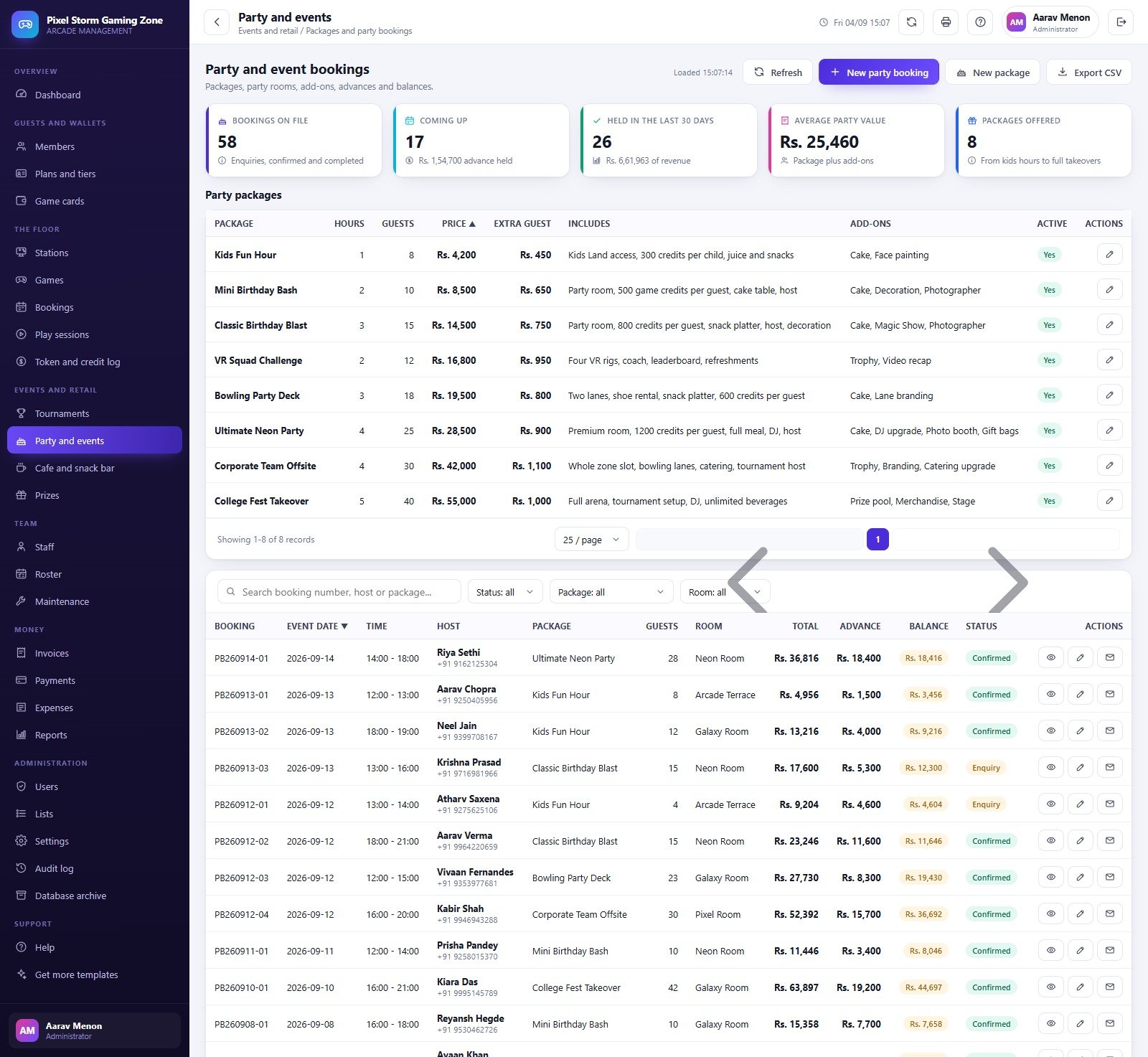
- Party and event packages. Eight priced packages from a one-hour Kids Fun Hour to a five-hour College Fest Takeover, each with included hours, guest count, extra-guest rate, inclusions and add-ons; party bookings carry room, total, advance and balance.
- Cafe and snack bar. A costed menu with categories, veg flag, stock and reorder level; combo deals; a counter for taking orders; and today/thirty-day sales with a gross-margin figure.
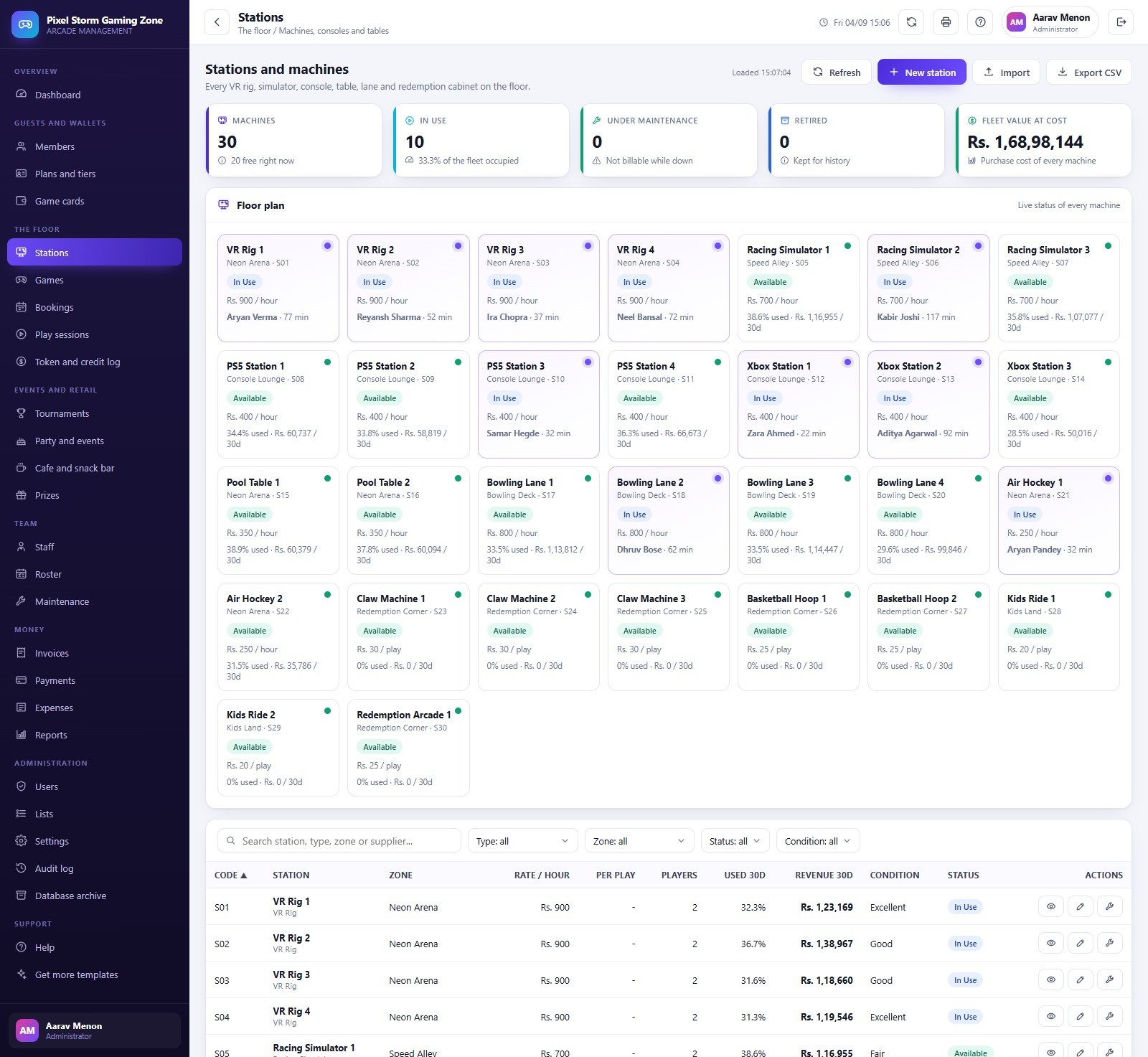
- Stations, games and maintenance. A live floor plan tile per machine with zone, rate, occupancy and current guest; a game catalogue with genre, platform, player count, age rating and popularity; and a fault log with technician, hours down, parts, labour and resolution.
- Staff, roster and attendance. Employee master with role and salary, scheduled shifts, clock-in and clock-out times, hours worked, overtime and an attendance rate.
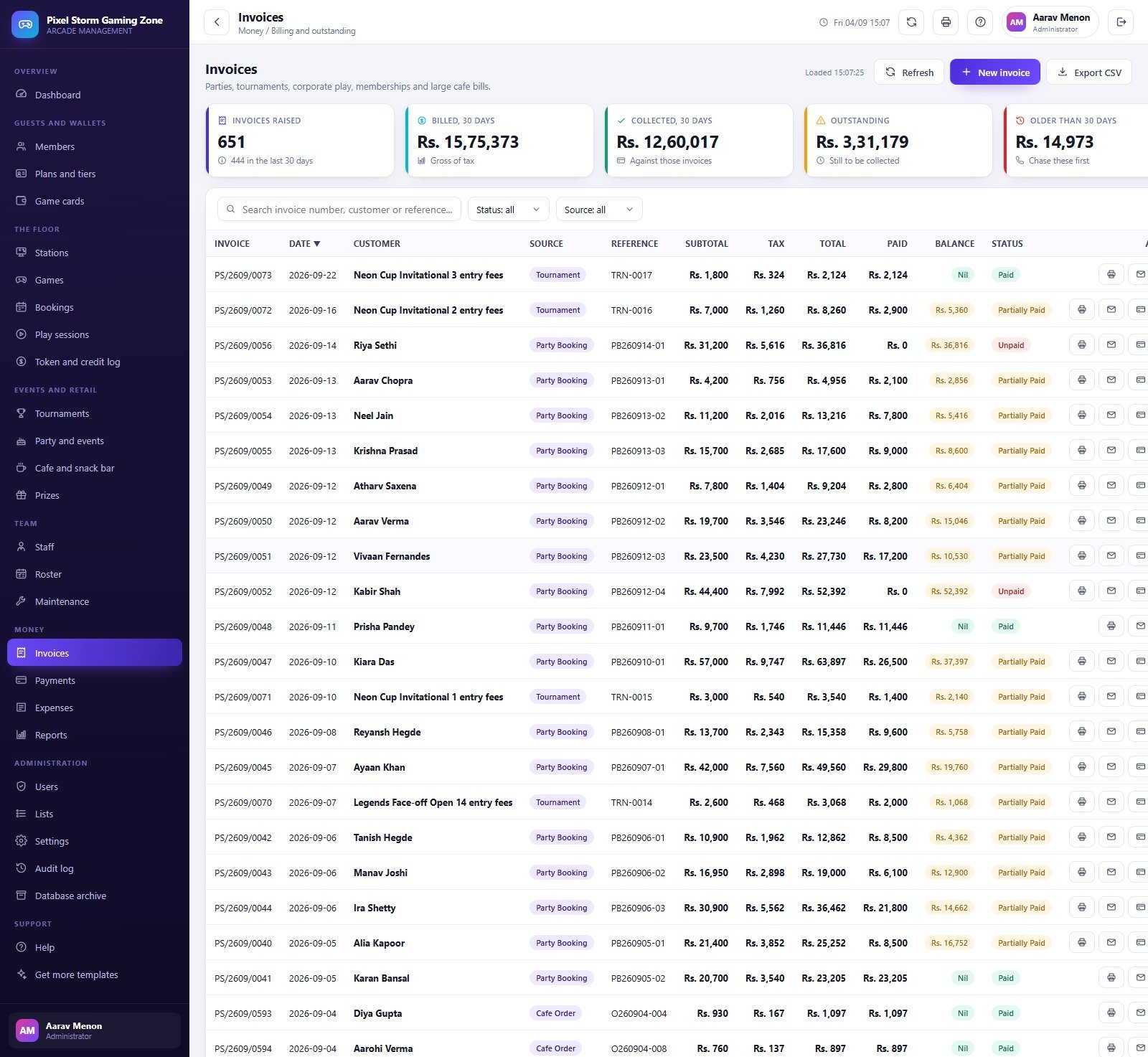
- Money in one place. Invoices with tax, paid and balance; receipts by mode (Card, UPI, Cash, Bank Transfer) and by collector; an expense voucher register across thirteen categories; and an ageing view of what is still owed.
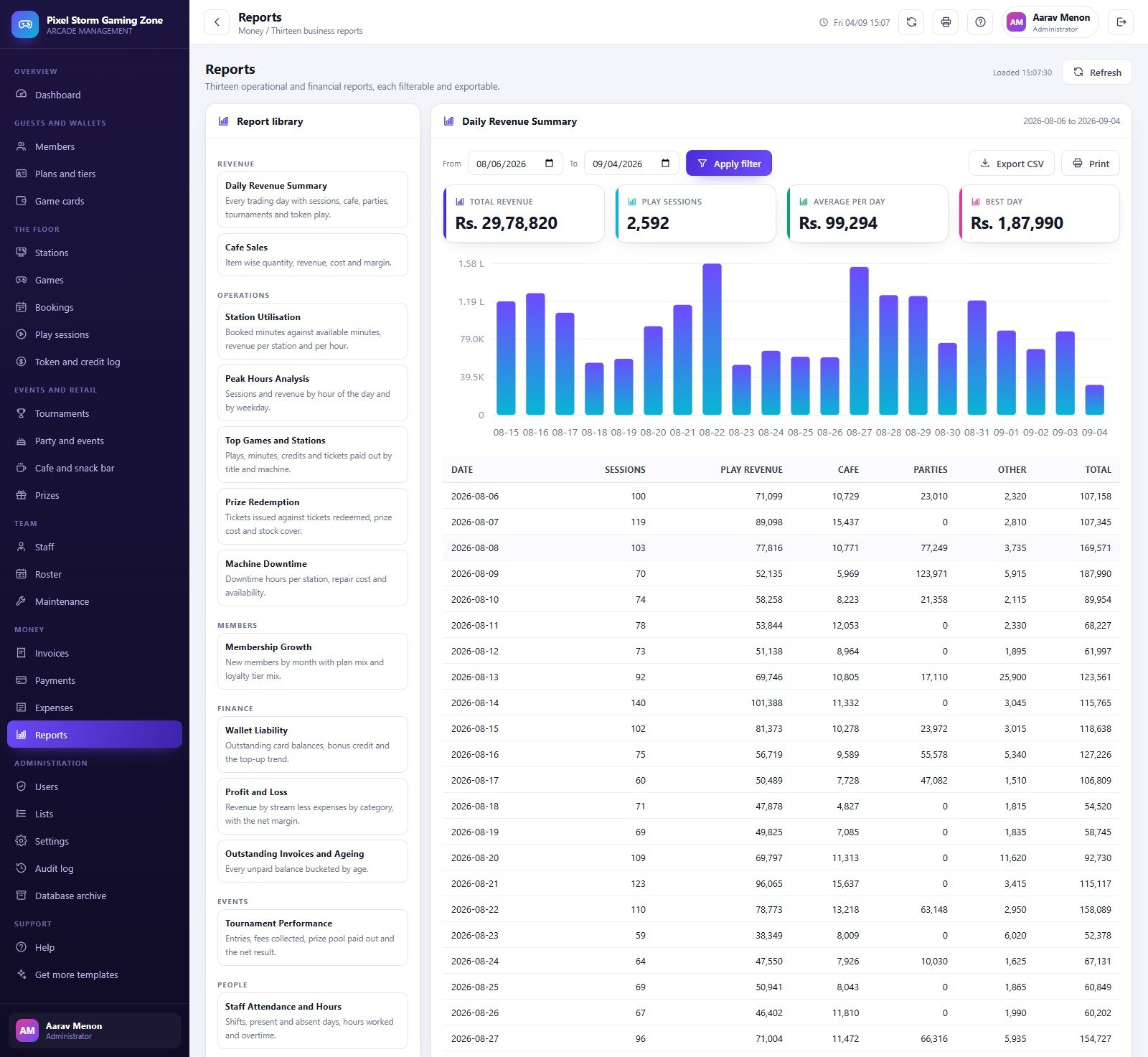
- Thirteen reports. Daily Revenue Summary, Cafe Sales, Station Utilisation, Peak Hours Analysis, Top Games and Stations, Prize Redemption, Machine Downtime, Membership Growth, Wallet Liability, Profit and Loss, Outstanding Invoices and Ageing, Tournament Performance, and Staff Attendance and Hours. Each takes a date range and exports to CSV or prints.
- Roles that actually bite. Five roles, eight seeded accounts and a 48-entry permission catalogue. The same permission map drives both the menu and the server-side guard, so a Technician cannot reach Invoices by typing at it.
- Audit log and database archive. Every sign-in, create, update, check-in, payment, redemption and export is logged with user, role, module and detail. When the sheet gets heavy, the archive tool previews what would move, copies the whole database into Drive and only then removes the closed rows – master data is never touched.
What you get in the download
A single ZIP holding three files: Code.cs.txt (the Apps Script server code), Index.txt (the single-page front end) and a Gaming Zone & Arcade Management System user manual PDF covering every screen, the role matrix, deployment and the settings you should change first.
Setting it up
- Try the demo first using the green box above – sign in as
cashierand then astechand you will see what role separation buys you in about ten seconds. - Create a new standalone Apps Script project at script.new, paste
Code.cs.txtintoCode.gs, add an HTML file named exactlyIndexand pasteIndex.txtinto it. - Deploy as a Web app, execute as yourself, access set to Anyone, and accept the Google permission prompt. The app needs Sheets, Drive and Gmail-send access.
- Run setup once – either from the “First run” panel on the sign-in card or by running
setup()in the editor. It creates its own Google Sheets database with 33 tables, the Drive folder tree and the full demonstration dataset. Setup is staged and resumable, so if it hits the six-minute Apps Script limit it queues a trigger and finishes by itself. - Sign in as
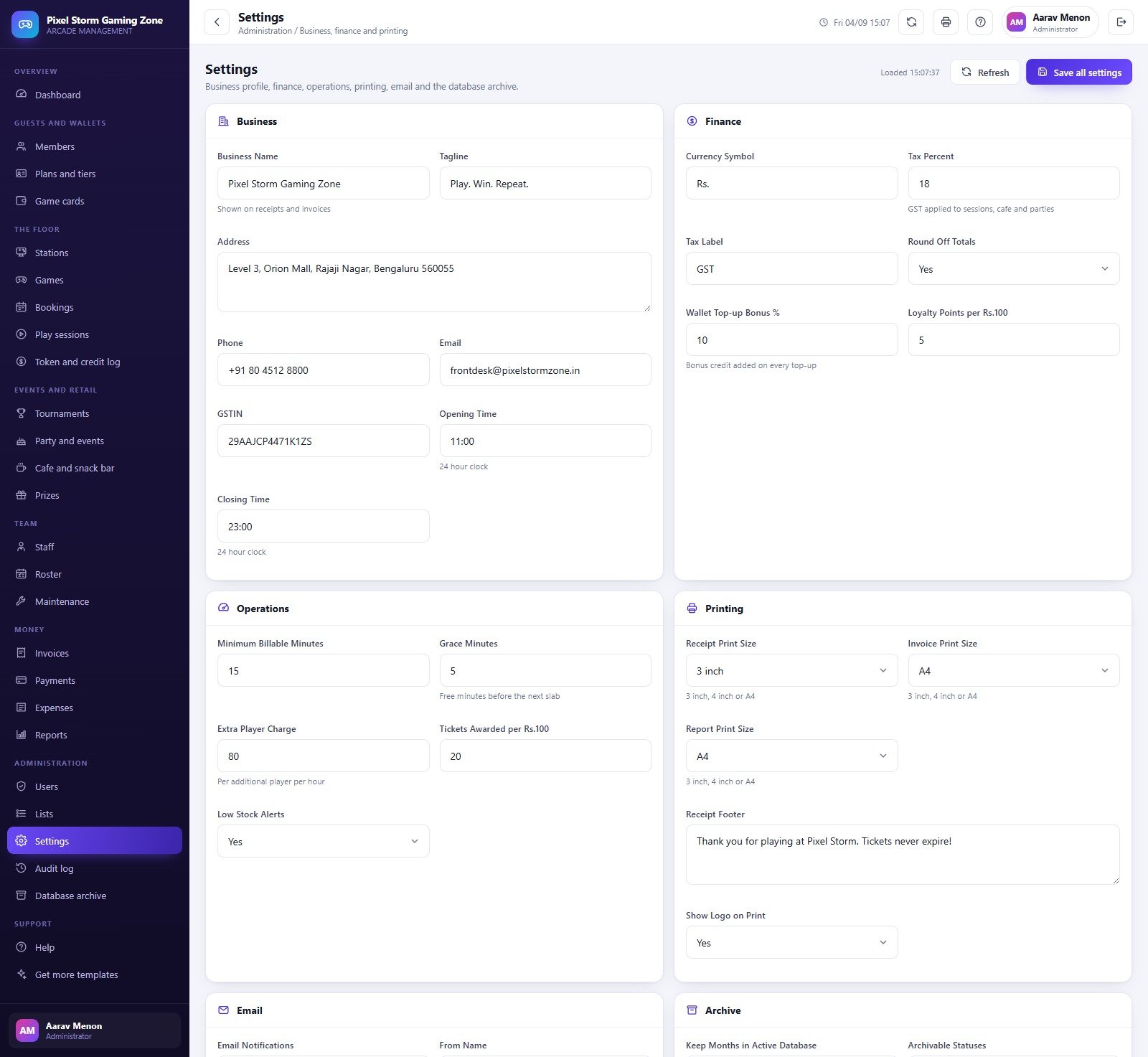
admin, change all eight passwords, then work through Settings: business profile and GSTIN, currency symbol and tax percent, minimum billable minutes and grace minutes, receipt and invoice print sizes (3 inch, 4 inch or A4), and the email notification addresses. - Replace the demonstration stations, menu and prize catalogue with your own – both the cafe menu and the redemption catalogue import from CSV – and tune the 32 dropdown lists to the way you actually speak about your business.
Remember that after any later edit to Code.gs or Index you must publish a new version from Manage deployments; saving the editor alone does not update the live app.
Who this arcade management system is for
Arcades and gaming zones, VR centres, console lounges, bowling-and-games venues, family entertainment centres, kids play zones with a redemption counter, and esports cafes that also sell food. This arcade management system suits an owner-operator or a single-site manager who wants floor control, prepaid wallets and honest reporting without paying a monthly SaaS fee. Multi-site chains that need consolidated cross-branch reporting should treat this as a per-site system.
Honest limitations – what this does not do
- It does not talk to your machines. There is no coin-mech, card-reader, RFID, IoT or cabinet-controller integration. Sessions are opened and closed by a person at the counter; token plays are recorded, not sensed.
- There is no payment gateway. Card, UPI, Cash and Bank Transfer are payment modes you record after the fact. Nothing is charged, no card details are stored, and there is no auto-debit or online checkout.
- No customer-facing portal or app. Guests cannot self-book, self-top-up or see their own ticket balance; staff do that for them.
- It is not accounting software and it files nothing. The tax percent and label are a printed line on the invoice – the system does not compute GST returns, generate e-invoices or e-way bills, or connect to any tax portal.
- Reports are the thirteen that ship. They filter by date and export to CSV, but there is no drag-and-drop report builder.
- Google’s quotas apply. This is an Apps Script web app on a Google Sheets database – fine for a single busy venue, not a substitute for a hosted SQL platform at chain scale.
Three things worth knowing before you buy
We open every screenshot before writing a listing, so here is what we found rather than what marketing would prefer.
- Two “in use” percentages use different denominators. The dashboard reads “10 stations – 45.5% of the billable machines in use” while the Stations page reads “10 in use – 33.3% of the fleet occupied”. Both are right: 10 of 30 machines is 33.3%, and 10 of the 22 hourly-billable machines is 45.5%. Redemption cabinets and per-play machines are not hourly-billable, which is the gap.
- The big list screens are capped at the 400 most recent rows. Bookings, the token log and the shift register all say so on the card, and the reports read the full table, but if you expect to scroll a full year in the register itself you will not.
- On the Daily Revenue Summary the bar chart plots the tail of the filtered range – twenty-one bars against a thirty-row table underneath. The table and the totals are complete; only the chart is shorter.
None of these stops the system doing its job, and the archive register is legitimately empty on a fresh install because a brand-new database has nothing old enough to move.
How this arcade management system compares to the neighbours
| System | Built for | Time-billed machines | Prepaid wallet and tickets | Price |
|---|---|---|---|---|
| Gaming Zone & Arcade Management System | Arcade, VR and console floor | Yes – 30 stations, four billing modes | Yes – cards, top-up bonus, prize counter | 39.99 |
| Bowling Alley Management System | Lanes, shoe hire and league nights | Lane-based | Partial | 39.99 |
| Amusement Park Ticketing System | Gate admission and ride tickets | No | Ticketing, not wallets | 39.99 |
| Concert & Ticketing Management System | Events, seats and gate scanning | No | No | 39.99 |
| Club & Association Membership System | Members, dues and facilities | No | Membership only | 39.99 |
If you also want the analytics view rather than the operational one, the Gaming KPI Scorecard in Google Sheets is a monthly scorecard, not a floor system, and the two sit happily side by side.
Frequently asked questions
Can I try this arcade management system before buying?
Yes – the green box above is a live deployment of exactly this build, with all eight demo accounts listed. Sign in as the most restricted role first; it is the fastest way to judge whether the permission model matches how your floor actually runs.
Does it connect to my arcade machines or coin mechs?
No. Every session and token play is entered by a person. There is no hardware, reader or IoT integration of any kind.
Can it take payments online?
No. It records how a guest paid; it never charges anything. No gateway, no stored card details, no auto-debit.
What currency does it use?
Whatever you type into Settings – the currency symbol is a single field. The demonstration data was seeded in Indian Rupees, which is why the screenshots read “Rs.”.
Do I need a Google Workspace subscription?
No. A normal Google account is enough. The app builds its Sheets database in your own Drive and runs on Apps Script.
Can more than one person use it at once?
Yes – eight accounts across five roles are seeded, and you can add more from the Users screen. Everyone signs in to the same deployment.
Will the demo data get in my way?
No. The manual shows two ways to clear it: run a Database Archive over the closed transactions, or clear the transaction tables from the Sheet directly. Master data such as members, stations, menu, prizes and staff is a separate step.
Can I get changes made?
Yes. Customisation is offered from inside the app on the Get more templates screen, or write to us with a short brief.
The bottom line
This is a complete, honestly documented arcade management system that you own outright: 24 screens, 33 database tables, 48 permissions, 13 reports and a live demo you can open right now before spending anything. If it matches how your venue runs, launch the demo above, sign in as a cashier, close a session and watch the wallet, the tickets and the invoice all move together.
Related Templates and Systems
- Gaming KPI Dashboard in Excel: a KPI view for gaming businesses in Excel
- Gaming KPI Dashboard in Google Sheets: the same topic in Google Sheets
- Gaming KPI Dashboard in Power BI: a Power BI edition of the gaming KPI dashboard
- Bowling Alley Management System Web App: lanes and bookings for a games venue
- Amusement Park Ticketing Management System Web App: ticketing for rides and gate admission
Browse all Web Apps.

































Reviews
There are no reviews yet.