

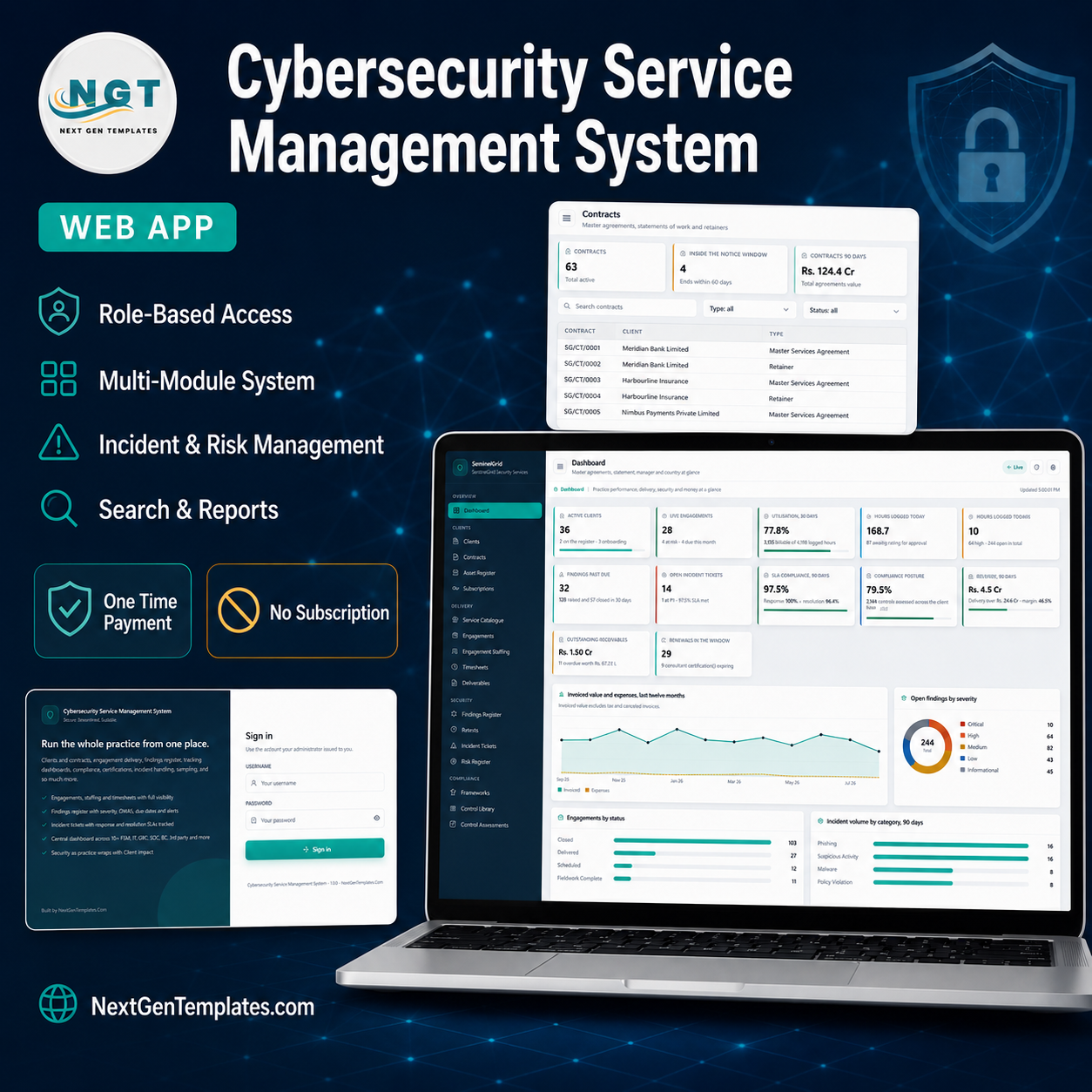



Cybersecurity Service Management System Web App is a complete back office for a security services firm. It joins up the client register, contracts and retainers, the in-scope asset estate, the delivery pipeline of engagements and staffing, the findings register with CVSS scores and remediation dates, retests, incident tickets with live SLA clocks, the risk register, compliance programmes against six frameworks, the consultant roster with certifications and training, and the whole money side of invoices, payments and expenses. Thirty two screens, seven roles, twenty six printable reports. Cybersecurity Service Management System Web App
It runs on Google Apps Script. You paste two files into a free Google account, deploy it once, and it builds its own Google Sheets database and its own Drive folder tree. There is no server to rent, no monthly fee and no seat licence. One payment, your Google account, your data.
Try the Live Demo
Open the deployed system before you buy. It is the real build with the seeded demonstration data, so every screen, chart and report is populated from the first click.
Sign in with any of the seven seeded roles
| Role | Username | Password | What it can reach |
|---|---|---|---|
| Administrator | admin | Sentinel@2026 | All 32 screens, users, lists, settings, backup and archive. Sees money. |
| Delivery Manager | delivery | Delivery@2026 | Engagements, staffing, timesheet approval, deliverables, findings, incidents, every report. Sees money. No user or setting control. |
| Security Consultant | consultant | Consult@2026 | Delivers the work: own timesheets, deliverables, findings, retests, incidents. Never sees rate, cost or invoice figures. |
| Compliance Officer | compliance | Comply@2026 | Frameworks, control library, control assessments, risk register, document library, certifications. No money figures. |
| Account Manager | accounts | Account@2026 | Clients, contracts, subscriptions, renewals and pipeline; invoices and payments read only. Sees money. |
| Finance Officer | finance | Finance@2026 | Invoices, payments, expenses and expense approval, subscriptions, every financial report. Sees money. |
| Auditor | auditor | Auditor@2026 | Read only across every operational screen plus the audit log and CSV export. No edit rights anywhere. No money figures. |
Sign in as consultant or auditor to see the point in ten seconds – the money columns simply are not there. These credentials are public on purpose. They belong to a shared demonstration instance that resets, not to anybody’s live deployment. Your own copy is built fresh in your own Google account, with your own passwords.
Key Features
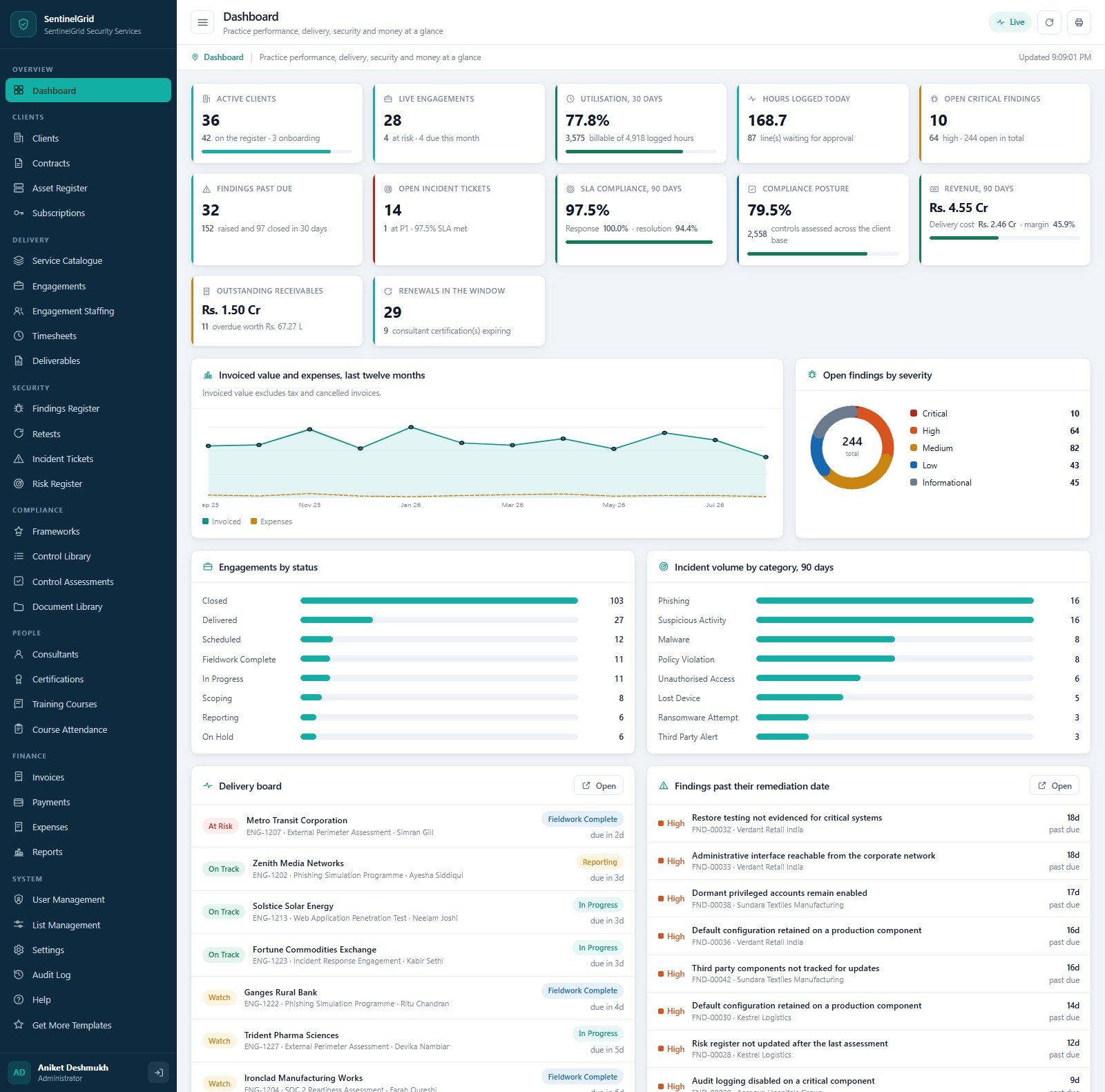
- A practice dashboard, not a wall of tiles. Twelve headline cards – active clients, live engagements, thirty day utilisation, hours logged today, open critical findings, findings past due, open incident tickets, ninety day SLA compliance, compliance posture, ninety day revenue, outstanding receivables and renewals in the window – above four charts: invoiced value and expenses over twelve months, open findings by severity, engagements by status, and incident volume by category. Underneath sit two live worklists: a delivery board of engagements with their health flag and days to go, and every finding past its remediation date. Cybersecurity Service Management System Web App
- Seven roles that actually differ. Permissions are fixed in the server guards, not just hidden in the menu, and the role cards show the count: Administrator 67 permissions, Delivery Manager 54, Compliance Officer 36, Security Consultant 32, Auditor 30, Account Manager 29, Finance Officer 26. Four roles carry a “sees money” badge; three never receive a rate, cost or invoice figure at all. Cybersecurity Service Management System Web App
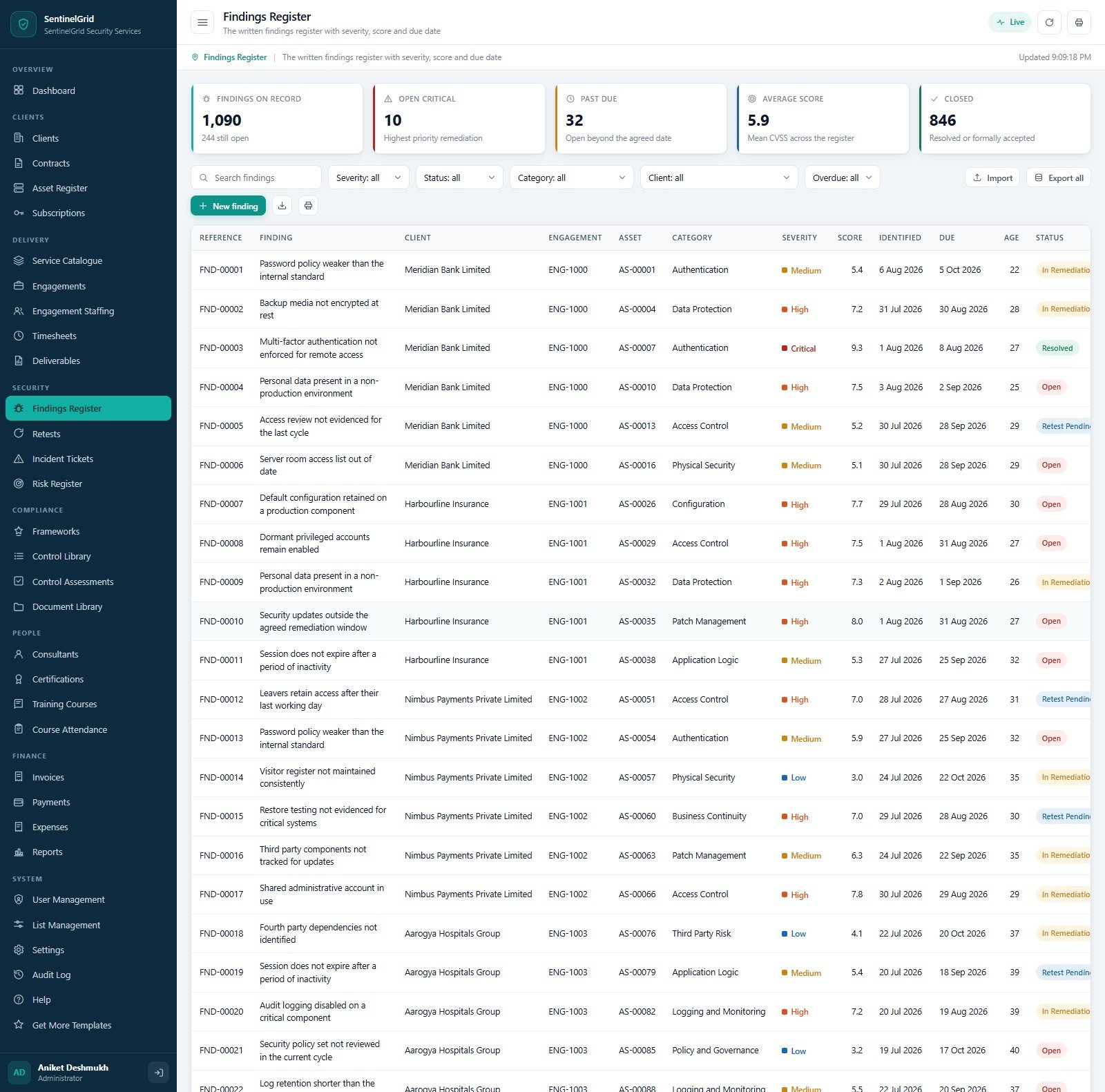
- A findings register that behaves like one. Every finding carries a reference, the client, the engagement, the affected asset tag, a category, a severity, a CVSS score, the date identified, the remediation due date, its age in days and a status that moves Open to In Remediation to Retest Pending to Resolved. Retests are their own module with a requested date, a scheduled date, the consultant and an outcome of Passed, Partially Fixed or Failed.
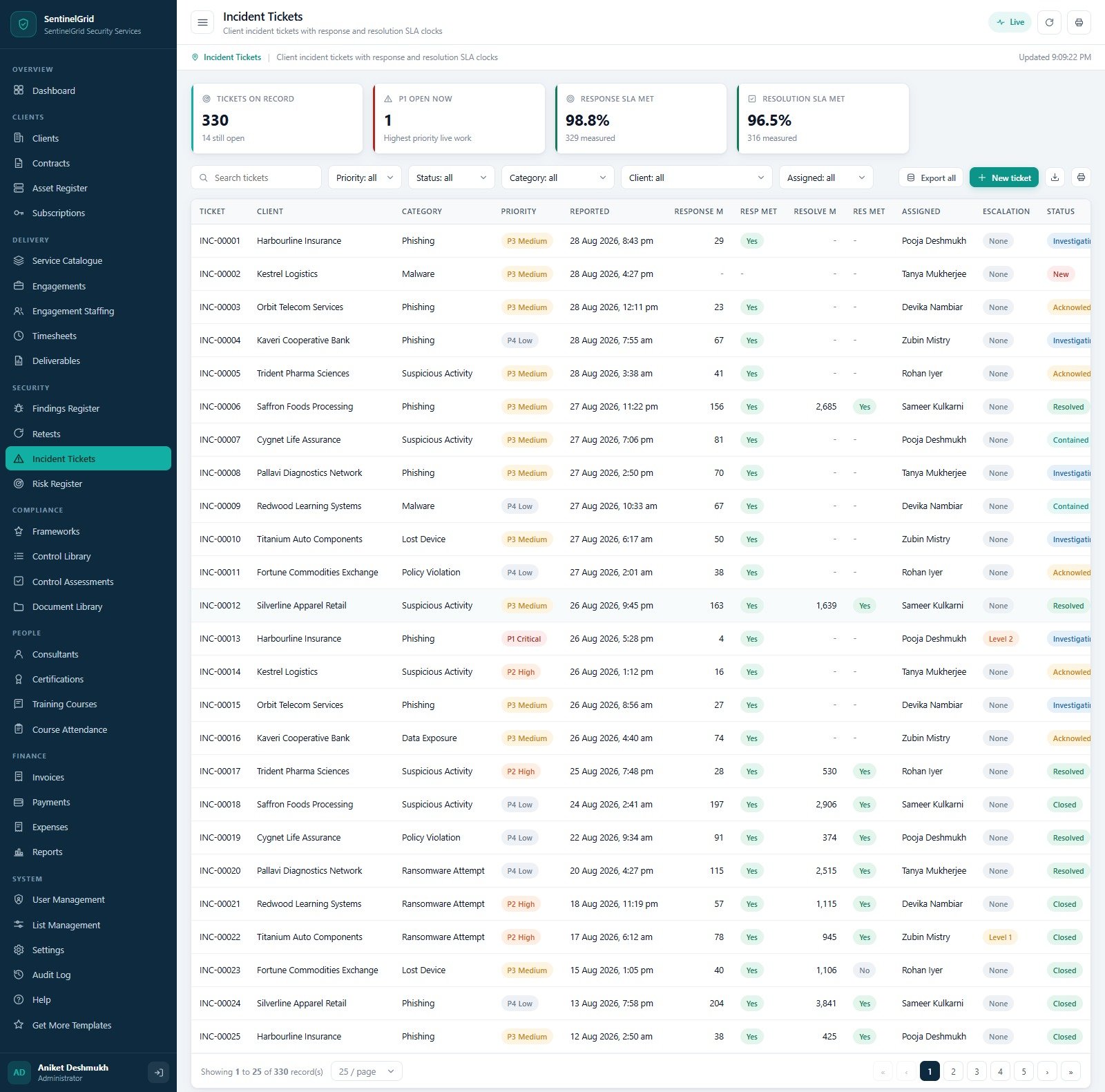
- Incident tickets with two SLA clocks. Response and resolution minutes are measured separately against the target for the client tier, each with its own met flag, plus a priority from P1 Critical to P4 Low and an escalation level. Categories cover phishing, suspicious activity, malware, policy violation, unauthorised access, lost device, ransomware attempt, data exposure and third party alerts.
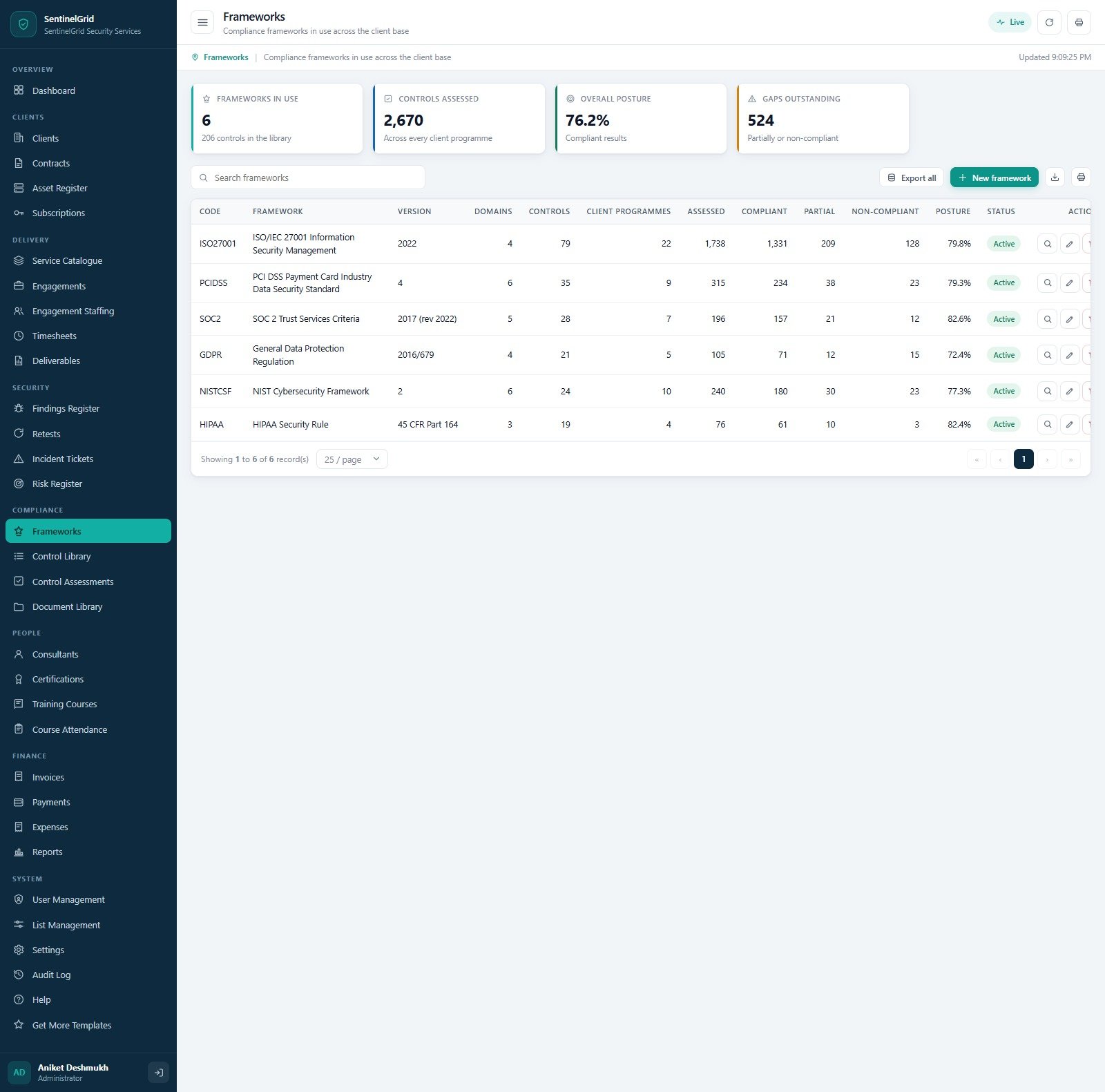
- Six compliance frameworks out of the box. ISO/IEC 27001:2022, PCI DSS v4, SOC 2 Trust Services Criteria, GDPR 2016/679, NIST Cybersecurity Framework 2 and the HIPAA Security Rule, backed by a control library of 206 controls across 27 domains and 10 evidence types. Each control assessment records the result, the assessor, the assessment date and a remediation due date.
- Delivery economics you can defend. Engagements carry planned hours, logged hours and a used percentage with an On Track, Watch or At Risk health flag. Staffing books named consultants onto engagements with an allocation percentage, planned hours, a billable flag and a charge rate. Timesheets run Draft, Submitted, Approved with an approver and a billable share.
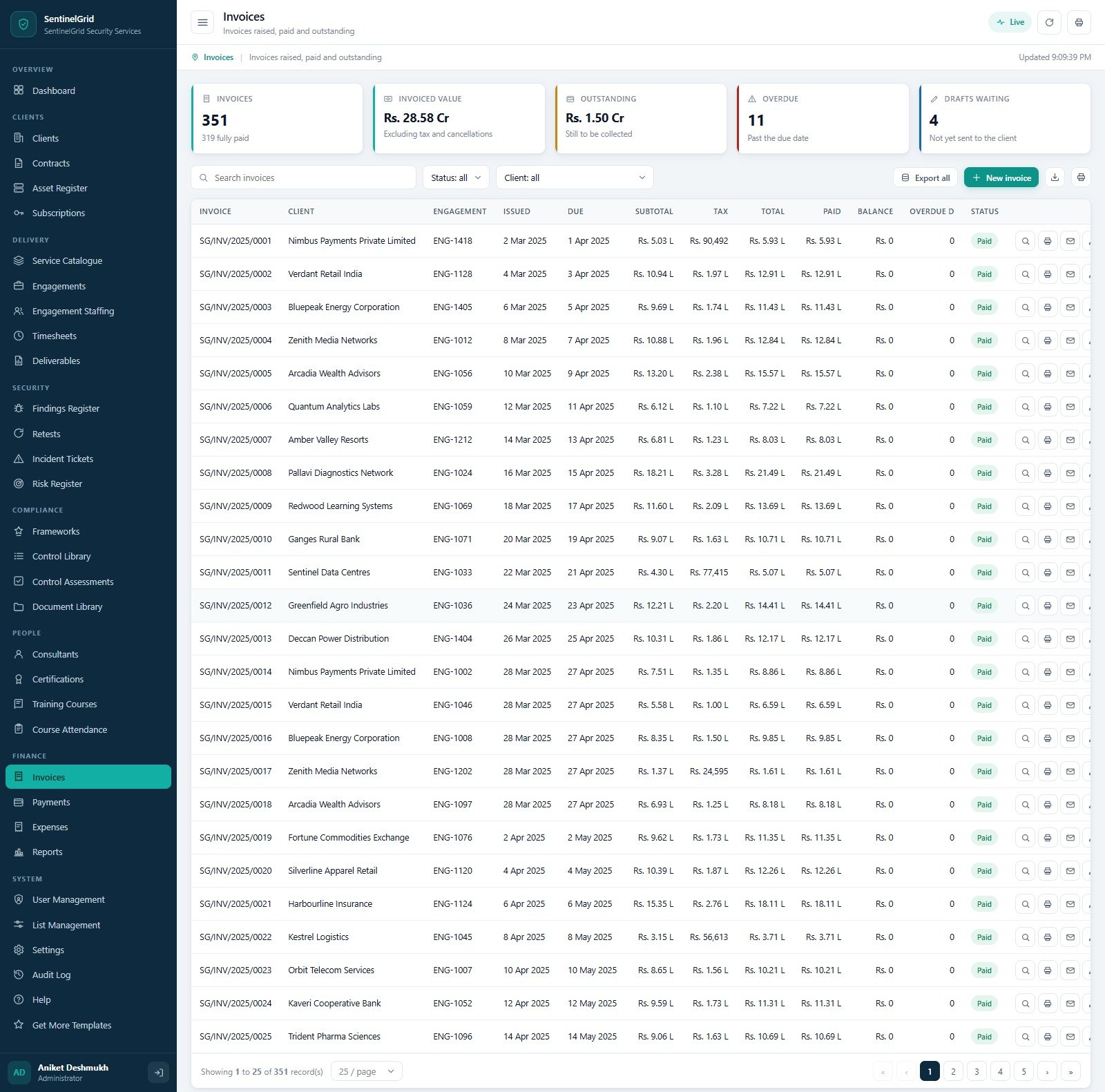
- The whole money trail. Invoices with subtotal, tax, total, paid and balance; payments by bank transfer, cheque, corporate card or UPI with a reference; expenses by category and vendor with approval and a recharged-to-client flag. Every figure ties back to an engagement.
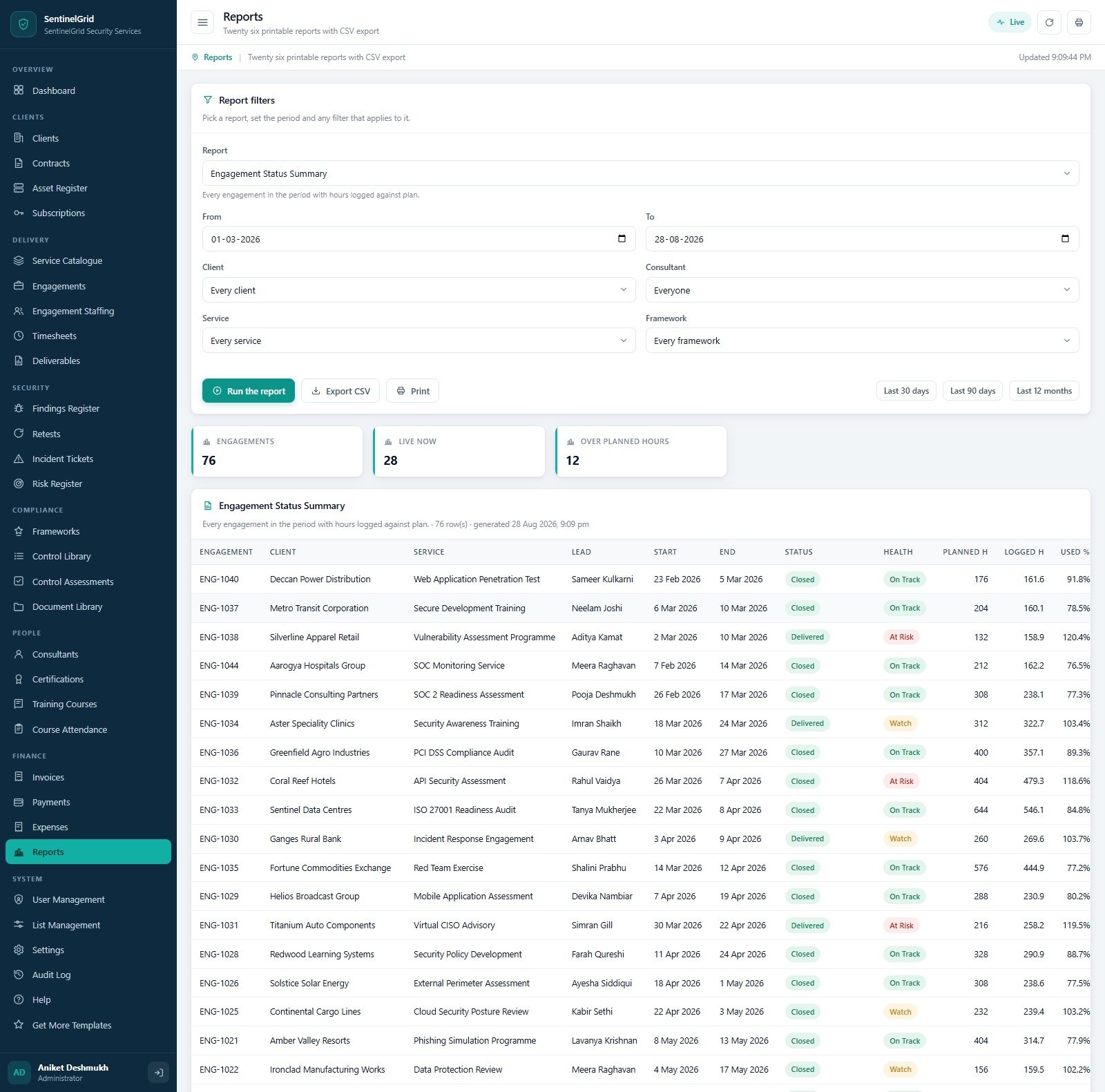
- Twenty six printable reports with CSV export. Pick a report, set a period, then narrow it by client, consultant, service or framework, with one-click ranges for the last 30 days, 90 days or 12 months. Print to A4, 4 inch or 3 inch.
- An audit log and a real archive. Every action is stamped with the user, the role, the module and the record. When the database grows, the archive tool copies the whole workbook to Drive first, then removes only closed transactions older than a cutoff you choose – master data and anything still open never moves. Cybersecurity Service Management System Web App
What Is Inside – All 32 Screens
Clients
- Clients – the register with tier (Platinum, Gold, Silver, Bronze), industry, account manager, primary contact, city, engagement count, open findings, invoiced and outstanding. The seeded book carries 42 clients across 14 industries.
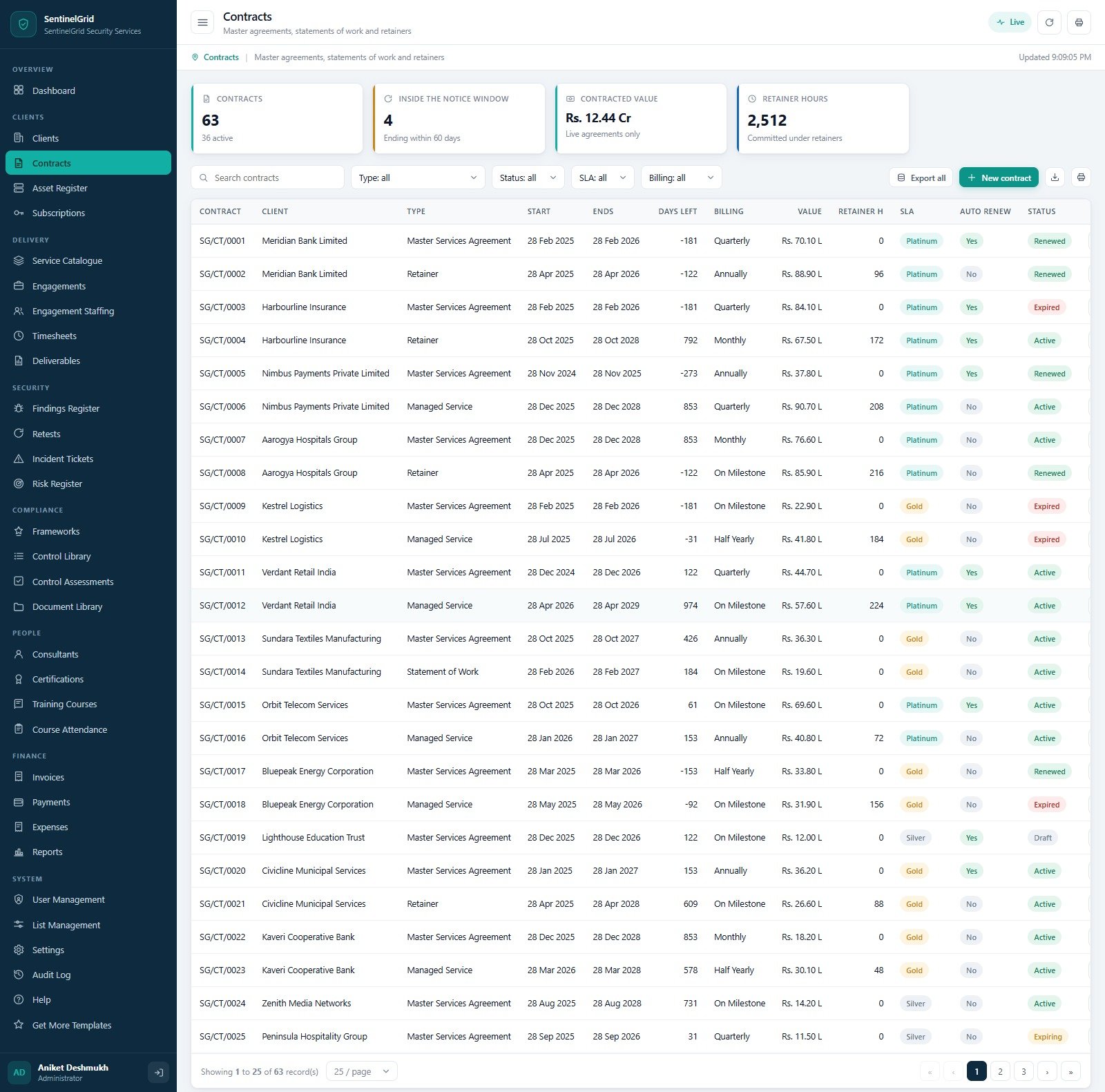
- Contracts – master services agreements, retainers, managed services and statements of work, with start and end dates, days left, billing cycle, value, committed retainer hours, SLA tier, auto renew and a status of Active, Renewed, Expiring, Expired or Draft.
- Asset Register – the in-scope estate per client engagement: firewalls, servers, network devices, web and mobile applications, API services, databases, cloud accounts, workstations, storage and IoT devices, each with environment, criticality, owner, last assessed date and open finding count. 699 assets seeded, 232 critical.
- Subscriptions – the security licences and tool subscriptions you manage for clients, by vendor and licence type (SIEM, vulnerability management, cloud posture, endpoint protection, email security, backup, threat intelligence, awareness platform), with seats, renewal date, days left, annual value and auto renew.Cybersecurity Service Management System Web App
Delivery
- Service Catalogue – the sellable list with a code, category, unit, indicative rate, typical days and the deliverable it produces. Twenty services across Offensive Assurance, Defensive Operations, Compliance, Advisory and Training.
- Engagements – the delivery projects, with client, service, lead, dates, planned and logged hours, used percentage, open findings, health and status from Scoping through Fieldwork Complete, Reporting, Delivered and Closed.
- Engagement Staffing – who is booked on what and for how long, by role (Lead Consultant, Reviewer, Quality Assurance, Project Manager) with allocation, planned hours, billable flag and charge rate.
- Timesheets – daily time lines by consultant, engagement and activity (Scoping, Fieldwork, Analysis, Report Writing, Peer Review, Remediation Support, Retest, Client Meeting, Travel) with a rate, a billable flag and an approval state.
- Deliverables – draft reports, final reports and executive summaries with a version, author, reviewer, due date, issued date, signed-off date and status. Cybersecurity Service Management System Web App
Security
- Findings Register – severity, CVSS score, category, age and remediation due date for every finding you raise.
- Retests – the closure loop, with outcomes and a pass rate.
- Incident Tickets – client incidents with response and resolution SLA measurement, priority, assignment and escalation.
- Risk Register – client risks by category (Third Party, Operational, People, Physical, Compliance, Technology, Strategic) with likelihood, impact, an inherent score, a treatment of Mitigate, Accept or Avoid, a residual score, an owner and a review date.
Compliance
- Frameworks – the six standards in use, each with its version, domains, control count, client programmes, assessed count, compliant, partial, non-compliant and a posture percentage.
- Control Library – 206 controls across 27 domains, each naming the evidence artefact it expects (signed policy document, access review sign-off, meeting minutes, register extract, system generated log extract, scan or test report, training attendance record, signed agreement, extract from the change record, certificate).
- Control Assessments – control by control results per client programme with Compliant, Partially Compliant, Non-Compliant or Not Applicable, the assessor, the assessment date, a remediation due date and a workflow status.
- Document Library – policies, procedures, standards, contract copies, evidence packs, certificates, training material and client reports, with a version, owner, issue date, review date and a handling class of Public, Internal, Confidential or Restricted. Cybersecurity Service Management System Web App
People
- Consultants – the roster with grade, primary skill, location, weekly capacity, billable hours in the last 30 days, utilisation against target, certification count, charge rate and status.
- Certifications – professional qualifications with the awarding body, reference, award and expiry dates, days left, renewal cost and a Valid, Expiring Soon or Expired flag. ISACA, AWS, EC-Council, Offensive Security, SANS GIAC, Microsoft, CompTIA and PECB are all seeded.
- Training Courses – the internal and client course catalogue by category and delivery mode with hours, trainer, seats, enrolment, attendance and fee.
- Course Attendance – enrolment by enrolment, with attendance, a knowledge check score, whether a certificate was issued and a feedback rating.
Finance and System
- Invoices, Payments, Expenses – raise, collect and control, with tax, balances, overdue days and expense approval.
- Reports – twenty six reports with filters and CSV export.
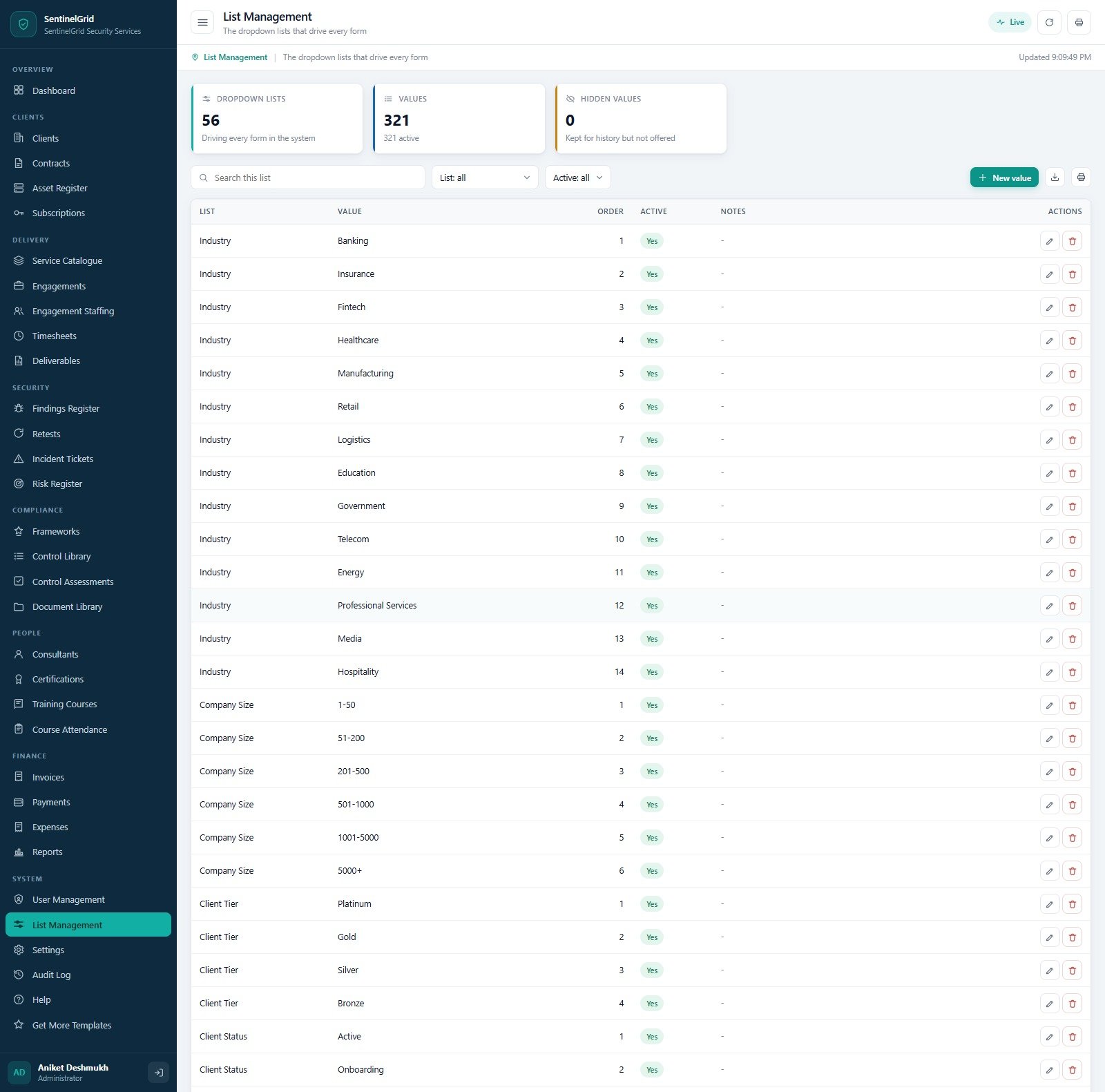
- User Management, List Management, Settings, Audit Log, Help – accounts and fixed roles, 56 dropdown lists holding 321 values you can edit, 64 settings across ten categories, a complete action trail and a built-in guide.
Who It Is For
- Penetration testing and offensive assurance practices that need the findings register, retests and client reporting joined to time and billing.
- Managed security and SOC service providers running incident tickets against contractual response and resolution targets.
- ISO 27001, PCI DSS, SOC 2 and GDPR consultancies that run control assessments for many clients and keep drowning in per-client spreadsheets.
- Virtual CISO and security advisory firms billing retainers and tracking risk registers on behalf of clients.
- Security training providers running courses, attendance and certificates alongside the delivery practice.
- Any firm at five to fifty consultants that has outgrown spreadsheets but does not want a per-seat SaaS platform.
How to Use It
- Try the live demo first using the credentials above, and sign in as more than one role so you can see what each one is allowed to reach.
- Buy and download the ZIP. It contains
Code.cs.txt,Index.txtand the user manual PDF. - Create a new Apps Script project at script.google.com, paste
Code.cs.txtintoCode.gs, add an HTML file named exactlyIndexand pasteIndex.txtinto it. - Deploy as a web app – execute as Me, access Anyone – and authorise the Sheets, Drive and Gmail scopes it needs to build its database, store uploads and send invoices.
- Run setup once, either from the first-run panel on the sign-in card or by running
setup()in the editor. It builds 35 tabs, seeds the demonstration data and creates nine Drive folders. If it hits the six minute Apps Script limit it remembers its stage and resumes. - Sign in as admin and change every password immediately, then fill in Settings > Company, set your currency symbol and tax in Settings > Finance, set your SLA targets per client tier, and set the remediation days per severity in Settings > Findings.
- Clear the demonstration data when you are ready to go live by running
reseedOperatingData()from the editor, which keeps your accounts, roles, lists and settings.
How It Compares
| Spreadsheets and email | This system | Enterprise GRC / PSA platform | |
|---|---|---|---|
| Cost | Free, but paid for in hours | One payment, no subscription | Per user, per month, per year |
| Role separation | None – anyone who opens the file sees the rates | Seven fixed roles; three never see money | Configurable, usually a paid tier |
| Findings to retest to closure | Manual, usually in the report document | Linked register with CVSS, due dates and outcomes | Yes |
| SLA measurement | Counted by hand, if at all | Response and resolution minutes with met flags | Yes |
| Multi-framework control assessments | One workbook per client per standard | 206 controls, 6 frameworks, one register | Yes |
| Time, staffing and billing joined up | Separate files that disagree | One database, one set of numbers | Yes |
| Where the data lives | Scattered | Your own Google account | The vendor’s cloud |
| Customisable | Yes, until it breaks | Yes – you own the source | Only what the vendor exposes |
| Setup time | Ongoing forever | About fifteen minutes | Weeks, plus an implementation fee |
What This System Does Not Do
It is a practice management back office. Being honest about the boundary is more useful than a longer feature list.
- It performs no security testing. It does not scan, probe, fuzz or penetration test anything. Your consultants do the work and record the results here.
- It connects to no security tooling. There is no integration with a SIEM, EDR, firewall, vulnerability scanner, cloud posture tool or ticketing system. It ingests no logs, alerts or telemetry, and it detects, blocks and responds to nothing.
- CVSS scores and severities are typed in, not calculated. The register stores and reports what your methodology decides.
- SLA clocks are computed from the times you record and the targets you set in Settings, not from a monitoring feed.
- It confers no certification or compliance on anyone. Assessing a client against ISO 27001, PCI DSS, SOC 2, GDPR, NIST CSF or HIPAA inside this system does not make that client – or you – certified, compliant, accredited or audit-ready. It is a place to record and report your own assessment work. It is not an accredited certification body, a QSA, a CREST or ISO scheme, a CERT or a monitoring service.
- It gives no legal, regulatory or insurance advice and is not a substitute for professional judgement.
- It is not accounting software and files no tax return, GST, e-invoice or e-way bill.
Specifications
- Platform: Google Apps Script web app with a Google Sheets database, created in your own Google account
- Files supplied:
Code.cs.txt,Index.txtand a user manual PDF, in one ZIP - Screens: 32
- Roles: 7, permissions enforced server side
- Database: 35 tabs; the seeded demonstration book counts 13,860 rows on the Settings screen
- Reports: 26, all printable, all CSV exportable
- Frameworks: ISO/IEC 27001:2022, PCI DSS v4, SOC 2 (2017 rev 2022), GDPR 2016/679, NIST CSF 2, HIPAA Security Rule
- Configuration: 64 settings in 10 categories, 56 dropdown lists holding 321 editable values
- Print sizes: A4, 4 inch, 3 inch
- Housekeeping: one-click Drive backup, a dated database archive with a preview step, and session control
- Requirements: a free Google account and a modern browser. No server, no database licence, no subscription.
Frequently Asked Questions
Can I try it before buying?
Yes. The live demo above is the real deployed build with the seeded data. Sign in with any of the seven accounts. Try consultant and then admin and compare what each one is shown – that difference is most of what you are buying.
Does it scan systems or find vulnerabilities by itself?
No. It records, tracks, reports and bills the work your consultants do. It is not a scanner and it connects to no security tooling.
Will using it make my clients ISO 27001 or SOC 2 compliant?
No – and it will not make you certified either. It is a place to run and evidence your own assessment programmes. Certification comes from an accredited body after their own audit.
The demo shows Indian Rupees. Can I change that?
Yes. Settings > Finance holds the currency symbol, the tax percentage, the payment terms and the invoice prefix. The seeded book is a demonstration; nothing in the code is tied to a currency.
Where is my data stored?
In a Google Sheets workbook created in the Drive of whoever runs setup, plus a Drive folder tree for deliverables, evidence packs, client documents, receipts and backups. Nothing is sent anywhere else. NextGenTemplates has no access to it.
Do the demo passwords come with my copy?
Setup seeds the same seven accounts so you can sign in the first time, and the first thing the manual tells you to do is change them. Passwords are stored as salted SHA-256 hashes and are never shown on the sign-in screen.
How many people can use it?
As many as you like. It is your Apps Script deployment – there are no seats and no per-user cost. Add accounts in User Management.
What happens when the database gets big?
Settings > Database and archive copies the whole workbook to Drive, then removes only closed transactions older than a cutoff you pick, after showing you a preview of exactly how many rows are eligible. Master data and anything still open stays put. Cybersecurity Service Management System Web App
Can it be customised?
Yes. You receive the full source. Extra fields, extra modules, your own branding or a new report can all be added – we quote for that at [email protected]. Cybersecurity Service Management System Web App
Related Templates
- Auditing Firm Management System Web App – the same back-office pattern for an audit practice.
- Business Consulting Client Management System Web App – engagements, staffing and billing for a general consultancy.
- Cybersecurity Dashboard in Google Sheets – a reporting layer if you only need the numbers.
- Cyber Risk Management Dashboard in Excel – risk reporting for an internal security team.
- Cybersecurity Startups Dashboard in Excel – for the commercial side of a security business.
- IT and Cybersecurity Operations Bundle – eight security and IT templates at a bundle price.
Read the full walkthrough on the blog: Cybersecurity Service Management System Web App – a full walkthrough.






























Reviews
There are no reviews yet.